
Nikon 60mm-f-28G-AF-S-Micro-Nikkor: 11. Using bayonet hood HB-42 Flash pictures using cameras with a built-in flash
11. Using bayonet hood HB-42 Flash pictures using cameras with a built-in flash: Nikon 60mm-f-28G-AF-S-Micro-Nikkor
Table of contents
- Notes on Safety Operations
- 1. Nomenclature ( ): Reference page
- 2. Usable cameras and available functions
- 3. Introduction
- 4. Focusing 5. Depth of field
- Focusing at a predetermined reproduction ratio Notes on close-up photography and duplication work
- Exposure factor Effective f-number variation (P. 146) Setting the aperture
- 11. Using bayonet hood HB-42 Flash pictures using cameras with a built-in flash
- 13. Recommended focusing screens
- 14. Lens care 15. Standard accessories 16. Optional accessories 17. Incompatible accessories
- 18. Specifications
- Weight: Approx. 425 g (15.0 oz)
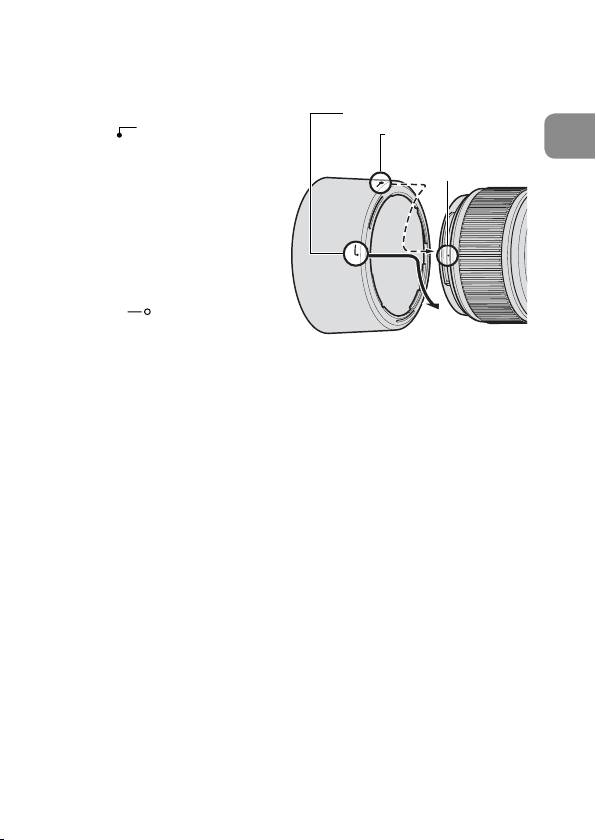
11. Using bayonet hood HB-42
Attaching the hood
Align the lens hood attachment
Lens hood attachment index
index ( ) on the hood (either
Lens hood setting index
En
one of the two indexes) with
Lens hood
the lens hood mounting index
mounting index
on the lens, and turn the lens
hood clockwise until it click
stops to secure.
• Make sure that the lens
hood mounting index aligns
with the lens hood setting
index (
).
• If the lens hood is not
correctly attached, vignetting can occur.
• To facilitate attachment or removal of the hood, hold it by its
base (around the lens hood attachment index) rather than its
outer edge.
• To store the lens hood, attach it in the reverse position.
Detaching the hood
While holding the base of the hood (near the lens hood
attachment index) rather than its outer edge, turn it
counterclockwise to detach.
12.
Flash pictures using cameras with a built-in flash
To prevent vignetting, do not use a lens hood.
21
