
LG 49UB850V – page 5
Manual for LG 49UB850V
22
ENG
EN
G
LIS
H
ASSEMBLING AND PREPARING
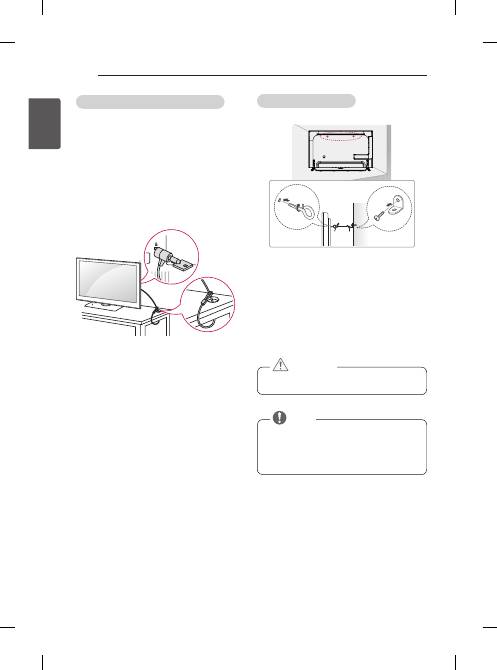
Securing the Tv to a wall
(This feature is not available for all models.)
1 Insert and tighten the eye-bolts, or TV brackets and
bolts on the back of the TV.
- If there are bolts inserted at the eye-bolts
position, remove the bolts first.
2 Mount the wall brackets with the bolts to the wall.
Match the location of the wall bracket and the eye-
bolts on the rear of the TV.
3 Connect the eye-bolts and wall brackets tightly with a
sturdy rope.
Make sure to keep the rope horizontal with the flat
surface.
y
Make sure that children do not climb on or hang
on the TV.
cAUTIoN
y
Use a platform or cabinet that is strong and large
enough to support the TV securely.
y
Brackets, bolts and ropes are not provided. You
can obtain additional accessories from your local
dealer.
NoTE
Using the Kensington security system
(This feature is not available for all models.)
y
Image shown may differ from your TV.
The Kensington security system connector is
located at the rear of the TV. For more information of
installation and using, refer to the manual provided
with the Kensington security system or visit
http://www.
kensington.com.
Connect the Kensington security system cable between
the TV and a table.
23
ENG
EN
G
LIS
H
ASSEMBLING AND PREPARING
Mounting on a wall
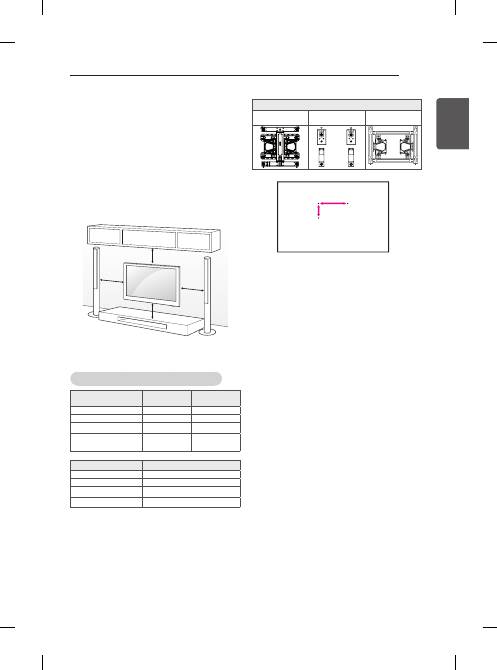
Attach an optional wall mount bracket at the rear of the
TV carefully and install the wall mount bracket on a
solid wall perpendicular to the floor. When you attach
the TV to other building materials, please contact quali-
fied personnel.
LG recommends that wall mounting be performed by a
qualified professional installer.
We recommend the use of LG’s wall mount bracket.
When you do not use LG’s wall mount bracket, please
use a wall mount bracket where the device is ad-
equately secured to the wall with enough space to allow
connectivity to external devices.
10 cm
10 cm
10 cm
10 cm
Make sure to use screws and wall mount bracket that
meet the VESA standard. Standard dimensions for the
wall mount kits are described in the following table.
Separate purchase (Wall Mounting Bracket)
Model
49/55UB85**
55UB95**
65UB95**
65UB98**
vESA (A x B)
400 x 400
400 x 400
Standard screw
M6
M6
Number of screws
4
4
Wall mount bracket
LSW440B
MSW240
LSW440B
Model
79/84UB98**
vESA (A x B)
600 x 400
Standard screw
M8
Number of screws
4
Wall mount bracket
LSW640B
A
B
Wall mount bracket
LSW440B
MSW240
LSW640B
24
ENG
EN
G
LIS
H
ASSEMBLING AND PREPARING
y
Disconnect the power first, and then move or
install the TV. Otherwise electric shock may
occur.
y
If you install the TV on a ceiling or slanted wall, it
may fall and result in severe injury.
Use an authorized LG wall mount and contact
the local dealer or qualified personnel.
y
Do not over tighten the screws as this may cause
damage to the TV and void your warranty.
y
Use the screws and wall mounts that meet the
VESA standard. Any damages or injuries by
misuse or using an improper accessory are not
covered by the warranty.
cAUTIoN
y
Use the screws that are listed on the VESA
standard screw specifications.
y
The wall mount kit includes an installation manual
and necessary parts.
y
The wall mount bracket is not provided. You can
obtain additional accessories from your local
dealer.
y
The length of screws may differ depending on the
wall mount. Make sure to use the proper length.
y
For more information, refer to the manual
supplied with the wall mount.
NoTE
Using Built-in camera
(Only UB98**)
You can make a Skype video call or use the motion
recognition function using the built-in camera of the
TV. This TV does not support the use of an external
camera.
y
Before using the built-in camera, you must
recognize the fact that you are legally responsible
for the use or misuse of the camera by the
relevant national laws including the criminal law.
y
The relevant laws include the Personal
Information Protection law which regulates
the processing and transferring of personal
information and the law which regulates the
monitoring by camera in a workplace and other
places.
y
When using the built-in camera, avoid
questionable, illegal, or immoral situations. Other
than at public places or events, consent to be
photographed may be required. We suggest
avoiding the following situations :
(1) Using the camera in areas where the use of
camera is generally prohibited such as restroom,
locker room, fitting room and security area.
(2) Using the camera while causing the
infringement of privacy.
(3) Using the camera while causing the violation
of the relevant regulations or laws.
NoTE
25
ENG
EN
G
LIS
H
ASSEMBLING AND PREPARING
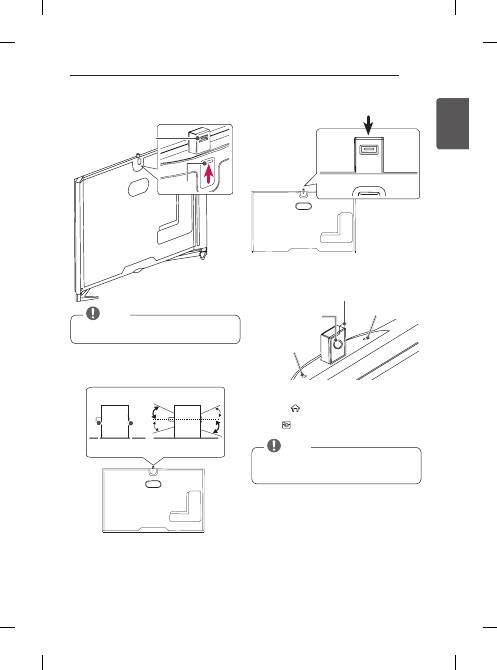
Preparing Built-in camera
1 Pull up the slide at the back of the TV.
Slide
Angle Adjustment Lever
y
Remove the protective film before using the built-
in camera.
NoTE
2 You can adjust the angle of the camera with the
angle adjustment lever on the back of the built-in
camera.
7°
5°
7°
5°
<Side View>
Lever
Lens
3 Push down the built-in camera when you are not
using it.
Name of Parts of Built-in camera
Camera Lens
Microphone
Microphone
Protective Film
checking the camera’s Shooting Range
1 Press the
(Home)
button to access the
Home
menu.
2 Select
camera
and then press the
Wheel(oK)
button.
y
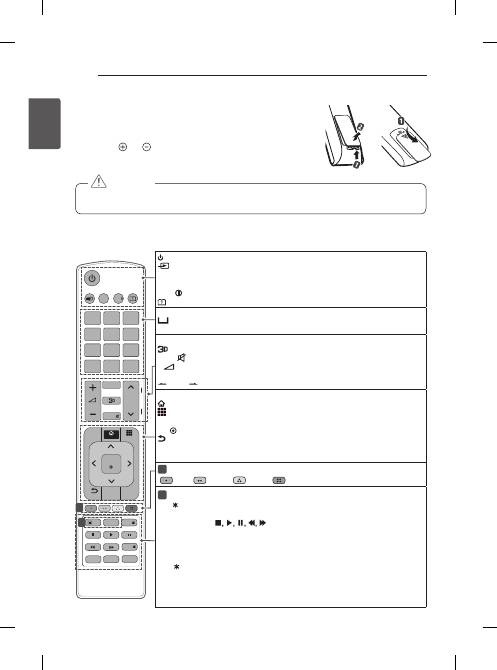
The optimal distance from the camera to use the
motion recognition function is between 1.5 m and
4.5 m.
NoTE
26
ENG
EN
G
LIS
H
REMOTE CONTROL
Q.MENU
1
.,;@
2
abc
3
def
4
ghi
5
jkl
6
mno
7
pqrs
8
tuv
0
9
wxyz
[
GUIDE
Q.VIEW
FAV
MUTE
P
P
A
G
E
EXIT
OK
LIVE MENU
BACK
AD
SUBTITLE
MY APPS
LIVE TV
TEXT
T.OPT
TV/RAD
Time Machine
SUBTITLE
SMART
REC/
APP/
INPUT
SETTINGS
INFO
RECENT
REMoTE coNTRoL
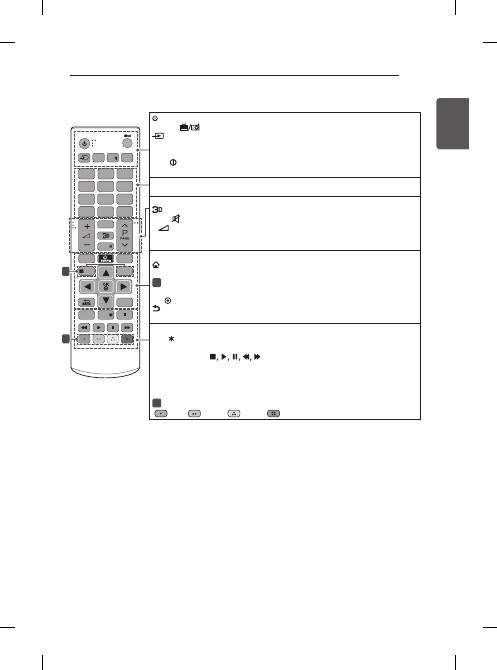
The descriptions in this manual are based on the buttons on the remote control.
Please read this manual carefully and use the TV correctly.
To replace batteries, open the battery cover, replace batteries (1.5 V AAA)
matching the and ends to the label inside the compartment, and close the
battery cover.
To remove the batteries, perform the installation actions in reverse.
y
Do not mix old and new batteries, as this may damage the remote control.
y
The remote control will not be included for all sales market
cAUTIoN
Make sure to point the remote control toward the remote control sensor on the TV.
(Depending on model)
(PoWER)
Turns the TV on or off.
INPUT
Changes the input source.
Q. MENU
Accesses the quick menus.
SETTINGS
Accesses the main menus.
INFO
Views the information of the current programme and screen.
(User Guide)
Sees User Guide.
GUIdE
Shows programme guide.
(Space)
Opens an empty space on the screen keyboard.
Q.vIEW
Returns to the previously viewed programme.
fAv
Accesses your favourite programme list.
Uses for viewing 3D video.
MUTE
Mutes all sounds.
+
-
Adjusts the volume level.
ꕌ
P
ꕍ
Scrolls through the saved programmes.
PAGE
Moves to the previous or next screen.
REcENT
Shows the previous history.
SMART
Accesses the Home menus.
My APPS
Shows the list of Apps.
Navigation buttons
(up/down/left/right) Scrolls through menus or options.
oK
Selects menus or options and confirms your input.
BAcK
Returns to the previous level.
LIvE MENU
Shows the list of Recommended, Programmes, Search and Recorded.
ExIT
Clears all on-screen display and returns to TV viewing.
1
coloured buttons
These access special functions in some menus.
(
: Red,
: Green,
: Yellow,
: Blue)
2
TELETExT BUTToNS
These buttons are used for teletext.
APP/
Selects the MHP TV menu source. (Only Italy) (Depending on model)
LIvE Tv
Returns to LIVE TV.
control buttons
(
) Controls the Premium contents, Time Machine
Ready
or SmartShare menus or the SIMPLINK compatible devices (USB or SIMPLINK or
Time Machine
Ready
).
II (fREEZE)
Freezes the current frame while using the TV, AV, Component, or HDMI
input source.
REc/
Starts to record and displays record menu. (only Time Machine
Ready
support
model)
SUBTITLE
Recalls your preferred subtitle in digital mode.
Ad
By pressing the AD button, audio descriptions function will be enabled.
Tv/RAd
Selects Radio, TV and DTV programme.
1
2
or
27
ENG
EN
G
LIS
H
REMOTE CONTROL
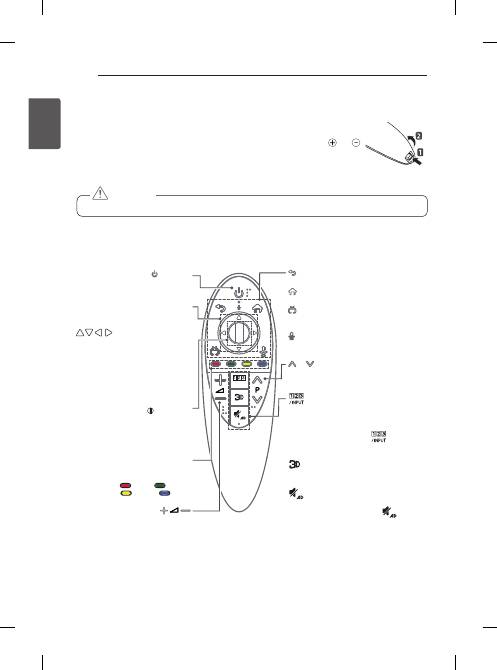
(PoWER)
Turns the TV on or off.
Tv/RAd
Selects Radio, TV and DTV programme.
INPUT
Changes the input source.
SETTINGS
Accesses the main menus.
Q. MENU
Accesses the quick menus.
INFO
Views the information of the current programme and screen.
SUBTITLE
Recalls your preferred subtitle in digital mode.
GUIdE
Shows programme guide.
Q.vIEW
Returns to the previously viewed programme.
fAv
Accesses your favourite programme list.
Uses for viewing 3D video.
MUTE
Mutes all sounds.
+
-
Adjusts the volume level.
ꕌ
P
ꕍ
Scrolls through the saved programmes.
ꕌ
PAGE
ꕍ
Moves to the previous or next screen.
REcENT
Shows the previous history.
SMART
Accesses the Home menus.
LIvE MENU
Shows the list of Recommended, Programmes, Search and Recorded.
1
TELETExT BUTToNS
These buttons are used for teletext.
Navigation buttons
(up/down/left/right) Scrolls through menus or options.
oK
Selects menus or options and confirms your input.
BAcK
Returns to the previous level.
ExIT
Clears all on-screen display and returns to TV viewing.
Ad
By pressing the AD button, audio descriptions function will be enabled.
REc/
Starts to record and displays record menu. (only Time Machine
Ready
support
model)
control buttons
(
) Controls the Premium contents, Time Machine
Ready
or SmartShare menus or the SIMPLINK compatible devices (USB or SIMPLINK or
Time Machine
Ready
).
II (fREEZE)
Freezes the current frame while using the TV, AV, Component, or HDMI
input source.
2
coloured buttons
These access special functions in some menus.
(
: Red,
: Green,
: Yellow,
: Blue)
1
4
5
6
7
8
9
TEXT
EXIT
AD/PIP
T.OPT
RECENT
Q.VIEW
0
FAV
MUTE
2
3
TV /
RAD
Time Machine
SUBTITLE
1
4
5
6
7
8
9
LIST
TEXT
Q.MENU
EXIT
INFO
T.OPT
Q.VIEW
0
FAV
GUIDE
MUTE
2
3
INPUT
INPUT
TV /
RAD
SETTINGS
RATIO
LIVE TV
SUBTITLE
INFO
SETTINGS
Q.MENU
GUIDE
REC/
AD
MENU
LIVE
1
2
(Depending on model)
28
ENG
EN
G
LIS
H
MAGIC REMOTE FUNCTIONS
MAGIc REMoTE fUNcTIoNS
When the message “Magic Remote battery is low. Change the battery.” is displayed, replace
the battery.
To replace batteries, open the battery cover, replace batteries (1.5 V AA) matching and
ends to the label inside the compartment, and close the battery cover. Be sure to point the
remote control toward the remote control sensor on the TV.
To remove the batteries, perform the installation actions in reverse.
y
Do not mix old and new batteries, as this may damage the remote control.
cAUTIoN
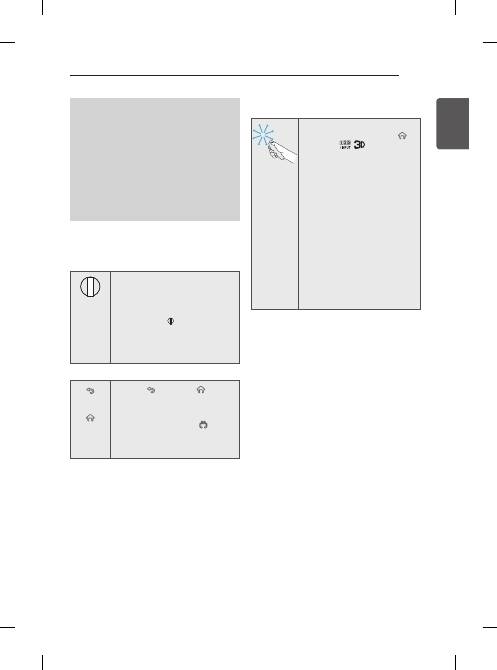
/INPUT
(BAcK)
Returns to the previous level.
(Home)
Accesses the Home menu.
(ExIT to LIvE)
Switches among broadcast (antenna) and
various inputs.
(voice recognition)
Navigation buttons
(up/down/left/right)
Press the up, down, left or right but-
ton to scroll the menu. If you press
buttons while the pointer
is in use, the pointer will disappear
from the screen and Magic Remote
will operate like a general remote
control. To display the pointer on the
screen again, shake Magic Remote to
the left and right.
coloured buttons
These access special functions in
some menus.
(
: Red,
: Green,
: Yellow,
: Blue)
Displays the Screen Remote.
* Accesses the Universal Control Menu.
(Depending on model)
* Pressing and holding the
button will
display a menu to select an external device
that is connected to the TV.
Used for viewing 3D video.
(MUTE)
Mutes all sounds.
*
By Pressing and holding the
button,
audio descriptions function will be enabled.
(PoWER)
Turns the TV on or off.
BACK
HOME
P
MY APPS
Wheel(oK)
Press the center of the Wheel button
to select a menu. You can change
programmes and scroll the menu by
using the Wheel button.
Adjusts the volume level.
P
Scrolls through the saved programmes.
(Only UB85**, UB95**, UB98**)
29
ENG
EN
G
LIS
H
MAGIC REMOTE FUNCTIONS
voice recognition
Network connection is required to use the voice
recognition function.
1. Press the Voice recognition button.
2. Speak when the voice display window appears
on the left of the TV screen.
•
The voice recognition may fail when you
speak too fast or too slow.
•
Use the Magic remote control no further than
10 cm from your face.
•
The recognition rate may vary depending on
the user’s characteristics (voice, pronuncia-
tion, intonation and speed) and the environ-
ment (noise and TV volume).
Registering Magic Remote
How to register the Magic Remote
BACK
HOME
P
MY APPS
(Wheel)
To use the Magic Remote, first pair it
with your TV.
1 Put batteries into the Magic Remote
and turn the TV on.
2 Point the Magic Remote at your TV
and press the
BACK
HOME
P
MY APPS
Wheel (oK)
on the
remote control.
*
If the TV fails to register the Magic
Remote, try again after turning the
TV off and back on.
How to de-register the Magic Remote
(BAcK)
(Home)
Press the (
BAcK
) and (
Home
)
buttons at the same time, for five
seconds, to unpair the Magic Remote
with your TV.
*
Pressing and holding the
(ExIT
to LIvE)
button will let you cancle
and re-register Magic Remote at
once.
How to use Magic Remote
y
Shake the Magic Remote slightly
to the right and left or press
(Home)
,
,
buttons to
make the pointer appear on the
screen.
(In some TV models, The pointer
will appear when you turn the
Wheel button.)
y
If the pointer has not been used
for a certain period of time or
Magic Remote is placed on a
flat surface, then the pointer will
disappear.
y
If the pointer is not responding
smoothly, you can reset the
pointer by moving it to the edge
of the screen.
y
The Magic Remote depletes
batteries faster than a normal
remote due to the additional
features.
30
ENG
EN
G
LIS
H
MAGIC REMOTE FUNCTIONS
Precautions to Take when Using
the Magic Remote
y
Use the Magic Remote within the maximum
communication distance (10 m). Using the Magic
Remote beyond this distance, or with an object
obstructing it, may cause a communication failure.
y
A communication failure may occur due to nearby
devices. Electrical devices such as a microwave
oven or wireless LAN product may cause
interference, as these use the same bandwidth (2.4
GHz) as the Magic Remote.
y
The Magic Remote may be damaged or may
malfunction if it is dropped or receives a heavy
impact.
y
Take care not to bump into nearby furniture or other
people when using the Magic Remote.
y
Manufacturer and installer cannot provide service
related to human safety as the applicable wireless
device has possibility of electric wave interference.
y
It is recommended that an Access Point (AP) be
located more than 1 m away from the TV. If the
AP is installed closer than 1 m, the Magic Remote
may not perform as expected due to frequency
interference.
31
ENG
EN
G
LIS
H
USING THE USER GUIDE / MAINTENANCE
MAINTENANcE
cleaning your Tv
Clean your TV regularly to keep the best performance
and to extend the product lifespan.
y
Make sure to turn the power off and disconnect
the power cord and all other cables first.
y
When the TV is left unattended and unused for
a long time, disconnect the power cord from
the wall outlet to prevent possible damage from
lightning or power surges.
cAUTIoN
Screen, frame, cabinet and stand
y
To remove dust or light dirt, wipe the surface with a
dry, clean, and soft cloth.
y
To remove major dirt, wipe the surface with a soft
cloth dampened in clean water or a diluted mild
detergent. Then wipe immediately with a dry cloth.
y
Avoid touching the screen at all times, as this
may result in damage to the screen.
y
Do not push, rub, or hit the screen surface with
your fingernail or a sharp object, as this may
result in scratches and image distortions.
y
Do not use any chemicals as this may damage
the product.
y
Do not spray liquid onto the surface. If water
enters the TV, it may result in fire, electric shock,
or malfunction.
cAUTIoN
Power cord
Remove the accumulated dust or dirt on the power cord
regularly.
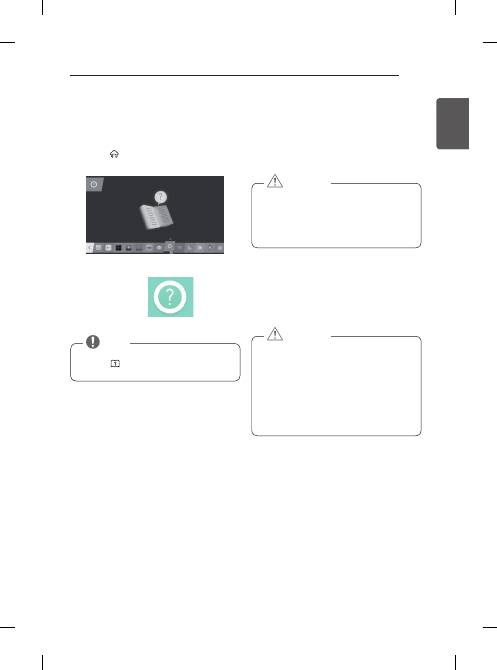
1 Press the
(Home)
button to access the
Home
menu.
2 Select
User Guide
and press
Wheel(oK)
.
USING THE USER GUIdE
User Guide allows you to more easily access the
detailed TV information.
y
You can also access the User Guide by
pressing (
User Guide
) in the remote control.
(Depending on model)
NoTE
32
ENG
EN
G
LIS
H
TROUBLESHOOTING / SPECIFICATIONS
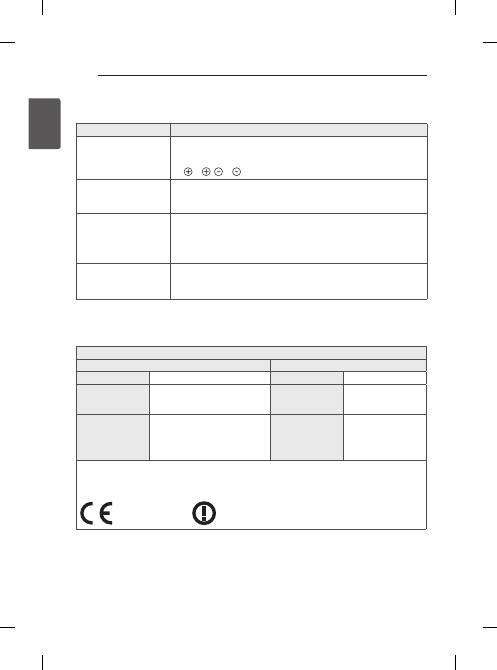
TRoUBLESHooTING
Problem
Solution
Cannot control the TV with
the remote control.
y
Check the remote control sensor on the product and try again.
y
Check if there is any obstacle between the product and the remote control.
y
Check if the batteries are still working and properly installed
( to , to ).
No image display and no
sound is produced.
y
Check if the product is turned on.
y
Check if the power cord is connected to a wall outlet.
y
Check if there is a problem in the wall outlet by connecting other products.
The TV turns off suddenly.
y
Check the power control settings. The power supply may be interrupted.
y
Check if the
Automatic Standby
(Depending on model) /
Sleep Timer
/
Timer
Power off
feature is activated in the
Timers
settings.
y
If there is no signal while the TV is on, the TV will turn off automatically after 15
minutes of inactivity.
When connecting to the
PC (HDMI/DVI), ‘No
signal’ or ‘Invalid Format’ is
displayed.
y
Turn the TV off/on using the remote control.
y
Reconnect the HDMI cable.
y
Restart the PC with the TV on.
SPEcIfIcATIoNS
(Only UB85**, UB95**)
Wireless module (LGSBW41) specification
Wireless LAN
Bluetooth
Standard
IEEE 802.11a/b/g/n
Standard
Bluetooth Version 3.0
Frequency Range
2400 to 2483.5 MHz
5150 to 5250 MHz
5725 to 5850 MHz (for Non EU)
Frequency Range
2400 to 2483.5 MHz
Output Power
(Max.)
802.11a: 13 dBm
802.11b: 15 dBm
802.11g: 14 dBm
802.11n - 2.4GHz: 16 dBm
802.11n - 5GHz: 16 dBm
Output Power
(Max.)
10 dBm or lower
y
Because band channel used by the country could be different, the user can not change or adjust the
operating frequency and this product is set for the regional frequency table.
y
This device should be installed and operated with minimum distance 20 cm between the device and your
body. And this phrase is for the general statement for consideration of user environment.
0197 0197
33
ENG
EN
G
LIS
H
SPECIFICATIONS
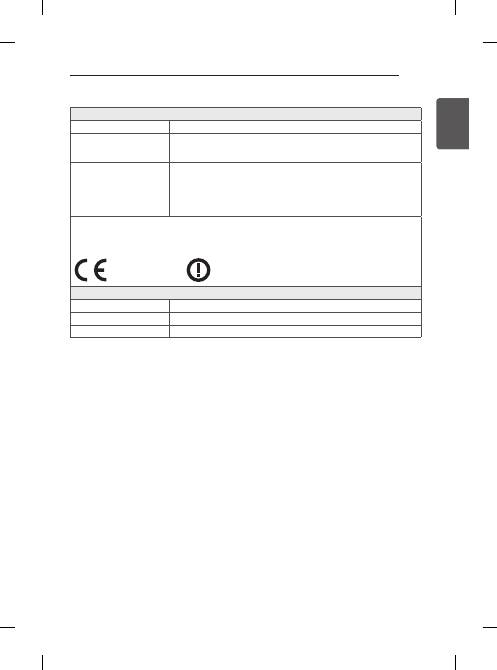
(Only UB98**)
Wireless LAN module (LGSWF41) specification
Standard
IEEE 802.11a/b/g/n/ac
Frequency Range
2400 to 2483.5 MHz
5150 to 5250 MHz
5725 to 5850 MHz (for Non EU)
Output Power
(Max.)
802.11a: 14.5 dBm
802.11b: 16 dBm
802.11g: 13.5 dBm
802.11n - 2.4GHz: 14 dBm
802.11n - 5GHz: 15.5 dBm
802.11ac - 5GHz : 16 dBm
y
Because band channel used by the country could be different, the user can not change or adjust the
operating frequency and this product is set for the regional frequency table.
y
This device should be installed and operated with minimum distance 20 cm between the device and your
body. And this phrase is for the general statement for consideration of user environment.
0197 0197
Bluetooth module (BM-LDS401) specification
Standard
Bluetooth Version 3.0
Frequency Range
2400 to 2483.5 MHz
Output Power (Max.)
10 dBm or lower
w
ww.lg.com
A készülék használatbavétele előtt figyelmesen olvassa el
az útmutatót, és őrizze meg, mert később szüksége lehet
rá.
HASZNÁLATI ÚTMUTATÓ
LED TV*
*
Az LG LED TV megnevezés a LED
háttérfénnyel ellátott LCD képernyőkre
vonatkozik.
Katt! Használati útmutató
2
TARTALOMJEGYZÉK
ENG
M
A
G
YA
R
TARTALOMJEGYZÉK
3
LicEncEK
3
nYÍLT FORRÁSKÓDÚ
SZOFTVEREKRE VOnATKOZÓ
MEGJEGYZÉSEK
3
KÜLSŐ VEZÉRLŐESZKÖZ
BEÁLLÍTÁSA
4
BiZTOnSÁGi TuDniVALÓK
11
3D képek megtekintése (Csak 3D
típusoknál)
13
ÖSSZESZERELÉSi foLyamat
13
ÖSSZESZERELÉS ÉS
ELŐKÉSZÍtÉS
13
Kicsomagolás
17
Külön megvásárolható tartozékok
18
A készülék részei és gombjai
20
-A joystick gomb használata
21
A TV felemelése és szállítása
21
Felszerelés asztalra
23
Felszerelés falra
24
Beépített kamera használata
25
-A beépített kamera előkészítése
25
-A beépített kamera részeinek neve
25
-A kamera hatósugarának ellenőrzése
26
TÁViRÁnYÍTÓ
28
A MAGic MOTiOn TÁViRÁnYÍTÓ
VEZÉRLŐ funKciói
29
A Magic Motion távirányító regisztrálása
29
A Magic Motion távirányító használata
30
A Magic Motion távirányító használatával
kapcsolatos óvintézkedések
31
A hASZnÁLATi ÚTMuTATÓ
hASZnÁLATA
31
KARBAnTARTÁS
31
A TV-készülék tisztítása
31
-Képernyő, keret, készülékház és állvány
31
-Tápkábel tisztítása
32
hiBAELhÁRÍTÁS
32
mŰSZaKi aDatoK
ViGYÁZAT
y
A jelzés olyan figyelmeztetésekre utal, amelyek be
nem tartása komoly sérülést, illetve súlyos vagy
akár halálos balesetet is okozhat.
FiGYELEM
y
A jelzés olyan figyelmeztetésekre utal, amelyek be
nem tartása könnyebb személyi sérülést, illetve a
készülék károsodását okozhatja.
MEGJEGYZÉS
y
A megjegyzés segít a készülék megértésében és
biztonságos használatában. A termék használata
előtt kérjük, figyelmesen olvassa el a megjegyzést.
3
ENG
M
A
G
YA
R
LICENCEK / NYÍLT FORRÁSKÓDÚ SZOFTVEREKRE VONATKOZÓ MEGJEGYZÉSEK /
KÜLSŐ VEZÉRLŐESZKÖZ BEÁLLÍTÁSA
LicEncEK
A támogatott licencek típustól függően eltérőek lehetnek. A licencekkel kapcsolatos további tudnivalókért látogas
-
son el a
www.lg.com
webhelyre.
nYÍLT FORRÁSKÓDÚ SZOFTVEREKRE VOnATKOZÓ
MEGJEGYZÉSEK
Ha hozzá kíván jutni a forráskódhoz GPL, LGPL, MPL és a készülék által tartalmazott más nyílt forráskódú licencek
alapján, látogasson el a következő webhelyre:
http://opensource.lge.com
.
A forráskód mellett minden hivatkozott licencfeltétel, jótállási nyilatkozat és szerzői jogi közlemény letölthető.
Az LG Electronics - térítés ellenében -, CD-ROM-on hozzáférhetővé teszi a forráskódot. A lemez ára a forgalmazás
költségeit (pl. az adathordozó ára, szállítási és kezelési költség) tartalmazza. A CD-ROM-ot a következő címen
lehet megrendelni e-mailben:
opensource@lge.com
. Ez az ajánlat a készülék megvásárolásától számított három
(3) évig érvényes.
KÜLSŐ VEZÉRLŐESZKÖZ BEÁLLÍtÁSa
A külső vezérlőeszköz beállításához szükséges információkért keresse fel a
www.lg.com
weboldalt.
4
BIZTONSÁGI TUDNIVALÓK
ENG
M
A
G
YA
R
BiZTOnSÁGi TuDniVALÓK
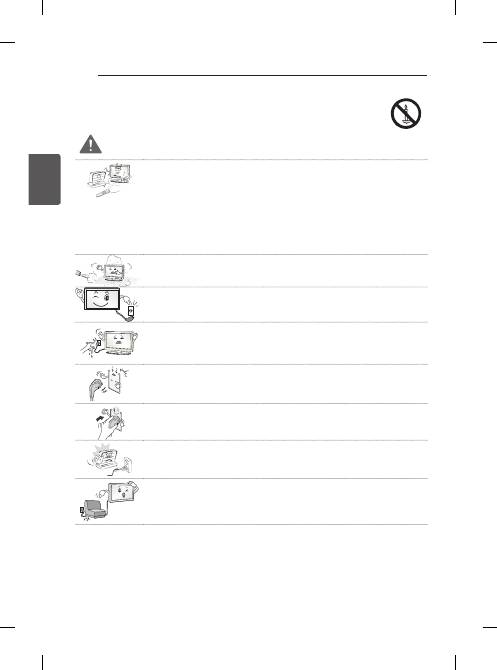
A készülék használata előtt kérjük, figyelmesen olvassa el a következő biztonsági óvintézkedéseket.
ViGYÁZAT
y
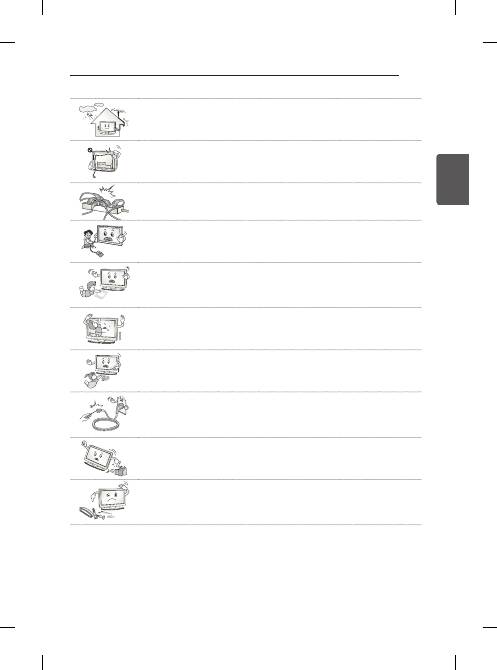
Ne helyezze a TV-készüléket és a távirányítót a következő környezetekbe:
- Közvetlen napsugárzásnak kitett helyek
-
Nedves területek, például fürdőszoba
-
Hőforrás közelébe, például kályhák és egyéb hőt kibocsátó eszközök
-
Konyhai berendezések vagy párologtató készülékek közelébe, ahol könnyen ki
vannak téve gőznek vagy olajnak
-
Esőnek vagy szélnek kitett helyek
-
Vizet tartalmazó tárgyak, például vázák közelébe
Ellenkező esetben tűz, áramütés, hibás működés vagy deformálódás következhet be.
y
Ne helyezze a készüléket olyan helyre, ahol por érheti.
Ez tűzveszélyes lehet.
y
A hálózati csatlakozódugó a készülék áramtalanítására szolgál. A dugónak könnyen
hozzáférhetőnek kell lennie.
y
Ne érintse meg a tápkábelt nedves kézzel. Ha a csatlakozódugó tűi nedvesek vagy po
-
rosak, törölje teljesen szárazra, illetve portalanítsa.
Ellenkező esetben a nedvesség halálos áramütést okozhat.
y
A tápkábelt minden esetben földelt konnektorhoz csatlakoztassa. (Kivéve a földelés nél-
küli eszközöket.)
Halálos áramütést vagy sérülést szenvedhet.
y
A tápkábelt szorosan csatlakoztassa az aljzathoz.
A nem megfelelően csatlakoztatott tápkábel tüzet okozhat.
y
Győződjön meg róla, hogy a tápkábel nem ér forró tárgyakhoz, például fűtőtesthez.
Ez tűzveszélyes és áramütést okozhat.
y
A kábelre se nehéz tárgyat, se készüléket ne helyezzen.
Ellenkező esetben tüzet vagy áramütést okozhat.
5
BIZTONSÁGI TUDNIVALÓK
ENG
M
A
G
YA
R
y
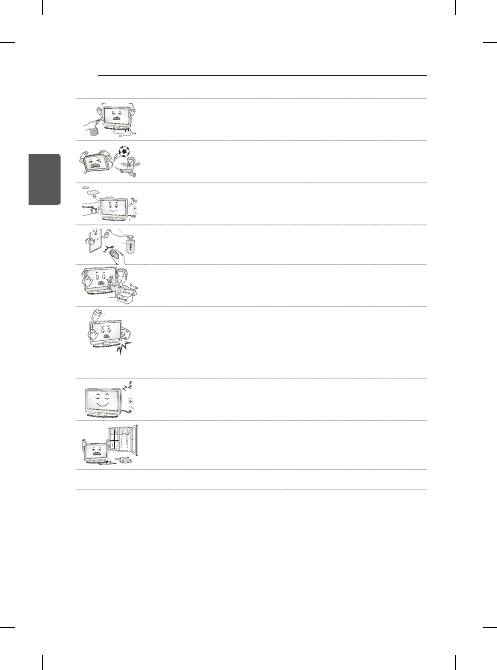
Hajlítsa el az antenna kábelét az épület belső és külső tere között úgy, hogy ne juthas
-
son bele esővíz.
Az eső tönkreteheti a készülék belsejét, és áramütést is okozhat.
y
Ha TV-készüléket szerel a falra, gondoskodjon arról, hogy azt ne a TV hátulján lévő
táp- és jelkábelnél fogva akassza fel.
Ez tüzet vagy áramütést okozhat.
y
Ne dugjon túl sok elektromos eszközt egyetlen, több csatlakozó számára készült aljzat
-
ba.
Ellenkező esetben a túlmelegedés miatt tűz keletkezhet.
y
Ne ejtse le a készüléket, illetve ne ejtse le külső eszközök csatlakoztatása közben.
Ellenkező esetben sérülést okozhat vagy kárt tehet a készülékben.
Desiccant
y
A csomagolásban található nedvszívó anyagot és a műanyag csomagolóanyagot tartsa
távol a gyermekektől.
Lenyelve a nedvszívó anyag káros lehet a szervezetre. Az anyagot véletlenül lenyelő
személyt meg kell hánytatni, és a legközelebbi kórházba kell szállítani. A műanyag cso
-
magolóanyag fulladást is okozhat. Tartsa gyermekektől távol.
y
Ne engedje, hogy gyermekei felmásszanak a TV-készülékre vagy azon lógjanak.
Ellenkező esetben a TV leeshet, ami súlyos sérülést okozhat.
y
Járjon el körültekintően az elemek leselejtezése során, nehogy gyermekei megegyék
azokat.
Ha esetleg lenyelnék, azonnal forduljon orvoshoz.
y
Ne dugjon áram vezetésére alkalmas tárgyat (például fém evőpálcát) a fali aljzathoz
csatlakoztatott tápkábel szabad végébe. Ne érintse meg a tápkábelt közvetlenül azu-
tán, hogy kihúzta azt a fali aljzatból.
Halálos áramütést szenvedhet!
(Típusfüggő)
y
Ne helyezzen el és ne tároljon gyúlékony anyagokat a készülék közelében.
A gyúlékony anyagok gondatlan kezelése robbanás- és tűzveszélyes.
y
Ne ejtsen a készülékbe fémtárgyakat, például pénzérmét, hajtűt, evőpálcát vagy drótot,
illetve gyúlékony anyagokat, például papírt vagy gyufát. Különösen ügyeljen a gyerme
-
kekre!
Áramütés, tűz vagy személyi sérülés kockázata áll fenn. Ha idegen tárgy kerül a készü
-
lékbe, húzza ki a tápkábelt és lépjen kapcsolatba az ügyfélszolgálattal.
6
BIZTONSÁGI TUDNIVALÓK
ENG
M
A
G
YA
R
y
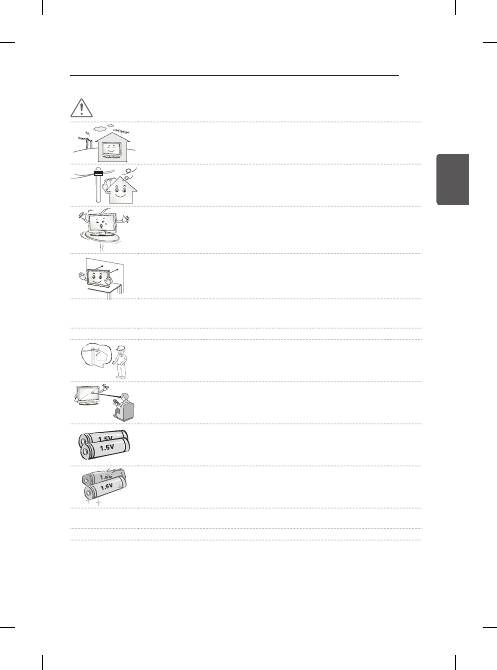
Ne permetezzen vizet a készülékre és ne tisztítsa gyúlékony anyaggal (hígítóval vagy
benzinnel). Tűz vagy áramütéses baleset következhet be.
y
Vigyázzon, hogy semmilyen tárgy ne essen rá, illetve ne üsse meg a készüléket és a
képernyőt.
Ez személyi sérülést vagy a készülék károsodását okozhatja.
y
Villámlás vagy vihar idején ne érjen hozzá a készülékhez és az antennához.
Halálos áramütést szenvedhet!
y
Gázszivárgás esetén semmilyen esetben se érintse meg a fali aljzatot. Nyissa ki az ab-
lakokat és szellőztessen!
Ellenkező esetben a szikra tüzet vagy égési sérülést okozhat.
y
Ne szerelje szét, ne kísérelje meg megjavítani és ne alakítsa át saját belátása szerint a
készüléket.
Tűz vagy áramütéses baleset következhet be.
Ellenőrzést, beállítást és javítást kizárólag a szervizközponttal végeztessen.
y
Ha az alábbiak egyike bekövetkezik, azonnal húzza ki a készüléket, és vegye fel a
kapcsolatot a helyi szervizközponttal.
- A készülék rázkódásnak volt kitéve
- A készülék megsérült
- Idegen tárgyak kerültek a készülékbe
-
A készülékből füst vagy furcsa szag távozott
Ez tüzet vagy áramütést okozhat.
y
Ha a készüléket hosszabb ideig nem kívánja használni, húzza ki a tápkábelt a
készülékből.
A kábelt borító por tüzet okozhat, a szigetelés meghibásodása miatt pedig
áramszivárgás, áramütés vagy tűz következhet be.
y
A készülékre ne csöpögtessen vagy permetezzen folyadékot, és ne helyezzen rá
folyadékkal teli tárgyakat, például vázát.
y
Ne szerelje fel a terméket olyan falra, amely olajnak vagy olajpárának lehet kitéve.
Ez kárt tehet a termékben, és a termék leesését okozhatja.
7
BIZTONSÁGI TUDNIVALÓK
ENG
M
A
G
YA
R
FiGYELEM
y
A készüléket rádióhullámoktól mentes helyen helyezze üzembe.
y
Hagyjon elegendő távolságot a külső antenna és a vezetékek között, hogy az antenna
leesése esetén ne érintkezzen a vezetékekkel.
Áramütést okozhat.
y
Ne helyezze a készüléket olyan helyekre, mint pl. instabil polcok vagy egyenetlen felü
-
letek. Kerülje azokat a helyeket, ahol rázkódás léphet fel, illetve ahonnan nem képes a
készülékhez teljes mértékben hozzáférni.
Ellenkező esetben a készülék leeshet vagy felborulhat, ami sérülést okozhat vagy kárt
tehet a készülékben.
y
Ha állványra szereli a TV-készüléket, gondoskodjon arról, hogy az ne boruljon fel.
Ellenkező esetben a készülék leeshet, ami súlyos sérülést okozhat.
y
Ha a készüléket falra kívánja szerelni, csatlakoztassa a VESA (külön beszerezhető) fali tartókonzolt a
készülék hátuljához. Ha a készüléket a (külön beszerezhető) fali tartókonzollal szereli fel, gondosan rögzítse
a leesés ellen.
y
Csak a gyártó által előírt tartozékokat és kiegészítőket használja.
y
Az antenna szereléséhez hívjon szakembert.
Ez tűzveszélyes és áramütést okozhat.
y
TV-nézés közben ajánlott legalább a képátló 2-7-szeresének megfelelő távolságot tar
-
tani.
Ha hosszú időn keresztül néz tévét, a látása elhomályosulhat.
y
Csak a megadott típusú elemet használja.
Ellenkező esetben a távirányító megrongálódhat.
y
Ne használjon együtt használt és új elemeket.
Ez az elemek túlmelegedését és szivárgását okozhatja.
y
Ne tegye ki az elemeket túlzott hőnek, tartsa távol azokat a közvetlen napsugárzástól, nyitott kandallótól, és
elektromos fűtőtestektől.
y
Ne tegyen nem újratölthető elemeket a töltés alatt álló készülékbe.


