
Yamaha NS-PA120: Connecting the speakers Connection diagram
Connecting the speakers Connection diagram: Yamaha NS-PA120
Table of contents
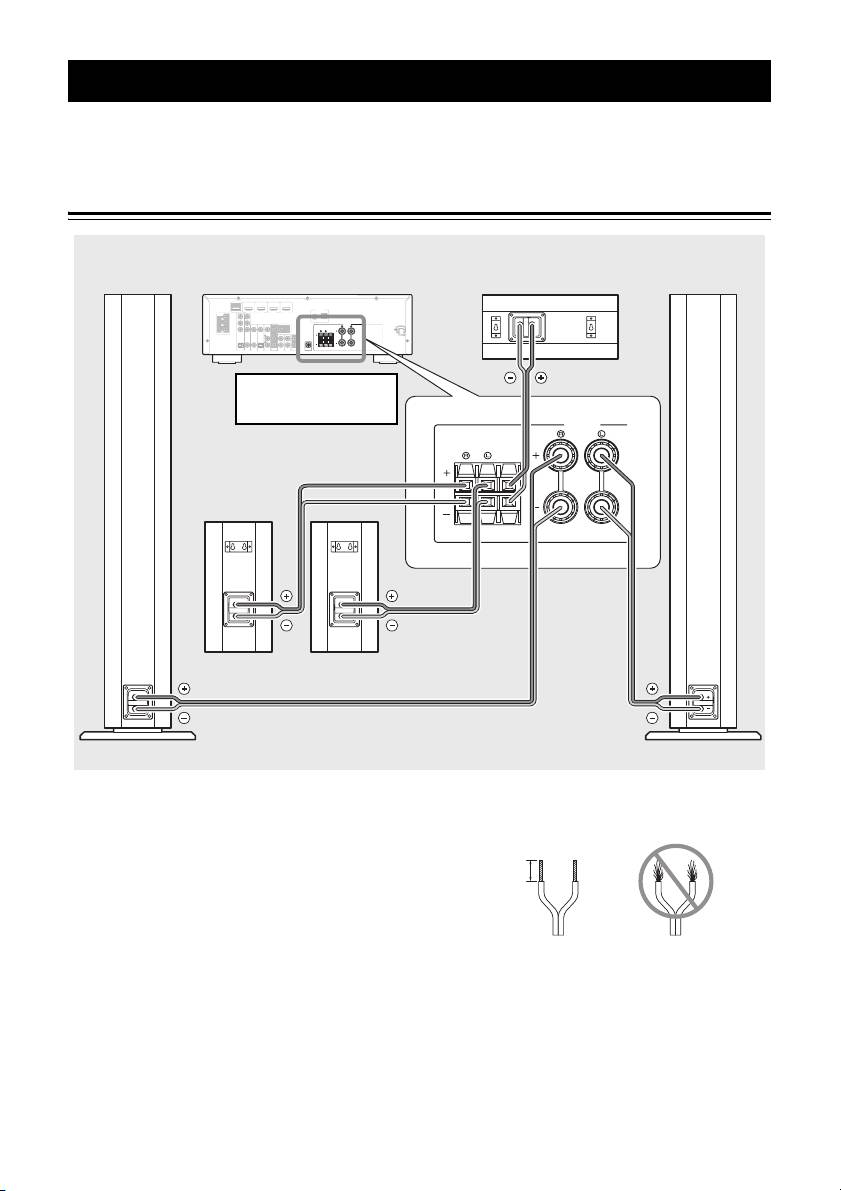
Connecting the speakers
Caution: Make sure the power cables for your AV components are disconnected from the AC wall outlets before
making any connections.
Connection diagram
Front speaker
Front speaker
Right Left
Amplifier
Center speaker
COMPONENT
HDMI
OUT
(
BD/DVD
)
VIDEO
HDMI 1
HDMI 2 HDMI 3
ANTENNA
AV 1
AV 2
HDMI 4
AV 3
AV 4
AV 5
FM
AUDIO 1
GND
AM
AUDIO 2
P
R
P
R
P
B
P
B
SPEAKERS
FRONT
MONITOR OUT
Y
COMPONENT
Y
SURROUND
CENTER
VIDEO
VIDEO
MONITOR OUT
OPTICAL
COAXIAL
COAXIAL
(
CD
)
(
OPTICAL
TV
)
AV
OUT
AUDIO
OUT
SUBWOOFER
Note: The exact layout of the
speaker terminals depends
on your amplifier.
SPEAKERS
FRONT
SURROUND
CENTER
Right Left
Surround speakers
■ Preparing the speaker cables
3 Twist the bare wires tightly so the individual
strands are not splayed.
Once you have positioned the speakers, cut the 24.5-
meter (80 ft.) speaker cable into five cables for
connecting the front right/left speakers, center speaker
15 mm (5/8")
and surround right/left speakers.
1 Cut the supplied speaker cable to suitable
length for each speaker.
Good No Good
2 Remove about 15 mm (5/8") of insulation from
the end of each speaker cable.
Notes
• Make the speaker cables as short as possible. Do not
bundle or roll up excess cable.
• Be careful not to injure yourself while preparing the
speaker cables.
5 En
