
Yamaha NS-P380: Using the Subwoofer Setting the subwoofer volume Frequency characteristics
Using the Subwoofer Setting the subwoofer volume Frequency characteristics: Yamaha NS-P380
Table of contents
- Precautions
- Precautions
- Package contents
- Installing the speakers Installing the subwoofer Installing the front, center, and surround speakers
- Installing the speakers Wall-mounting the front and surround speakers
- Connecting the speakers Connection diagram
- Connecting the speakers Connecting the power cables
- Using the Subwoofer Setting the subwoofer volume Frequency characteristics
- Troubleshooting Specifications
Using the Subwoofer
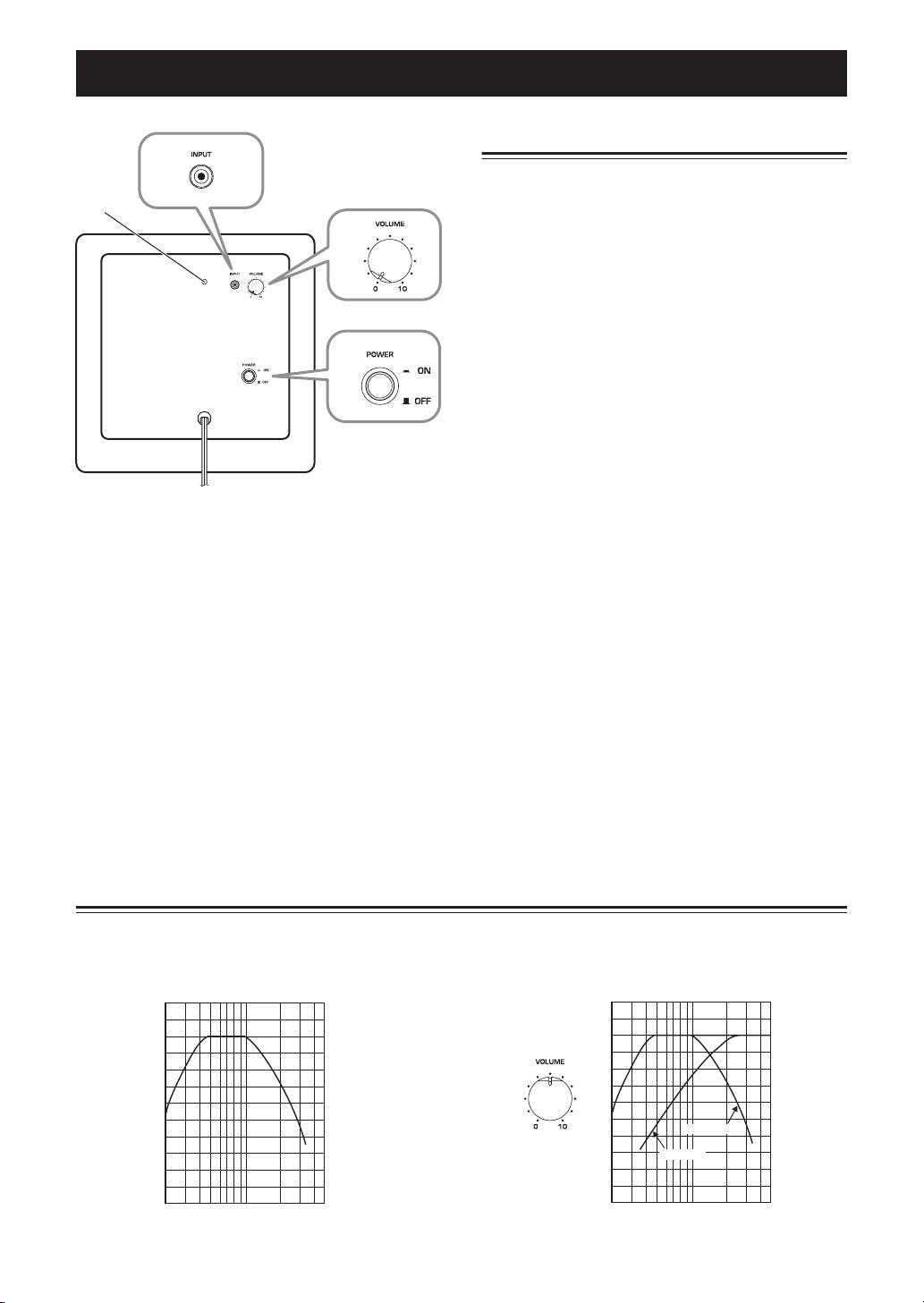
Setting the subwoofer volume
2
The very first time you use the subwoofer, you need to
set the volume balance between the subwoofer and the
1
front speakers as follows.
3
1 Turn on your other AV components.
2 Set the subwoofer’s VOLUME control to
minimum (0).
4
3 Set the subwoofer’s POWER switch to ON.
The power indicator on the rear panel lights up.
4 Play a audio source that contains low-
frequency bass sounds. Set the amplifier’s
volume control to a suitable level.
Rear panel
5 Turn the subwoofer’s VOLUME control up
gradually until you achieve a good balance
1
Power indicator
between the subwoofer and the other
Lights up when the POWER switch is set to ON;
speakers.
goes off when the POWER switch is set to OFF.
Notes
2 INPUT jack
•Once the subwoofer volume has been set, you can
Input jack for connecting the line-level subwoofer
leave the subwoofer’s VOLUME control set as it is
output on your amplifier.
and use your amplifier’s volume control to adjust the
volume of the entire system.
3 VOLUME control
•If you replace the front speakers (NS-B380) with
Adjusts the volume of the subwoofer. Turn it
other speakers, you will need to re-adjust the
clockwise to increase the volume;
subwoofer’s volume.
counterclockwise to decrease the volume.
•The frequency characteristics graphs below show
4 POWER switch
how the subwoofer and front speakers work
Set this to ON to turn on the subwoofer. Set it to
together to provide a full-range sound.
OFF to turn off the subwoofer.
Frequency characteristics
The following graph shows the frequency
The following graph shows the combined frequency
characteristics of the subwoofer (NS-SW380).
characteristics of the subwoofer (NS-SW380) and
front speakers (NS-B380).
100 dB
100 dB
90
90
80
80
70
70
NS-SW380
60
60
NS-B380
50
50
40
40
20 50 100 200 500 Hz
20 50 100 200 500 Hz
6
En
