
Toshiba JournE Air1000: Zooming the photo Controls on the Calendar menu
Zooming the photo Controls on the Calendar menu: Toshiba JournE Air1000
Table of contents
- Table of Contents
- Regulatory information . . . . . . . . . . . . . . . . . . . . . . . . . . . . . 20
- Introduction Safety instructions
- Step 1: Check the package contents
- Step 2: Identify the parts Rear view Left view
- Remote control
- Step 3: Use the foot stand
- Step 4: Connect the AC power Step 5: Insert or remove a memory card
- Step 6: Operate the unit
- Step 7: Use the OSD menus Controls on the Photo menu
- Zooming the photo Controls on the Calendar menu
- Controls on the Music menu Controls on the Video menu
- Controls on the WiFi menu Using WiFi-enabled services
- To use the on-screen keypad: RSS
- Flickr / Picasa
- Radio
- Frequently asked questions
- TOSHIBA support Regulatory information
- Indication of restrictions of use Working environment
- Following information is only valid for EU-member states:
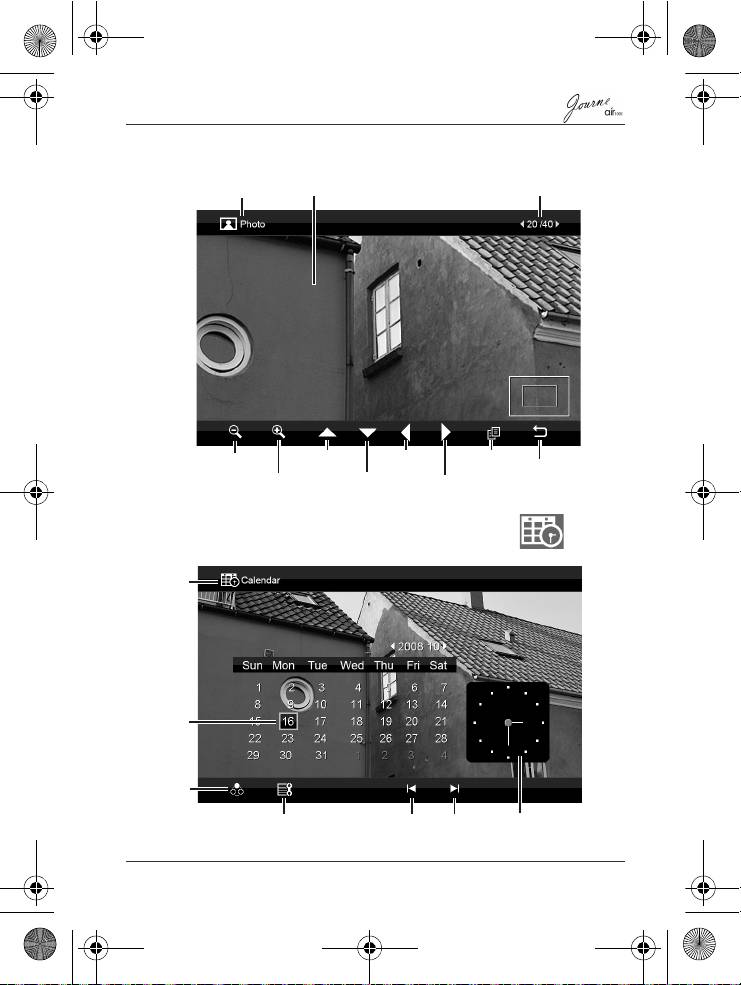
Zooming the photo
Controls on the Calendar menu
Quick Start Guide
EN-13
Current file number/
Current mode
LCD screen
Total number of files
Move up
Move left
Copy
Zoom out
Return
Zoom in
Move down
Move right
Current
mode
Current
date
Mode
selection
Set up date/time, alarm time
Previous
Next
Current time
and backlight saving function
month
month
Air1000-QSG-EEMEA-V1-1208.book Page 13 Tuesday, November 18, 2008 11:54 PM
Top 10 manuals
100.00
NZXT HALE90 1000W99.99
Samsung SM-R38099.97
AEG BSB 18C99.97
Dell 2700W99.97
Smeg KSEC70X99.96
Beurer HDE 4099.96
Pyramida KH 50 v.299.96
MSI CSM-H81M-P3299.96
AEG HR 562799.95
Melissa 640-048