
Toshiba JournE Air1000: Remote control
Remote control: Toshiba JournE Air1000
Table of contents
- Table of Contents
- Regulatory information . . . . . . . . . . . . . . . . . . . . . . . . . . . . . 20
- Introduction Safety instructions
- Step 1: Check the package contents
- Step 2: Identify the parts Rear view Left view
- Remote control
- Step 3: Use the foot stand
- Step 4: Connect the AC power Step 5: Insert or remove a memory card
- Step 6: Operate the unit
- Step 7: Use the OSD menus Controls on the Photo menu
- Zooming the photo Controls on the Calendar menu
- Controls on the Music menu Controls on the Video menu
- Controls on the WiFi menu Using WiFi-enabled services
- To use the on-screen keypad: RSS
- Flickr / Picasa
- Radio
- Frequently asked questions
- TOSHIBA support Regulatory information
- Indication of restrictions of use Working environment
- Following information is only valid for EU-member states:
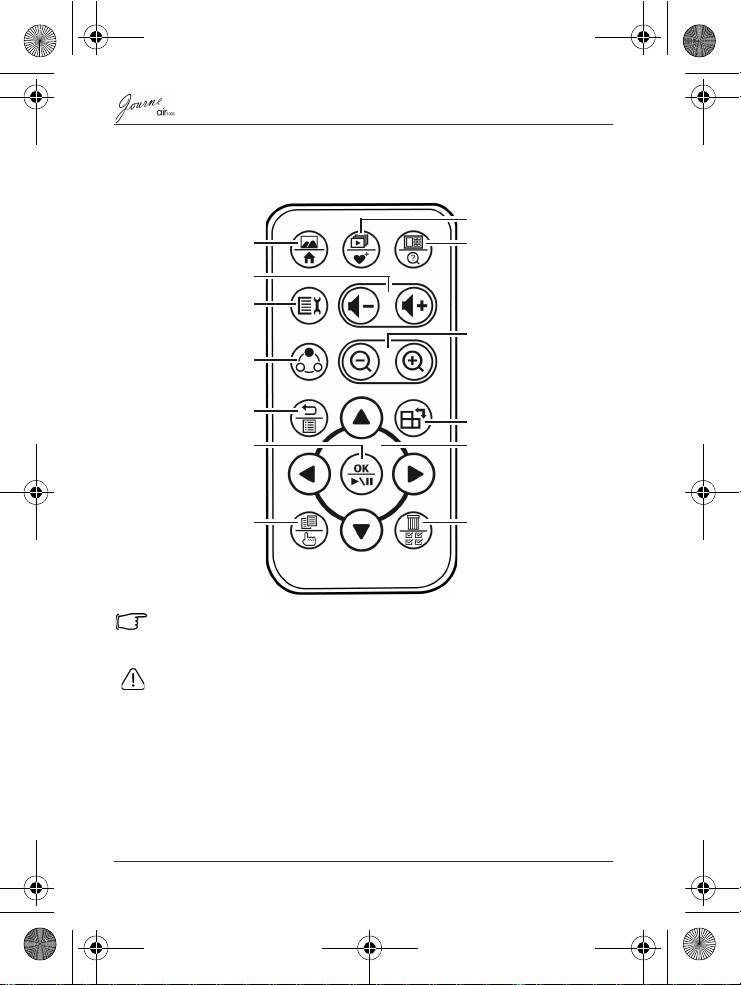
Remote control
Please remove the plastic film under the battery before using the
remote control for the first time.
• Protect the battery from overheating or excessive moisture.
• Failure to replace the battery in the correct manner may result in
damage to the battery.
• Use only the approved specified batteries.
• Properly recycle or dispose used batteries according to local
guidelines and regulations.
• Do not throw batteries into fire. This may result in an explosion.
EN-8
Quick Start Guide
Slideshow view/
My favorite
Single View/Home
Thumbnail view/
New search
Volume up/
Volume down
Setup
Zoom in/Zoom out
Mode change
Return/Playlist
Rotate
OK/Play back/Pause
Navigation buttons
Copy/Select
Delete/Select all
Air1000-QSG-EEMEA-V1-1208.book Page 8 Tuesday, November 18, 2008 11:54 PM
