
Samsung L310W: Getting to know your camera
Getting to know your camera: Samsung L310W
Getting to know your camera
CAUTION
CAUTION indicates a potentially hazardous situation which, if
not avoided, may result in a minor or moderate injury.
Remove the battery when not planning to use the camera
for a long period of time.
Otherwise the battery may leak corrosive electrolyte and
permanently damage the camera’s components.
Leaking, overheating, or damaged battery could result in fire
or injury.
– Use battery with the correct specification for the camera.
– Do not short circuit, heat or dispose of battery in fire.
– Do not insert the battery with the polarities reversed.
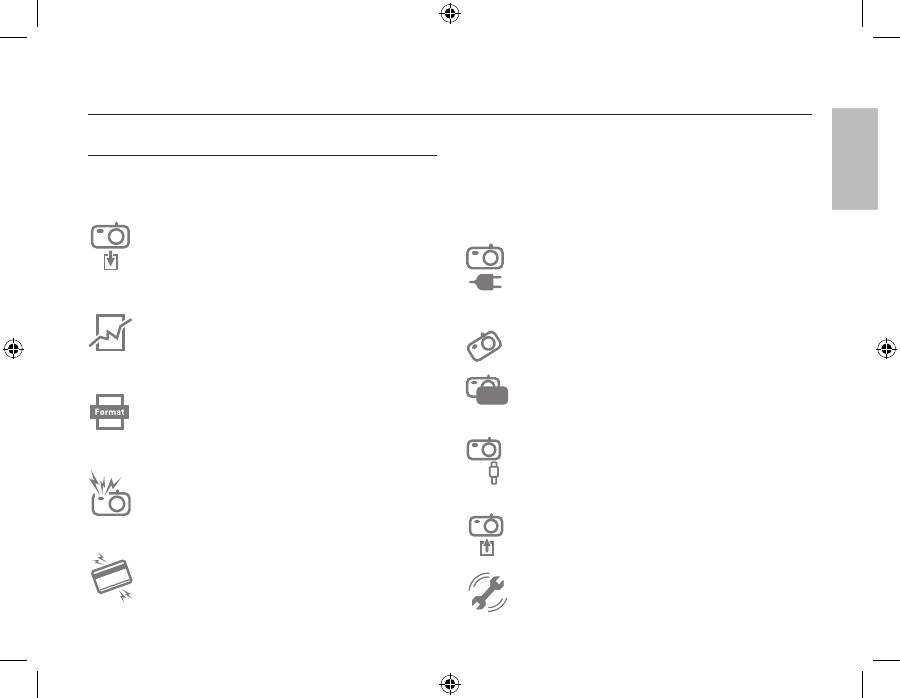
Be sure to format the memory card if you are using a newly
purchased memory for the first time, if it contains data
that the camera cannot recognise, or if it contains images
captured with a different camera.
Do not fire the flash while it is in contact with hands or
objects. Do not touch the flash after using it continuously. It
may cause burns.
Credit cards may be demagnetized if left near a camera
case.
Avoid leaving magnetic strip cards near the case.
Do not move the camera while it is switched on when you
are using the AC Charger. After use, always switch off the
camera before unplugging the cable from the wall socket.
Then make sure that any connector cords or cables to other
devices are disconnected before moving the camera. Failure
to do so may damage the cords or cables and cause a fire
or electric shock.
Take care not to touch the lens or lens cover to avoid taking
an unclear image and possibly causing camera malfunction.
Avoid obstructing the lens or the flash when you capture an
image.
Before inserting any cables or AC adapter, check the
directions and do not insert by force. It may cause breakage
of cable or camera.
It is highly likely to result in computer malfunctions when
the 20 pin connector is connected to the USB port of a PC.
Never connect the 20 pin connector to USB port of a PC.
Do not insert the memory card the wrong way round.
Doing so may cause damage to the camera.
Before an important event or going on a trip, you should
check the camera condition. Samsung cannot be held
responsible for camera malfunctions.
En
glis
h
EN-3
En
glis
h
Table of contents
- Getting to know your camera
- Getting to know your camera
- Getting to know your camera
- Identification of features / Contents of camera
- Battery life & Number of shot (Recording time)
- When Using the Camera for the First Time
- LCD monitor indicator
- Mode dial
- Taking a picture
- Playingback, Deleting and Protecting Images
- Downloading images
- Specifications
- Die Kamera kennen lernen
- Die Kamera kennen lernen
- Die Kamera kennen lernen
- Identifikation der Funktionen / Lieferumfang der Kamera
- Batteriebetriebsdauer und Anzahl der Aufnahmen (Aufnahmezeit)
- Wenn die Kamera zum ersten Mal benutzt wird
- LCD-Monitoranzeige
- Betriebsarten-Einstellrad
- Fotografieren
- Wiedergabe, Löschen und Schützen von Bildern
- Herunterladen von Bildern
- Technische Daten
- Kameraan tutustuminen
- Kameraan tutustuminen
- Kameraan tutustuminen
- Toimintojen tunnistaminen / kameran sisältö
- Akun kesto ja kuvien määrä (tallennusaika)
- Kameran käyttöönottaminen
- LCD-näytössä näkyvät kuvakkeet
- Tilanvalitsin
- Kuvan ottaminen
- Kuvien toistaminen, poistaminen ja suojaaminen
- Kuvien lataaminen
- Tekniset tiedot
- Att bli bekant med din kamera
- Att bli bekant med din kamera
- Att bli bekant med din kamera
- Identifiering av egenskaper / innehåll hos kamera
- Batteriets livslängd & antalet tagningar (inspelningstid)
- När du använder kameran första gången
- LCD-skärm indikator
- Lägesomkopplare
- Att ta en blid
- Uppspelning, radering och skyddande av bilder
- Nedladdning av bilder
- Specifi kationer
- Lær dit kamera at kende Korrekt bortskaffelse af dette produkt
- Lær dit kamera at kende
- Lær dit kamera at kende
- Kameraets funktioner/Kameraets indhold
- Batterilevetid og antal billeder (optagetid)
- Når du bruger kameraet for første gang
- Indikatorer på LCD-skærmen
- Funktionsknap
- Optagelse af et billede
- Afspilning, sletning og beskyttelse af billeder
- Overførsel af billeder
- Specifikationer
- Знакомство с фотокамерой
- Знакомство с фотокамерой
- Знакомство с фотокамерой
- Рабочие элементы / содержимое упаковки
- Ресурс батарей и доступное количество снимков (время записи)
- Подготовка к первому включению фотокамеры
- Информация, отображаемая на ЖК-дисплее
- Селектор режимов
- Фотосъемка
- Воспроизведение, удаление и защита изображений
- Загрузка изображений
- Технические характеристики
- Iepazīstiet savu kameru
- Iepazīstiet savu kameru
- Iepazīstiet savu kameru
- Funkciju / kameras komplektācijas identifikācija
- Baterijas/akumulatora lādiņš un uzņēmumu skaits (ieraksta laiks)
- Pirmoreiz izmantojot kameru
- LCD monitora indikators
- Režīmu skala
- Attēla uzņemšana
- Attēlu atskaņošana/rādīšana, dzēšana un aizsargāšana
- Attēlu lejupielāde
- Specifi kācijas
- Susipažinimas su fotoaparatu
- Susipažinimas su fotoaparatu
- Susipažinimas su fotoaparatu
- Savybių identifikavimas / fotoaparato turinys
- Akumuliatoriaus veikimo laikas ir nuotraukos numeris (įrašymo laikas)
- Naudojantis fotoaparatu pirmą kartą
- LCD monitoriaus indikatorius
- Režimo rankenėlė
- Fotografavimas
- Vaizdų paleidimas, naikinimas ir apsauga
- Nuotraukų atsisiuntimas
- Techniniai duomenys
- Kaamera tundmaõppimine
- Kaamera tundmaõppimine
- Kaamera tundmaõppimine
- Funktsioonide kirjeldus / fotoaparaadi osad
- Aku eluiga ja piltide arv (salvestusaeg)
- Kaamera esmakordsel kasutamisel
- LCD-ekraani indikaator
- Režiimivaliku ketas
- Pildistamine
- Piltide taasesitamine, kustutamine ja kaitsmine
- Piltide allalaadimine
- Tehnilised andmed
- Memo


