
JVC KD-SC402: Ÿ Turn on the connected component and
Ÿ Turn on the connected component and : JVC KD-SC402
Warning:
Ÿ Turn on the connected component and
start playing the source.
• Do not install any battery other than CR2025 or its
equivalent; otherwise, it may explode.
! Adjust the volume.
• Do not leave the remote controller in a place
(such as dashboards) exposed to direct sunlight
ENGLISH
for a long time; otherwise, it may explode.
• Store the battery in a place where children cannot
reach to avoid risk of accident.
• To prevent the battery from over-heating,
⁄ Adjust the sound as you want. (See
cracking, or starting a fire:
page 12.)
– Do not recharge, short, disassemble, heat the
battery, or dispose of it in a fire.
– Do not leave the battery with other metallic
To check the other information while
materials.
listening to an external component
– Do not poke the battery with tweezers or
similar tools.
AUX IN or EXT IN Ô Clock
– Wrap the battery with tape and insulate when
throwing away or saving it.
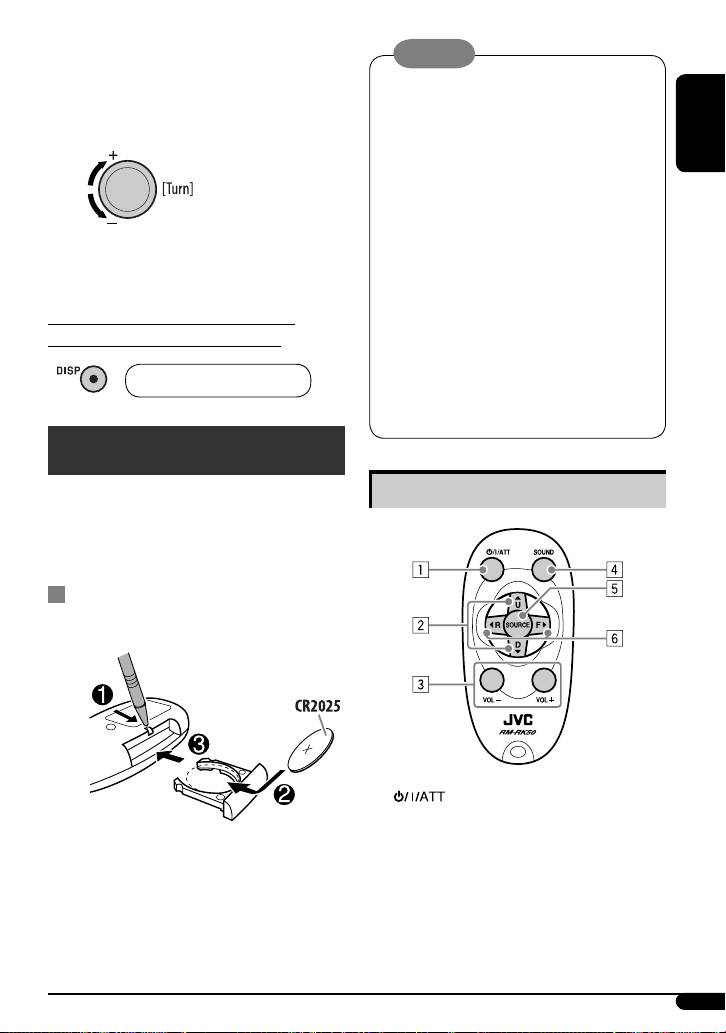
Remote controller — RM-RK50
This unit can be remotely controlled as instructed here
Main elements and features
(with an optionally purchased remote controller). We
recommend that you use remote controller RM-RK50
with your unit.
Installing the lithium coin battery
(CR2025)
1 (standby/on/attenuator) button
• Turns the power on if pressed briefly or
attenuates the sound when the power is on.
Aim the remote controller directly at the remote
• Turns the power off if pressed and held.
sensor on the unit. Make sure there is no obstacle
in between.
Continued on the next page
19
EN14-27_KD-G431_003A_f.indd 19EN14-27_KD-G431_003A_f.indd 19 9/29/06 2:39:01 PM9/29/06 2:39:01 PM
Table of contents
- CONTENTS
- Control panel
- Getting started
- Radio operations
- Ÿ Select one of your favorite programme
- ~
- Sound adjustments
- General settings — PSM
- DAB tuner operations
- iPod operations
- ~
- Other external component
- Ÿ Turn on the connected component and
- Maintenance
- More about this unit
- Troubleshooting
- Specifications
- INHALT
- Bedienfeld
- Erste Schritte
- Bedienung des Tuners
- Ÿ Wählen Sie einen ihres gewünschten
- ~
- Klangeinstellungen
- Allgemeine Einstellungen — PSM
- DAB-Tuner-Funktionen
- iPod Bedienverfahren
- ~ Ÿ
- Bedienung von anderen
- Ÿ Schalten Sie die angeschlossene
- Wartung
- Weitere Informationen zu
- Störungssuche
- Technische Daten
- CОДЕРЖАНИЕ
- Панель управления
- Начало работы
- Операции с
- Ÿ Выберите один из типов любимых
- ~
- Настройки звучания
- Общие настройки—PSM
- Операции с тюнером DAB
- Операции
- ~ Ÿ
- Другие операции с
- Ÿ Включите подключенное устройство
- Обслуживание
- Дополнительная
- Устранение проблем
- Технические характеристики
