
Canon Legria HF G25: Installing the software Your camcorder’s serial number
Installing the software Your camcorder’s serial number: Canon Legria HF G25
Table of contents
- • Saving and managing movies • Editing and converting movies • Creating discs from your movies • Uploading your movies
- Installing the software Your camcorder’s serial number
En
05
Installing the software
See
Installation
and
System requirements
in the
VideoBrowser
Software
Guide (PDF file) for step-by-step installation instructions and full system
requirements. Below are the main system requirements.
OS:
Windows 8 (Desktop only), Windows 7 SP1, Windows Vista SP2,
Windows XP SP3 (32-bit only)
CPU:
Intel
®
Pentium
®
D, 3.0 GHz / Intel
®
Core™2 Duo, 2.13 GHz
(Intel
®
Core™2 Duo, 2.33 GHz for handling recordings in MXP mode)
Intel
®
Core™ i3, 2.13 GHz
RAM:
2 GB (Windows 8, Windows 7 and Windows Vista);
1 GB (Windows XP)
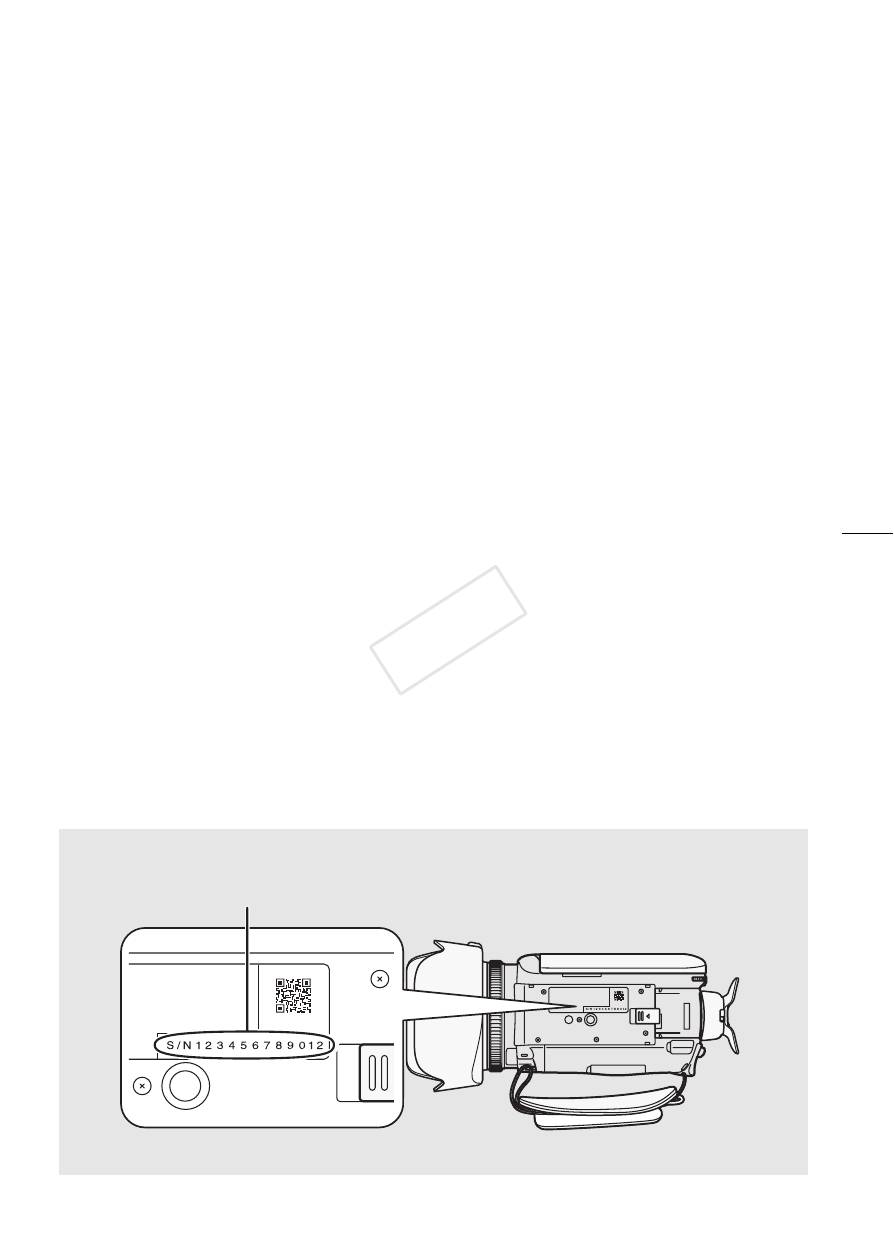
Furthermore, you will need to validate the software online. You will need to
enter your camcorder’s serial number as part of the software validation
process. Enter only the 12 digits (without the “S/N” prefix).
Your camcorder’s serial number
Enter only the 12 digits
(bottom view)


