
Eizo FlexScan HD2442W: Adjusting Sound Volume
Adjusting Sound Volume: Eizo FlexScan HD2442W
English
13
Prior to use Installation TroubleshootingSetting/Adjustment
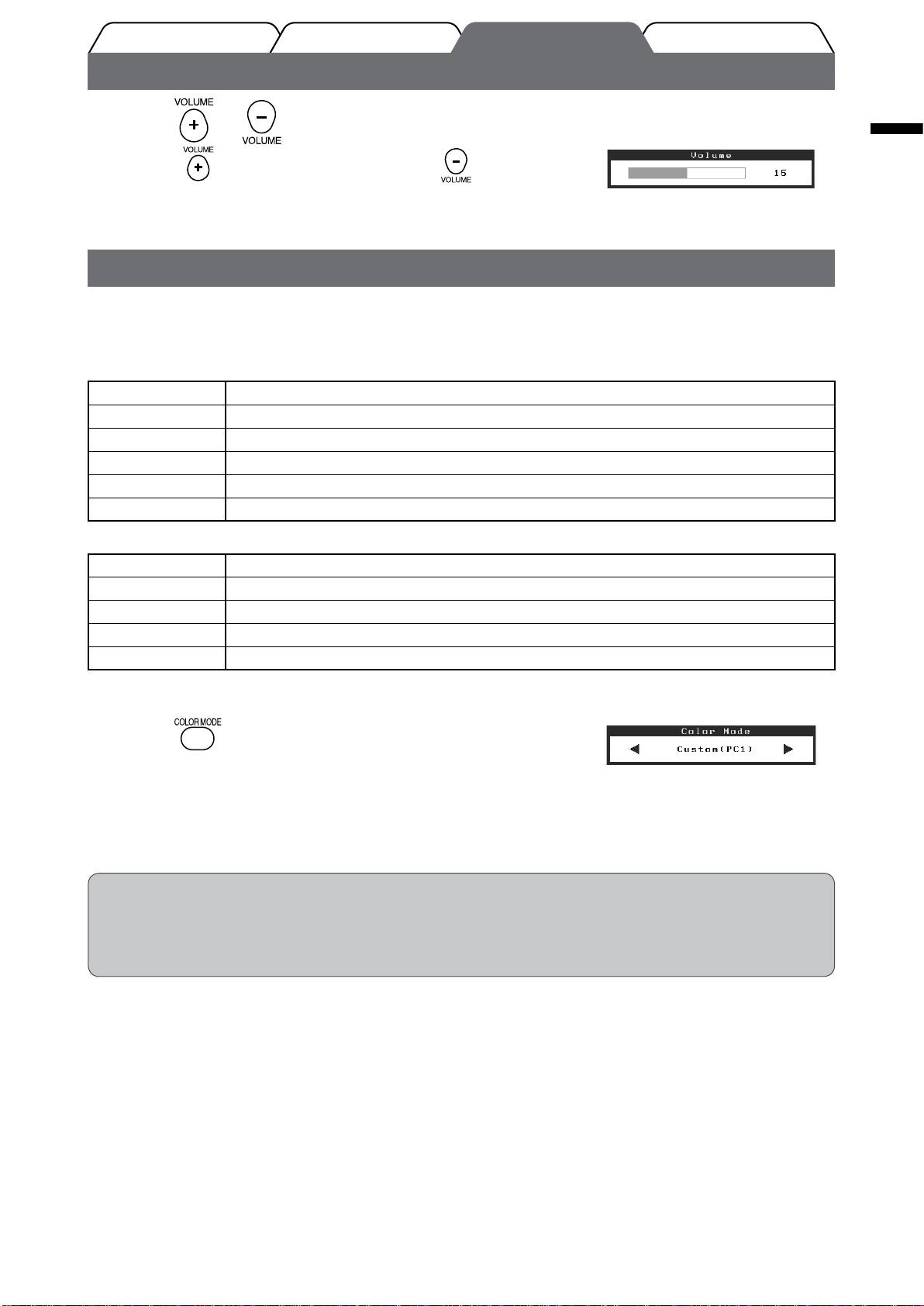
Adjusting Sound Volume
Press or on the remote control.
Volume menu
1
Pressing raises the volume, and pressing reduces the
volume.
Selecting Display Mode
Changing the color mode allows you to set the appropriate display mode easily.
Color Mode
(For PC input signal)
Text Suitable for displaying texts for word processing or spreadsheets.
Picture Suitable for displaying images such as photos or picture images.
Movie Suitable for playing back animated images.
sRGB Suitable for color matching with sRGB compatible peripherals.
Game (PC) Suitable for displaying game images.
Custom (xxx
*
) Available for making desired settings.
(For HDMI input signal)
Standard Standard video display.
Cinema Suitable for cinema effect, etc.
Dynamic Suitable for a clearly outlined image.
Game Suitable for displaying game images.
Custom (xxx
*
) Available for making desired settings.
* The input selected at that time is displayed.
Color Mode menu
Press on the remote control.
1
Each time you press the button, the mode changes.
NOTE
• Adjusting volume and changing color mode can be performed from the shortcut menu.
By touching the slide bar when the menu is not displayed on the screen, the shortcut menu is displayed. By touching
the slide bar for 5 seconds, the content of the menu changes (
see page 7)
. Display the <Volume> menu or the
<Color Mode> menu, and trace the slide bar left and right to set.
Оглавление
- FlexScan HD2442W
- Compatible Resolutions/Signal Format
- Controls and Functions
- Using the Operation Switch
- Connecting Cables
- Adjusting the Screen Height and Angle
- Displaying the Screen
- Adjusting Sound Volume
- Adjusting Brightness
- No-Picture Problem
- FlexScan HD2442W
- Kompatible Auösungen/Signalformate
- Bedienelemente und Funktionen
- Verwenden des Bedienschalters
- Kabel anschließen
- Höhe und Neigung des Bildschirms einstellen
- Bild wiedergeben
- Anpassen der Lautstärke
- Bildschirmhelligkeit einstellen
- Problem: Kein Bild
- FlexScan HD2442W
- Résolutions/Format de signal compatibles
- Controls and Functions
- Utilisation de l’interrupteur de fonctionnement
- Connexion des câbles
- Ajustage de la hauteur et de l’angle de l’écran
- Afchage de l’écran
- Réglage du volume sonore
- Problème de non-afchage d’images
- FlexScan HD2442W
- Resoluciones/formato de señal compatibles
- Controles y funciones
- Uso del interruptor de funcionamiento
- Conexión de los cables
- Ajuste de la altura y el ángulo de la pantalla
- Visualización de la pantalla
- Ajuste del volumen del sonido
- Ajuste del brillo
- Si no se muestra ninguna imagen
- FlexScan HD2442W
- Risoluzioni/Formato del segnale compatibili
- Comandi e funzioni
- Uso dell’interruttore di funzionamento
- Collegamento dei cavi
- Regolazione dell’altezza e dell’angolo dello schermo
- Visualizzazione dello schermo
- Regolazione del volume dell’audio
- Regolazione della luminosità
- Problema Nessuna immagine
- FlexScan HD2442W
- Kompatibla upplösningar/signalformat
- Reglage och funktioner
- Använda driftknappen
- Att ansluta kablarna
- Justera skärmhöjd och vinkel
- Visa skärmen
- Justering av ljudvolym
- Ställa in skärmens ljusstyrka
- Ingen bild visas
- FlexScan HD2442W
- Συμβατές αναλύσεις/Μορφότυπο σήματος
- Χειριστήρια και λειτουργίες
- Χρήση του διακόπτη λειτουργίας
- Σύνδεση καλωδίων
- Ρύθμιση του ύψους και της γωνίας κλίσης
- Εμφάνιση της οθόνης
- Ρύθμιση έντασης ήχου
- Εκτέλεση ρυθμίσεων για προχωρημένους/Ρύθμιση
- Πρόβλημα "Καθόλου εικόνα"
- FlexScan HD2442W
- Совместимое разрешение/формат сигнала
- Средства управления и их назначение
- Использование переключателя
- Подключение кабелей
- Регулировка высоты и угла наклона экрана
- Отображение экрана
- Настройка громкости звука
- Настройка яркости экрана
- Отсутствует изображение на экране
- FlexScan HD2442W
- 适用的分辨率/信号格式
- 控制和功能
- 使用操作开关
- 连接电缆
- 调整屏幕高度和角度
- 显示屏幕
- 调节声音音量
- 调整亮度
- 无图片的问题
