
Yamaha ns-f700: PLACING THE CONNECTIONS TO YOUR SPEAKERS AMPLIFIER Standard connections
PLACING THE CONNECTIONS TO YOUR SPEAKERS AMPLIFIER Standard connections: Yamaha ns-f700
Table of contents
- PRECAUTIONS PRECAUTIONS WHEN POSITIONING THE SPEAKERS
- SUPPLIED ACCESSORIES ATTACHING THE STANDS
- PLACING THE CONNECTIONS TO YOUR SPEAKERS AMPLIFIER Standard connections
- ■ How to connect ■About Bi-Wire Connection ■When using a banana plug Bi-wire connection
- ATTACHING THE FRONT SPECIFICATIONS COVER
PLACING THE
CONNECTIONS TO YOUR
SPEAKERS
AMPLIFIER
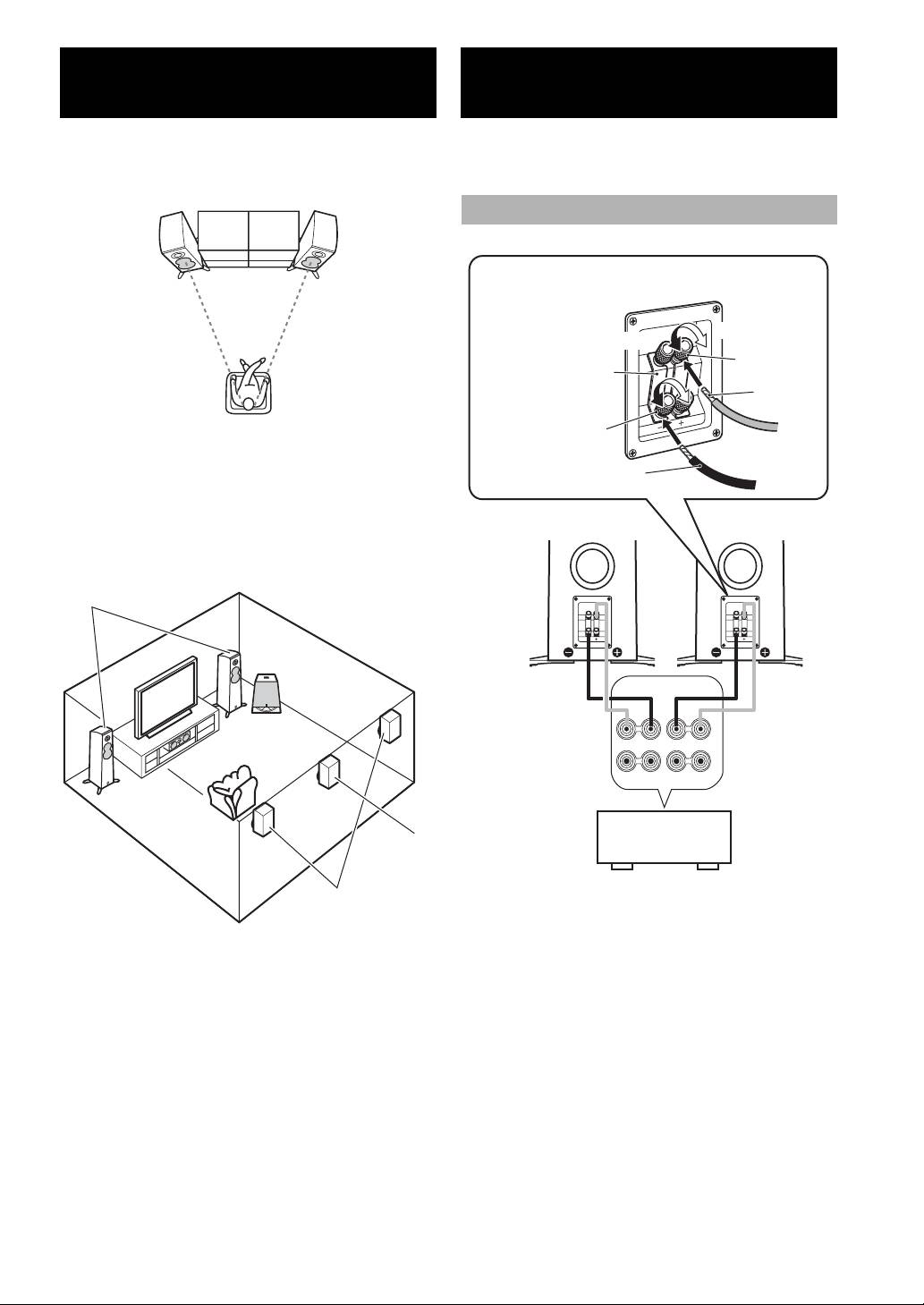
■ Using as 2ch stereo speakers
This speaker system is capable of standard connections and bi-
wire connection. Before making connections, make sure that
Better stereo images will be obtained when the speakers are
the amplifier is switched off.
slightly angled in towards the listeners.
Standard connections
Leave the short bars in place when connecting.
Tighten
Loosen
Red (+)
Short bar
Bare wire
Black (–)
■ Using as front speakers in a multi channel
system
Insulation
coating
Position the speakers on both sides of the TV. The positioning of
speakers is important, since this dictates the overall sound quality
of the multi channel system. Set up the speakers on the basis of
NS-F700
NS-F700
your listening position by following the owner’s manual supplied
with your amplifier.
NS-F700
Subwoofer
SPEAKERS
R
L
A
Speakers output
+
–
–
+
terminals of the
Center
B
amplifier (or receiver)
Amplifier or
Surround
Receiver
back
• Connect the screw-type input terminals at the rear of the
Surround
speakers to the speaker output terminals of the amplifier (or
receiver) with the speaker cable.
• Connect the (+) terminals on the amplifier (or receiver) to the
Notes
(+) terminal of each speaker, making sure to confirm the color-
• Placing this unit too close to a CRT TV set might impair
coded wire of the cable at each end. Use the other wire of the
picture color or create a buzzing noise. Should this happen,
cable to connect the (–) terminals of the components.
move the speaker away (more than 20 cm (7-7/8”)) from the
• Connect one speaker to the left (marked L) terminals of your
TV set.
amplifier, and another speaker to the right (marked R)
• To avoid accidents resulting from tripping over loose
terminals, making sure not to reverse the polarity (+, –). If one
speaker cables, fix them to the floor.
speaker is connected with reversed polarity the sound will be
unnatural and lack bass.
2 En


