
Yamaha PJP-25UR: Controls and Functions
Controls and Functions: Yamaha PJP-25UR
Table of contents
- IMPORTANT SAFETY INSTRUCTIONS
- COMPLIANCE INFORMATION STATEMENT FCC INFORMATION (for US customers)
- CAUTION: READ THIS BEFORE OPERATING YOUR UNIT.
- Introduction
- Controls and Functions
- ■ Other ■ Functions of the LEDs
- Connecting this unit Connection Check the following before connecting this unit to the computer
- Specifications General Audio
Controls and Functions
12
78 90
3451
6
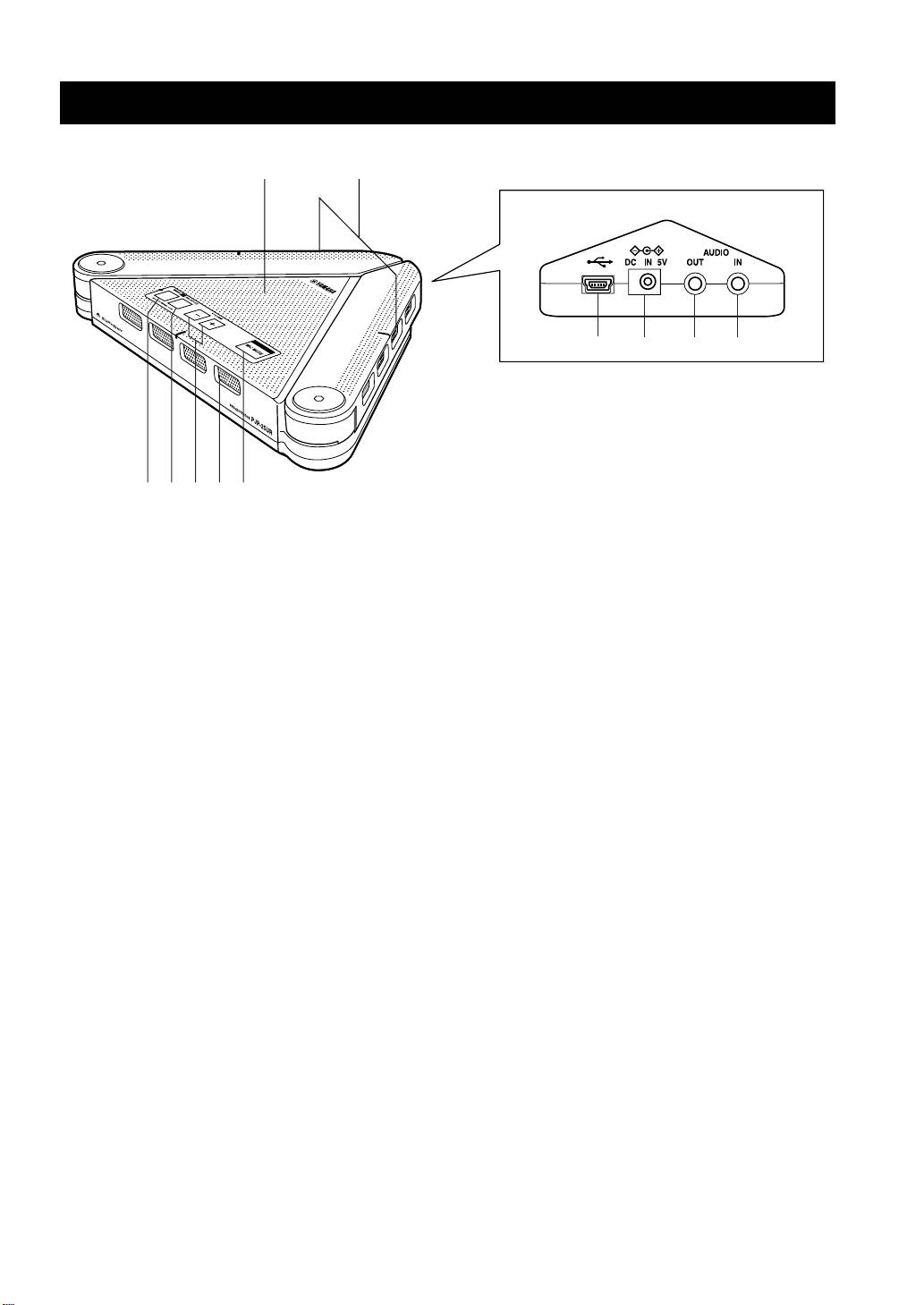
1 Arrayed microphones
6 MIC MUTE
Picks up the talker’s voice.
Press to temporarily turn off (mute) the microphones. To
cancel the mute function, press it again.
2 Speaker
Outputs the sounds.
7 USB port
Connect to the computer using the USB cable.
3 MENU/PC
Press to activate the PJP-25UR Controller. For details,
8 DC IN 5V terminal
refer to the “User’s Manual” included in the supplied CD-
Connect the AC adapter (sold separately).
ROM.
9 AUDIO OUT terminal
4 SHORTCUT
Connect to the line-in on the audio device or computer.
Press to activate the function specified in the PJP-25UR
0 AUDIO IN terminal
Controller. For details, refer to the “User’s Manual”
Connect to the line-out on the audio device or computer.
included in the supplied CD-ROM.
5 VOLUME +/–
Press to adjust the speaker volume. Holding either key
increases or decreases the volume continuously.
y
Pressing MENU/PC and VOLUME + at the same time switches the environment setting to “Conference Room”.
Pressing MENU/PC and VOLUME – at the same time switches it to “Normal”.
Holding down MENU/PC and SHORTCUT at the same time resets this unit’s settings.
English 13
