
JVC KD-SHX851: Ÿ
Ÿ: JVC KD-SHX851
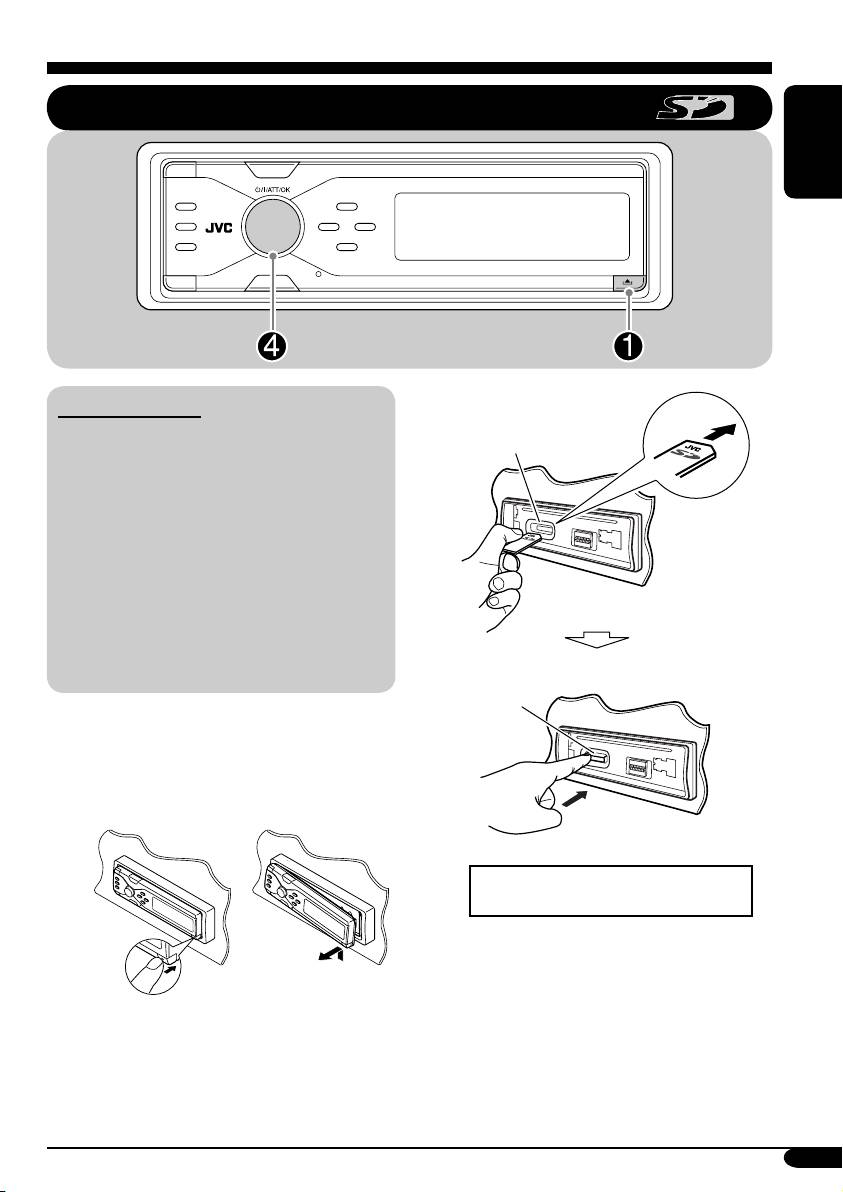
Playing an SD card
ENGLISH
About the SD card
Ÿ
• When an MP3 or a WMA folder includes
SD loading slot
an image <jpw> file edited by Image
Converter (Color Ver. 2.0)—supplied in
the CD-ROM, you can show the image on
the display while the tracks in the folder
are played back—ImageLink. (See pages
41 and 58 for details.)
• The required SD recording format is FAT
12/16 and the recommended storage type is
8 MB to 512 MB.
• You cannot use MMC or mini SD with this
receiver.
SD card
Before detaching the control panel, turn off the
power.
~ Detach the control panel.
Press in the SD card until you hear
a clicking sound.
To eject the SD card, press the SD
card again.
• Press the SD card softly (do not
release your finger quickly);
otherwise, the SD card may pop out
from the unit.
To be continued....
19
EN17-24_KD-SHX851[EY]f.indd 19EN17-24_KD-SHX851[EY]f.indd 19 05.4.11 1:57:30 PM05.4.11 1:57:30 PM
Table of contents
- KD-SHX851
- ⁄ Adjust the volume.
- ~
- ! Select a PTY code.
- ~
- Ÿ
- ! Attach the control panel.
- ! Adjust the effect level (1 – 3).
- ~ Enter the EQ menu (see page
- ! Adjust the selected setting item. ~ Enter the SEL menu (see page
- ! Select the picture size—“Large”
- Ÿ Turn on the connected component
- ~ ! Start searching for an ensemble.
- ⁄ Stellen Sie die Lautstärke ein.
- ~
- ! Wählen Sie einen PTY-Code.
- ~
- Ÿ
- ! Anbringen des Bedienfelds.
- ! Passen Sie die Effektstufe an
- ~ Rufen Sie das EQ-Menü auf
- ! Stellen Sie den gewählten
- !
- Ÿ Schalten Sie die angeschlossene
- ~ ! Starten Sie die Suche nach einem
- ⁄ Настройка громкости.
- ~
- ! Выберите код PTY.
- ~
- Ÿ
- ! Подключите панель управления.
- ! Настройте уровень эффекта
- ~ Войдите в меню EQ (см. стр. 5).
- ! Настройте выбранный элемент.
- Ÿ Войдите в меню PICT (см. стр. 5).
- Ÿ Включите подключенное
- ~ ! Запустите поиск блока
