
JVC KD-R901: Listening to the radio
Listening to the radio: JVC KD-R901

ENGLISH
9
OPERATIONS
Listening to the radio
1
Select “
FM
” or “
AM
.”
2
Search for a station to listen—Auto Search.
When a station is tuned in, searching stops. To stop searching, press the same button
again.
• You can also search for a station manually—Manual Search. Hold either one of the
buttons until “M” appears on the display, then press it repeatedly.
• When receiving an FM stereo broadcast with sufficient signal strength, the
indicator lights up on the display.
Improving the FM reception
When an FM stereo broadcast is hard to receive,
activate monaural mode for better reception.
• See also page 30.
<
Tuner
>
<
Stereo/Mono
>
<
Mono
>
Reception improves, but stereo effect will be lost. The
lights up on the display.
To restore the stereo effect,
repeat the same
procedure to select <
Stereo
>.
[Turn]
=
[Press]
Storing stations in memory
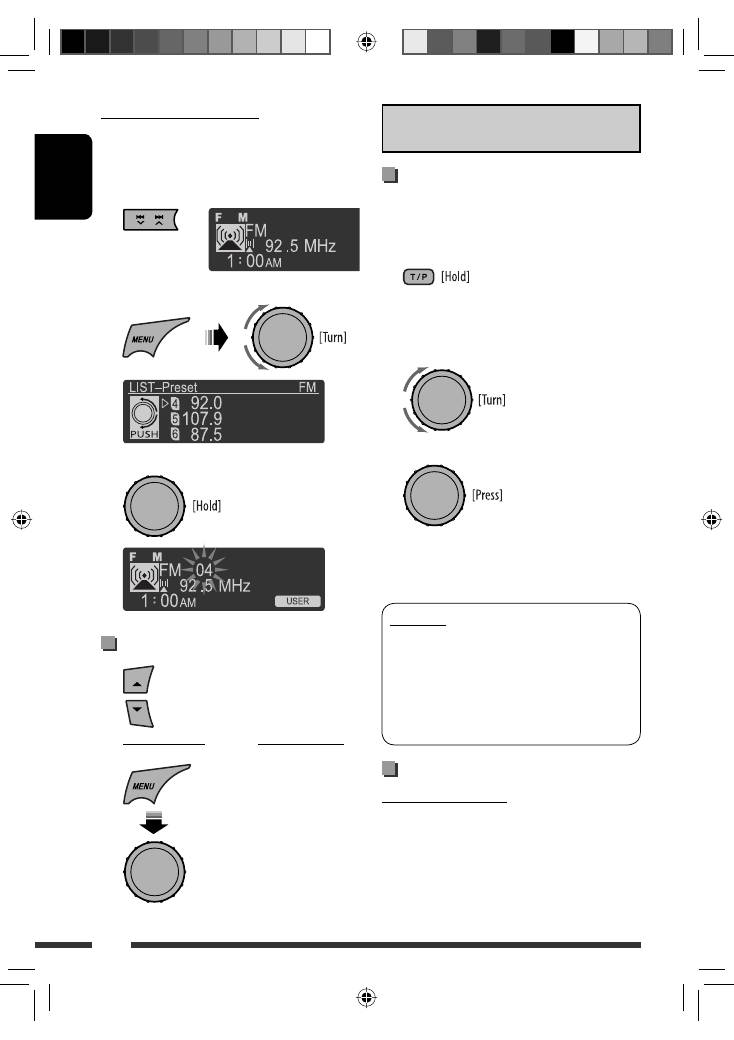
Automatic presetting (FM)— SSM (Strong-
station Sequential Memory)
You can preset up to 18 stations for FM.
1
While listening to a station, enter “SSM”
screen.
2
Select the preset number range you want to
store.
3
Local FM stations with the strongest signals are
searched and stored automatically.
•
To stop searching,
press
4
/
¢
.
To preset other 6 stations,
repeat from step
1
again.
Continued on the next page
“
SSM 01–06
”
“
SSM 07–12
”
“
SSM 13–18
”
EN02-09_KD-R901_003A_pre.indd 9
EN02-09_KD-R901_003A_pre.indd 9
5/2/09 10:35:21 AM
5/2/09 10:35:21 AM
ENGLISH
10
Manual presetting (FM/AM)
You can preset up to 18 stations for FM and 6 stations
for AM.
Ex.: Storing FM station of 92.5 MHz into preset number
“4.”
1
2
Select preset number “4.”
3
Selecting preset station
[Turn]
=
[Press]
The following features are available only for FM
Radio Data System stations.
Searching for FM Radio Data
System programme—PTY Search
You can tune in to a station broadcasting your favorite
programme by searching for a PTY code.
1
The last selected PTY code
appears.
2
Select one of your favorite programme types
or a PTY code.
3
Start searching for your favorite programme.
If a station is broadcasting a programme of the
same PTY code as you have selected, that station is
tuned in.
PTY codes
News, Affairs, Info, Sport, Educate, Drama, Culture,
Science, Varied, Pop M (music), Rock M (music),
Easy M (music), Light M (music), Classics, Other
M (music), Weather, Finance, Children, Social,
Religion, Phone In, Travel, Leisure, Jazz, Country,
Nation M (music), Oldies, Folk M (music), Document
Using the standby receptions
TA Standby Reception
TA Standby Reception allows the unit to switch
temporarily to Traffic Announcement (TA) from any
source other than AM.
The volume changes to the preset TA volume level if
the current level is lower than the preset level (see
page 30).
or
EN10-19_KD-R901_003A_1.indd 10
EN10-19_KD-R901_003A_1.indd 10
5/2/09 11:07:01 AM
5/2/09 11:07:01 AM
ENGLISH
11
OPERATIONS
To activate TA Standby Reception
The TP (Traffic Programme)
indicator either lights up or
flashes.
• If the TP indicator lights up, TA Standby Reception is
activated.
• If the TP indicator flashes, TA Standby Reception is
not yet activated. (This occurs when you are listening
to an FM station without the Radio Data System
signals required for TA Standby Reception.)
To activate the reception, tune in to another station
providing these signals. The TP indicator will stop
flashing and remain lit.
To deactivate the TA Standby Reception
The TP indicator goes off.
PTY Standby Reception
PTY Standby Reception allows the unit to switch
temporarily to your favorite PTY programme from any
source other than AM.
To activate and select your favorite PTY code for
PTY Standby Reception,
see page 30.
The PTY indicator either lights up or flashes.
• If the PTY indicator lights up, PTY Standby Reception
is activated.
• If the PTY indicator flashes, PTY Standby Reception is
not yet activated.
To activate the reception, tune in to another station
providing these signals. The PTY indicator will stop
flashing and remain lit.
To deactivate the PTY Standby Reception,
select
<
Off
> for the PTY code (see page 30). The PTY
indicator goes off.
• When a DAB tuner is connected, TA/PTY Standby
Reception also searches for services. (See also
page 30.)
• The unit will not switch to Traffic Announcement or
PTY programme when a call connection is established
through “
BT FRONT/BT REAR
.”
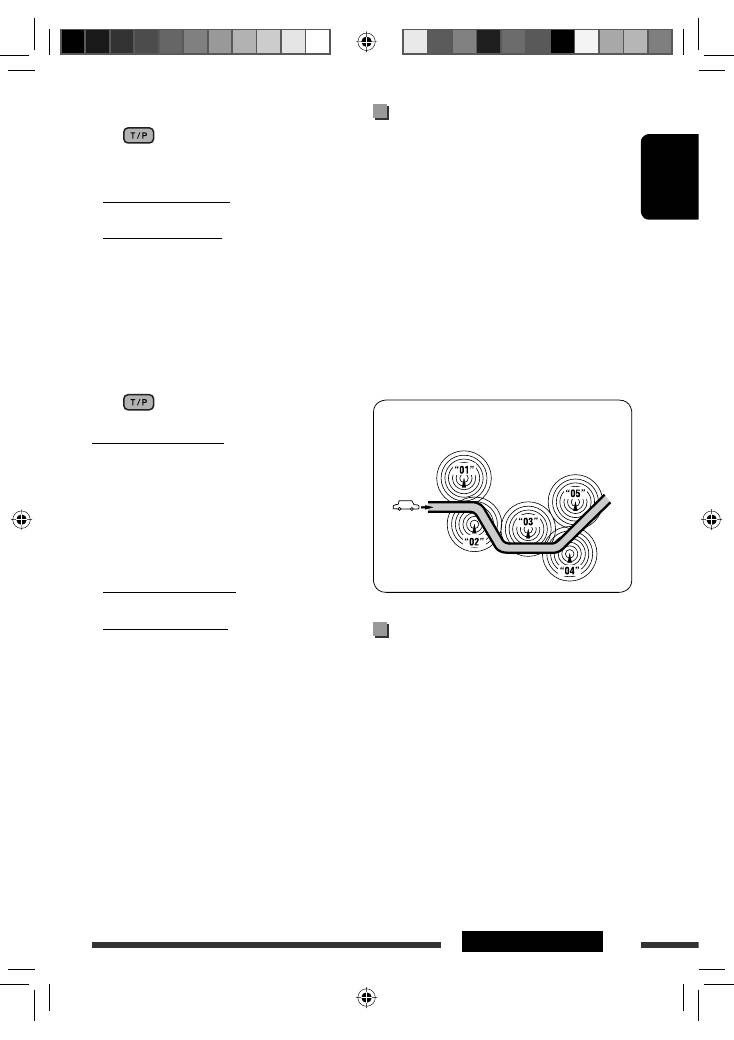
Tracing the same programme—
Network-Tracking Reception
When driving in an area where FM reception is not
sufficient enough, this unit automatically tunes in to
another FM Radio Data System station of the same
network, possibly broadcasting the same programme
with stronger signals (see the illustration below).
When shipped from the factory, Network-Tracking
Reception is activated.
To change the Network-Tracking Reception
setting,
see <
AF Regional
> on page 30.
• When the DAB tuner is connected, refer to “Tracing
the same programme—Alternative Frequency
Reception (DAB AF)” on page 24.
Programme A broadcasting on different frequency areas
(01 – 05)
Automatic station selection—
Programme Search
Usually when you select a preset number, the station
preset in that number is tuned in.
If the signals from the FM Radio Data System preset
station are not sufficient for good reception, this
unit, using the AF data, tunes in to another frequency
possibly broadcasting the same programme as the
original preset station is broadcasting.
• The unit takes some time to tune in to another
station using programme search.
• See also page 30.
EN10-19_KD-R901_003A_3.indd 11
EN10-19_KD-R901_003A_3.indd 11
16/2/09 11:59:16 AM
16/2/09 11:59:16 AM
Table of contents
- Preparation
- Basic operations
- Listening to the radio
- Disc operations
- USB operations
- Using the Bluetooth ® devices
- Listening to the CD changer
- Listening to the iPod/iPhone
- Listening to the DAB tuner
- Listening to the other external components
- Selecting a preset sound mode
- Menu operations
- More about this unit
- Troubleshooting
- Maintenance
- Specifications
- Vorbereitung
- Grundlegende Bedienung
- Rundfunkempfang
- Bedienung der Disc
- USB-Vorgänge
- Verwendung von Bluetooth ®-Geräten
- Hören vom CD-Wechsler
- Von einem iPod/iPhone hören
- DAB-Tuner-Empfang
- Hören von den anderen externen Komponenten
- Wählen eines Vorgabe-Klangmodus
- Menü-Bedienungen
- Weitere Informationen zu Ihrem Receiver
- Störungssuche
- Wartung
- Technische Daten
- Подготовка
- Основные операции
- Прослушивание радио
- Операции с дисками
- Операции с устройством USB
- Использование устройств Bluetooth ®
- Прослушивание с устройства автоматической смены компакт-дисков
- Прослушивание проигрывателя iPod или iPhone
- Прослушивание тюнера DAB
- Прослушивание с других внешних устройств
- Выбор запрограммированного режима звучания
- Операции с меню
- Дополнительная информация о приемнике
- Устранение проблем
- Обслуживание
- Технические характеристики
- Προετοιμασία
- Βασικές λειτουργίες
- Ακρόαση ραδιοφωνικών σταθµών
- Λειτουργίες δίσκου
- Λειτουργίες USB
- Χρήση των συσκευών Bluetooth ®
- Ακρόαση συσκευής αναπαραγωγής πολλαπλών δίσκων CD
- Ακρόαση iPod/iPhone
- Ακρόαση του δέκτη DAB
- Ακρόαση άλλων εξωτερικών συσκευών
- Επιλογή προεπιλεγμένης κατάστασης ήχου
- Λειτουργίες μενού
- Περισσότερα σχετικά µε το δέκτη αυτό
- Αντιµετώπιση προβληµάτων
- Συντήρηση
- Προδιαγραφές
