
JVC KD-PDR51: iPod operations
iPod operations: JVC KD-PDR51
Caution:
iPod operations
• Avoid using the iPod if it might hinder your safety
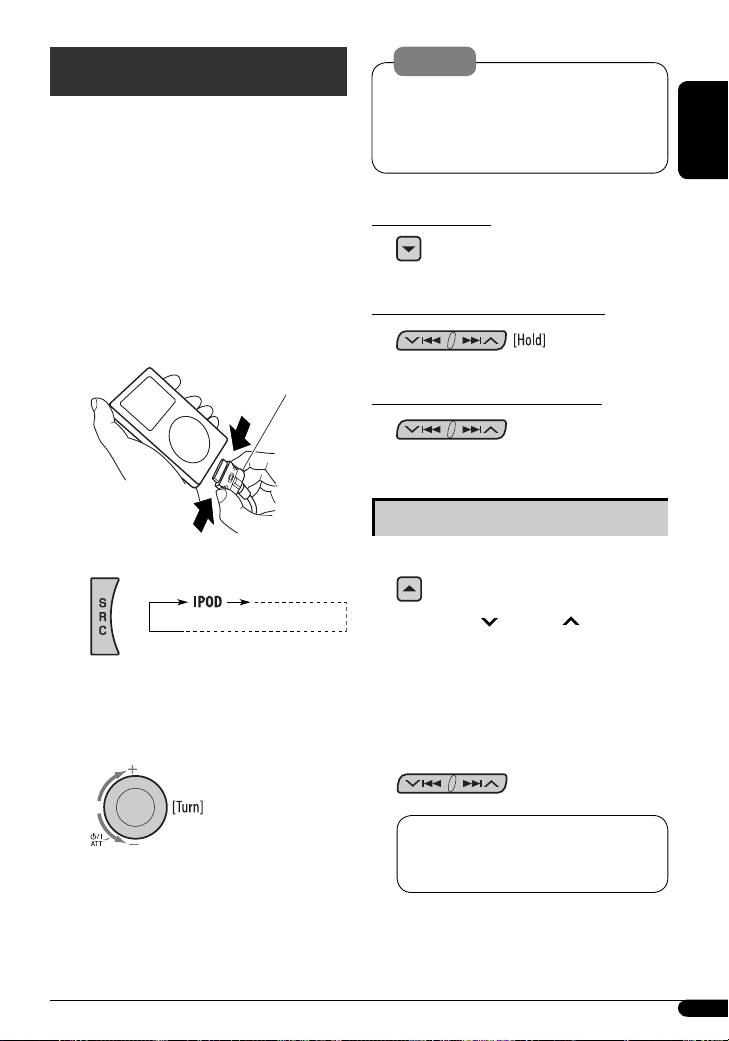
You can play songs from an Apple iPod through this
driving.
unit by connecting it with the supplied connection
• Make sure all important data has been backed up
cable for iPod.
to avoid losing the data.
ENGLISH
• Disconnecting the iPod will also stop playback. Press
SRC to listen to another playback source.
To pause playback
• For connection, see Installation/Connection Manual
To resume playback, press the button
(separate volume).
again.
• For details, refer also to the manual supplied with
your iPod.
To fast-forward or reverse the track
~ Connect an iPod.
Connection cable for iPod
To go to the next or previous tracks
Selecting a track from the menu
If an iPod has been connected...
1 Enter the main menu.
Now the 5/∞/ 4/¢ buttons work as
the menu selecting buttons*.
* The menu selecting mode will be canceled:
Playback starts automatically from where it has
– If no operations are done for about 5 seconds.
been paused previously.
– When you confirm the selection of a track.
Ÿ Adjust the volume.
2 Select the desired menu.
PLAYLIST Ô ARTISTS Ô ALBUMS Ô
SONGS Ô GENRES Ô COMPOSER Ô
(back to the beginning)
! Adjust the sound as you want. (See
pages 14 and 15.)
Continued on the next page
13
EN08-13_KD-PDR51_003A_f.indd 13EN08-13_KD-PDR51_003A_f.indd 13 11/24/06 1:02:26 PM11/24/06 1:02:26 PM
Table of contents
- CONTENTS
- Control panel
- Remote controller — RM-RK50
- Getting started
- Radio operations
- FM RDS operations
- ! Start searching for your favorite
- Disc operations
- iPod operations
- Sound adjustments
- General settings — PSM
- External component More about this unit operations
- Maintenance
- Troubleshooting
- Specifications
- INHALT
- Bedienfeld
- Fernbedienung — RM-RK50
- Erste Schritte
- Bedienung des Tuners
- UKW-RDS-Funktionen
- ! Beginnen Sie die Suche nach Ihrer
- Bedienung der Disc
- iPod Bedienverfahren
- Klangeinstellungen
- Allgemeine Einstellungen
- Bedienung von externen Weitere Informationen zu Komponenten Ihrem Receiver
- Wartung
- Störungssuche
- Technische Daten
- CОДЕРЖАНИЕ
- Панель управления
- Пульт дистанционного управления —
- Начало работы
- Операции с
- Операции с FM RDS
- ! Запустите поиск любимой
- Операции с дисками
- Операции
- Настройки звучания
- Общие настройки—
- Операции с внешними Дополнительная устройствами информация о приемнике
- Обслуживание
- Устранение проблем
- Технические характеристики


