
Gorenje SMO-23 DGW: Operation Instruction 1. Setting digital clock 2. Microwave cooking 4. Grill 5. Combination 1 6. Combination 2 7. Auto cook 3. Quick start
Operation Instruction 1. Setting digital clock 2. Microwave cooking 4. Grill 5. Combination 1 6. Combination 2 7. Auto cook 3. Quick start: Gorenje SMO-23 DGW
Table of contents
- OWNERS INSTRUCTION MANUAL GB SPECIFICATIONS Radio interference Before you call for service Installation
- IMPORTANT Important safety instructions Safety instructions for general use
- IMPORTANT-COOKWARE NOT TO USE IN YOUR MICROWAVE OVEN
- Computer control panel Feature diagram
- Operation Instruction 1. Setting digital clock 2. Microwave cooking 4. Grill 5. Combination 1 6. Combination 2 7. Auto cook 3. Quick start
- Cooking menu: 10. CHILD LOCK Care of your microwave oven 8. AUTO DEFROST 9. MULTI-STAGE COOKING
- Environment Guarantee & service
36
Operation Instruction
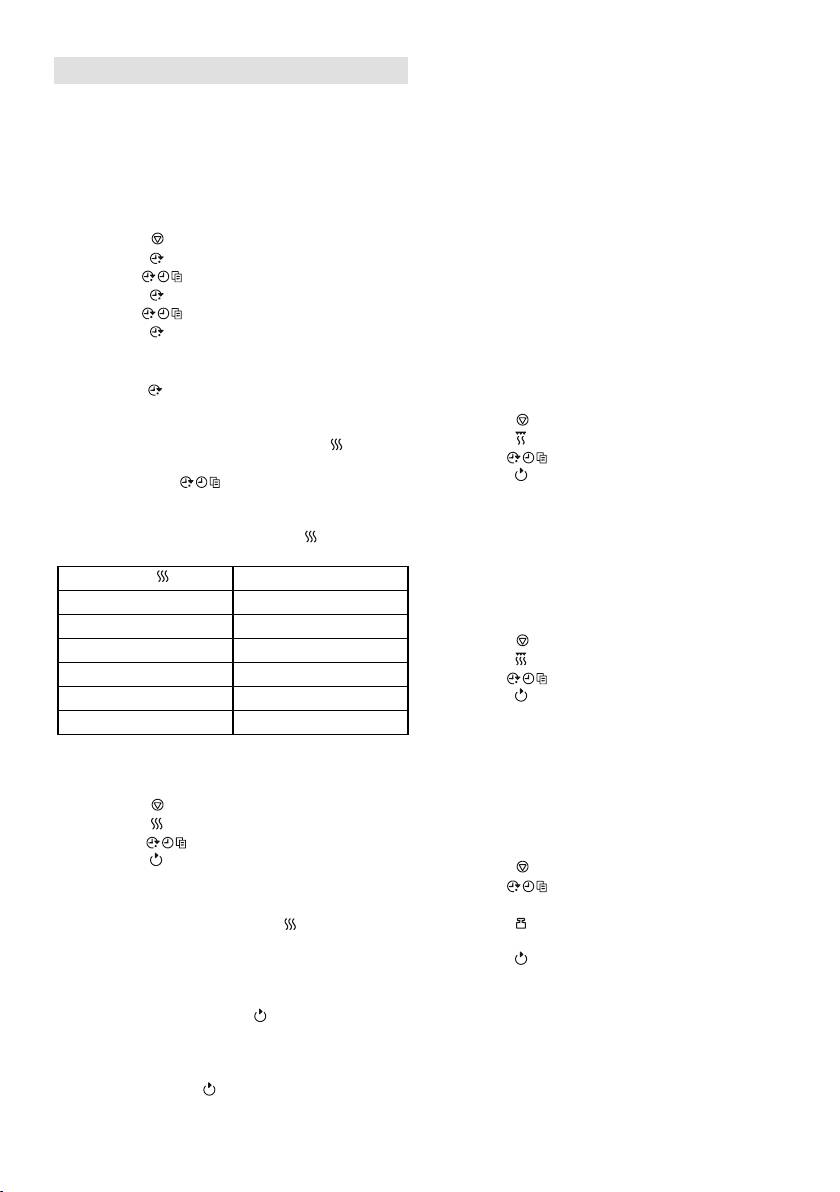
1. Setting digital clock
The oven is equipped with a digital clock, you
can choose to set the clock time in 24-hour cycle
by pressing the clock button in waiting mode.
For example: Suppose you want to set the oven
clock time to 8:30.
1. Press button.
2. Press button once.
3. Turn to set 8 hours.
4. Press button once.
5. Turn to set 30 min.
6. Press button once to confirm the
setting.
Note: You can check the time during cooking by
pressing the button.
2. Microwave cooking
For microwave cooking, just press the button a
number of times to select a cooking power level,
and then use the dial to set a desired
cooking time. The maximum cooking time is 95
minutes.
Select power level by pressing the button.
Pres
Cooking Power
once
100%
Twice
80%
3 times
60%
4 times
40%
5 times
20%
6 times
00%
4. Grill
The longest cooking time is 95 minutes. The grill
cooking is particularly useful for thin slices of
meat, steaks, chops, kebabs, sausages of piece
of chicken. It is also suitable for hot sandwiches
and au gratin dishes.
For example, suppose you want to grill for 12
minutes.
1. Press PAUSE/CANCEL button.
2. Press GRILL button.
3. Turn the MENU/TIME to 12:00.
4. Press START/QUICK START button.
5. Combination 1
The longest cooking time is 95 minutes.
30% time for microwave cooking, 70% for grill
cooking. Use for fish or au gratin.
Suppose you want to set combination 1 cooking
for 25 minutes.
1. Press button.
2. Press button once.
3. Turn to 25:00.
4. Press button.
6. Combination 2
The longest cooking time is 95 minutes.
55% time for microwave cooking, 45% for grill
cooking. Use for puddings omelettes, baked
potatoes and poultry.
Suppose you want to set combination 2 cooking
for 12 minutes.
1. Press button.
2. Press button once.
3. Turn to 12:00.
4. Press button.
7. Auto cook
For the following foods or cooking operation, you
For example, suppose you want to cook for 1
do not need to input cooking power and time. Try
minute at 60% of microwave power.
to focus on telling the oven what you want to
1. Press button.
cook and how much the food weighs.
2. Press button 3 times.
3. Turn to 1:00.
Steps:
4. Press button.
1. Press button.
2. Turn dial counterclockwise to select
Note: You can check the power level during
food code.
microwave cooking by pressing .
3. Press button a number of times to
indicate food weight.
3. Quick start
4. Press button.
This feature allows you to start the oven quickly.
The longest cooking time is 10 minutes.
In standby mode, press the button in quick
succession to set the cooking time, the oven
starts working at full power level immediately.
You can extend the cooking time during cooking
process by pressing .



