
Xiaomi Mi Robot Vacuum-Mop 2 Pro+: Before Use
Before Use: Xiaomi Mi Robot Vacuum-Mop 2 Pro+
Before Use
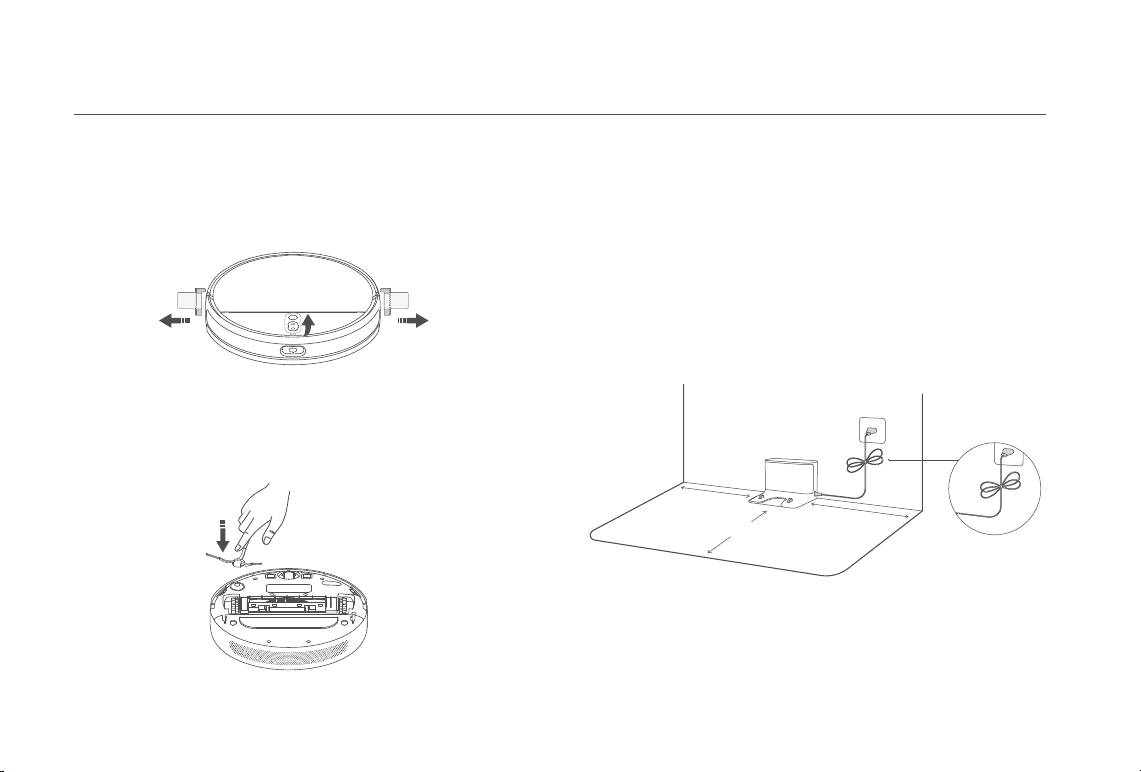
Remove Protective Coverings Position and Connect the Charging Dock
Before use, remove the protective strips from both sides of the
Place the charging dock near an electrical outlet in an area with a good
vacuum-mop's bumper as well as the protective film on the visual
Wi-Fi signal. To ensure the vacuum-mop can return to the charging dock,
navigation sensor.
leave at least 0.5 meters of clearance on either side of the charging dock
and at least 1.5 meters of open space in front, and make sure no objects
are directly overhead. Do not place the charging dock under furniture,
such as a cabinet, or chair. Connect the power cord to the charging dock
and tidy up any loose cord to prevent the vacuum-mop from getting
tangled, which could accidentally move or unplug the charging dock.
Install the Side Brush
Insert the side brush into the attachment slot on the bottom of the
vacuum-mop.
> 0.5 m
> 0.5 m
> 1.5 m
Tidy up Any Loose Cord
Note: Make sure the charging dock is in a well-lit area out of direct sunlight and away
from reflective objects, such as mirrors, which can prevent the vacuum-mop from
returning to the charging dock.
9
Before Use
Charge the Vacuum-mop Connect with Mi Home/Xiaomi Home App
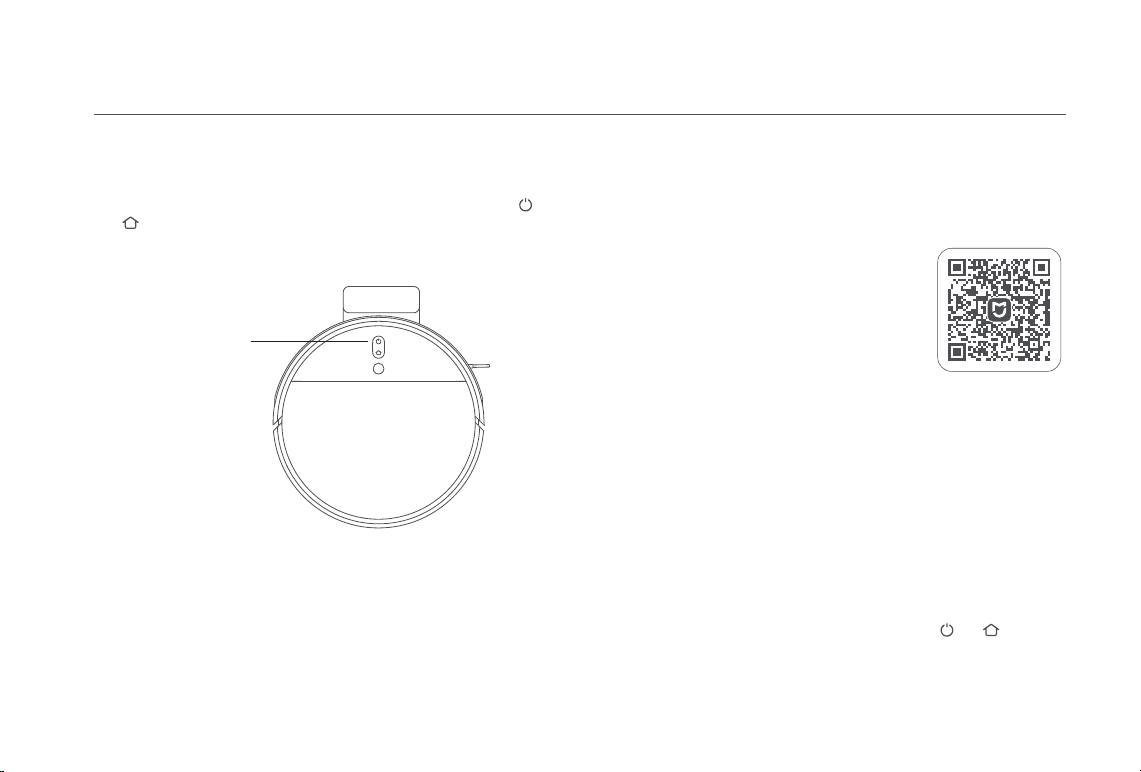
Place the vacuum-mop onto the charging dock. The vacuum-mop will
This product works with the Mi Home/Xiaomi Home app*. Use the Mi
automatically turn on and begin charging. The indicators of buttons
Home/Xiaomi Home app to control your device, and to interact with other
and on the vacuum-mop will slowly blink white while charging, and
smart home devices.
remain lit once fully charged.
Scan the QR code to download and install the
app. You will be directed to the connection
setup page if the app is installed already. Or
search "Mi Home/Xiaomi Home" in the app
store to download and install it.
Battery Level Indicator
Open Mi Home/Xiaomi Home app, tap "+" on
White:
the upper right, and then follow prompts to add
Battery level > 15%
your device.
Orange:
* The app is referred to as Xiaomi Home app in Europe (except for Russia). The name
Battery level ≤ 15%
of the app displayed on your device should be taken as the default.
Notes:
· Only 2.4 GHz Wi-Fi networks are supported.
· The version of the app might have been updated, please follow the instructions
based on the current app version.
Reset Wi-Fi
When there is a connection loss between your phone and the vacuum-
Notes:
mop due to the router reconfiguration, wrong password or so, please
· Fully charge the vacuum-mop before using it for the first time. This will take about 6
open the cover of the vacuum-mop so that you can see the Wi-Fi
hours.
indicator. Simultaneously press and hold the buttons and until you
· To ensure safety while charging and to prevent the mop pad from damaging floor
surfaces, please remove the mopping assembly prior to charging.
hear a voice saying "Waiting for the network configuration". Once the Wi-
Fi indicator is slowly blinking, the Wi-Fi has been successfully reset.
10
Оглавление
- Welcome
- Safety Information
- Product Overview
- Before Use
- How to Use
- Care & Maintenance
- Troubleshooting
- FAQ
- Specifications
- Bienvenido/a
- Información de seguridad
- Descripción General del Producto
- Antes de usar
- Modo de uso
- Mantenimiento rutinario
- Resolución de problemas
- FAQ
- Especificaciones
- Bienvenue
- Informations sur la sécurité
- Présentation du produit
- Avant utilisation
- Mode d’utilisation
- Routine de maintenance
- Dépannage
- FAQ
- Spécifications
- Benvenuto
- Informazioni di sicurezza
- Panoramica prodotto
- Prima dell'uso
- Modalità d'utilizzo
- Manutenzione di routine
- Risoluzione del problemi
- FAQ
- Specifiche tecniche
- Добро пожаловать!
- Информация по технике безопасности
- Ограничения на эксплуатацию
- Обзор устройства
- Обзор устройства
- Перед использованием
- Инструкция
- Уход в эксплуатации
- Устранение неполадок
- FAQ
- Технические характеристики
- Witamy
- Informacje dotyczące bezpieczeństwa
- Przegląd produktu
- Przed użyciem
- Użytkowanie
- Rutynowa konserwacja
- Rozwiązywanie problemów
- Pytania i odpowiedzi
- Dane techniczne
- Willkommen
- Sicherheitsinformationen
- Sicherheitsinformationen
- Produktübersicht
- Vor der Verwendung
- Verwendung
- Regelmäßige Wartung
- Fehlerbehebung
- FAQ
- Spezifikationen
- Hoş geldiniz
- Güvenlik Bilgileri
- Ürüne Genel Bakış
- Kullanmadan Önce
- Kullanım
- Rutin Bakım
- Sorun Giderme
- SSS
- Belirtimler
-
-
-
-
-
-
-
-
-
-
-
