
Yamaha ns-c700: ATTACHING THE FRONT COVER
ATTACHING THE FRONT COVER: Yamaha ns-c700
Table of contents
- PRECAUTIONS
- SUPPLIED CONNECTIONS TO YOUR ACCESSORIES AMPLIFIER PLACING THE SPEAKERS
- ATTACHING THE FRONT COVER
- SPECIFICATIONS
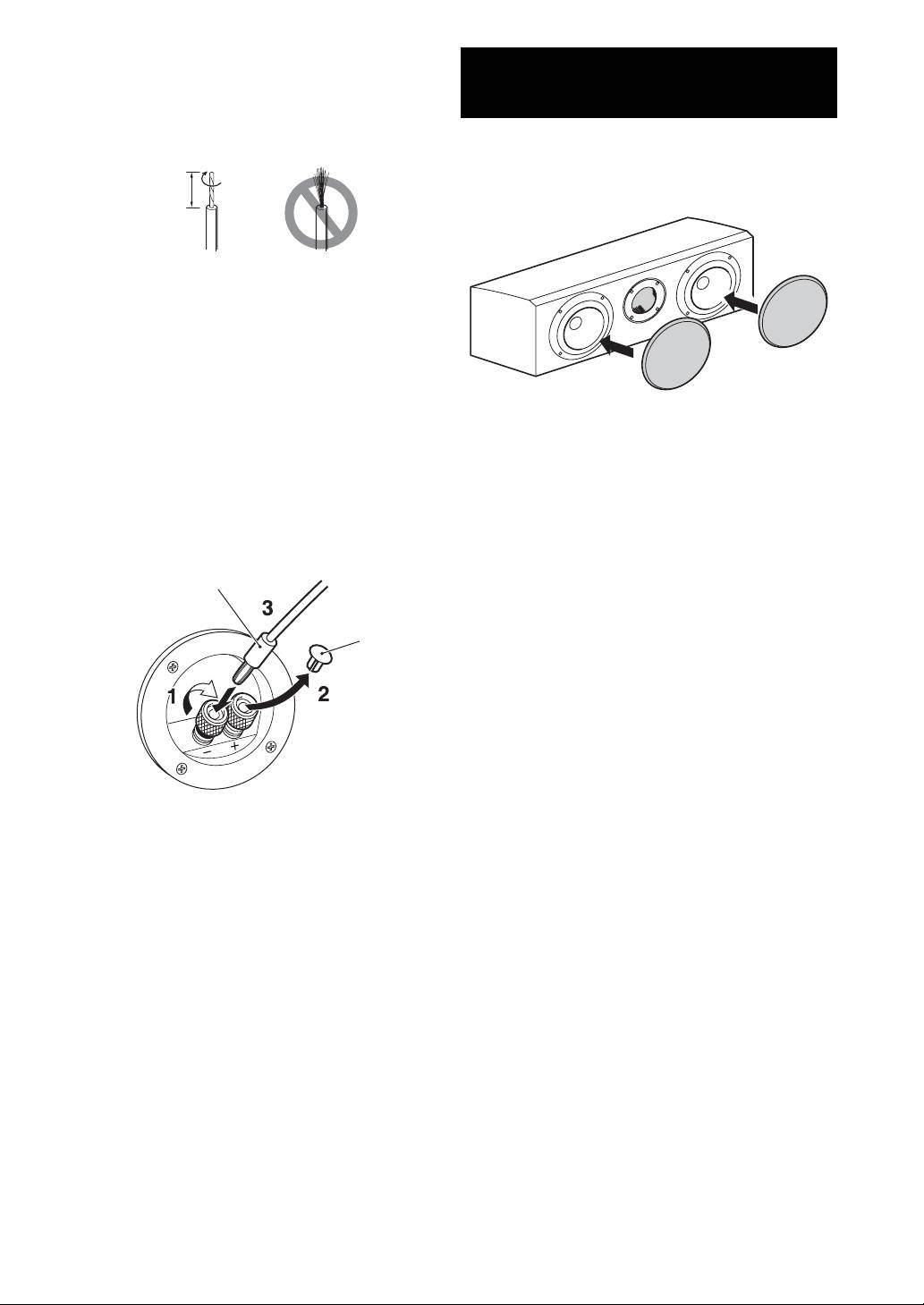
■ How to connect
ATTACHING THE FRONT
1 Loosen the knob.
2 Remove 10 mm (3/8”) of insulation from each end of the
COVER
cables, and twist the exposed conductors together neatly and
tightly, as shown below.
The speaker and the front cover are packed separately. To attach
the front cover, line up the projections (magnets) on the reverse
side of the front cover with their corresponding screw heads on the
10 mm
speaker.
(3/8 ”)
Good No Good
3 Insert the bare wire.
4 Tighten the knob and secure the cables.
Test the firmness of the connection by pulling lightly on the
cables at the terminal.
Notes
• Do not let the bare speaker wires touch each other as this
could damage the speaker or the amplifier, or both.
Notes
• Do not insert the insulation into the hole. Sound may not be
• When removing the cover, be careful that you don’t touch
produced.
the drive units, and don’t exert excessive force with any
tools.
■ When using a banana plug
• There are magnets on the reverse side of the front cover. Do
not place a front cover close to objects that might be affected
Note
by magnets, such as TV, clock, magnetic card, diskette, etc,
Do not take off this cover unless using a banana plug.
after removing it.
Banana plug
Cover
1 Tighten the terminal knob.
2 Remove the cover by pulling it toward you.
3 Simply insert the banana plug into the terminal.
Note
Use a suitable instrument to remove the cover. Removing it
with your bare hands may hurt your fingertips.
2 En


