
Yamaha NS-PB120: Connecting the speakers Connection diagram
Connecting the speakers Connection diagram: Yamaha NS-PB120
Table of contents
- Precautions
- Package contents Installing the speakers
- Installing the center speaker Installing the front/surround speakers
- Wall-mounting the speakers
- Connecting the speakers Connection diagram
- Specifications
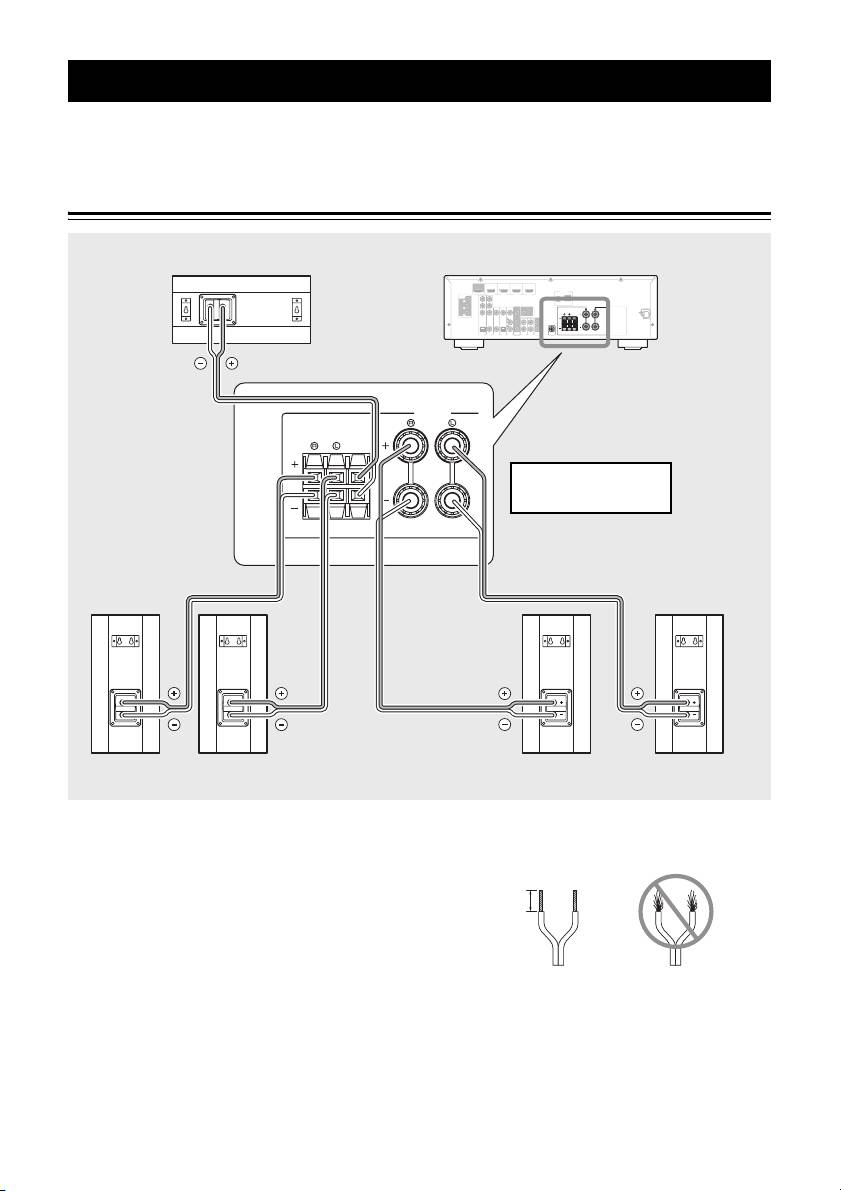
Connecting the speakers
Caution: Make sure the power cables for your AV components are disconnected from the AC wall outlets before
making any connections.
Connection diagram
Center speaker Amplifier
COMPONENT
HDMI
OUT
(
HDMI 1
BD/DVD
)
VIDEO
HDMI 2 HDMI 3
AV 2
HDMI 4
ANTENNA
AV 1
AV 3
AV 4
AV 5
FM
AUDIO 1
GND
AM
AUDIO 2
P
R
P
R
P
B
P
B
SPEAKERS
Y
Y
SURROUND
CENTER
FRONT
MONITOR OUT
COMPONENT
VIDEO
VIDEO
MONITOR OUT
OPTICAL
COAXIAL
(
COAXIAL
CD
)
OPTICAL
(
TV
)
AV
OUT
AUDIO
OUT
SUBWOOFER
SPEAKERS
FRONT
SURROUND
CENTER
Note: The exact layout of the
speaker terminals depends
on your amplifier.
Right Left
Right Left
Surround speakers
Front speakers
■ Preparing the speaker cables
3 Twist the bare wires tightly so the individual
strands are not splayed.
Once you have positioned the speakers, cut the 24.5-
meter (80 ft.) speaker cable into five cables for
connecting the front right/left speakers, center speaker
15 mm (5/8")
and surround right/left speakers.
1 Cut the supplied speaker cable to suitable
length for each speaker.
Good No Good
2 Remove about 15 mm (5/8") of insulation from
the end of each speaker cable.
Notes
• Make the speaker cables as short as possible. Do not
bundle or roll up excess cable.
• Be careful not to injure yourself while preparing the
speaker cables.
5 En
