
JVC KD-G731: Basic operations
Basic operations: JVC KD-G731
Basic operations
Using the control panel
ENGLISH
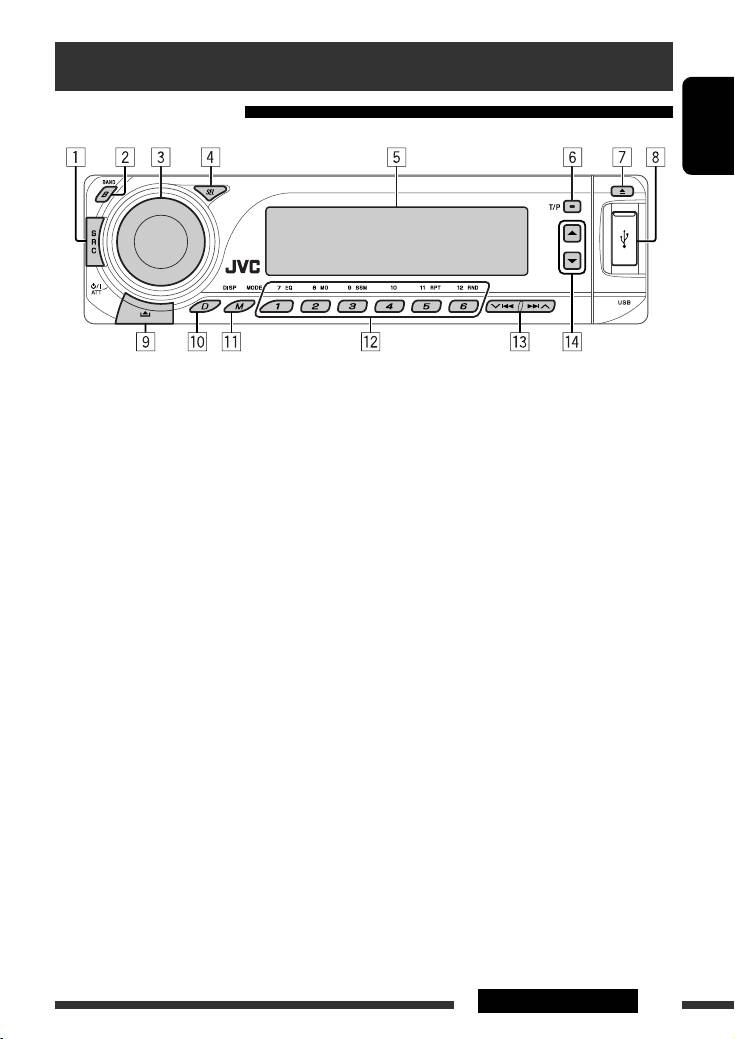
1 Select the source.
q Enter functions mode.
FM/AM = DAB * = CD * = USB * = CD-CH */
Press M MODE, then one of the following buttons
IPOD */D.PLAYER * (or EXT IN) = BT-PHONE
(within 5 seconds)...
(Bluetooth Phone)* = BT-AUDIO (Bluetooth
EQ : Select the sound mode.
Audio)* = (back to the beginning)
MO : Turn on/off monaural reception.
*
You cannot select these sources if they are not
SSM : Automatic station presetting [Hold].
ready or not connected.
RPT : Select repeat play.
RND : Select random play.
2 Select the bands.
5 / ∞ : Skip 10 tracks.
3 • Turn on the power.
w • FM/AM/DAB: Select preset station/DAB service.
• Turn off the power [Hold].
• CD/USB: Select folder/track/disc (for CD
• Attenuate the sound (if the power is on).
changer).
• Volume control [Turn].
• BT-PHONE: Select preset phone number.
4 • Adjust the sound mode.
e • FM/AM/DAB: Search for station/DAB ensemble.
• Enter the PSM settings [Hold].
• CD/USB: Select track.
5 Display window
• IPOD/D.PLAYER: Select track.
• BT-PHONE/BT-AUDIO: Select setting item/
6 • Activate/deactivate TA Standby Reception.
Select a registered device.
• Enter RDS programme search [Hold].
r • DAB: Select DAB service.
7 Eject disc.
• CD/USB: Select folder.
8 USB (Universal Serial Bus) input terminal
• IPOD/D.PLAYER: Enter the main menu/Pause or
stop playback/Confirm selection.
9 Detach the panel.
• BT-PHONE/BT-AUDIO: Enter setting menu/
p Change the display information.
Confirm selection.
5OPERATIONS
EN02-05_KD-G731_003A_f.indd 5EN02-05_KD-G731_003A_f.indd 5 12/18/06 3:35:48 PM12/18/06 3:35:48 PM
Display window
ENGLISH
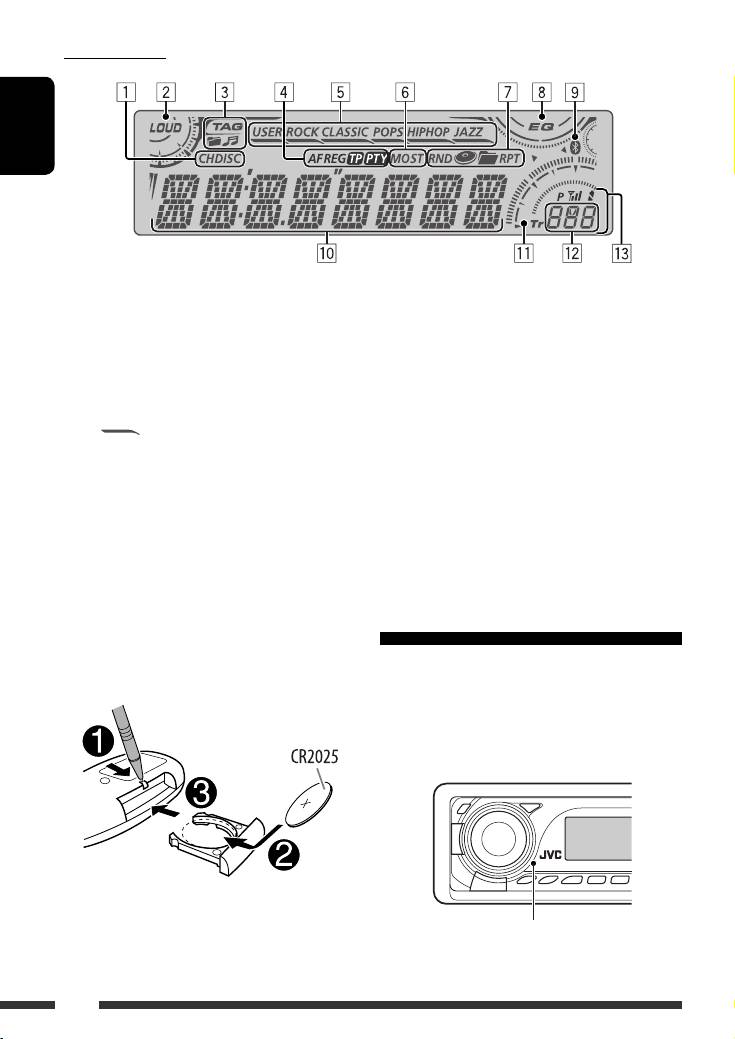
1 Playback source indicators
9 Bluetooth indicator
2 Loudness indicator
p Main display
(Time, menu, playback information)
3 Track information indicators
q Track indicator
4 RDS indicators
w Source display/Preset No./Track No./Folder No./
5 Sound mode indicators
Disc No.
• lights up for the selected item.
e Status of Bluetooth device
6 Tuner reception indicators
(Device number, [1 – 5]; signal strength, [0 – 3]*;
7 Playback mode/item indicators
battery reminder, [0 – 3]*)
(Random/Repeat)
* As the number increases, the signal/battery
strength becomes stronger.
8 Equalizer indicator
Using the remote controller (RM-RK50)
Installing the lithium coin battery (CR2025)
Before using the remote controller:
• Aim the remote controller directly at the remote
sensor on the unit.
• DO NOT expose the remote sensor to bright light
(direct sunlight or artificial lighting).
Remote sensor
6
EN06-13_KD-G731_003A_f.indd 6EN06-13_KD-G731_003A_f.indd 6 12/12/06 9:37:48 AM12/12/06 9:37:48 AM
• While playing an MP3 disc on an
Warning:
MP3-compatible CD changer:
To prevent accidents and damage
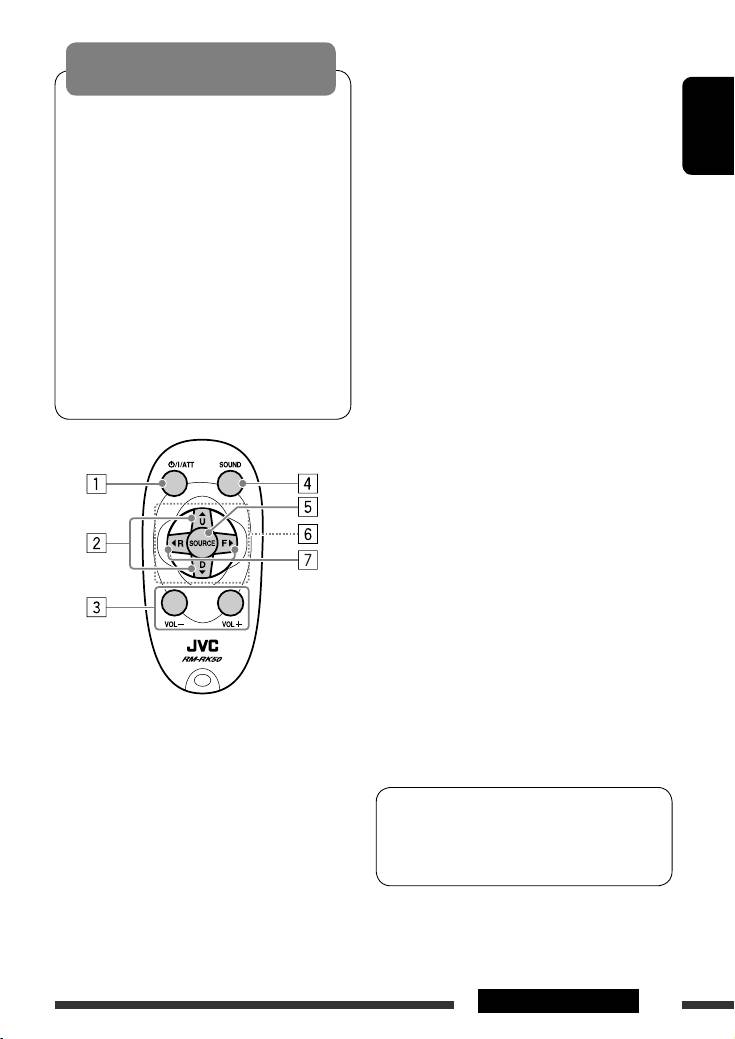
– Changes the disc if pressed briefly.
• Do not install any battery other than CR2025 or
– Changes the folder if pressed and held.
its equivalent.
• While listening to an Apple iPod or a JVC
• Do not leave the remote controller in a place
D. player:
ENGLISH
(such as dashboards) exposed to direct sunlight
– Pauses/stops or resumes playback with D
∞.
for a long time.
– Enters the main menu with 5 U.
• Store the battery in a place where children
(Now 5 U/D ∞/2 R/F 3 work as the menu
cannot reach.
selecting buttons.)*
• Do not recharge, short, disassemble, heat the
3 Adjusts the volume level.
battery, or dispose of it in a fire.
• Do not leave the battery with other metallic
4 Selects the sound mode (iEQ: intelligent equalizer).
materials.
5 Selects the source.
• Do not poke the battery with tweezers or similar
tools.
6 For Bluetooth cellular phone:
• Wrap the battery with tape and insulate when
– Answers calls if pressed briefly.
throwing away or saving it.
– Rejects calls if pressed and held.
7 • Searches for stations (or DAB services) if pressed
briefly.
• Searches for DAB ensembles if pressed and held.
• Fast-forwards or reverses the track if pressed and
held.
• Changes the tracks if pressed briefly.
• While listening to an iPod or a D. player (in menu
selecting mode):
– Selects an item if pressed briefly. (Then, press
D ∞ to confirm the selection.)
– Skips 10 items at a time if pressed and held.
• Reverse skip/forward skip for Bluetooth audio.
1 • Turns the power on if pressed briefly or
* 5 U : Returns to the previous menu.
attenuates the sound when the power is on.
D ∞ : Confirms the selection.
• Turns the power off if pressed and held.
2 • Changes the FM/AM/DAB bands with 5 U.
This unit is equipped with the steering wheel
• Changes the preset stations (or DAB services)
remote control function.
with D ∞.
• See the Installation/Connection Manual (separate
• Changes the folder of the MP3/WMA/AAC/WAV.
volume) for connection.
7OPERATIONS
EN06-13_KD-G731_003A_f.indd 7EN06-13_KD-G731_003A_f.indd 7 12/22/06 10:21:48 AM12/22/06 10:21:48 AM
Table of contents
- CONTENTS
- Preparation
- Basic operations
- Listening to the radio
- Searching for FM RDS programme — PTY Search
- Disc operations
- Listening to the USB device
- Using the Bluetooth ® devices
- Listening to the CD changer
- Listening to the DAB tuner
- Listening to the iPod / D. player
- Listening to the other external components
- Selecting a preset sound mode
- General settings — PSM
- Bluetooth settings
- Maintenance
- More about this unit
- Troubleshooting
- Specifications
- INHALT
- Vorbereitung
- Grundlegende Bedienung
- Rundfunkempfang
- Suchen nach UKW RDS-Programm—PTY-Suchlauf
- Bedienung der Disc
- Hören vom USB-Gerät
- Verwendung der Bluetooth®-Geräte
- Hören vom CD-Wechsler
- DAB-Tuner-Empfang
- Hören vom iPod / D. player
- Hören von den anderen externen Komponenten
- Wählen eines Vorgabe-Klangmodus
- Allgemeine Einstellungen
- Bluetooth-Einstellungen
- Wartung
- Weitere Informationen zu Ihrem Receiver
- Störungssuche
- Technische Daten
- CОДЕРЖАНИЕ
- Подготовка
- Основные операции
- Прослушивание радио
- Поиск программы FM RDS—поиск PTY
- Операции с дисками
- Прослушивание устройства USB
- Использование устройств Bluetooth®
- Прослушивание с устройства автоматической смены компакт-дисков
- Прослушивание тюнера DAB
- Прослушивание с проигрывателя iPod или D.
- Прослушивание с других внешних устройств
- Выбор запрограммированного режима звучания
- Общие настройки —
- Настройки Bluetooth
- Обслуживание
- Дополнительная информация о приемнике
- Устранение проблем
- Технические характеристики



