
JVC KD-G721 RU: Remote controller — RM-RK50
Remote controller — RM-RK50: JVC KD-G721 RU
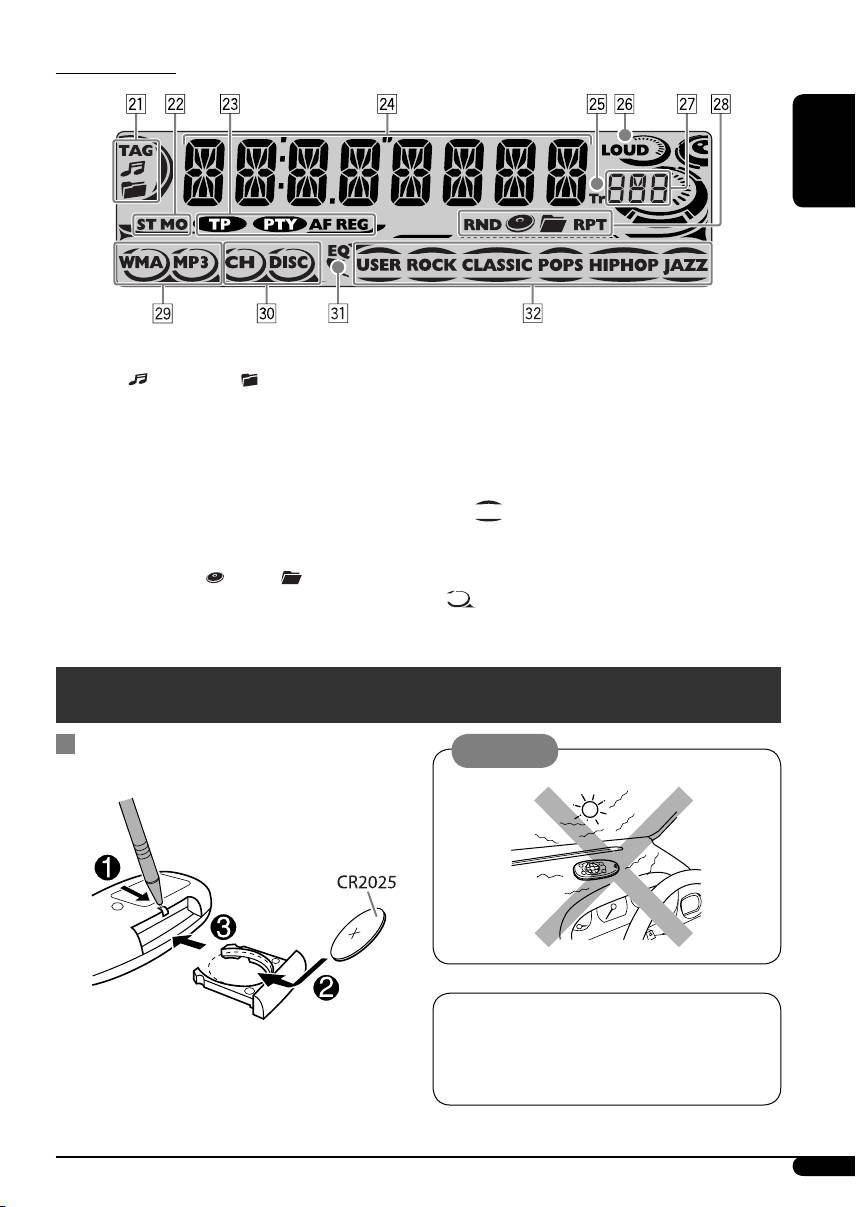
Display window
ENGLISH
a Track information indicators—TAG (ID3
l Tracks type indicators*—WMA, MP3
Tag),
(track/file), (folder)
/ Playback source indicators*—CH (CD
s Tuner reception indicators—ST (stereo),
changer), DISC (built-in CD player)
MO (monaural)
z EQ (equalizer) indicator
d RDS indicators—TP, PTY, AF, REG
x Sound mode (C-EQ: custom equalizer)
f Main display
indicators—USER, ROCK, CLASSIC,
g Tr (track) indicator
POPS, HIP HOP, JAZZ
h LOUD (loudness) indicator
•
also works as the time countdown
j Source display / Volume level indicator
indicator and level meter during play (see
k Playback mode / item indicators—
page 17).
RND (random),
(disc), (folder),
RPT (repeat)
*
lights up for the selected item.
Remote controller — RM-RK50
Installing the lithium coin battery
Caution:
(CR2025)
The unit is equipped with the steering wheel
remote control function.
Aim the remote controller directly at the
• See the Installation/Connection Manual
remote sensor on the unit. Make sure there is
(separate volume) for connection.
no obstacle in between.
Continued on the next page
5
EN02-07_KD-G722[EY]_006A_f.indd 5EN02-07_KD-G722[EY]_006A_f.indd 5 12/15/05 11:36:15 AM12/15/05 11:36:15 AM
• Changes the folder of the MP3/WMA/
Warning:
USB.
• Do not install any battery other than
• While playing an MP3 disc on an
CR2025 or its equivalent; otherwise, it may
MP3-compatible CD changer:
explode.
– Changes the disc if pressed briefly.
• Store the battery in a place where children
– Changes the folder if pressed and held.
ENGLISH
cannot reach to avoid risk of accident.
• While listening to an Apple iPod
or a
®
• To prevent the battery from over-heating,
JVC D. player:
cracking, or starting a fire:
– Pauses/stops or resumes playback with
– Do not recharge, short, disassemble,
D ∞.
heat the battery, or dispose of it in a fire.
– Enter the main menu with 5 U.
– Do not leave the battery with other
(Now 5 U/D ∞/2 R/F 3 work as the
metallic materials.
menu selecting buttons.)*
– Do not poke the battery with tweezers or
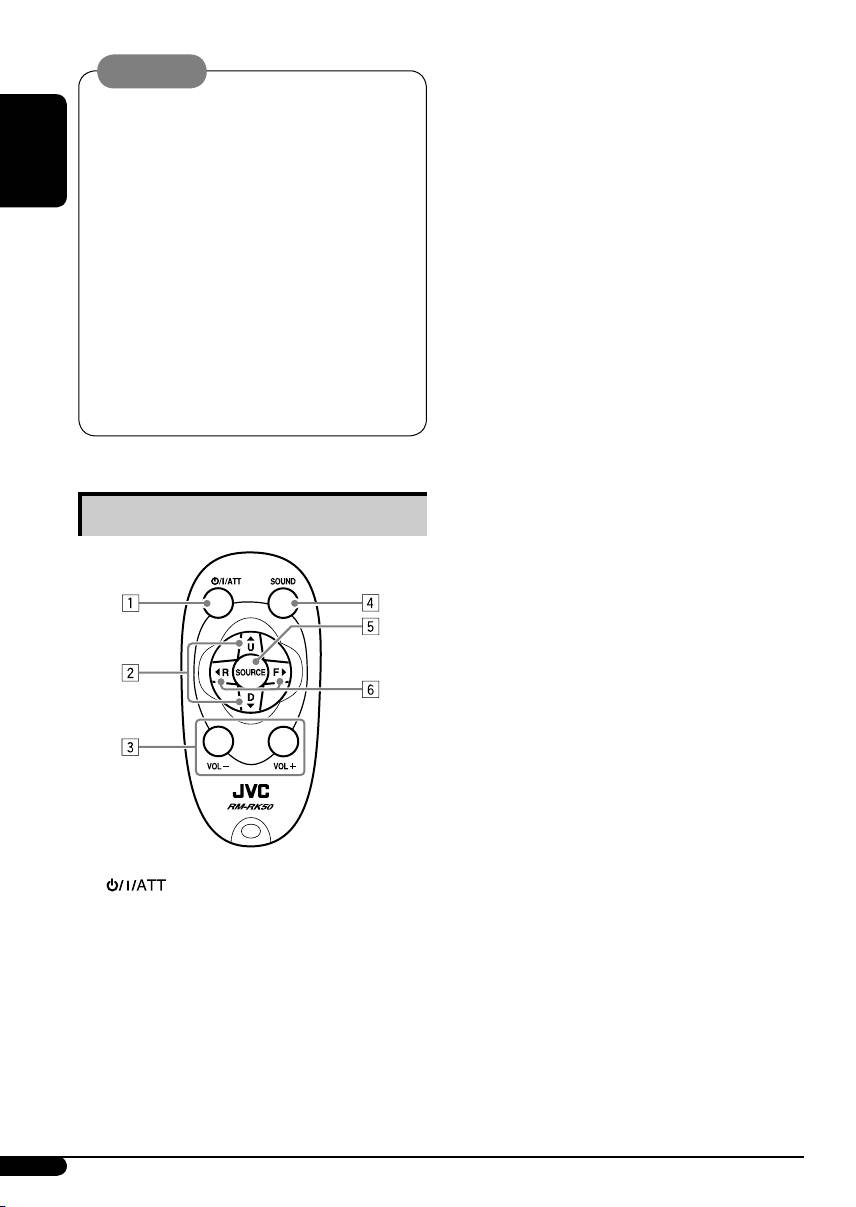
3 VOL – / VOL + buttons
similar tools.
• Adjusts the volume level.
– Wrap the battery with tape and insulate
4 SOUND button
when throwing away or saving it.
• Selects the sound mode (C-EQ: custom
equalizer).
5 SOURCE button
• Selects the source.
6 2 R (reverse) / F (forward) 3 buttons
Main elements and features
• Searches for stations (or services) if
pressed briefly.
• Searches for ensembles if pressed and
held.
• Fast-forwards or reverses the track if
pressed and held.
• Changes the tracks if pressed briefly.
• While listening to an iPod or a D. player
(in menu selecting mode):
– Selects an item if pressed briefly. (Then,
press D ∞ to confirm the selection.)
– Skips 10 items at a time if pressed and
held.
*
5 U : Returns to the previous menu.
D ∞ : Confirms the selection.
1 (standby/on/attenuator) button
• Turns the power on if pressed briefly or
attenuates the sound when the power is
on.
• Turns the power off if pressed and held.
2 5 U (up) / D (down) ∞ buttons
• Changes the FM/AM/DAB bands with
5 U.
• Changes the preset stations (or services)
with D ∞.
6
EN02-07_KD-G722[EY]_006A_f.indd 6EN02-07_KD-G722[EY]_006A_f.indd 6 12/15/05 11:36:16 AM12/15/05 11:36:16 AM
Table of contents
- CONTENTS
- Control panel — KD-G722 and KD-G721
- Remote controller — RM-RK50
- Getting started
- Radio operations
- FM RDS operations
- ! Start searching for your favorite
- Disc/USB memory
- ~
- Sound adjustments
- General settings — PSM
- Title assignment
- ⁄ Adjust the sound as you want. (See iPod®/D. player operations
- Other external component
- Ÿ Turn on the connected component ~
- More about this unit
- Maintenance
- Troubleshooting
- Specifications
- INHALT
- Bedienfeld — KD-G722 und KD-G721
- Fernbedienung — RM-RK50
- Erste Schritte
- Bedienung des Tuners
- UKW-RDS-Funktionen
- ! Beginnen Sie die Suche nach Ihrer
- Disk/USB-Speicherbetrieb.
- ~
- Klangeinstellungen
- Allgemeine Einstellungen—PSM
- Titel zuweisen
- ⁄ Stellen Sie den Klang nach Wunsch iPod®/D. player-
- Bedienung von anderen
- Ÿ Schalten Sie die angeschlossene ~
- Weitere Informationen zu
- Wartung
- Störungssuche
- Technische Daten
- CОДЕРЖАНИЕ
- Панель управления — KD-G722 и KD-G721
- Пульт дистанционного управления — RM-RK50
- Начало работы
- Операции с
- Операции с FM RDS
- ! Запустите поиск любимой
- Операции с дисками или
- ~
- Настройки звучания
- Общие настройки — PSM
- Присвоения названия
- ⁄ Настройка необходимого звука. Операции
- Другие операции с
- Ÿ Включите подключенное ~
- Дополнительная
- Обслуживание
- Устранение проблем
- Технические характеристики
- Please reset your unit
