
JVC KD-G531: Other external component
Other external component: JVC KD-G531
Selecting the playback modes
Other external component
1
operations
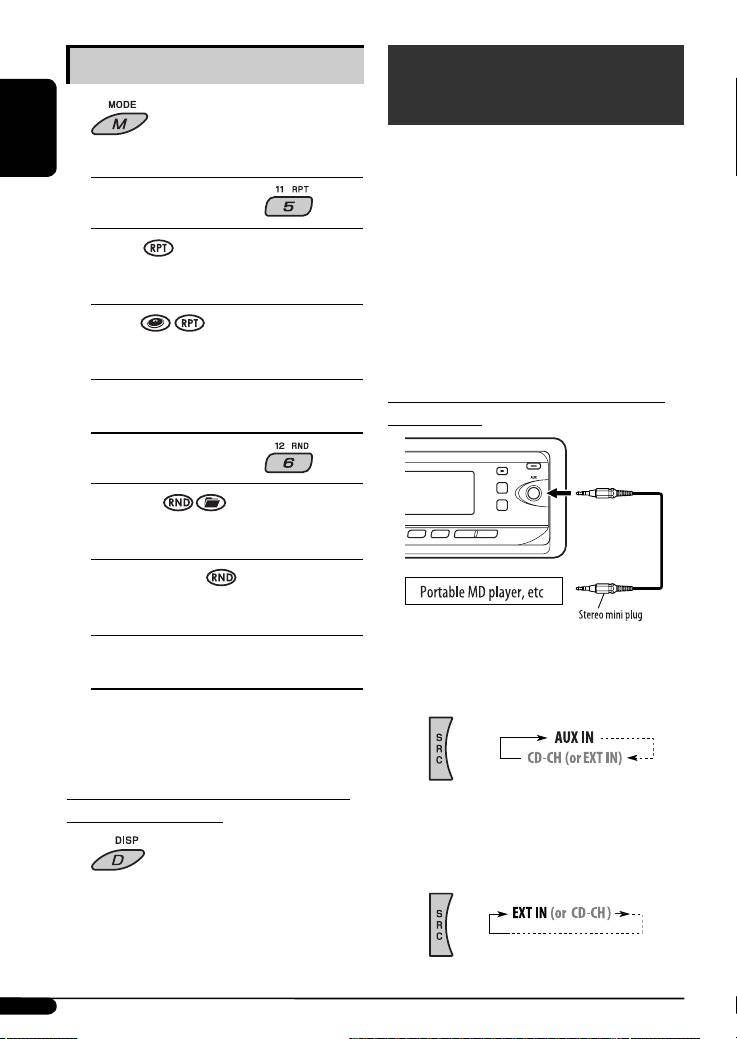
You can connect an external component to...
ENGLISH
2 Select your desired playback mode.
• CD changer jack on the rear using the Line Input
Adapter—KS-U57 (not supplied) or AUX Input
7 Repeat play
Adapter—KS-U58 (not supplied) for any other
components (except iPod and D. player).
ONE RPT
• AUX (auxiliary) input jack on the control panel.
Functions the same as “Repeat One” of the iPod or
“Repeat Mode
= One” for the D. player.
For connection, see Installation/Connection Manual
(separate volume).
ALL RPT
For listening to the JVC DAB tuner, iPod, or D. player,
Functions the same as “Repeat All” of the iPod or
see pages 17 – 20.
“Repeat Mode = All” for the D. player.
RPT OFF
Connecting an external component to the
Cancels.
AUX input jack
7 Random play
ALBM RND*
Functions the same as “Shuffle Albums” of the
iPod.
SONG RND/RND ON
Functions the same as “Shuffle Songs” of the iPod
or “Random Play
= On” of the D. player.
RND OFF
~ For selecting the external component
Cancels.
connected to...
• AUX input jack
* For iPod: Functions only if you select “ALL” in
“ALBUMS” of the main “MENU.”
To check other information while listening
• CD changer jack on the rear using KS-U57
to an iPod or a D. player
or KS-U58
If “EXT IN” does not appear, see page 16 and
select the external input (“EXT IN”).
20
EN14-21KD-G531_003A_f.indd 20EN14-21KD-G531_003A_f.indd 20 11/28/06 9:12:12 AM11/28/06 9:12:12 AM
Table of contents
- CONTENTS
- Control panel
- Remote controller — RM-RK50
- ⁄ Adjust the volume.
- Radio operations
- ~ The last selected PTY code
- Disc operations
- ~
- Sound adjustments
- General settings — PSM
- DAB tuner operations
- iPod / D. player operations
- ~
- Other external component
- Ÿ Turn on the connected component and
- More about this unit
- Troubleshooting
- Specifications
- INHALT
- Bedienfeld
- Fernbedienung — RM-RK50
- ⁄ Stellen Sie die Lautstärke ein.
- Bedienung des Tuners
- ~ Der zuletzt
- Bedienung der Disc
- ~
- Klangeinstellungen
- Allgemeine Einstellungen
- DAB-Tuner-Funktionen
- iPod / D. player-
- ~
- Bedienung von anderen
- Ÿ Schalten Sie die angeschlossene
- Weitere Informationen zu Ihrem Receiver
- Störungssuche
- Technische Daten
- CОДЕРЖАНИЕ
- Панель управления
- Пульт дистанционного управления —
- ⁄ Настройте громкость.
- Операции с радиоприемником
- ~ Появляется
- Операции с дисками
- ~
- Настройки звучания
- Общие настройки—
- Операции с тюнером DAB
- Операции
- ~
- Другие операции с
- Ÿ Включите подключенное устройство
- Дополнительная
- Устранение проблем
- Технические характеристики


