
JVC GR-DVL300: 4 EN
4 EN: JVC GR-DVL300
CONTENTS
4 EN
MAJOR FEATURES 5 – 6
GETTING STARTED 7
Operating Environment ...........................................................
7
CONNECTIONS 8 – 9
INSTALLATION 10
NOTICE FOR USERS 11
NOTE:
The JLIP Video Capture/Producer instruction manual is also included on the CD-ROM in
®
PDF format. To open, double-click the file in the desired language. Note that Adobe
®
Acrobat
Reader must be installed to read PDF files.
CAUTION:
● Operate this equipment according to the operating procedures described in this manual.
● Use only the provided CD-ROM. Never use any other CD-ROM to run this software.
● Do not attempt to modify this software.
● Changes or modifications not approved by JVC could void user’s authority to operate the
equipment.
How to handle a CD-ROM
● Take care not to soil or scratch the mirror surface (opposite to the printed surface). Do
not write anything or put a sticker on either the front or back surface. If the CD-ROM gets
dirty, gently wipe it with a soft cloth outward from the centre hole using a circular
motion.
● Do not use conventional disc cleaners or cleaning spray.
● Do not bend the CD-ROM or touch its mirror surface.
● Do not store your CD-ROM in a dusty, hot or humid environment. Keep it away from
direct sunlight.
● The Readme.TXT file provides additional information for setup and information that is not
included in the instruction manual. Please read the file before installing the provided
software programme.
● You can find the latest information (in English) on the provided software programme at our
world wide web server at http://www.jvc-victor.co.jp.
MAJOR FEATURES
EN 5
Two software programmes are provided.
JLIP Video Capture
JLIP Video Producer
Video Capture Facility
JLIP Control Facility
Video images from a video camera can be
With a JLIP-compatible video camera,
captured as still images with 16.7 million
• all basic video operations can be
colours through the serial port (RS-232C) of a
executed on the computer display;
WindowsT-operated computer.
• programmed video playback (up to 99
programmes) or assemble editing can be
performed.
JLIP Control Facility
With a JLIP compatible video camera,
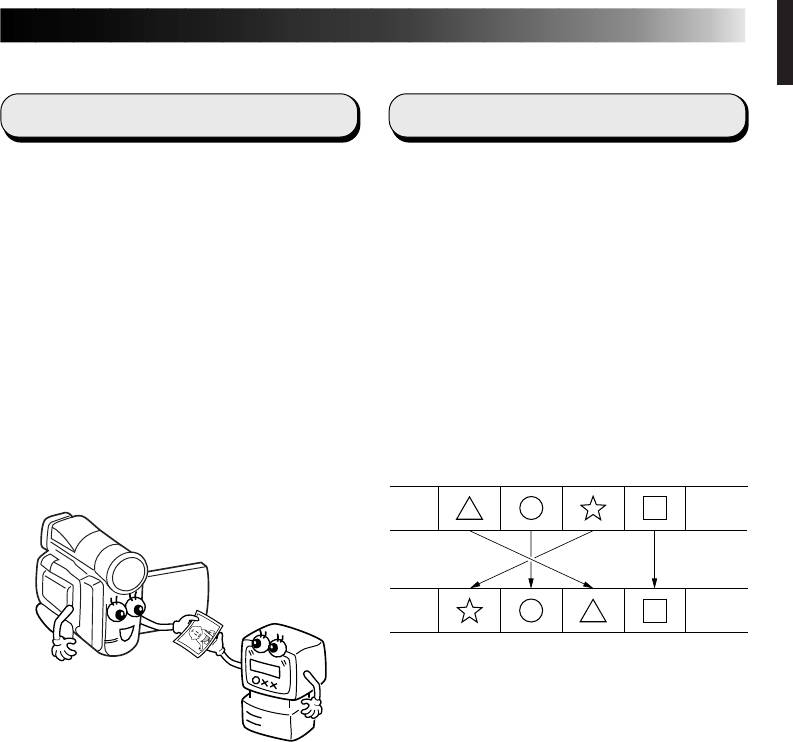
Assemble Editing
• all basic video operations can be
executed via the computer display;
Selected scenes on a pre-recorded tape can
• up to 99 images can be captured
be edited in a specified sequence.
automatically with Programme Video
Capture (playing tape — scanning —
Pre-recorded tape
transferring to PC).
(on video camera)
Recording tape
(on VCR)


