
HP Designjet 10000s Printer series: 5 Troubleshooting
5 Troubleshooting: HP Designjet 10000s Printer series
Table of contents
- I Introduction
- II Product ddescription
- III Safety III 11 General iinformation III 22 Use aas iintended III 33 Information oon ssigns aand ssymbols
- III 44 Warnings
- III 55 Warnings ffor mmaintenance III 66 Protective eequipment
- Index
- 1 Installation && FFunction DDescription 1.1 Warnings ffor mmaintenance
- 1.2 Unpacking aand iinstallation 1.3 Box ccontent
- 1.4 Connection oof tthe pprinter 1.5 Power oon tthe AAPS 1.6 Function ddescription
- 2 Operation 2.1 Operating cconditions 2.2 Operation
- 2.3 Test ooperation
- Designation
- Figure 1 Figure 2 Figure 3
- Figure 4 3.3.2 IInsert tthe nnew ffilter(s) Figure 5 Figure 6 Figure 7
- 3.4 Enter tthe ccode oof tthe nnew rreplacement ffilter 3.4.1 HHP DDesignjet 88000s AAir PPurifier SSystem
- 3.4.2 HP DDesignjet 99000s/10000s AAir PPurifier SSystem
- 4 Disposal
- 5 Troubleshooting
- 6 Legal iinformation
- 6.Your exclusive remedies for defective HP products are the following:
- B. Limitations of liability C. Local law
- 7 Regulatory nnotices 7.1 Regulatory mmodel nnumber 7.2 Regulatory sstatements
- 9 Technical ddata
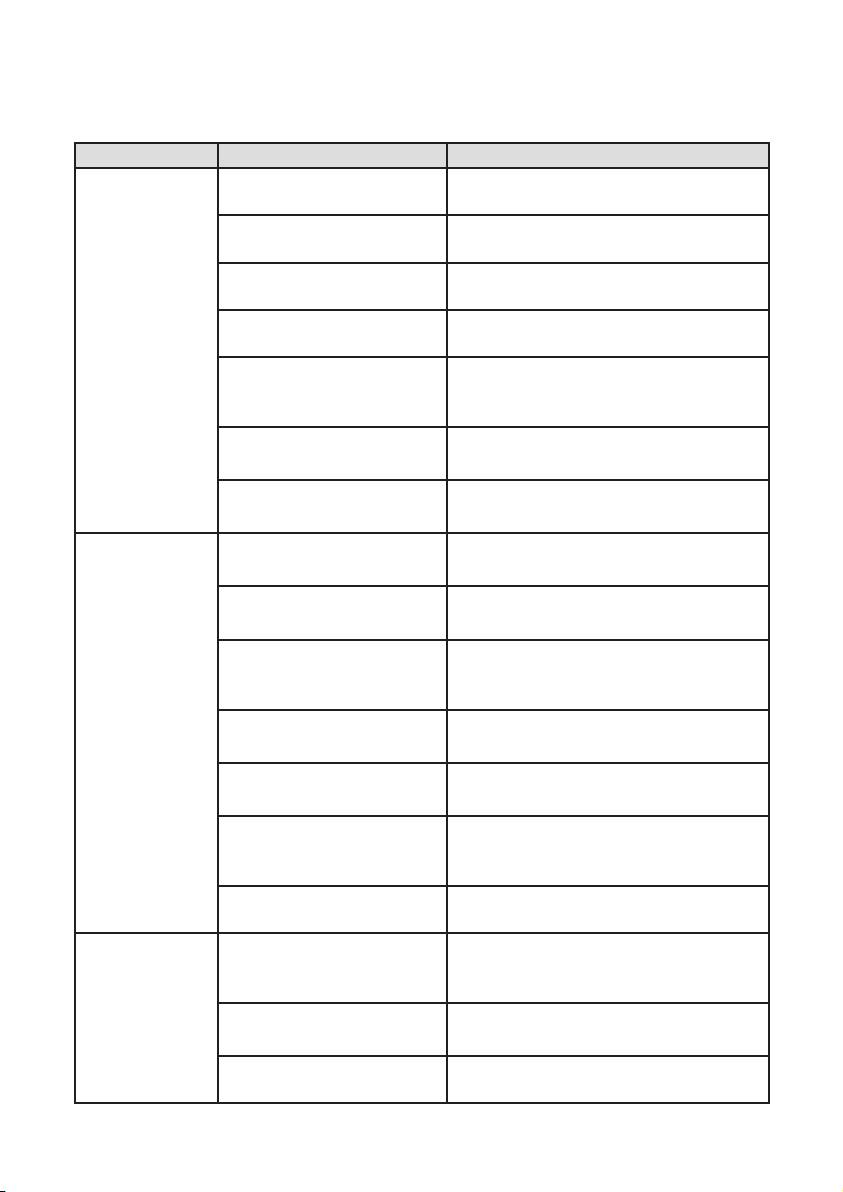
5 Troubleshooting
Fault Cause Correction
No suction
Suction hose not connected
Connect suction hose to the APS.
output
to the APS.
(fumes/gases
Suction hose not connected
Connect suction hose to the printer.
are not being
to the machine
extracted).
Damage to the suction
Replace suction hose.
hose.
Suction hose is connected
Connect suction hose to the correct
to the wrong machine.
machine.
Suction hose is connected
Connect suction hose to the right point of
to the wrong point of entry
entry (opening) of the machine.
(opening) of the machine.
Suction channel blocked. Check suction channel, if necessary cor-
rect error found.
Clean gas channel blo-
Check clean gas channel, if necessary
cked.
correct error found.
Suction output
Filter elements full. Replace filter package, dispose of old fil-
too low
ter properly!
(fumes/gases
Damage to the suction
Replace suction hose.
are hardly
hose.
being extracted).
Suction hose not correctly
Check fitting of the suction hose to the
connected to the APS.
APS, if applicable reinsert into suction
opening.
Suction hose not correctly
Check fitting of the suction hose to the
connected to the machine.
machine if necessary reconnect.
Air outlet blocked. Check air outlet status,and clean blocke
holes.
Suction hose is connected
Connect suction hose to the right point of
to the wrong point of entry
entry (opening) on the machine.
(opening) on the machine.
Fault on the APS. Contact your HP Service representative.
APS is not
Plug connection power sup-
Check/correctly plug in plug connection
running.
ply not or wrongly plugged
power supply.
in.
No power on the socket. Check power supply, if necessary correct
error.
Fault on the APS. Contact your HP Service representative.
21HP Air Purifier System
