
Gorenje MO-20 DGE: Computer control panel Feature diagram
Computer control panel Feature diagram: Gorenje MO-20 DGE
Table of contents
- SPECIFICATIONS Radio interference Before you call for service Installation
- IMPORTANT Important safety instructions Safety instructions for general use
- IMPORTANT-COOKWARE NOT TO USE IN YOUR MICROWAVE OVEN
- Computer control panel Feature diagram
- Operation Instruction 1. SETTING DIGITAL CLOCK/WEIGHT 2. MICROWAVE COOKING 3. QUICK START 4. Grill 5. COMBINATION 1 6. COMBINATION 2 7. CONVECTION
- 8. MICROWAVE +CONVECTION 9. MULTI-STAGE COOKING
- 10. AUTO COOK 11. JET DEFROST 12. CHILD LOCK
- Care of your microwave oven Environment Guarantee & service
39
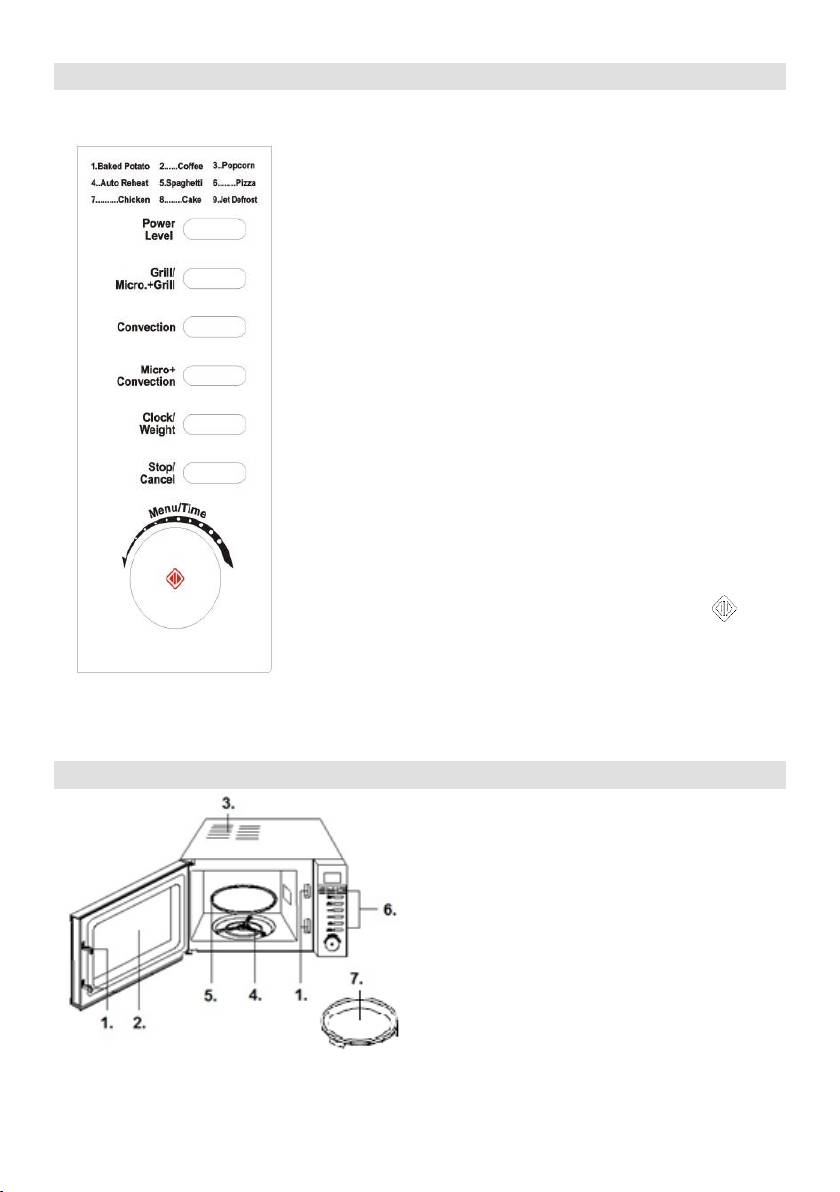
Computer control panel
Feature diagram
1. Door Safety Lock System
2. Oven Window
3. Oven Air Vent
4. Roller Ring
5. Glass Tray
6. Control Panel
7. Baking tray
MENU ACTION SCREEN
Cooking time, power, action indicators, and clock time are displayed.
POWER LEVEL
Touch this button a number of times to set microwave cooking power
level.
GRILL / MICRO + GRILL
Press this button to select one of two combination cooking settings.
WEIGHT / TIME (Dial)
Turn the dial to set the oven clock time and imput cooking time. Turn
the WEIGHT / TIME dial to select an auto cook menu.
CONVECTION
Touch this button to program convection temperature.
MICRO + CONVECTION
Touch this button to select one of four combination cooking settings.
CLOCK / WEIGHT
Touch this button to select amount of food; press to set time
STOP / CANCEL
Press to cancel setting or reset the oven before setting a cooking
program.
Press once to temporarily stop cooking, or twice to cancel cooking
altogether.
It is also used for setting child lock.
START / QUICK START (WEIGHT / TIME BUTTON)
Touch to start a cooking program. Simply touch it a namber of times to
ser cooking timeand cook immediately at full pover level


