
Gorenje EC57335AW: Electronic timer EN Setting the clock Manual (non-programmed) operation Semi-automatic operation by setting the cooking time Semi-automatic operation by setting the end of cooking time
Electronic timer EN Setting the clock Manual (non-programmed) operation Semi-automatic operation by setting the cooking time Semi-automatic operation by setting the end of cooking time: Gorenje EC57335AW
Table of contents
- Electronic timer EN Setting the clock Manual (non-programmed) operation Semi-automatic operation by setting the cooking time Semi-automatic operation by setting the end of cooking time
- Automatic operation by setting the cooking time and end of cooking time Example Minute minder Acoustic alarm volume Cancelling the timer programming Instant reset of timer programming Using the timer in combination with the oven
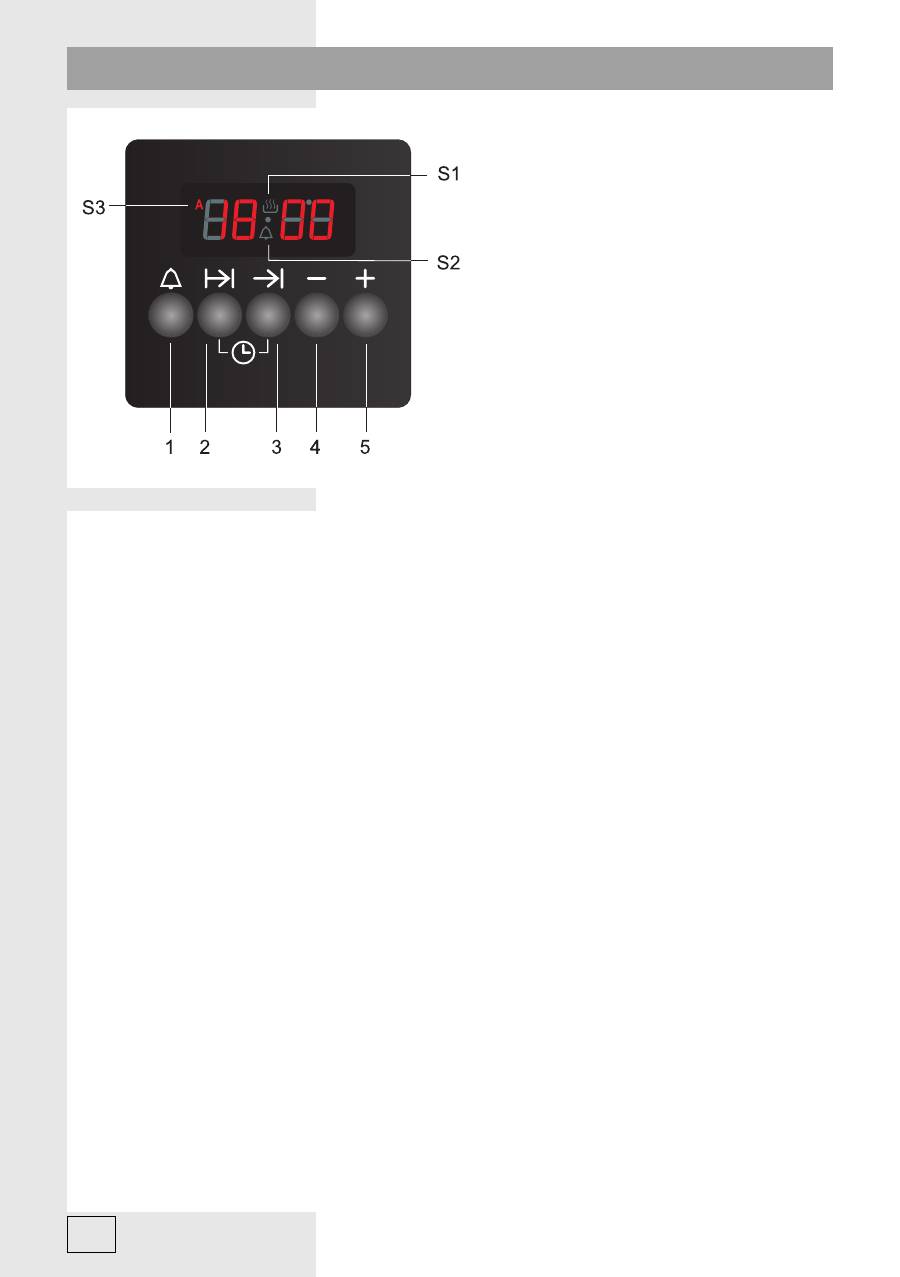
326554
1
Minute minder
2
Cooking time
3
End of cooking time
4
(-) minus
5
(+) plus
Setting the clock
When the appliance is connected to the power mains,
“0 00”
will
fl
ash on the display; furthermore,
the symbol
S3
will
fl
ash as well. Press the
2
and
3
keys simultaneously and use the keys 4 and
5 to set the clock. Symbol
S1
will also light up to indicate that the timer is set to non-programmed
(manual) operation.
Note:
if you keep the
4
and
5
key pressed for a while, the digits will change faster.
Manual (non-programmed) operation
Press the
2
and
3
keys simultaneously.
All previously set programs will be reset
(symbol S3 will
disappear, if it was activated). Symbol S1 will appear (if it had not been activated earlier), which
means that manual (non-programmed) operation has been selected.
Semi-automatic operation by setting the cooking time
Press the 2 key.
0 00
will appear on the display. Use the
4
and
5
keys to set the desired time.
Symbol
S3
will appear. The time can be set in 1-minute steps. Cooking time can be set to a
maximum of 10 hours. When the time is set, countdown will begin in
fi
ve-second steps. The display
will indicate the time of day. Press the 2 key to check the remaining cooking time and adjust it as
required using the 4 and 5 keys. When the set time expires, an acoustic signal will go off. The alarm
will be deactivated automatically after 7 minutes, if it is not acknowledged earlier by pressing the
1
,
2
, or
3
key. The symbol
S1
will disappear and the symbol
S3
will
fl
ash. At that time, the oven will be
switched off. Press the
2
and
3
keys simultaneously and the symbol
S3
will disappear. The symbol
S1
will appear and the timer will be reset to manual (non-programmed operation).
In order to complete the cooking process, switch off the oven!
Semi-automatic operation by setting the end of cooking time
Press the
3
key. Current time of day (clock) will appear on the display. Use the
4
and
5
keys to set
the desired end of cooking time (i.e. the time when you wish the cooking to end); this time has to
be later than the current time. Symbol
S3
will appear. 5 seconds after the desired time is set, clock
will be displayed again. When the clock reaches the set end of cooking time, an acoustic signal




