
Alpine IVE-W535BT: 2 Mounting the Microphone.
2 Mounting the Microphone.: Alpine IVE-W535BT
ration
Owner’s manual Installation
Installation
VE-
•
When making connections to the vehicle’s electrical
2 Mounting the Microphone.
system, be aware of the factory installed components
(e.g. on-board computer). Do not tap into these leads
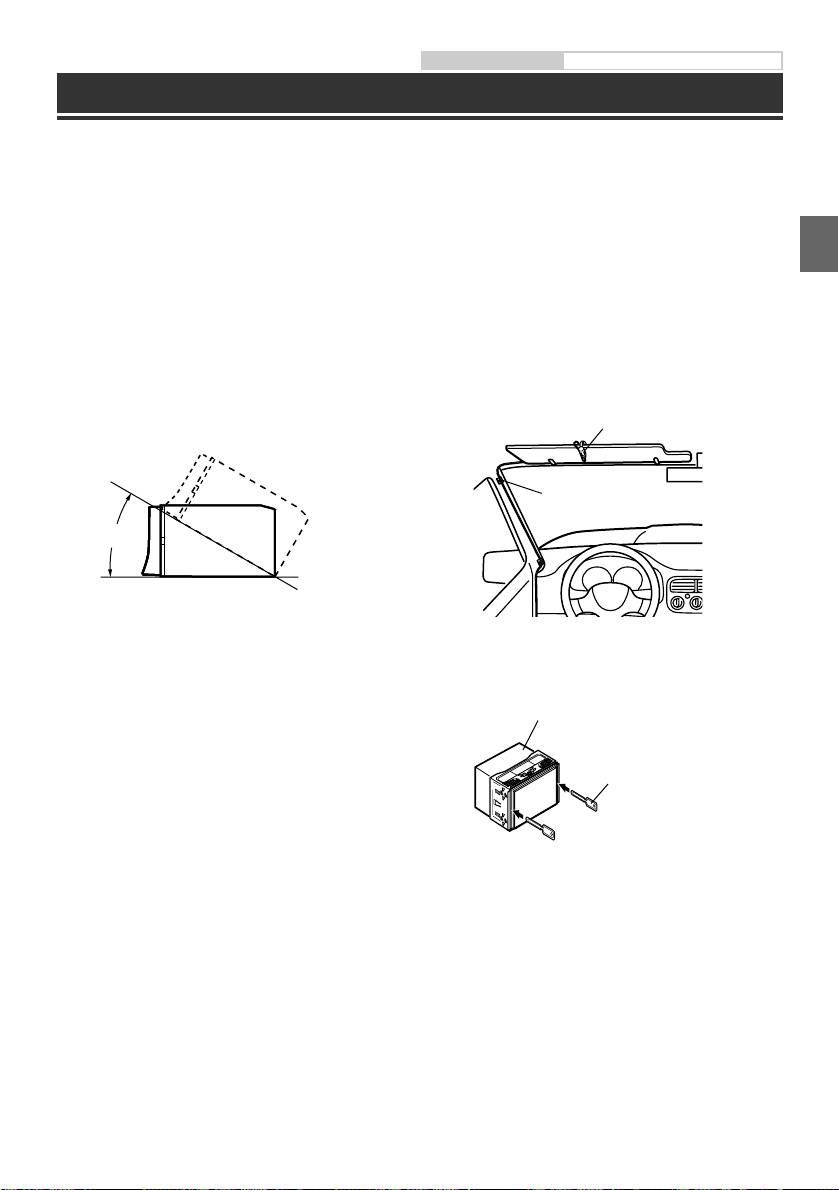
For safe use, make sure of the following:
to provide power for this unit. When connecting the
•
location is stable and firm.
e device
IVE-W535BT to the fuse box, make sure the fuse for the
•
driver’s view and operations are not obstructed.
intended circuit of the IVE-W535BT has the appropriate
•
microphone is located where the driver’s voice
amperage. Failure to do so may result in damage to the
EN
can be easily picked up (on the sun visor, etc.).
unit and/or the vehicle. When in doubt, consult your
Alpine dealer.
When you speak into the microphone, you should
•
The Display must be completely retracted in the casing
not have to change your driving posture. This may
when installing. If it is not, problems may occur.
cause a distraction, taking your attention away
DE
from safely driving your vehicle. Carefully consider
direction and distance while mounting the
1 Install at an angle between horizontal
microphone. Confirm that the driver’s voice can be
and 30°. Note that installing at an angle
easily picked up at the selected location.
e.
outside of this range will result in a loss of
FR
evice.
Microphone
performance and possibly damage.
plete, a
turns to
ES
Cable clamp
(Sold separately)
depending
0 - 30°
airing). If
ice, enter
IT
le device.
make
ETOOTH
SE
3 Remove the mounting sleeve from the
main unit.
This unit
NL
ne and
Bracket keys
(Included)
RU
PL
on.
GR
11-EN
ALPINE IVE-W535BT QRG 68-21057Z55-A (EN)
Table of contents
- MOBILE MEDIA STATION
- 1 Turn the ignition key to the ACC or ON position.
- 1 Press the (My Favorites) button. 5 Touch [Search].
- 4 Touch the selected artist name.
- 8 Touch [Audio] or [Hands-free] of the device
- 2 Mounting the Microphone.
- 5 Slide the IVE-W535BT into the dashboard
- 1 Drehen Sie den Zündschlüssel in die Stellung ACC oder EIN.
- 1 Drücken Sie die Taste (My Favorites). 5 Berühren Sie [Suchen].
- 4 Berühren Sie den Namen des ausgewählten
- 8 Berühren Sie [Audio] oder [Hands-free] für
- 2 Befestigung des Mikrofons.
- 4 Falls das Fahrzeug eine Stützhalterung
- 1 Placer la touche de démarrage sur ACC ou ON.
- 1 Appuyez sur le bouton (My Favorites). 5 Appuyez sur la touche [Chercher].
- 4 Appuyez sur le nom de l’artiste sélectionné.
- 8 Appuyez sur [Audio] ou [Hands-free] du
- 2 Montage du microphone.
- 4 Si votre véhicule possède un support, 5 Faites glisser l’IVE-W535BT dans le tableau
- 1 Gire la llave de contacto a la posición ACC u ON.
- 1 Pulse el botón (My Favorites). 5 Toque [Buscar].
- 4 Toque el nombre del artista seleccionado.
- 8 Toque [Audio] o [Hands-free] del
- 2 Instalación del micrófono.
- 4 Si su vehículo posee soporte, instale 5 Deslice el IVE-W535BT en el salpicadero
- 1 Girare la chiave di accensione sulla posizione di attivazione (ACC o ON).
- 1 Premere il tasto (My Favorites). 5 Toccare [Ricerca].
- 4 Toccare il nome dell’artista selezionato.
- 1 Toccare l’icona [Setup] nella barra
- 2 Montaggio del Microfono.
- 4 Una volta dotata la vettura della staffa, 5 Far scorrere l’unità IVE-W535BT nel
- 1 Vrid tändningsnyckeln till läge ACC eller ON.
- 1 Tryck på -knappen (My Favorites). 5 Peka på [Sök].
- 4 Tryck på det markerade artistnamnet.
- 8 Tryck på [Audio] eller [Hands-free] för den
- 2 Montera mikrofonen.
- 5 Skjut in IVE-W535BT i instrumentpanelen
- 1 Draai de contactsleutel naar de ACC of AAN positie.
- 1 Druk op de -knop (My Favorites). 5 Raak [Zoeken] aan.
- 4 Raak de naam van de geselecteerde artiest
- 8 Raak [Audio] of [Hands-free] aan van het
- 2 Montage van de Microfoon.
- 4 Wanneer uw voertuig uitgerust is met de
- 1 Поверните ключ зажигания в положение ACC или ON.
- 1 Нажмите кнопку (My Favorites). 5 Нажмите [Поиск].
- 1 Во время воспроизведения коснитесь [
- 8 Коснитесь кнопки [Audio] или [Hands-
- 2 Установка микрофона.
- 4 Если автомобиль оборудован
- 1 Obróć kluczyk zapłonu w pozycję ACC lub ON.
- 1 Naciśnij przycisk (My Favorites). 5 Dotknij przycisku [Szukaj].
- 4 Dotknij nazwę wybranego wykonawcy.
- 8 Dla urządzenia z listy, które chcesz
- 2 Montaż mikrofonu.
- 5 Wsuń urządzenie IVE-W535BT w deskę 4 Jeżeli w pojeździe dostępny jest wspornik,
- 1 Θέστε το κλειδί έναρξης στη θέση ACC ή ON (ΕΝΕΡΓΟΠΟΙΗΣΗ).
- 1 Πατήστε το πλήκτρο (My Favorites). 5 Πιέστε το [Αναζήτηση].
- 1 Πιέστε το [ (Αναζήτηση)] κατά την
- 1 Πιέστε το εικονίδιο [Setup] της Πάνω
- 2 Τοποθέτηση του μικροφώνου.
- 4 Αν το όχημά σας διαθέτει το Υποστήριγμα,



