
Toshiba JOURNE F700: Step 3: Connect the AC power.
Step 3: Connect the AC power.: Toshiba JOURNE F700
Table of contents
- Before operating this unit (Journe F700), please carefully read and follow the instructions below.
- Follow the instructions below to install and operate the unit. Step 1: Check the package contents.
- Controls on the back Step 2: Install the foot stand.
- Step 3: Connect the AC power.
- Step 4: (Optional) Insert a memory card. Step 5: Turn on the unit. Step 6: Operate the unit.
- Using the Photo mode
- Using the Calendar mode Using the Music mode
- Need help? Regulatory Compliance
- Disposal of batteries and/or accumulators
GMH300054020.book Page 5 Sunday, August 31, 2008 10:54 PM
F 700
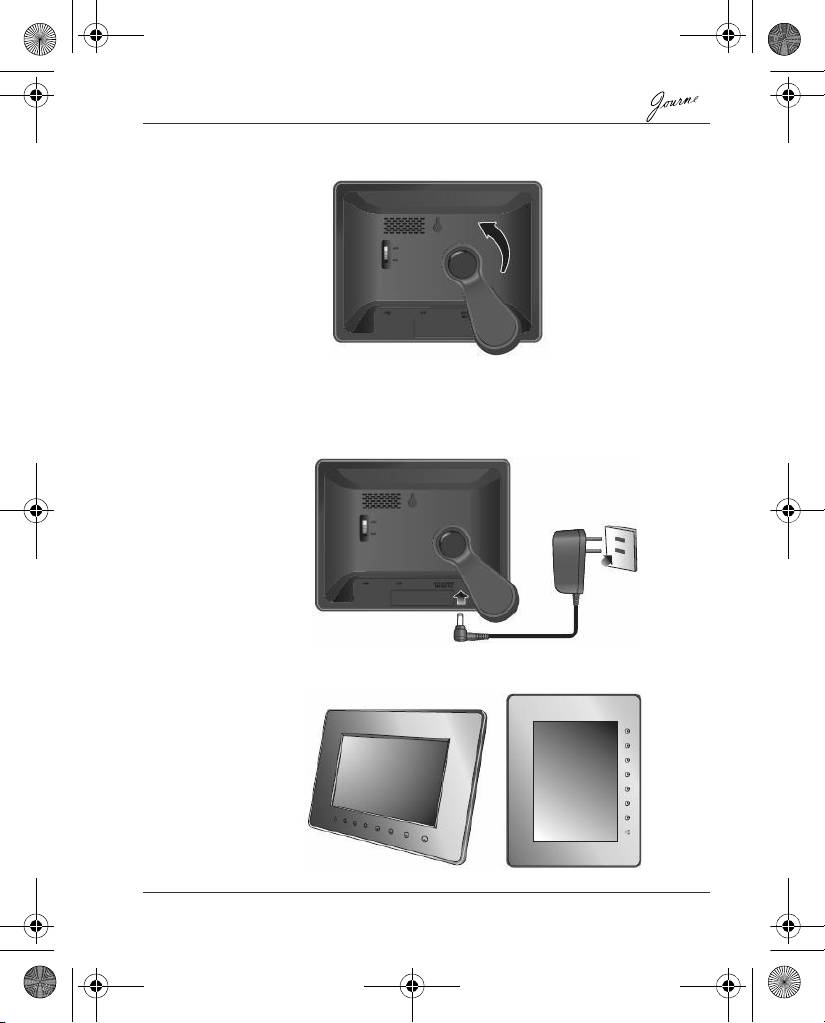
2. Rotate the foot stand counter-clockwise until it is secured to the
photo frame.
Step 3: Connect the AC power.
1. Plug one end of the AC power adapter into the power jack on the
back of this unit.
2. Plug the other end into a power outlet.
3. Place this unit horizontally (recommended direction) or vertically
on a stable surface.
Quick Start Guide EN-5
Top 10 manuals
100.00
NZXT HALE90 1000W99.99
Samsung SM-R38099.97
AEG BSB 18C99.97
Dell 2700W99.97
Smeg KSEC70X99.96
Beurer HDE 4099.96
Pyramida KH 50 v.299.96
MSI CSM-H81M-P3299.96
AEG HR 562799.95
Melissa 640-048