
Toshiba JOURNE F700: Follow the instructions below to install and operate the unit. Step 1: Check the package contents.
Follow the instructions below to install and operate the unit. Step 1: Check the package contents.: Toshiba JOURNE F700
Table of contents
- Before operating this unit (Journe F700), please carefully read and follow the instructions below.
- Follow the instructions below to install and operate the unit. Step 1: Check the package contents.
- Controls on the back Step 2: Install the foot stand.
- Step 3: Connect the AC power.
- Step 4: (Optional) Insert a memory card. Step 5: Turn on the unit. Step 6: Operate the unit.
- Using the Photo mode
- Using the Calendar mode Using the Music mode
- Need help? Regulatory Compliance
- Disposal of batteries and/or accumulators
F 700
Follow the instructions below to install and
operate the unit.
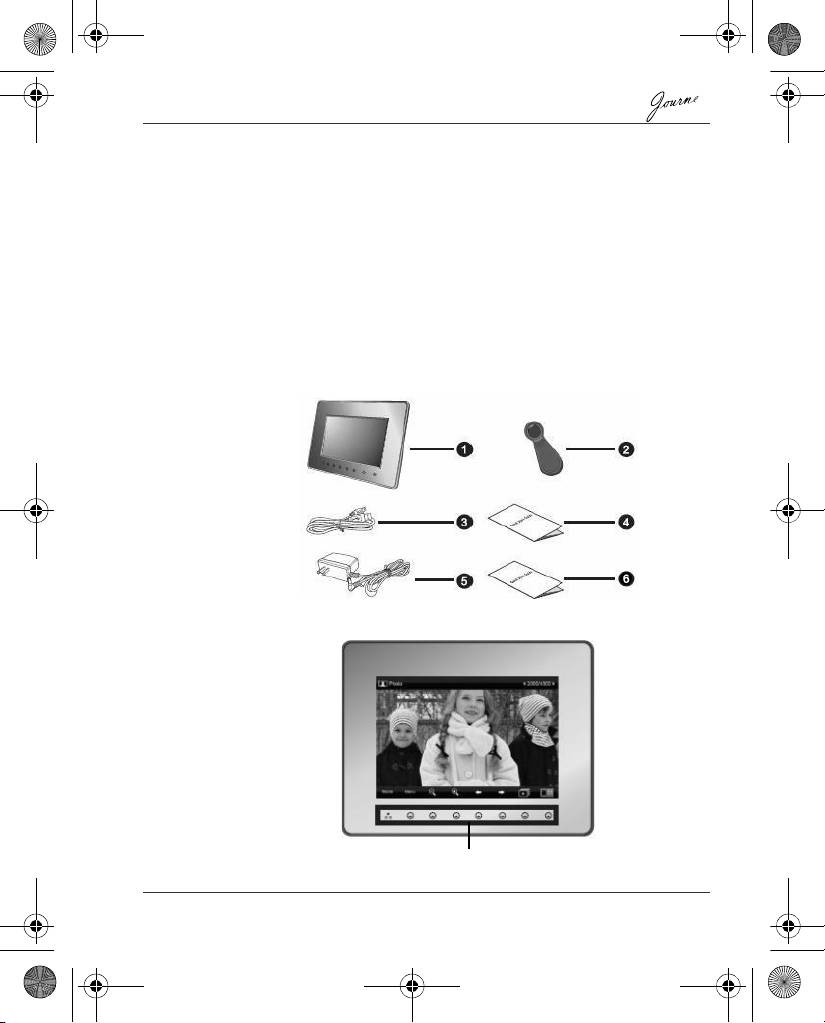
Step 1: Check the package contents.
Carefully open the packing box and ensure that you have the
following items.
1. Journe F700
2. Foot stand
3. USB cable
4. Quick Start Guide
5. AC power adapter
6. Warranty Leaflet
Controls on the front
Quick Start Guide EN-3
Control panel
GMH300054020.book Page 3 Sunday, August 31, 2008 10:54 PM
Top 10 manuals
100.00
NZXT HALE90 1000W99.99
Samsung SM-R38099.97
AEG BSB 18C99.97
Dell 2700W99.97
Smeg KSEC70X99.96
Beurer HDE 4099.96
Pyramida KH 50 v.299.96
MSI CSM-H81M-P3299.96
AEG HR 562799.95
Melissa 640-048