
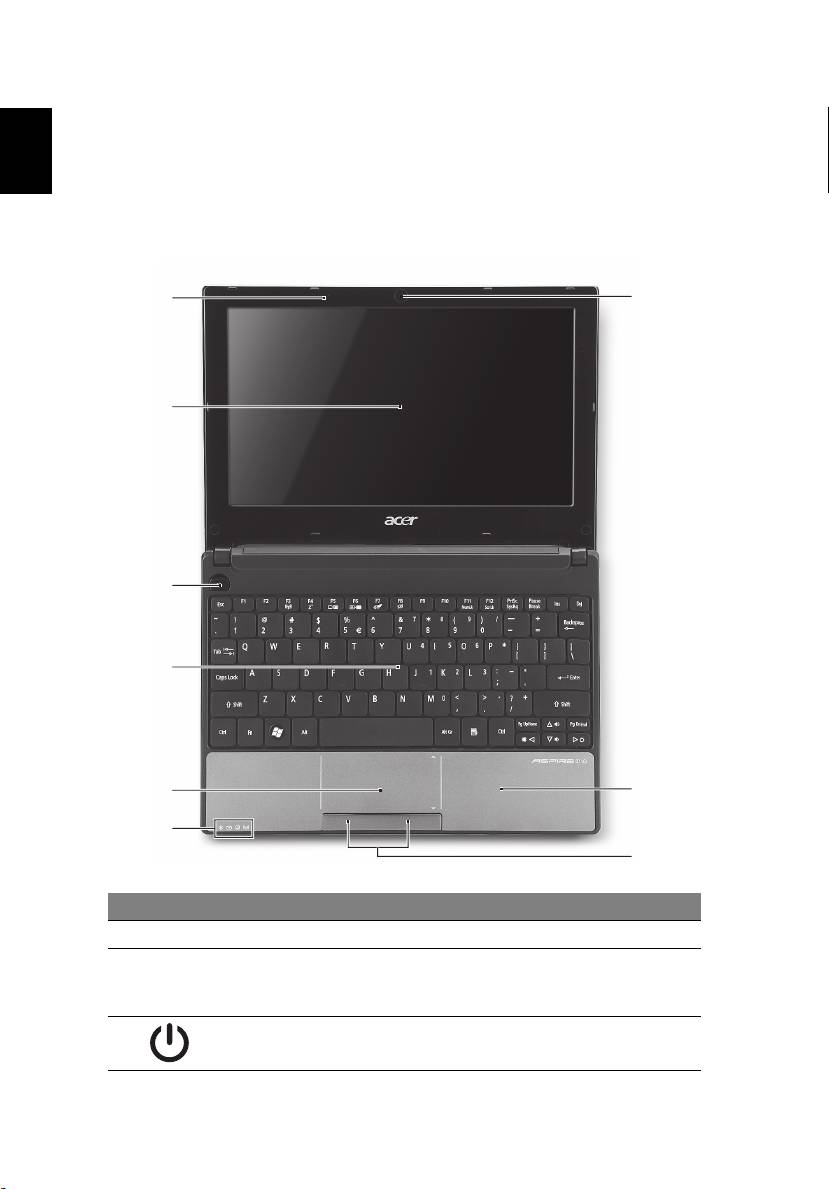
Acer AOD255: Your Acer notebook tour Top view # Icon Item Description
Your Acer notebook tour Top view # Icon Item Description: Acer AOD255
Table of contents
- First things first Your guides
- Your Acer notebook tour Top view # Icon Item Description
- # Icon Item Description Hotkeys Hotkey Icon Function Description
- Hotkey Icon Function Description Using the communication key*
- Closed front view Rear view
- Left view Right view
- Base view Environment
4
Your Acer notebook tour
After setting up your computer as illustrated in the setup poster, let us show
English
you around your new Acer notebook.
Top view
1
9
2
3
4
5
8
6
7
# Icon Item Description
1 Microphone Internal microphone for sound recording.
2 Display screen Also called Liquid-Crystal Display (LCD),
displays computer output (configuration
may vary by model).
3 Power button Turns the computer on and off.
Top 10 manuals
100.00
NZXT HALE90 1000W99.99
Samsung SM-R38099.97
AEG BSB 18C99.97
Dell 2700W99.97
Smeg KSEC70X99.96
Beurer HDE 4099.96
Pyramida KH 50 v.299.96
MSI CSM-H81M-P3299.96
AEG HR 562799.95
Melissa 640-048