
Acer AOD255: Base view Environment
Base view Environment: Acer AOD255
Table of contents
9
English
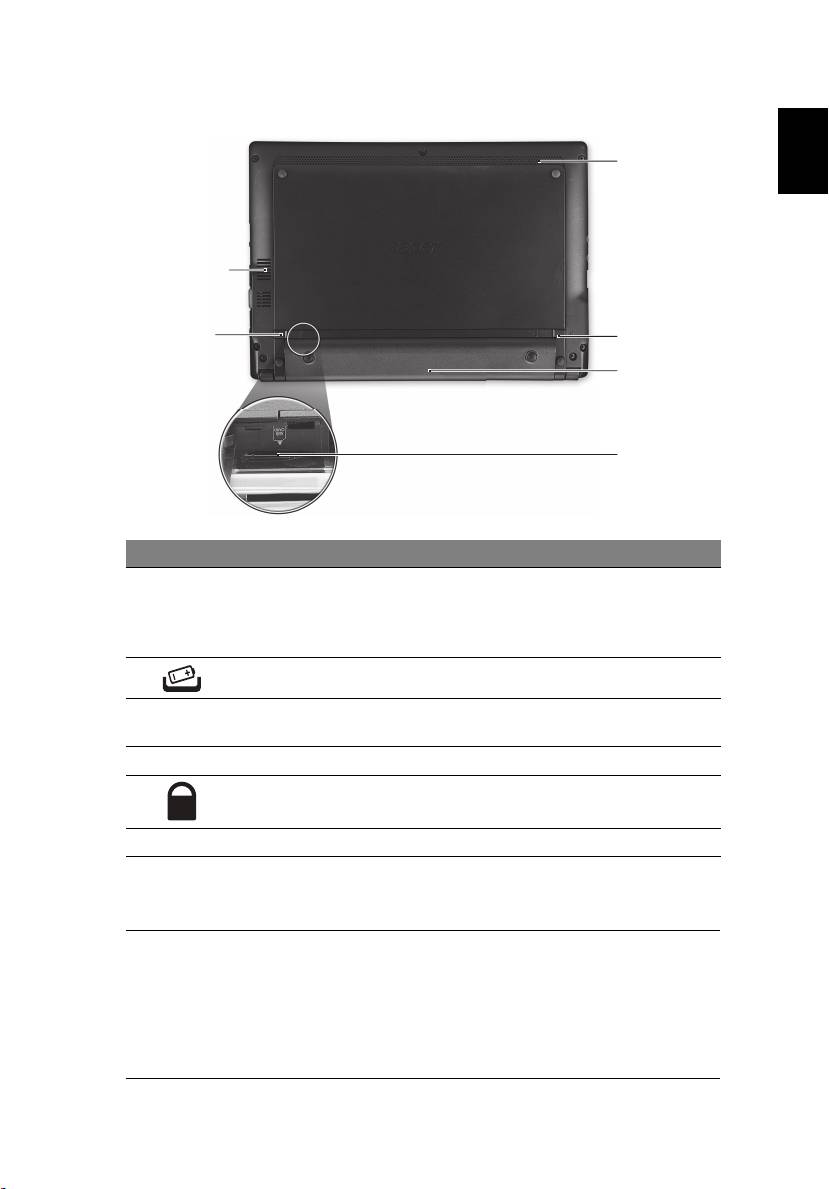
Base view
6
1
2
5
4
3
# Icon Item Description
1 Ventilation slots and
Enable the computer to stay cool, even
cooling fan
after prolonged use.
Note: Do not cover or obstruct the
opening of the fan.
2 Battery release latch Releases the battery for removal.
3 3G SIM card slot Accepts a 3G SIM card for 3G connectivity
(only for certain models).
4 Battery bay Houses the computer's battery pack.
5 Battery lock Locks the battery in position.
6 Speaker Emits audio from your computer.
Environment
• Temperature:
• Operating: 5 °C to 35 °C
• Non-operating: -20 °C to 65 °C
• Humidity (non-condensing):
• Operating: 20% to 80%
• Non-operating: 20% to 80%
Top 10 manuals
100.00
NZXT HALE90 1000W99.99
Samsung SM-R38099.97
AEG BSB 18C99.97
Dell 2700W99.97
Smeg KSEC70X99.96
Beurer HDE 4099.96
Pyramida KH 50 v.299.96
MSI CSM-H81M-P3299.96
AEG HR 562799.95
Melissa 640-048