
Acer AOD255: Left view Right view
Left view Right view: Acer AOD255
Table of contents
8
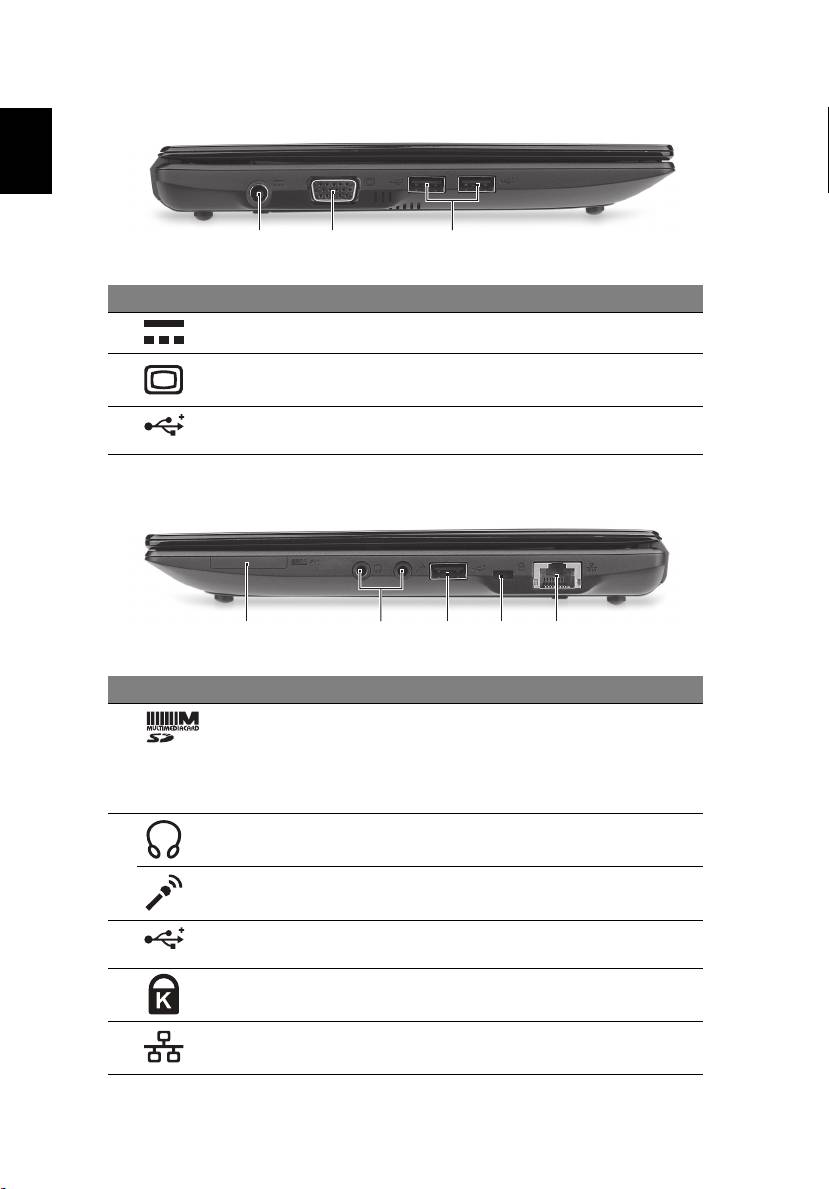
Left view
English
213
# Icon Item Description
1 DC-in jack Connects to an AC adapter.
2 External display
Connects to a display device (e.g.,
(VGA) port
external monitor, LCD projector).
3 USB ports Connect to USB devices (e.g., USB mouse,
USB camera).
Right view
21345
# Icon Item Description
1 2-in-1 card reader Accepts Secure Digital (SD) and
MultiMediaCard (MMC)
.
Note: Push to remove/install the card.
Only one card can operate at any given
time.
2 Headphone/speaker/
Connects to audio line-out devices
line-out jack
(e.g., speakers, headphones).
Microphone-in jack Accepts inputs from external
microphones.
3 USB port Connects to USB devices
(e.g., USB mouse, USB camera).
4 Kensington lock slot Connects to a Kensington-compatible
computer security lock.
5 Ethernet (RJ-45) port Connects to an Ethernet 10/100 based
network.
