
ASRock 990FX EXTREME3: 1. Penjelasan
1. Penjelasan: ASRock 990FX EXTREME3

1. Penjelasan
Terima kasih telah membeli motherboard ASRock 990FX Extreme3, motherboard
andal yang diproduksi berdasarkan kontrol kualitas tinggi ASRock secara konsisten.
Motherboard ini memberikan performa terbaik dengan desain yang kokoh sesuai
komitmen ASRock untuk kualitas dan daya tahan.
Panduan Pemasangan Ringkas ini berisi pendahuluan tentang motherboard dan
panduan pemasangan langkah demi langkah. Informasi lengkap lainnya tentang
motherboard ini tersedia di buku panduan yang diberikan bersama Support CD (CD
Pendukung).
Spesikasi motherboard dan perangkat lunak BIOS mungkin diperbarui, karena
tu konten panduan ini dapat berubah setiap saat tanpa pemberitahuan sebelumnya.
Jika ada perubahan atas panduan ini, versi terbaru tersedia di situs Web ASRock
tanpa pemberitahuan selanjutnya. Daftar dukungan kartu VGA dan CPU terbaru
juga tersedia di situs Web ASRock. Situs Web ASRock http://www.asrock.com
Jika Anda memerlukan dukungan teknis terkait dengan motherboard ini, kunjungi
situs Web kami untuk informasi khusus tentang model yang Anda gunakan.
www.asrock.com/support/index.asp
1.1 Isi Paket
Papan Induk 990FX Extreme3 ASRock
(Faktor Form Mikro ATX: 12.0-in x 8.6-in, 30.5 cm x 21.8 cm)
Pemimpin Instalasi Cepat 990FX Extreme3 ASRock
Support CD 990FX Extreme3 ASRock
1 x Kartu ASRock SLI_Bridge_2S
2 x Kabel satu serial Data ATA (SATA) (bebas-pilih)
1 Kabel Audio 3,5 mm (Opsional)
1 x Satu Pelindung I/O
Bahasa Indonesia
ASRock Mengingatkan...
Untuk mendapatkan performa lebih baik di Windows® 7/ 7 64-bit/
VistaTM/ VistaTM 64-bit, sebaiknya atur pilihan BIOS dalam Storage
Configuration (Konfigurasi Penyimpanan) ke mode AHCI. Untuk
kongurasi BIOS, lihat “Panduan Pengguna” dalam CD dukungan kami
untuk informasi rinci.
172
ASRock 990FX Extreme3 Motherboard

1.2 Spesifikasi
Podium - Faktor Form Mikro ATX: 12.0-in x 8.6-in, 30.5 cm x 21.8 cm
- Desain All Solid Capacitor (Kapasitor Polimer Konduktif
berkualitas tinggi 100% buatan Jepang)
CPU - Dukungan untuk prosesor Socket AM3+
- Dukungan untuk prosesor Socket AM3: prosesor AMD
TM
Phenom
II X6/X4/X3/X2 (kecuali 920/940)/Athlon II
X4/X3/X2/Sempron
- Mendukung CPU 8-Core
- Mendukung tur UCC (Mengaktifkan Core CPU)
- Desain daya 4+1 fase
- Mendukung CPU hingga 140W
TM
- Mendukung Teknologi Cool ‘n’ Quiet
AMD
- FSB 2600 MHz (5,2 GT/d)
- Mendukung Teknologi Untied Overclocking
- Mendukung Teknologi Hyper-Transport 3.0 (HT 3.0)
Grup Chip - Northbridge: AMD 990FX
- Southbridge: AMD SB950
Ingatan - Teknologi ingatan DDR3 dwi saluran
- 4 x Alur DDR3 DIMM
- Mendukung memori DDR3 2100(OC)/1866/1600/1333/1066
/800 non-ECC yang tidak di-buffer
- Kapasitas paling banyak: 32GB
Alur Ekspansi - 3 x PCI Express 2.0 x16 slots (PCIE2/PCIE3: x16 mode;
PCIE4: x4 mode)
- 1 x PCI Express 2.0 x1 slot
- 2 x Alur PCI
TM
TM
- Mendukung AMD
Quad CrossFireX
, 3-Way
TM
TM
CrossFireX
dan CrossFireX
®
TM
TM
- Mendukung NVIDIA
Quad SLI
dan SLI
Audio - 7.1 CH HD Audio dengan Content Protection
(Realtek ALC892 Audio Codec)
- Mendukung Premium Blu-ray audio
LAN - PCIE x1 Gigabit LAN 10/100/1000 Mb/s
- Broadcom BCM57781
- Menggunakan Wake-On-LAN
Bahasa Indonesia
- Mendukung Energy Efcient Ethernet 802.3az
- Mendukung PXE
173
ASRock 990FX Extreme3 Motherboard

Papan Belakang I/O Panel
I/O - 1 x Port Mouse PS/2
- 1 x Port Keyboard PS/2
- 1 x Port keluaran Coaxial SPDIF
- 1 x Port Keluaran Optical SPDIF
- 6 x Port USB 2.0 siap-dipakai
- 2 x Port USB 3.0 siap-dipakai
- 1 x Port eSATA3
- 1 x RJ-45 LAN Port LED (ACT/LINK LED dan SPEED LED)
- Soket Audio HD: Speaker Samping/Speaker Belakang/
Tengah/Bas/Saluran masuk/Speaker Depan/Mikrofon
SATA3 - 5 x penghubung SATA3 6.0Gb/s, dapat digunakan RAID
(RAID 0, RAID 1, RAID 5 dan RAID 10), NCQ, AHCI dan
fungsi fungsi “Hot Plug”
USB 3.0 - 2 x Port Belakang USB 3.0 dari Etron EJ168A, mendukung
USB 1.0/2.0/3.0 hingga 5Gb/s
Penghubung - 5 x penghubung SATA3 6.0Gb/s
- 1 x IR header
- 1 x port header COM
- 1 x HDMI_SPDIF header
- 1 x header power LED
- Penghubung KIPAS CPU/casis/Power
- Penghubung power 24 pin ATX
- Penghubung power 8 pin 12V
- Penghubung audio panel depan
- 3 x USB 2.0 header (menggunakan 6 port USB 2.0)
Ciri-ciri BIOS - 32Mb AMI UEFI Legal BIOS dengan dukungan GUI
- Menggunakan “Plug and Play”
- ACPI 1.1 Compliance Wake Up Events
- Menggunakan jumperfree
- Penyokong AMBIOS 2.3.1
- Multipenyesuaian Tegangan CPU, VCCM, NB, SB
Sokongan CD - Penggerak, kegunaan, Software AntiVirus (Versi Cobaan),
Bahasa Indonesia
CyberLink MediaEspresso 6.5 Trial
Fitur Unik - ASRock Extreme Tuning Utility (AXTU)
- ASRock Instant Boot
- ASRock Instant Flash
- ASRock APP Charger
- ASRock XFast USB
- ASRock XFast LAN
- ASRock On/Off Play Technology
174
ASRock 990FX Extreme3 Motherboard

- Hybrid Booster:
- Kontrol tanpa langkah Frekwensi CPU
- ASRock U-COP
- Penjaga kegagalan input (B.F.G.)
- Turbo 50 / Turbo 60 CPU overclocking
- Turbo UCC
Penjaga - Perasa Suhu CPU
Hardware - Perasa Suhu Casis
- Pengukur Kipas CPU/casis/Power
- Kipas diam CPU
- Kontrol Multi-Kecepatan Kipas CPU/casis
- Penjagaan voltasi: +12V, +5V, +3.3V, Vcore
®
®
TM
OS - dapat digunakan Microsoft
Windows
7 / 7 64-bit / Vista
/
TM
Vista
64-bit / XP / XP 64-bit
Sertikasi - FCC, CE, WHQL
- ErP/EuP Ready (memerlukan catu daya ErP/EuP ready)
* Untuk informasi rinci, silakan kunjungi website kami: http://www.asrock.com
PERHATIAN
Overclocking dapat pasti menimbulkan risiko, seperti pengaturan susunan BIOS,
penggunaan Untied Overclocking Technology, atau pemakaian perlengkapan
overclocking lain. Overclocking barangkali mengganggu stabilitas sistem Anda, atau
menimbulkan kerusakan terhadap komponen dan alat sistem Anda. Anda
seharusnya.
Bahasa Indonesia
175
ASRock 990FX Extreme3 Motherboard

Installing OS on a HDD Larger Than 2TB in AHCI Mode
®
This motherboard is adopting UEFI BIOS that allows Windows
OS to be installed
on a large size HDD (>2TB). Please follow below procedure to install the operating
system.
®
TM
1. Please make sure to use Windows
Vista
64-bit (with SP1 or above) or
®
Windows
7 64-bit.
2. Press <F2> or <Delete> at system POST. Set AHCI Mode in UEFI Setup Utility >
Advanced > Storage Conguration > SATA Mode.
3. Choose the item “UEFI:xxx“ to boot in UEFI Setup Utility > Boot > Boot Option #1.
®
(“xxx” is the device which contains your Windows
installation les. Normally it is
an optical drive.) You can also press <F11> to launch boot menu at system POST
and choose the item “UEFI:xxx“ to boot.
®
4. Start Windows
installation.
English
176
ASRock 990FX Extreme3 Motherboard
Installing OS on a HDD Larger Than 2TB in RAID Mode
®
This motherboard is adopting UEFI BIOS that allows Windows
OS to be installed
on a large size HDD (>2TB). Please follow below procedure to install the operating
system.
®
TM
1. Please make sure to use Windows
Vista
64-bit (with SP1 or above) or
®
Windows
7 64-bit.
2. Press <F2> or <Delete> at system POST. Set RAID Mode in UEFI Setup Utility >
Advanced > Storage Conguration > SATA Mode.
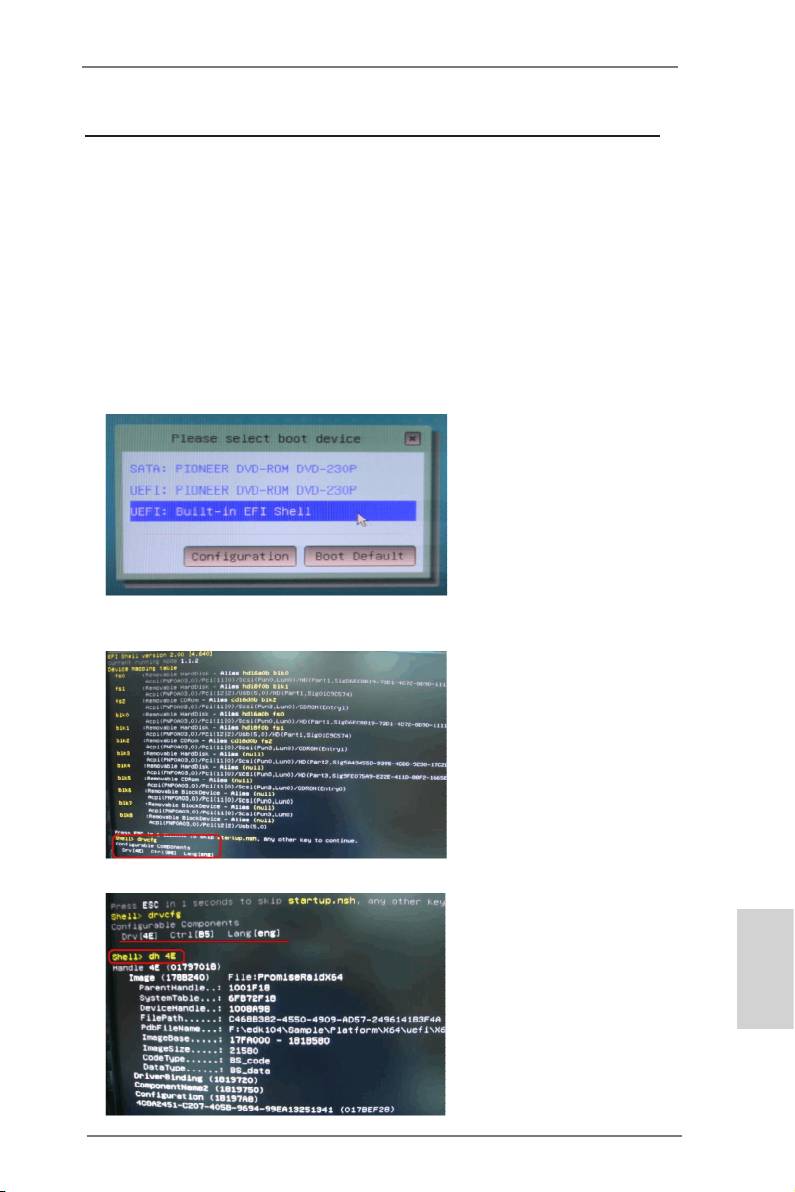
3. Choose onboard RAID 3TB+ unlocker > UEFI Mode For GPT partition. Press
<F10> to save the change and exit.
4. Press <F11> to enter Boot Manual. Choose UEFI : Built - in EFI Shell.
5. Key in drvcfg, for example you will see below:
Drv[4E] Ctrl[B5] Lang[eng]
6. Key in dh [Drv number], for example: key in dh 4E.
English
177
ASRock 990FX Extreme3 Motherboard
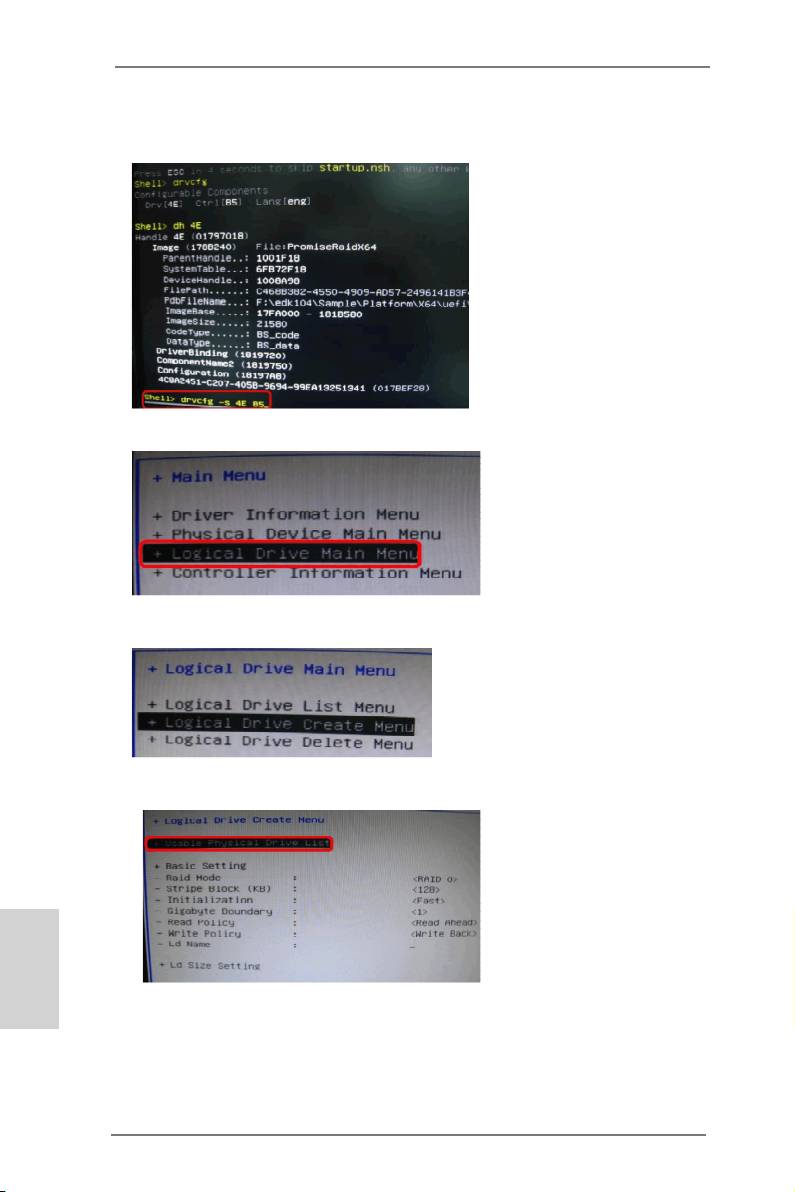
7. And then key in drvcfg –s [Drv number] [Ctrl number] to enter Raid Utility.
For example: key in drvcfg –s 4E B5.
8. Choose Logical Drive Main Menu to set up Raid Drive.
9. Choose Logical Drive Create Menu to create a Raid Drive.
10. Choose Usable Physical Drive List to select Raid HDD.
English
178
ASRock 990FX Extreme3 Motherboard

11. Press Space on keyboard to toggle checkbox.
12. Choose Ld Size setting, and key in the Raid size.
13. After set up Raid size, please click Start to Create.
14. Press <F10> to exit Utility.
15. During reboot, please press <F11> to enter Boot Manual. Choose UEFI: SCSI
CD/DVD Drive.
English
®
TM
* This option only shows on Windows
7 64-bit and Vista
64-bit OS.
179
ASRock 990FX Extreme3 Motherboard

®
16. Follow Windows
Installation Guide to install OS.
®
TM
If you install Windows
7 64-bit / Vista
64-bit in a large hard disk (ex. Disk
®
volume > 2TB), it may take more time to boot into Windows
or install driver/
utilities. If you encounter this problem, you will need to following instructions
to x this problem.
®
TM
Windows
Vista
64-bit:
®
Microsoft
does not provide hotfix for this problem. Below steps are
®
Microsoft
suggested solution:
A. Disable System Restore.
a. Type “systempropertiesprotection” in the Start Menu. Then press
"Enter".
b. De-select Local Disks for System Restore. Then Click “Turn System
Restore Off” to conrm. Then Press “Ok”.
English
180
ASRock 990FX Extreme3 Motherboard

B. Disable “Volume Shadow Copy” service.
a. Type “computer management” in the Start Menu, then press “Enter”.
b. Go to “Services and Applications>Services”; Then double click “Volume
Shadow Copy”.
c. Set “Startup type” to “Disable” then Click “OK”.
English
181
ASRock 990FX Extreme3 Motherboard

C. Reboot your system.
D. After reboot, please start to install motherboard drivers and utilities.
®
Windows
7 64-bit:
A. Please request the hotx KB2505454 thru this link:
http://support.microsoft.com/kb/2505454/
®
B. After installing Windows
7 64-bit, install the hotx kb2505454.
(This may take long time; >30 mins.)
C. Reboot your system. (It may take about 5 mins to boot.)
®
D. The Windows
will install this hotx then reboot by itself.
E. Please start to install motherboard drivers and utilities.
17. Finish.
English
182
ASRock 990FX Extreme3 Motherboard
Table of contents
- Motherboard Layout
- I/O Panel
- 1. Introduction
- 2. Installation
- 3. BIOS Information
- 1. Einführung
- 2. BIOS-Information
- 1. Introduction
- 2. Informations sur le BIOS
- 1. Introduzione
- 2. Informazioni sul BIOS
- 1. Introducción
- 2. BIOS Información
- 1. Введение
- 2. Информация о BIOS
- 1. Giriş
- 2. BIOS Bilgileri
- 1. 제품소개
- 2. 시스템 바이오스 정보
- 1. 主板簡介
- 2. BIOS 信息
- 1. 主機板簡介
- 2. BIOS 訊息
- 1. Penjelasan


