
Xerox DocuColor 242-252-260 mit Creo Spire CX260-8985: инструкция
Раздел: Бытовая, кухонная техника, электроника и оборудование
Тип: Принтер
Инструкция к Принтеру Xerox DocuColor 242-252-260 mit Creo Spire CX260-8985
Оглавление
- Краткое руководство по подключению к сети
- Терминология
- Конфигурирование Spire CX260
- Шаг 1. Включение Spire CX260
- Включение Spire CX260
- Шаг 2. Стандартные системные и сетевые настройки
- Шаг 3. Настройка сети
- Шаг 4. Просмотр и печать параметров конфигурации системы
- Установка TCP/IP-принтера в Windows 2000/2000 Pro/2003/XP
- Установка LPR-принтера в Windows 2000/2000 Pro/2003/XP
- Установка принтера LPR
- Установка принтера на компьютере Macintosh (Mac OS 9.0 или более поздней версии) Установка принтера на компьютере Macintosh (Mac OS X -10,4 или более поздней версии)—IP, SMB, или AppleTalk
- Установка принтера Novell в Windows (2000, 2000 Pro, XP или 2003)
Xxxxxxxx
Xxxxxx
Creo Color Server
for the Xerox DocuColor 242/252/260 Printer/Copier
653-01328B-MUL
731-00991B-MUL Internal
Quick Connect
Guide
English (EN)
Français (FR)
Italiano (IT)
Deutsch (DE)
Español (ES)
Português (PB)
Nederlands (NL)
Svenska (SV)
Norsk (NO)
Suomi (FI)
Dansk (DA)
Português (PT)
Türkçe (TR)
Pycckий (RU)


Copyright
© Creo, 2007. All rights reserved.
This document is also distributed in Adobe Systems Incorporated's PDF (Portable Document Format). You may
reproduce the document from the PDF file for internal use. Copies produced from the PDF file must be repro-
duced in whole.
Trademarks
Creo is a trademark of Creo.
Adobe, Acrobat, Adobe Illustrator, Distiller, Photoshop, PostScript, and PageMaker are registered trademarks of
Adobe Systems Incorporated.
Apple, AppleShare, AppleTalk, iMac, ImageWriter, LaserWriter, Mac OS, Power Macintosh, and TrueType are reg-
istered trademarks of Apple Computer, Inc. Macintosh is a trademark of Apple Computer, Inc., registered in the
U.S.A. and other countries.
PANTONE, Hexachrome, PANTONE Hexachrome, and PANTONE MATCHING SYSTEM are the property of
Pantone, Inc.
PEARL, PEARLsetter, PEARLhdp, PEARLdry, and PEARLgold are registered trademarks of Presstek, Inc.
XEROX is a trademark of XEROX CORPORATION.
FCC Compliance
Any Creo equipment referred to in this document complies with the requirements in part 15 of the FCC Rules for
a Class A digital device. Operation of the Creo equipment in a residential area may cause unacceptable interfer-
ence to radio and TV reception, requiring the operator to take whatever steps are necessary to correct the interfer-
ence.
Equipment Recycling
In the European Union, this symbol indicates that when the last user wishes to discard this product, it must be
sent to appropriate facilities for recovery and recycling. Contact your local Print On-Demand Solutions
representative or refer to www.kodak.com/go/recycle/ for additional information on the collection and recovery
programs available for this product.
Limitation of Liability
The product, software or services are being provided on an "as is" and "as available" basis. Except as may be stated
specifically in your contract, Creo and its parents, subsidiaries, and affiliates expressly disclaim all warranties of

any kind, whether express or implied, including, but not limited to, any implied warranties of merchantability,
fitness for a particular purpose and non-infringement.
You understand and agree that, except as may be stated specifically in your contract, Creo and its parents, subsid-
iaries, and affiliates shall not be liable for any direct, indirect, incidental, special, consequential or exemplary
damages, including but not limited to, damages for loss of profits, goodwill, use, data or other intangible losses
(even if Creo has been advised of the possibility of such damages), resulting from: (i) the use or the inability to
use the product or software; (ii) the cost of procurement of substitute goods and services resulting from any prod-
ucts, goods, data, software, information or services purchased; (iii) unauthorized access to or alteration of your
products, software or data; (iv) statements or conduct of any third party; (v) any other matter relating to the
product, software, or services.
The text and drawings herein are for illustration and reference only. The specifications on which they are based
are subject to change. Creo may, at any time and without notice, make changes to this document. Creo, for itself
and on behalf of its parents, subsidiaries, and affiliates, assumes no liability for technical or editorial errors or
omissions made herein, and shall not be liable for incidental, consequential, indirect, or special damages, includ-
ing, without limitation, loss of use, loss or alteration of data, delays, or lost profits or savings arising from the use
of this document.
www.printondemandsolutions.com
Internal 731-00991B-EN Rev A
Revised April 2007

Contents
Quick Connect Guide 1
How to Use This Guide ................................................................................................................................... 1
Terminology ................................................................................................................................................... 2
Configuring the Spire CX260.......................................................................................................................... 3
Step 1: Powering Up the Spire CX260............................................................................................................. 4
Powering Up the Spire CX260.................................................................................................................. 5
Step 2: Default System and Network Settings ................................................................................................. 6
System and Network Settings................................................................................................................... 6
Protocols and Services Installed ................................................................................................................ 7
Network Virtual Printers - Print Queues .................................................................................................... 7
Step 3: Network Setup.................................................................................................................................... 7
TCP/IP Setup ............................................................................................................................................ 7
AppleTalk Setup....................................................................................................................................... 8
IPX and Novell Client Setup...................................................................................................................... 8
Step 4: View and Print the System Configuration ............................................................................................ 9
Step 5: Printing from a Macintosh or Windows Computer .............................................................................. 9
Setting Up a Printer in Windows 2000/2000 Pro/2003/XP (SMB) .............................................................. 9
Setting Up a TCP/IP Printer in Windows 2000/2000 Pro/2003/XP............................................................ 10
Setting Up an LPR Printer in Windows 2000/2000 Pro/2003/XP .............................................................. 11
Setting Up a Printer on a Macintosh Computer (Mac OS 9.0 or later) ..................................................... 13
Setting Up a Printer on a Macintosh Computer (Mac OS X - 10.4 or later)—IP, SMB, or AppleTalk ......... 13
Setting Up a Novell Printer in Windows (2000, 2000 Pro, XP and 2003) ................................................. 14
Guide simplifié de connexion 15
Comment utiliser ce guide ............................................................................................................................ 15
Terminologie ................................................................................................................................................ 16
Configuration du Spire CX260...................................................................................................................... 17
Etape 1 : Mise sous tension du Spire CX260 ................................................................................................. 18
Mise sous tension du Spire CX260 ......................................................................................................... 19
Étape 2 : Paramètres réseau et système par défaut........................................................................................ 20
Paramètres réseau et système ................................................................................................................ 20
Protocoles et services installés ................................................................................................................ 21
Imprimantes virtuelles du réseau - Files d’attente d’impression ............................................................... 21
Etape 3 : Configuration du réseau ................................................................................................................ 21
Configuration TCP / IP............................................................................................................................ 21
Configuration Apple Talk....................................................................................................................... 22
Configuration du protocole IPX et du client Novell ................................................................................. 22
Etape 4 : Affichage et impression de la configuration système ...................................................................... 23
Etape 5 : Impression à partir d’un ordinateur Macintosh ou Windows ........................................................... 23
Configuration d’une imprimante dans Windows 2000/2000 Pro/2003/XP (SMB) .................................... 23
Configuration d’une imprimante TCP / IP dans Windows 2000/2000 Pro/2003/XP.................................. 24
Configuration d’une imprimante LPR dans Windows 2000/2000 Pro/2003/XP........................................ 25
Configuration d’une imprimante sur un ordinateur Macintosh (Mac OS 9.0 ou version ultérieure).......... 27
Configuration d’une imprimante sur un ordinateur Macintosh (Mac OS X à 10.4 ou version ultérieure) -
IP, SMB ou AppleTalk............................................................................................................................. 27
Configuration d’une imprimante Novell dans Windows (2000, 2000 Pro, XP et 2003)............................ 28

6 Spire CX260 Quick Connect Guide
Manuale di introduzione rapida 29
Come usare questa guida ............................................................................................................................. 29
Terminologia ................................................................................................................................................ 30
Configurazione del Spire CX260................................................................................................................... 31
Punto 1: Accensione di Spire CX260............................................................................................................. 32
Accensione di Spire CX260 .................................................................................................................... 33
Fase 2: Impostazioni predefinite del sistema e della rete................................................................................ 34
Impostazioni del sistema e della rete ...................................................................................................... 34
Protocolli e servizi installati..................................................................................................................... 35
Stampanti di rete virtuali – Code di stampa............................................................................................ 35
Punto 3: Impostazioni di rete ........................................................................................................................ 35
Impostazioni TCP/IP ............................................................................................................................... 35
Impostazioni AppleTalk.......................................................................................................................... 36
Impostazioni client IPX e Novell.............................................................................................................. 36
Punto 4: Visualizzare e stampare la configurazione di sistema....................................................................... 37
Punto 5: Stampa da un computer Macintosh o Windows.............................................................................. 37
Impostare una stampante in Windows 2000/2000 Pro/2003/XP (SMB) ................................................... 37
Impostare una stampante TCP/IP in Windows 2000/2000 Pro/2003/XP .................................................. 38
Impostazione di una stampante LPR in Windows 2000/2000 Pro/2003/XP.............................................. 39
Impostazione di una stampante su Macintosh (Mac OS 9.0 o versione successiva).................................. 41
Impostazione di una stampante su un computer Macintosh (Mac OS X - 10.4 o versioni successive)—
IP, SMB, o AppleTalk.............................................................................................................................. 41
Impostazione di una stampante Novell in Windows (2000, 2000 Pro, XP e 2003)................................... 42
Kurzanleitung für den Netzwerkanschluss 43
Hinweise zur Benutzung dieses Handbuchs................................................................................................... 43
Terminologie ................................................................................................................................................ 44
Konfigurieren des Spire CX260..................................................................................................................... 45
Schritt 1: Einschalten des Spire CX260.......................................................................................................... 46
Einschalten des Spire CX260.................................................................................................................. 47
Schritt 2: Standardeinstellungen für System und Netzwerk ........................................................................... 48
System- und Netzwerkeinstellungen ...................................................................................................... 48
Installierte Protokolle und Dienste .......................................................................................................... 49
Virtuelle Netzwerkdrucker – Druckwarteschlangen................................................................................. 49
Schritt 3: Netzwerk-Setup............................................................................................................................. 49
TCP/IP-Setup.......................................................................................................................................... 49
AppleTalk Setup .................................................................................................................................... 50
IPX- und Novell-Client-Setup.................................................................................................................. 50
Schritt 4: Anzeigen und Drucken der Systemkonfiguration............................................................................ 51
Schritt 5: Drucken von einem Macintosh- oder Windows-Computer aus ....................................................... 51
Einrichten eines Druckers unter Windows 2000/2000 Pro/2003/XP (SMB) .............................................. 51
Einrichten eines TCP/IP-Druckers unter Windows 2000/2000 Pro/2003/XP.............................................. 52
Einrichten eines LPR-Druckers unter Windows 2000/2000 Pro/2003/XP.................................................. 53
Einrichten eines Druckers auf einem Macintosh-Computer (Mac OS 9.0 oder später) ............................. 55
Einrichten eines Druckers auf einem Macintosh-Computer (Mac OS X - 10.4 oder höher) –
IP, SMB oder AppleTalk.......................................................................................................................... 55
Einrichten eines Novell-Druckers unter Windows (2000, 2000 Pro/XP und 2003).................................... 56
Guía de conexión rápida 57
Cómo utilizar esta guía................................................................................................................................. 57
Terminología ................................................................................................................................................ 58
Configuración del Spire CX260..................................................................................................................... 59
Paso 1: Encendido del Spire CX260 .............................................................................................................. 60
Encendido del Spire CX260.................................................................................................................... 61
Paso 2: Parámetros predeterminados del sistema y la red.............................................................................. 62

Contents 7
Parámetros del sistema y de la red ......................................................................................................... 62
Protocolos y servicios instalados ............................................................................................................. 63
Impresoras virtuales de red - Colas de impresión .................................................................................... 63
Paso 3: configuración de red......................................................................................................................... 63
TCP/IP, configuración ............................................................................................................................. 63
AppleTalk, configuración ....................................................................................................................... 64
Configuración de IPX y Novell Client ...................................................................................................... 64
Paso 4: Visualización e impresión de la configuración del sistema.................................................................. 65
Paso 5: Impresión desde un ordenador Macintosh o Windows ...................................................................... 65
Configuración de una impresora en Windows 2000/2000 Pro/2003/XP (SMB)........................................ 65
Instalación de una impresora TCP/IP en Windows 2000/2000 Pro/2003/XP............................................. 66
Configuración de una impresora LPR en Windows 2000/2000 Pro/2003/XP ........................................... 67
Configuración de una impresora en un equipo Macintosh (Mac OS 9.0 o superior) ................................ 69
Configuración de una impresora en un equipo Macintosh (Mac OS X -10.4 o superior):
IP, SMB o AppleTalk............................................................................................................................... 69
Configuración de una impresora Novell Printer en Windows (2000, 2000 Pro, XP y 2003)...................... 71
Handleiding voor een snelle aansluiting 73
Gebruik van deze handleiding....................................................................................................................... 73
Terminologie ................................................................................................................................................ 74
Configuratie van de Spire CX260.................................................................................................................. 75
Stap 1: De Spire CX260 inschakelen ............................................................................................................. 76
De Spire CX260 inschakelen .................................................................................................................. 77
Stap 2: Standaard systeem- en netwerkinstellingen....................................................................................... 78
System and Network Settings (Systeem- en netwerkinstellingen) ............................................................ 78
Protocols en de geïnstalleerde Services................................................................................................... 79
Network Virtual Printers - Print Queues (Netwerk virtuele printers - printer wachtrijen) ........................... 79
Stap 3: Netwerkinstellingen .......................................................................................................................... 79
TCP/IP instellingen.................................................................................................................................. 79
AppleTalk instellingen ............................................................................................................................ 80
IPX en Novell Client installatie ................................................................................................................ 80
Stap 4: De System Configuration (Systeemconfiguratie) bekijken en afdrukken ............................................. 81
Stap 5: Vanuit een Macintosh of Windows computer afdrukken ................................................................... 81
Een printer in Windows 2000/2000 Pro/2003/XP (SMB) installeren......................................................... 81
Een TCP/IP-printer in Windows 2000/2000 Pro/2003/XP installeren ........................................................ 82
Een LPR-printer in Windows 2000/2000 Pro/2003/XP installeren ............................................................ 83
Een printer op een Macintosh (OS 9.0 of hoger) installeren .................................................................... 85
Een printer op een Macintosh-computer (Mac OS X -10.4 of hoger)—IP, SMB of AppleTalk installeren .. 85
Een Novell Printer in Windows (2000, 2000 Pro, XP en 2003) installeren ................................................ 86
Guia de conexão rápida 87
Como utilizar este guia ................................................................................................................................. 87
Terminologia ................................................................................................................................................ 88
Configuração do Spire CX260 ...................................................................................................................... 89
Etapa 1: Como ligar o Spire CX260............................................................................................................... 90
Como ligar o Spire CX260 ..................................................................................................................... 91
Etapa 2: Configurações padrão do sistema e da rede .................................................................................... 92
Configurações do sistema e da rede....................................................................................................... 92
Protocolos e serviços instalados.............................................................................................................. 93
Impressoras virtuais de rede - Filas de impressão .................................................................................... 93
Etapa 3: Configuração de rede ..................................................................................................................... 94
Configuração de TCP/IP ......................................................................................................................... 94
Configuração de AppleTalk.................................................................................................................... 94
Configuração de cliente IPX e Novell ...................................................................................................... 94
Etapa 4: Visualizar e imprimir a configuração do sistema............................................................................... 95
Etapa 5: Impressão de um computador Macintosh ou Windows ................................................................... 95

8 Spire CX260 Quick Connect Guide
Configuração de uma impressora no Windows 2000/2000 Pro/2003/XP (SMB) ...................................... 96
Configuração de uma impressora TCP/IP no Windows 2000/2000 Pro/2003/XP ..................................... 96
Configuração de uma impressora LPR no Windows 2000/2000 Pro/2003/XP.......................................... 97
Configuração de uma impressora em um computador Macintosh (Mac OS 9.0 ou posterior) ................. 99
Configuração de uma impressora em um computador Macintosh (Mac OS X 10.4 ou posterior) –
IP, SMB ou AppleTalk............................................................................................................................. 99
Configuração de uma impressora Novell no Windows (2000, 2000 Pro, XP e 2003)............................. 100
Hurtigoppsettguide 101
Hvordan du bruker denne guiden ............................................................................................................... 101
Terminologi ................................................................................................................................................ 102
Konfigurering av Spire CX260 .................................................................................................................... 103
Trinn 1: Starte Spire CX260 ........................................................................................................................ 104
Starte Spire CX260 .............................................................................................................................. 105
Trinn 2: Standard system- og nettverksinnstillinger ..................................................................................... 106
System- og nettverksinnstillinger.......................................................................................................... 106
Protokoller og tjenester som er installert .............................................................................................. 107
Virtuelle skrivere i nettverket – utskriftskøer ......................................................................................... 107
Trinn 3: Nettverksoppsett ........................................................................................................................... 107
TCP/IP-oppsett ..................................................................................................................................... 107
Oppsett av AppleTalk........................................................................................................................... 108
Oppsett av IPX og Novell Client............................................................................................................ 108
Trinn 4: Vise og skrive ut systemkonfigurasjonen ........................................................................................ 109
Trinn 5: Skrive ut fra Macintosh- eller Windows-maskin .............................................................................. 109
Sette opp en skriver i Windows 2000/2000 Pro/2003/XP (SMB)............................................................ 109
Sette opp en TCP/IP-skriver i Windows 2000/2000 Pro/2003/XP ........................................................... 110
Sette opp en LPR-skriver i Windows 2000/2000 Pro/2003/XP ............................................................... 111
Oppsett av skriver på Macintosh-maskin (Mac OS 9.0 eller senere)....................................................... 113
Sette opp en skriver på en Macintosh-datamaskin (Mac OS X – 10.4 eller senere) –
IP, SMB eller AppleTalk ........................................................................................................................ 113
Sette opp en Novell-skriver i Windows (2000, 2000 Pro, XP and 2003) ................................................ 114
Handbok för snabbanslutning 115
Hur du använder handboken ...................................................................................................................... 115
Terminologi ................................................................................................................................................ 116
Konfigurera Spire CX260............................................................................................................................ 117
Steg 1: Starta upp Spire CX260 .................................................................................................................. 118
Starta upp Spire CX260 ....................................................................................................................... 119
Steg 2: Standardsystem och nätverksinställningar ....................................................................................... 120
System- och nätverksinställningar ........................................................................................................ 120
Installerade protokoll och tjänster ........................................................................................................ 121
Virtuella nätverksskrivare - utskriftsköer ............................................................................................... 121
Steg 3: Nätverkskonfiguration .................................................................................................................... 121
TCP/IP-konfiguration............................................................................................................................ 121
AppleTalk-konfiguration ...................................................................................................................... 122
Klientkonfigurering för IPX och Novell.................................................................................................. 122
Steg 4: Visa och skriv ut systemkonfigurationen.......................................................................................... 123
Steg 5: Skriva ut från Macintosh eller Windows-datorer.............................................................................. 123
Lägga till en skrivare i Windows 2000/2000 Pro/2003/XP (SMB) ........................................................... 123
Lägga till en TCP/IP-skrivare i Windows 2000/2000 Pro/2003/XP .......................................................... 124
Lägga till en LPR-skrivare i Windows 2000/2000 Pro/2003/XP .............................................................. 125
Konfiguration av en skrivare på en Macintosh-dator (Mac OS 9.0 eller senare) ..................................... 127
Konfiguration av en skrivare på en Macintosh-dator (Mac OS X - 10.4 eller senare) –
IP, SMB eller AppleTalk ........................................................................................................................ 127
Konfigurera en Novell-skrivare i Windows (2000, 2000 Pro, XP och 2003) ........................................... 129

Contents 9
Pikakytkentäopas 131
Tietoja oppaasta ......................................................................................................................................... 131
Termistö ..................................................................................................................................................... 132
Spire CX260 -palvelimen asetusten määrittäminen...................................................................................... 133
Vaihe 1: Spire CX260 -palvelimen käynnistäminen ...................................................................................... 134
Spire CX260 -palvelimen käynnistäminen............................................................................................. 135
Vaihe 2: Oletusjärjestelmä ja verkkoasetukset ............................................................................................. 136
Järjestelmä- ja verkkoasetukset ............................................................................................................ 136
Asennetut protokollat ja palvelut ......................................................................................................... 137
Virtuaaliset verkkotulostimet - tulostusjonot......................................................................................... 137
Vaihe 3: Verkon asetukset .......................................................................................................................... 137
TCP/IP-asetukset .................................................................................................................................. 137
AppleTalk-asetukset............................................................................................................................. 138
IPX- ja Novell-asiakkaan asennus .......................................................................................................... 138
Vaihe 4: Järjestelmän kokoonpanon näyttäminen ja tulostaminen............................................................... 139
Vaihe 5: Tulostaminen Macintosh- tai Windows-tietokoneesta.................................................................... 139
Tulostimen asentaminen Windows 2000/2000 Pro/2003/XP (SMB) -tietokoneeseen ............................. 139
TCP/IP-tulostimen asentaminen Windows 2000/2000 Pro/2003/XP -tietokoneeseen ............................. 140
LPR-tulostimen asentaminen Windows 2000/2000 Pro/2003/XP -tietokoneeseen ................................. 141
Tulostimen asentaminen Macintosh-tietokoneeseen (Mac OS 9.0 tai uudempi) .................................... 143
Tulostimen asentaminen Macintosh-tietokoneeseen (Mac OS X - 10.4 tai uudempi) –
IP, SMB tai AppleTalk ........................................................................................................................... 143
Novell-tulostimen asentaminen Windows-käyttöjärjestelmään (2000, 2000 Pro, XP ja 2003) ................ 144
Vejledning i hurtig tilslutning 145
Sådan bruges denne vejledning .................................................................................................................. 145
Terminologi ................................................................................................................................................ 146
Konfiguration af Spire CX260 ..................................................................................................................... 147
Trin 1: Start af Spire CX260 ........................................................................................................................ 148
Start af Spire CX260 ............................................................................................................................ 149
Trin 2: Standardindstillinger for system og netværk..................................................................................... 150
System- og netværksindstillinger .......................................................................................................... 150
Installerede protokoller og tjenester ..................................................................................................... 151
Virtuelle netværksprintere – udskriftskøer ............................................................................................ 151
Trin 3: Netværkskonfiguration .................................................................................................................... 151
TCP/IP-konfiguration ............................................................................................................................ 151
AppleTalk-konfiguration ...................................................................................................................... 152
IPX- og Novell-klientkonfiguration........................................................................................................ 152
Trin 4: Visning og udskrivning af systemkonfigurationen............................................................................. 153
Trin 5: Udskrivning fra en Macintosh- eller Windows-computer................................................................... 153
Konfiguration af en printer i Windows 2000/2000 Pro/2003/XP (SMB) ................................................. 153
Konfiguration af en TCP/IP-printer i Windows 2000/2000 Pro/2003/XP ................................................ 154
Konfiguration af en LPR-printer i Windows 2000/2000 Pro/2003/XP (SMB)........................................... 155
Konfiguration af en printer på en Macintosh-computer (Mac OS 9.0 eller nyere) .................................. 157
Konfiguration af en printer på en Macintosh-computer (Mac OS X -10.4 eller nyere) –
IP, SMB eller AppleTalk ........................................................................................................................ 157
Konfiguration af en Novell-printer i Windows (2000, 2000 Pro, XP og 2003)........................................ 158
Guia de Ligação Rápido 159
Como Utilizar Este Guia .............................................................................................................................. 159
Terminologia .............................................................................................................................................. 160
Configurar o Spire CX260........................................................................................................................... 161
Passo 1: Ligar o Spire CX260 ...................................................................................................................... 162
Ligar o Spire CX260............................................................................................................................. 163
Passo 2: Configurações Predefinidas do Sistema e da Rede ......................................................................... 164

10 Spire CX260 Quick Connect Guide
Configurações do Sistema e da Rede ................................................................................................... 164
Protocolos e serviços instalados............................................................................................................ 165
Impressoras virtuais de rede – Filas de impressão.................................................................................. 165
Passo 3: Configuração da rede ................................................................................................................... 165
Configuração do TCP/IP ....................................................................................................................... 165
Configuração de AppleTalk.................................................................................................................. 166
Configuração de IPX e do cliente Novell............................................................................................... 166
Passo 4: Ver e imprimir a configuração do sistema...................................................................................... 167
Passo 5: Imprimir a partir de um computador Macintosh ou Windows ........................................................ 167
Configurar uma Impressora no Windows 2000/2000 Pro/2003/XP (SMB) ............................................. 167
Configurar uma Impressora TCP/IP no Windows 2000/2000 Pro/2003/XP ............................................ 168
Configurar uma Impressora LPR no Windows 2000/2000 Pro/2003/XP................................................. 169
Configurar uma impressora no Macintosh (Mac OS 9.0 ou superior) .................................................... 171
Configurar uma Impressora num Computador Macintosh (Mac OS X - 10.4 ou posterior)—
IP, SMB ou AppleTalk........................................................................................................................... 171
Configurar uma Impressora Novell no Windows (2000/2000 Pro/XP e 2003)........................................ 173
Hızlı Ba÷lantı Kılavuzu 175
Bu Kılavuzun Kullanımı ............................................................................................................................. 175
Terminoloji................................................................................................................................................. 176
Spire CX260 cihazını yapılandırma........................................................................................................... 177
Adım 1: Spire CX260 Cihazını Açma ........................................................................................................ 178
Spire CX260 Cihazını Açma............................................................................................................... 179
Adım 2: Varsayılan Sistem ve A÷ Ayarları ................................................................................................ 180
Sistem ve A÷ Ayarları ......................................................................................................................... 180
Yüklü Protokol ve Hizmetler ............................................................................................................... 181
A÷ Sanal Yazıcıları - Yazıcı Kuyrukları .............................................................................................. 181
Adım 3: A÷ Kurulumu ................................................................................................................................ 181
TCP/IP Kurulumu ............................................................................................................................... 181
Apple Talk Kurulumu .......................................................................................................................... 182
IPX ve Novell Client Kurulumu ........................................................................................................... 182
Adım 4: Sistem Yapılandırmasını Görüntüleme ve Yazdırma................................................................... 183
Adım 5: Macintosh veya Windows Bilgisayardan Yazdırma ..................................................................... 183
Windows 2000/2000 Pro/2003/XP (SMB) øúletim Sistemlerinde Yazıcıyı Ayarlama .......................... 183
Windows 2000/2000 Pro/2003/XP øúletim Sistemlerinde TCP/IP Yazıcısını Ayarlama...................... 184
Windows 2000/2000 Pro/2003/XP øúletim Sistemlerinde LPR Yazıcısını Ayarlama .......................... 185
Macintosh Bilgisayara Yazıcı Kurma (Mac OS 9.0 veya sonraki bir sürümü) .................................... 187
Macintosh Bilgisayarında Yazıcı Kurma (Mac OS X - 10.4 veya sonraki sürüm)—
IP, SMB veya AppleTalk..................................................................................................................... 187
Windows (2000, 2000 Pro, XP ve 2003) øúletim Sistemlerinde Novell Yazıcısı Ayarlama ................. 188
Ʉɪɚɬɤɨɟ ɪɭɤɨɜɨɞɫɬɜɨ ɩɨ ɩɨɞɤɥɸɱɟɧɢɸ ɤ ɫɟɬɢ 189
Ʉɚɤ ɢɫɩɨɥɶɡɨɜɚɬɶ ɞɚɧɧɨɟ ɪɭɤɨɜɨɞɫɬɜɨ .................................................................................................. 189
Ɍɟɪɦɢɧɨɥɨɝɢɹ .......................................................................................................................................... 190
Ʉɨɧɮɢɝɭɪɢɪɨɜɚɧɢɟ Spire CX260............................................................................................................. 191
ɒɚɝ 1. ȼɤɥɸɱɟɧɢɟ Spire CX260............................................................................................................... 192
ȼɤɥɸɱɟɧɢɟ Spire CX260 ................................................................................................................... 193
ɒɚɝ 2. ɋɬɚɧɞɚɪɬɧɵɟ ɫɢɫɬɟɦɧɵɟ ɢ ɫɟɬɟɜɵɟ ɧɚɫɬɪɨɣɤɢ......................................................................... 194
ɋɢɫɬɟɦɧɵɟ ɢ ɫɟɬɟɜɵɟ ɧɚɫɬɪɨɣɤɢ .................................................................................................... 194
ɍɫɬɚɧɨɜɥɟɧɧɵɟ ɩɪɨɬɨɤɨɥɵ ɢ ɫɥɭɠɛɵ ............................................................................................. 195
ȼɢɪɬɭɚɥɶɧɵɟ ɫɟɬɟɜɵɟ ɩɪɢɧɬɟɪɵ - ɨɱɟɪɟɞɢ ɩɟɱɚɬɢ ....................................................................... 195
ɒɚɝ 3. ɇɚɫɬɪɨɣɤɚ ɫɟɬɢ............................................................................................................................. 195
ɧɚɫɬɪɨɣɤɚ TCP/IP.............................................................................................................................. 195
ɇɚɫɬɪɨɣɤɚ AppleTalk......................................................................................................................... 196
ɇɚɫɬɪɨɣɤɚ ɤɥɢɟɧɬɚ IPX ɢ Novell....................................................................................................... 196
ɒɚɝ 4. ɉɪɨɫɦɨɬɪ ɢ ɩɟɱɚɬɶ ɩɚɪɚɦɟɬɪɨɜ ɤɨɧɮɢɝɭɪɚɰɢɢ ɫɢɫɬɟɦɵ.......................................................... 197

Contents 11
ɒɚɝ 5. ɉɟɱɚɬɶ ɢɡ ɤɨɦɩɶɸɬɟɪɚ Macintosh ɢɥɢ Windows......................................................................... 197
ɍɫɬɚɧɨɜɤɚ ɩɪɢɧɬɟɪɚ ɜ Windows 2000/2000 Pro/2003/XP (SMB)..................................................... 197
ɍɫɬɚɧɨɜɤɚ TCP/IP-ɩɪɢɧɬɟɪɚ ɜ Windows 2000/2000 Pro/2003/XP ................................................... 198
ɍɫɬɚɧɨɜɤɚ LPR-ɩɪɢɧɬɟɪɚ ɜ Windows 2000/2000 Pro/2003/XP........................................................ 199
ɍɫɬɚɧɨɜɤɚ ɩɪɢɧɬɟɪɚ ɧɚ ɤɨɦɩɶɸɬɟɪɟ Macintosh (Mac OS 9.0 ɢɥɢ ɛɨɥɟɟ ɩɨɡɞɧɟɣ ɜɟɪɫɢɢ) .......... 201
ɍɫɬɚɧɨɜɤɚ ɩɪɢɧɬɟɪɚ ɧɚ ɤɨɦɩɶɸɬɟɪɟ Macintosh (Mac OS X -10,4 ɢɥɢ ɛɨɥɟɟ ɩɨɡɞɧɟɣ ɜɟɪɫɢɢ)—
IP, SMB, ɢɥɢ AppleTalk ..................................................................................................................... 201
ɍɫɬɚɧɨɜɤɚ ɩɪɢɧɬɟɪɚ Novell ɜ Windows (2000, 2000 Pro, XP ɢɥɢ 2003) ......................................... 202

12 Spire CX260 Quick Connect Guide

English (EN)
English (EN)
How to Use This Guide 1
Quick Connect Guide English (EN)
How to Use This Guide
This guide assists you with setting up the network and system
configuration settings for your Creo® Color Server (Spire CX260) for the
Xerox® DocuColor 242/252/260 printer/copier. In addition, this guide
provides steps for setting up a network printer on the Macintosh® and
Windows® client workstations.
The Spire CX260 was designed to connect to most networks with minimal
changes.
Step 1 describes the sequence for powering up the Spire CX260. Steps 2-5
provide instructions on how to setup and configure the Spire CX260 on
the network.
Important: A Network Administrator is required in order to ensure that the
Spire CX260 is configured properly on the network. The Network Administrator
must supply the appropriate TCP/IP settings (IP address, subnet mask, gateway
address or DHCP settings).
For more detailed information and procedures, see the Creo Color Server
for the Xerox DocuColor 242/252/260 Printer/Copier Technical Manual
(document number 731-01024A-EN) or the Creo Color Server for the Xerox
DocuColor 242/252/260 Printer/Copier User Guide (document number
731-01023A-EN).

2 Quick Connect Guide
Terminology
The following table lists the four Spire CX260 configurations:
Configuration Description
Spire CX260 (“Basic
Spire CX260 mounted on the Xerox DocuColor 242/252/260 printer/
configuration”)
copier.
Spire CX260 with Control
Upgrade kit that includes the Spire CX260 mounted on a stand,
Station Upgrade Kit
monitor, keyboard, mouse, and DVD-ROM. A dongle is required for
(“Control Station
this configuration.
configuration”)
Note: Prerequisite is the Spire CX260 Basic configuration.
Spire CX260 with
Upgrade kit that includes the GretagMacbeth® Eye-One®
Professional Basic Upgrade
spectrophotometer and advanced software features. A dongle is
Kit (“Pro Basic
required for this configuration.
configuration”)
Note: Prerequisite is the Spire CX260 Basic configuration.
Spire CX260 with
Upgrade kit that includes the Spire CX260 mounted on a stand,
Professional Control Station
monitor, keyboard, mouse, DVD-ROM, GretagMacbeth® Eye-One®
Upgrade Kit (“Pro Control
spectrophotometer, and advanced software features. A dongle is
Station configuration”)
required for this configuration.
Note: Prerequisite is the Spire CX260 with Control Station Upgrade Kit.
English (EN)
English (EN)
Configuring the Spire CX260 3
Configuring the Spire CX260
The first time configuration and setup is performed during the initial
installation of the Spire CX260 software. After the software is installed and
the Spire CX260 is turned on, the Configuration Wizard automatically
appears.
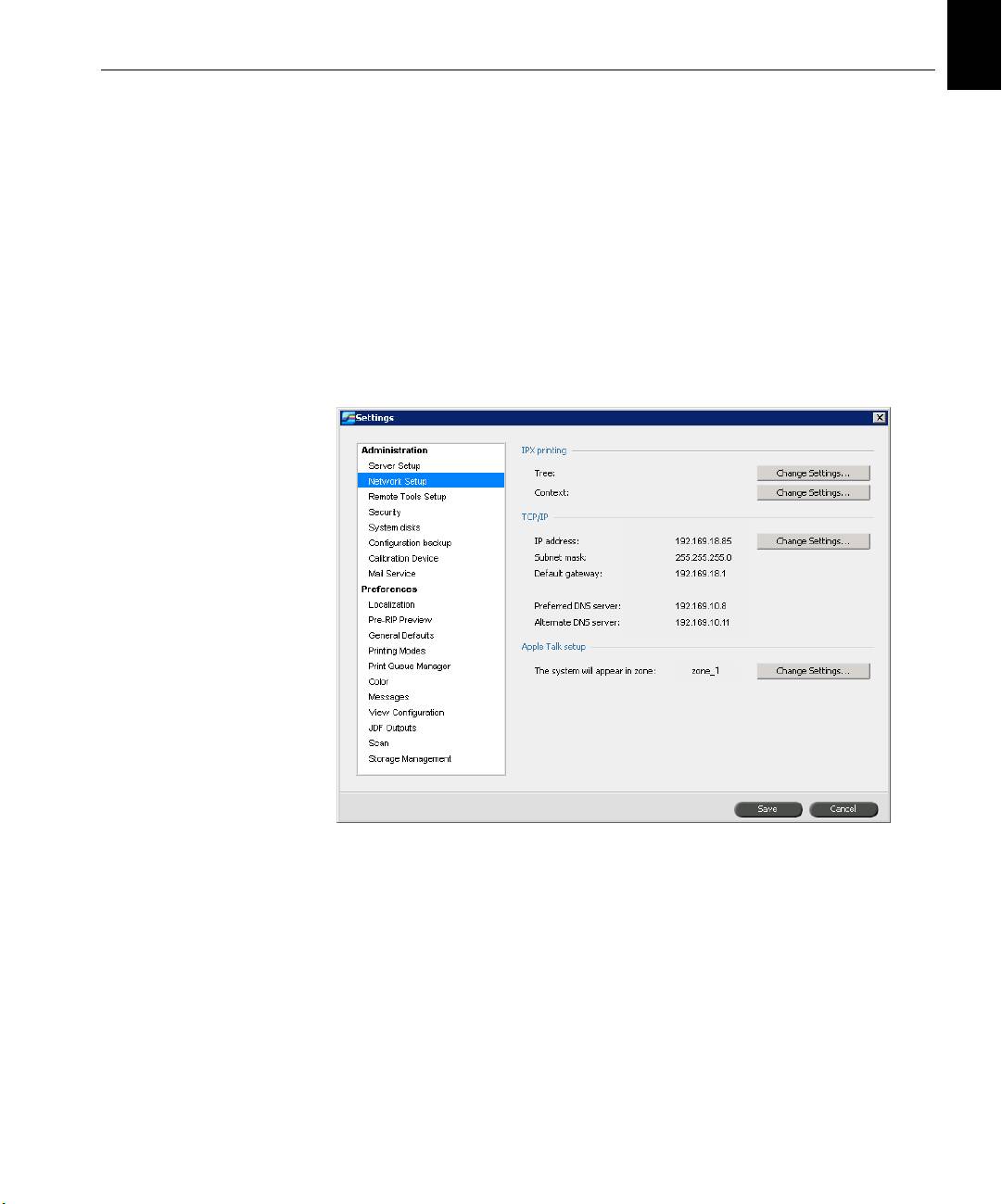
You can also access these configuration settings in the Spire CX260
software.
To open the Settings window:
¾
From the Tools menu, select Settings.
4 Quick Connect Guide
Step 1: Powering Up the Spire CX260
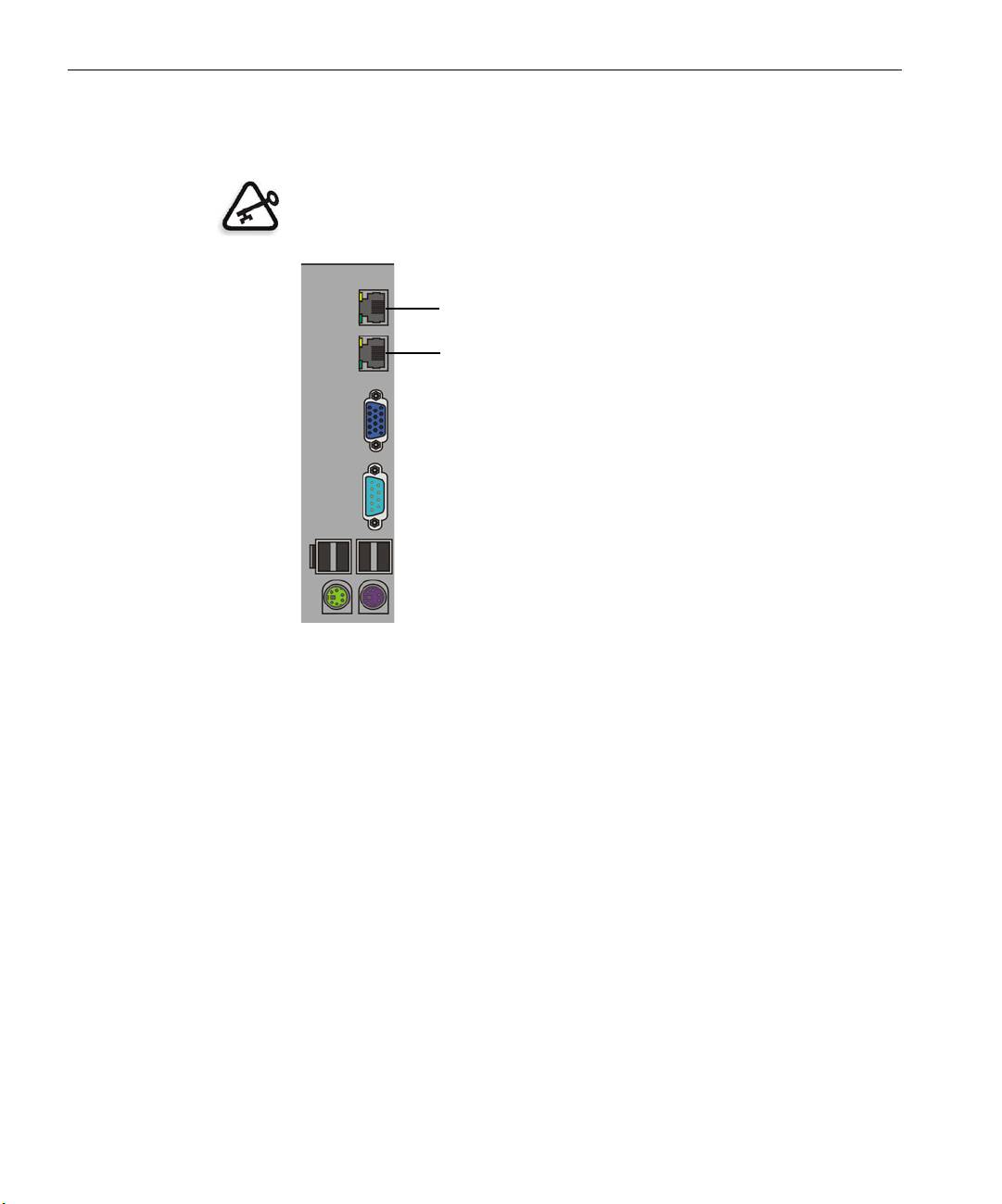
The following graphic shows the network connections on the Spire CX260.
Important: The network cable should be connected to the network port
(10/100/1,000) on the Spire CX260 and a network port, hub or router.
Network port #2 for NetScan crossover application
Network port #1 for the client network
English (EN)
English (EN)
Step 1: Powering Up the Spire CX260 5
Powering Up the Spire CX260
Basic and Pro Basic Configurations
¾ Do one of the following actions:
Turn on the Xerox DocuColor 242/252/260 printer/copier.
The Spire CX260 turns on automatically when the Xerox
DocuColor 242/252/260 printer/copier is turned on.
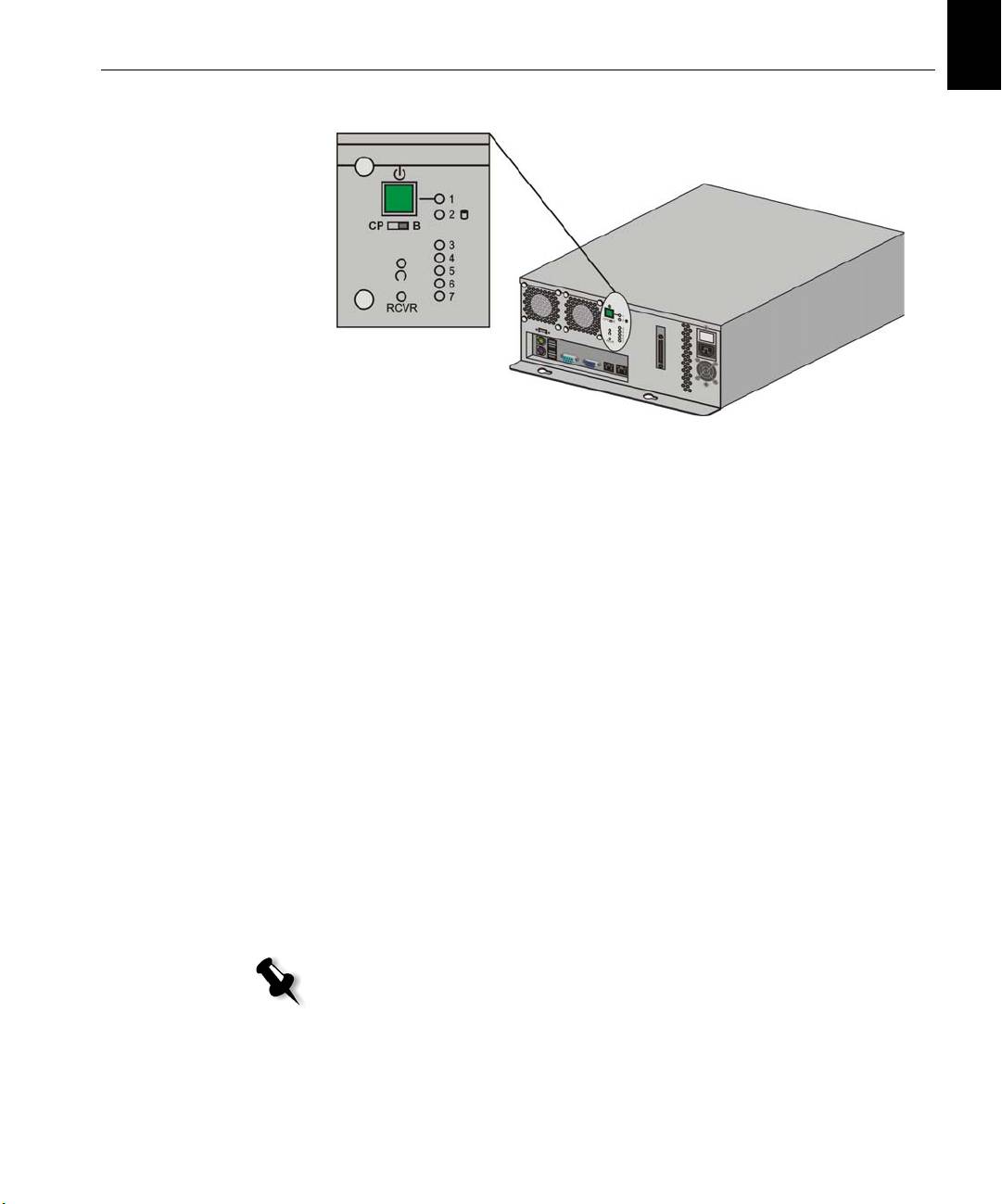
Push the On/Off button on the front of the Spire CX260.
The Spire CX260 automatically turns on and the Xerox DocuColor
242/252/260 printer/copier prints a test page.
Control Station and Pro Control Station Configurations
1. Turn on the monitor.
2. Do one of the following actions:
• Turn on the Xerox DocuColor 242/252/260 printer/copier.
The Spire CX260 turns on automatically when the Xerox
DocuColor 242/252/260 printer/copier is turned on.
• Push the On/Off button on the front of the Spire CX260.
Note: The Spire CX260 can be turned on when the Xerox DocuColor
242/252/260 printer/copier is turned off. In this state, the server runs
until turned off manually by the user. If the server is running and the
printer is then turned on, the server continues running and is not
affected by this action.
6 Quick Connect Guide
The power indicator on the front panel lights up. The Windows
operating system starts, and the Spire CX260 splash screen appears.
Step 2: Default System and Network Settings
Note: If you need to change any of the default settings, see the Creo Color
Server for the Xerox DocuColor 242/252/260 Printer/Copier Technical Manual
(document number 731-01024A-EN) or the Creo Color Server for the Xerox
DocuColor 242/252/260 Printer/Copier User Guide
(document number 731-01023A-EN).
System and Network Settings
The following table lists the default system and network settings. These are
automatically taken from the Xerox DocuColor 242/252/260 printer/
copier settings.
Parameter Default Setting
Language English
Host name CX260 (the host name is taken from the
Computer Name you typed during the
Windows XP installation, see the Creo Color
Server for the Xerox DocuColor 242/252/260
Printer/Copier
Technical Manual for more
details).
Wo rk group WO RKGRO UP
Date & Time US and Canada
Measurement Units Millimeters
IP address Enable DHCP: Yes
AppleTalk setup Enabled, Zone: Automatically detected
English (EN)
English (EN)
Step 3: Network Setup 7
Protocols and Services Installed
The table below describes the default protocols and services installed on
the system.
Parameter Default Setting
Client for Microsoft Networks Enabled
File and Printer Sharing for Microsoft
Enabled
Networks
NetBEUI Protocol Enabled
NWLink BetBIOS Enabled
NWLink IPX/SPX/NetBIOS Compatible
Enabled
Transport Protocol
Network Monitor Driver Enabled
Internet Protocol (TCP/IP) Enabled: DHCP Yes
AppleTalk Protocol Enabled
Network Virtual Printers - Print Queues
The table below describes the default virtual printers which are available
from the Macintosh and PC clients.
Network Virtual Printers - Print Queues <hostname>_ProcessPrint
<hostname>_ProcessStore
<hostname>_SpoolStore
Step 3: Network Setup
TCP/IP Setup
The following should only be performed if you need to change the default
settings (see Step 2 for the default settings).
1. In the Spire CX260 workspace, select Tools > Settings.
2. In the Network Setup parameter, click Change Settings in the TCP/IP
area.

8 Quick Connect Guide
3. Select Use the following IP Address.
4. Type the new IP address, Subnet mask and Default gateway
(according to the Network Administrator).
5. If required, enter the DNS server addresses (according to the Network
Administrator).
6. Click OK.
7. Click OK in the Local Area Connections Properties window.
8. When prompted to restart your computer, click Yes.
AppleTalk Setup
The following should only be performed if you need to change the default
settings (see Step 2 for the default settings).
1. In the Spire CX260 workspace, select Tools > Settings.
2. In the Network Setup parameter, click Change Settings in the Apple
Talk setu p area.
The AppleTalk Protocol Properties window appears.
3. From the zone list, select the desired AppleTalk zone for your
computer, and click
OK.
IPX and Novell Client Setup
Note: For more detailed information, see the Creo Color Server for the Xerox
DocuColor 242/252/260 Printer/Copier Technical Manual (document number
731-01024A-EN) or the Creo Color Server for the Xerox DocuColor 242/252/260
Printer/Copier User Guide (document number 731-01023A-EN).
The following procedures are relevant for those customers who have a
Novell® network running IPX protocol.
Installing Novell Client on the Spire CX260
1. Close the Spire CX260 software.
2. Close all other open applications.
3. On the Windows desktop, click Start and select CX260 > CX260 Tools >
Novell Client Installation
.
4. Click Install; then click Reboot.
