
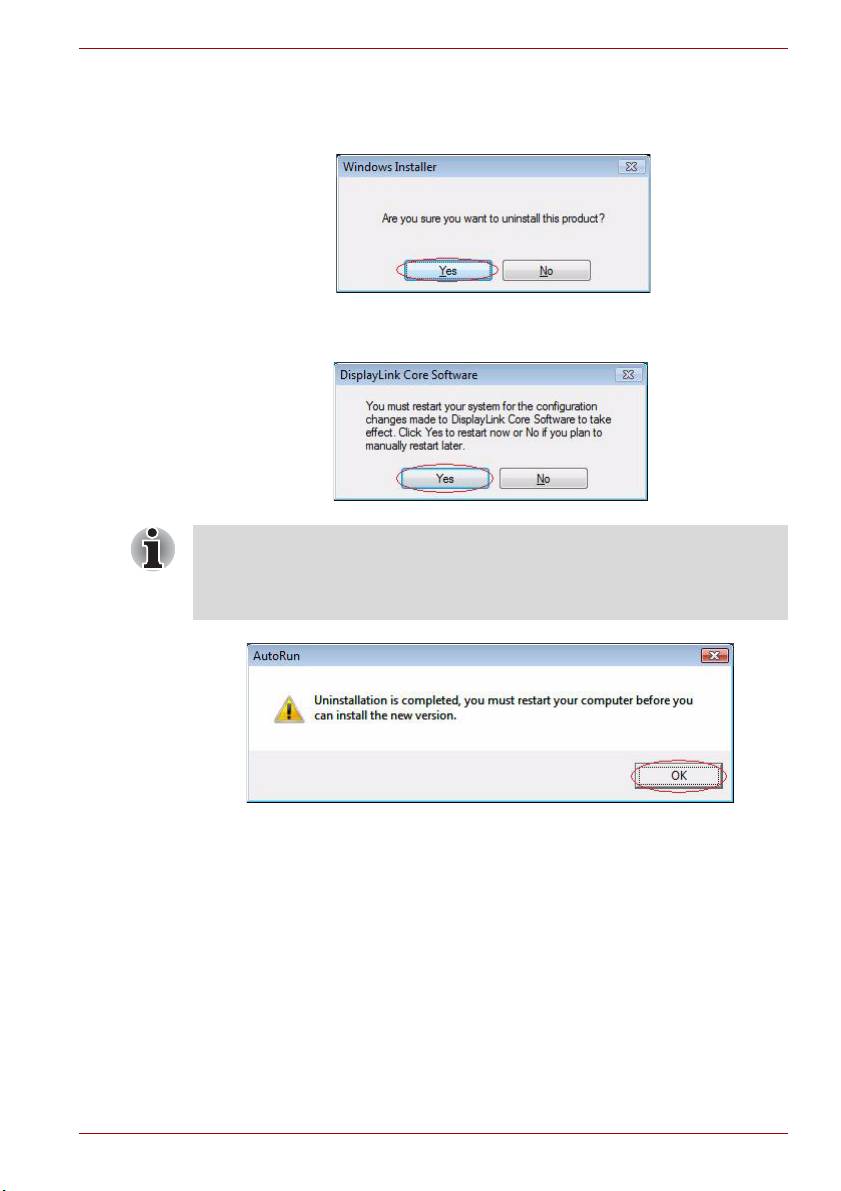
Toshiba Dynadock: 5. When the computer is restarted, the Video Driver will be uninstalled automatically.
5. When the computer is restarted, the Video Driver will be uninstalled automatically.: Toshiba Dynadock
Table of contents
- Guide for Uninstalling the dynadock™ Utility & Driver 1. Insert the dynadock™ Software Installation CD that was included in the 2. You will see the following message. Click “OK” to begin the Utility &
- 3. Follow the on-screen directions to finish uninstalling the dynadock™ Utility.
- 4. After the Utility uninstall is completed, the Audio Driver will be uninstalled automatically.
- 5. When the computer is restarted, the Video Driver will be uninstalled automatically.
- 6. After the computer has restarted, click “Install dynadock Utility & Driver” to install the new version.
Guide for Uninstalling the dynadock™ Utility & Driver
5. When the computer is restarted, the Video Driver will be uninstalled
automatically.
Step1: Click “Yes” to continue.
Step2: After uninstall is finished, the program will request that you
restart your computer. Click “Yes” to finish uninstall.
If you uninstalled the Audio Driver or Video driver without restarting the
computer and then attempted to install the new version, you will be
instructed to restart your computer. That must be done before you can
install the new version. Click “OK” to proceed.
EN-5
Top 10 manuals
100.00
NZXT HALE90 1000W99.99
Samsung SM-R38099.97
AEG BSB 18C99.97
Dell 2700W99.97
Smeg KSEC70X99.96
Beurer HDE 4099.96
Pyramida KH 50 v.299.96
MSI CSM-H81M-P3299.96
AEG HR 562799.95
Melissa 640-048