
Toshiba Dynadock: 4. After the Utility uninstall is completed, the Audio Driver will be uninstalled automatically.
4. After the Utility uninstall is completed, the Audio Driver will be uninstalled automatically.: Toshiba Dynadock
Table of contents
- Guide for Uninstalling the dynadock™ Utility & Driver 1. Insert the dynadock™ Software Installation CD that was included in the 2. You will see the following message. Click “OK” to begin the Utility &
- 3. Follow the on-screen directions to finish uninstalling the dynadock™ Utility.
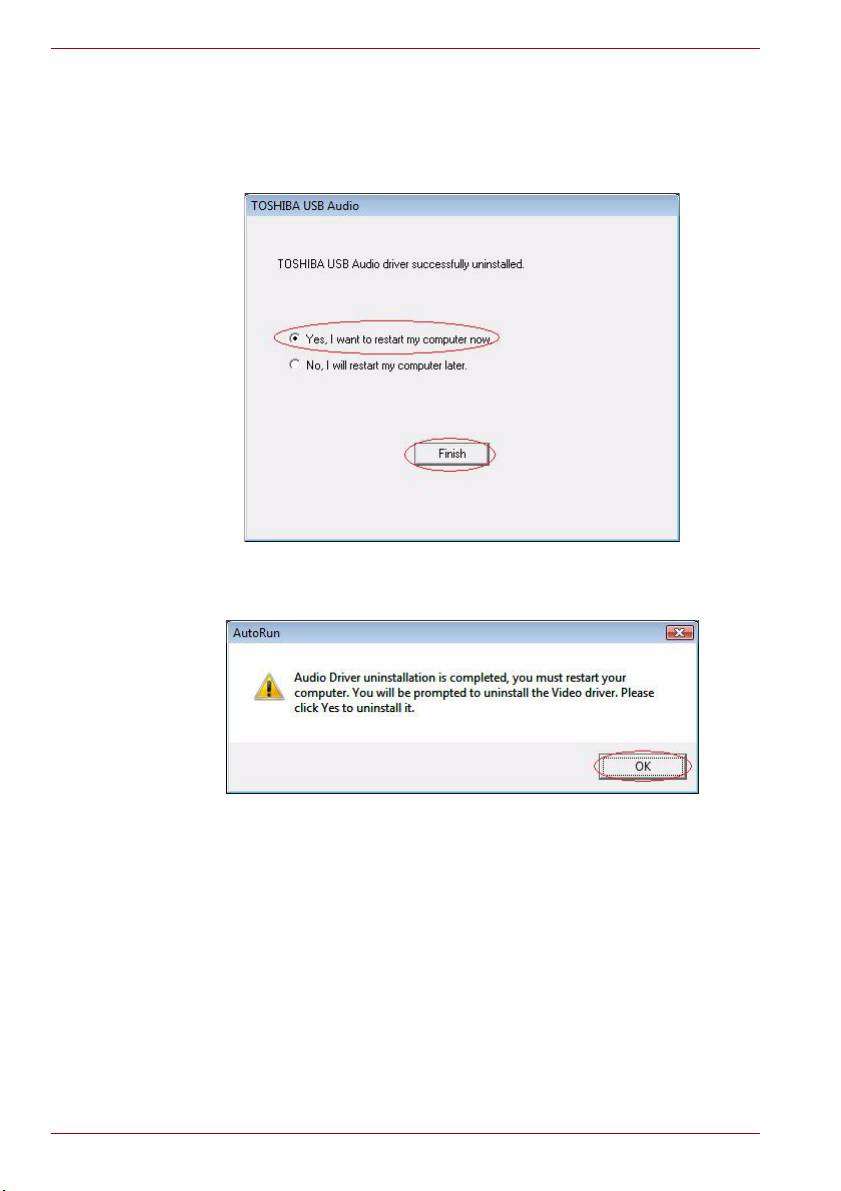
- 4. After the Utility uninstall is completed, the Audio Driver will be uninstalled automatically.
- 5. When the computer is restarted, the Video Driver will be uninstalled automatically.
- 6. After the computer has restarted, click “Install dynadock Utility & Driver” to install the new version.
Guide for Uninstalling the dynadock™ Utility & Driver
4. After the Utility uninstall is completed, the Audio Driver will be
uninstalled automatically.
When the Audio Driver has been successfully uninstalled, you must
choose “Yes, I want to restart my computer now.” and then click
“Finish”.
If you choose “No, I will restart my computer later.” and then click on
“Install dynadock Utility & Driver”, you will see the following message
and you must restart the computer.
EN-4
Top 10 manuals
100.00
NZXT HALE90 1000W99.99
Samsung SM-R38099.97
AEG BSB 18C99.97
Dell 2700W99.97
Smeg KSEC70X99.96
Beurer HDE 4099.96
Pyramida KH 50 v.299.96
MSI CSM-H81M-P3299.96
AEG HR 562799.95
Melissa 640-048