
Lacie LaPlug: Accessing USB Devices (Mac and Windows)
Accessing USB Devices (Mac and Windows) : Lacie LaPlug
Accessing USB Devices (Mac and Windows)
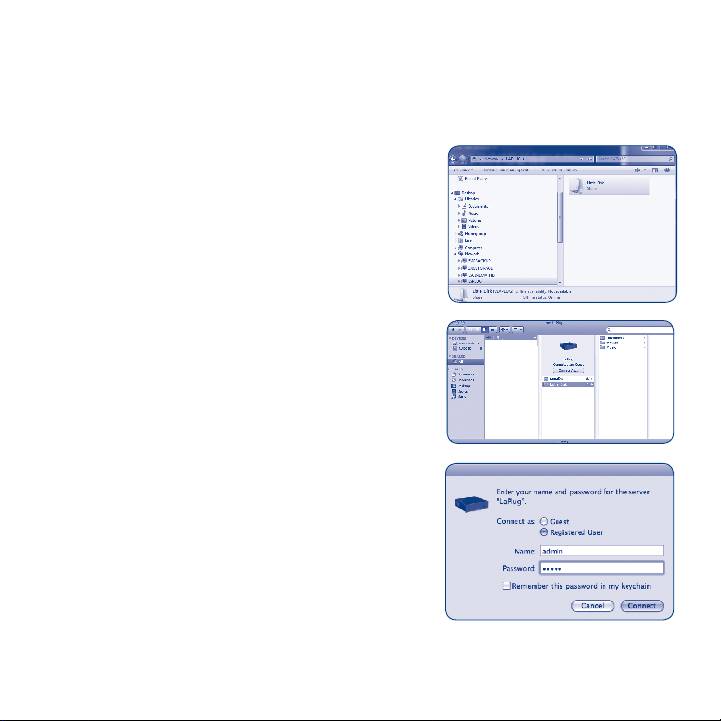
B) Use Finder (Mac) or an Explorer Window (Windows).
a. Windows 7/Vista users: in an Explorer
window, navigate to
Network > [disk name] (\\LaPlug)
Windows XP users: in an Explorer window,
navigate to
Network Places > LaPlug > [disk name]
Fig. 7
Mac users: in the Finder, navigate to
Network > LaPlug > [disk name].
Fig. 8
b. If you are prompted for a username/
password, enter your username and
password (by default):
Username = admin
Password = admin
Fig. 9
Table of contents
- Quick Install Guide
- Accessing USB Devices (LaCie Network Assistant)
- Accessing USB Devices (Mac and Windows)
- Accessing LaCie Dashboard
- LaPlug LED Behavior
- Updating Firmware
- Contact Us
Top 10 manuals
100.00
NZXT HALE90 1000W99.99
Samsung SM-R38099.97
AEG BSB 18C99.97
Dell 2700W99.97
Smeg KSEC70X99.96
Beurer HDE 4099.96
Pyramida KH 50 v.299.96
MSI CSM-H81M-P3299.96
AEG HR 562799.95
Melissa 640-048