
Apple LED Cinema Display – страница 5
Инструкция к Монитору Apple LED Cinema Display
Оглавление
- Начало работы
- Настройка монитора
- Настройка компьютера при закрытой крышке
- Использование монитора Настройка звуковых входа и выхода
- Использование встроенной камеры iSight
- Настройка монитора Apple LED Cinema в качестве дополнительного монитора Настройка цвета и яркости
- Использование портов USB и слота безопасности Использование монтажного комплекта VESA для Вашего монитора
- Безопасность и уход Как почистить экран монитора При использовании монитора следуйте данным инструкциям по безопасности.
- Эргономика
- Установите монитор и наклоняйте его вверх или вниз так, чтобы избежать бликов и отражения света от световых приборов или из окон.
- Устранение неполадок монитора
- Встроенная камера iSight, микрофон, динамики или порты USB монитора не работают Дополнительная информация, обслуживание и поддержка Тема Где найти информацию
- Спецификации
ПРЕДУПРЕЖДЕНИЕ. Используйте только кабель, входящий в комплект поставки
монитора. Кабель питания оснащен трехпроводной заземляющей вилкой
(вилкой, у которой есть третий заземляющий контакт), которая подойдет только
к розетке с заземлением. Если Вы не можете вставить вилку в розетку, потому что
она не заземлена, обратитесь к квалифицированному электрику, который заменит
ее подходящей розеткой с заземлением.
ПРЕДУПРЕЖДЕНИЕ. Ваш монитор находится под высоким напряжением, и его
не следует разбирать ни при каких обстоятельствах, даже когда он отключен
от сети питания. Если монитор нуждается в ремонте, ознакомьтесь с содержанием
раздела «Дополнительная информация, обслуживание и поддержка» на стр. 16.
Эргономика
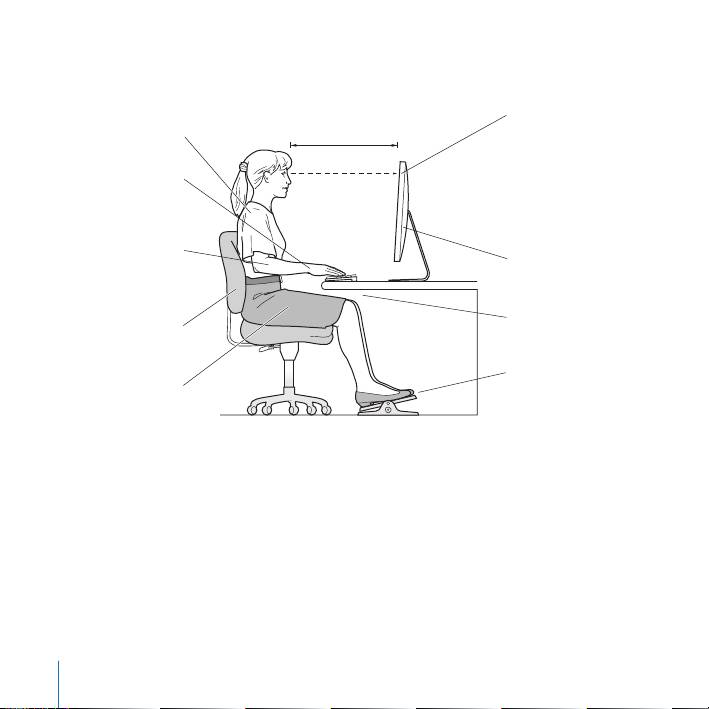
Ниже приведены некоторые рекомендации по устранению бликов и настройке
физических параметров.
Â
Установите монитор так, чтобы верхняя грань экрана была чуть ниже уровня глаз,
когда Вы сидите за клавиатурой. Наиболее приемлемое расстояние от глаз зависит
от Ваших предпочтений, в большинстве случаев оно составляет от 45 до 70 см
(от 18 до 28 дюймов).
Русский 81
English 81
Â
Установите монитор и наклоняйте его вверх или вниз так, чтобы избежать бликов
и отражения света от световых приборов или из окон.
Верхняя часть
45–70 см (18–28 дюймов)
Плечи
экрана на уровне
расслаблены
глаз или чуть ниже
(для настройки
Предплечья и
высоты монитора
кисти образуют
может потребоваться
прямую линию
регулировка высоты
рабочего места)
Предплечья
Экран отрегулирован
держатся прямо
так, чтобы избежать
или слегка
отсвечивания
отведены
Свободное
Нижный
пространство под
отдел спины
рабочим столом
поддерживается
Ступни полностью
Бедра слегка
на полу или
опущены
на подставке
Для получения более подробной информации об избежании вреда для здоровья,
безопасности и обслуживании посетите веб-сайт Apple, посвященный эргономике
по адресу: www.apple.com/ru/about/ergonomics.
82 Русский
82 English

Устранение неполадок монитора
Прежде чем предпринимать какие-либо из следующих действий, убедитесь, что Ваш
компьютер включен и не находится в режиме сна, монитор подключен к сети
питания, а все кабели посоединены к компьютеру и монитору должным образом.
На экране нет изображения
Â
Проверьте кабели и разъемы еще раз и убедитесь, что они подсоединены
к компьютеру и монитору должным образом.
Â
Убедитесь, что компьютер включен и не находится в режиме сна. Если крышка
компьютера закрыта, выведите его из режима сна с помощью внешней клавиатуры
или мыши.
Â
Сбросьте параметры PRAM, перезапустив компьютер и удерживая при этом
клавиши Command (x), Option, P и R, пока не услышите звук запуска во второй раз.
Темный экран
Â
Убедитесь, что яркость дисплея настроена должным образом. Выберите
«Apple» () > «Системные настройки» и нажмите «Мониторы». Перетащите
бегунок яркости и настройте яркость.
Â
Если цвета дисплея слишком насыщенные или отображаются неверно, возможно,
потребуется калибровка монитора. Откройте настройки монитора, выберите
«Цвет», нажмите «Калибровать» и следуйте инструкциям.
Портативный компьютер не заряжается
Убедитесь, что разъем MagSafe монитора подсоединен к порту MagSafe компьютера
должным образом.
Русский 83
English 83
Встроенная камера iSight, микрофон, динамики или порты USB монитора
не работают
Убедитесь, что кабель USB монитора надежно подсоединен к порту USB компьютера.
Камера, микрофон, динамики и порты USB работают только в случае, если этот
кабель подключен к компьютеру.
Дополнительная информация по устранению неполадок
Дополнительную информацию по устранению неполадок можно получить на сайте
поддержки мониторов по адресу: www.apple.com/ru/support/displays.
Дополнительная информация, обслуживание и поддержка
Дополнительную информацию о Вашем мониторе можно получить на веб-сайте
Apple в Справке Mac.
Тема Где найти информацию
Использование монитора В строке меню выберите «Справка» > «Справка Mac» и введите
«мониторы» в поле поиска.
Обслуживание мониторов,
Посетите www.apple.com/ru/support/displays
поддержка, обсуждения,
устранение неполадок
и загрузка ПО
Последняя информация
Посетите www.apple.com/ru/displays
о мониторах
Регистрация монитора Посетите www.apple.com/ru/register
84 Русский
84 English

Спецификации
Â
Модель: A1267
Â
Разрешение: 1920 x 1200, частота 60 Гц
Â
Порты: три порта USB 2.0 на задней панели
Â
Камера и микрофон: встроенная камера iSight с микрофоном
Â
Динамики: встроенные динамики 2.1 с выходной мощностью 12 Вт
Размеры
Â
Вес: 9,49 кг
Â
Высота: 478,38 мм
Â
Ширина: 573,22 мм
Â
Глубина (с подставкой): 197,10 мм
Â
Размер экрана: диагональ 24 дюйма (609,60 мм)
Требования к среде эксплуатации
Â
Температура при эксплуатации: от 10° до 35° C
Â
Влажность при эксплуатации: от 20% до 80% (без конденсации)
Â
Максимальная высота эксплуатации: от 0 до 3048 м
Русский 85
English 85

Regulatory Compliance Information
FCC Compliance Statement
This product has demonstrated EMC compliance under
This equipment has been tested and found to comply
conditions that included the use of compliant peripheral
with the limits for a Class B digital device, pursuant to
devices and shielded cables between system
part 15 of the FCC Rules. These limits are designed to
components. It is important that you use compliant
provide reasonable protection against harmful
peripheral devices and shielded cables between system
interference in a residential installation.
components to reduce the possibility of causing
interference to radios, television sets, and other
This equipment generates, uses, and can radiate radio
electronic devices.
frequency energy and, if not installed and used in
accordance with the instructions, may cause harmful
Responsible party (contact for FCC matters only):
interference to radio communications. However, there is
Apple Inc. Corporate Compliance
no guarantee that interference will not occur in a
1 Infinite Loop, MS 26-A
particular installation. If this equipment does cause
Cupertino, CA 95014 USA
harmful interference to radio or television reception,
Industry Canada Statement
which can be determined by turning the equipment off
Complies with the Canadian ICES-003 Class B
and on, the user is encouraged to try to correct the
specifications. Cet appareil numérique de la classe B est
interference by one or more of the following measures:
conforme à la norme NMB-003 du Canada.
 Reorient or relocate the receiving antenna.
 Increase the separation between the equipment and
VCCI Class B Statement
receiver.
 Connect the equipment into an outlet on a circuit
different from that to which the receiver is connected.
 Consult the dealer or an experienced radio/TV
technician for help.
If necessary, consult an Apple Authorized Service
Provider or Apple. See the service and support
information that came with your Apple product. Or,
consult an experienced radio/television technician for
additional suggestions.
Important: Changes or modifications to this product
not authorized by Apple Inc. could void the EMC
compliance and negate your authority to operate the
product.
87
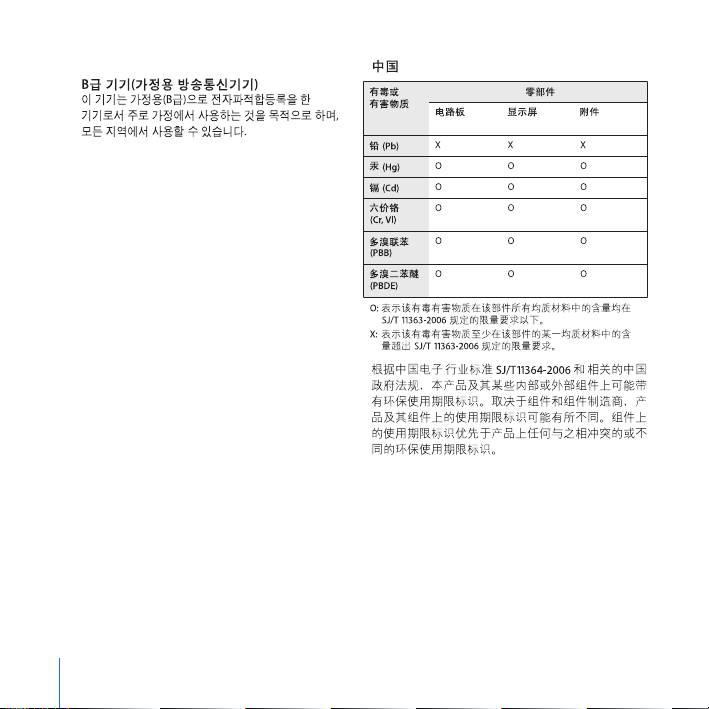
Korea Class B Statement
Europe–EU Declaration of Conformity
See www.apple.com/euro/compliance.
High-Risk Activities Warning
This display is not intended for use in the operation of
nuclear facilities, aircraft navigation or communications
systems, or air traffic control machines, or for any other
uses where the failure of the computer system could
lead to death, personal injury or severe environmental
damage.
Apple and the Environment
Apple Inc. recognizes its responsibility to minimize the
environmental impacts of its operations and products.
More information is available on the web:
www.apple.com/environment
88
ENERGY STAR
®
Compliance
European Union—Disposal Information
The symbol above means that according to local laws
and regulations your product should be disposed of
separately from household waste. When this product
As an ENERGY STAR
®
partner, Apple has determined
reaches its end of life, take it to a collection point
that standard configurations of this product meet the
designated by local authorities. Some collection points
ENERGY STAR
®
guidelines for energy efficiency. The
accept products for free. The separate collection and
ENERGY STAR
®
program is a partnership with electronic
recycling of your product at the time of disposal will
equipment manufacturers to promote energy-efficient
help conserve natural resources and ensure that it is
products. Reducing energy consumption of products
recycled in a manner that protects human health and
saves money and helps conserve valuable resources.
the environment.
For more information about ENERGY STAR
®
, visit:
Union Européenne: informations sur l’élimination
www.energystar.gov
Le symbole ci-dessus signifie que vous devez vous
Disposal and Recycling Information
débarasser de votre produit sans le mélanger avec les
ordures ménagères, selon les normes et la législation de
votre pays. Lorsque ce produit n’est plus utilisable,
portez-le dans un centre de traitement des déchets
This symbol indicates that your product must be
agréé par les autorités locales. Certains centres
disposed of properly according to local laws and
acceptent les produits gratuitement. Le traitement et le
regulations. When your product reaches its end of life,
recyclage séparé de votre produit lors de son
contact Apple or your local authorities to learn about
élimination aideront à préserver les ressources naturelles
recycling options.
et à protéger l’environnement et la santé des êtres
For information about Apple’s recycling program, go to
humains.
www.apple.com/environment/recycling.
89

Europäische Union – Informationen zur Entsorgung
Das Symbol oben bedeutet, dass dieses Produkt
entsprechend den geltenden gesetzlichen Vorschriften
und getrennt vom Hausmüll entsorgt werden muss.
Geben Sie dieses Produkt zur Entsorgung bei einer
offiziellen Sammelstelle ab. Bei einigen Sammelstellen
können Produkte zur Entsorgung unentgeltlich
abgegeben werden. Durch das separate Sammeln und
Recycling werden die natürlichen Ressourcen geschont
und es ist sichergestellt, dass beim Recycling des
Produkts alle Bestimmungen zum Schutz von
Gesundheit und Umwelt beachtet werden.
Unione Europea: informazioni per lo smaltimento
Il simbolo qui sopra significa che, in base alle leggi e alle
norme locali, il prodotto dovrebbe essere smaltito
separatamente dai rifiuti casalinghi. Quando il prodotto
diventa inutilizzabile, portalo nel punto di raccolta
stabilito dalle autorità locali. Alcuni punti di raccolta
accettano i prodotti gratuitamente. La raccolta separata
e il riciclaggio del prodotto al momento dello
smaltimento aiutano a conservare le risorse naturali e
assicurano che venga riciclato nel rispetto della salute
umana e dell’ambiente.
Europeiska unionen – uttjänta produkter
Symbolen ovan betyder att produkten enligt lokala lagar
och bestämmelser inte får kastas tillsammans med
hushållsavfallet. När produkten har tjänat ut måste den
tas till en återvinningsstation som utsetts av lokala
myndigheter. Vissa återvinningsstationer tar
kostnadsfritt hand om uttjänta produkter. Genom att
låta den uttjänta produkten tas om hand för återvinning
hjälper du till att spara naturresurser och skydda hälsa
och miljö.
90
