
Aiptek MobileCinema i55: User’s Manual
User’s Manual: Aiptek MobileCinema i55
User’s Manual
(DE)
Wenn die Lebensdauer des Produkts zu Ende
kommt, lassen Sie bitte möglichst alle
Komponenten recyceln. Bitte recyceln Sie
dieses Produkt ordnungsgemäß, wenn es
nicht mehr verwendet werden kann. Es kann
nicht als Haushaltsmüll behandelt werden. Es
muss separat über die verfügbaren
Rücknahme- und Sammelsysteme entsorgt
werden.
(FR)
Si il est temps de jeter votre produit, veuillez recycler tous les composants possibles. Si ce
produit est arrivé en fin de vie, veuillez s’il vous plait le recycler correctement. Il ne peut pas
être traité comme les ordures ménagères. Il doit être être apporté à un point de collecte
approprié pour le recyclage.
(IT)
Al momento di buttare via il prodotto, riciclare il maggior numero di componenti. Se questo
prodotto giunge alla fine del suo ciclo di vita, lo ricicli correttamente. Non può essere trattato
come rifiuto urbano. Deve essere smaltito separatamente attraverso l’appropriato sistema di
reso e di raccolta.
(AR)
.
!
.
.
(RU)
.
! .
.
(TR)
Ürününüzü atma zamanı geldiinde, lütfen mümkün olan tüm bileenleri geri dönütürün.
Piller ve arj edilebilir piller ev atıklarına atılmamalıdır! Lütfen bunları yerel geri dönütürme
noktanızda geri dönütürün. Birlikte çevreyi korumaya yardımc
ı olabiliriz.
V

User’s Manual
Product Overview
EN
⑥
①
③
④
⑤
⑦
⑧
②
⑨
⑩
⑪ ⑫
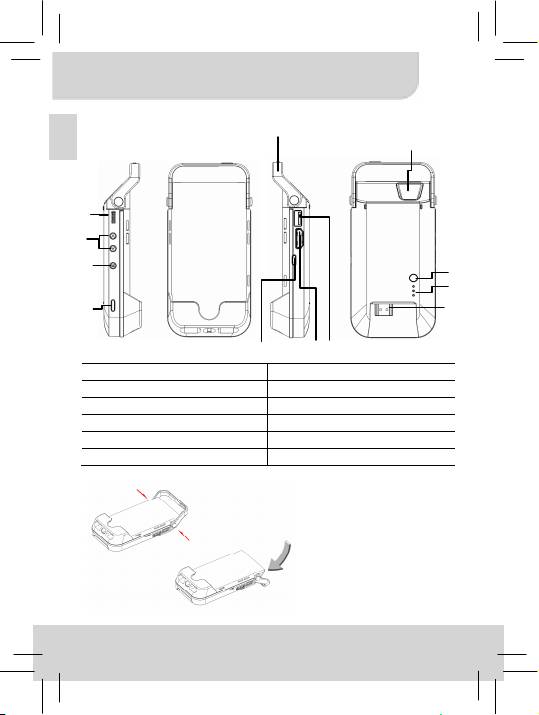
① Projector Lens ⑦ Charging Mode Button
② Projection On/Off Button ⑧ LED Indicator
③ Focus Wheel ⑨ HDMI Male Plug
④ Volume/Up & Down Button ⑩ Micro USB Charging Port
⑤ Menu Button ⑪ HDMI port
⑥ Top holder* ⑫ Type A USB Port
* You can press both side
buttons to switch the top holder
to hold iPhone 5 or be a stand
while placing the projector on
the table.
1
Оглавление
- User’s Manual
- User’s Manual
- User’s Manual
- User’s Manual
- User’s Manual
- User’s Manual
- User’s Manual
- User’s Manual
- User’s Manual
- User’s Manual
- Benutzerhandbuch
- Benutzerhandbuch
- Benutzerhandbuch
- Benutzerhandbuch
- Benutzerhandbuch
- Benutzerhandbuch
- Guide de l’utilisateur
- Guide de l’utilisateur
- Guide de l’utilisateur
- Guide de l’utilisateur
- Guide de l’utilisateur
- Guide de l’utilisateur
- Manuale utente
- Manuale utente
- Manuale utente
- Manuale utente
- Manuale utente
- Manuale utente
- Руководство пользователя
- Руководство пользователя
- Руководство пользователя
- Руководство пользователя
- Руководство пользователя
- Руководство пользователя
- Kullanıcı Kılavuzu
- Kullanıcı Kılavuzu
- Kullanıcı Kılavuzu
- Kullanıcı Kılavuzu
- Kullanıcı Kılavuzu
- Kullanıcı Kılavuzu
- 用户手册
- 用户手册
- 用户手册
- 用户手册
- 用户手册
- 用户手册
- 使用手冊
- 使用手冊
- 使用手冊
- 使用手冊
- 使用手冊
- 使用手冊
- ユーザーマニュアル
- ユーザーマニュアル
- ユーザーマニュアル
- ユーザーマニュアル
- ユーザーマニュアル
- ユーザーマニュアル
- 사용 설명서
- 사용 설명서
- 사용 설명서
- 사용 설명서
- 사용 설명서
- 사용 설명서
-
-
-
-
- User’s Manual
-
