
Huawei Mate 9: instruction
Class: Mobile, portable devices and accessories
Type: Mobile Phone
Manual for Huawei Mate 9
Table of contents
- For more information
- Your phone at a glance
- Getting started
- Dual card dual standby single pass Safety Information Viewing the safety and regulatory information
- Operation and safety
- EU regulatory conformance Body worn operation Statement
- FCC Regulatory Compliance Body worn operation Certification information (SAR)
- FCC statement
- Privacy Policy Legal Notice Trademarks and Permissions
Quick Start Guide
For DTS patents, see http://patents.dts.com. Manufactured under license from DTS Licensing
Limited. DTS, the Symbol, & DTS and the Symbol together are registered trademarks, and DTS
Sound is a trademark of DTS, Inc. © DTS, Inc. All Rights Reserved.
The N-Mark is a trademark or registered trademark of NFC Forum, Inc. in the United
States and in other countries.
Note: Remember the Google account your phone last logged in to.
During an untrusted factory settings restoration or microSD card–based update, Google's anti-theft
mechanism requires you to enter the Google account your phone last logged in to on the startup
navigation screen for identity authentication. Your phone can properly power on only after the
identity authentication passes.
Please visit http://consumer.huawei.com/en/support/hotline for recent updated hotline and email
address in your country or region.
Model: LON-L29

Contents
English ...............................................................................1
Srpski ..............................................................................181
Svenska ........................................................................10
Русский..................................................................
189
Dansk ............................................................................19
Norsk .............................................................................28
Suomi ............................................................................37
Polski .............................................................................46
Lietuvių .........................................................................57
Latviešu ...........................................................................66
Eesti ...............................................................................75
Ελληνικά...............................................................
..84
Čeština ..........................................................................95
Slovenčina................................................................ 104
Deutsch ........................................................................113
Slovenščina................................................................. 123
Magyar ........................................................................132
Hrvatski ......................................................................142
Română ......................................................................151
Български........................................................... 161
Македонски......................................................... 171


English
For more information
Go to http://consumer.huawei.com/en/ to download the user guide
for your device and read the FAQ, privacy policy, and other
information.
Go to
Settings
>
About phone
>
Legal information
to read the
legal information.
Please visit
http://consumer.huawei.com/en/support/hotline/ for the most up-
to-date contact information for your country or region.
1
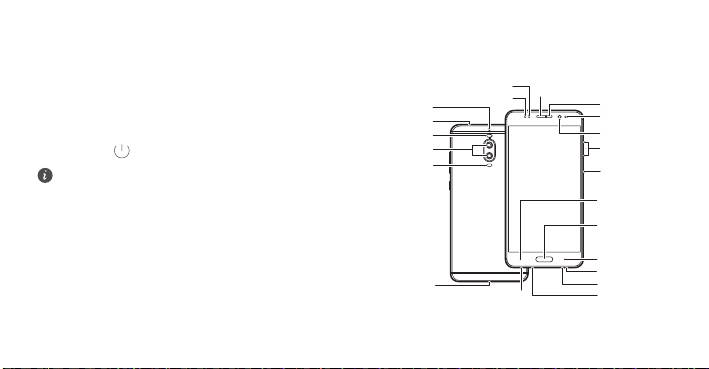
Your phone at a glance
Before you start, let's take a look at your new phone.
Optical proximity sensor
•
To turn on your phone, press and hold the power button until
Earpiece
Status indicator
Secondary
Secondary
microphone 2
your phone vibrates and the screen turns on.
microphone 1
Ambient light
Infrared sensor
sensor
•
To turn off your phone, press and hold the power button, and
Dual-tone flash
Front camera
Dual-lens
then touch .
Volume button
camera
Laser sensor
Power button
To forcibly restart your phone, press and hold the power
button until your phone vibrates.
Left navigation
key
Primary
navigation key/
Fingerprint
scanner
Right navigation
key
Speaker
Primary
USB-C port
microphone 2
Primary microphone 1
Headset jack
2

Getting started
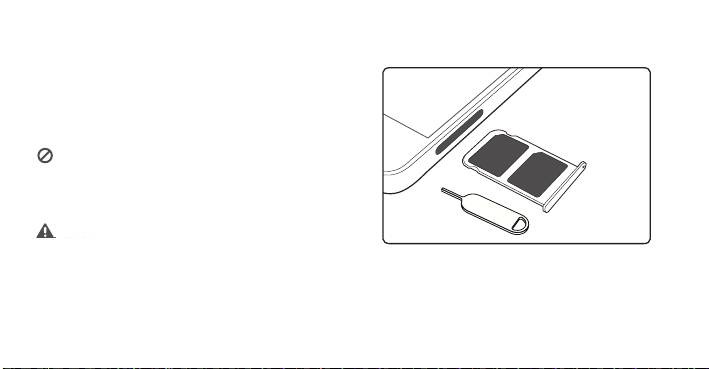
Follow the instructions in the following figures to set up your
phone.
• Do not insert or remove a SIM card while your phone is on.
• Ensure that the SIM card is in the correct position and keep
the card tray level when inserting it into your phone.
Please exercise caution when using the SIM ejector pin to avoid
hurting your fingers or damaging your phone. Store your pin in
a safe place out of the reach of children to prevent them from
swallowing it or injuring themselves by accident.
3
Caution
Insert the SIM card into the correct card slot to ensure that it
can be recognized by the phone.
/BOP4*.
/BOP4*.

It may be a good idea to contact your service provider and subscribe
Dual card dual standby single pass
to missed call reminder and related assistance services to avoid the
conflicts mentioned above.
Your phone supports only dual card dual standby single pass, which
means you cannot use both SIM cards for calls or data services
simultaneously.
Safety Information
•
When you are on a call using SIM card 1, SIM card 2 cannot be
Please read all of the safety information carefully before using your
used to make or answer calls. If someone calls SIM card 2, the
device to ensure its safe and proper operation and to learn how to
caller will hear a voice message similar to "The subscriber you
dispose of your device properly.
dialed is out of the service area" or "The subscriber you dialed
cannot be connected for the moment, please try again later."
Viewing the safety and regulatory information
The actual message will vary by service provider.
For more information on safety, touch
Settings
>
About phone
>
•
When you are using SIM card 1's data service, SIM card 2's
Legal information
>
Safety information
.
data service will be disabled.
For more information on regulation, touch
Settings
>
About
Your phone's single pass feature helps reduce power consumption
phone
>
Authentication info
.
and increase your phone's standby time. It is not related to your
service provider's network conditions.
4

Operation and safety
opposite the pacemaker and do not carry the device in your
front pocket.
•
Keep the device and the battery away from excessive heat and
direct sunlight. Do not place them on or in heating devices,
such as microwave ovens, stoves, or radiators.
•
To prevent possible hearing damage, do not listen at high
•
Observe local laws and regulations while using the device. To
volume levels for long periods.
reduce the risk of accidents, do not use your wireless device
while driving.
•
Using an unapproved or incompatible power adapter, charger,
or battery may damage your device, shorten its lifespan, or
•
While flying in an aircraft or immediately before boarding, only
cause a fire, explosion, or other hazards.
use your device according to instructions provided. Use of a
wireless device in an aircraft may disrupt wireless networks,
•
Ideal operating temperatures are 0 °C to 35 °C. Ideal storage
present a hazard to aircraft operation, or be illegal.
temperatures are -20 °C to +45 °C.
•
To prevent damage to your device's parts or internal circuits,
•
Pacemaker manufacturers recommend that a minimum
do not use it in dusty, smoky, damp, or dirty environments or
distance of 15 cm be maintained between a device and a
near magnetic fields.
pacemaker to prevent potential interference with the
pacemaker. If using a pacemaker, hold the device on the side
•
When charging the device, make sure the power adapter is
plugged into a socket near the devices and is easily accessible.
5

EU regulatory conformance
•
Unplug the charger from electrical outlets and the device when
not in use.
Body worn operation
•
Do not use, store or transport the device where flammables or
The device complies with RF specifications when used near your ear
explosives are stored (in a gas station, oil depot, or chemical
or at a distance of 0.5 cm from your body. Ensure that the device
accessories, such as a device case and device holster, are not
plant, for example). Using your device in these environments
increases the risk of explosion or fire.
composed of metal components. Keep the device away from your
body to meet the distance requirement.
•
Dispose of this device, the battery, and accessories according
The highest SAR value reported for this device type when tested at
to local regulations. They should not be disposed of in normal
the ear is 0.96 W/kg, and when properly worn on the body is
household waste. Improper battery use may lead to fire,
0.98 W/kg.
explosion, or other hazards.
Statement
•
Use only the following listed AC Adapters/Power Supplies:
Hereby, Huawei Technologies Co., Ltd. declares that this device is in
HUAWEI: HW-050450B00, HW-050450E00, HW-050450U00,
compliance with the essential requirements and other relevant
HW-050450A00.
provisions of Directive 1999/5/EC and 2009/125/EC and 2011/65/
EU.
The most recent, effective version of the DoC (declaration of
conformity) can be viewed at
http://consumer.huawei.com/certification.
6

The following marking is included in the product:
FCC Regulatory Compliance
Body worn operation
The device complies with RF specifications when used near your ear
or at a distance of 1.5 cm from your body. Ensure that the device
accessories, such as a device case and device holster, are not
This device may be operated in all member states of the EU.
composed of metal components. Keep the device away from your
Observe national and local regulations where the device is used.
body to meet the distance requirement.
This device may be restricted for use, depending on the local
Certification information (SAR)
network.
This device is also designed to meet the requirements for exposure
Restrictions in the 2.4 GHz band:
to radio waves established by the Federal Communications
Norway
: This subsection does not apply for the geographical area
Commission (USA).
within a radius of 20 km from the centre of Ny-Ålesund.
The SAR limit adopted by the USA is 1.6 W/kg averaged over one
Restrictions in the 5 GHz band:
gram of tissue. The highest SAR value reported to the FCC for this
WLAN function of this device is restricted only to indoor use when
device type complies with this limit.
operating in the 5150 to 5350 MHz frequency range.
The highest SAR value reported to the FCC for this device type when
using at the ear is 1.49 W/kg, and when properly worn on the body
is 0.66 W/kg, and when using the Wi-Fi hotspot function is
1.45 W/Kg.
7

FCC statement
This device complies with Part 15 of the FCC Rules. Operation is
This equipment has been tested and found to comply with the limits
subject to the following two conditions: (1) this device may not
for a Class B digital device, pursuant to Part 15 of the FCC Rules.
cause harmful interference, and (2) this device must accept any
These limits are designed to provide reasonable protection against
interference received, including interference that may cause
harmful interference in a residential installation. This equipment
undesired operation.
generates, uses and can radiate radio frequency energy and, if not
Caution:
Any changes or modifications to this device not expressly
installed and used in accordance with the instructions, may cause
approved by Huawei Technologies Co., Ltd. for compliance could
harmful interference to radio communications. However, there is
void the user's authority to operate the equipment.
no guarantee that interference will not occur in a particular
installation. If this equipment does cause harmful interference to
radio or television reception, which can be determined by turning
the equipment off and on, the user is encouraged to try to correct
the interference by one or more of the following measures:
--Reorient or relocate the receiving antenna.
--Increase the separation between the equipment and receiver.
--Connect the equipment into an outlet on a circuit different from
that to which the receiver is connected.
--Consult the dealer or an experienced radio/TV technician for help.
8
Privacy Policy
Legal Notice
To better understand how we protect your personal information,
please see the privacy policy at
Trademarks and Permissions
http://consumer.huawei.com/privacy-policy.
Copyright © Huawei Technologies Co., Ltd.
, , and are trademarks or registered
2016. All rights reserved.
trademarks of Huawei Technologies Co., Ltd.
THIS DOCUMENT IS FOR INFORMATION PURPOSE ONLY, AND
Android™ is a trademark of Google Inc.
DOES NOT CONSTITUTE ANY KIND OF WARRANTIES.
LTE is a trademark of ETSI.
®
The
Bluetooth
word mark and logos are registered trademarks
owned by
Bluetooth SIG, Inc.
and any use of such marks by Huawei
All pictures and illustrations in this guide, including but not
Technologies Co., Ltd. is under license.
limited to the phone color, size, and display content, are for
®
Wi-Fi
, the Wi-Fi CERTIFIED logo, and the Wi-Fi logo are trademarks
your reference only. The actual product may vary. Nothing in
this guide constitutes a warranty of any kind, express or
of Wi-Fi Alliance.
implied.
9

Svenska
Mer information
Öppna
HiCare
för att läsa bruksanvisningen och
serviceinformationen. Du kan också få hjälp på forumet online.
Gå till http://consumer.huawei.com/en/ och hämta
bruksanvisningen för enheten och läs vanliga frågor, vår
sekretesspolicy och annan information.
Gå till
Inställningar
>
Om telefonen
>
Juridisk information
för
att läsa den juridiska informationen.
Besök http://consumer.huawei.com/en/support/hotline/. Där hittar
du de senast uppdaterade kontaktuppgifterna för ditt land eller
region.
10

Snabbtitt på din telefon
Innan du börjar ska vi ta en titt på din nya telefon.
•
När du vill slå på telefonen håller du ned på/av-knappen tills
telefonen vibrerar och skärmen tänds.
•
När du vill stänga av telefonen håller du ned på/av-knappen
och pekar sedan på .
Om du vill framtvinga en omstart av telefonen håller du ned på/
av-knappen tills telefonen vibrerar.
11
Optisk närhetssensor
Hörlur
Sekundär
Statusindikator
Sekundär
mikrofon 2
mikrofon 1
Omgivning-
Infraröd sensor
sljussensor
Blixt med
Kamera på
två toner
framsidan
Kamera med
två objektiv
Volym-knapp
Lasersensor
På/av-knapp
Vänster
navigeringsknapp
Primär
navigeringsknapp/
fingeravtryc-
ksskanner
Höger
navigeringsknapp
Högtalare
Primär
USB-C-port
mikrofon 2
Primär mikrofon 1
Headsetuttag
Kom igång
Följ instruktionerna i följande figurer för att ställa in telefonen.
•
Sätt inte i och ta inte bort ett SIM-kort medan telefonen är på.
•
Kontrollera att SIM-kortet är i rätt position och håll kortfacket
vågrätt när du sätter i kortet i telefonen.
Var försiktig när du använder stiftet för att mata ut SIM-kortet
så att inte dina fingrar eller telefonen skadas. Spara stiftet på
en säker plats som barn inte kan nå för att förhindra att de
oavsiktligen sväljer stiftet eller skadar sig på det.
12
Caution
Sätt in SIM-kortet i rätt kortplats för att säkerställa att
telefonen kan känna igen det.
/BOP4*.
/BOP4*.

Enkortsfunktionen minskar telefonens strömförbrukning och ökar
Dubbla kort med dubbel standby
standby-tiden. Det beror inte på operatörens nätverksvillkor.
Det kan vara en bra idé att kontakta tjänsteleverantören för att
och enkortsfunktion
abonnera på en tjänst för påminnelse om missade samtal och
relaterad service för att undvika kortkonflikter av det ovannämnda
slaget.
Telefonen har stöd för två kort med dubbel standby men det
är bara ett kort som fungerar åt gången. Det betyder att du
inte kan använda båda SIM-korten samtidigt för samtal eller
Säkerhetsinformation
datatjänster.
Läs all säkerhetsinformation noga innan du använder din enhet så
att du vet hur du ska använda den på ett säkert och korrekt sätt och
•
När du befinner dig i ett samtal med SIM-kort 1 kan inte SIM-
hur den ska tas om hand när den kasseras.
kort 2 användas för att ringa eller ta emot samtal. Om någon
ringer till SIM-kort 2 kommer uppringaren att höra ett
Visa information om säkerhet och föreskrifter
meddelande av typen "Abonnenten du har ringt upp befinner
För mer information om säkerhet, peka på
Inställningar
>
Om
sig utanför tjänstområdet" eller "Abonnenten du har ringt upp
telefonen
>
Juridisk information
>
Säkerhetsinformation
.
kan inte nås för tillfället. Försök igen senare". Meddelandet
För mer information om bestämmelser, peka på
Inställningar
>
varierar beroende på operatör.
Om telefonen
>
Autentiseringsinfo
.
•
När du använder datatjänsten för SIM-kort 1 inaktiveras
datatjänsten för SIM-kort 2.
13

Drift och säkerhet
förhållande till pacemakern och inte bära enheten i
bröstfickan.
•
Håll enheten och batteriet borta från stark värme och direkt
solljus. Lägg dem inte på uppvärmningsanordningar, till
exempel mikrovågsugnar, spisar eller element.
•
Skydda hörseln genom att inte lyssna på ljud med hög volym
•
Respektera gällande lagar och föreskrifter när du använder
längre stunder.
enheten. Minska risken för olyckor genom att aldrig använda
den trådlösa enheten när du kör.
•
Användning av en icke-godkänd eller inkompatibel nätadapter,
laddare eller batteri kan skada enheten, förkorta dess brukstid
•
Använd endast enheten enligt de anvisningar då fått under
eller orsaka brand, explosion eller andra faror.
flygning eller omedelbart före ombordstigning i flygplanet.
Användning av en trådlös enhet i ett flygplan kan störa trådlösa
•
Den idealiska drifttemperaturen är 0 °C till 35 °C. Den idealiska
nätverk, utgöra en fara för driften av flygplanet eller vara
förvaringstemperaturen är -20 °C till +45 °C.
olagligt.
•
Pacemakertillverkare rekommenderar ett minsta avstånd på
•
Använd inte enheten i dammiga, rökiga eller smutsiga miljöer
15 cm mellan enheten och pacemakern för att eventuell
eller nära magnetfält för att förhindra skada på enhetens delar
interferens med pacemakern inte ska uppstå. Om du använder
eller inre kretsar.
en pacemaker bör du hålla enheten på motsatt sida i
14

Överensstämmelse med EU-krav
•
När du laddar enheten ska du se till att nätadaptern är anslutet
till ett eluttag som är nära enheterna och lätt tillgänglig.
Avstånd från kroppen
•
Koppla bort laddaren från eluttaget och enheten när den inte
Enheten överensstämmer med RF-specifikationerna när den hålls
används.
mot örat eller 0,5 cm från kroppen. Se till att enhetens tillbehör,
t.ex. väska och hölster, inte innehåller metalldelar. Håll enheten på
•
Använd inte enheten och förvara eller transportera den inte där
avstånd från kroppen för att uppfylla avståndskravet.
brandfarliga och explosiva ämnen förvaras (till exempel på
Det högsta SAR-värde som rapporterats för den här enhetstypen
bensinstationer, oljedepåer eller kemikaliefabriker).
när den har testats vid örat är 0,96 W/kg och när den bärs korrekt
Användning av enheten i sådana miljöer ökar risken för
på kroppen 0,98 W/kg.
explosion eller brand.
Utlåtande
•
Kassera enheten, batteriet och tillbehör i enlighet med lokala
Huawei Technologies Co., Ltd. försäkrar härmed att denna enhet
föreskrifter. De får inte kastas bland vanliga hushållssopor.
överensstämmer med de väsentliga kraven och andra relevanta
Felaktig batterianvändning kan leda till brand, explosion eller
föreskrifter i direktiv 1999/5/EG och 2009/125/EG och 2011/65/EU.
medföra andra risker.
Den senaste, gällande versionen av försäkran om överensstämmelse
kan ses på http://consumer.huawei.com/certification.
•
Använd endast följande AC-adaptrar/strömförsörjning:
HUAWEI: HW-050450B00, HW-050450E00, HW-050450U00,
HW-050450A00.
15

Produkten har följande märkning:
FCC-överensstämmelse
Avstånd från kroppen
Enheten överensstämmer med RF-specifikationerna när den hålls
mot örat eller 1,5 cm från kroppen. Se till att enhetens tillbehör,
t.ex. väska och hölster, inte innehåller metalldelar. Håll enheten på
Enheten får användas i alla EU-medlemsstater.
avstånd från kroppen för att uppfylla avståndskravet.
Följ nationella och lokala föreskrifter som gäller på den plats där
Certifieringsinformation (SAR)
enheten används.
Denna enhet är också utformad för att uppfylla kraven för
Användningen av enheten kan vara begränsad, beroende på det
exponering för radiovågor som fastställts av Federal
lokala nätverket.
Communications Commission (USA).
Begränsningar i 2,4 GHz-bandet:
Det SAR-gränsvärde som gäller i USA är 1,6 watt/kilogram (W/kg) i
Norge
: Detta underavsnitt gäller inte för det geografiska området
genomsnitt på ett gram vävnad. Det högsta SAR-värde som har
inom en radie på 20 km från Ny-Ålesunds centrum.
rapporterats till FCC för den här typen av enhet ligger under detta
Begränsningar i 5 GHz-bandet:
gränsvärde.
Enhetens WLAN-funktion är begränsad till inomhusbruk när den
Det högsta SAR-värde som rapporterats till FCC för den här
används i frekvensområdet 5 150 till 5 350 MHz.
enhetstypen vid användning vid örat är 1,49 W/kg, när den bärs
korrekt på kroppen 0,66 W/kg, och när funktionen Wi-Fi-surfzon
används är det 1,45 W/Kg.
16
