
Acer AO753: Right view Rear & base views
Right view Rear & base views: Acer AO753
Table of contents
Quick Guide
Right view
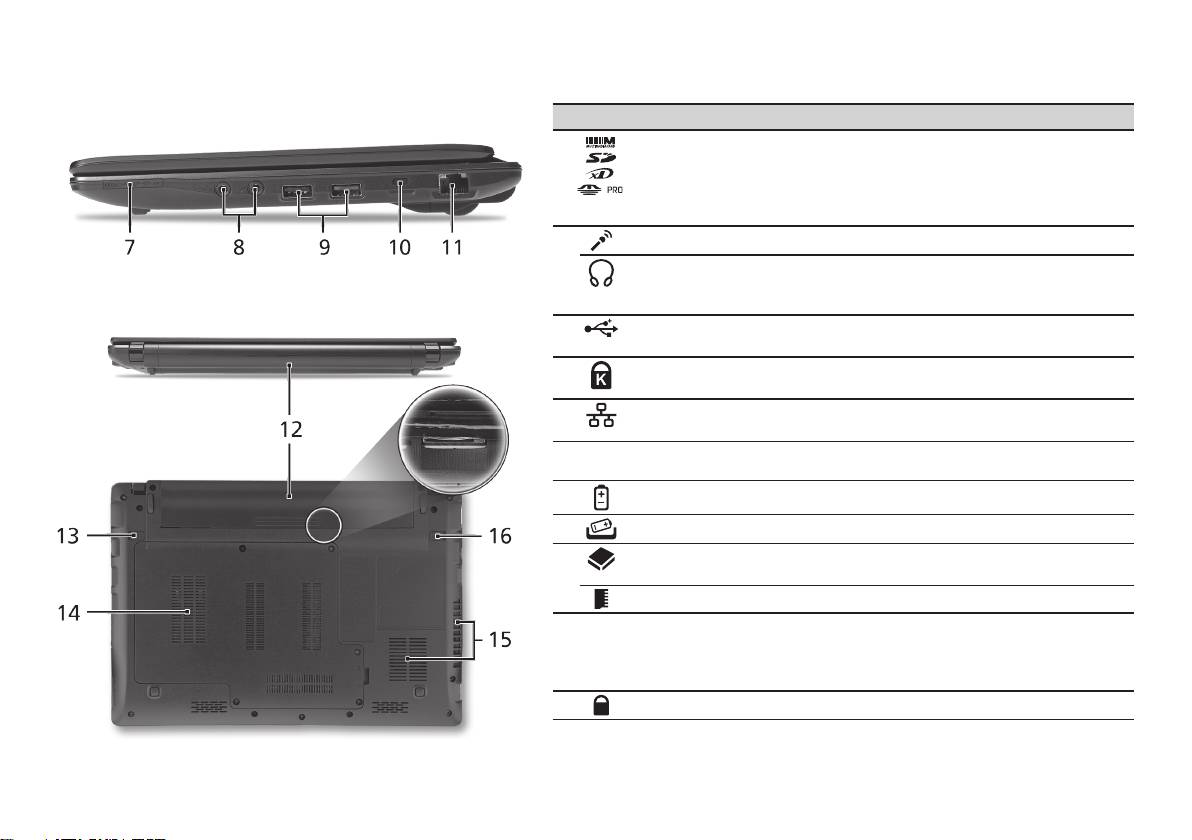
# Icon Item Description
7
Multi-in-1 card reader Accepts Secure Digital (SD), MultiMediaCard
(MMC), Memory Stick (MS), Memory Stick
PRO (MS PRO), xD-Picture Card (xD).
Note: Push to remove/install the card. Only
one card can operate at any given time.
8
Microphone-in jack Accepts inputs from external microphones.
Headphone/speaker/
Connects to audio line-out devices
line-out jack with
(e.g., speakers, headphones).
S/PDIF support
9
USB 2.0 port Connects to USB 2.0 devices (e.g., USB
mouse).
10
Kensington lock slot Connects to a Kensington-compatible
computer security lock.
11
Ethernet (RJ-45) port Connects to an Ethernet 10/100/1000-based
network.
Rear & base views
12
Battery bay Houses the computer's battery pack.
13
Battery release latch Releases the battery for removal.
14
Hard disk bay Houses the computer's hard disk
(secured with screws).
Memory compartmen Houses the computer's main memory.
15
Ventilation slots and
Enable the computer to stay cool, even
cooling fan
after prolonged use.
Note: Do not cover or obstruct the opening
of the fan.
16
Battery lock Locks the battery in position.
6
