
Acer AO721: Environment
Environment: Acer AO721
Table of contents

Series
Environment
Temperature:
Operating: 5 °C to 35 °C
Non-operating: -20 °C to 65 °C
Humidity (non-condensing):
Operating: 20% to 80%
Non-operating: 20% to 80%
7

Gamme
Guide rapide

Gamme
© 2010 Tous droits réservés
Guide rapide de la gamme Aspire One
Première publication : 04/2010
Ordinateur notebook de la gamme Aspire One
Modèle : ______________________________________
No. de série : __________________________________
Date d'achat : _________________________________
Lieu d'achat : __________________________________

Guide rapide
Federal Communications Commission
Declaration of Conformity
This device complies with Part 15 of the FCC Rules. Operation is subject to the following two conditions: (1) this device may not
cause harmful interference, and (2) this device must accept any interference received, including interference that may cause
undesired operation.
The following local Manufacturer / Importer is responsible for this declaration:
Product name: Notebook PC
Brand: Acer
Model number: MS2298
Machine type: AO 721 series
Name of Responsible Party: Acer America Corporation
Address of responsible party: 333 West San Carlos St., San Jose
CA 95110, U. S. A.
Contact person: Acer Representative
Phone No.: 1-254-298-4000
Fax No.: 1-254-298-4147
April 30, 2010

Gamme
• Themaximumconcentrationvaluesoftherestrictedsubstancesbyweightinhomogenousmaterialare:
CE Declaration of Conformity
Lead
0.1%
Polybrominated Biphenyls (PBB’s)
0.1%
We,
Mercury
0.1%
Polybrominated Diphenyl Ethers (PBDE’s)
0.1%
Acer Incorporated
Hexavalent Chromium
0.1%
Cadmium
0.01%
8F, 88, Sec. 1, Hsin Tai Wu Rd., Hsichih, Taipei Hsien 221, Taiwan
Directive 2009/125/EC with regard to establishing a framework for the setting of ecodesign requirements for energy-related
product.
Contact Person: Mr. Easy Lai, e-mail:easy_lai@acer.com.tw
R&TTE Directive 1999/5/EC as attested by conformity with the following harmonized standard:
And,
• Article3.1(a)HealthandSafety
Acer Europe SA
- EN60950-1
Via Cantonale, Centro Galleria 2 6928 Manno Switzerland
- EN62311
Hereby declare that:
• Article3.1(b)EMC
Product: Notebook Computer
- EN301 489-1
Trade Name: Acer
- EN301 489-3 (Applicable to non-bluetooth wireless keyboard mouse set).
Model Number: MS2298
- EN301 489-7
Machine Type: AO721 series
- EN301 489-17
Is compliant with the essential requirements and other relevant provisions of the following EC directives, and that all the
- EN301 489-24
necessary steps have been taken and are in force to assure that production units of the same product will continue comply with
• Article3.2SpectrumUsages
the requirements.
- EN300 440-2 (Applicable to non-bluetooth wireless keyboard mouse set).
EMC Directive 2004/108/EC as attested by conformity with the following harmonized standards:
- EN300 328
• EN55022,AS/NZSCISPR22,ClassB
- EN301 511
• EN55024
- EN301 893 (Applicable to 5GHz high performance RLAN).
• EN61000-3-2ClassD
- EN301 908-1
• EN61000-3-3
- EN301 908-2
Year to begin affixing CE marking 2010.
Low Voltage Directive 2006/95/EC as attested by conformity with the following harmonized standard:
• EN60950-1
Apr. 30, 2010
Council Decision 98/482/EC (CTR21):
(Applicable to product with pan- European single terminal connection to the Public Switched Telephone Network (PSTN).)
Date
Easy Lai /Manager
RoHS Directive 2002/95/EC on the Restriction of the Use of certain Hazardous Substances in Electrical and Electronic Equipment
Regulation Center, Acer Inc.
Guide rapide
• Themaximumconcentrationvaluesoftherestrictedsubstancesbyweightinhomogenousmaterialare:
CE Declaration of Conformity
Lead
0.1%
Polybrominated Biphenyls (PBB’s)
0.1%
We,
Mercury
0.1%
Polybrominated Diphenyl Ethers (PBDE’s)
0.1%
Acer Incorporated
Hexavalent Chromium
0.1%
Cadmium
0.01%
8F, 88, Sec. 1, Hsin Tai Wu Rd., Hsichih, Taipei Hsien 221, Taiwan
Directive 2009/125/EC with regard to establishing a framework for the setting of ecodesign requirements for energy-related
product.
Contact Person: Mr. Easy Lai, e-mail:easy_lai@acer.com.tw
R&TTE Directive 1999/5/EC as attested by conformity with the following harmonized standard:
And,
• Article3.1(a)HealthandSafety
Acer Europe SA
- EN60950-1
Via Cantonale, Centro Galleria 2 6928 Manno Switzerland
- EN62311
Hereby declare that:
• Article3.1(b)EMC
Product: Notebook Computer
- EN301 489-1
Trade Name: Acer
- EN301 489-3 (Applicable to non-bluetooth wireless keyboard mouse set).
Model Number: MS2298
- EN301 489-7
Machine Type: AO721 series
- EN301 489-17
Is compliant with the essential requirements and other relevant provisions of the following EC directives, and that all the
- EN301 489-24
necessary steps have been taken and are in force to assure that production units of the same product will continue comply with
• Article3.2SpectrumUsages
the requirements.
- EN300 440-2 (Applicable to non-bluetooth wireless keyboard mouse set).
EMC Directive 2004/108/EC as attested by conformity with the following harmonized standards:
- EN300 328
• EN55022,AS/NZSCISPR22,ClassB
- EN301 511
• EN55024
- EN301 893 (Applicable to 5GHz high performance RLAN).
• EN61000-3-2ClassD
- EN301 908-1
• EN61000-3-3
- EN301 908-2
Year to begin affixing CE marking 2010.
Low Voltage Directive 2006/95/EC as attested by conformity with the following harmonized standard:
• EN60950-1
Apr. 30, 2010
Council Decision 98/482/EC (CTR21):
(Applicable to product with pan- European single terminal connection to the Public Switched Telephone Network (PSTN).)
Date
Easy Lai /Manager
RoHS Directive 2002/95/EC on the Restriction of the Use of certain Hazardous Substances in Electrical and Electronic Equipment
Regulation Center, Acer Inc.
Gamme
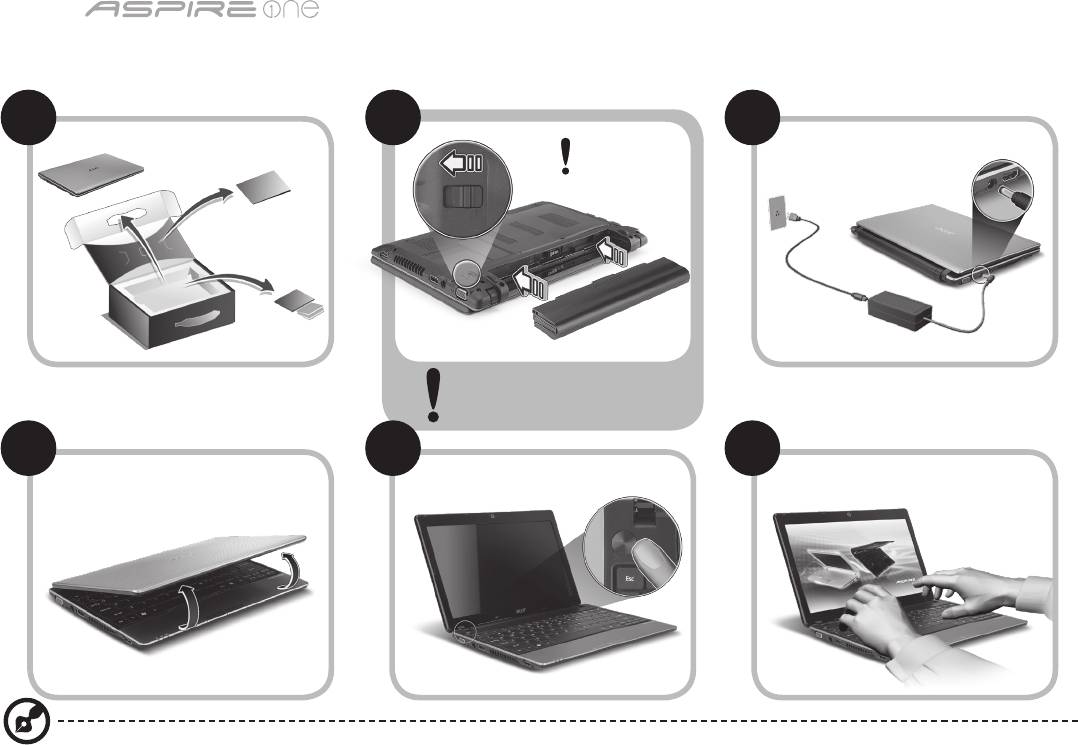
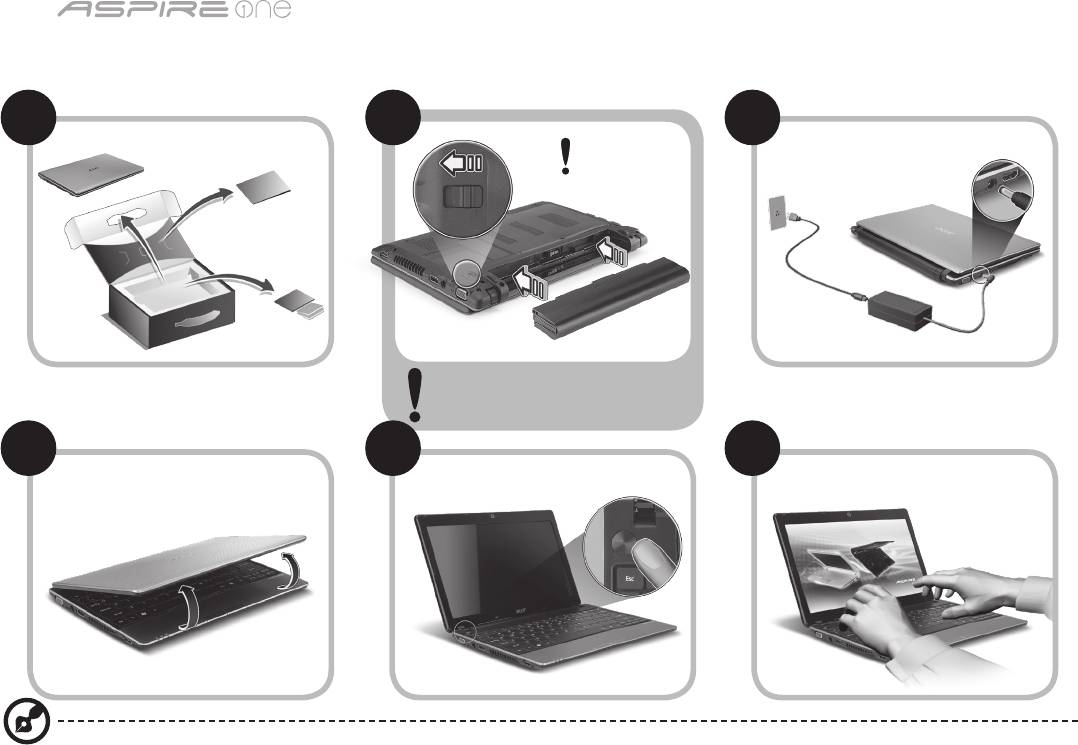
1
Pour partir du bon pied
1 2
3
2-2
3-3
3-1
3-2
2-1
Assurez que la batterie est
correctement verrouillée en
place, comme illustré à 2-2.
4 5 6
Les illustrations sont mises uniquement à titre de référence. Les caractéristiques réelles des produits peuvent changer.

Guide rapide
2
Pour commencer
Nous désirons vous remercier d’avoir fait d’un notebook Acer votre choix pour répondre à vos besoins informatiques mobiles.
Vos guides
Pour vous aider à utiliser votre notebook Acer, nous avons conçu plusieurs guides* :
Tout d’abord, le Guide rapide vous aide à configurer votre ordinateur.
Pour plus d’information sur l’aide que peut vous apporter votre ordinateur pour être plus productif, veuillez vous reporter
au Guide utilisateur AcerSystem. Ce guide contient des informations détaillées sur des sujets tels que les utilitaires systèmes,
la récupération des données, les options d’extension et le dépannage. De plus, il contient des informations de garantie et les
réglementations générales et les avis de sécurité pour votre notebook. Il est disponible au format PDF (Portable Document
Format) et est préchargé sur votre notebook.
Remarque : L'affichage du fichier nécessite Adobe Reader. Si Adobe Reader n’est pas installé dans votre ordinateur, le clic
sur Guide utilisateur AcerSystem va exécuter le programme d’installation d’Adobe Reader. Suivez les instructions à l’écran
pour terminer l’installation. Pour des instructions sur l’utilisation de Adobe Reader, accédez au menu Aide et Support.
* AVIS IMPORTANT : Veuillez noter que les guides mentionnés ici, que ce soit imprimés ou au format électronique, sont
pour votre référence seulement et à l’exception de ce qui est indiqué dans les informations spécifiques à la garantie
contenue dans AcerSystem User Guide, rien de ce qui est contenu dans ces guides ne constitue une déclaration ou
garantie par Acer en ce qui concerne le produit que vous avez acheté. Acer rejette expressément toute responsabilité
pour les erreurs contenues dans les guides.
Gamme
3
Configuration réseau
Ce guide vous aide à configurer les paramètres de votre réseau local et de votre réseau sans fil pour pouvoir vous connecter à
Internet.
Configurer la connexion réseau
Branchez simplement le câble réseau dans le port Ethernet RJ-45. Veuillez vous reporter « Vue droite » à la page 6 pour
l’emplacement du port Ethernet.
Configurer une connexion sans fil
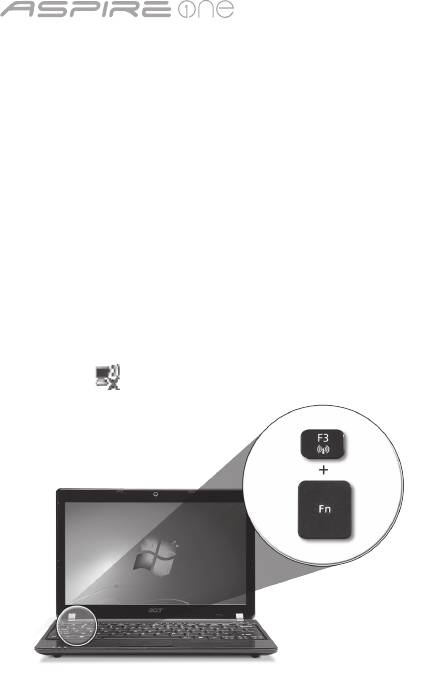
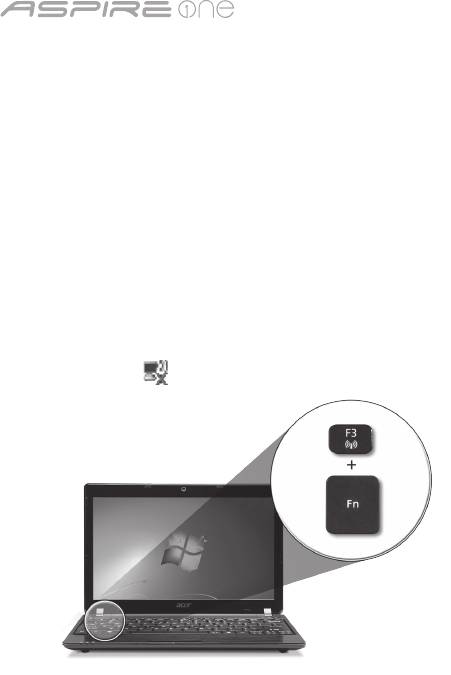
1. Appuyez <Fn> + <F3> pour accéder au gestionnaire de communication. Ici vous pouvez activer la connexion Wi-Fi en cliquant
sur le bouton rouge à côté de Wi-Fi.
Remarque : 3G et Bluetooth sont également accessibles via le gestionnaire de communication. Les périphériques de
communication varient en fonction du modèle.
2. Cliquez sur l’icône sur votre barre des tâches et choisissez le point d’accès sans fil auquel vous souhaitez vous connecter.
Insérer une carte SIM 3G (seulement pour certains modèles)
Retirez la batterie et insérez avec soin une carte SIM 3G dans le connecteur de carte SIM 3G. Veuillez consulter « Vue arrière &
Vue de la base » à la page 6 pour l’emplacement du connecteur de carte SIM 3G.
Guide rapide
4
Vue supérieure
Visite guidée de votre Aspire One
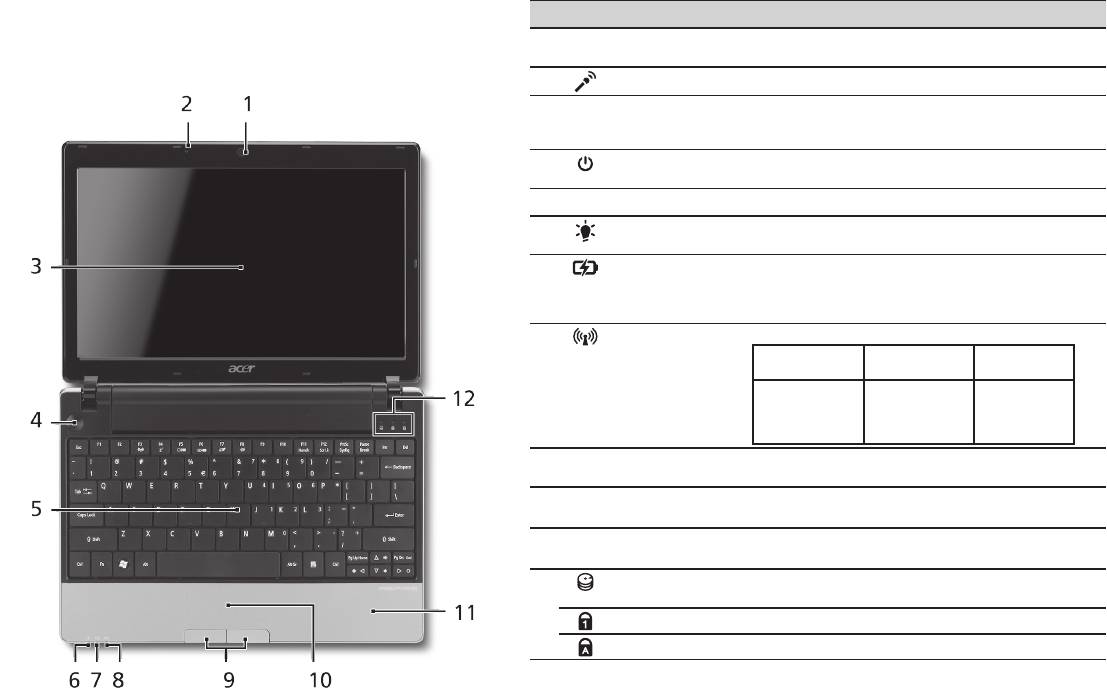
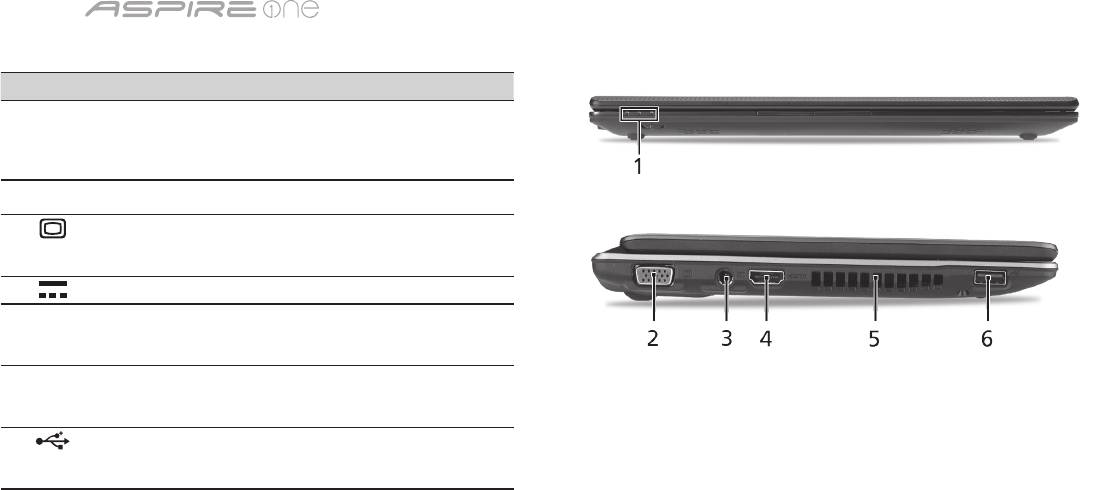
# Icône Élément Description
Après avoir configuré votre ordinateur comme illustré la
1
Webcam Acer
Webcam pour communication video (la
section Pour partir du bon pied, nous allons vous faire
Crystal Eye
configuration peut varier en fonction des modèle).
explorer votre nouveau notebook Acer.
2
Microphone Microphone interne pour l’enregistrement sonore.
3
Écran d’affichage Également appelé écran LCD (Liquid Crystal
Display), affiche les données de l’ordinateur (la
configuration peut varier en fonction des modèle).
4
Bouton Marche/
Met l’ordinateur sous tension et hors tension.
Arrêt
5
Clavier Pour l’entrée des informations dans votre ordinateur.
6
Indicateur
Indique l’état d’alimentation de l’ordinateur.
1
d’alimentation
7
Indicateur de
Indique l’état de la pile de l’ordinateur.
1
batterie
1. Charge : La lumière est orange lorsque la pile se
recharge.
2. Pleine charge : La diode est bleue en mode secteur.
8
Indicateur de
Indique l’état de la communication réseau sans fil/3G.
1
communication
Lumière bleue
Lumière orange
Pas allumé
allumée
allumée
3G activé/
WiFi activé
3G désactivé/
3G désactivé/
3G activé/
WiFi activé
WiFi désactivé
WiFi désactivé
9
Boutons
Le bouton gauche et le bouton droit fonctionnent
(gauche et droit)
comme le bouton gauche et le bouton droit d’une souris.
10
Touchpad Périphérique de pointage sensible au touché qui
fonctionne comme une souris.
11
Repose mains Zonedesupportconfortablepourvosmains
lorsque vous utilisez l’ordinateur.
12
Indicateur du
Indique l’activité du disque dur.
disque dur
Verr Num Est allumé lorsque Verr Num est activée.
Verr Maj Est allumé lorsque Verr Maj est activée.
1. Les indicateurs du panneau avant sont visibles même lorsque l’écran LCD est fermé.
Gamme
5
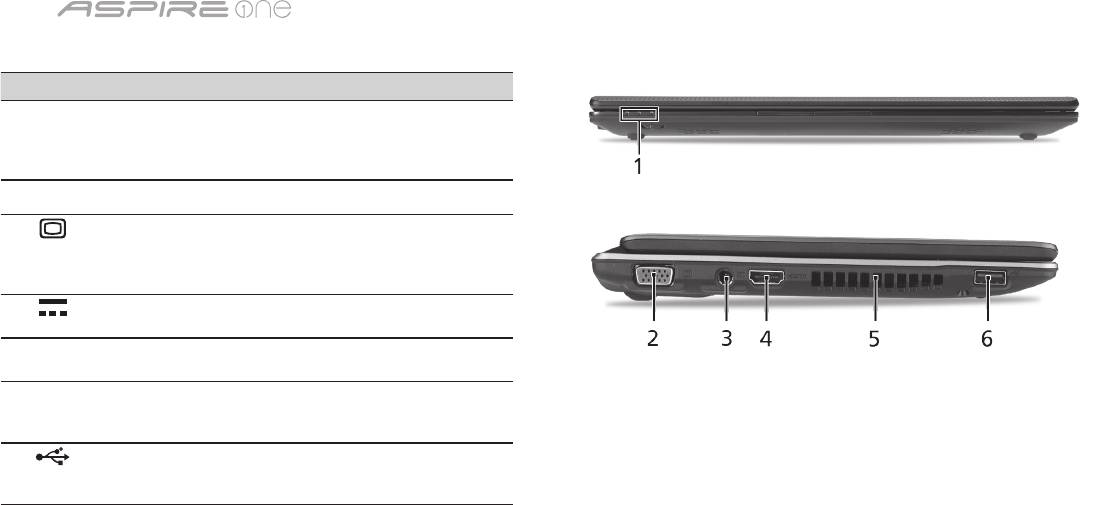
Vue frontale fermée
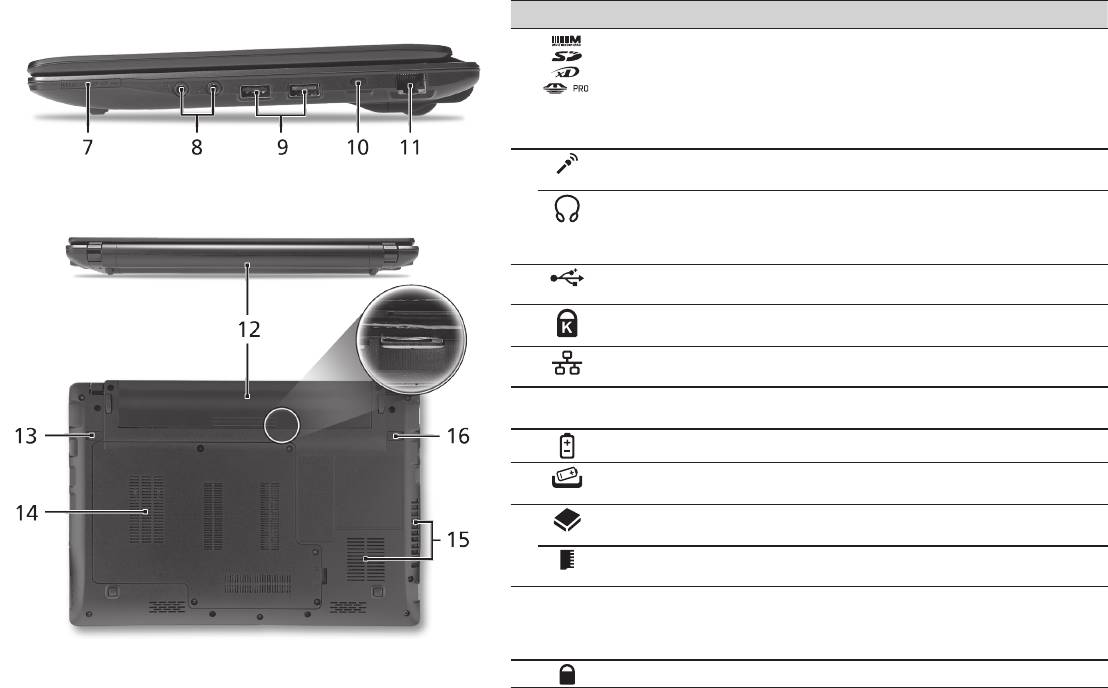
# Icône Élément Description
1
Indicateurs d’état Diodes électroluminescentes (DEL)
qui s’allume pour indiquer l’état
des fonctions et composants de
l’ordinateur.
Vue gauche
2
Port d’affichage
Se connecte à un périphérique
(VGA) externe
d’affichage (p.ex. un moniteur
externe, un projecteur LCD).
3
Prise d’alimentation Se connecte à l’adaptateur secteur.
4
HDMI Port HDMI Prend en charge les connexions
vidéo numériques à haute
définition.
5
Fentes de ventilation Permettent à l’ordinateur de rester
froid, même après une longue
utilisation.
6
Port USB 2.0 Se connecte à des périphériques
USB 2.0 (p.ex. une souris USB, une
caméra USB).
Guide rapide
6
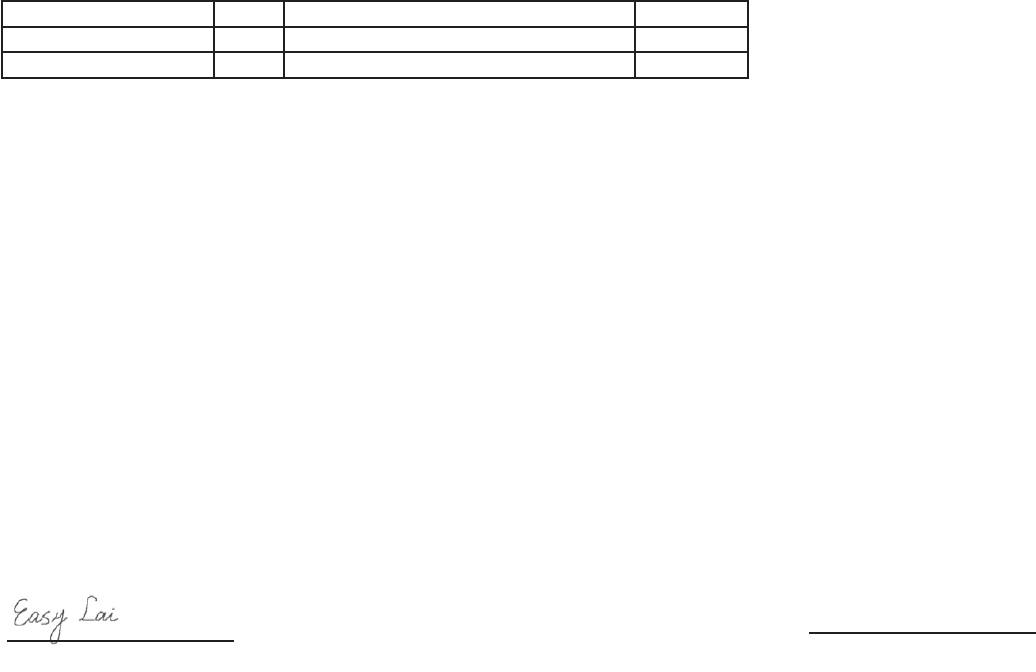
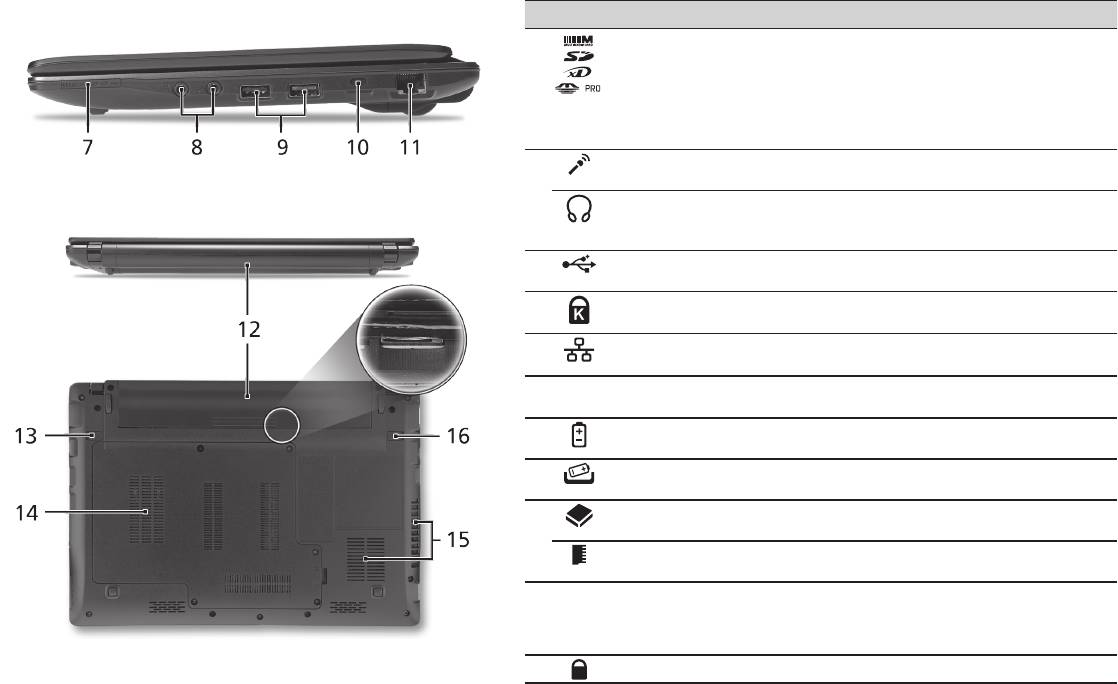
Vue droite
# Icône Élément Description
7
Lecteur de cartes
Accepte une carte mémoire Secure Digital
multiples en un
(SD), MultiMediaCard (MMC), Memory Stick
(MS), Memory Stick Pro (MS PRO), et xD-
Picture (xD).
Remarque : Poussez pour retirer/installer la
carte. Seule une carte peut fonctionner à un
moment donné.
8
Prise d’entrée
Accepte les entrées de microphones externes.
microphone
Prise de sortie audio/
Se connecte à des périphériques audio en
haut-parleur/casque
sortie (p.ex. haut-parleurs ou un casque
avec prise en charge
stéréo).
de S/PDIF
9
Port USB 2.0 Se connecte à des périphériques USB 2.0
(p.ex. une souris USB).
10
Fente pour cadenas
Se connecte à un cadenas de sécurité pour
Kensington
ordinateur Kensington.
11
Port Ethernet RJ-45 Se connecte à un réseau Ethernet
10/100/1000 Base.
Vue arrière & Vue de la base
12
Baie de la batterie Contient la batterie de l’ordinateur.
13
Loquet de libération
Libère la batterie pour le retrait.
de la batterie
14
Baie du disque dur Contient le disque dur de l'ordinateur
(fixé avec des vis).
Compartiment
Contient la mémoire principale de
mémoire
l’ordinateur.
15
Fentes de ventilation
Permettent à l’ordinateur de rester froid,
et ventilateur de
même après une longue utilisation.
refroidissement
Remarque : Ne couvrez pas et ne bloquez
pas l’ouverture du ventilateur.
16
Verrou de la batterie Verrouille la batterie en position.

Gamme
Environnement
Température :
En marche : 5°C à 35°C
À l’arrêt : -20°C à 65°C
Humidité (sans condensation) :
En marche : 20% à 80%
À l’arrêt : 20% à 80%
7

Serie
Kurzanleitung

Serie
© 2010 Alle Rechte vorbehalten
Kurzanleitung für Aspire One Serie
Originalausgabe: 04/2010
Notebook-PC der Aspire One Serie
Modellnummer: _______________________________
Seriennummer: ________________________________
Kaufdatum: ___________________________________
Kaufort: ______________________________________

Kurzanleitung
Federal Communications Commission
Declaration of Conformity
This device complies with Part 15 of the FCC Rules. Operation is subject to the following two conditions: (1) this device may not
cause harmful interference, and (2) this device must accept any interference received, including interference that may cause
undesired operation.
The following local Manufacturer / Importer is responsible for this declaration:
Product name: Notebook PC
Brand: Acer
Model number: MS2298
Machine type: AO 721 series
Name of Responsible Party: Acer America Corporation
Address of responsible party: 333 West San Carlos St., San Jose
CA 95110, U. S. A.
Contact person: Acer Representative
Phone No.: 1-254-298-4000
Fax No.: 1-254-298-4147
April 30, 2010

Serie
• Themaximumconcentrationvaluesoftherestrictedsubstancesbyweightinhomogenousmaterialare:
CE Declaration of Conformity
Lead
0.1%
Polybrominated Biphenyls (PBB’s)
0.1%
We,
Mercury
0.1%
Polybrominated Diphenyl Ethers (PBDE’s)
0.1%
Acer Incorporated
Hexavalent Chromium
0.1%
Cadmium
0.01%
8F, 88, Sec. 1, Hsin Tai Wu Rd., Hsichih, Taipei Hsien 221, Taiwan
Directive 2009/125/EC with regard to establishing a framework for the setting of ecodesign requirements for energy-related
product.
Contact Person: Mr. Easy Lai, e-mail:easy_lai@acer.com.tw
R&TTE Directive 1999/5/EC as attested by conformity with the following harmonized standard:
And,
• Article3.1(a)HealthandSafety
Acer Europe SA
- EN60950-1
Via Cantonale, Centro Galleria 2 6928 Manno Switzerland
- EN62311
Hereby declare that:
• Article3.1(b)EMC
Product: Notebook Computer
- EN301 489-1
Trade Name: Acer
- EN301 489-3 (Applicable to non-bluetooth wireless keyboard mouse set).
Model Number: MS2298
- EN301 489-7
Machine Type: AO721 series
- EN301 489-17
Is compliant with the essential requirements and other relevant provisions of the following EC directives, and that all the
- EN301 489-24
necessary steps have been taken and are in force to assure that production units of the same product will continue comply with
• Article3.2SpectrumUsages
the requirements.
- EN300 440-2 (Applicable to non-bluetooth wireless keyboard mouse set).
EMC Directive 2004/108/EC as attested by conformity with the following harmonized standards:
- EN300 328
• EN55022,AS/NZSCISPR22,ClassB
- EN301 511
• EN55024
- EN301 893 (Applicable to 5GHz high performance RLAN).
• EN61000-3-2ClassD
- EN301 908-1
• EN61000-3-3
- EN301 908-2
Year to begin affixing CE marking 2010.
Low Voltage Directive 2006/95/EC as attested by conformity with the following harmonized standard:
• EN60950-1
Apr. 30, 2010
Council Decision 98/482/EC (CTR21):
(Applicable to product with pan- European single terminal connection to the Public Switched Telephone Network (PSTN).)
Date
Easy Lai /Manager
RoHS Directive 2002/95/EC on the Restriction of the Use of certain Hazardous Substances in Electrical and Electronic Equipment
Regulation Center, Acer Inc.
Kurzanleitung
• Themaximumconcentrationvaluesoftherestrictedsubstancesbyweightinhomogenousmaterialare:
CE Declaration of Conformity
Lead
0.1%
Polybrominated Biphenyls (PBB’s)
0.1%
We,
Mercury
0.1%
Polybrominated Diphenyl Ethers (PBDE’s)
0.1%
Acer Incorporated
Hexavalent Chromium
0.1%
Cadmium
0.01%
8F, 88, Sec. 1, Hsin Tai Wu Rd., Hsichih, Taipei Hsien 221, Taiwan
Directive 2009/125/EC with regard to establishing a framework for the setting of ecodesign requirements for energy-related
product.
Contact Person: Mr. Easy Lai, e-mail:easy_lai@acer.com.tw
R&TTE Directive 1999/5/EC as attested by conformity with the following harmonized standard:
And,
• Article3.1(a)HealthandSafety
Acer Europe SA
- EN60950-1
Via Cantonale, Centro Galleria 2 6928 Manno Switzerland
- EN62311
Hereby declare that:
• Article3.1(b)EMC
Product: Notebook Computer
- EN301 489-1
Trade Name: Acer
- EN301 489-3 (Applicable to non-bluetooth wireless keyboard mouse set).
Model Number: MS2298
- EN301 489-7
Machine Type: AO721 series
- EN301 489-17
Is compliant with the essential requirements and other relevant provisions of the following EC directives, and that all the
- EN301 489-24
necessary steps have been taken and are in force to assure that production units of the same product will continue comply with
• Article3.2SpectrumUsages
the requirements.
- EN300 440-2 (Applicable to non-bluetooth wireless keyboard mouse set).
EMC Directive 2004/108/EC as attested by conformity with the following harmonized standards:
- EN300 328
• EN55022,AS/NZSCISPR22,ClassB
- EN301 511
• EN55024
- EN301 893 (Applicable to 5GHz high performance RLAN).
• EN61000-3-2ClassD
- EN301 908-1
• EN61000-3-3
- EN301 908-2
Year to begin affixing CE marking 2010.
Low Voltage Directive 2006/95/EC as attested by conformity with the following harmonized standard:
• EN60950-1
Apr. 30, 2010
Council Decision 98/482/EC (CTR21):
(Applicable to product with pan- European single terminal connection to the Public Switched Telephone Network (PSTN).)
Date
Easy Lai /Manager
RoHS Directive 2002/95/EC on the Restriction of the Use of certain Hazardous Substances in Electrical and Electronic Equipment
Regulation Center, Acer Inc.
Serie
1
Für den Anfang
1 2
3
2-2
3-3
3-1
3-2
2-1
Stellen Sie sicher, dass der Akku
wie in Abbildung 2-2 gezeigt an
seinem Platz festsitzt.
4 5 6
Abbildung nur Referenz und kann zum Produkt variieren. Das tatsächliche Produkt kann sich von den Abbildungen
unterscheiden.

Kurzanleitung
2
Das Wichtigste zuerst
Wir möchten uns bei Ihnen dafür bedanken, dass Sie sich in Bezug auf mobilen Computerbedarf für ein Acer-Notebook
entschieden haben.
Hilfen
Als Hilfe für Sie bei der Verwendung des Acer-Notebooks haben wir einen Satz von Richtlinien aufgestellt*:
ZuallerersthilftIhnendieKurzanleitungdabei,IhrenComputerdasersteMalinBetriebzunehmen.
Für weitere Informationen dazu, wie Ihnen Ihr Computer helfen kann, noch produktiver zu arbeiten, lesen Sie bitte
die AcerSystem Benutzeranleitung. Dieses Benutzerhandbuch enthält detaillierte Informationen zu Themen wie z. B.
Systemprogramme, Datenwiederherstellung, Erweiterungsoptionen und Problembehebung. Darüber hinaus enthält es
Informationen zur Garantie und allgemeine Bestimmungen und Sicherheitshinweise zu Ihrem Notebook. Das Benutzerhandbuch
steht in PDF (Portable Document Format) zur Verfügung und ist bereits in Ihrem Notebook installiert.
Hinweis:ZumBetrachtenderDateimußAdobeReaderinstalliertsein.WennAdobeReadernichtaufIhremComputer
installiert ist, wird durch Klicken auf AcerSystem Benutzerhandbuch zuerst das Setup-Programm von Adobe Reader
ausgeführt. Folgen Sie zur Durchführung der Installation den Anweisungen auf dem Bildschirm. Hinweise über die
Verwendung von Adobe Reader finden Sie im Menü Hilfe und Support.
* WICHTIGER HINWEIS: Denken Sie daran, dass die beschriebenen Anleitungen, ob in ausgedruckter oder
elektronischer Form, nur zur Erläuterung dienen. Mit Ausnahme der Informationen zur Garantie, die in der AcerSystem
Benutzeranleitung enthalten ist, gibt Acer mit diesen Anleitungen keine Versprechungen oder Garantien hinsichtlich
des von Ihnen gekauften Produktes. Acer übernimmt ausdrücklich keine Haftung für Fehler, die in diesen Anleitungen
enthalten sein können.
Serie
3
Netzkonfiguration
Diese Anleitung hilft Ihnen bei der Konfiguration Ihrer LAN- und Drahtlos-Netzeinstellungen, damit Sie eine Verbindung mit
dem Internet herstellen können.
Herstellung einer LAN-Verbindung
SchließenSieeinfachdasLAN-KabelandenEthernet(RJ-45)-Anschlussan.Siehe„Rechte Seite“ auf Seite 6, um den Ort der
Ethernet-Schnittstelle zu erfahren.
Einrichten einer Drahtlosverbindung
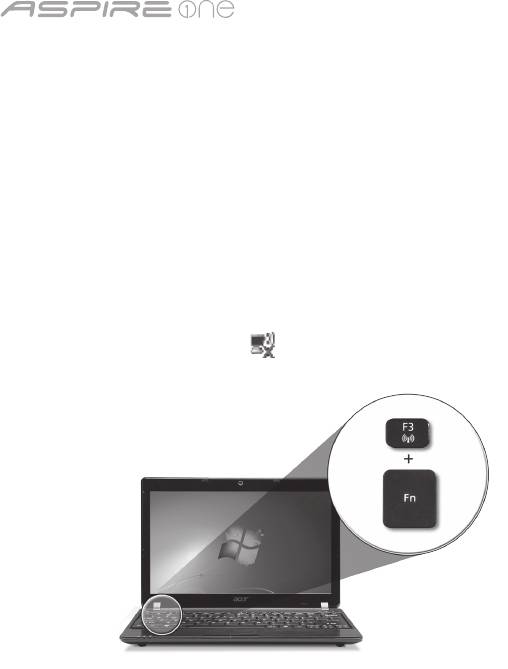
1.DrückenSieauf<Fn>+<F3>,umaufdenKommunikationsmanagerzuzugreifenDortkönnenSieanschließenddieWLAN-
Verbindung durch Klicken auf die rote Schaltfläche neben WLAN aktivieren.
Hinweis: Über den Kommunikationsmanager gelangen Sie auch nach 3G und Bluetooth. Kommunikationsgeräte können sich
je nach Modell unterscheiden.
2. Klicken Sie auf das Symbol aufderSystemleisteundwählenSiedenDrahtlos-Zugriffspunktaus,zudemSieeine
Verbindung herstellen möchten.
Einsetzen einer 3G-SIM-Karte (Nur für bestimmte Modelle)
Entfernen Sie den Akku und setzen Sie eine 3G-SIM-Karte vorsichtig in den 3G-SIM-Karteneinschub hinein. Unter „Rückseite &
Unterseite“ auf Seite 6 erfahren Sie den Ort des 3G SIM-Karteneinschubs.
Kurzanleitung
4
Ansicht von oben
Eine Tour durch das Aspire One
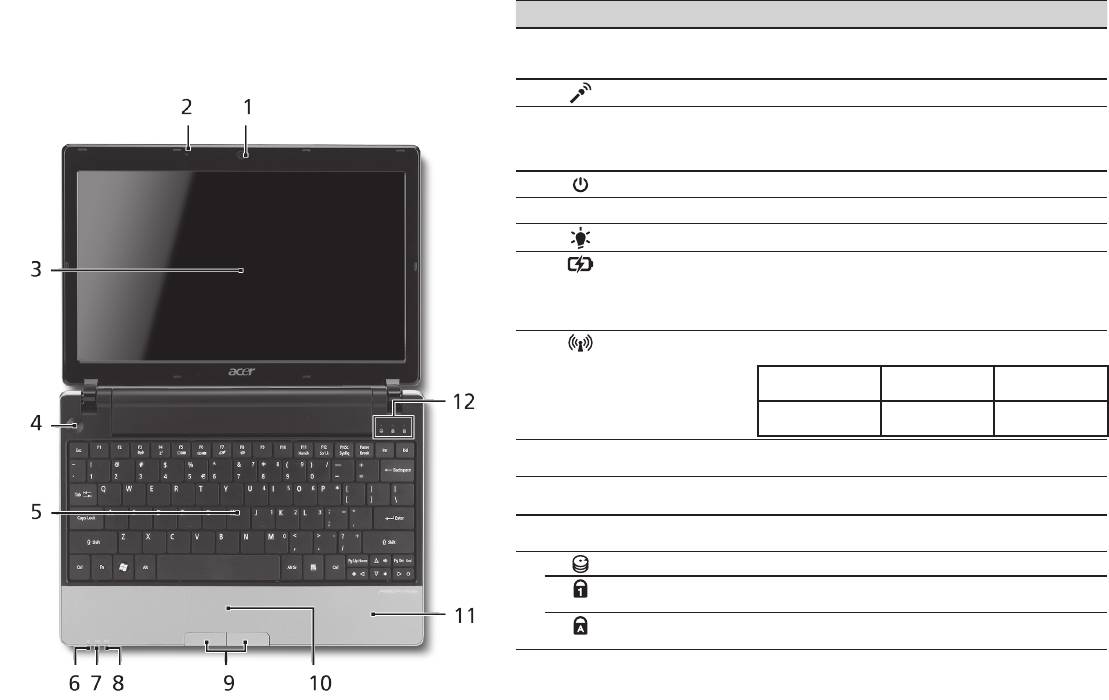
# Symbol Element Beschreibung
Nachdem Sie Ihren Computer wie im Abschnitt Für den
1
Acer Crystal Eye
Web-Kamera für Videokommunikation
Anfang gezeigt aufgestellt haben, lassen Sie uns nun Ihr
Webcam
(konfiguration kann sich von Modell zu Modell
unterscheiden).
neues Acer-Notebook vorstellen.
2
Mikrofon Internes Mikrofon für die Tonaufnahme.
3
Anzeigebildschirm Wird auch als LCD (Liquid-Crystal-Display)
bezeichnet.ZeigtdieAusgabedesComputersan
(konfiguration kann sich von Modell zu Modell
unterscheiden).
4
Ein/Aus-Taste Schaltet den Computer ein und aus.
5
Tastatur Dient der Eingabe von Daten in den Computer.
1
6
Stromanzeige
ZeigtdenEin/Aus-StatusdesComputersan.
1
7
Akkuanzeige
ZeigtdenAkkustatusdesComputersan.
1. Aufladung: Die Leuchte erscheint gelb, wenn
der Akku aufgeladen wird.
2. Voll aufgeladen: Die Leuchte erscheint blau,
wenn Netzstrom verwendet wird.
8
Anzeige für
Leuchtet auf, um den Status der WLAN-
1
Kommunikation
Kommunikation anzuzeigen.
Blaue Leuchte ein Orangefarbene
Leuchtet nicht
Leuchte ein
3G ein/WiFi ein
3G aus/WiFi ein 3G aus/WiFi aus
3G ein/WiFi aus
9
Anklicktasten
Die linken und rechten Tasten funktionieren wie
(links und rechts)
die linken und rechten Tasten einer Maus.
10
Touchpad BerührungssensiblesZeigegerät,dasdiegleichen
Funktionen besitzt wie eine Computer-Maus.
11
Handablage Bequemer Ablagebereich für Ihre Hände
während der Bedienung des Computers.
12
HDD-Anzeige Leuchtet auf, wenn die Festplatte aktiv ist.
Num Lock Leuchtet auf, wenn die Num Lock-Funktion
aktiviert ist.
Caps Lock Leuchtet auf, wenn die Caps Lock-Funktion
aktiviert ist.
1. Die Statusanzeigen auf der Vorderseite sind selbst dann zu sehen, wenn die
Computerklappe geschlossen ist.
Serie
5
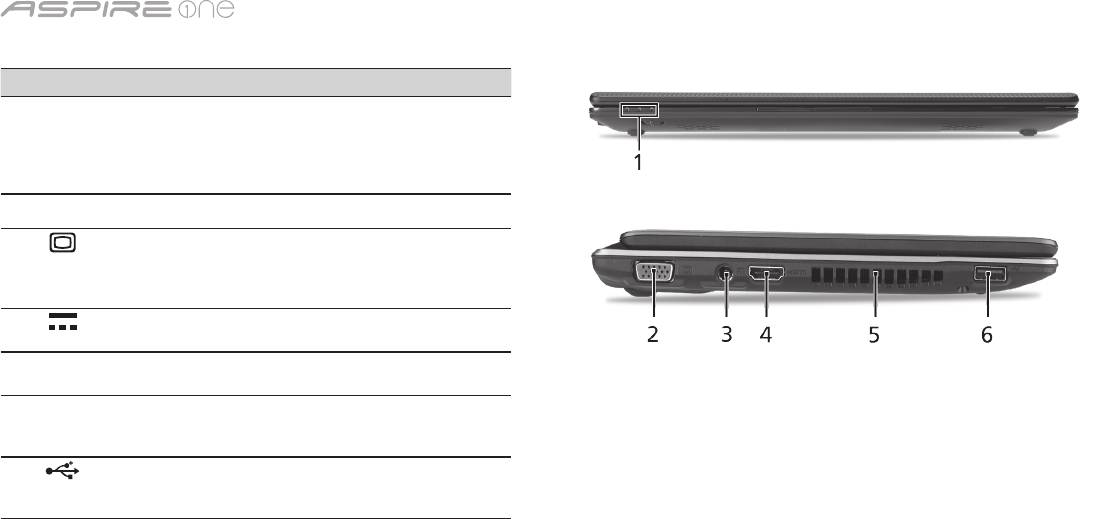
Geschlossene Vorderseite
# Symbol Element Beschreibung
1
Statusanzeigen Diese LEDs (Light-Emitting
Diodes) leuchten auf, um Ihnen
den Status der Funktionen und
Komponenten des Computers
anzuzeigen.
Linke Seite
2
Anschluss für externe
Dient dem Anschluss eines
Anzeige (VGA)
Anzeigegerätes (z. B. einem
externen Monitor oder LCD-
Projektor).
3
DC-Eingangsbuchse HierschließenSiedasNetzteil
an.
4
HDMI HDMI-Anschluss Unterstützt digitale High-
Definition-Video-Verbindungen.
5
Belüftungsschlitze Schützt den Computer vor
Überhitzung, selbst bei längerem
Einsatz.
6
USB 2.0-Anschluss HierschließenSieUSB2.0-Geräte
(z. B. USB-Maus oder USB-
Kamera) an.
Kurzanleitung
6
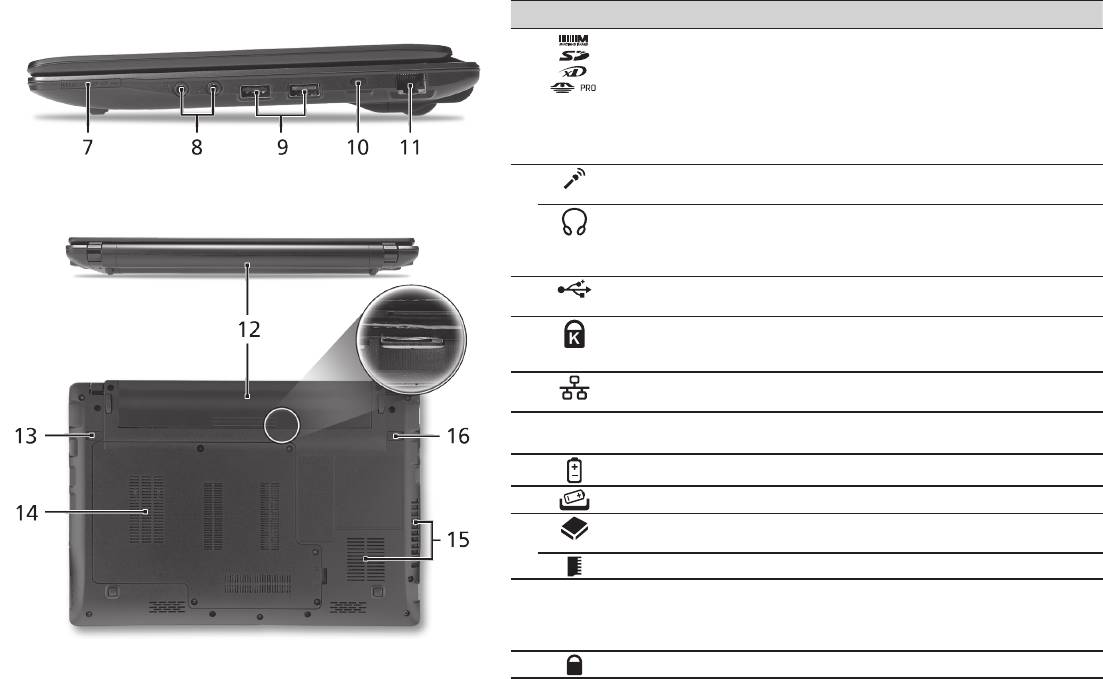
Rechte Seite
# Symbol Element Beschreibung
7
Mehrere-in-1-
Eignet sich für Secure Digital (SD),
Kartenleser
MultiMediaCard (MMC), Memory Stick
(MS), Memory Stick PRO (MS PRO) und
xD-Picture Card (xD).
Hinweis: Drücken Sie hier, um die Karte
zu entfernen/einzusetzen. Es kann
nicht mehr als eine Karte gleichzeitig
verwendet werden.
8
Mikrofon-Eingangs-
Eignet sich für Eingaben aus externen
Buchse
Mikrofonen.
Buchse für Kopfhörer/
ZumAnschlussvonAudioausgabe-
Lautsprecher/
Geräten (z.B. Lautsprechern,
Ausgang mit S/PDIF-
Kopfhörern).
Unterstützung
9
USB 2.0-Anschluss HierschließenSieUSB2.0-Geräte
(z. B. USB-Maus) an.
10
Steckplatz für
Hier können Sie ein Kensington-
Kensington-Schloss
kompatibles Sicherheitsschloss für den
Computer anbringen.
11
Ethernet (RJ-45)-
ZumAnschlusseinesEthernet
Anschluss
10/100/1000-basierten Netzwerks.
Rückseite & Unterseite
12
Akkufach Enthält den Akku des Computers.
13
Verriegelung des Akkus Entsperrt den Akku für die Herausnahme.
14
Festplattenfach Enthält die Computer-Festplatte (durch
Schrauben gesichert).
Speicherfach Enthält den Hauptspeicher des Computers.
15
Belüftungsschlitze und
Schützt den Computer vor Überhitzung,
Ventilator
selbst bei längerem Einsatz.
Hinweis:VerdeckenoderschließenSie
nicht die Öffnungen des Ventilators.
16
Akkuverschluss Sichert den Akku an seiner Position.

Serie
Umgebung
Temperatur:
Betrieb: 5°C bis 35°C
Nichtbetrieb: -20°C bis 65°C
Luftfeuchtigkeit (nicht kondensierend):
Betrieb: 20% bis 80%
Nichtbetrieb: 20% bis 80%
7

Serie
Guida rapida

Serie
© 2010 Tutti i diritti riservati
Guida rapida per Serie Aspire One
Prima edizione: 04/2010
PC Notebook Serie Aspire One
Numero di modello: ___________________________
Numero di serie: _______________________________
Data di acquisto: ______________________________
Luogo d'acquisto: _____________________________

Guida rapida
Federal Communications Commission
Declaration of Conformity
This device complies with Part 15 of the FCC Rules. Operation is subject to the following two conditions: (1) this device may not
cause harmful interference, and (2) this device must accept any interference received, including interference that may cause
undesired operation.
The following local Manufacturer / Importer is responsible for this declaration:
Product name: Notebook PC
Brand: Acer
Model number: MS2298
Machine type: AO 721 series
Name of Responsible Party: Acer America Corporation
Address of responsible party: 333 West San Carlos St., San Jose
CA 95110, U. S. A.
Contact person: Acer Representative
Phone No.: 1-254-298-4000
Fax No.: 1-254-298-4147
April 30, 2010

Serie
• Themaximumconcentrationvaluesoftherestrictedsubstancesbyweightinhomogenousmaterialare:
CE Declaration of Conformity
Lead
0.1%
Polybrominated Biphenyls (PBB’s)
0.1%
We,
Mercury
0.1%
Polybrominated Diphenyl Ethers (PBDE’s)
0.1%
Acer Incorporated
Hexavalent Chromium
0.1%
Cadmium
0.01%
8F, 88, Sec. 1, Hsin Tai Wu Rd., Hsichih, Taipei Hsien 221, Taiwan
Directive 2009/125/EC with regard to establishing a framework for the setting of ecodesign requirements for energy-related
product.
Contact Person: Mr. Easy Lai, e-mail:easy_lai@acer.com.tw
R&TTE Directive 1999/5/EC as attested by conformity with the following harmonized standard:
And,
• Article3.1(a)HealthandSafety
Acer Europe SA
- EN60950-1
Via Cantonale, Centro Galleria 2 6928 Manno Switzerland
- EN62311
Hereby declare that:
• Article3.1(b)EMC
Product: Notebook Computer
- EN301 489-1
Trade Name: Acer
- EN301 489-3 (Applicable to non-bluetooth wireless keyboard mouse set).
Model Number: MS2298
- EN301 489-7
Machine Type: AO721 series
- EN301 489-17
Is compliant with the essential requirements and other relevant provisions of the following EC directives, and that all the
- EN301 489-24
necessary steps have been taken and are in force to assure that production units of the same product will continue comply with
• Article3.2SpectrumUsages
the requirements.
- EN300 440-2 (Applicable to non-bluetooth wireless keyboard mouse set).
EMC Directive 2004/108/EC as attested by conformity with the following harmonized standards:
- EN300 328
• EN55022,AS/NZSCISPR22,ClassB
- EN301 511
• EN55024
- EN301 893 (Applicable to 5GHz high performance RLAN).
• EN61000-3-2ClassD
- EN301 908-1
• EN61000-3-3
- EN301 908-2
Year to begin affixing CE marking 2010.
Low Voltage Directive 2006/95/EC as attested by conformity with the following harmonized standard:
• EN60950-1
Apr. 30, 2010
Council Decision 98/482/EC (CTR21):
(Applicable to product with pan- European single terminal connection to the Public Switched Telephone Network (PSTN).)
Date
Easy Lai /Manager
RoHS Directive 2002/95/EC on the Restriction of the Use of certain Hazardous Substances in Electrical and Electronic Equipment
Regulation Center, Acer Inc.
Guida rapida
• Themaximumconcentrationvaluesoftherestrictedsubstancesbyweightinhomogenousmaterialare:
CE Declaration of Conformity
Lead
0.1%
Polybrominated Biphenyls (PBB’s)
0.1%
We,
Mercury
0.1%
Polybrominated Diphenyl Ethers (PBDE’s)
0.1%
Acer Incorporated
Hexavalent Chromium
0.1%
Cadmium
0.01%
8F, 88, Sec. 1, Hsin Tai Wu Rd., Hsichih, Taipei Hsien 221, Taiwan
Directive 2009/125/EC with regard to establishing a framework for the setting of ecodesign requirements for energy-related
product.
Contact Person: Mr. Easy Lai, e-mail:easy_lai@acer.com.tw
R&TTE Directive 1999/5/EC as attested by conformity with the following harmonized standard:
And,
• Article3.1(a)HealthandSafety
Acer Europe SA
- EN60950-1
Via Cantonale, Centro Galleria 2 6928 Manno Switzerland
- EN62311
Hereby declare that:
• Article3.1(b)EMC
Product: Notebook Computer
- EN301 489-1
Trade Name: Acer
- EN301 489-3 (Applicable to non-bluetooth wireless keyboard mouse set).
Model Number: MS2298
- EN301 489-7
Machine Type: AO721 series
- EN301 489-17
Is compliant with the essential requirements and other relevant provisions of the following EC directives, and that all the
- EN301 489-24
necessary steps have been taken and are in force to assure that production units of the same product will continue comply with
• Article3.2SpectrumUsages
the requirements.
- EN300 440-2 (Applicable to non-bluetooth wireless keyboard mouse set).
EMC Directive 2004/108/EC as attested by conformity with the following harmonized standards:
- EN300 328
• EN55022,AS/NZSCISPR22,ClassB
- EN301 511
• EN55024
- EN301 893 (Applicable to 5GHz high performance RLAN).
• EN61000-3-2ClassD
- EN301 908-1
• EN61000-3-3
- EN301 908-2
Year to begin affixing CE marking 2010.
Low Voltage Directive 2006/95/EC as attested by conformity with the following harmonized standard:
• EN60950-1
Apr. 30, 2010
Council Decision 98/482/EC (CTR21):
(Applicable to product with pan- European single terminal connection to the Public Switched Telephone Network (PSTN).)
Date
Easy Lai /Manager
RoHS Directive 2002/95/EC on the Restriction of the Use of certain Hazardous Substances in Electrical and Electronic Equipment
Regulation Center, Acer Inc.
Serie
1
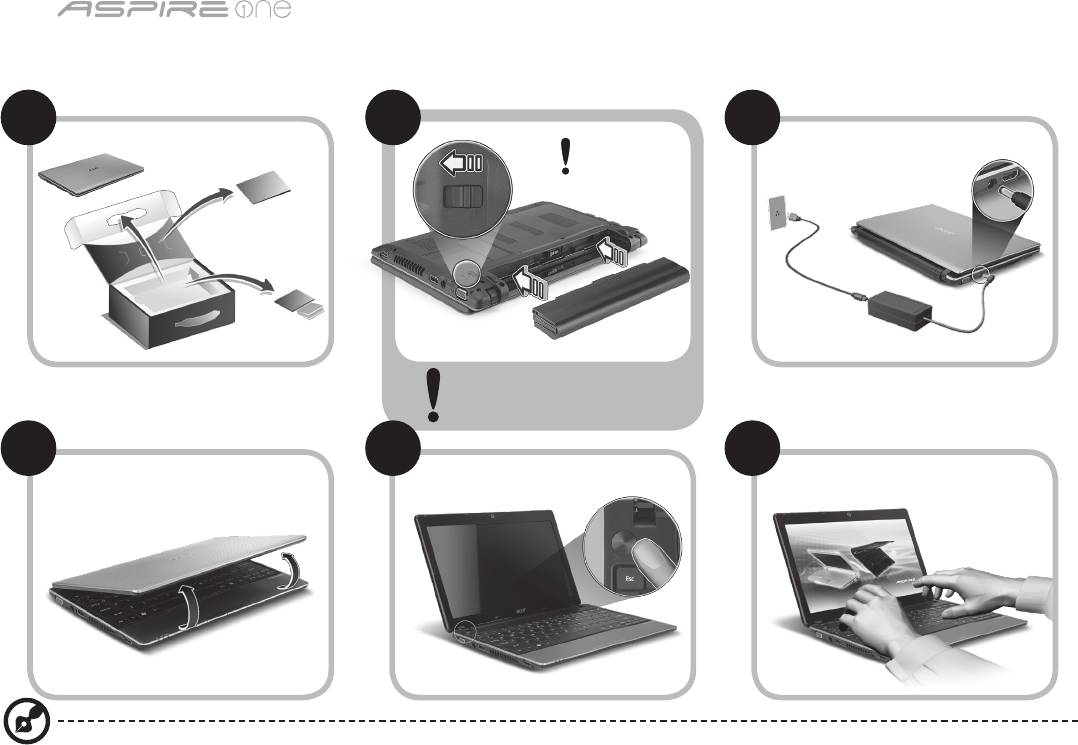
Per i principianti
1 2
3
2-2
3-3
3-1
3-2
2-1
Verificare che la batteria sia
bloccata in posizione, come
illustrato in 2-2.
4 5 6
Le illustrazioni sono di solo riferimento. Le specifiche dei prodotti possono differire.

Guida rapida
2
Avvertenze preliminari
Grazie per aver scelto il notebook Acer, la scelta ideale per poter lavorare in piena libertà anche in movimento.
Le guide disponibili
Sono state realizzate delle guide per assistere l’utente nell’uso del notebook Acer*:
Innanzitutto, la Guida rapida aiuta a semplificare la configurazione del computer.
Per altre nozioni su come il vostro computer può aiutarvi a diventare ancora più produttivi, consultate la AcerSystem User
Guide. Questa guida contiene informazioni dettagliate su argomenti come utilità del sistema, ripristino dei dati, opzioni di
espansione e ricerca guasti. Contiene inoltre informazioni sulla garanzia, le norme e gli standard di riferimento e le avvertenze
per la sicurezza del vostro notebook. È disponibile nel formato PDF e viene fornita già caricata nel notebook.
Nota: Per visualizzare il file, è necessario che sul computer sia installato Adobe Reader. Se Adobe Reader non è installato
sul computer, fare clic su AcerSystem User Guide per eseguire il programma di installazione di Adobe Reader. Per
completare l'installazione, attenersi alle istruzioni visualizzate sullo schermo. Per istruzioni sull'uso di Adobe Reader,
consultare il menu Guida in linea e supporto tecnico.
* AVVISO IMPORTANTE: Notare che le guide menzionate in precedenza, sia informa stampata che elettronica, sono
solo per riferimento e a eccezione delle informazioni specifiche sulla garanzie contenute nella AcerSystem User Guide,
nulla di ciò che è contenuto nelle presenti guide costituisce una rappresentazione o una garanzia da parte di Acer
con riferimento al prodotto acquistato. Acer declina espressamente qualsiasi responsabilità per errori contenuti nelle
presenti guide.
Serie
3
Configurazione rete
Questa guida aiuta ad eseguire la configurazione delle impostazioni di rete LAN e wireless per poter eseguire l’accesso a
Internet.
Configurazione della connessione LAN
Semplicemente collegare il cavo LAN alla porta Ethernet (RJ-45). Fare riferimento a "Vista da destra" a pagina 6 per la posizione
della porta Ethernet.
Configurare una connessione wireless
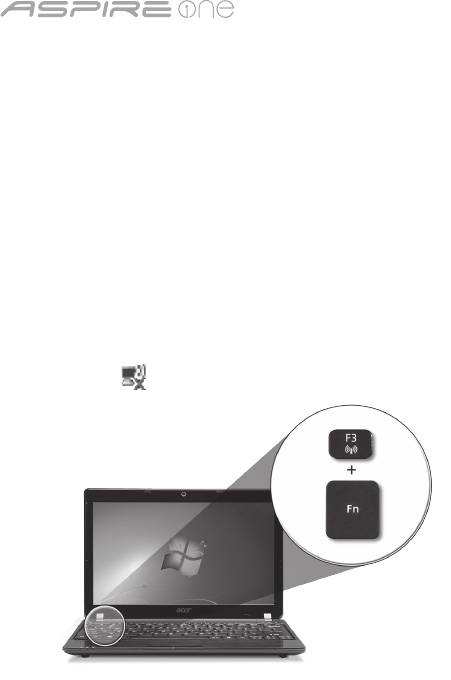
1. Premere<Fn> + <F3> per accedere a Manager Comm. Da qui è possibile attivare la connessione Wi-Fi facendo clic sul pulsante
rosso accanto a Wi-Fi.
Nota: È possibile effettuare l’accesso a 3G e a Bluetooth anche da Manager Comm. I dispositivi di comunicazione possono
variare da un modello all’altro.
2. Fare clic sull’icona nella barra delle applicazioni e scegliere l’access point wireless a cui connettersi.
Inserire una carta 3G SIM (solo per alcuni modelli)
Rimuovere la batteria e inserire con attenzione la carta 3G SIM nello slot carta 3G SIM. Per la posizione dello slot carta 3G SIM,
fare riferimento a "Vista posteriore & base" a pagina 6.
Guida rapida
4
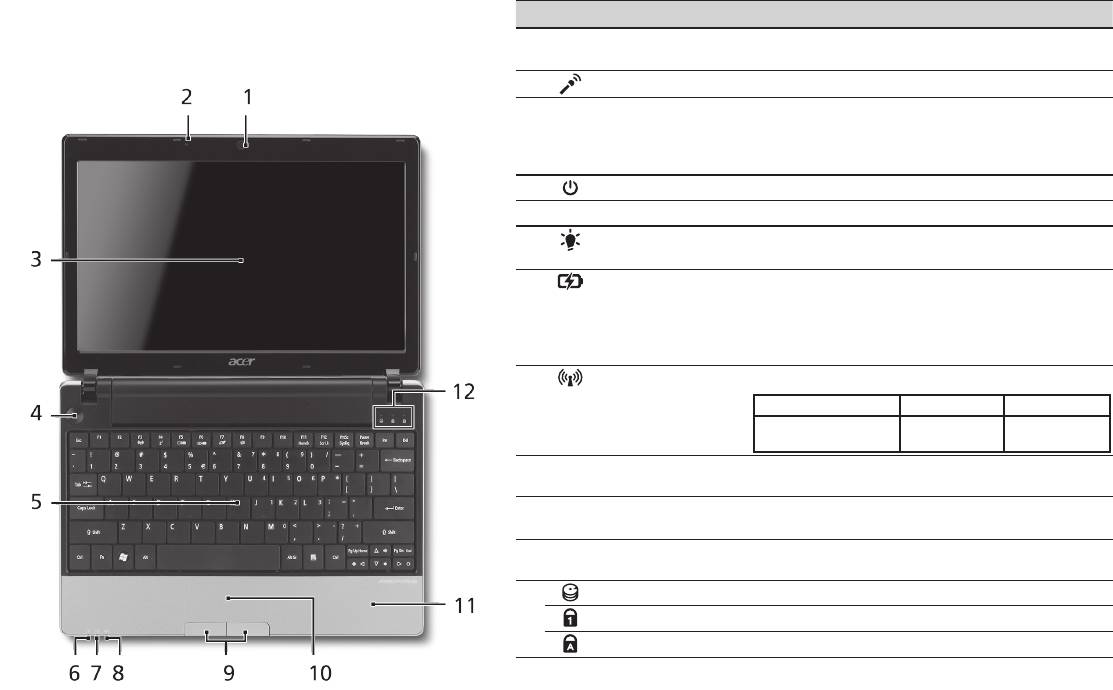
Vista dall’alto
Presentazione di Aspire One
# Icona Elemento Descrizione
Dopo aver configurato il computer come illustrato nella
1
Webcam Acer
Webcam per comunicazioni video (la configurazione
sezione Per i principianti, far riferimento alla presente
Crystal Eye
può variare in relazione al modello).
documentazione per la presentazione del nuovo notebook
2
Microfono Microfono interno per la registrazione di audio.
Acer.
3
Display Grande display a cristalli liquidi (Liquid-
Crystal Display; LCD), per una visualizzazione
confortevole (la configurazione può variare in
relazione al modello).
4
Tasto di accensione Accende/spegne il computer.
5
Tastiera Per l’immissione di dati sul computer.
6
Indicatore di
Indicano lo stato di accensione/alimentazione
1
alimentazione
del computer.
1
7
Indicatore batteria
Indicano lo stato della batteria del computer.
1. In carica: Luce di colore giallo quando la
batteria è in ricarica.
2. Completamente carica: Luce di colore blu
quando è nella modalità AC.
8
Indicatore
Indica lo stato della trasmissione wireless LAN/3G.
1
comunicazione
Luce blu Luce arancione Spento
3G attivo/WiFi attivo
3G disattivo/
3G disattivo/
3G attivo/WiFi disattivo
WiFi attivo
WiFi disattivo
9
Tasti clic
I tasti destra e sinistra hanno le stesse funzioni
(sinistra e destra)
dei tasti destra e sinistra del mouse.
10
Touchpad Dispositivo di puntamento sensibile al tocco con
funzioni simili a quelle di un comune mouse.
11
Poggiapolsi Comoda area su cui poggiare i polsi durante
l’utilizzo del computer.
12
Indicatore disco rigido Si accende quando l'hard disk è attivo.
Bloc Num Si illumina quando Bloc Num è attivato.
Bloc Maiusc Si illumina quando Bloc Maiusc è attivato.
1. Gli indicatori del pannello frontale sono visibili anche quando il coperchio del computer
è chiuso.
Serie
5
Vista frontale in dettaglio
# Icona Elemento Descrizione
1
Indicatori di stato LED (Light-Emitting Diodes) che si
illuminano per mostrare lo stato
di funzioni e componenti del
computer.
Vista da sinistra
2
Porta display esterno
Effettua il collegamento a un
(VGA)
dispositivo di visualizzazione (ad
es., monitor esterno, proiettore
LCD).
3
Jack CC-in Per il collegamento all’adattatore
CA.
4
HDMI Porta HDMI Supporta collegamento per video
digitali ad alta definizione.
5
Aperture per la
Permettono il raffreddamento
ventilazione
del computer, anche dopo un uso
prolungato.
6
Porta USB 2.0 Effettua il collegamento ai
dispositivi USB 2.0 (ad es., mouse
USB, fotocamera USB).
Guida rapida
6
Vista da destra
# Icona Elemento Descrizione
7
Lettore di schede
Supporta Secure Digital (SD),
multiplo
MultiMediaCard (MMC), Memory Stick (MS),
Memory Stick Pro (MS PRO), e xD-Picture
Card (xD).
Nota: Premere per rimuovere/installare
la scheda. è possibile utilizzare una sola
scheda di memoria alla volta.
8
Jack ingresso
Accetta ingressi proveniente da microfoni
microfono
esterni.
Jack auricolari/
Effettua il collegamento ai dispositivi audio
altoparlante/line-out
line-out (ad es., altoparlanti, auricolari).
con supporto S/PDIF
9
Porta USB 2.0 Connette a dispositivi USB 2.0 (p.e., mouse
USB).
10
Slot blocco Kensington Per il collegamento al blocco di sicurezza
dei computer Kensington-compatibili.
11
Porta Ethernet (RJ-45) Effettua il collegamento a una rete con
Ethernet 10/100/1000.
Vista posteriore & base
12
Alloggiamento della
Contiene il pacco batteria del computer.
batteria
13
Gancio di rilascio della
Per togliere la batteria.
batteria
14
Alloggiamento per il
Alloggia il disco rigido del computer (fissato
disco rigido
con viti).
Vano per la memoria Contiene la memoria principale del
computer.
15
Aperture per la
Permettono il raffreddamento del
ventilazione e ventola
computer, anche dopo un uso prolungato.
di raffreddamento
Nota: Non coprire e non ostruire l’apertura
della ventola.
16
Blocco batteria Blocca la batteria al suo posto.

Serie
Condizioni operative
Temperatura:
Di esercizio: 5°C e 35°C
Non di esercizio: -20°C e 65°C
Umidità (senza condensa):
Di esercizio: 20% e 80%
Non di esercizio: 20% e 80%
7

Serie
Guía rápida

Serie
© 2010 Reservados todos los derechos
Guía rápida de la Serie Aspire One
Versión original: 04/2010
Ordenador portátil Serie Aspire One
Número de modelo: ___________________________
Número de serie: ______________________________
Fecha de compra: ______________________________
Lugar de compra: ______________________________

Guía rápida
Federal Communications Commission
Declaration of Conformity
This device complies with Part 15 of the FCC Rules. Operation is subject to the following two conditions: (1) this device may not
cause harmful interference, and (2) this device must accept any interference received, including interference that may cause
undesired operation.
The following local Manufacturer / Importer is responsible for this declaration:
Product name: Notebook PC
Brand: Acer
Model number: MS2298
Machine type: AO 721 series
Name of Responsible Party: Acer America Corporation
Address of responsible party: 333 West San Carlos St., San Jose
CA 95110, U. S. A.
Contact person: Acer Representative
Phone No.: 1-254-298-4000
Fax No.: 1-254-298-4147
April 30, 2010

Serie
• Themaximumconcentrationvaluesoftherestrictedsubstancesbyweightinhomogenousmaterialare:
CE Declaration of Conformity
Lead
0.1%
Polybrominated Biphenyls (PBB’s)
0.1%
We,
Mercury
0.1%
Polybrominated Diphenyl Ethers (PBDE’s)
0.1%
Acer Incorporated
Hexavalent Chromium
0.1%
Cadmium
0.01%
8F, 88, Sec. 1, Hsin Tai Wu Rd., Hsichih, Taipei Hsien 221, Taiwan
Directive 2009/125/EC with regard to establishing a framework for the setting of ecodesign requirements for energy-related
product.
Contact Person: Mr. Easy Lai, e-mail:easy_lai@acer.com.tw
R&TTE Directive 1999/5/EC as attested by conformity with the following harmonized standard:
And,
• Article3.1(a)HealthandSafety
Acer Europe SA
- EN60950-1
Via Cantonale, Centro Galleria 2 6928 Manno Switzerland
- EN62311
Hereby declare that:
• Article3.1(b)EMC
Product: Notebook Computer
- EN301 489-1
Trade Name: Acer
- EN301 489-3 (Applicable to non-bluetooth wireless keyboard mouse set).
Model Number: MS2298
- EN301 489-7
Machine Type: AO721 series
- EN301 489-17
Is compliant with the essential requirements and other relevant provisions of the following EC directives, and that all the
- EN301 489-24
necessary steps have been taken and are in force to assure that production units of the same product will continue comply with
• Article3.2SpectrumUsages
the requirements.
- EN300 440-2 (Applicable to non-bluetooth wireless keyboard mouse set).
EMC Directive 2004/108/EC as attested by conformity with the following harmonized standards:
- EN300 328
• EN55022,AS/NZSCISPR22,ClassB
- EN301 511
• EN55024
- EN301 893 (Applicable to 5GHz high performance RLAN).
• EN61000-3-2ClassD
- EN301 908-1
• EN61000-3-3
- EN301 908-2
Year to begin affixing CE marking 2010.
Low Voltage Directive 2006/95/EC as attested by conformity with the following harmonized standard:
• EN60950-1
Apr. 30, 2010
Council Decision 98/482/EC (CTR21):
(Applicable to product with pan- European single terminal connection to the Public Switched Telephone Network (PSTN).)
Date
Easy Lai /Manager
RoHS Directive 2002/95/EC on the Restriction of the Use of certain Hazardous Substances in Electrical and Electronic Equipment
Regulation Center, Acer Inc.

Guía rápida
• Themaximumconcentrationvaluesoftherestrictedsubstancesbyweightinhomogenousmaterialare:
CE Declaration of Conformity
Lead
0.1%
Polybrominated Biphenyls (PBB’s)
0.1%
We,
Mercury
0.1%
Polybrominated Diphenyl Ethers (PBDE’s)
0.1%
Acer Incorporated
Hexavalent Chromium
0.1%
Cadmium
0.01%
8F, 88, Sec. 1, Hsin Tai Wu Rd., Hsichih, Taipei Hsien 221, Taiwan
Directive 2009/125/EC with regard to establishing a framework for the setting of ecodesign requirements for energy-related
product.
Contact Person: Mr. Easy Lai, e-mail:easy_lai@acer.com.tw
R&TTE Directive 1999/5/EC as attested by conformity with the following harmonized standard:
And,
• Article3.1(a)HealthandSafety
Acer Europe SA
- EN60950-1
Via Cantonale, Centro Galleria 2 6928 Manno Switzerland
- EN62311
Hereby declare that:
• Article3.1(b)EMC
Product: Notebook Computer
- EN301 489-1
Trade Name: Acer
- EN301 489-3 (Applicable to non-bluetooth wireless keyboard mouse set).
Model Number: MS2298
- EN301 489-7
Machine Type: AO721 series
- EN301 489-17
Is compliant with the essential requirements and other relevant provisions of the following EC directives, and that all the
- EN301 489-24
necessary steps have been taken and are in force to assure that production units of the same product will continue comply with
• Article3.2SpectrumUsages
the requirements.
- EN300 440-2 (Applicable to non-bluetooth wireless keyboard mouse set).
EMC Directive 2004/108/EC as attested by conformity with the following harmonized standards:
- EN300 328
• EN55022,AS/NZSCISPR22,ClassB
- EN301 511
• EN55024
- EN301 893 (Applicable to 5GHz high performance RLAN).
• EN61000-3-2ClassD
- EN301 908-1
• EN61000-3-3
- EN301 908-2
Year to begin affixing CE marking 2010.
Low Voltage Directive 2006/95/EC as attested by conformity with the following harmonized standard:
• EN60950-1
Apr. 30, 2010
Council Decision 98/482/EC (CTR21):
(Applicable to product with pan- European single terminal connection to the Public Switched Telephone Network (PSTN).)
Date
Easy Lai /Manager
RoHS Directive 2002/95/EC on the Restriction of the Use of certain Hazardous Substances in Electrical and Electronic Equipment
Regulation Center, Acer Inc.
Serie
1
Sólo para principiantes
1 2
3
2-2
3-3
3-1
3-2
2-1
Asegúrese de que la batería queda
bien fijada en su sitio, tal y como se
muestra en la figura 2-2.
4 5 6
Las ilustraciones son sólo una referencia. Las especificaciones reales del producto pueden ser diferentes.

Guía rápida
2
Primero lo más importante
Le agradecemos que haya elegido el ordenador portátil de Acer para satisfacer sus necesidades de informática móvil.
Sus guías
Para ayudarle a utilizar su ordenador portátil de Acer, hemos diseñado un conjunto de guías*:
En primer lugar, la Guía Rápida le ayuda a empezar a configurar su ordenador.
Si desea más información sobre cómo puede su ordenador ayudarle a ser más productivo, consulte AcerSystem User Guide. Esta
guía contiene información detallada sobre temas como utilidades del sistema, recuperación de datos, opciones de ampliación y
solución de problemas. Además, contiene información sobre garantías y las normativas generales y advertencias de seguridad
para su ordenador portátil. Está disponible en PDF (Formato de Documento Portátil) y viene precargada en su ordenador
portátil.
Nota: Para ver los archivos debe tener Adobe Reader instalado en su ordenador. Si no tiene instalado Adobe Reader en
su ordenador, haga clic en AcerSystem User Guide para ejecutar en primer lugar el programa de instalación de Adobe
Reader. Siga las instrucciones en pantalla para completar la instalación. Para obtener instrucciones sobre cómo utilizar
Adobe Reader, acceda al menú de Soporte y Ayuda.
* AVISO IMPORTANTE: Tenga en cuenta que las guías mencionadas, en forma electrónica o impresa, sirven únicamente
de referencia y salvo que se especifique en la información de garantía específica que se incluye en AcerSystem User
Guide, nada de lo contenido en estas guías constituirá una representación o garantía de Acer en relación con el producto
adquirido. Acer rechaza expresamente cualquier responsabilidad por errores contenidos en las guías.
Serie
3
Configuración de red
Esta guía le ayudará a configurar los ajustes de red inalámbrica y LAN para que pueda conectarse a Internet.
Configurar una conexión LAN
Basta con conectar el cable LAN al puerto de Ethernet (RJ-45). Consulte "Vista derecha" en la página 6 para la ubicación del
puerto Ethernet.
Configurar una conexión inalámbrica
1. Pulse <Fn> + <F3> para acceder al administrador de comunicación. Aquí puede activar la conexión Wi-Fi haciendo clic en el
botón rojo que hay junto a Wi-Fi.
Nota: También se puede acceder a 3G y Bluetooth a través del administrador de comunicación. Los dispositivos de
comunicación varían según el modelo.
2. Haga clic en el icono en la bandeja del sistema y seleccione el punto de acceso inalámbrico que desee conectar.
Insertar una tarjeta SIM 3G (sólo en determinados modelos)
Extraiga la batería e inserte con cuidado una tarjeta SIM 3G en la ranura para tarjeta SIM 3G. Consulte "Vista trasera & Vista de
la base" en la página 6 para ver dónde se encuentra la ranura para tarjeta SIM 3G.
Guía rápida
4
Vista superior
Presentación de su Aspire One
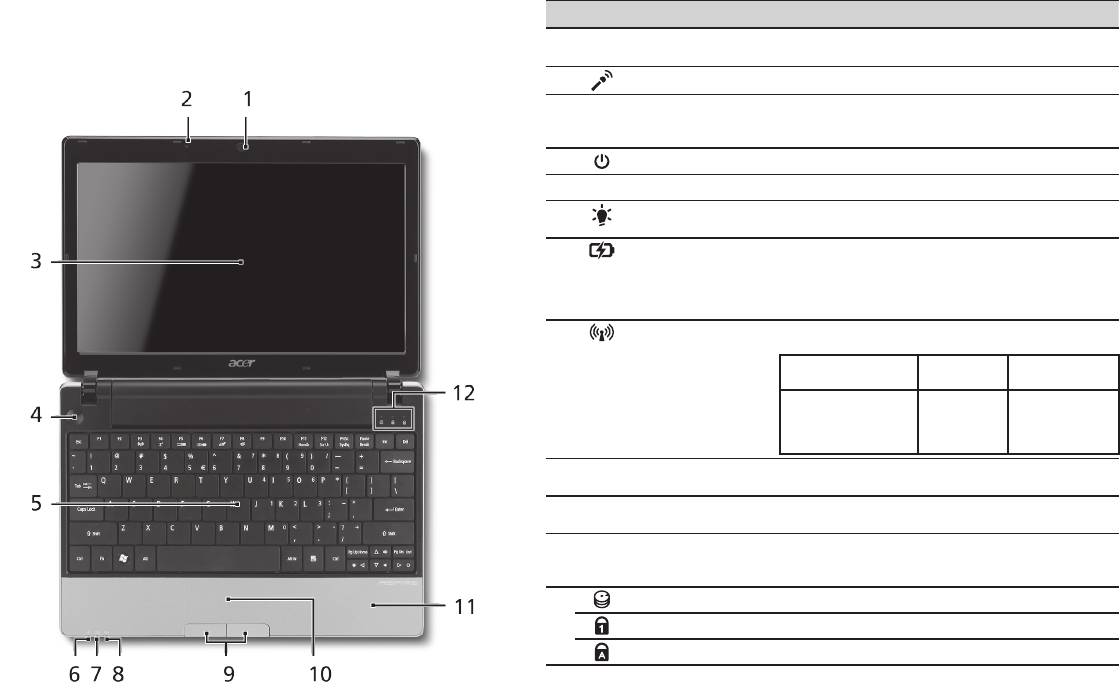
# Icono Elemento Descripción
Después de configurar su ordenador tal y como se indica en
1
Webcam Acer Crystal
Cámara Web para comunicación de vídeo (la
la sección Sólo para principiantes, permítanos enseñarle su
Eye
configuración puede variar según el modelo).
nuevo ordenador portátil de Acer.
2
Micrófono Micrófono interno para la grabación del sonido.
3
Visualización en
También denominada pantalla de cristal líquido (LCD)
pantalla
es el dispositivo de salida visual del ordenador (la
configuración puede variar según el modelo).
4
Botón de encendido Enciende o apaga el ordenador.
5
Teclado Para introducir datos en su ordenador.
6
Indicador de
Proporciona información sobre el estado de
1
encendido
energía del ordenador.
1
7
Indicador de batería
Proporciona información sobre el estado de la batería.
1. Carga: La luz se vuelve ámbar cuando se carga
la batería.
2. Carga completa: La luz se vuelve azul en modo
de CA.
8
Indicador de
Indica el estado de la comunicación LAN
1
comunicación
inalámbrica/3G.
Luz azul encendida Luz naranja
Apagado
encendida
Función 3G activada/
Función 3G
Función 3G
WiFi activada
desactivada/
desactivada/
Función 3G activada/
WiFi activada
WiFi desactivada
WiFi desactivada
9
Botones de clic
Los botones izquierdo y derecho funcionan como
(izquierdo y derecho)
los botones izquierdo y derecho del ratón.
10
Teclado táctil Dispositivo apuntador táctil que funciona como
un ratón de ordenador.
11
Soporte para las
Área de soporte que permite reposar
palmas
cómodamente las palmas de las manos cuando se
utiliza el ordenador.
12
Indicador de disco duro Indica si la unidad de disco duro está activa.
Bloq Núm Se enciende al activar el bloqueo del teclado numérico.
Bloq mayús Se enciende al activar el bloqueo de mayúsculas.
1. Los indicadores del panel frontal son visibles aunque se cierre la tapa del ordenador.
Serie
5
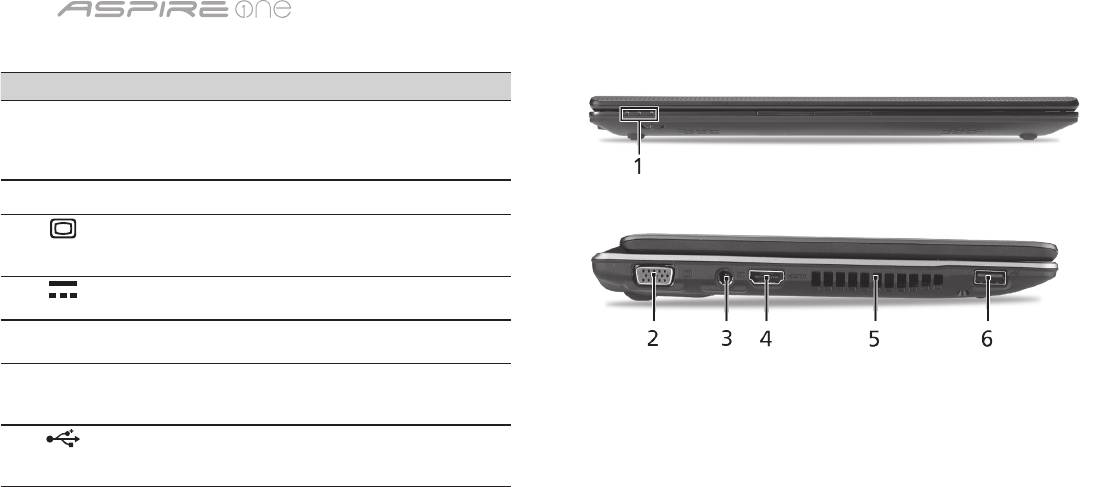
Vista frontal cerrada
# Icono Elemento Descripción
1
Indicadores de
Diodos luminosos (LED) que
estado
se encienden para mostrar
el estado de las funciones y
componentes del ordenador.
Vista izquierda
2
Puerto de
Permite conectar a un dispositivo
visualización externo
de visualización (p.ej., monitor
(VGA)
externo, proyector de LCD).
3
Conector de entrada
Permite conectar a un adaptador
de DC
de CA.
4
HDMI Puerto HDMI Compatible con conexiones de
vídeo digital de alta definición.
5
Ranuras de
Permite que el ordenador
ventilación
esté frío, incluso tras un uso
prolongado.
6
Puerto USB 2.0 Permite conectar a dispositivos
USB 2.0 (p.ej., ratón USB, cámara
USB).
Guía rápida
6
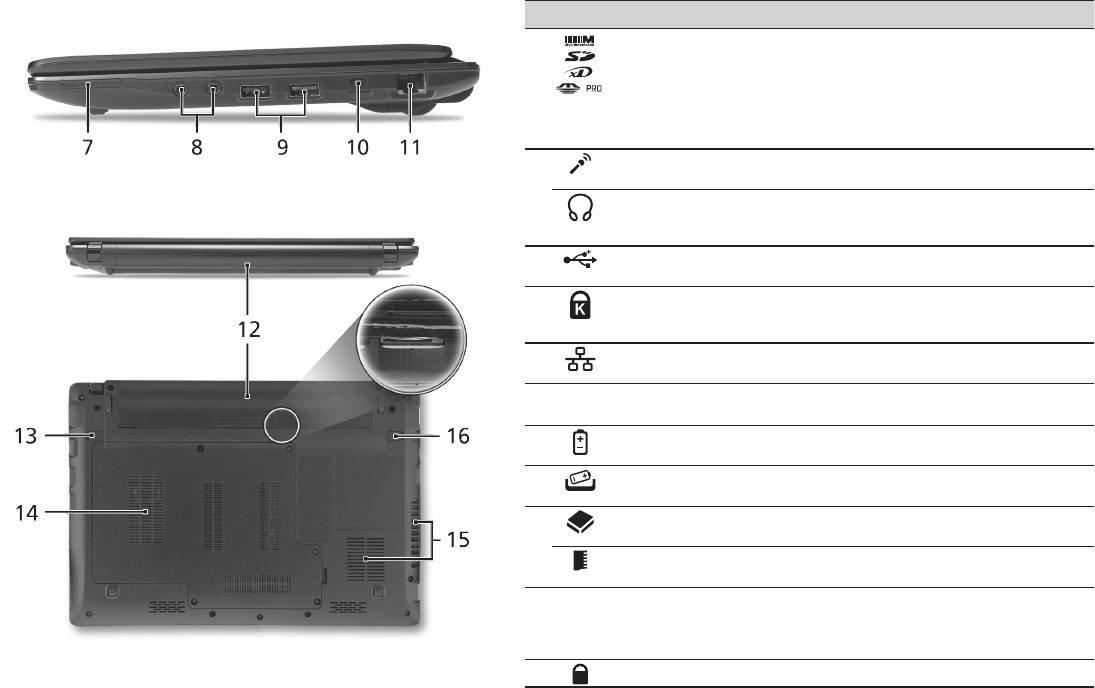
Vista derecha
# Icono Elemento Descripción
7
Lector de tarjetas
Admite la tarjeta Secure Digital (SD),
multifunción
MultiMedia (MMC), Memory Stick (MS),
Memory Stick PRO (MS PRO), xD-Picture
(xD).
Nota: Presionar para extraer/instalar
la tarjeta. Sólo puede funcionar una
tarjeta en un momento dado.
8
Conector de entrada
Permite la entrada de audio de
para micrófono
micrófonos externos.
Conector de salida/
Conexión para dispositivos de salida de
auriculares/altavoz
audio (p.ej., altavoces, auriculares, etc.).
compatible con S/PDIF
9
Puerto USB 2.0 Permite conectar a dispositivos USB 2.0
(p.ej., ratón USB).
10
Ranura de bloqueo
Permite conectar a un candado de
Kensington
seguridad para ordenador compatible
con Kensington.
11
Puerto Ethernet
Permite conectar a una red basada en
(RJ-45)
Ethernet 10/100/1000.
Vista trasera & Vista de la base
12
Compartimiento de la
Aloja la batería del ordenador.
batería
13
Pestillo de liberación
Libera la batería para poder sacarla.
de la batería
14
Compartimento del
Contiene el disco duro del ordenador
disco duro
(fijado con tornillos).
Compartimiento de
Contiene la memoria principal de
memoria
ordenador.
15
Ranuras de ventilación
Permite que el ordenador esté frío,
y ventilador de
incluso tras un uso prolongado.
refrigeración
Nota: No tape ni obstruya la apertura
del ventilador.
16
Bloqueo de la batería Permite que la batería quede trabada.

Serie
Medio ambiente
Temperatura:
Encendido: entre 5°C y 35°C
Apagado: entre -20°C y 65°C
Humedad (sin condensación):
Encendido: entre 20% y 80%
Apagado: entre 20% y 80%
7

Série
Guia rápido

Série
© 2010 Todos os Direitos Reservados
Guia rápido da Série Aspire One
Edição Original: 04/2010
Computador Portátil Série Aspire One
Número de modelo: ___________________________
Número de série: ______________________________
Data da aquisição: _____________________________
Local de aquisição: _____________________________

Guia rápido
Federal Communications Commission
Declaration of Conformity
This device complies with Part 15 of the FCC Rules. Operation is subject to the following two conditions: (1) this device may not
cause harmful interference, and (2) this device must accept any interference received, including interference that may cause
undesired operation.
The following local Manufacturer / Importer is responsible for this declaration:
Product name: Notebook PC
Brand: Acer
Model number: MS2298
Machine type: AO 721 series
Name of Responsible Party: Acer America Corporation
Address of responsible party: 333 West San Carlos St., San Jose
CA 95110, U. S. A.
Contact person: Acer Representative
Phone No.: 1-254-298-4000
Fax No.: 1-254-298-4147
April 30, 2010

Série
• Themaximumconcentrationvaluesoftherestrictedsubstancesbyweightinhomogenousmaterialare:
CE Declaration of Conformity
Lead
0.1%
Polybrominated Biphenyls (PBB’s)
0.1%
We,
Mercury
0.1%
Polybrominated Diphenyl Ethers (PBDE’s)
0.1%
Acer Incorporated
Hexavalent Chromium
0.1%
Cadmium
0.01%
8F, 88, Sec. 1, Hsin Tai Wu Rd., Hsichih, Taipei Hsien 221, Taiwan
Directive 2009/125/EC with regard to establishing a framework for the setting of ecodesign requirements for energy-related
product.
Contact Person: Mr. Easy Lai, e-mail:easy_lai@acer.com.tw
R&TTE Directive 1999/5/EC as attested by conformity with the following harmonized standard:
And,
• Article3.1(a)HealthandSafety
Acer Europe SA
- EN60950-1
Via Cantonale, Centro Galleria 2 6928 Manno Switzerland
- EN62311
Hereby declare that:
• Article3.1(b)EMC
Product: Notebook Computer
- EN301 489-1
Trade Name: Acer
- EN301 489-3 (Applicable to non-bluetooth wireless keyboard mouse set).
Model Number: MS2298
- EN301 489-7
Machine Type: AO721 series
- EN301 489-17
Is compliant with the essential requirements and other relevant provisions of the following EC directives, and that all the
- EN301 489-24
necessary steps have been taken and are in force to assure that production units of the same product will continue comply with
• Article3.2SpectrumUsages
the requirements.
- EN300 440-2 (Applicable to non-bluetooth wireless keyboard mouse set).
EMC Directive 2004/108/EC as attested by conformity with the following harmonized standards:
- EN300 328
• EN55022,AS/NZSCISPR22,ClassB
- EN301 511
• EN55024
- EN301 893 (Applicable to 5GHz high performance RLAN).
• EN61000-3-2ClassD
- EN301 908-1
• EN61000-3-3
- EN301 908-2
Year to begin affixing CE marking 2010.
Low Voltage Directive 2006/95/EC as attested by conformity with the following harmonized standard:
• EN60950-1
Apr. 30, 2010
Council Decision 98/482/EC (CTR21):
(Applicable to product with pan- European single terminal connection to the Public Switched Telephone Network (PSTN).)
Date
Easy Lai /Manager
RoHS Directive 2002/95/EC on the Restriction of the Use of certain Hazardous Substances in Electrical and Electronic Equipment
Regulation Center, Acer Inc.
Guia rápido
• Themaximumconcentrationvaluesoftherestrictedsubstancesbyweightinhomogenousmaterialare:
CE Declaration of Conformity
Lead
0.1%
Polybrominated Biphenyls (PBB’s)
0.1%
We,
Mercury
0.1%
Polybrominated Diphenyl Ethers (PBDE’s)
0.1%
Acer Incorporated
Hexavalent Chromium
0.1%
Cadmium
0.01%
8F, 88, Sec. 1, Hsin Tai Wu Rd., Hsichih, Taipei Hsien 221, Taiwan
Directive 2009/125/EC with regard to establishing a framework for the setting of ecodesign requirements for energy-related
product.
Contact Person: Mr. Easy Lai, e-mail:easy_lai@acer.com.tw
R&TTE Directive 1999/5/EC as attested by conformity with the following harmonized standard:
And,
• Article3.1(a)HealthandSafety
Acer Europe SA
- EN60950-1
Via Cantonale, Centro Galleria 2 6928 Manno Switzerland
- EN62311
Hereby declare that:
• Article3.1(b)EMC
Product: Notebook Computer
- EN301 489-1
Trade Name: Acer
- EN301 489-3 (Applicable to non-bluetooth wireless keyboard mouse set).
Model Number: MS2298
- EN301 489-7
Machine Type: AO721 series
- EN301 489-17
Is compliant with the essential requirements and other relevant provisions of the following EC directives, and that all the
- EN301 489-24
necessary steps have been taken and are in force to assure that production units of the same product will continue comply with
• Article3.2SpectrumUsages
the requirements.
- EN300 440-2 (Applicable to non-bluetooth wireless keyboard mouse set).
EMC Directive 2004/108/EC as attested by conformity with the following harmonized standards:
- EN300 328
• EN55022,AS/NZSCISPR22,ClassB
- EN301 511
• EN55024
- EN301 893 (Applicable to 5GHz high performance RLAN).
• EN61000-3-2ClassD
- EN301 908-1
• EN61000-3-3
- EN301 908-2
Year to begin affixing CE marking 2010.
Low Voltage Directive 2006/95/EC as attested by conformity with the following harmonized standard:
• EN60950-1
Apr. 30, 2010
Council Decision 98/482/EC (CTR21):
(Applicable to product with pan- European single terminal connection to the Public Switched Telephone Network (PSTN).)
Date
Easy Lai /Manager
RoHS Directive 2002/95/EC on the Restriction of the Use of certain Hazardous Substances in Electrical and Electronic Equipment
Regulation Center, Acer Inc.
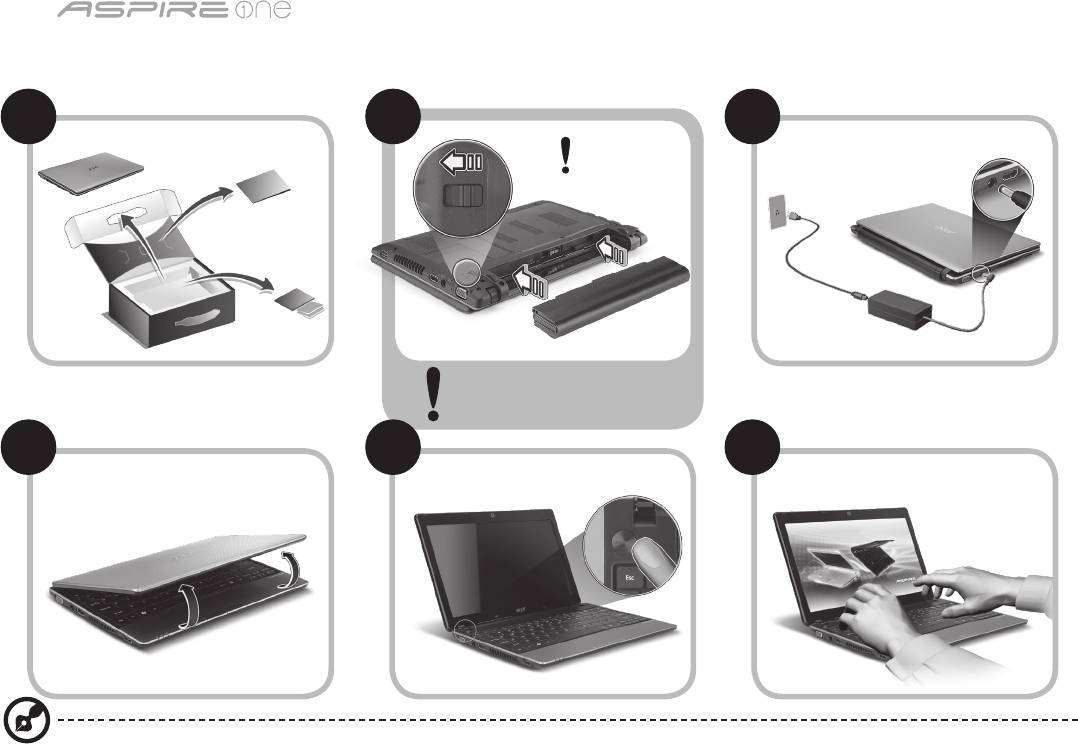
Série
1
Para começar
1 2
3
2-2
3-3
3-1
3-2
2-1
Certifique-se de que a bateria
está fixa no respectivo lugar, tal
como indicado em 2-2.
4 5 6
As ilustrações são apenas uma referência. As especificações reais do produto podem variar.

Guia rápido
2
Primeiro que tudo
Gostaríamos de lhe agradecer por ter escolhido um computador portátil Acer para preencher as suas necessidades de
computador móvel.
Os seus manuais
Para o ajudar a usar o seu computador portátil Acer, preparámos uma série de manuais*:
Antes de mais, o Guia Rápido ajuda-o a ligar e configurar o seu computador.
Para mais detalhes sobre como o seu computador o pode ajudar a ser mais produtivo, consulte o AcerSystem User Guide
(Manual do Utilizador AcerSystem). Esse manual contém informações pormenorizadas sobre temas como utilitários do
sistema, recuperação de dados, opções de expansão e solução de problemas. Além disso, contém a informação da garantia
e as regulamentações gerais e notas de segurança para o seu computador portátil. Está disponível no formato PDF (Portable
Document Format) e vem já instalado no seu computador.
Nota: É necessário o Adobe Reader para visualizar o ficheiro. Se o Adobe Reader não estiver instalado no seu computador,
ao clicar em AcerSystem User Guide é executado o programa de instalação do Acrobat Reader. Siga as instruções do ecrã
para finalizar a instalação. Para obter instruções sobre como utilizar o Adobe Reader, vá ao menu Ajuda e Suporte.
* AVISO IMPORTANTE: Os guias aqui mencionados, seja em formato impresso ou electrónico, são apenas de natureza
informativa e, exceptuando quando referido nas informações de garantia específicas, incluídas no AcerSystem User
Guide, nada do que consta destes guias constitui uma representação ou garantia da Acer relativamente ao produto que
adquiriu. A Acer declina expressamente qualquer responsabilidade por erros contidos nos guias.
Série
3
Configuração de rede
Este guia ajudá-lo(a)-á a configurar as definições da sua LAN e rede sem fios para que possa ligar-se à Internet.
Configurar uma ligação LAN
Basta ligar o cabo LAN ao porto Ethernet (RJ-45). Consulte "Vista direita" na página 6 para saber a localização do porto
Ethernet.
Configurar uma ligação sem fios
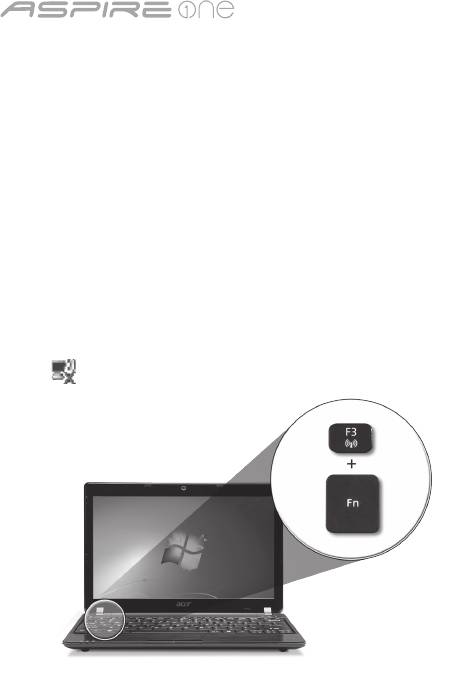
1. Prima <Fn> + <F3> para aceder ao gestor de comunicação. Aqui poderá activar a ligação WI-Fi clicando no botão vermelho
junto de Wi-Fi.
Nota: Também pode aceder a 3G e Bluetooth através do gestor de comunicação. Os dispositivos de comunicação variam
consoante o modelo.
2. Clique no ícone no seu tabuleiro de sistema e escolha o ponto de acesso sem fios ao qual se deseja ligar.
Inserir um cartão SIM 3G (apenas em certos modelos)
Retire a bateria e insira com cuidado o cartão SIM 3G na respectiva ranhura. Consulte “Vista traseira & Vista da base” na página
6 quanto à localização da ranhura para o cartão SIM 3G.
Guia rápido
4
Vista de cima
Visita guiada ao seu Aspire One
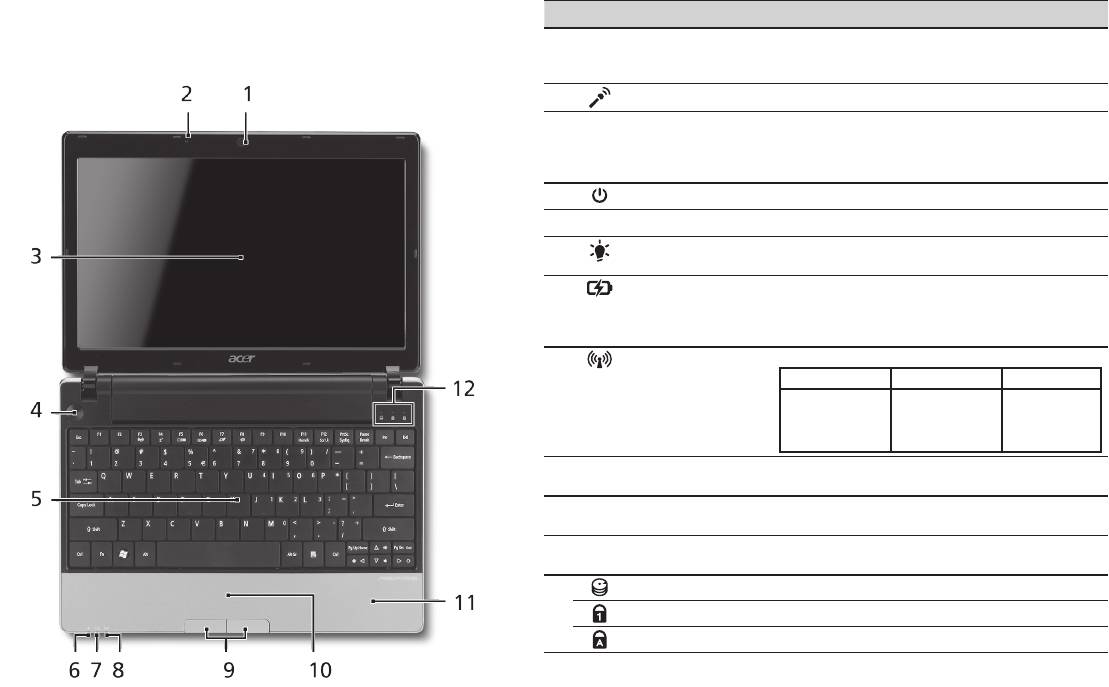
# Ícone Item Descrição
Depois de configurar o seu computador como ilustrado na
1
Webcam Acer
Webcam para comunicação por vídeo
secção Para começar, deixe-nos dar-lhe a conhecer o seu
Crystal Eye
(a configuração pode variar consoante o
novo portátil Acer.
modelo).
2
Microfone Microfone interno para gravação de som.
3
Ecrã Também chamado ecrã de cristais líquidos
(LCD), permite visualizar a informação do
computador (a configuração pode variar
consoante o modelo).
4
Botão de alimentação Liga e desliga o computador.
5
Teclado Para introduzir informações no seu computador.
6
Indicador de
Indica o estado da alimentação do
1
alimentação
computador.
1
7
Indicador da bateria
Indica o estado da bateria do computador.
1. A carregar: A luz é âmbar quando a bateria
está a carregar.
2. Carga completa: A luz é azul no modo CA.
8
Indicador de
Indica o estado de comunicação Sem Fios LAN/3G.
1
comunicação
Luz azul ligada Luz laranja ligada Sem luz
3G ligado/
WiFi ligado
3G desligado/
3G desligado/
3G ligado/
WiFi ligado
WiFi desligado
WiFi desligado
9
Botões de clique
Os botões esquerdo e direito funcionam como
(esquerdo e direito)
os botões esquerdo e direito de um rato.
10
Teclado táctil Dispositivo apontador sensível ao toque, que
funciona como um rato de computador.
11
Descanso de mãos Área confortável de apoio para as suas mãos
enquanto utiliza o computador.
12
Indicador HDD Indica quando o disco rígido está activo.
Num Lock Acende-se quando a função Num Lock é activada.
Caps Lock Acende-se quando a função Caps Lock é activada.
1. Os indicadores no painel dianteiro são visíveis mesmo com a tampa do monitor fechada.
Série
5
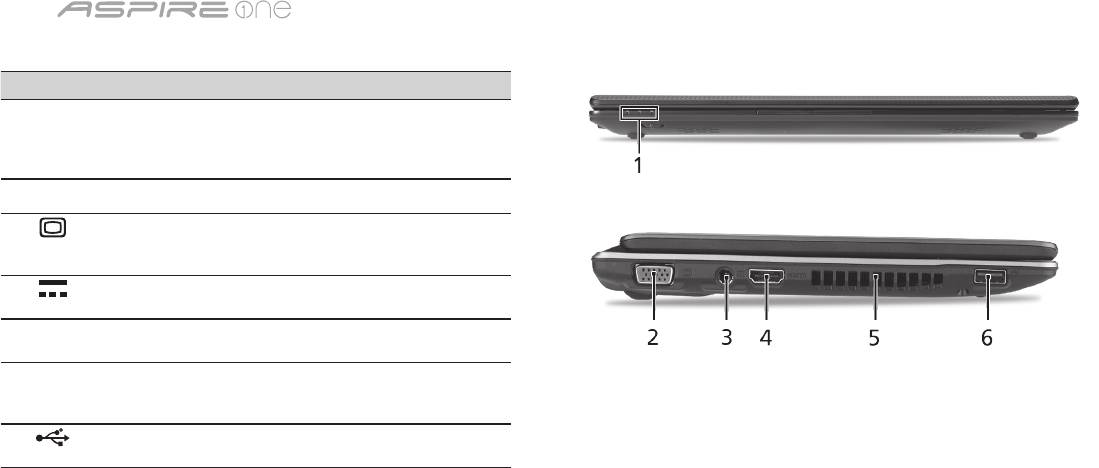
Vista frontal, fechado
# Ícone Item Descrição
1
Indicadores de
Díodos Emissores de Luz (LED) que
estado
se acendem para mostrar o estado
das funções e componentes do
computador.
Vista esquerda
2
Ligação a ecrã
Liga a um dispositivo de
externo (VGA)
visualização (por exemplo, monitor
externo, projector LCD).
3
Tomada de entrada
Liga a um adaptador CA.
CC
4
HDMI Porta HDMI Suporta ligações de vídeo digital
de alta definição.
5
Ranhuras de
Permite ao computador manter-
ventilação
se fresco, mesmo após uso
prolongado.
6
Entrada USB 2.0 Liga a dispositivos USB 2.0 (por ex.
rato USB, câmara USB).
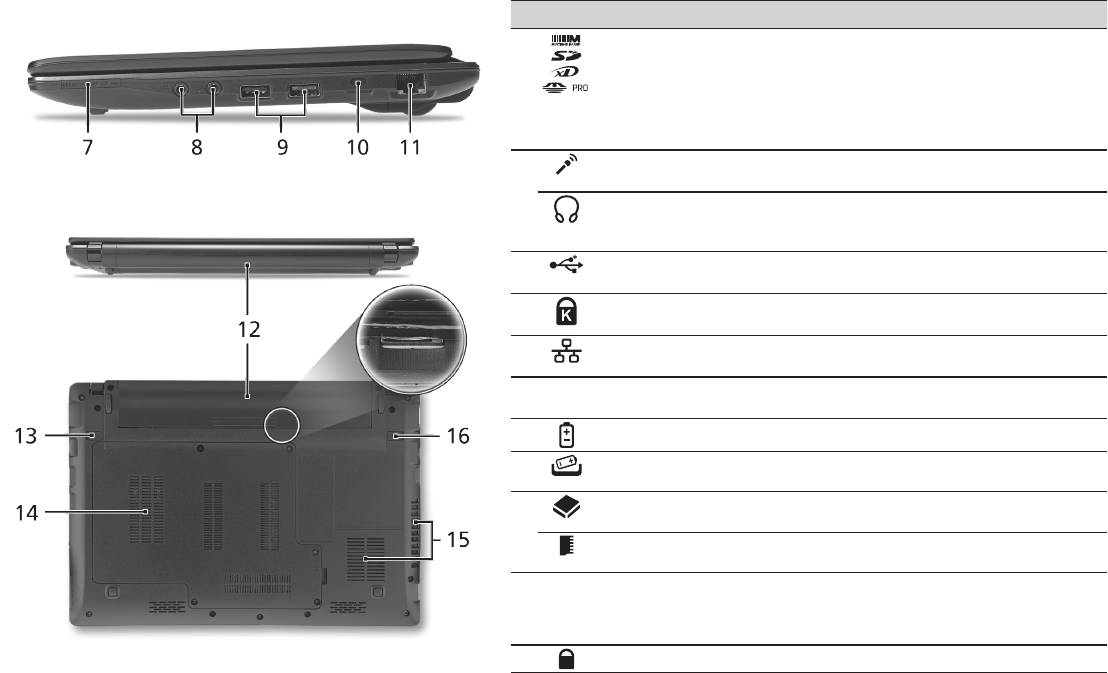
Guia rápido
6
Vista direita
# Ícone Item Descrição
7
Leitor de cartões vários-
Aceita cartõesSecure Digital (SD),
em-um
MultiMediaCard (MMC), Memory Stick
(MS), Memory Stick PRO (MS PRO),
xD-Picture Card (xD).
Nota: Empurre para remover/instalar o
cartão. Apenas pode ser utilizado um
cartão de cada vez.
8
Conector de entrada do
Aceita entradas de microfones externos.
microfone
Tomada de auscultador/
Liga a dispositivos de saída de áudio
altifalante/saída
(por exemplo, altifalantes, auscultadores).
compativel com S/PDIF
9
Entrada USB 2.0 Liga a dispositivos USB 2.0 (por ex. rato
USB).
10
Ranhura de bloqueio
Liga a um cadeado de segurança
Kensington
Kensington (ou compatível).
11
Entrada Ethernet
Liga a uma rede Ethernet de base
(RJ-45)
10/100/1000.
Vista traseira & Vista da base
12
Baía da bateria Contém a bateria do computador.
13
Patilha de libertação da
Liberta a bateria para remoção.
bateria
14
Compartimento do
Aloja o disco rígido do computador (seguro
disco rígido
por parafusos).
Compartimento da
Aloja a memória principal do computador.
memória
15
Ranhuras de ventilação
Permite ao computador manter-se fresco,
e ventoinha de
mesmo após uso prolongado.
arrefecimento
Nota: Não tape nem obstrua a abertura da
ventoinha.
16
Bloqueio da bateria Bloqueia a bateria, mantendo-a no sítio.

Série
Ambiente
Temperatura:
Funcionamento: 5°C a 35°C
Não em funcionamento: -20°C a 65°C
Humidade (não condensação):
Funcionamento: 20% a 80%
Não em funcionamento: 20% a 80%
7

Serie
Snelgids

Serie
© 2010 Alle rechten voorbehouden
Snelgids voor de Aspire One Serie
Oorspronkelijke uitgave: 04/2010
Aspire One Serie Notebook PC
Modelnummer: ________________________________
Serienummer: _________________________________
Aankoopdatum: _______________________________
Plaats van aankoop: ___________________________

Snelgids
Federal Communications Commission
Declaration of Conformity
This device complies with Part 15 of the FCC Rules. Operation is subject to the following two conditions: (1) this device may not
cause harmful interference, and (2) this device must accept any interference received, including interference that may cause
undesired operation.
The following local Manufacturer / Importer is responsible for this declaration:
Product name: Notebook PC
Brand: Acer
Model number: MS2298
Machine type: AO 721 series
Name of Responsible Party: Acer America Corporation
Address of responsible party: 333 West San Carlos St., San Jose
CA 95110, U. S. A.
Contact person: Acer Representative
Phone No.: 1-254-298-4000
Fax No.: 1-254-298-4147
April 30, 2010

Serie
• Themaximumconcentrationvaluesoftherestrictedsubstancesbyweightinhomogenousmaterialare:
CE Declaration of Conformity
Lead
0.1%
Polybrominated Biphenyls (PBB’s)
0.1%
We,
Mercury
0.1%
Polybrominated Diphenyl Ethers (PBDE’s)
0.1%
Acer Incorporated
Hexavalent Chromium
0.1%
Cadmium
0.01%
8F, 88, Sec. 1, Hsin Tai Wu Rd., Hsichih, Taipei Hsien 221, Taiwan
Directive 2009/125/EC with regard to establishing a framework for the setting of ecodesign requirements for energy-related
product.
Contact Person: Mr. Easy Lai, e-mail:easy_lai@acer.com.tw
R&TTE Directive 1999/5/EC as attested by conformity with the following harmonized standard:
And,
• Article3.1(a)HealthandSafety
Acer Europe SA
- EN60950-1
Via Cantonale, Centro Galleria 2 6928 Manno Switzerland
- EN62311
Hereby declare that:
• Article3.1(b)EMC
Product: Notebook Computer
- EN301 489-1
Trade Name: Acer
- EN301 489-3 (Applicable to non-bluetooth wireless keyboard mouse set).
Model Number: MS2298
- EN301 489-7
Machine Type: AO721 series
- EN301 489-17
Is compliant with the essential requirements and other relevant provisions of the following EC directives, and that all the
- EN301 489-24
necessary steps have been taken and are in force to assure that production units of the same product will continue comply with
• Article3.2SpectrumUsages
the requirements.
- EN300 440-2 (Applicable to non-bluetooth wireless keyboard mouse set).
EMC Directive 2004/108/EC as attested by conformity with the following harmonized standards:
- EN300 328
• EN55022,AS/NZSCISPR22,ClassB
- EN301 511
• EN55024
- EN301 893 (Applicable to 5GHz high performance RLAN).
• EN61000-3-2ClassD
- EN301 908-1
• EN61000-3-3
- EN301 908-2
Year to begin affixing CE marking 2010.
Low Voltage Directive 2006/95/EC as attested by conformity with the following harmonized standard:
• EN60950-1
Apr. 30, 2010
Council Decision 98/482/EC (CTR21):
(Applicable to product with pan- European single terminal connection to the Public Switched Telephone Network (PSTN).)
Date
Easy Lai /Manager
RoHS Directive 2002/95/EC on the Restriction of the Use of certain Hazardous Substances in Electrical and Electronic Equipment
Regulation Center, Acer Inc.
Snelgids
• Themaximumconcentrationvaluesoftherestrictedsubstancesbyweightinhomogenousmaterialare:
CE Declaration of Conformity
Lead
0.1%
Polybrominated Biphenyls (PBB’s)
0.1%
We,
Mercury
0.1%
Polybrominated Diphenyl Ethers (PBDE’s)
0.1%
Acer Incorporated
Hexavalent Chromium
0.1%
Cadmium
0.01%
8F, 88, Sec. 1, Hsin Tai Wu Rd., Hsichih, Taipei Hsien 221, Taiwan
Directive 2009/125/EC with regard to establishing a framework for the setting of ecodesign requirements for energy-related
product.
Contact Person: Mr. Easy Lai, e-mail:easy_lai@acer.com.tw
R&TTE Directive 1999/5/EC as attested by conformity with the following harmonized standard:
And,
• Article3.1(a)HealthandSafety
Acer Europe SA
- EN60950-1
Via Cantonale, Centro Galleria 2 6928 Manno Switzerland
- EN62311
Hereby declare that:
• Article3.1(b)EMC
Product: Notebook Computer
- EN301 489-1
Trade Name: Acer
- EN301 489-3 (Applicable to non-bluetooth wireless keyboard mouse set).
Model Number: MS2298
- EN301 489-7
Machine Type: AO721 series
- EN301 489-17
Is compliant with the essential requirements and other relevant provisions of the following EC directives, and that all the
- EN301 489-24
necessary steps have been taken and are in force to assure that production units of the same product will continue comply with
• Article3.2SpectrumUsages
the requirements.
- EN300 440-2 (Applicable to non-bluetooth wireless keyboard mouse set).
EMC Directive 2004/108/EC as attested by conformity with the following harmonized standards:
- EN300 328
• EN55022,AS/NZSCISPR22,ClassB
- EN301 511
• EN55024
- EN301 893 (Applicable to 5GHz high performance RLAN).
• EN61000-3-2ClassD
- EN301 908-1
• EN61000-3-3
- EN301 908-2
Year to begin affixing CE marking 2010.
Low Voltage Directive 2006/95/EC as attested by conformity with the following harmonized standard:
• EN60950-1
Apr. 30, 2010
Council Decision 98/482/EC (CTR21):
(Applicable to product with pan- European single terminal connection to the Public Switched Telephone Network (PSTN).)
Date
Easy Lai /Manager
RoHS Directive 2002/95/EC on the Restriction of the Use of certain Hazardous Substances in Electrical and Electronic Equipment
Regulation Center, Acer Inc.
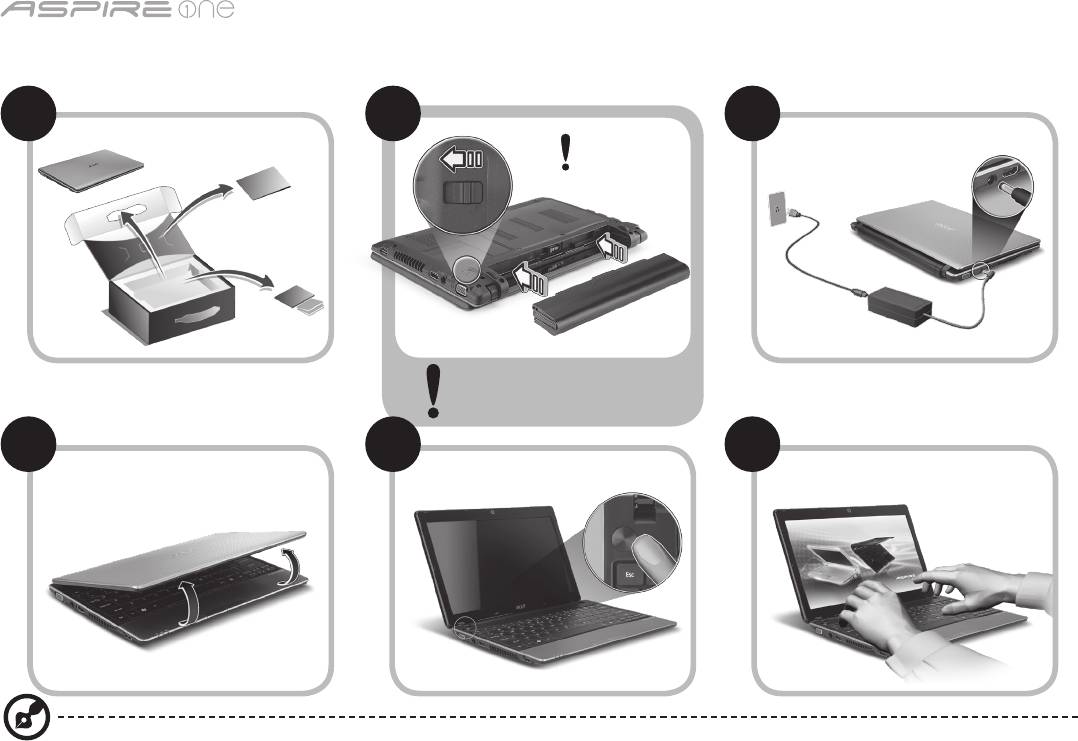
Serie
1
Aan de slag
1 2
3
2-2
3-3
3-1
3-2
2-1
Zorgdatdeaccucorrectis
geplaatst, zoals is aangegeven
in 2-2.
4 5 6
Illustraties zijn alleen ter verwijzing. Daadwerkelijke productspecificaties kunnen afwijken.

Snelgids
2
Om te beginnen
Bedankt dat u hebt gekozen voor een notebook van Acer als oplossing voor uw mobiele computereisen.
Uw gidsen
Om u te helpen met het werken op het Acer notebook hebben we een aantal gidsen ontworpen*:
Allereerst helpt de Snelgids u bij het instellen van uw computer.
Als u meer wilt weten over hoe uw computer u kan helpen productiever te werken, raadpleeg dan de AcerSystem User Guide.
Deze Gebruikershandleiding bevat gedetailleerde informatie over onderwerpen zoals systeemfuncties, gegevensherstel,
uitbreidingsopties en probleem oplossen. Daarnaast bevat het informatie over garantie en de algemene voorwaarden en
veiligheid voor uw notebook. Het is als Portable Document Format (PDF) beschikbaar en is al van te voren op uw notebook
gezet.
Opmerking: Als u het bestand wilt inzien, dient Adobe Reader te zijn geïnstalleerd. Als Adobe Reader nog niet op uw
computer is geïnstalleerd, wordt, als u op AcerSystem User Guide klikt, eerst het installatieprogramma van Adobe Reader
gestart. Volg de instructies op het scherm om het programma te installeren. Gebruiksaanwijzingen bij Adobe Reader
vindt u in het menu Help en Ondersteuning.
* BELANGRIJKE MEDEDELING: Neem voor kennisgeving aan dat de hier genoemde gidsen, hetzij gedrukt of in
elektronische vorm, slechts ter naslag dienen en dat niets in deze gidsen een vertegenwoordiging of garantie van de
kant van Acer impliceert met betrekking tot het door u gekochte product, met uitzondering van de specifieke garantie-
informatie in de AcerSystem User Guide. Acer wijst uitdrukkelijke elke aansprakelijkheid af voor fouten in de gidsen.
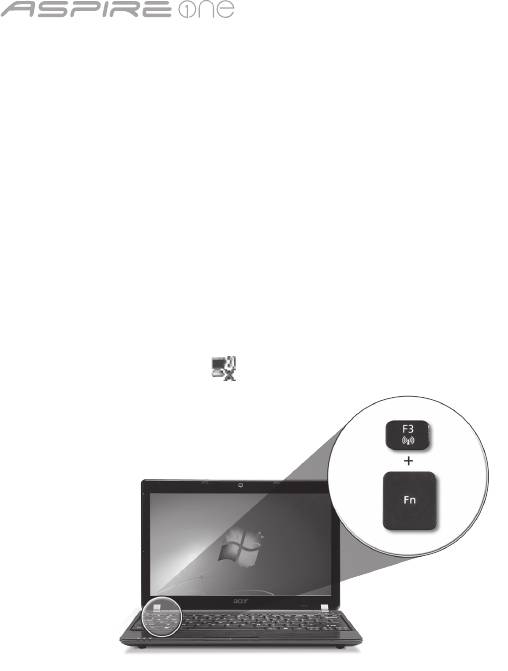
Serie
3
Netwerkconfiguratie
Deze handleiding helpt u bij het configureren van de instellingen voor LAN en draadloos netwerk zodat u verbinding met
internet kunt maken.
Lan-verbinding instellen
Steekgewoondelan-kabelindeethernetpoort(RJ-45).Zie"Rechterkant" op pagina 6 voor de plek van de ethernet-poort.
Een draadloze verbinding instellen
1. Druk op <Fn> + <F3> om communicatiebeheer te openen. Hier kunt u de Wi-Fi-verbinding inschakelen door op de rode knop
naast Wi-Fi te drukken.
Opmerking: Via communicatiebeheer zijn ook 3g en Bluetooth toegankelijk. Communicatieapparaten kunnen verschillen per
model.
2. Klik op het pictogram in het systeemvak en kies het draadloos toegangspunt waarmee u verbinding wilt maken.
Een 3G-simkaart plaatsen (alleen voor bepaalde modellen)
Verwijderdebatterijenplaatsvoorzichtigeen3g-sim-kaartinde3g-sim-kaartsleuf.Zie"Achterkant & Onderkant" op pagina 6
voor de plek van de 3g-sim-kaartsleuf.
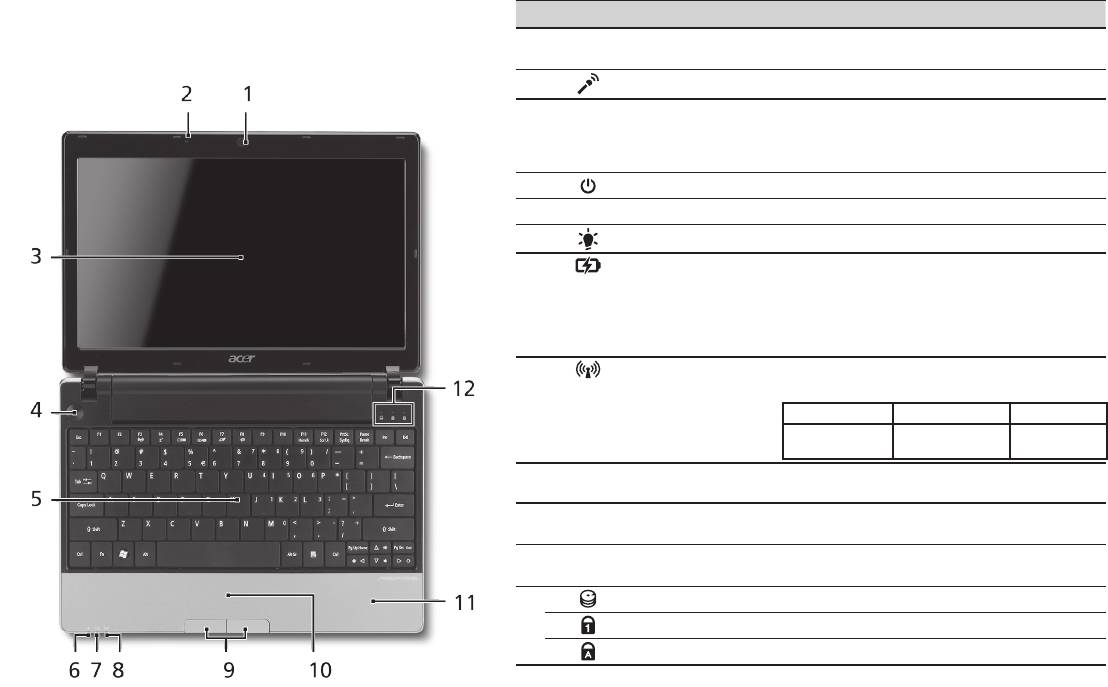
Snelgids
4
Bovenkant
Rondleiding door de Aspire One
# Pictogram Item Beschrijving
Na het instellen van de computer zoals aangegeven in het
Acer Crystal Eye
onderdeel Aan de slag, bent u nu klaar voor een rondleiding
1
Webcam voor videocommunicatie
webcam
(configuratie kan per model verschillen).
door het nieuwe Acer notebook.
2
Microfoon Interne microfoon voor geluidsopname.
3
Beeldscherm Ook wel Liquid-Crystal Display (LCD)
genoemd, geeft de output van de
computer weer (configuratie kan per
model verschillen).
4
Aan/uit knop Schakelt de computer aan en uit.
5
Toetsenbord Om gegevens in te voeren in de computer.
1
6
Stroomindicator
Geeft de vermogenstatus van de computer aan.
1
7
Accu-indicator
Geeft de batterijstatus van de computer
aan.
1. Opladen: Het licht is oranje wanneer de
accu wordt opgeladen.
2. Volledig opgeladen: Het licht is blauw
in de AC-modus.
8
Communicatie-
Geeft de status van draadloze lan/3g-
1
indicator
communicatie aan.
Blauw lampje aan Oranje lampje aan Brandt niet
3G aan/WiFi aan
3G uit/WiFi aan 3G uit/WiFi uit
3G aan/WiFi uit
9
Kliktoetsen (links
De toetsen links en rechts functioneren als
en rechts)
de linker en rechter muistoetsen.
10
Touchpad Tastgevoelig aanwijsapparaat dat
functioneert als een computermuis.
11
Polssteun Comfortabele ondersteuning voor uw
handen wanneer u de computer gebruikt.
12
HDD-indicator Licht op wanneer de harde schijf actief is.
Num Lock Brandt wanneer het Num Lock is ingeschakeld.
Caps Lock Brandt wanneer het Caps Lock is ingeschakeld.
1. De statusindicatoren aan de voorkant zijn zelfs zichtbaar als het scherm gesloten is.
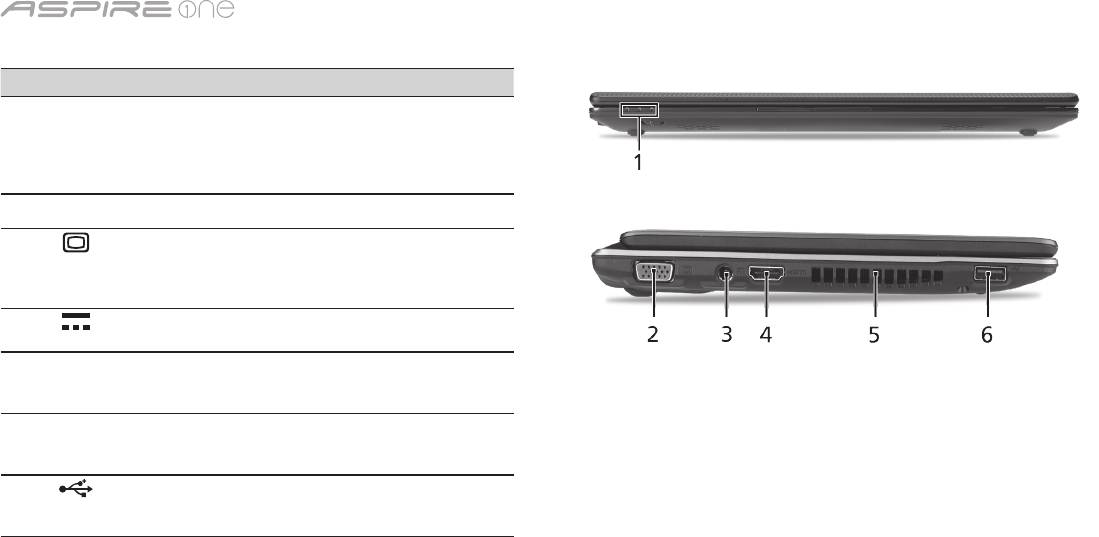
Serie
5
Voorkant gesloten
# Pictogram Item Beschrijving
1
Statusindicatoren Light-Emitting Diodes
(leds) die oplichten om
de status van functies
en componenten van de
computer aan te geven.
Linkerkant
2
Externe weergavepoort
Aansluiting voor een
(VGA)
beeldscherm (bijv. een
externe monitor, LCD-
projector).
3
Gelijkstroomaansluiting Aansluiting voor een
adapter.
4
Hdmi Hdmi-poort Ondersteunt high-
definition digitale
videosignalen.
5
Ventilatie-sleuven Zorgendatdecomputer
koel blijft, zelfs na
langdurig gebruik.
6
Usb 2.0-poort Aansluiting voor usb
2.0-apparaten (bijv. usb-
muis, usb-camera).
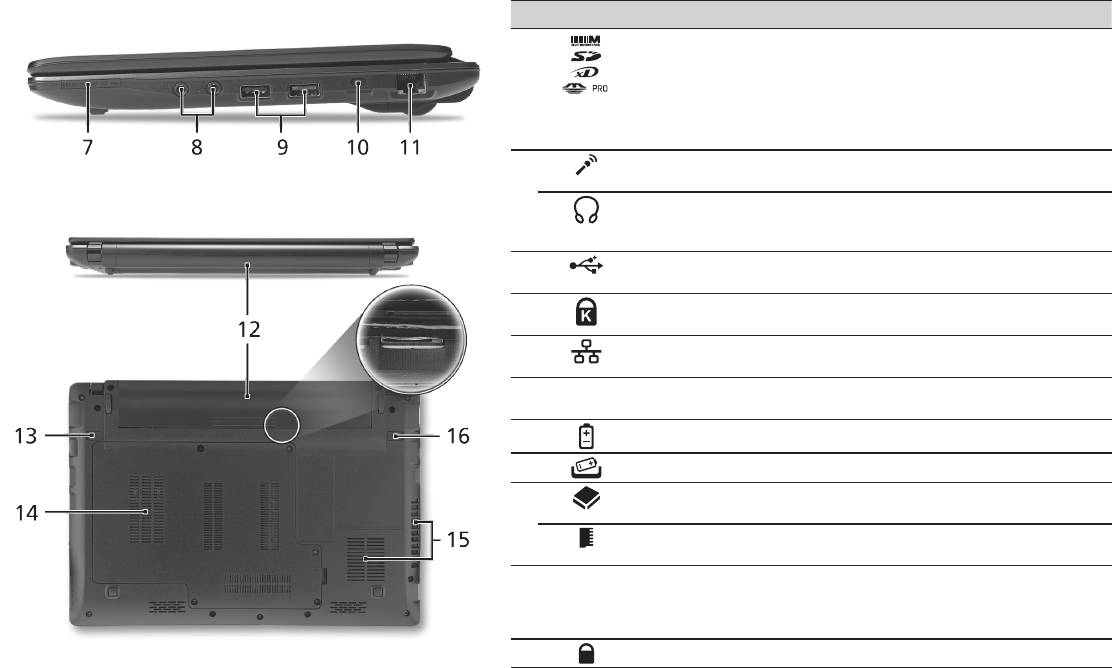
Snelgids
6
Rechterkant
# Pictogram Item Beschrijving
7
Meer-in-één-
Accepteert Secure Digital (SD),
kaartlezer
MultiMediaCard (MMC), Memory Stick
(MS), Memory Stick PRO (MS PRO) en
xD-Picture Card (xD).
Opmerking: Duwen om de kaart te
verwijderen/plaatsen. Er kan één kaart
tegelijk worden gebruikt.
8
Aansluiting voor
Aansluitingen voor externe microfoon.
Microfoon-in
S/PDIF-ondersteuning
Aansluiting voor lijn-uit
voor hoofdtelefoon/
audioapparaten (bijv. luidsprekers,
luidspreker/lijn-uit
hoofdtelefoon).
9
Usb 2.0-poort Aansluiting voor usb 2.0-apparaten
(bijv. usb-muis).
10
Sleuf voor Kensington-
Aansluiting voor een Kensington-
slot
compatibel computerbeveiligingsslot.
11
Ethernetpoort (RJ-45) Aansluiting voor een op Ethernet
10/100/1000-gebaseerd netwerk.
Achterkant & Onderkant
12
Batterijnis Bevat de batterij van de computer.
13
Batterijvergrendeling Maakt de batterij los.
14
Harde schijf nis Bevat de harde schijf van de computer
(vastgeschroefd).
Geheugenvak Bevat het hoofdgeheugen van de
computer.
15
Ventilatiesleuven en
Zorgendatdecomputerkoelblijft,
koelventilator
zelfs na langdurig gebruik.
Opmerking: Dek de opening van de
ventilator nooit af.
16
Batterijgrendel Vergrendelt de accu op z’n plaats.

Serie
Omgeving
Temperatuur:
In gebruik: 5°C tot 35°C
Niet in gebruik: -20°C tot 65°C
Vochtigheidsgraad (geen condensvorming):
In gebruik: 20% tot 80%
Niet in gebruik: 20% tot 80%
7

-serien
Hurtigguide

-serien
© 2010 Med enerett
Hurtigguide for Aspire One-serien
Opprinnelig utgave: 04/2010
Notebook-PC i Aspire One-serien
Modellnummer: _______________________________
Serienummer: _________________________________
Innkjøpsdato: _________________________________
Innkjøpssted: __________________________________

Hurtigguide
Federal Communications Commission
Declaration of Conformity
This device complies with Part 15 of the FCC Rules. Operation is subject to the following two conditions: (1) this device may not
cause harmful interference, and (2) this device must accept any interference received, including interference that may cause
undesired operation.
The following local Manufacturer / Importer is responsible for this declaration:
Product name: Notebook PC
Brand: Acer
Model number: MS2298
Machine type: AO 721 series
Name of Responsible Party: Acer America Corporation
Address of responsible party: 333 West San Carlos St., San Jose
CA 95110, U. S. A.
Contact person: Acer Representative
Phone No.: 1-254-298-4000
Fax No.: 1-254-298-4147
April 30, 2010

-serien
• Themaximumconcentrationvaluesoftherestrictedsubstancesbyweightinhomogenousmaterialare:
CE Declaration of Conformity
Lead
0.1%
Polybrominated Biphenyls (PBB’s)
0.1%
We,
Mercury
0.1%
Polybrominated Diphenyl Ethers (PBDE’s)
0.1%
Acer Incorporated
Hexavalent Chromium
0.1%
Cadmium
0.01%
8F, 88, Sec. 1, Hsin Tai Wu Rd., Hsichih, Taipei Hsien 221, Taiwan
Directive 2009/125/EC with regard to establishing a framework for the setting of ecodesign requirements for energy-related
product.
Contact Person: Mr. Easy Lai, e-mail:easy_lai@acer.com.tw
R&TTE Directive 1999/5/EC as attested by conformity with the following harmonized standard:
And,
• Article3.1(a)HealthandSafety
Acer Europe SA
- EN60950-1
Via Cantonale, Centro Galleria 2 6928 Manno Switzerland
- EN62311
Hereby declare that:
• Article3.1(b)EMC
Product: Notebook Computer
- EN301 489-1
Trade Name: Acer
- EN301 489-3 (Applicable to non-bluetooth wireless keyboard mouse set).
Model Number: MS2298
- EN301 489-7
Machine Type: AO721 series
- EN301 489-17
Is compliant with the essential requirements and other relevant provisions of the following EC directives, and that all the
- EN301 489-24
necessary steps have been taken and are in force to assure that production units of the same product will continue comply with
• Article3.2SpectrumUsages
the requirements.
- EN300 440-2 (Applicable to non-bluetooth wireless keyboard mouse set).
EMC Directive 2004/108/EC as attested by conformity with the following harmonized standards:
- EN300 328
• EN55022,AS/NZSCISPR22,ClassB
- EN301 511
• EN55024
- EN301 893 (Applicable to 5GHz high performance RLAN).
• EN61000-3-2ClassD
- EN301 908-1
• EN61000-3-3
- EN301 908-2
Year to begin affixing CE marking 2010.
Low Voltage Directive 2006/95/EC as attested by conformity with the following harmonized standard:
• EN60950-1
Apr. 30, 2010
Council Decision 98/482/EC (CTR21):
(Applicable to product with pan- European single terminal connection to the Public Switched Telephone Network (PSTN).)
Date
Easy Lai /Manager
RoHS Directive 2002/95/EC on the Restriction of the Use of certain Hazardous Substances in Electrical and Electronic Equipment
Regulation Center, Acer Inc.
Hurtigguide
• Themaximumconcentrationvaluesoftherestrictedsubstancesbyweightinhomogenousmaterialare:
CE Declaration of Conformity
Lead
0.1%
Polybrominated Biphenyls (PBB’s)
0.1%
We,
Mercury
0.1%
Polybrominated Diphenyl Ethers (PBDE’s)
0.1%
Acer Incorporated
Hexavalent Chromium
0.1%
Cadmium
0.01%
8F, 88, Sec. 1, Hsin Tai Wu Rd., Hsichih, Taipei Hsien 221, Taiwan
Directive 2009/125/EC with regard to establishing a framework for the setting of ecodesign requirements for energy-related
product.
Contact Person: Mr. Easy Lai, e-mail:easy_lai@acer.com.tw
R&TTE Directive 1999/5/EC as attested by conformity with the following harmonized standard:
And,
• Article3.1(a)HealthandSafety
Acer Europe SA
- EN60950-1
Via Cantonale, Centro Galleria 2 6928 Manno Switzerland
- EN62311
Hereby declare that:
• Article3.1(b)EMC
Product: Notebook Computer
- EN301 489-1
Trade Name: Acer
- EN301 489-3 (Applicable to non-bluetooth wireless keyboard mouse set).
Model Number: MS2298
- EN301 489-7
Machine Type: AO721 series
- EN301 489-17
Is compliant with the essential requirements and other relevant provisions of the following EC directives, and that all the
- EN301 489-24
necessary steps have been taken and are in force to assure that production units of the same product will continue comply with
• Article3.2SpectrumUsages
the requirements.
- EN300 440-2 (Applicable to non-bluetooth wireless keyboard mouse set).
EMC Directive 2004/108/EC as attested by conformity with the following harmonized standards:
- EN300 328
• EN55022,AS/NZSCISPR22,ClassB
- EN301 511
• EN55024
- EN301 893 (Applicable to 5GHz high performance RLAN).
• EN61000-3-2ClassD
- EN301 908-1
• EN61000-3-3
- EN301 908-2
Year to begin affixing CE marking 2010.
Low Voltage Directive 2006/95/EC as attested by conformity with the following harmonized standard:
• EN60950-1
Apr. 30, 2010
Council Decision 98/482/EC (CTR21):
(Applicable to product with pan- European single terminal connection to the Public Switched Telephone Network (PSTN).)
Date
Easy Lai /Manager
RoHS Directive 2002/95/EC on the Restriction of the Use of certain Hazardous Substances in Electrical and Electronic Equipment
Regulation Center, Acer Inc.
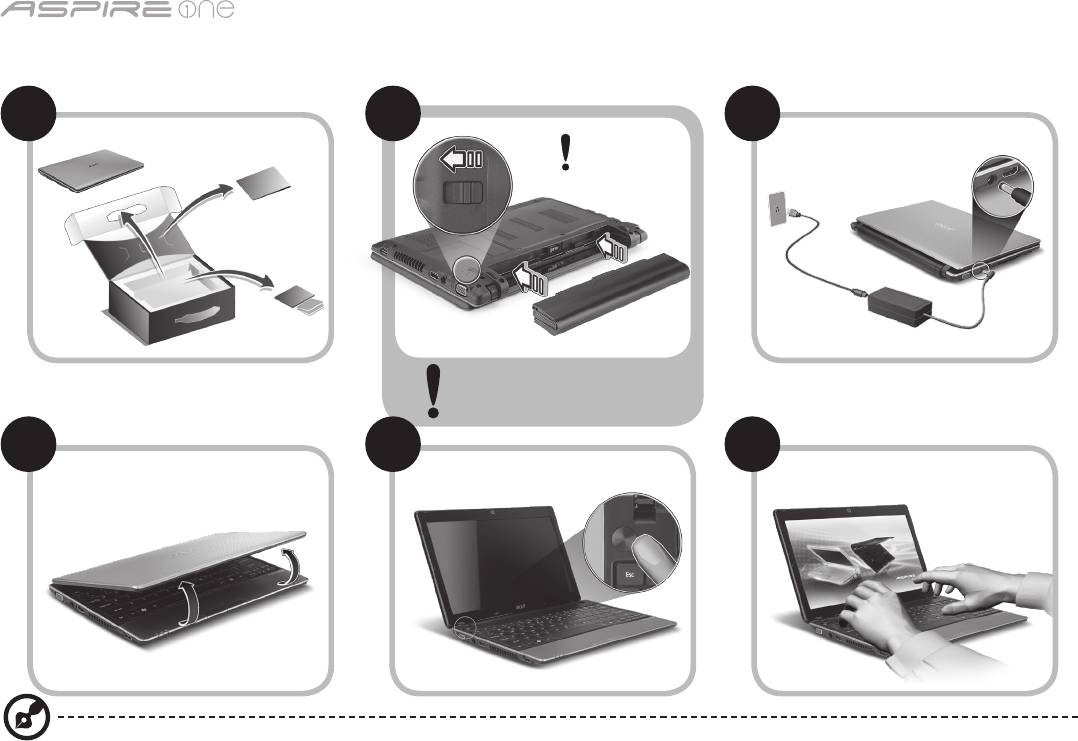
-serien
1
Før vi begynner
1 2
3
2-2
3-3
3-1
3-2
2-1
Kontroller at batteriet er
låst på plass som vist i 2-2.
4 5 6
Bildene er kun til illustrasjon. De faktiske produkt spesifikasjonene kan variere.

Hurtigguide
2
Begynne med begynnelsen
Vi vil gjerne takke deg for at du har valgt en Acer-notebook til dine mobile databehandlingsbehov.
Dine veiledere
Som hjelp til bruk av Acer-notebooken har vi utarbeidet et sett av guider*:
Den første er hurtigguiden, som hjelper deg i gang med oppsettet av datamaskinen.
Hvis du vil vite mer om hvordan datamaskinen kan hjelpe deg med å bli mer produktiv, vennligst slå opp i AcerSystem User
Guide. Denne guiden innholder detaljert informasjon om emner som systemverktøy, datagjenvinning, utbyggingsalternativer
og feilsøking/problemløsing. I tillegg finner du garantiopplysninger, generell informasjon og sikkerhetsmerknader for
notisbokmaskinen din. Boken er tilgjengelig som PDF-fil (Portable Document Format) og leveres forhåndslastet på maskinen.
Merk: Visning av filen krever Adobe Reader. Hvis Adobe Reader ikke er installert på datamaskinen, vil klikking på
AcerSystem User Guide føre til at installeringsprogrammet for Adobe Reader kjøres først. Følg instruksjonene på skjermen
for å fullføre installeringen. Hvis du vil ha instruksjoner i bruk av Adobe Reader, se menyen Hjelp og støtte.
* VIKTIG MERKNAD: Vennligst merk at guidene som nevnes her, enten de er i trykt eller elektronisk form, er beregnet
på dine referanseformål. Med unntak av det som er nevnt i den bestemte garantiinformasjonen i AcerSystem User
Guide, er det ingenting i disse guidene som utgjør en påstand eller en garanti fra Acer om produktet du har kjøpt. Acer
fraskriver seg uttrykkelig ethvert ansvar for feil som måtte forekomme i disse guidene og håndbøkene.
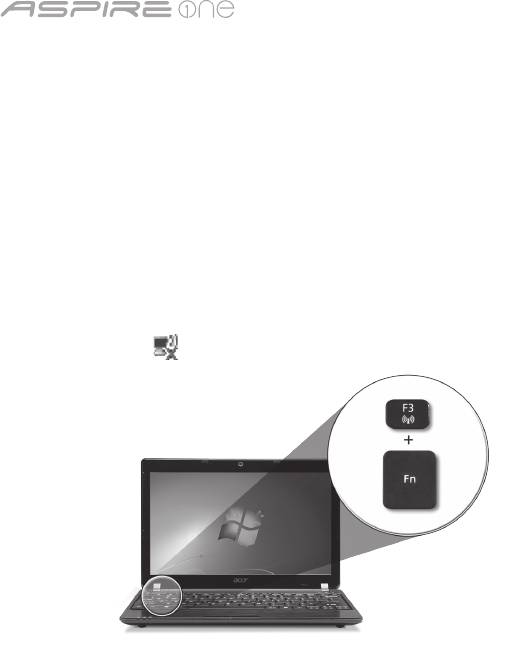
-serien
3
Nettverkskonfigurasjon
Denne guiden vil hjelpe deg med å konfigurere innstillinger for LAN og trådløst nettverk slik at du kan koble deg til Internett.
Sette opp en LAN-tilkobling
Plugg inn LAN-kabelen i Ethernet-porten (RJ-45). Se "Høyre visning" på side 6 hvis du vil finne Ethernet-portens plassering.
Sette opp en trådløs tilkobling
1. Trykk på <Fn> + <F3> for å få tilgang til kommunikasjonsstyring. Her kan du slå på Wi-Fi-tilkoblingen ved å klikke på den
røde knappen ved siden av Wi-Fi.
Merk: 3G og Bluetooth er også tilgjengelige gjennom kommunikasjonsstyring. Kommunikasjonsenheter kan variere avhengig
av modell.
2. Klikk på ikonet i systemskuffen, og velg det trådløse tilgangspunktet du vil koble deg til.
Sette inn et 3G SIM-kort (bare for visse modeller)
Fjern batteriet og sett forsiktig inn et 3G SIM-kort i 3G SIM-kortsporet. Under "Bakre visning & Bunnvisning" på side 6 kan du se
3G SIM-kortsporets plassering.
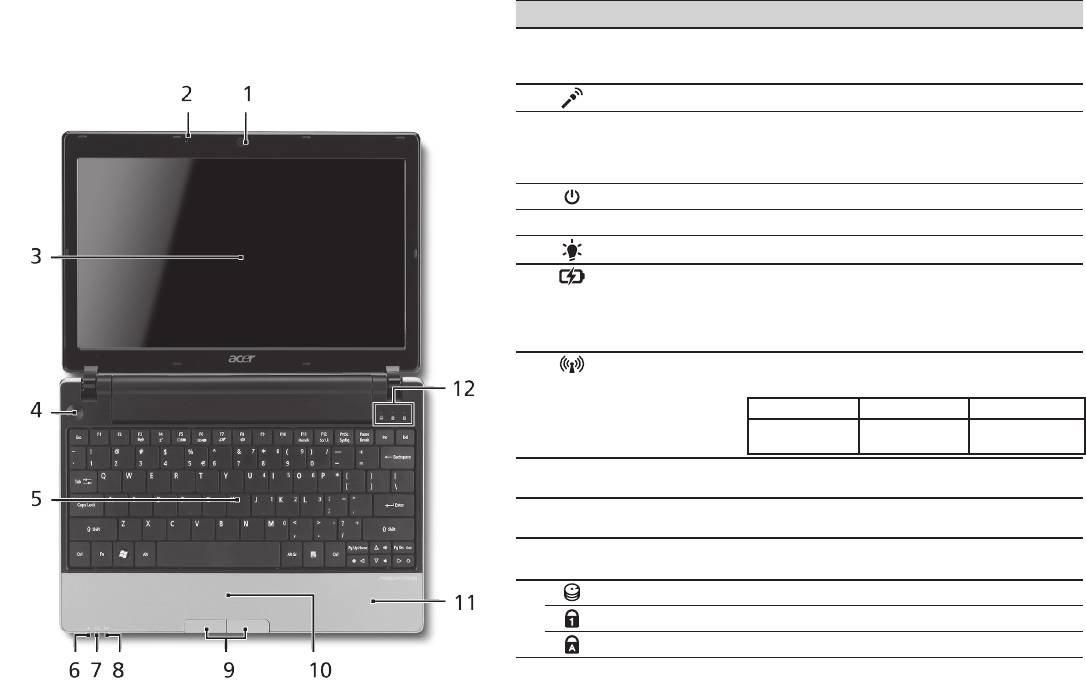
Hurtigguide
4
Visning ovenfra
Din Aspire One-omvisning
# Ikon Element Beskrivelse
Etter at du har satt opp datamaskinen som illustrert i
1
Acer Crystal
Webkamera til videokommunikasjon
avsnittet Før vi begynner, vil vi nå gjerne vise deg den nye
Eye-webkamera
(konfigurasjonen kan variere mellom
Acer-notebooken.
modellene).
2
Mikrofon Intern mikrofon for lydinnspilling.
3
Skjerm Kalles også LCD-skjerm (Liquid-Crystal
Display; LCD), viser utdata fra datamaskinen
(konfigurasjonen kan variere mellom
modellene).
4
Av/på-knapp Slår datamaskinen av og på.
5
Tastatur Legger inn data i datamaskinen.
1
6
Strømindikator
Angir datamaskinens strømstatus.
1
7
Batteriindikator
Angir datamaskinens batteristatus.
1. Lading: Lampen lyser gult når batteriet
lades.
2. Helt oppladet: Lampen lyser blått i
nettstrømmodus.
8
Kommunikasjons-
Angir statusen for trådløs LAN/3G-
1
indikator
kommunikasjon.
Blått lys på Oransjelys på Ikke tent
3G på/WiFi på
3G av/WiFi på 3G av/WiFi av
3G på/WiFi av
9
Klikkeknapper
Venstre og høyre knapp fungere på samme
(venstre og høyre)
måte som venstre og høyre museknapp.
10
Pekeplate Pekeenhet som reagerer på berøring og
fungerer som en mus.
11
Håndleddshviler Komfortabelt støtteområde for hendene når
du bruker datamaskinen.
12
Harddiskindikator Lyser når harddisken er aktiv.
Num Lock Lyser når Num Lock er aktivert.
Caps Lock Lyser når Caps Lock er aktivert.
1. Frontpanelindikatorene er synlige selv når datamaskindekselet er lukket.
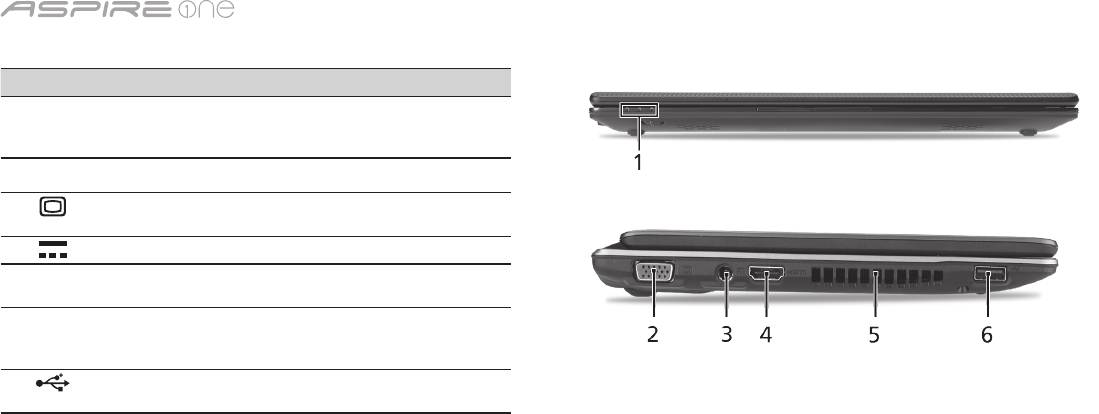
-serien
5
Lukket frontvisning
# Ikon Element Beskrivelse
1
Statusindikatorer Lamper (LED) som tennes for å
vise statusen for datamaskinens
funksjoner og komponenter.
Venstre visning
2
Port for ekstern skjerm
Kobler til en skjermenhet (f.eks.
(VGA)
ekstern skjerm, LCD-projektor).
3
Strømtilkobling Kobler til en batterieliminator.
4
HDMI HDMI-port Støtter høydefinisjons digitale
videoforbindelser.
5
Ventilasjonsåpninger Gir datamaskinen mulighet til å
holde seg kjølig, selv etter lang
tids bruk.
6
USB 2.0-port Kobler til USB 2.0-enheter
(f.eks. USB-mus, USB-kamera).
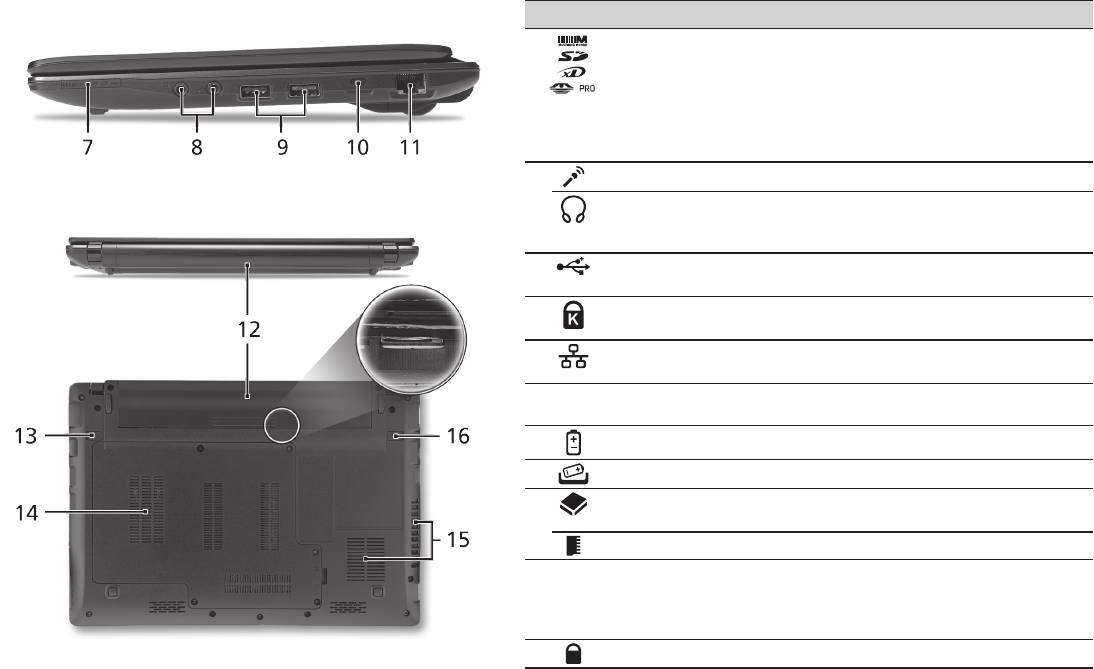
Hurtigguide
6
Høyre visning
# Ikon Element Beskrivelse
7
Multi-i-1-kortleser Godtar Secure Digital (SD),
MultiMediaCard (MMC), Memory Stick
(MS), Memory Stick Pro (MS PRO), og
xD-Picture Card (xD).
Merk: Skyv inn for å fjerne/installere
kortet. Bare ett kort kan være i bruk til
enhver tid.
8
Mikrofonplugg Mottar inndata fra eksterne mikrofoner.
Hodetelefon/
Kobler til utdataenheter for lyd (f.eks.
høyttaler/line-out-port
høyttalere, hodetelefon).
med S/PDIF-støtte
9
USB 2.0-port Kobler til USB 2.0-enheter (f.eks. USB-
mus).
10
Spor for Kensington-
Kobler til en Kensington-kompatibel
lås
sikkerhetslås for datamaskinen.
11
Ethernet-port (RJ-45) Kobler til et Ethernet 10/100/1000-basert
nettverk.
Bakre visning & Bunnvisning
12
Batterirom Huser datamaskinens batterier.
13
Batterifrigivelsesbolt Frigir batteriet for fjerning.
14
Harddiskplass Huser datamaskinens harddisk (sikret med
skruer).
Minnerom Huser datamaskinens hovedminne.
15
Ventilasjonsåpninger
Gir datamaskinen mulighet til å holde seg
og kjølevifte
kjølig, selv etter lang tids bruk.
Merk: Ikke dekk til eller blokker viftens
åpning.
16
Batterilås Låser batteriet på plass.

-serien
Miljø
Temperatur:
Drift: 5°C til 35°C
Ikke i bruk: -20°C til 65°C
Luftfuktighet (ikke-kondenserende):
Drift: 20% til 80%
Ikke i bruk: 20% til 80%
7

Seriens
Hurtig-guide

Seriens
© 2010 Alle rettigheder forbeholdes
Aspire One Seriens Hurtig-guide
Oprindeligt udgivet: 04/2010
Aspire One seriens notebook-pc
Modelnummer: ________________________________
Serienummer: _________________________________
Købsdato: _____________________________________
Købt hos: _____________________________________

Hurtig-guide
Federal Communications Commission
Declaration of Conformity
This device complies with Part 15 of the FCC Rules. Operation is subject to the following two conditions: (1) this device may not
cause harmful interference, and (2) this device must accept any interference received, including interference that may cause
undesired operation.
The following local Manufacturer / Importer is responsible for this declaration:
Product name: Notebook PC
Brand: Acer
Model number: MS2298
Machine type: AO 721 series
Name of Responsible Party: Acer America Corporation
Address of responsible party: 333 West San Carlos St., San Jose
CA 95110, U. S. A.
Contact person: Acer Representative
Phone No.: 1-254-298-4000
Fax No.: 1-254-298-4147
April 30, 2010

Seriens
• Themaximumconcentrationvaluesoftherestrictedsubstancesbyweightinhomogenousmaterialare:
CE Declaration of Conformity
Lead
0.1%
Polybrominated Biphenyls (PBB’s)
0.1%
We,
Mercury
0.1%
Polybrominated Diphenyl Ethers (PBDE’s)
0.1%
Acer Incorporated
Hexavalent Chromium
0.1%
Cadmium
0.01%
8F, 88, Sec. 1, Hsin Tai Wu Rd., Hsichih, Taipei Hsien 221, Taiwan
Directive 2009/125/EC with regard to establishing a framework for the setting of ecodesign requirements for energy-related
product.
Contact Person: Mr. Easy Lai, e-mail:easy_lai@acer.com.tw
R&TTE Directive 1999/5/EC as attested by conformity with the following harmonized standard:
And,
• Article3.1(a)HealthandSafety
Acer Europe SA
- EN60950-1
Via Cantonale, Centro Galleria 2 6928 Manno Switzerland
- EN62311
Hereby declare that:
• Article3.1(b)EMC
Product: Notebook Computer
- EN301 489-1
Trade Name: Acer
- EN301 489-3 (Applicable to non-bluetooth wireless keyboard mouse set).
Model Number: MS2298
- EN301 489-7
Machine Type: AO721 series
- EN301 489-17
Is compliant with the essential requirements and other relevant provisions of the following EC directives, and that all the
- EN301 489-24
necessary steps have been taken and are in force to assure that production units of the same product will continue comply with
• Article3.2SpectrumUsages
the requirements.
- EN300 440-2 (Applicable to non-bluetooth wireless keyboard mouse set).
EMC Directive 2004/108/EC as attested by conformity with the following harmonized standards:
- EN300 328
• EN55022,AS/NZSCISPR22,ClassB
- EN301 511
• EN55024
- EN301 893 (Applicable to 5GHz high performance RLAN).
• EN61000-3-2ClassD
- EN301 908-1
• EN61000-3-3
- EN301 908-2
Year to begin affixing CE marking 2010.
Low Voltage Directive 2006/95/EC as attested by conformity with the following harmonized standard:
• EN60950-1
Apr. 30, 2010
Council Decision 98/482/EC (CTR21):
(Applicable to product with pan- European single terminal connection to the Public Switched Telephone Network (PSTN).)
Date
Easy Lai /Manager
RoHS Directive 2002/95/EC on the Restriction of the Use of certain Hazardous Substances in Electrical and Electronic Equipment
Regulation Center, Acer Inc.
Hurtig-guide
• Themaximumconcentrationvaluesoftherestrictedsubstancesbyweightinhomogenousmaterialare:
CE Declaration of Conformity
Lead
0.1%
Polybrominated Biphenyls (PBB’s)
0.1%
We,
Mercury
0.1%
Polybrominated Diphenyl Ethers (PBDE’s)
0.1%
Acer Incorporated
Hexavalent Chromium
0.1%
Cadmium
0.01%
8F, 88, Sec. 1, Hsin Tai Wu Rd., Hsichih, Taipei Hsien 221, Taiwan
Directive 2009/125/EC with regard to establishing a framework for the setting of ecodesign requirements for energy-related
product.
Contact Person: Mr. Easy Lai, e-mail:easy_lai@acer.com.tw
R&TTE Directive 1999/5/EC as attested by conformity with the following harmonized standard:
And,
• Article3.1(a)HealthandSafety
Acer Europe SA
- EN60950-1
Via Cantonale, Centro Galleria 2 6928 Manno Switzerland
- EN62311
Hereby declare that:
• Article3.1(b)EMC
Product: Notebook Computer
- EN301 489-1
Trade Name: Acer
- EN301 489-3 (Applicable to non-bluetooth wireless keyboard mouse set).
Model Number: MS2298
- EN301 489-7
Machine Type: AO721 series
- EN301 489-17
Is compliant with the essential requirements and other relevant provisions of the following EC directives, and that all the
- EN301 489-24
necessary steps have been taken and are in force to assure that production units of the same product will continue comply with
• Article3.2SpectrumUsages
the requirements.
- EN300 440-2 (Applicable to non-bluetooth wireless keyboard mouse set).
EMC Directive 2004/108/EC as attested by conformity with the following harmonized standards:
- EN300 328
• EN55022,AS/NZSCISPR22,ClassB
- EN301 511
• EN55024
- EN301 893 (Applicable to 5GHz high performance RLAN).
• EN61000-3-2ClassD
- EN301 908-1
• EN61000-3-3
- EN301 908-2
Year to begin affixing CE marking 2010.
Low Voltage Directive 2006/95/EC as attested by conformity with the following harmonized standard:
• EN60950-1
Apr. 30, 2010
Council Decision 98/482/EC (CTR21):
(Applicable to product with pan- European single terminal connection to the Public Switched Telephone Network (PSTN).)
Date
Easy Lai /Manager
RoHS Directive 2002/95/EC on the Restriction of the Use of certain Hazardous Substances in Electrical and Electronic Equipment
Regulation Center, Acer Inc.
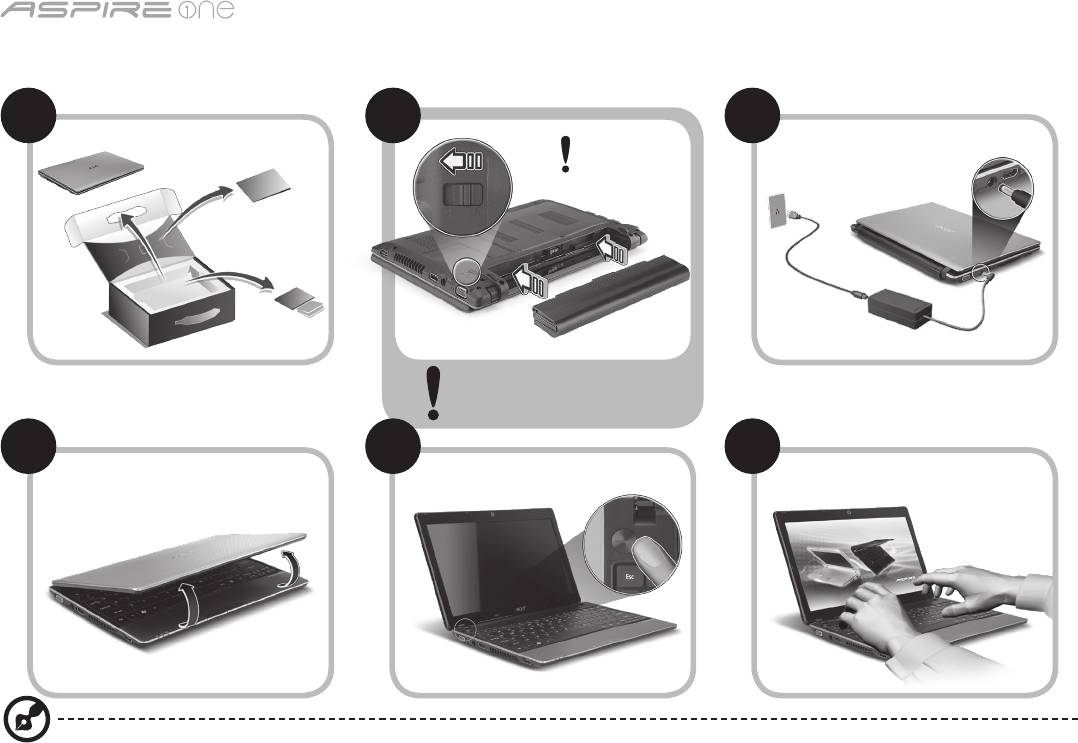
Seriens
1
Kun for begyndere
1 2
3
2-2
3-3
3-1
3-2
2-1
Sørg for, at batteriet er korrekt
låst på plads. Se tegning i 2-2.
4 5 6
Billederne er kun til illustration. De faktiske produktspecifikationer kan variere.

Hurtig-guide
2
For det første
Vi vil gerne takke for, at du har valgt en Acer bærbar til at opfylde dine mobile computerbehov.
Dine vejledninger
Vi har designet et sæt vejledninger, som hjælper dig med at bruge din Acer bærbare*:
For det første hjælper hurtigvejledningen dig med at komme i gang med at konfigurere din computer.
Der henvises til AcerSystem-brugervejledningen, hvor du kan få flere oplysninger om, hvordan din computer kan hjælpe dig
med at blive mere produktiv. Denne vejledning indeholder detaljerede oplysninger om emner som systemhjælpeprogrammer,
datagenoprettelse, udvidelsesvalg og fejlfinding. Derudover indeholder den garantioplysninger og generelle regulativer
og sikkerhedsmeddelelser til din bærbare. Den findes i Portable Document Format (PDF) og leveres forudindstalleret på din
bærbare.
Bemærk: Visning af filen kræver Adobe Reader. Hvis Adobe Reader ikke er installeret på din computer, vil klik på
AcerSystem-brugervejledningen først køre installationsprogrammet til Adobe Reader. Følg instruktionerne på skærmen
for at fuldføre installationen. Instruktioner om, hvordan du bruger Adobe Reader, fås i menuen Hjælp og support.
* VIGTIGT: Bemærk, at de vejledninger, der nævnes heri, hvad enten de er trykt eller i elektronisk format, kun
er til referenceformål, og med undtaelse af det, som er angivet i bestemte garantioplysninger i AcerSystem-
brugervejledningen, vil intet i disse vejledninger udgøre en indsigelse eller garanti fra Acer med hensyn til det produkt,
du købte. Acer fraskriver sig udtrykkeligt ethvert ansvar for fejl i disse vejledninger.
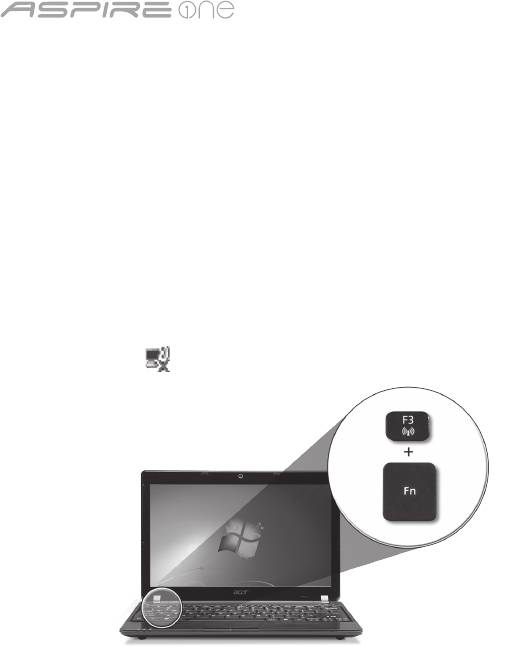
Seriens
3
Netværkskonfiguration
Denne vejledning hjælper dig med at konfigurere dine indstillinger for LAN og trådløst netværk, så du sættes i stand til at
oprette forbindelse til internettet.
Opsætning af LAN-forbindelse
Indsæt LAN-kablet i Ethernet'ets (RJ-45)-port. Der henvises til "Fra højre" på side 6 for at se placerinen af Ethernet-porten.
Opsætning af en trådløs forbindelse
1. Tryk på <Fn> + <F3> for at få adgang til Kommunikationsadministrator. Her kan du tænde for Wi-Fi-forbindelsen ved at
klikke på den røde kan ved siden af Wi-Fi.
Bemærk: Der er også adgang til 3G og Bluetooth via kommunikationsadministratoren. Kommunikationsenheder kan variere
efter model.
2. Klik på ikonet i din systembakke, og vælg det trådløse adgangspunkt, som du vil oprette forbindelse til.
Indsættelse af et 3G-SIM-kort (kun på visse modeller)
Fjern batteriet, og indsæt et 3G-SIM-kort forsigtigt i 3G-SIM-kortstikket. Der henvises til "Bagfra & Nedefra" på side 6, hvor du
kan se, hvor 3G-SIM-kortstikket sidder.
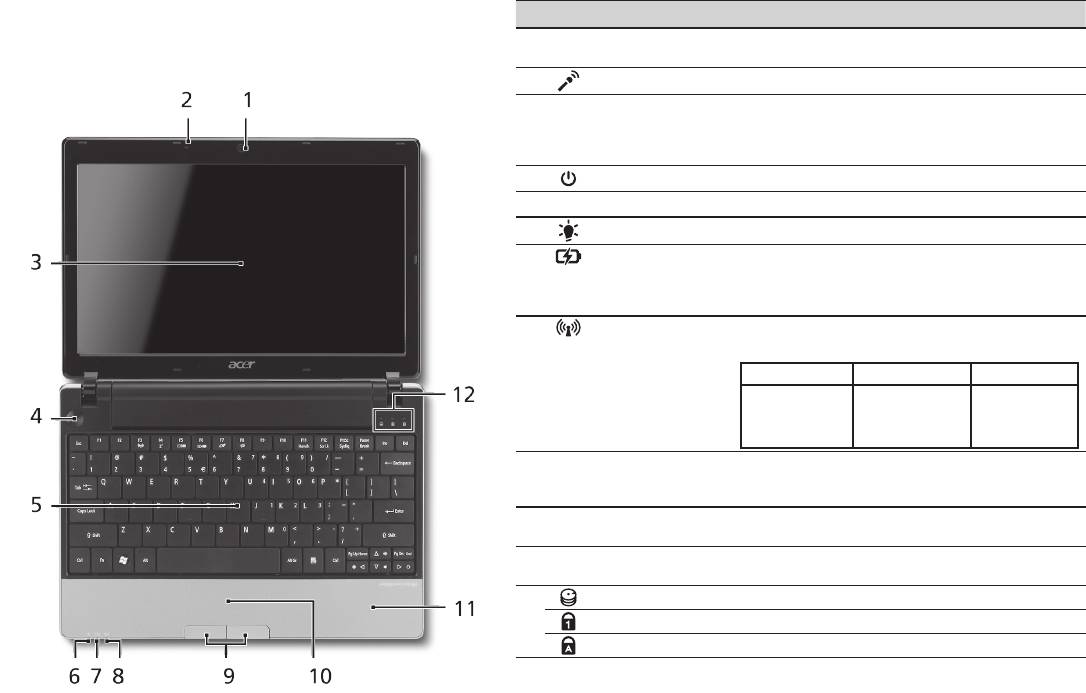
Hurtig-guide
4
Fra oven
Din Aspire One-tur
# Ikon Emne Beskrivelse
Når du har konfigureret din computer som vist i afsnittet
1
Acer Crystal Eye
Webkamera til videokommunikation
Kun for begyndere, vil vi vise dig rundt på din nye Acer
webcam
(konfiguration kan varierer fra model til model).
Notebook.
2
Mikrofon Intern mikrofon til optagelse af lyd.
3
Skærm Det kaldes også for et LCD (Liquid-Crystal
Display - flydende krystaldisplay), og det
viser computerens output (konfiguration kan
varierer fra model til model).
4
Afbryderknap Tænder/slukker for computeren.
5
Tastatur Til indtastning af data på computeren.
1
6
Strømindikator
Angiver computerens strømstatus.
1
7
Batteriindikator
Angiver computerens batteristatus.
1. Oplader: Lampen lyser gult, når batteriet
oplader.
2. Fuldt opladet: Lampen lyser blåt i AC-tilstand.
8
Kommunikations-
Angiver status for den trådløse LAN/3G-
1
indikator
kommunikation.
Blåt lys tændt Orange lys tændt Ikke tændt
3G aktiveret/
WiFi aktiveret
3G deaktiveret/WiFi
3G deaktiveret/
3G aktiveret/
aktiveret
WiFi deaktiveret
WiFi deaktiveret
9
Klik-knapper
Knapperne til højre og venstre fungerer på
(til venstre og til
samme måde som musens højre og venstre
højre)
knapper.
10
Touchpad
Et berøringsfølsomt pegeredskab, der
(pegefelt)
fungerer ligesom en computermus.
11
Håndfladestøtte Et komfortabelt støtteområde for dine
hænder, når du bruger computeren.
12
Harddiskindikator Lyser, når harddisken er aktiv.
Num lock Lyser, når Num Lock er aktiveret.
Caps Lock Lyser, når Caps Lock er aktiveret.
1. Frontpanelets indikatorer er synlige, selvom computerens låg er lukket.
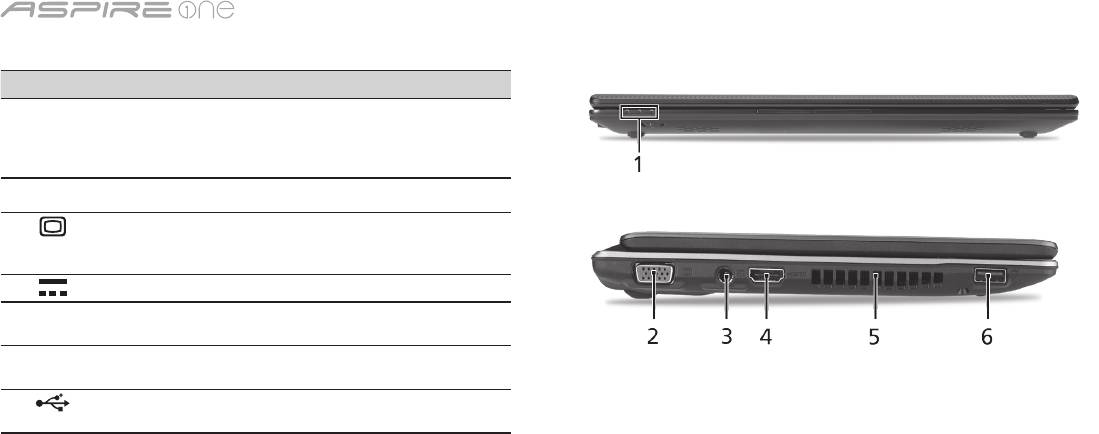
Seriens
5
Forfra - Lukket
# Ikon Emne Beskrivelse
1
Statusindikatorer LED'er (Light-Emitting Diodes),
der lyser for at vise status for
computerens funktioner og
komponenter.
Fra venstre
2
Stik til ekstern
Tilslutter til en skærmenhed
skærm (VGA)
(f.eks. ekstern skræm, LCD-
projektor).
3
Jævnstrøm ind-stik Tilslutter til en AC-adapter.
4
HDMI HDMI-port Understøtter high-definition
digitale netværksforbindelser.
5
Ventilationsåbninger Lader computeren være kølig selv
efter lang tids brug.
6
USB 2.0-port Tilslutter til USB 2.0-enheder
(f.eks. USB-mus, USB-kamera).
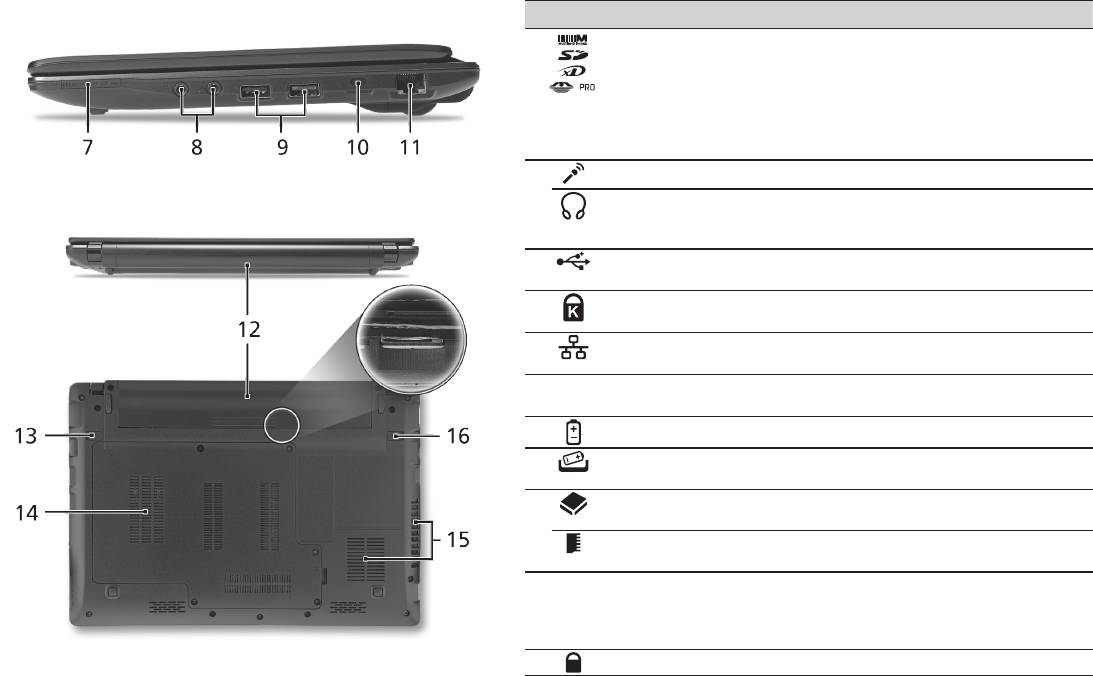
Hurtig-guide
6
Fra højre
# Ikon Emne Beskrivelse
7
Flere-i-en-kortlæser Accepterer Secure Digital (SD),
MultiMediaCard (MMC), Memory Stick
(MS), Memory Stick PRO (MS PRO), xD-
Picture Card (xD).
Bemærk: Skub for at fjerne/installere
kortet. Der kan kun være et kort aktivt ad
gangen.
8
Mikrofonstik Accepterer input fra eksterne mikrofoner.
Hovedtelefon/højtaler/
Der kan tilsluttes ekstraudstyr (f. eks.
udgangsstik med
højtalere, hovedtelefoner).
S/PDIF understøttelse
9
USB 2.0-port Tilslutter til USB 2.0-enheder (f.eks. USB-
mus).
10
Åbning til en
Tilslutter til en Kensington-kompatibel
Kensington-lås
computers sikkerhedslås.
11
Netværksport (RJ-45) Tilslutter til et Ethernet 10/100/1000-
baseret netværk.
Bagfra & Nedefra
12
Batterirum Indeholder computerens batteri.
13
Frigørelsesarm til
Frigør batteriet til udtagning.
batteri
14
Harddiskbås Indeholder computerens harddisk (fastsat
med skruer).
Hukommelsesrum Her sidder computerens centrale
hukommelse.
15
Ventilationshuller og
Lader computeren være kølig selv efter
køleblæser
lang tids brug.
Bemærk: Du må aldrig tildække eller
spærre åbningen til køleren.
16
Batterilås Låser batteriet på plads.

Seriens
Omgivelser
Temperatur:
Under brug: 5°C til 35°C
Ikke i brug: -20°C til 65°C
Fugtighed (ikke-kondenserende):
Under brug: 20% til 80%
Ikke i brug: 20% til 80%
7

-serien
Snabbguide

-serien
© 2010 Med ensamrätt
Aspire One-serien - Snabbguide
Ursprunglig utgåva: 04/2010
Aspire One-serien – bärbar PC-dator
Modellnummer: _______________________________
Serienummer: _________________________________
Inköpsdatum: _________________________________
Inköpsställe: __________________________________

Snabbguide
Federal Communications Commission
Declaration of Conformity
This device complies with Part 15 of the FCC Rules. Operation is subject to the following two conditions: (1) this device may not
cause harmful interference, and (2) this device must accept any interference received, including interference that may cause
undesired operation.
The following local Manufacturer / Importer is responsible for this declaration:
Product name: Notebook PC
Brand: Acer
Model number: MS2298
Machine type: AO 721 series
Name of Responsible Party: Acer America Corporation
Address of responsible party: 333 West San Carlos St., San Jose
CA 95110, U. S. A.
Contact person: Acer Representative
Phone No.: 1-254-298-4000
Fax No.: 1-254-298-4147
April 30, 2010

-serien
• Themaximumconcentrationvaluesoftherestrictedsubstancesbyweightinhomogenousmaterialare:
CE Declaration of Conformity
Lead
0.1%
Polybrominated Biphenyls (PBB’s)
0.1%
We,
Mercury
0.1%
Polybrominated Diphenyl Ethers (PBDE’s)
0.1%
Acer Incorporated
Hexavalent Chromium
0.1%
Cadmium
0.01%
8F, 88, Sec. 1, Hsin Tai Wu Rd., Hsichih, Taipei Hsien 221, Taiwan
Directive 2009/125/EC with regard to establishing a framework for the setting of ecodesign requirements for energy-related
product.
Contact Person: Mr. Easy Lai, e-mail:easy_lai@acer.com.tw
R&TTE Directive 1999/5/EC as attested by conformity with the following harmonized standard:
And,
• Article3.1(a)HealthandSafety
Acer Europe SA
- EN60950-1
Via Cantonale, Centro Galleria 2 6928 Manno Switzerland
- EN62311
Hereby declare that:
• Article3.1(b)EMC
Product: Notebook Computer
- EN301 489-1
Trade Name: Acer
- EN301 489-3 (Applicable to non-bluetooth wireless keyboard mouse set).
Model Number: MS2298
- EN301 489-7
Machine Type: AO721 series
- EN301 489-17
Is compliant with the essential requirements and other relevant provisions of the following EC directives, and that all the
- EN301 489-24
necessary steps have been taken and are in force to assure that production units of the same product will continue comply with
• Article3.2SpectrumUsages
the requirements.
- EN300 440-2 (Applicable to non-bluetooth wireless keyboard mouse set).
EMC Directive 2004/108/EC as attested by conformity with the following harmonized standards:
- EN300 328
• EN55022,AS/NZSCISPR22,ClassB
- EN301 511
• EN55024
- EN301 893 (Applicable to 5GHz high performance RLAN).
• EN61000-3-2ClassD
- EN301 908-1
• EN61000-3-3
- EN301 908-2
Year to begin affixing CE marking 2010.
Low Voltage Directive 2006/95/EC as attested by conformity with the following harmonized standard:
• EN60950-1
Apr. 30, 2010
Council Decision 98/482/EC (CTR21):
(Applicable to product with pan- European single terminal connection to the Public Switched Telephone Network (PSTN).)
Date
Easy Lai /Manager
RoHS Directive 2002/95/EC on the Restriction of the Use of certain Hazardous Substances in Electrical and Electronic Equipment
Regulation Center, Acer Inc.
Snabbguide
• Themaximumconcentrationvaluesoftherestrictedsubstancesbyweightinhomogenousmaterialare:
CE Declaration of Conformity
Lead
0.1%
Polybrominated Biphenyls (PBB’s)
0.1%
We,
Mercury
0.1%
Polybrominated Diphenyl Ethers (PBDE’s)
0.1%
Acer Incorporated
Hexavalent Chromium
0.1%
Cadmium
0.01%
8F, 88, Sec. 1, Hsin Tai Wu Rd., Hsichih, Taipei Hsien 221, Taiwan
Directive 2009/125/EC with regard to establishing a framework for the setting of ecodesign requirements for energy-related
product.
Contact Person: Mr. Easy Lai, e-mail:easy_lai@acer.com.tw
R&TTE Directive 1999/5/EC as attested by conformity with the following harmonized standard:
And,
• Article3.1(a)HealthandSafety
Acer Europe SA
- EN60950-1
Via Cantonale, Centro Galleria 2 6928 Manno Switzerland
- EN62311
Hereby declare that:
• Article3.1(b)EMC
Product: Notebook Computer
- EN301 489-1
Trade Name: Acer
- EN301 489-3 (Applicable to non-bluetooth wireless keyboard mouse set).
Model Number: MS2298
- EN301 489-7
Machine Type: AO721 series
- EN301 489-17
Is compliant with the essential requirements and other relevant provisions of the following EC directives, and that all the
- EN301 489-24
necessary steps have been taken and are in force to assure that production units of the same product will continue comply with
• Article3.2SpectrumUsages
the requirements.
- EN300 440-2 (Applicable to non-bluetooth wireless keyboard mouse set).
EMC Directive 2004/108/EC as attested by conformity with the following harmonized standards:
- EN300 328
• EN55022,AS/NZSCISPR22,ClassB
- EN301 511
• EN55024
- EN301 893 (Applicable to 5GHz high performance RLAN).
• EN61000-3-2ClassD
- EN301 908-1
• EN61000-3-3
- EN301 908-2
Year to begin affixing CE marking 2010.
Low Voltage Directive 2006/95/EC as attested by conformity with the following harmonized standard:
• EN60950-1
Apr. 30, 2010
Council Decision 98/482/EC (CTR21):
(Applicable to product with pan- European single terminal connection to the Public Switched Telephone Network (PSTN).)
Date
Easy Lai /Manager
RoHS Directive 2002/95/EC on the Restriction of the Use of certain Hazardous Substances in Electrical and Electronic Equipment
Regulation Center, Acer Inc.
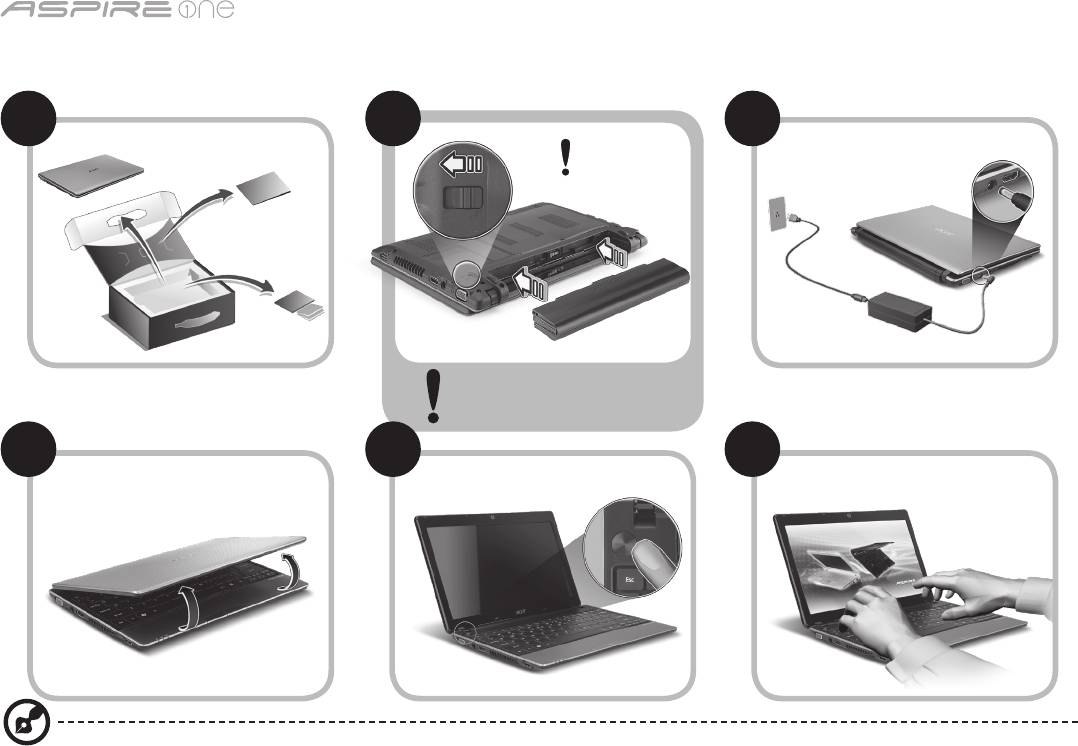
-serien
1
Komma igång
1 2
3
2-2
3-3
3-1
3-2
2-1
Se till att batteriet sitter
ordentligt på plats enligt
bilden 2-2.
4 5 6
Illustrationerna är endast avsedda för referensändamål. De faktiska produktspecifikationerna kan variera.

Snabbguide
2
Först och främst
Vi vill tacka för att du valde en bärbar Acer-dator för att uppfylla dina behov av mobil databehandling.
Dina guider
Vi har framställt en rad guider som hjälper dig att använda den bärbara Acer-datorn*:
Snabbguiden hjälper dig att komma igång med installation av datorn.
Om du vill veta mer om hur datorn kan hjälpa dig att bli mer produktiv studerar du AcerSystem User Guide. I den här guiden
finns detaljerad information om ämnen som systemfunktioner, återställning av data, utbyggnadsalternativ och felsökning.
Dessutom innehåller den garantiinformation samt allmänna föreskrifter och säkerhetsmeddelanden angående den bärbara
datorn. Den finns i Portable Document Format (PDF) och har förladdats i den bärbara datorn.
Obs! Adobe Reader krävs för visning av filen. Om du inte har Adobe Reader i datorn klickar du på AcerSystem User Guide
för att köra installationsprogrammet för Adobe Reader. Följ anvisningarna på skärmen för att genomföra installationen.
Instruktioner om användning av Adobe Reader finns under menyn Hjälp och support.
* VIKTIGT MEDDELANDE: Observera att guiderna som nämns häri, oavsett om de är i tryckt eller elektroniskt format,
endast är avsedda för referensändamål och förutom vad som anges i den särskilda garantiinformationen i AcerSystem
User Guide ska inget i de här guiderna utgöra en uppgift eller garanti från Acer avseende den produkt du har köpt. Acer
friskriver sig uttryckligen ansvaret för fel i de här guiderna.
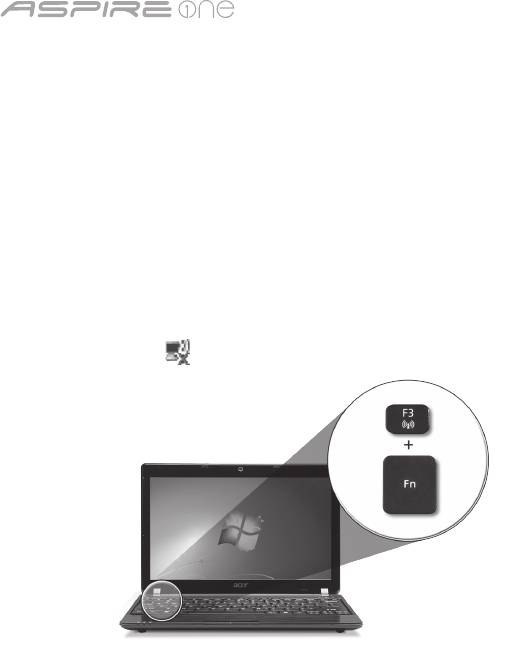
-serien
3
Nätverkskonfiguration
Den här guiden hjälper dig att konfigurera inställningar för LAN och trådlöst nätverk så att du kan ansluta till Internet.
Upprätta LAN-anslutning
Anslut bara LAN-kabeln till Ethernet-porten (RJ-45). I "Vy från höger" på sidan 6 finns uppgifter om Ethernet-portens placering.
Upprätta en trådlös anslutning
1. Tryck på <Fn> + <F3> för att komma åt kommunikationshanteraren. Här kan du slå på Wi-Fi-anslutningen genom att klicka
på den röda knappen bredvid Wi-Fi.
Obs! 3G och Bluetooth är också tillgängliga via kommunikationshanteraren. Kommunikationsenheterna kan variera mellan
olika modeller.
2. Klicka på ikonen i systemfältet och välj den trådlösa åtkomstpunkt som du vill ansluta till.
Sätta i ett 3G-SIM-kort (bara för vissa modeller)
Ta bort batteriet och för försiktigt in ett 3G-SIM-kort på kortplatsen för 3G-SIM-kort. 3G-SIM-kortplatsens placering visas i
“Vy över baksidan & Vy över basen” på sidan 6.
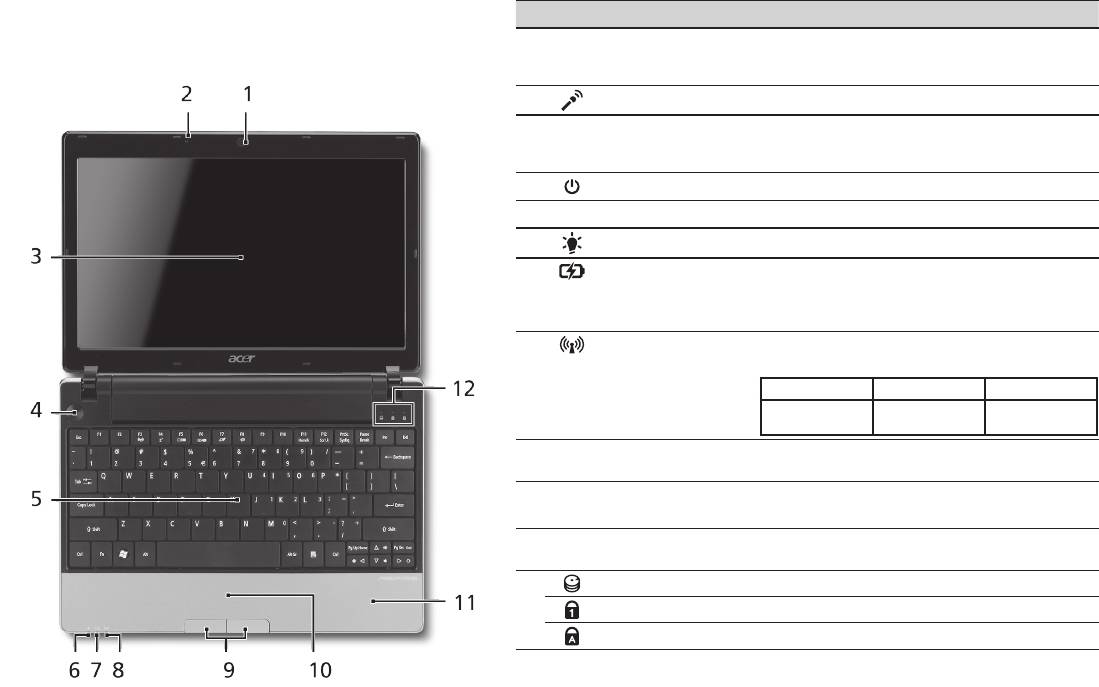
Snabbguide
4
Vy över ovansidan
Visning av Aspire One
# Ikon Objekt Beskrivning
När du har ställt in datorn enligt beskrivning i avsnittet
1
Acer Crystal Eye
Webbkamera för videokommunikation
Komma igång vill vi gärna visa dig din nya bärbara dator
webbkamera
(konfigurationen kan variera med olika
från Acer.
modeller).
2
Mikrofon Inbyggd mikrofon för ljudinspelning.
3
Bildskärm Kallas även Liquid-Crystal Display (LCD), visar
utdata från datorn (konfigurationen kan
variera med olika modeller).
4
Av/på-knapp Slår på och stänger av datorn.
5
Tangentbord För inmatning av data i datorn.
1
6
På-indikator
Anger om datorn är av eller på.
1
7
Batteriindikator
Anger status för datorns batteri.
1. Laddar: Lyser orange när batteriet laddas.
2. Fulladdad: Lyser blått då datorn är
ansluten till nätström.
8
Kommunikations-
Visar status för trådlös LAN-/3G-
1
indikator
kommunikation.
Lyser blått Lyser orange Inte tänd
3G på/WiFi på
3G av/WiFi på 3G av/WiFi av
3G på/WiFi av
9
Klickknappar
Vänster och höger knapp fungerar som
(vänster och höger)
vänster och höger musknapp.
10
Pekplatta Beröringskänslig pekenhet som fungerar
som en datormus.
11
Handlovsstöd Handlovsstödet ger bekvämt stöd för
händerna när du använder datorn.
12
Hårddiskindikator Tänds när hårddisken arbetar.
Num Lock Lyser när det Num Lock aktiveras.
Caps Lock Lyser när skiftlåset (Caps Lock) aktiveras.
1. Indikatorerna på frontpanelen syns även när datorhöljet är stängt.
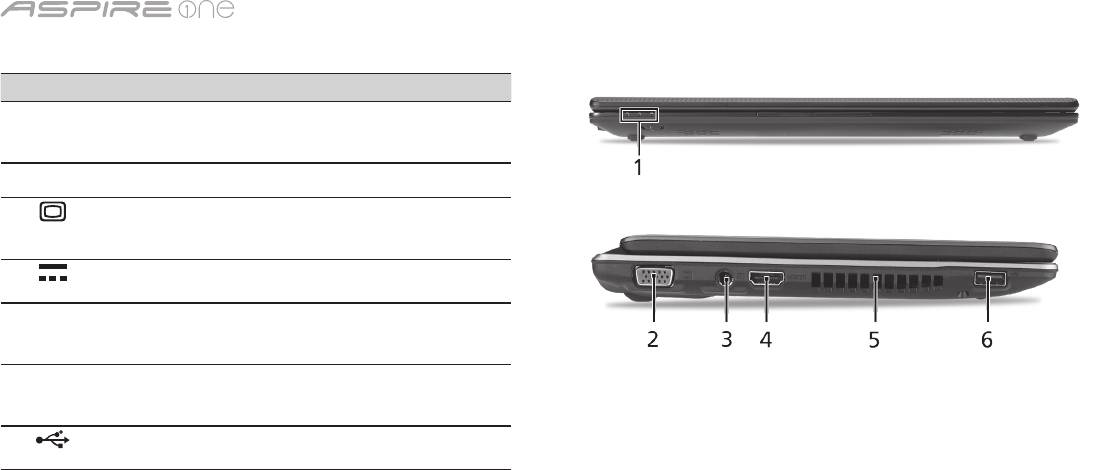
-serien
5
Vy över stängd framsida
# Ikon Objekt Beskrivning
1
Statusindikatorer Lysdioder (LED) som tänds för
att visa statusen för datorns
funktioner och komponenter.
Vy från vänster
2
Port för extern
Anslutning till en visningsenhet
bildskärm (VGA)
(t.ex. extern bildskärm, LCD-
projektor).
3
DC in-anslutning Ansluts till en
växelströmsadapter.
4
HDMI HDMI-port Har stöd för digitala
videoanslutningar av
högdefinitionstyp.
5
Ventilationsöppningar Möjliggör att datorn håller
sig sval, även efter långvarig
användning.
6
USB 2.0-port Ansluts till USB 2.0-enheter
(t.ex. USB-mus, USB-kamera).
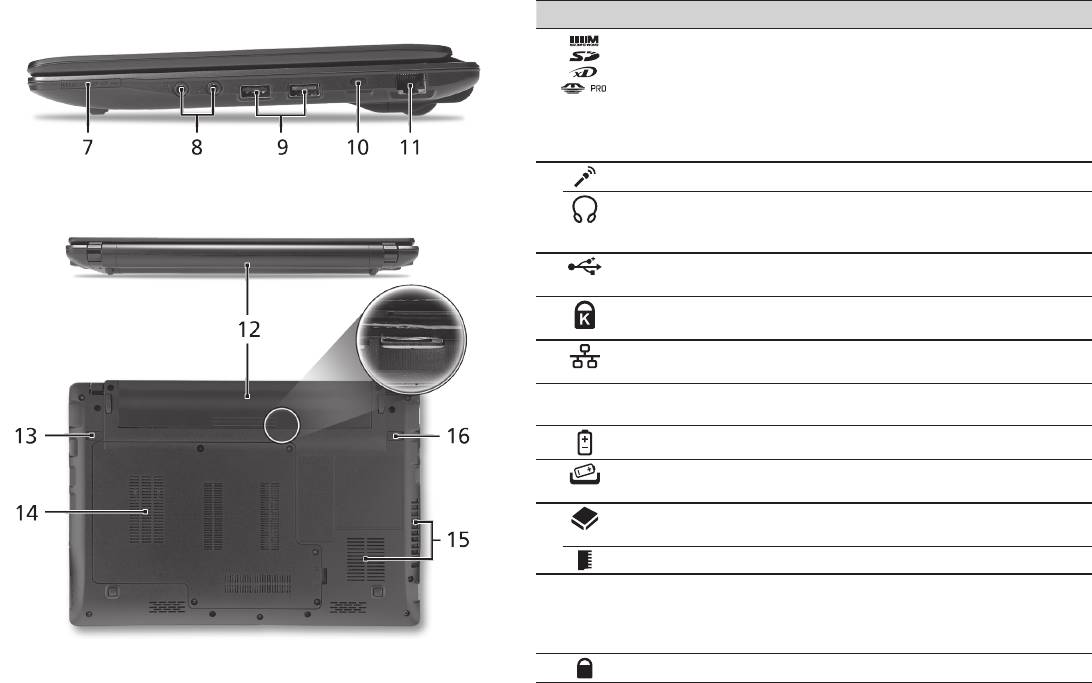
Snabbguide
6
Vy från höger
# Ikon Objekt Beskrivning
7
Flera-i-1-kortläsare Avsedd för Secure Digital (SD),
MultiMediaCard (MMC), Memory Stick
(MS), Memory Stick PRO (MS PRO),
xD-Picture Card (xD).
Obs! Tryck för att ta bort/sätta i kortet.
Det går bara att använda ett kort i
taget.
8
Ingång för mikrofon Anslutning för externa mikrofoner.
Utgång för hörlurar/
Anslutning för externa ljudenheter (t.ex.
högtalar/linje ut med
högtalare, hörlurar).
S/PDIF-stöd
9
USB 2.0-port Ansluts till USB 2.0-enheter (t.ex. USB-
mus).
10
Skåra för
Ansluts till ett Kensington-kompatibelt
Kensingtonlås
datorskyddslås.
11
Ethernet-port (RJ-45) Ansluts till ett Ethernet 10/100/1000-
baserat nätverk.
Vy över baksidan & Vy över basen
12
Batterifack Avsett för datorns batteripack.
13
Hake för frigöring av
Frigör batteriet före borttagning.
batteriet
14
Hårddiskfack Utrymme för datorns hårddisk
(fastskruvad).
Minnesfack Här finns datorns huvudminne.
15
Ventilationsöppningar
Möjliggör att datorn håller sig sval, även
och kylfläkt
efter långvarig användning.
Obs! Täck inte över eller ställ något för
fläktöppningen.
16
Batterilås Låser batteriet på plats.

-serien
Miljö
Temperatur:
Vid drift: 5°C till 35°C
Utom drift: -20°C till 65°C
Luftfuktighet (icke-kondenserande):
Vid drift: 20% till 80%
Utom drift: 20% till 80%
7

-sarja
Pikaohje

-sarja
© 2010 Kaikki oikeudet pidätetään
Aspire One-sarjan Pikaohje
Alkuperäinen painos: 04/2010
Aspire One –sarjan Kannettava tietokone
Mallinumero: _________________________________
Sarjanumero: __________________________________
Ostopäivämäärä: ______________________________
Ostopaikka: ___________________________________

Pikaohje
Federal Communications Commission
Declaration of Conformity
This device complies with Part 15 of the FCC Rules. Operation is subject to the following two conditions: (1) this device may not
cause harmful interference, and (2) this device must accept any interference received, including interference that may cause
undesired operation.
The following local Manufacturer / Importer is responsible for this declaration:
Product name: Notebook PC
Brand: Acer
Model number: MS2298
Machine type: AO 721 series
Name of Responsible Party: Acer America Corporation
Address of responsible party: 333 West San Carlos St., San Jose
CA 95110, U. S. A.
Contact person: Acer Representative
Phone No.: 1-254-298-4000
Fax No.: 1-254-298-4147
April 30, 2010

-sarja
• Themaximumconcentrationvaluesoftherestrictedsubstancesbyweightinhomogenousmaterialare:
CE Declaration of Conformity
Lead
0.1%
Polybrominated Biphenyls (PBB’s)
0.1%
We,
Mercury
0.1%
Polybrominated Diphenyl Ethers (PBDE’s)
0.1%
Acer Incorporated
Hexavalent Chromium
0.1%
Cadmium
0.01%
8F, 88, Sec. 1, Hsin Tai Wu Rd., Hsichih, Taipei Hsien 221, Taiwan
Directive 2009/125/EC with regard to establishing a framework for the setting of ecodesign requirements for energy-related
product.
Contact Person: Mr. Easy Lai, e-mail:easy_lai@acer.com.tw
R&TTE Directive 1999/5/EC as attested by conformity with the following harmonized standard:
And,
• Article3.1(a)HealthandSafety
Acer Europe SA
- EN60950-1
Via Cantonale, Centro Galleria 2 6928 Manno Switzerland
- EN62311
Hereby declare that:
• Article3.1(b)EMC
Product: Notebook Computer
- EN301 489-1
Trade Name: Acer
- EN301 489-3 (Applicable to non-bluetooth wireless keyboard mouse set).
Model Number: MS2298
- EN301 489-7
Machine Type: AO721 series
- EN301 489-17
Is compliant with the essential requirements and other relevant provisions of the following EC directives, and that all the
- EN301 489-24
necessary steps have been taken and are in force to assure that production units of the same product will continue comply with
• Article3.2SpectrumUsages
the requirements.
- EN300 440-2 (Applicable to non-bluetooth wireless keyboard mouse set).
EMC Directive 2004/108/EC as attested by conformity with the following harmonized standards:
- EN300 328
• EN55022,AS/NZSCISPR22,ClassB
- EN301 511
• EN55024
- EN301 893 (Applicable to 5GHz high performance RLAN).
• EN61000-3-2ClassD
- EN301 908-1
• EN61000-3-3
- EN301 908-2
Year to begin affixing CE marking 2010.
Low Voltage Directive 2006/95/EC as attested by conformity with the following harmonized standard:
• EN60950-1
Apr. 30, 2010
Council Decision 98/482/EC (CTR21):
(Applicable to product with pan- European single terminal connection to the Public Switched Telephone Network (PSTN).)
Date
Easy Lai /Manager
RoHS Directive 2002/95/EC on the Restriction of the Use of certain Hazardous Substances in Electrical and Electronic Equipment
Regulation Center, Acer Inc.
Pikaohje
• Themaximumconcentrationvaluesoftherestrictedsubstancesbyweightinhomogenousmaterialare:
CE Declaration of Conformity
Lead
0.1%
Polybrominated Biphenyls (PBB’s)
0.1%
We,
Mercury
0.1%
Polybrominated Diphenyl Ethers (PBDE’s)
0.1%
Acer Incorporated
Hexavalent Chromium
0.1%
Cadmium
0.01%
8F, 88, Sec. 1, Hsin Tai Wu Rd., Hsichih, Taipei Hsien 221, Taiwan
Directive 2009/125/EC with regard to establishing a framework for the setting of ecodesign requirements for energy-related
product.
Contact Person: Mr. Easy Lai, e-mail:easy_lai@acer.com.tw
R&TTE Directive 1999/5/EC as attested by conformity with the following harmonized standard:
And,
• Article3.1(a)HealthandSafety
Acer Europe SA
- EN60950-1
Via Cantonale, Centro Galleria 2 6928 Manno Switzerland
- EN62311
Hereby declare that:
• Article3.1(b)EMC
Product: Notebook Computer
- EN301 489-1
Trade Name: Acer
- EN301 489-3 (Applicable to non-bluetooth wireless keyboard mouse set).
Model Number: MS2298
- EN301 489-7
Machine Type: AO721 series
- EN301 489-17
Is compliant with the essential requirements and other relevant provisions of the following EC directives, and that all the
- EN301 489-24
necessary steps have been taken and are in force to assure that production units of the same product will continue comply with
• Article3.2SpectrumUsages
the requirements.
- EN300 440-2 (Applicable to non-bluetooth wireless keyboard mouse set).
EMC Directive 2004/108/EC as attested by conformity with the following harmonized standards:
- EN300 328
• EN55022,AS/NZSCISPR22,ClassB
- EN301 511
• EN55024
- EN301 893 (Applicable to 5GHz high performance RLAN).
• EN61000-3-2ClassD
- EN301 908-1
• EN61000-3-3
- EN301 908-2
Year to begin affixing CE marking 2010.
Low Voltage Directive 2006/95/EC as attested by conformity with the following harmonized standard:
• EN60950-1
Apr. 30, 2010
Council Decision 98/482/EC (CTR21):
(Applicable to product with pan- European single terminal connection to the Public Switched Telephone Network (PSTN).)
Date
Easy Lai /Manager
RoHS Directive 2002/95/EC on the Restriction of the Use of certain Hazardous Substances in Electrical and Electronic Equipment
Regulation Center, Acer Inc.
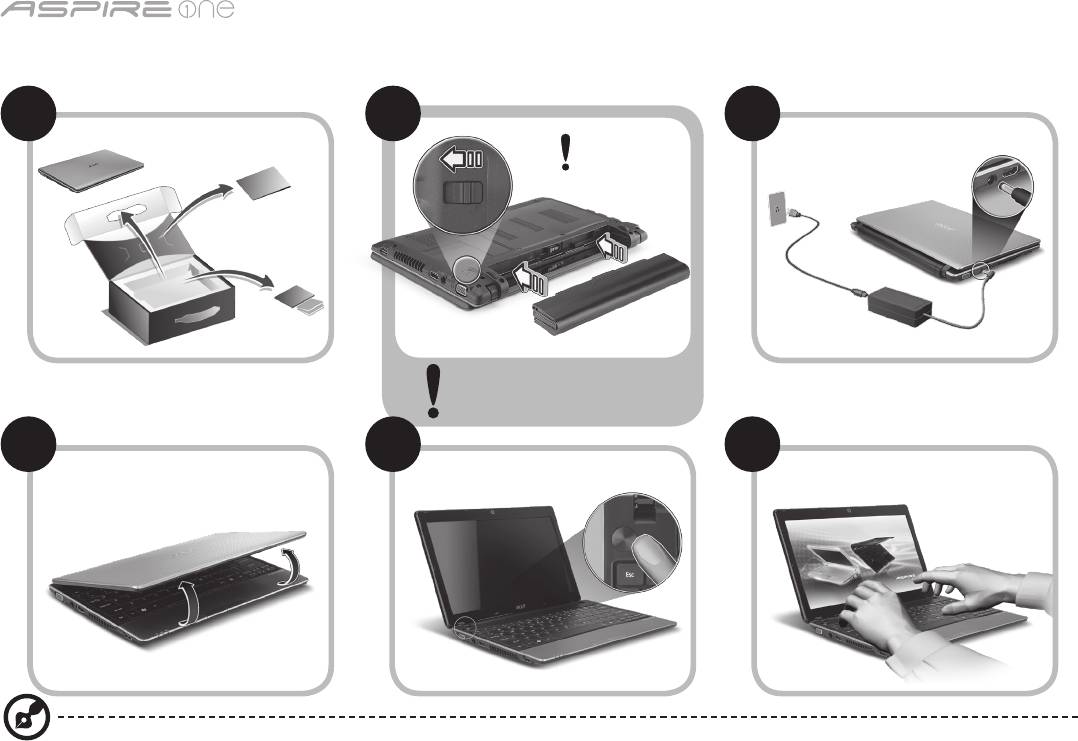
-sarja
1
Aloittelijoille
1 2
3
2-2
3-3
3-1
3-2
2-1
Varmista, että akku on oikein
lukittu paikalleen, kuten
kohdassa 2-2 on esitetty.
4 5 6
Kuvat ovat viitteellisiä. Varsinainen tuote saattaa poiketa lehtisen kuvista.

Pikaohje
2
Aloitetaan perusasioista
Haluamme kiittää sinua Acerin kannettavan tietokoneen valitsemisesta liikkuvien tietokonetarpeittesi täyttämisessä.
Ohjeet
Helpottaaksesi sinua Acer-tietokoneen käyttämisessä olemme suunnitelleet sarjan ohjekirjoja*:
Ihan aluksi Pikaohje auttaa sinua tietokoneen käyttöönotossa.
Lisätietoja siitä, miten tietokoneesi auttaa sinua lisäämään tuottavuutta, on annettu ohjeessa AcerSystem Käyttäjän opas.
Tässä oppaassa on yksityiskohtaiset ohjeet järjestelmätoiminnoista, tietojen palauttamisesta, tietokoneen laajentamisesta ja
ongelmanratkaisusta. Siinä on myös annettu yleisiä ohjeita, tietoja takuusta sekä turvallisuusohjeita. Se on saatavana Portable
Document Format (PDF) –muodossa, ja ja tulee esiasennettuna tietokoneellesi.
Ohje: Jotta voit katsella käyttöohjekirjan tiedostoa, Adobe Readerin on oltava asennettu. Jos Adobe Reader ei ole
asennettu tietokoneeseesi, sen asennus käynnistyy ennen AcerSystem User Guide avaamista. Noudata näytölle tulevia
ohjeita, kunnes asennus on valmis. Saat lisätietoja Adobe Readerin asennuksesta ja käytöstä valikosta Ohje ja Tuki.
* TÄRKEÄ HUOMAUTUS: Huomaa, että tässä mainitut, joko painetussa tai sähköisessä muodossa olevat oppaat,
ovat vain tulevaa käyttöä varten, ja AcerSystem Käyttäjän oppaaseen sisältyvää erityistä takuutiedotetta ja niitä
lukuunottamatta, jotka eivät sisälly näihin oppaisiin, vastaavat Acerin ostamallesi tuotteelle antamaa kuvausta ja
takuuta. Acer sanoutuu selvästi irti kaikesta vastuusta, joka koskee oppaisiin sisältyviä virheitä.
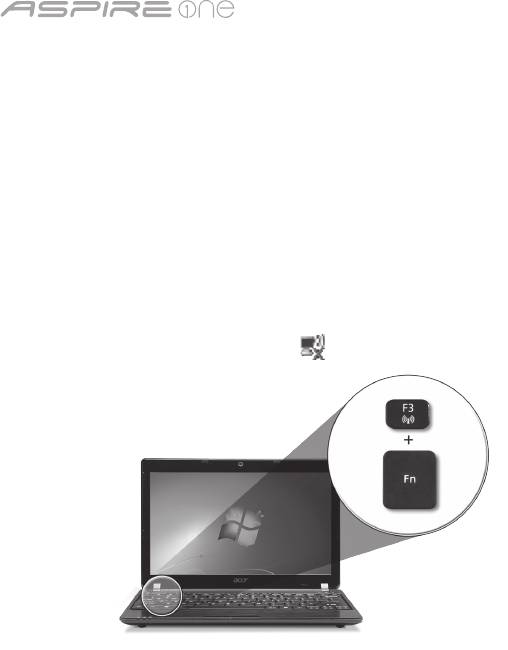
-sarja
3
Verkkokonfigurointi
Tämä opas auttaa konfiguroimaan LANin ja langattomat verkoasetukset, jotta pääset Internet-yhteyteen.
LAN-yhteyden määrittäminen
Kytke LAN-kaapeli Ethernet (RJ-45) -porttiin. Katso Ethernet-portin sijaintia koskien "Oikea näkymä" sivulta 6.
Langattoman yhteyden määrittäminen
1. Paina <Fn> + <F3> päästäksesi tietoliikenteen hallintaan. Tässä voit käynnistää Wi-Fi-yhteyden napsauttamalla punaista
painiketta Wi-Fi:n vieressä.
Huomautus: 3G ja Bluetooth ovat saavutettavissa myös tietoliikenteen hallinnalla. Tietoliikennelaitteet voivat vaihdella
mallista riippuen.
2. Napsauta järjestelmätarjottimen -kuvaketta ja valitse langaton liitäntäpiste, johon haluat yhteyden.
Laita 3G SIM -kortti sisään (vain valituille malleille)
Poista paristo ja laita 3G SIM -kortti varovasti sisään 3G SIM -kortin aukkoon. Katso "Taustanäkymä & Pohjanäkymä" sivulta 6
3G SIM -kortin aukon sijaintipaikan osalta.
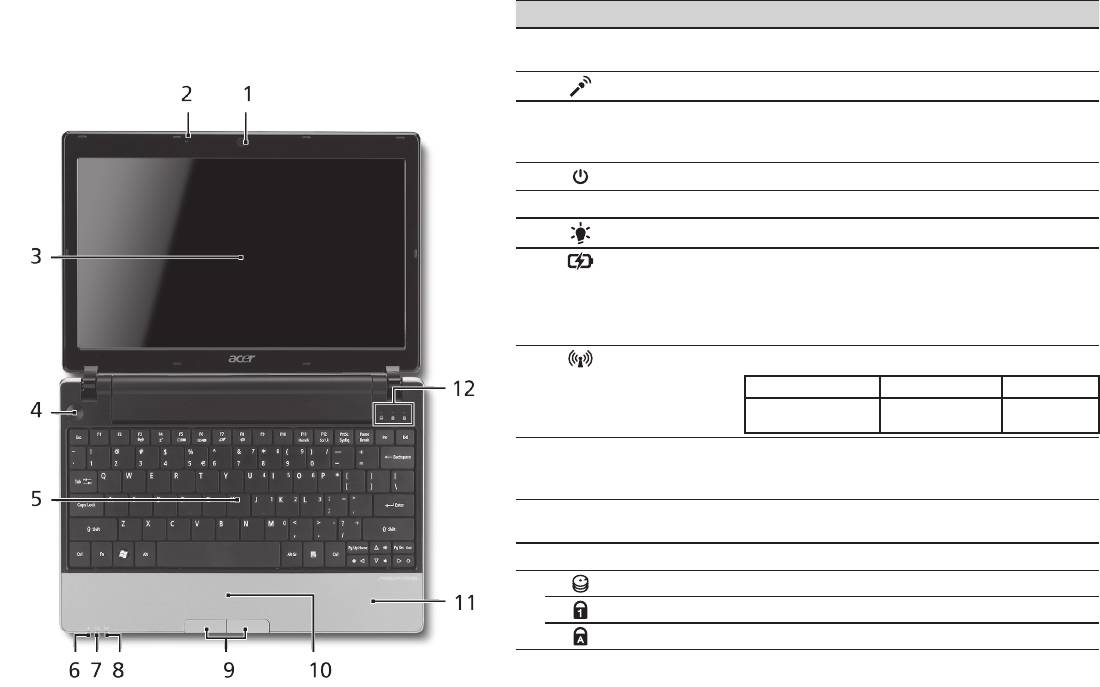
Pikaohje
4
Näkymä ylhäältä
Aspire One -laitteen esittely
# Kuvake Osio Kuvaus
Kun olet määrittänyt tietokoneen, kuten Aloittelijoille
1
Acer Crystal Eye
Webkamera videotietoliikenteeseen
-osiossa on kuvattu, anna meidän esitellä uusi kannettava
-webkamera
(konfiguraatio voi vaihdella malleista riippuen).
Acer-tietokoneesi.
2
Mikrofoni Sisäinen mikrofoni äänen tallentamista varten.
3
Näyttöruutu Nimeltään myös nestekidenäyttö (Liquid-Crystal
Display ; LCD), näyttää tietokoneen ulostulon
(konfiguraatio voi vaihdella malleista riippuen).
4
Virtapainike Käynnistää ja sulkee koneen.
5
Näppäimistö Tiedon syöttämiseen tietokoneelle.
1
6
Virranilmaisin
Osoittaa tietokoneen virran tilan.
7
Akkutilan
Osoittaa tietokoneen akun tilan.
1
ilmaisin
1. Lataus meneillään: Valo palaa oranssina,
kun akku latautuu.
2. Täyteen ladattu: Valo palaa sinisenä,
kun tietokone toimii verkkovirralla.
8
Tietoliikenteen
Osoittaa langattoman LAN/3G-tietoliikenteen.
1
ilmaisin
Sininen valo päällä Oranssi valo päällä Ei syttynyt
3G päällä/WiFi päällä
3G pois/
3G pois/WiFi päällä
3G päällä/WiFi pois
WiFi pois
9
Napsauta
Vasen ja oikea painike toimivat kuten hiiren
painikkeita
vasen ja oikea painike.
(vasen ja oikea)
10
Kosketusalusta Kosketusherkkä osoitinlaite, joka toimii kuten
tietokoneen hiiri.
11
Rannetuki Mukava tuki käsillesi konetta käyttäessäsi.
12
HDD-ilmaisin Palaa, kun kiintolevy on aktiivinen.
Num Lock Syttyy, kun Num Lock on aktivoituneena.
Caps Lock Syttyy, kun Caps Lock on aktivoituneena.
1. Etupaneelin tilailmaisimet näkyvät, vaikka tietokoneen kansi olisi suljettu.
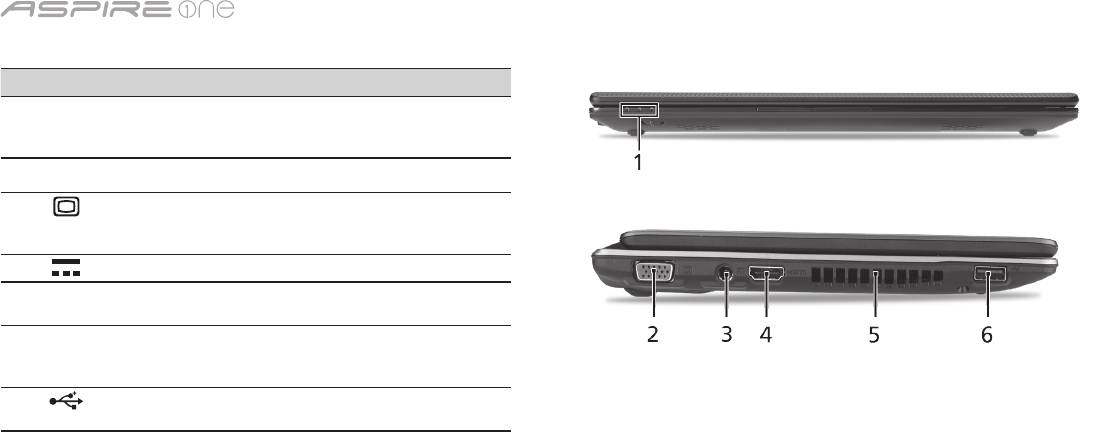
-sarja
5
Etunäkymä suljettuna
# Kuvake Osio Kuvaus
1
Tilanosoittimet Loistediodit (LEDs), jotka
ilmoittavat tietokoneen
toimintojen ja osien tilan.
Vasen näkymä
2
Ulkoinen
Yhdistä näyttölaitteeseen
näyttöportti (VGA)
(esim. ulkoinen monitori,
LCD-projektori).
3
DC-tulolinja Yhdistää AC-sovittimeen.
4
HDMI HDMI-portti Tukee korkealaatuisia
digitaalisia videoliitäntöjä.
5
Tuuletuspaikat Mahdollistaa tietokoneen
pysymisen viileänä jopa
pitkitetyn käytön jälkeen.
6
USB 2.0 -portti Yhdistää USB 2.0 -laitteisiin
(esim. USB-hiiri, USB-kamera).
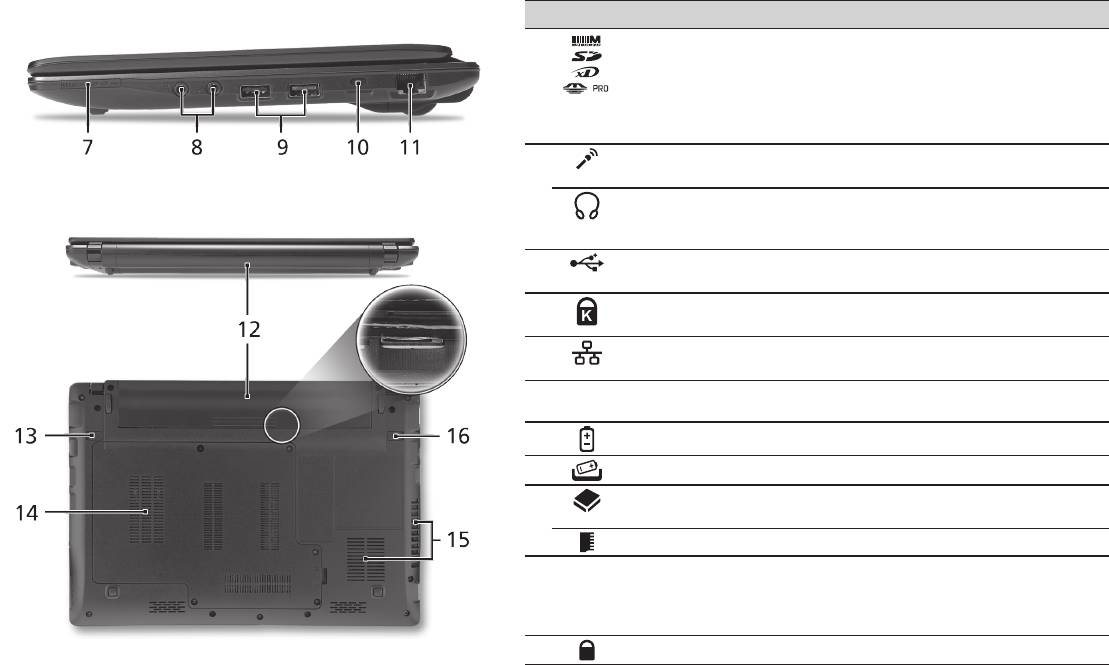
Pikaohje
6
Oikea näkymä
# Kuvake Osio Kuvaus
7
Monta yhdessä
Hyväksyy seuraavat muistikortit: Secure
-kortinlukija
Digital (SD), MultiMediaCard (MMC),
Memory Stick (MS), Memory Stick PRO
(MS PRO) ja xD-Picture Card (xD).
Ohje: Poista/Asenna kortti työntämällä.
Vain yksi kortti voi toimia kerrallaan.
8
Mikrofonin tulolinja Hyväksyy syötteet ulkoisilta
mikrofoneilta.
Kuuloke/kaiutin/line-
Yhdistää audioliitäntälaitteisiin (esim.
out -jakkiliitin S/PDIF-
kaiuttimet, kuulokkeet).
tuella
9
USB 2.0 -portti Yhdistää USB 2.0 -laitteisiin (esim. USB-
hiiri).
10
Kensington-lukon
Yhdistää Kensington-yhteensopivaan
paikka
tietokoneen turvalukkoon.
11
Ethernet (RJ-45)-portti Yhdistää Ethernet 10/100/1000-
pohjaiseen verkkoon.
Taustanäkymä & Pohjanäkymä
12
Akkutila Sisältää tietokoneen akkuyksikön.
13
Akun vapautussalpa Vapauttaa akun poistamista varten.
14
Kovalevytila Sisältää koneen kovalevyn (varmistettu
ruuveilla).
Muistilokero Sisältää tietokoneen päämuisti.
15
Tuuletusaukot ja
Mahdollistaa tietokoneen pysymisen
jäähdytystuuletin
viileänä jopa pitkitetyn käytön jälkeen.
Ohje: Älä peitä tai tuki tuulettimen
aukkoa.
16
Akun lukko Lukitsee akun paikoilleen.

-sarja
Ympäristö
Lämpötila:
Käyttö: 5°C:sta 35°C:een
Ei käytössä: -20°C:sta 65°C:een
Kosteus (ei kondensoitunut):
Käyttö: 20%:sta 80%:een
Ei käytössä: 20%:sta 80%:een
7

Cерия
Краткое руководство

Cерия
© 2010 Все права защищены
Краткое руководство ноутбуков серии Aspire One
Первое издание: 04/2010
Портативный компьютер серии Aspire One
Номер модели: ____________________________
Серийный номер: __________________________
Дата покупки: ______________________________
Место покупки: ____________________________

Краткое руководство
Federal Communications Commission
Declaration of Conformity
This device complies with Part 15 of the FCC Rules. Operation is subject to the following two conditions: (1) this device may not
cause harmful interference, and (2) this device must accept any interference received, including interference that may cause
undesired operation.
The following local Manufacturer / Importer is responsible for this declaration:
Product name: Notebook PC
Brand: Acer
Model number: MS2298
Machine type: AO 721 series
Name of Responsible Party: Acer America Corporation
Address of responsible party: 333 West San Carlos St., San Jose
CA 95110, U. S. A.
Contact person: Acer Representative
Phone No.: 1-254-298-4000
Fax No.: 1-254-298-4147
April 30, 2010

Cерия
• Themaximumconcentrationvaluesoftherestrictedsubstancesbyweightinhomogenousmaterialare:
CE Declaration of Conformity
Lead
0.1%
Polybrominated Biphenyls (PBB’s)
0.1%
We,
Mercury
0.1%
Polybrominated Diphenyl Ethers (PBDE’s)
0.1%
Acer Incorporated
Hexavalent Chromium
0.1%
Cadmium
0.01%
8F, 88, Sec. 1, Hsin Tai Wu Rd., Hsichih, Taipei Hsien 221, Taiwan
Directive 2009/125/EC with regard to establishing a framework for the setting of ecodesign requirements for energy-related
product.
Contact Person: Mr. Easy Lai, e-mail:easy_lai@acer.com.tw
R&TTE Directive 1999/5/EC as attested by conformity with the following harmonized standard:
And,
• Article3.1(a)HealthandSafety
Acer Europe SA
- EN60950-1
Via Cantonale, Centro Galleria 2 6928 Manno Switzerland
- EN62311
Hereby declare that:
• Article3.1(b)EMC
Product: Notebook Computer
- EN301 489-1
Trade Name: Acer
- EN301 489-3 (Applicable to non-bluetooth wireless keyboard mouse set).
Model Number: MS2298
- EN301 489-7
Machine Type: AO721 series
- EN301 489-17
Is compliant with the essential requirements and other relevant provisions of the following EC directives, and that all the
- EN301 489-24
necessary steps have been taken and are in force to assure that production units of the same product will continue comply with
• Article3.2SpectrumUsages
the requirements.
- EN300 440-2 (Applicable to non-bluetooth wireless keyboard mouse set).
EMC Directive 2004/108/EC as attested by conformity with the following harmonized standards:
- EN300 328
• EN55022,AS/NZSCISPR22,ClassB
- EN301 511
• EN55024
- EN301 893 (Applicable to 5GHz high performance RLAN).
• EN61000-3-2ClassD
- EN301 908-1
• EN61000-3-3
- EN301 908-2
Year to begin affixing CE marking 2010.
Low Voltage Directive 2006/95/EC as attested by conformity with the following harmonized standard:
• EN60950-1
Apr. 30, 2010
Council Decision 98/482/EC (CTR21):
(Applicable to product with pan- European single terminal connection to the Public Switched Telephone Network (PSTN).)
Date
Easy Lai /Manager
RoHS Directive 2002/95/EC on the Restriction of the Use of certain Hazardous Substances in Electrical and Electronic Equipment
Regulation Center, Acer Inc.
Краткое руководство
• Themaximumconcentrationvaluesoftherestrictedsubstancesbyweightinhomogenousmaterialare:
CE Declaration of Conformity
Lead
0.1%
Polybrominated Biphenyls (PBB’s)
0.1%
We,
Mercury
0.1%
Polybrominated Diphenyl Ethers (PBDE’s)
0.1%
Acer Incorporated
Hexavalent Chromium
0.1%
Cadmium
0.01%
8F, 88, Sec. 1, Hsin Tai Wu Rd., Hsichih, Taipei Hsien 221, Taiwan
Directive 2009/125/EC with regard to establishing a framework for the setting of ecodesign requirements for energy-related
product.
Contact Person: Mr. Easy Lai, e-mail:easy_lai@acer.com.tw
R&TTE Directive 1999/5/EC as attested by conformity with the following harmonized standard:
And,
• Article3.1(a)HealthandSafety
Acer Europe SA
- EN60950-1
Via Cantonale, Centro Galleria 2 6928 Manno Switzerland
- EN62311
Hereby declare that:
• Article3.1(b)EMC
Product: Notebook Computer
- EN301 489-1
Trade Name: Acer
- EN301 489-3 (Applicable to non-bluetooth wireless keyboard mouse set).
Model Number: MS2298
- EN301 489-7
Machine Type: AO721 series
- EN301 489-17
Is compliant with the essential requirements and other relevant provisions of the following EC directives, and that all the
- EN301 489-24
necessary steps have been taken and are in force to assure that production units of the same product will continue comply with
• Article3.2SpectrumUsages
the requirements.
- EN300 440-2 (Applicable to non-bluetooth wireless keyboard mouse set).
EMC Directive 2004/108/EC as attested by conformity with the following harmonized standards:
- EN300 328
• EN55022,AS/NZSCISPR22,ClassB
- EN301 511
• EN55024
- EN301 893 (Applicable to 5GHz high performance RLAN).
• EN61000-3-2ClassD
- EN301 908-1
• EN61000-3-3
- EN301 908-2
Year to begin affixing CE marking 2010.
Low Voltage Directive 2006/95/EC as attested by conformity with the following harmonized standard:
• EN60950-1
Apr. 30, 2010
Council Decision 98/482/EC (CTR21):
(Applicable to product with pan- European single terminal connection to the Public Switched Telephone Network (PSTN).)
Date
Easy Lai /Manager
RoHS Directive 2002/95/EC on the Restriction of the Use of certain Hazardous Substances in Electrical and Electronic Equipment
Regulation Center, Acer Inc.
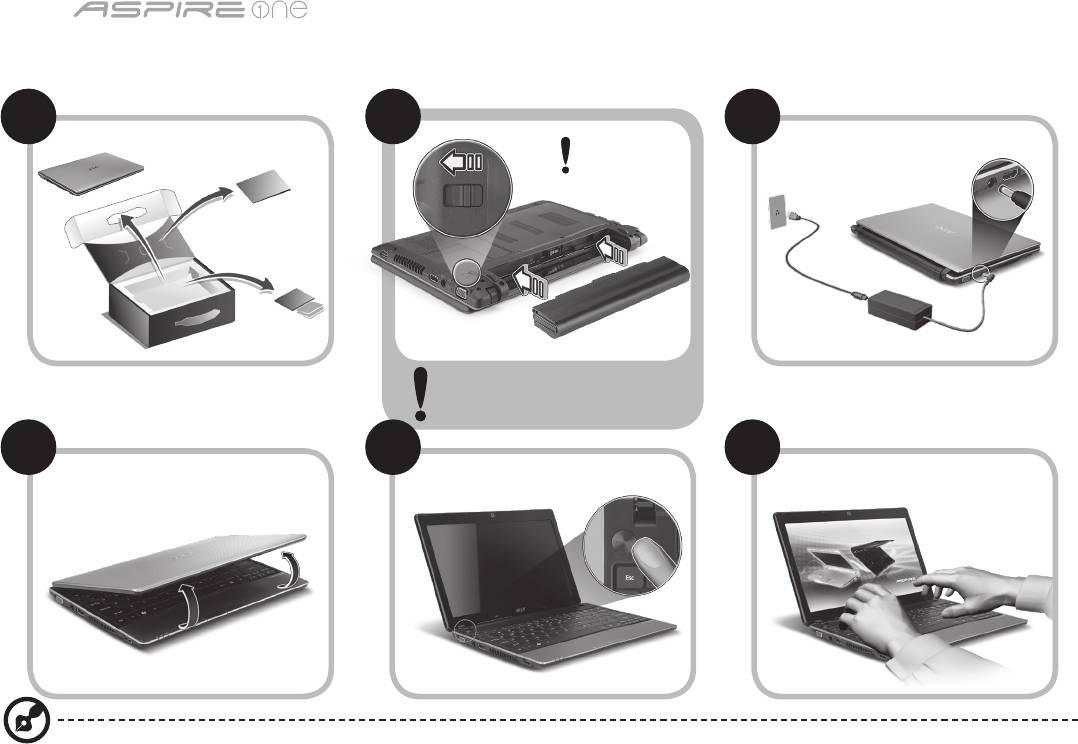
Cерия
1
Для пользователей-новичков
1 2
3
2-2
3-3
3-1
3-2
2-1
Убедитесь, что аккумулятор
правильно зафиксирован в
отсеке, как показано на рис. 2-2.
4 5 6
Иллюстрации носят ориентировочный характер. Реальные характеристики могут отличаться от указанных.

Краткое руководство
2
Вначале о главном
Благодарим вас за то, что для решения своих мобильных вычислительных задач вы выбрали ноутбук Acer.
Ваши руководства
Мы разработали ряд руководств, которые помогут вам в использовании ноутбука Acer*:
Прежде всего, Краткое руководство поможет вам настроить основные параметры компьютера.
Дополнительные сведения о том, как этот компьютер помогает повысить производительность работы, см. в Руководстве
пользователя AcerSystem. Это руководство содержит подробные сведения о системных функциях, восстановлении данных,
возможностях расширения и устранении неисправностей. В нем также приведена информация о гарантийном обслуживании,
а также общие предписания и правила безопасности при работе с ноутбуком. Это руководство в виде файла PDF изначально
загружено в компьютер.
Примечание: для просмотра этого файла требуется программа Adobe Reader. Если программа Adobe Reader не
установлена в вашем компьютере, то по щелчку по пункту "AcerSystem User Guide" сначала запустится утилита
установки программы Adobe Reader. Для завершения установки выполните отображаемые на экране инструкции.
Указания по работе с программой Adobe Reader см. в Справке и в меню Поддержка.
* ВАЖНОЕ ПРИМЕЧАНИЕ: Следует иметь в виду, что упоминаемые здесь руководства в печатной или в
электронной форме служат только для справки, и за исключением положений, изложенных в разделе
гарантийной информации в Руководстве пользователя AcerSystem, в этих руководствах никакие другие
положения не являются заявлением компании Acer или ее гарантией в отношении купленного вами продукта.
Компания Acer в прямой форме отказывается от всякой ответственности за возможные ошибки в этих
руководствах.
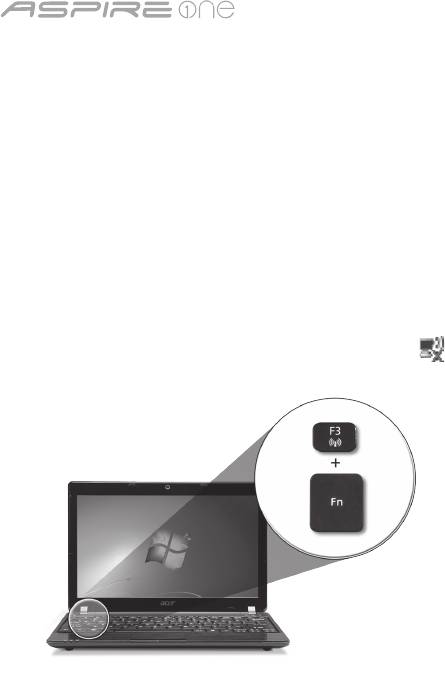
Cерия
3
Конфигурация сети
Это руководство поможет вам настроить параметры локальной и беспроводной сети для подключения к Интернету.
Настройка подключения по локальной сети
Достаточно подключить кабель локальной сети к разъему Ethernet (RJ-45). Расположение разъема Ethernet см. на рис. "Вид
справа" на стр. 6.
Настройка подключения к беспроводной сети
1. Чтобы открыть диспетчер связи, нажмите <Fn> + <F3> Здесь можно включить модуль Wi-Fi, нажав красную кнопку рядом с
Wi-Fi.
Примечание: Диспетчер связи также позволяет включать модули 3G и Bluetooth. Типы модулей связи зависят от
конфигурации системы.
2. В системной области панели задач щелкните по значку и выберите точку беспроводного доступа, к которой хотите
подключиться.
Установка SIM-карты сети 3G (только для определенных моделей)
Извлеките аккумулятор и осторожно вставьте SIM-карту 3G в гнездо для SIM-карты 3G. Местоположение гнезда для SIM-карты
3G см. на рисунке "Вид сзади & Вид снизу" на стр. 6.
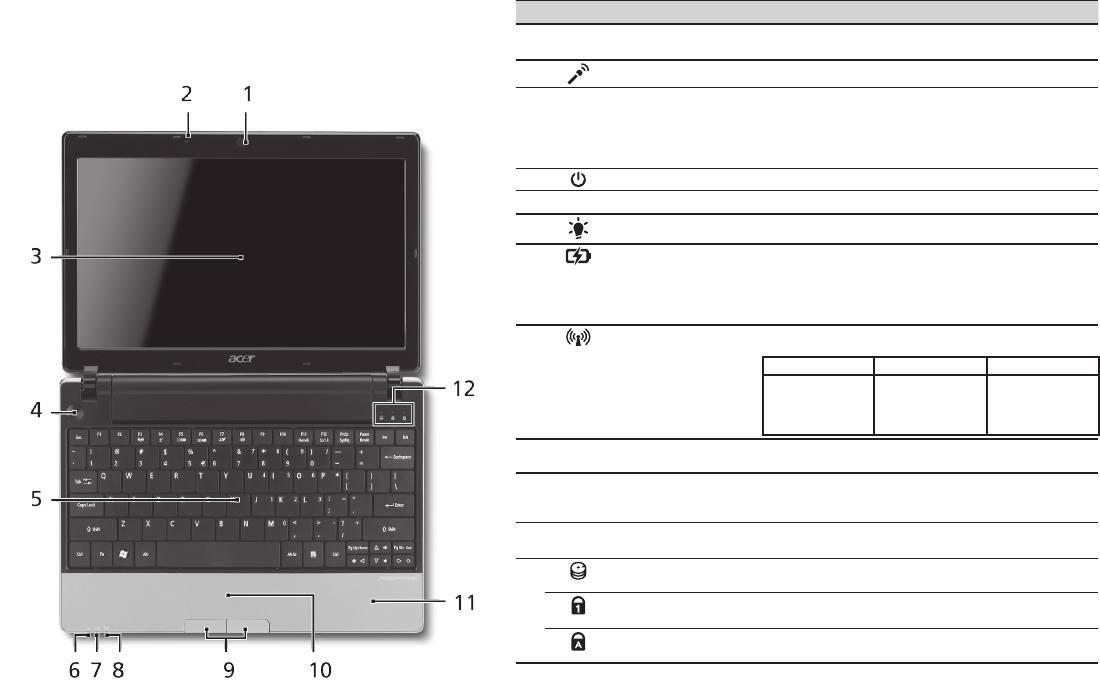
Краткое руководство
4
Вид сверху
Знакомство с Aspire One
# Значок Элемент Описание
Теперь, когда вы выполнили настройки, как показано в
1
Веб-камера Acer
Веб-камера для видеосвязи (конфигурация
Crystal Eye
может отличаться в зависимости от модели).
разделе Для пользователей-новичков, давайте поближе
познакомимся с вашим новым ноутбуком Acer.
2
Микрофон Внутренний микрофон для записи звука.
3
Экран дисплея Другое название - жидкокристаллический
дисплей (ЖК-дисплей); служит для вывода
изображения, формируемого компьютером
(конфигурация может отличаться в
зависимости от модели).
4
Кнопка питания Служит для включения/выключения компьютера.
5
Клавиатура Служит для ввода данных в компьютер.
1
6
Индикатор питания
Отображает состояние питания компьютера.
7
Индикатор
Отображает состояние аккумулятора компьютера.
1
аккумулятора
1. Зарядка: этот индикатор горит желтым во
время зарядки аккумулятора.
2. Полностью заряжен: Этот индикатор горит
синим при питании от электросети.
1
8
Индикатор связи
Указывает на состояние связи в беспроводной
сети / сети 3G.
Горит синим Горит оранжевым Не горит
Подключение 3G/
WiFi вкл.
Подключение 3G/
Подключение 3G/
Подключение 3G/
WiFi вкл.
WiFi выкл.
WiFi выкл.
9
Кнопки управления
Эти левая и правая кнопки действуют так же,
(левая и правая)
как левая и правая кнопки мыши.
10
Сенсорная панель Чувствительное к прикосновениям указательное
устройство, позволяющее управлять курсором
на экране так же, как и мышью.
11
Подставка для
Упорная площадка, на которую удобно
запястий
положить руки при работе на компьютере.
12
Индикатор работы
Горит при обращении к жесткому диску.
жесткого диска
Num Lock Зажигается при включенной фиксации
числового регистра (Num Lock).
Caps Lock Зажигается при включенной фиксации верхнего
регистра (Caps Lock).
1. Индикаторы на передней панели видны даже при закрытой крышке компьютера.
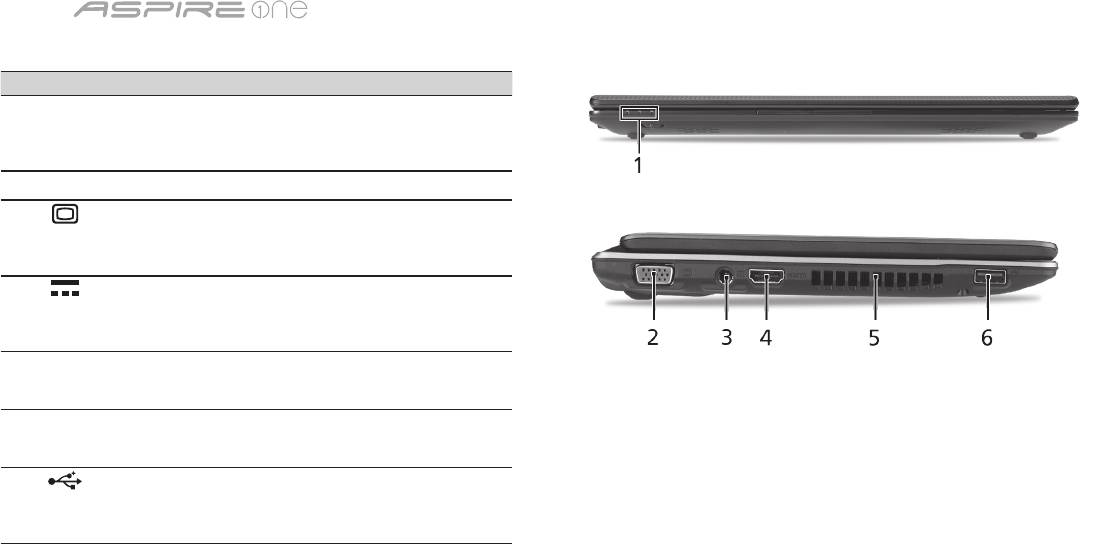
Cерия
5
Вид спереди с закрытой крышкой
# Значок Элемент Описание
1
Индикаторы
Поджигание светоизлучающих
состояния
диодов (СД) отображает
состояние функций и
компонентов компьютера.
Вид слева
2
Разъем внешнего
Служит для подключения
дисплея (VGA)
устройства отображения
(например, внешнего монитора,
ЖК-проектора).
3
Разъем для
Служит для подключения
подключения
адаптера переменного тока.
питания постоянного
тока
4
HDMI Разъем HDMI Служит для подключения к
источникам цифрового видео
высокой четкости.
5
Вентиляционные
Позволяют компьютеру не
отверстия
перегреваться даже при
длительной работе.
6
Разъем USB 2.0 Служит для подключения
устройств с интерфейсом
USB 2.0 (например, мыши или
камеры).
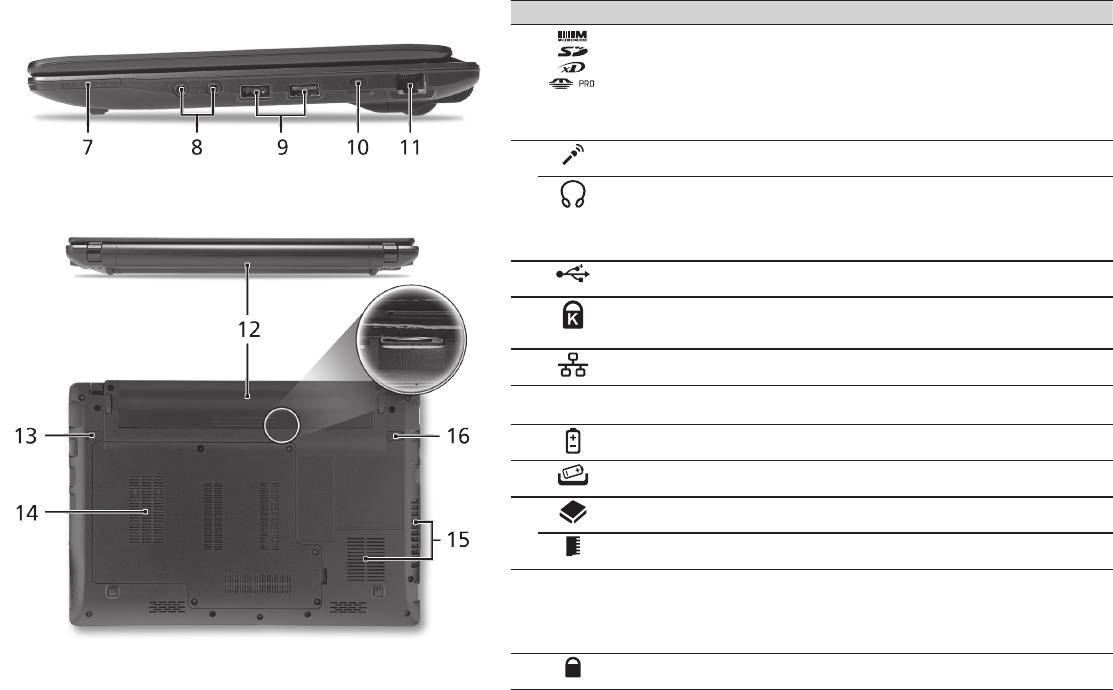
Краткое руководство
6
Вид справа
# Значок Элемент Описание
7
Комбинированное
Поддерживает форматы Secure Digital (SD),
устройство
MultiMediaCard (MMC), Memory Stick (MS),
считывания карт
Memory Stick PRO (MS PRO), xD-Picture
памяти различных
Card (xD).
форматов
Примечание: надавите, чтобы извлечь/
вставить карту. Единовременно можно
использовать только одну карту памяти.
8
Гнездо микрофонного
Служит для подключения внешнего
входа
микрофона.
Гнездо наушников/
Служит для подключения звуковых
динамика/линейного
устройств к линейному выходу (например,
выхода с поддержкой
динамиков, наушников).
цифрового
интерфейса S/PDIF
9
Разъем USB 2.0 Служит для подключения устройств с
интерфейсом USB 2.0 (например, мыши).
10
Замок типа Kensington Служит для подсоединения защитного
тросика с замком типа Kensington для
предотвращения кражи компьютера.
11
Разъем Ethernet
Служит для подключения к сети Ethernet
(RJ-45)
10/100/1000 Мбит/с.
Вид сзади & Вид снизу
12
Отсек аккумулятора В этот отсек устанавливается аккумулятор
компьютера.
13
Защелка извлечения
Разблокирует аккумулятор для его
аккумулятора
извлечения.
14
Отсек жесткого диска Здесь размещается жесткий диск
компьютера (крепится винтами).
Отсек модулей
В этот отсек устанавливаются модули
оперативной памяти
оперативной памяти компьютера.
15
Вентиляционные
Позволяют компьютеру не перегреваться
отверстия и
даже при длительной работе.
вентилятор
Примечание: не заслоняйте и не
охлаждения
загораживайте входное отверстие
вентилятора.
16
Защелка
Служит для фиксации аккумулятора в
аккумулятора
отсеке.

Cерия
Условия эксплуатации
Температура:
Рабочая: от 5°C до 35°C
Нерабочая: от -20°C до 65°C
Влажность (без конденсации):
Рабочая: от 20% до 80%
Нерабочая: от 20% до 80%
7

Komputer Serii
Skrócony poradnik

Komputer serii
© 2010 Wszelkie prawa zastrzeżone
Skrócony poradnik komputera serii Aspire One
Wydanie oryginalne: 04/2010
Notebook PC serii Aspire One
Oznaczenie modelu: _________________________
Numer seryjny: _____________________________
Data zakupu: ______________________________
Miejsce zakupu: ____________________________

Skrócony poradnik
Federal Communications Commission
Declaration of Conformity
This device complies with Part 15 of the FCC Rules. Operation is subject to the following two conditions: (1) this device may not
cause harmful interference, and (2) this device must accept any interference received, including interference that may cause
undesired operation.
The following local Manufacturer / Importer is responsible for this declaration:
Product name: Notebook PC
Brand: Acer
Model number: MS2298
Machine type: AO 721 series
Name of Responsible Party: Acer America Corporation
Address of responsible party: 333 West San Carlos St., San Jose
CA 95110, U. S. A.
Contact person: Acer Representative
Phone No.: 1-254-298-4000
Fax No.: 1-254-298-4147
April 30, 2010

Komputer serii
• Themaximumconcentrationvaluesoftherestrictedsubstancesbyweightinhomogenousmaterialare:
CE Declaration of Conformity
Lead
0.1%
Polybrominated Biphenyls (PBB’s)
0.1%
We,
Mercury
0.1%
Polybrominated Diphenyl Ethers (PBDE’s)
0.1%
Acer Incorporated
Hexavalent Chromium
0.1%
Cadmium
0.01%
8F, 88, Sec. 1, Hsin Tai Wu Rd., Hsichih, Taipei Hsien 221, Taiwan
Directive 2009/125/EC with regard to establishing a framework for the setting of ecodesign requirements for energy-related
product.
Contact Person: Mr. Easy Lai, e-mail:easy_lai@acer.com.tw
R&TTE Directive 1999/5/EC as attested by conformity with the following harmonized standard:
And,
• Article3.1(a)HealthandSafety
Acer Europe SA
- EN60950-1
Via Cantonale, Centro Galleria 2 6928 Manno Switzerland
- EN62311
Hereby declare that:
• Article3.1(b)EMC
Product: Notebook Computer
- EN301 489-1
Trade Name: Acer
- EN301 489-3 (Applicable to non-bluetooth wireless keyboard mouse set).
Model Number: MS2298
- EN301 489-7
Machine Type: AO721 series
- EN301 489-17
Is compliant with the essential requirements and other relevant provisions of the following EC directives, and that all the
- EN301 489-24
necessary steps have been taken and are in force to assure that production units of the same product will continue comply with
• Article3.2SpectrumUsages
the requirements.
- EN300 440-2 (Applicable to non-bluetooth wireless keyboard mouse set).
EMC Directive 2004/108/EC as attested by conformity with the following harmonized standards:
- EN300 328
• EN55022,AS/NZSCISPR22,ClassB
- EN301 511
• EN55024
- EN301 893 (Applicable to 5GHz high performance RLAN).
• EN61000-3-2ClassD
- EN301 908-1
• EN61000-3-3
- EN301 908-2
Year to begin affixing CE marking 2010.
Low Voltage Directive 2006/95/EC as attested by conformity with the following harmonized standard:
• EN60950-1
Apr. 30, 2010
Council Decision 98/482/EC (CTR21):
(Applicable to product with pan- European single terminal connection to the Public Switched Telephone Network (PSTN).)
Date
Easy Lai /Manager
RoHS Directive 2002/95/EC on the Restriction of the Use of certain Hazardous Substances in Electrical and Electronic Equipment
Regulation Center, Acer Inc.
Skrócony poradnik
• Themaximumconcentrationvaluesoftherestrictedsubstancesbyweightinhomogenousmaterialare:
CE Declaration of Conformity
Lead
0.1%
Polybrominated Biphenyls (PBB’s)
0.1%
We,
Mercury
0.1%
Polybrominated Diphenyl Ethers (PBDE’s)
0.1%
Acer Incorporated
Hexavalent Chromium
0.1%
Cadmium
0.01%
8F, 88, Sec. 1, Hsin Tai Wu Rd., Hsichih, Taipei Hsien 221, Taiwan
Directive 2009/125/EC with regard to establishing a framework for the setting of ecodesign requirements for energy-related
product.
Contact Person: Mr. Easy Lai, e-mail:easy_lai@acer.com.tw
R&TTE Directive 1999/5/EC as attested by conformity with the following harmonized standard:
And,
• Article3.1(a)HealthandSafety
Acer Europe SA
- EN60950-1
Via Cantonale, Centro Galleria 2 6928 Manno Switzerland
- EN62311
Hereby declare that:
• Article3.1(b)EMC
Product: Notebook Computer
- EN301 489-1
Trade Name: Acer
- EN301 489-3 (Applicable to non-bluetooth wireless keyboard mouse set).
Model Number: MS2298
- EN301 489-7
Machine Type: AO721 series
- EN301 489-17
Is compliant with the essential requirements and other relevant provisions of the following EC directives, and that all the
- EN301 489-24
necessary steps have been taken and are in force to assure that production units of the same product will continue comply with
• Article3.2SpectrumUsages
the requirements.
- EN300 440-2 (Applicable to non-bluetooth wireless keyboard mouse set).
EMC Directive 2004/108/EC as attested by conformity with the following harmonized standards:
- EN300 328
• EN55022,AS/NZSCISPR22,ClassB
- EN301 511
• EN55024
- EN301 893 (Applicable to 5GHz high performance RLAN).
• EN61000-3-2ClassD
- EN301 908-1
• EN61000-3-3
- EN301 908-2
Year to begin affixing CE marking 2010.
Low Voltage Directive 2006/95/EC as attested by conformity with the following harmonized standard:
• EN60950-1
Apr. 30, 2010
Council Decision 98/482/EC (CTR21):
(Applicable to product with pan- European single terminal connection to the Public Switched Telephone Network (PSTN).)
Date
Easy Lai /Manager
RoHS Directive 2002/95/EC on the Restriction of the Use of certain Hazardous Substances in Electrical and Electronic Equipment
Regulation Center, Acer Inc.
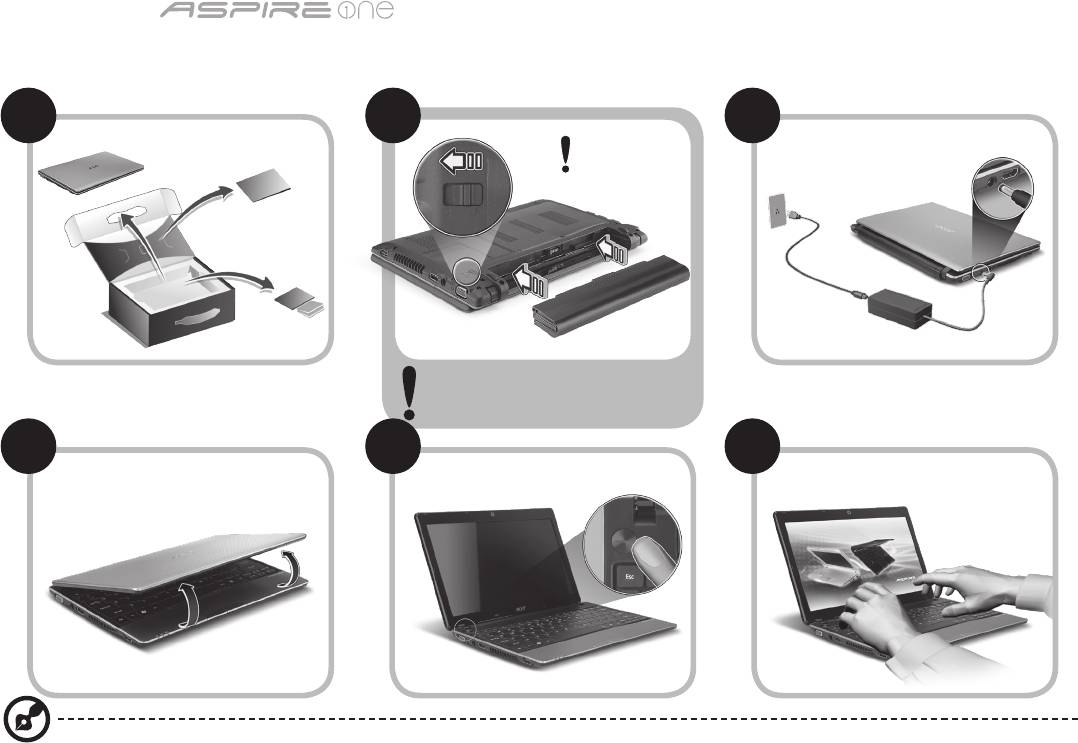
Komputer serii
1
Na początek
1 2
3
2-2
3-3
3-1
3-2
2-1
Upewnij się, że bateria jest prawidłowo
zamocowana na swoim miejscu tak,
jak to przedstawiono na ilustracji 2-2.
4 5 6
Ilustracje są przykładowe. Faktyczne specykacje produktów mogą różnić się od przedstawionej.

Skrócony poradnik
2
Po kolei
Dziękujemy za wybranie komputera rmy Acer do spełnienia potrzeb w zakresie mobilnego przetwarzania.
Instrukcje
Aby pomóc w korzystaniu z komputera Acer, opracowaliśmy zestaw instrukcji*:
Jako pierwszy wymienić można Skrócony poradnik, który pomoże użytkownikom rozpocząć ustawianie komputera.
Aby uzyskać więcej informacji o tym, w jaki sposób nowy komputer może pomóc Ci być bardziej produktywnym, zapoznaj się z
AcerSystem User Guide. Przewodnik ten zawiera szczegółowe informacje dotyczące takich tematów, jak narzędzia systemowe,
odzyskiwanie danych, opcje rozszerzeń oraz rozwiązywanie problemów. Oprócz nich zawiera także informacje na temat gwarancji oraz
informacje dotyczące bezpieczeństwa pracy z Twoim komputerem przenośnym. Jest on dostępny w formie elektronicznej jako plik PDF
zapisany fabrycznie na dysku komputera.
Uwaga: Podgląd pliku wymaga zainstalowania programu Adobe Acrobat Reader. Jeżeli na komputerze nie ma zainstalowanego
programu Adobe Acrobat Reader, kliknięcie AcerSystem User Guide spowoduje uruchomienie instalatora programu Adobe
Acrobat Reader. Aby zakończyć instalację, należy postępować zgodnie z instrukcjami wyświetlanymi na ekranie. Instrukcje
dotyczące użytkowania programu Adobe Acrobat Reader znaleźć można w menu Pomoc i obsługa techniczna.
* WAŻNA UWAGA: Należy pamiętać, że wszelkie instrukcje opisane w niniejszej publikacji, zarówno w formie pisemnej,
jak i elektronicznej, mają charakter wyłącznie referencyjny, oraz że żadne informacje w niej zawarte nie stanowią
gwarancji na zakupiony produkt rmy Acer z wyjątkiem warunków gwarancyjnych określonych w podręczniku
użytkownika AcerSystem User Guide. Firma Acer zrzeka się odpowiedzialności za wszelkie błędy, jakie zawierać mogą
niniejsze instrukcje.
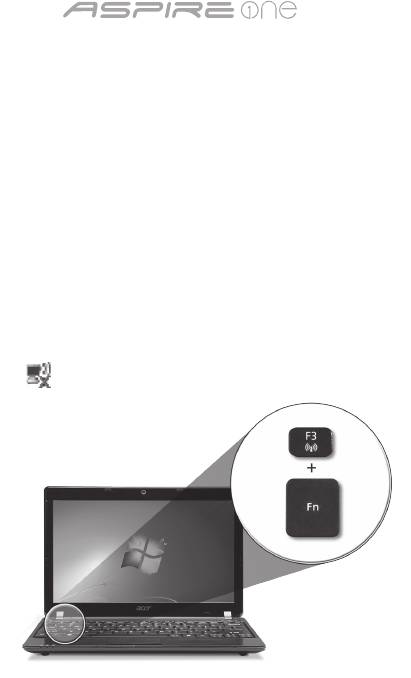
Komputer serii
3
Konguracja sieci
Niniejszy przewodnik pomoże Ci skongurować ustawienia sieci LAN oraz bezprzewodowej tak, aby możliwe było nawiązanie
połączenia z Internetem.
Konguracja połączenia z siecią LAN
Po prostu podłącz kabel sieciowy LAN do gniazda Ethernet (RJ-45). Zajrzyj do sekcji "Widok z prawej" na stronie 6 aby dowiedzieć
się gdzie znajduje się gniazdo Ethernet.
Konguracja połączenia z siecią bezprzewodową
1. Naciśnij klawisze <Fn> + <F3>, aby uzyskać dostęp do menedżera komunikacji. Można w nim włączyć połączenie Wi-Fi klikając
czerwony przycisk obok napisu Wi-Fi.
Uwaga: Menedżer komunikacji umożliwia również połączenia za pomocą 3G i Bluetooth. Urządzenia komunikacyjne różnią się w
zależności od modelu.
2. Kliknij ikonę w zasobniku systemowym i wybierz bezprzewodowy punkt dostępowy, z którym chcesz się połączyć.
Wkładanie karty SIM 3G (w wybranych modelach)
Wyciągnij baterię i ostrożnie włóż kartę SIM 3G do gniazda karty SIM 3G. Patrz "Widok z tyłu & Widok od spodu" na stronie 6, aby
uzyskać informacje o lokalizacji gniazda karty SIM 3G.
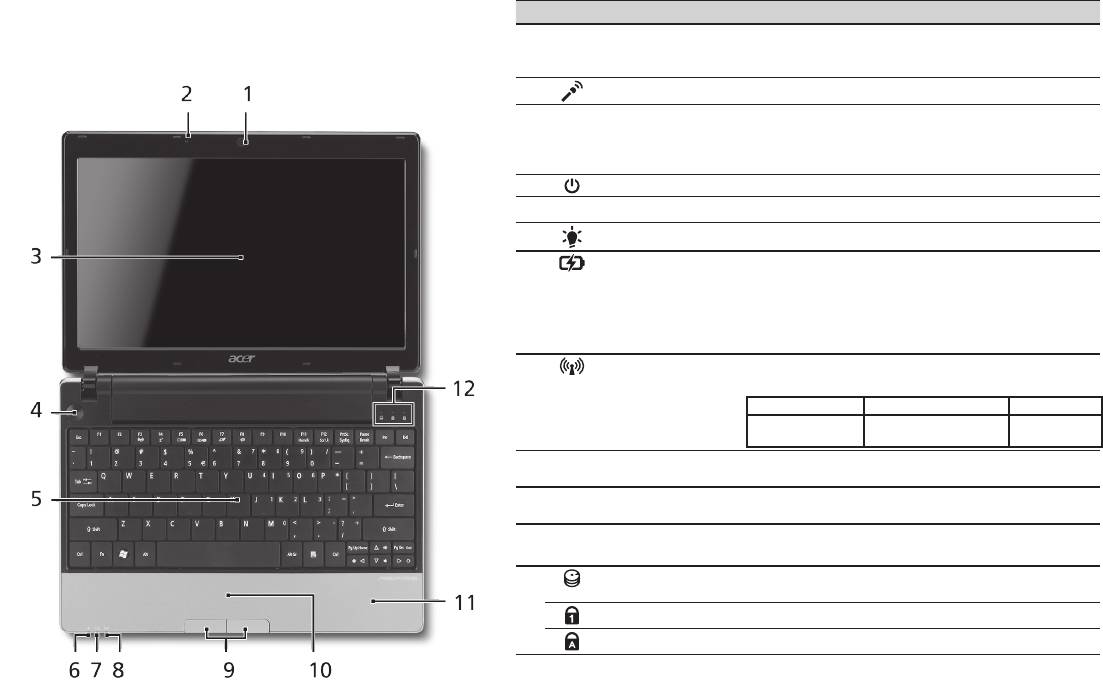
Skrócony poradnik
4
Widok z góry
Opis komputera Aspire One
# Ikona Element Opis
Po przygotowaniu komputera do pracy według instrukcji
1
Kamera Acer
Kamera internetowa do komunikacji wideo
zawartych w sekcji Na początek zapoznaj się bliżej z
Crystal Eye
(konguracja może być różna w zależności od
modelu).
notebookiem Acer.
2
Mikrofon Wewnętrzny mikrofon do rejestrowania dźwięku.
3
Ekran wyświetlacza Nazywany jest także wyświetlaczem
ciekłokrystalicznym (Liquid-Crystal Display; LCD),
wyświetla informacje wyjściowe komputera
(konguracja może być różna w zależności od modelu).
4
Przycisk zasilania Służy do włączania i wyłączania komputera.
5
Klawiatura Umożliwia wprowadzanie danych do komputera.
1
6
Wskaźnik zasilania
Wskazuje stan zasilania komputera.
7
Wskaźnik
Wskazuje stan akumulatora komputera.
1
akumulatora
1. Ładowanie: Świeci żółtym światłem, gdy
akumulator jest ładowany.
2. Pełne naładowanie: Świeci niebieskim
światłem podczas pracy w trybie zasilania
prądem przemiennym.
8
Wskaźnik
Wskazuje stan komunikacji bezprzewodowej sieci
1
komunikacji
LAN/3G.
Świeci na niebiesko Świeci na pomarańczowo Nie świeci
Wł. 3G/wł. Wi-Fi
Wył. 3G/
Wył. 3G/wł. WiFi
Wł. 3G/wył. WiFi
wył. WiFi
9
Przyciski kliknięć
Działanie lewego i prawego przycisku jest podobne
(lewy i prawy)
do działania lewego i prawego przycisku myszki.
10
Touchpad Dotykowe urządzenie wskazujące, które działa
jak myszka komputerowa.
11
Podparcie
Wygodne podparcie dłoni podczas używania
nadgarstków
komputera.
12
Wskaźnik dysku
Świeci, gdy działa dysk twardy.
twardego
NumLk Świeci po uaktywnieniu klawisza NumLk.
Caps Lock Świeci po uaktywnieniu klawisza Caps Lock.
1. Wskaźniki panelu czołowego są widoczne nawet po zamknięciu pokrywy komputera.
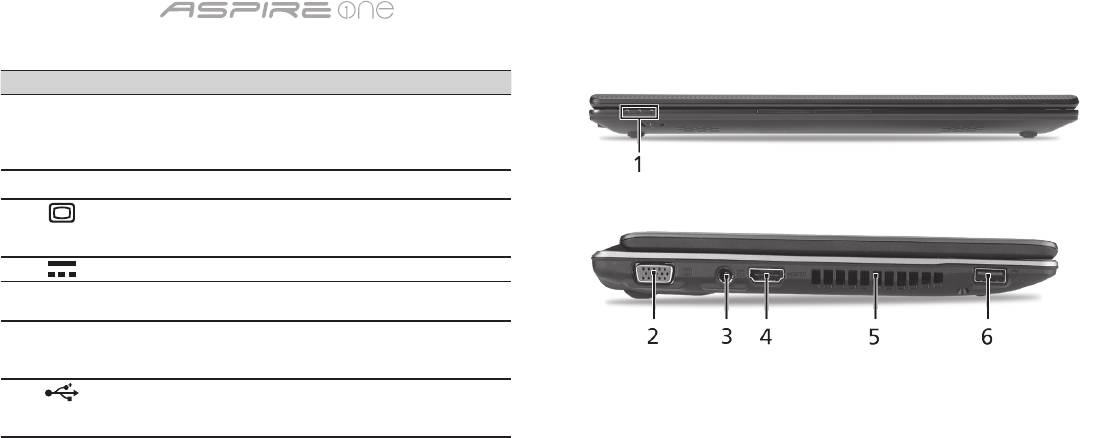
Komputer serii
5
Widok z przodu (pokrywa zamknięta)
# Ikona Element Opis
1
Wskaźniki stanu Diody LED (ang. Light-Emitting
Diodes), które zapalają się i
gasną, pokazując stan funkcji i
podzespołów komputera.
Widok z lewej
2
Port zewnętrznego
Służy do przyłączania urządzenia
wyświetlacza (VGA)
wyświetlającego (np. zewnętrzny
monitor, projektor LCD).
3
Gniazdo zasilania Gniazdo zasilacza.
4
HDMI Port HDMI Obsługuje połączenia cyfrowego
wideo o wysokiej rozdzielczości.
5
Szczeliny
Umożliwiają chłodzenie komputera
wentylacyjne
nawet podczas długotrwałego
użytkowania.
6
Port USB 2.0 Służy do podłączania urządzeń
USB (np. mysz USB lub kamera
USB).
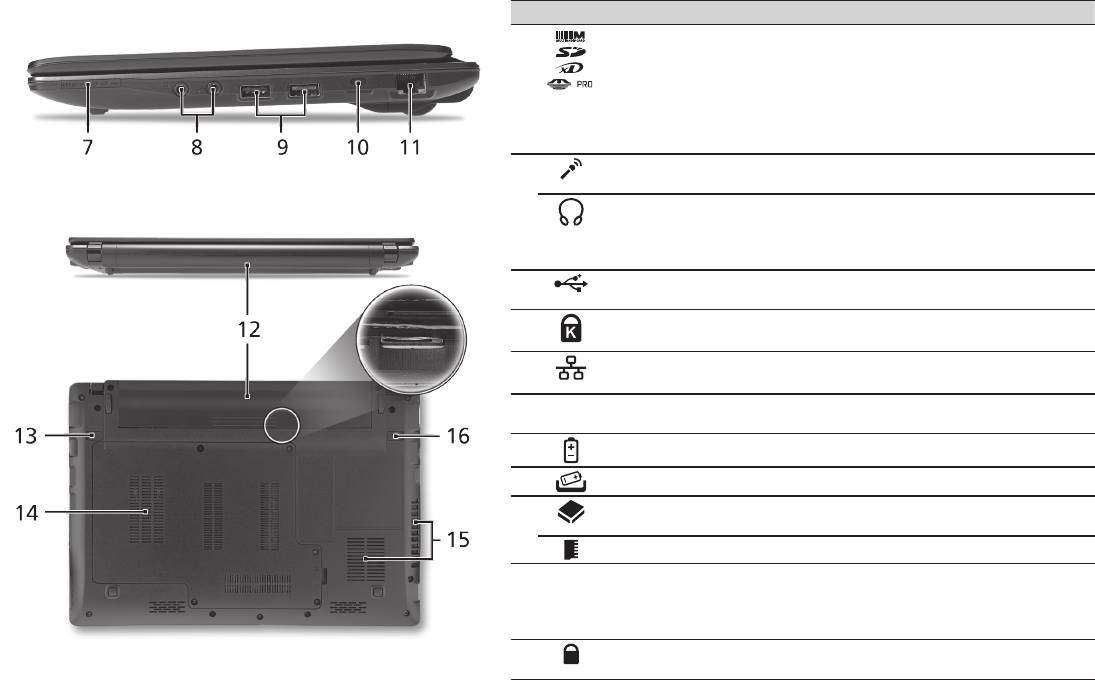
Skrócony poradnik
6
Widok z prawej
# Ikona Element Opis
7
Wielofunkcyjny czytnik
Obsługuje następujące typy kart: Secure
kart pamięci
Digital (SD), MultiMediaCard (MMC),
Memory Stick (MS), Memory Stick PRO
(MS PRO) oraz xD-Picture Card (xD).
Uwaga: Aby wyjąć/zainstalować kartę,
wciśnij ją delikatnie. Jednorazowo można
używać tylko jednego rodzaju karty.
8
Gniazdo mikrofonowe Służy do przyłączania sygnału z
zewnętrznych mikrofonów.
Gniazdo słuchawkowe/
Służy do przyłączania urządzeń liniowego
głośnikowe/wyjścia
wyjścia audio (np. głośniki, słuchawki).
liniowego z obsługą S/
PDIF
9
Port USB 2.0 Służy do podłączania urządzeń USB 2.0
(np. mysz USB lub kamera USB).
10
Gniazdo blokady
Służy do podłączania blokady zgodnej ze
Kensington
standardem rmy Kensington.
11
Port Ethernet (RJ-45) Służy do łączenia z siecią Ethernet
10/100/1000.
Widok z tyłu & Widok od spodu
12
Wnęka na baterię Przechowuje baterię komputera.
13
Blokada baterii Umożliwia zwolnienie i wyjęcie baterii.
14
Wnęka na dysk twardy Mieści dysk twardy komputera
(zabezpieczona śrubami).
Przegroda na pamięć Mieści główną pamięć komputera.
15
Otwory wentylacyjne
Umożliwiają chłodzenie komputera nawet
oraz wentylator
podczas długotrwałego użytkowania.
Uwaga: Nie wolno przykrywać lub blokować
wlotów powietrza.
16
Zatrzask baterii Pozwala zabezpieczyć baterię w
prawidłowej pozycji.

Komputer serii
Warunki środowiska
Temperatura:
Podczas pracy: 5°C do 35°C
Podczas przechowywania: -20°C do 65°C
Wilgotność (bez kondensacji pary):
Podczas pracy: 20% do 80%
Podczas przechowywania: 20% do 80%
7

sorozat
Rövid útmutató

sorozat
© 2010 Minden jog fenntartva
Aspire One sorozat Rövid útmutató
Eredeti kiadás: 04/2010
Aspire One sorozatú hordozható számítógép
Modellszám: _______________________________
Sorozatszám: ______________________________
A vásárlás időpontja: ________________________
A vásárlás helye: ___________________________

Rövid útmutató
Federal Communications Commission
Declaration of Conformity
This device complies with Part 15 of the FCC Rules. Operation is subject to the following two conditions: (1) this device may not
cause harmful interference, and (2) this device must accept any interference received, including interference that may cause
undesired operation.
The following local Manufacturer / Importer is responsible for this declaration:
Product name: Notebook PC
Brand: Acer
Model number: MS2298
Machine type: AO 721 series
Name of Responsible Party: Acer America Corporation
Address of responsible party: 333 West San Carlos St., San Jose
CA 95110, U. S. A.
Contact person: Acer Representative
Phone No.: 1-254-298-4000
Fax No.: 1-254-298-4147
April 30, 2010

sorozat
• Themaximumconcentrationvaluesoftherestrictedsubstancesbyweightinhomogenousmaterialare:
CE Declaration of Conformity
Lead
0.1%
Polybrominated Biphenyls (PBB’s)
0.1%
We,
Mercury
0.1%
Polybrominated Diphenyl Ethers (PBDE’s)
0.1%
Acer Incorporated
Hexavalent Chromium
0.1%
Cadmium
0.01%
8F, 88, Sec. 1, Hsin Tai Wu Rd., Hsichih, Taipei Hsien 221, Taiwan
Directive 2009/125/EC with regard to establishing a framework for the setting of ecodesign requirements for energy-related
product.
Contact Person: Mr. Easy Lai, e-mail:easy_lai@acer.com.tw
R&TTE Directive 1999/5/EC as attested by conformity with the following harmonized standard:
And,
• Article3.1(a)HealthandSafety
Acer Europe SA
- EN60950-1
Via Cantonale, Centro Galleria 2 6928 Manno Switzerland
- EN62311
Hereby declare that:
• Article3.1(b)EMC
Product: Notebook Computer
- EN301 489-1
Trade Name: Acer
- EN301 489-3 (Applicable to non-bluetooth wireless keyboard mouse set).
Model Number: MS2298
- EN301 489-7
Machine Type: AO721 series
- EN301 489-17
Is compliant with the essential requirements and other relevant provisions of the following EC directives, and that all the
- EN301 489-24
necessary steps have been taken and are in force to assure that production units of the same product will continue comply with
• Article3.2SpectrumUsages
the requirements.
- EN300 440-2 (Applicable to non-bluetooth wireless keyboard mouse set).
EMC Directive 2004/108/EC as attested by conformity with the following harmonized standards:
- EN300 328
• EN55022,AS/NZSCISPR22,ClassB
- EN301 511
• EN55024
- EN301 893 (Applicable to 5GHz high performance RLAN).
• EN61000-3-2ClassD
- EN301 908-1
• EN61000-3-3
- EN301 908-2
Year to begin affixing CE marking 2010.
Low Voltage Directive 2006/95/EC as attested by conformity with the following harmonized standard:
• EN60950-1
Apr. 30, 2010
Council Decision 98/482/EC (CTR21):
(Applicable to product with pan- European single terminal connection to the Public Switched Telephone Network (PSTN).)
Date
Easy Lai /Manager
RoHS Directive 2002/95/EC on the Restriction of the Use of certain Hazardous Substances in Electrical and Electronic Equipment
Regulation Center, Acer Inc.

Rövid útmutató
• Themaximumconcentrationvaluesoftherestrictedsubstancesbyweightinhomogenousmaterialare:
CE Declaration of Conformity
Lead
0.1%
Polybrominated Biphenyls (PBB’s)
0.1%
We,
Mercury
0.1%
Polybrominated Diphenyl Ethers (PBDE’s)
0.1%
Acer Incorporated
Hexavalent Chromium
0.1%
Cadmium
0.01%
8F, 88, Sec. 1, Hsin Tai Wu Rd., Hsichih, Taipei Hsien 221, Taiwan
Directive 2009/125/EC with regard to establishing a framework for the setting of ecodesign requirements for energy-related
product.
Contact Person: Mr. Easy Lai, e-mail:easy_lai@acer.com.tw
R&TTE Directive 1999/5/EC as attested by conformity with the following harmonized standard:
And,
• Article3.1(a)HealthandSafety
Acer Europe SA
- EN60950-1
Via Cantonale, Centro Galleria 2 6928 Manno Switzerland
- EN62311
Hereby declare that:
• Article3.1(b)EMC
Product: Notebook Computer
- EN301 489-1
Trade Name: Acer
- EN301 489-3 (Applicable to non-bluetooth wireless keyboard mouse set).
Model Number: MS2298
- EN301 489-7
Machine Type: AO721 series
- EN301 489-17
Is compliant with the essential requirements and other relevant provisions of the following EC directives, and that all the
- EN301 489-24
necessary steps have been taken and are in force to assure that production units of the same product will continue comply with
• Article3.2SpectrumUsages
the requirements.
- EN300 440-2 (Applicable to non-bluetooth wireless keyboard mouse set).
EMC Directive 2004/108/EC as attested by conformity with the following harmonized standards:
- EN300 328
• EN55022,AS/NZSCISPR22,ClassB
- EN301 511
• EN55024
- EN301 893 (Applicable to 5GHz high performance RLAN).
• EN61000-3-2ClassD
- EN301 908-1
• EN61000-3-3
- EN301 908-2
Year to begin affixing CE marking 2010.
Low Voltage Directive 2006/95/EC as attested by conformity with the following harmonized standard:
• EN60950-1
Apr. 30, 2010
Council Decision 98/482/EC (CTR21):
(Applicable to product with pan- European single terminal connection to the Public Switched Telephone Network (PSTN).)
Date
Easy Lai /Manager
RoHS Directive 2002/95/EC on the Restriction of the Use of certain Hazardous Substances in Electrical and Electronic Equipment
Regulation Center, Acer Inc.
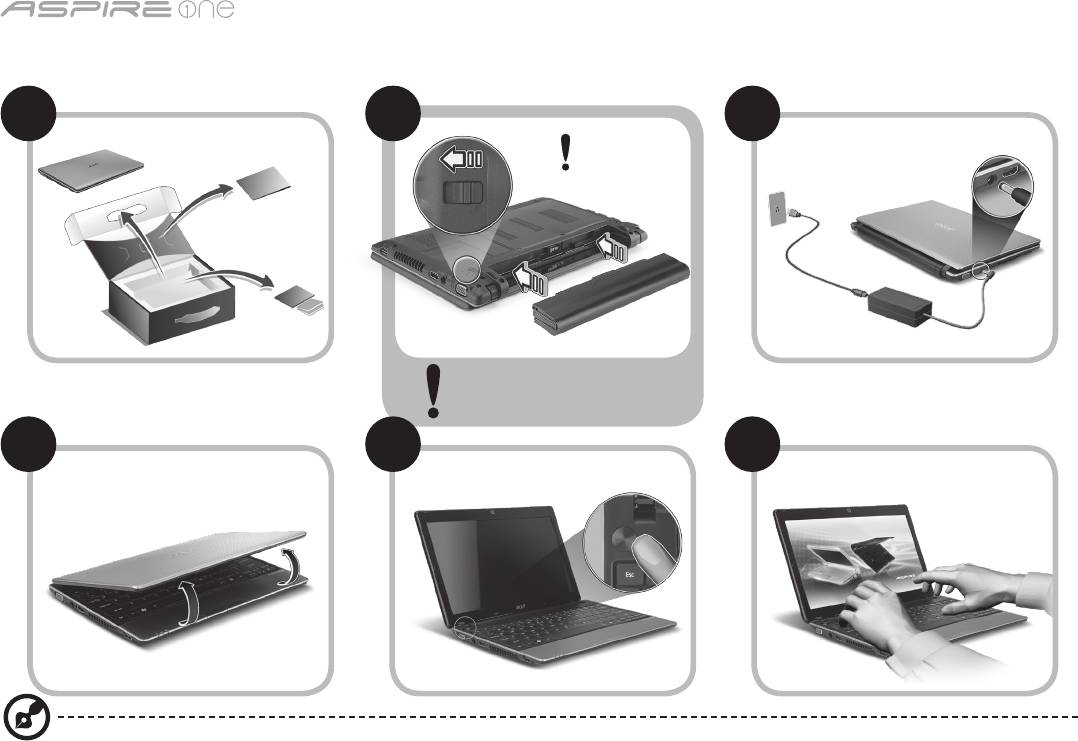
sorozat
1
Miután a Kezdők számára...
1 2
3
2-2
3-3
3-1
3-2
2-1
Győződjön meg arról, hogy az
akkumulátor biztosan rögzült a
helyén (lásd a 2-2 ábrát).
4 5 6
A képek csak illusztrációk. A termék műszaki leírásában eltérések lehetnek.

Rövid útmutató
2
Az első lépések
Köszönjük, hogy mobil számítástechnikai feladatai elvégzéséhez egy Acer hordozható számítógépet választott.
Útmutatók
Minden segítséget szeretnénk megadni Önnek új Acer gépének használatához, ezért a következő útmutatókat dolgoztuk ki*:
Az első a Rövid útmutató, amely segítségére lesz a számítógép üzembe helyezésénél.
A számítógép hatékonyabb használatához az AcerSystem User Guide ad segítséget. Ez a kézikönyv részletes információkat tartalmaz
például az előre telepített segédprogramokról, az adat-helyreállításról, a bővítési lehetőségekről és a hibaelhárításról. Emellett ismerteti
a garanciával kapcsolatos tudnivalókat, valamint a számítógépre vonatkozó általános szabályokat és biztonsági előírásokat is.
A kézikönyv Portable Document Format (PDF) formátumú, és gyárilag telepítve van a számítógépre.
Megjegyzés: A fájl megtekintéséhez szükség van az Adobe Reader alkalmazásra. Ha az Adobe Reader nincs telepítve a
számítógépre, akkor az AcerSystem User Guide elemre kattintva először az Adobe Reader telepítőprogramja jelenik meg. A
telepítés elvégzéséhez kövesse a képernyőn megjelenő utasításokat. Az Adobe Reader használatához a Súgó és támogatás
menüben talál útmutatást.
* FONTOS MEGJEGYZÉS: Felhívjuk gyelmét arra, hogy az itt említett útmutatók, legyen szó akár elektronikus, akár
nyomtatott formátumú kiadványról, kizárólag tájékoztató célt szolgálnak, és hacsak az AcerSystem User Guide másként
nem rendelkezik, ezeknek az útmutatóknak a tartalma semmilyen kijelentést vagy garanciavállalást nem jelent az Acer
részéről az Ön által megvásárolt terméket illetően. Az Acer kifejezetten elhárít az útmutatókban található hibákkal
kapcsolatos minden felelősséget.

sorozat
3
Hálózati konguráció
Ezen útmutató segítségével megadhatja a vezetékes és a vezeték nélküli hálózat beállításait; ezt követően csatlakozhat az Internetre.
LAN-kapcsolat beállítása
Egyszerűen csatlakoztassa a hálózati kábelt az Ethernet (RJ-45) portba. Az Ethernet port helyét illetően lásd „Jobb oldali nézet” a 6.
oldalon.
Vezeték nélküli hálózati kapcsolat beállítása
1. Az <Fn> + <F3> billentyűkombinációval nyissa meg a Kommunikációkezelőt. Itt kapcsolható be a Wi-Fi-adapter; a bekapcsoláshoz
kattintson a Wi-Fi melletti vörös gombra.
Megjegyzés: A 3G és a Bluetooth ugyancsak a Kommunikációkezelővel érhető el. A kommunikációs modulok kongurációtól
függően eltérők lehetnek.
2. Kattintson a rendszer tálcáján található ikonra, majd válassza ki, hogy melyik vezeték nélküli hozzáférési ponthoz kíván
csatlakozni.
3G SIM-kártya behelyezése (csak bizonyos típusok esetében).
Távolítsa el az akkumulátort, majd óvatosan tegye be a 3G SIM-kártyát a 3G SIM-kártyafoglalatba. A 3G SIM-kártyafoglalat helyét
illetően lásd: „Hátulnézet & Alulnézet” a 6. oldalon.
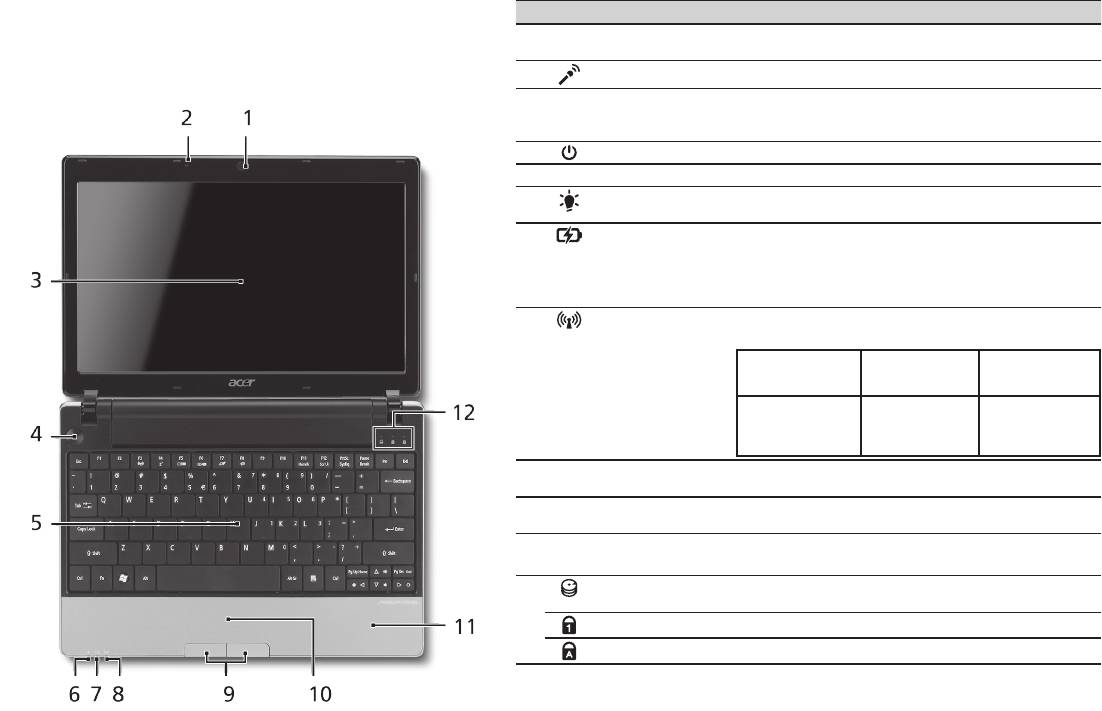
Rövid útmutató
4
Felülnézet
Ismerkedés az Aspire One
# Ikon Elem Leírás
készülékkel
1
Acer Crystal Eye
Webkamera videokommunikációs célokra
webkamera
(a konguráció típustól függően változhat).
Miután a Kezdők számára... szakasz alapján üzembe helyezte
2
Mikrofon Belső mikrofon hangfelvételek készítéséhez.
a számítógépet, ismerkedjen meg új Acer notebookjával!
3
Kijelző Más néven folyadékkristályos kijelző (Liquid-Crystal
Display, LCD), a számítógép kimenetét jeleníti meg
(a konguráció típustól függően változhat).
4
Bekapcsoló gomb A számítógép be- és kikapcsolására szolgál.
5
Billentyűzet Az adatbevitel eszköze.
6
Üzemállapot
A számítógép üzemállapotát jelzi.
1
jelzőfénye
7
Akkumulátor
Az akkumulátor üzemállapotát jelzi.
1
állapotjelzője
1. Töltés: Sárgán világít, ha az akkumulátor töltése
folyamatban van.
2. Teljesen feltöltve: Hálózati tápellátás
használatakor kéken világít.
8
Kommunikációs
A vezeték nélküli LAN/3G kommunikáció állapotát
1
állapotjelző
jelzi.
Kék jelzőfény
Narancssárga
Kikapcsolva
bekapcsolva
jelzőfény
bekapcsolva
3G bekapcsolva/
Wi-Fi bekapcsolva
3G kikapcsolva/
3G kikapcsolva/
3G bekapcsolva/
Wi-Fi bekapcsolva
WiFi kikapcsolva
WiFi kikapcsolva
9
Kattintógombok
A bal és a jobb gomb az egér bal és jobb
(bal és jobb)
gombjához hasonlóan működik.
10
Érintőpad Érintésérzékeny mutatóeszköz, a számítógépek
egeréhez hasonlóan működik.
11
Csuklótámasz Kényelmes támaszkodási felület a számítógép
használatának idejére.
12
Merevlemez
Jelzi, ha a merevlemez használatban van.
jelzőfénye
Num Lock Akkor világít, ha a Num Lock be van kapcsolva.
Caps Lock Akkor világít, ha a Caps Lock be van kapcsolva.
1. Az előlap jelzői akkor is láthatók, ha a számítógép fedele le van hajtva.
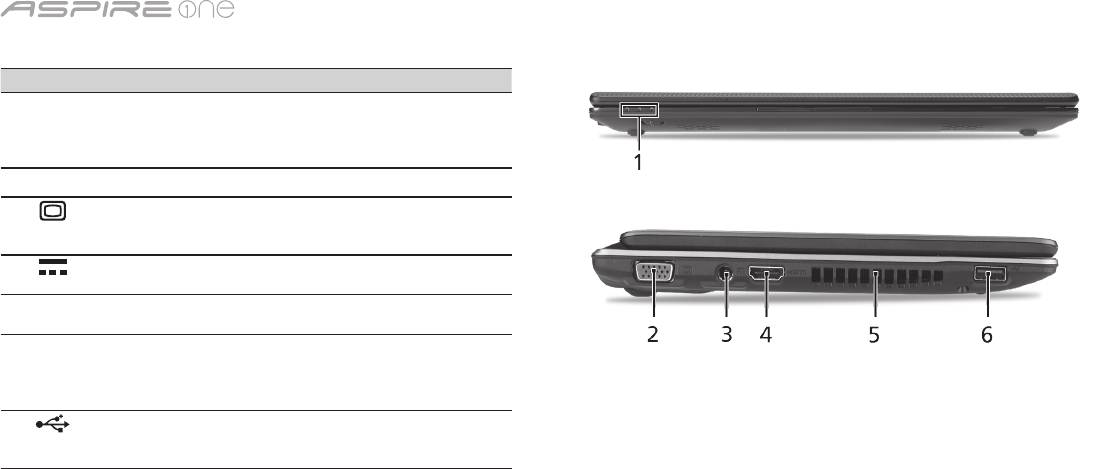
sorozat
5
Elölnézet lehajtott kijelzővel
# Ikon Elem Leírás
1
Állapotjelző fények Fénykibocsátó diódák (Light-Emitting
Diode, LED), fényükkel a számítógép
funkcióinak és összetevőinek
állapotát jelzik.
Bal oldali nézet
2
Külső kijelző (VGA)
Megjelenítő eszköz (pl. külső monitor
port
vagy LCD kivetítő) csatlakoztatását
teszi lehetővé.
3
Egyenáramú
A váltakozó áramú hálózati adapter
bemeneti aljzat
csatlakoztatását teszi lehetővé.
4
HDMI HDMI port A nagy felbontású, digitális
videokapcsolatokat támogatja.
5
Szellőzőnyílások Segítségükkel még hosszas
használat esetén is fenntartható
a számítógép megfelelő üzemi
hőmérséklete.
6
USB 2.0 port USB 2.0 eszközök (pl. USB-s egér
vagy kamera) csatlakoztatását teszi
lehetővé.
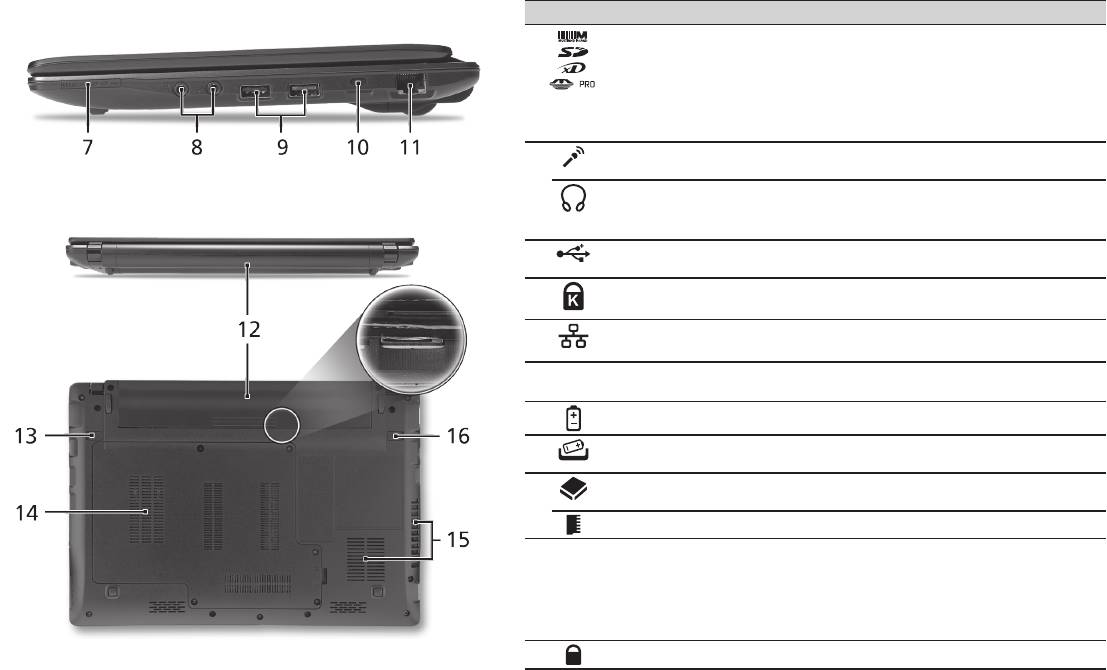
Rövid útmutató
6
Jobb oldali nézet
# Ikon Elem Leírás
7
Multifunkciós
Secure Digital (SD), MultiMediaCard (MMC),
kártyaolvasó
Memory Stick (MS), Memory Stick PRO
(MS PRO) és xD-Picture Card (xD) kártyák
fogadására képes.
Megjegyzés: A kártyák noman benyomva
helyezhetők be és vehetők ki. Egyszerre csak
egy kártya használatára van lehetőség.
8
Mikrofonbemeneti aljzat Külső mikrofon csatlakoztatását teszi
lehetővé.
Fejhallgató/hangszóró/
Hangkimeneti eszközök (pl. hangszórók,
vonali kimenet, S/PDIF-
fejhallgató) csatlakoztatását teszi lehetővé.
támogatással
9
USB 2.0 port USB 2.0 eszközök (pl. USB-s egér)
csatlakoztatását teszi lehetővé.
10
Kensington záraljzat Kensington számítógépes biztonsági zár
alkalmazását teszi lehetővé.
11
Ethernet (RJ-45) port Ethernet 10/100/1000 típusú hálózattal képes
biztosítani a kapcsolatot.
Hátulnézet & Alulnézet
12
Akkumulátorfoglalat A számítógép akkumulátorát fogadja be.
13
Akkumulátor
Az akkumulátor eltávolítását teszi lehetővé.
kioldógombja
14
Merevlemez-foglalat A számítógép merevlemezét fogadja be
(csavaros rögzítésű).
Memóriarekesz A számítógép memóriáját fogadja be.
15
Szellőzőnyílások és
Segítségükkel még hosszas használat esetén
hűtőventilátor
is fenntartható a számítógép megfelelő üzemi
hőmérséklete.
Megjegyzés: A ventilátor nyílását nem szabad
elfedni, illetve a levegő áramlását egyéb
módon sem szabad akadályozni.
16
Akkumulátor retesze Az akkumulátor rögzítését biztosítja.

sorozat
Környezet
Hőmérséklet:
Üzemeltetés: 5°C – 35°C
Kikapcsolt állapotban: -20°C – 65°C
Páratartalom (kicsapódás nélkül):
Üzemeltetés: 20% – 80%
Kikapcsolt állapotban: 20% – 80%
7

Řada
Stručné pokyny

Řada
Stručné pokyny
Řada
Stručné pokyny
© 2010 Všechna práva vyhrazena
Stručné pokyny pro počítače řady Aspire One
Původní vydání: 04/2010
Notebook řady Aspire One
Číslo modelu: ______________________________
Sériové číslo: ______________________________
Datum zakoupení: __________________________
Místo zakoupení: ___________________________

Řada
Stručné pokyny
Řada
Stručné pokyny
Federal Communications Commission
Declaration of Conformity
This device complies with Part 15 of the FCC Rules. Operation is subject to the following two conditions: (1) this device may not
cause harmful interference, and (2) this device must accept any interference received, including interference that may cause
undesired operation.
The following local Manufacturer / Importer is responsible for this declaration:
Product name: Notebook PC
Brand: Acer
Model number: MS2298
Machine type: AO 721 series
Name of Responsible Party: Acer America Corporation
Address of responsible party: 333 West San Carlos St., San Jose
CA 95110, U. S. A.
Contact person: Acer Representative
Phone No.: 1-254-298-4000
Fax No.: 1-254-298-4147
April 30, 2010

Řada
Stručné pokyny
Řada
Stručné pokyny
• Themaximumconcentrationvaluesoftherestrictedsubstancesbyweightinhomogenousmaterialare:
CE Declaration of Conformity
Lead
0.1%
Polybrominated Biphenyls (PBB’s)
0.1%
We,
Mercury
0.1%
Polybrominated Diphenyl Ethers (PBDE’s)
0.1%
Acer Incorporated
Hexavalent Chromium
0.1%
Cadmium
0.01%
8F, 88, Sec. 1, Hsin Tai Wu Rd., Hsichih, Taipei Hsien 221, Taiwan
Directive 2009/125/EC with regard to establishing a framework for the setting of ecodesign requirements for energy-related
product.
Contact Person: Mr. Easy Lai, e-mail:easy_lai@acer.com.tw
R&TTE Directive 1999/5/EC as attested by conformity with the following harmonized standard:
And,
• Article3.1(a)HealthandSafety
Acer Europe SA
- EN60950-1
Via Cantonale, Centro Galleria 2 6928 Manno Switzerland
- EN62311
Hereby declare that:
• Article3.1(b)EMC
Product: Notebook Computer
- EN301 489-1
Trade Name: Acer
- EN301 489-3 (Applicable to non-bluetooth wireless keyboard mouse set).
Model Number: MS2298
- EN301 489-7
Machine Type: AO721 series
- EN301 489-17
Is compliant with the essential requirements and other relevant provisions of the following EC directives, and that all the
- EN301 489-24
necessary steps have been taken and are in force to assure that production units of the same product will continue comply with
• Article3.2SpectrumUsages
the requirements.
- EN300 440-2 (Applicable to non-bluetooth wireless keyboard mouse set).
EMC Directive 2004/108/EC as attested by conformity with the following harmonized standards:
- EN300 328
• EN55022,AS/NZSCISPR22,ClassB
- EN301 511
• EN55024
- EN301 893 (Applicable to 5GHz high performance RLAN).
• EN61000-3-2ClassD
- EN301 908-1
• EN61000-3-3
- EN301 908-2
Year to begin affixing CE marking 2010.
Low Voltage Directive 2006/95/EC as attested by conformity with the following harmonized standard:
• EN60950-1
Apr. 30, 2010
Council Decision 98/482/EC (CTR21):
(Applicable to product with pan- European single terminal connection to the Public Switched Telephone Network (PSTN).)
Date
Easy Lai /Manager
RoHS Directive 2002/95/EC on the Restriction of the Use of certain Hazardous Substances in Electrical and Electronic Equipment
Regulation Center, Acer Inc.
Řada
Stručné pokyny
Řada
Stručné pokyny
• Themaximumconcentrationvaluesoftherestrictedsubstancesbyweightinhomogenousmaterialare:
CE Declaration of Conformity
Lead
0.1%
Polybrominated Biphenyls (PBB’s)
0.1%
We,
Mercury
0.1%
Polybrominated Diphenyl Ethers (PBDE’s)
0.1%
Acer Incorporated
Hexavalent Chromium
0.1%
Cadmium
0.01%
8F, 88, Sec. 1, Hsin Tai Wu Rd., Hsichih, Taipei Hsien 221, Taiwan
Directive 2009/125/EC with regard to establishing a framework for the setting of ecodesign requirements for energy-related
product.
Contact Person: Mr. Easy Lai, e-mail:easy_lai@acer.com.tw
R&TTE Directive 1999/5/EC as attested by conformity with the following harmonized standard:
And,
• Article3.1(a)HealthandSafety
Acer Europe SA
- EN60950-1
Via Cantonale, Centro Galleria 2 6928 Manno Switzerland
- EN62311
Hereby declare that:
• Article3.1(b)EMC
Product: Notebook Computer
- EN301 489-1
Trade Name: Acer
- EN301 489-3 (Applicable to non-bluetooth wireless keyboard mouse set).
Model Number: MS2298
- EN301 489-7
Machine Type: AO721 series
- EN301 489-17
Is compliant with the essential requirements and other relevant provisions of the following EC directives, and that all the
- EN301 489-24
necessary steps have been taken and are in force to assure that production units of the same product will continue comply with
• Article3.2SpectrumUsages
the requirements.
- EN300 440-2 (Applicable to non-bluetooth wireless keyboard mouse set).
EMC Directive 2004/108/EC as attested by conformity with the following harmonized standards:
- EN300 328
• EN55022,AS/NZSCISPR22,ClassB
- EN301 511
• EN55024
- EN301 893 (Applicable to 5GHz high performance RLAN).
• EN61000-3-2ClassD
- EN301 908-1
• EN61000-3-3
- EN301 908-2
Year to begin affixing CE marking 2010.
Low Voltage Directive 2006/95/EC as attested by conformity with the following harmonized standard:
• EN60950-1
Apr. 30, 2010
Council Decision 98/482/EC (CTR21):
(Applicable to product with pan- European single terminal connection to the Public Switched Telephone Network (PSTN).)
Date
Easy Lai /Manager
RoHS Directive 2002/95/EC on the Restriction of the Use of certain Hazardous Substances in Electrical and Electronic Equipment
Regulation Center, Acer Inc.

Řada
Stručné pokyny
1
Řada
Stručné pokyny
První kroky...
1 2
3
2-2
3-3
3-1
3-2
2-1
Zkontrolujte, zda je baterie
zajištěná na svém místě,
viz obr. 2-2.
4 5 6
Ilustrace jsou pouze orientační. Skutečná specikace produktu se může lišit.

Řada
Stručné pokyny
Řada
Stručné pokyny
2
Stručné pokyny
Děkujeme vám, že jste si k uspokojení svých potřeb v oblasti přenosných počítačů vybrali notebook Acer.
Uživatelské příručky
Abychom vám při používání notebooku Acer pomohli, vytvořili jsme pro vás sadu příruček*:
Stručná příručka vám pomůže při úvodním nastavení počítače.
Další informace o tom, jak můžete pomocí počítače zvýšit svou produktivitu, naleznete v příručce AcerSystem User Guide. Tato
příručka obsahuje podrobné informace týkající se například systémových nástrojů, obnovování dat, možností rozšíření a odstraňování
potíží. Dále obsahuje záruční informace, informace týkající se všeobecných předpisů a bezpečnostní upozornění k notebooku. Příručka
je k dispozici ve formátu PDF (Portable Document Format) a je již uložena do notebooku.
Poznámka: K zobrazení tohoto souboru je vyžadován program Adobe Reader. Pokud v počítači není program Adobe Reader
nainstalován, klepnutím na položku AcerSystem User Guide nejprve spustíte instalační program. Dokončete instalaci podle
pokynů na obrazovce. Pokyny týkající se používání programu Adobe Reader jsou k dispozici v nabídce Nápověda a odborná
pomoc.
* DŮLEŽITÉ UPOZORNĚNÍ: Upozorňujeme, že uvedené příručky, ať tištěné nebo elektronické, slouží pouze pro
referenci a s výjimkou informací uvedených ve zvláštních informacích o záruce v AcerSystem User Guide nepředstavují
žádná ujištění nebo záruky společnosti Acer v souvislosti s vámi zakoupeným produktem. Společnost Acer výslovně
odmítá jakoukoli odpovědnost za chyby uvedené v těchto příručkách.

Řada
Stručné pokyny
3
Řada
Stručné pokyny
Kongurace sítě
Tento průvodce vám pomůže kongurovat nastavení sítě LAN nebo bezdrátové sítě, aby bylo možné se připojit k Internetu.
Nastavení připojení k síti LAN
Stačí připojit síťový kabel LAN do portu Ethernet (RJ-45). Umístění portu Ethernet naleznete na obrázku „Pohled zprava“ na straně 6.
Nastavení bezdrátového připojení
1. Stisknutím kláves <Fn> + <F3> otevřete správce komunikace. Zde můžete zapnout připojení Wi-Fi klepnutím na červené tlačítko
vedle Wi-Fi.
Poznámka: Prostřednictvím správce komunikace jsou dostupné také možnosti 3G a Bluetooth. Komunikační zařízení se liší podle
modelu.
2. Klepněte na ikonu na hlavním panelu a vyberte přístupový bod bezdrátové sítě, k němuž se chcete připojit.
Vložení karty 3G SIM (pouze u vybraných modelů)
Vyjměte baterii a opatrně vložte kartu 3G SIM do patice pro kartu 3G SIM. Umístění patice pro kartu 3G SIM najdete na „Pohled
zezadu & Pohledu zespodu“ na straně 6.
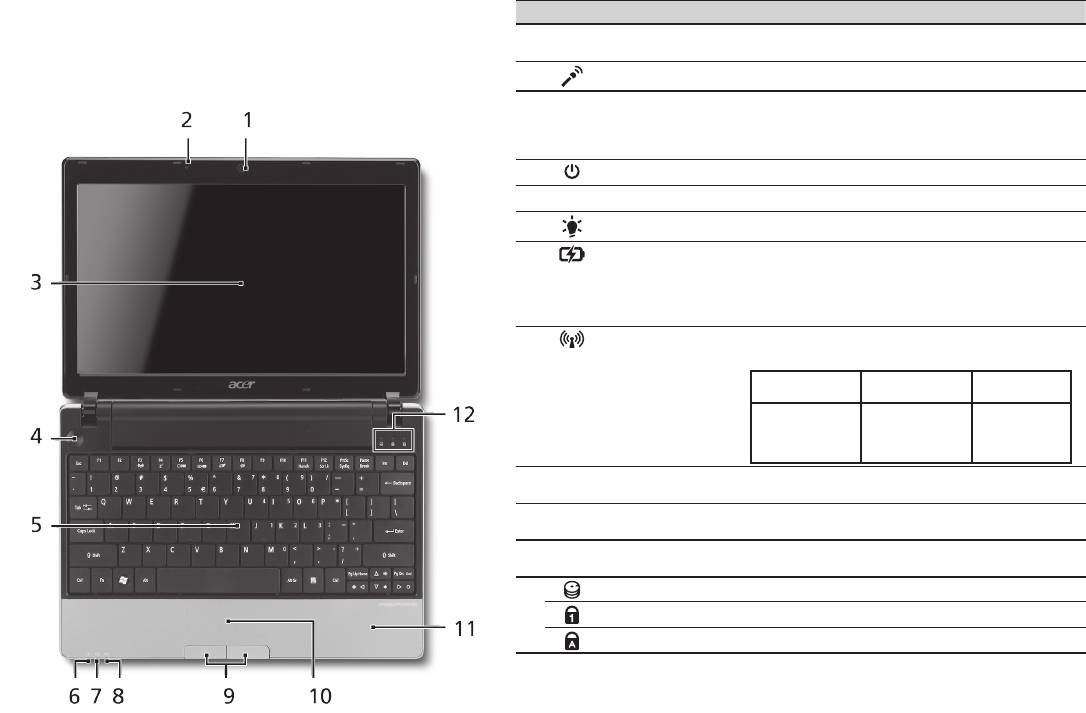
Řada
Stručné pokyny
Řada
Stručné pokyny
4
Pohled shora
Seznámení s počítačem
# Ikona Položka Popis
Aspire One
1
Webová kamera
Webová kamera pro obrazovou komunikaci
Acer Crystal Eye
(Kongurace se může lišit podle modelů).
Po nastavení počítače podle pokynů znázorněných v části
2
Mikrofon Interní mikrofon pro nahrávání zvuku.
První kroky... vás seznámíme s vaším novým notebookem Acer.
3
Displej Na displeji, označovaném také displej
z tekutých krystalů (Liquid-Crystal Display;
LCD), se zobrazuje gracký výstup počítače
(Kongurace se může lišit podle modelů).
4
Tlačítko napájení Slouží k zapnutí a vypnutí počítače.
5
Klávesnice Slouží k zadávání údajů do počítače.
1
6
Indikátor napájení
Indikuje stav napájení počítače.
1
7
Indikátor baterie
Indikuje stav baterie počítače.
1. Nabíjení: Při nabíjení baterie svítí indikátor
jantarově.
2. Plně nabití: V režimu napájení ze sítě svítí
indikátor modře.
8
Indikátor
Indikuje stav komunikace v bezdrátové síti
1
komunikace
LAN/3G.
Svítí modrá
Svítí oranžová
Nesvítí
kontrolka
kontrolka
3G zapnuto/
WiFi zapnuto
3G vypnuto/
3G vypnuto/
3G zapnuto/
Wi-Fi zapnuto
WiFi vypnuto
WiFi vypnuto
9
Tlačítka (levé a
Levé a pravé tlačítko funguje jako levé a pravé
pravé)
tlačítko myši.
10
Touchpad Polohovací zařízení citlivé na dotek, které má
podobnou funkci jako počítačová myš.
11
Podložka ruky Oblast k pohodlnému opření rukou při
používání počítače.
12
Indikátor HDD Svítí, pokud je aktivní pevný disk.
NumLk Svítí při aktivaci funkce NumLk.
Caps Lock Svítí při aktivaci funkce Caps Lock.
1. Stavové indikátory na předním panelu jsou viditelné i po zavření víka počítače.

Řada
Stručné pokyny
5
Řada
Stručné pokyny
Pohled na zavřenou přední stranu
# Ikona Položka Popis
1
Stavové indikátory Diody LED (Light-Emitting Diodes;
LED), které se rozsvěcují a informují
o stavu funkcí a součástí počítače.
Pohled zleva
2
Port externího
Umožňuje připojení zobrazovacího
zobrazovacího
zařízení (například externího
zařízení (VGA)
monitoru nebo projektoru LCD).
3
Napájecí konektor Zajišťuje připojení k síťovému
adaptéru.
4
HDMI Port HDMI Podporuje připojení digitálního
videa ve vysokém rozlišení.
5
Ventilační otvory Umožňují chlazení počítače i při
dlouhodobém používání.
6
Port USB 2.0 Umožňuje připojení zařízení
s rozhraním USB 2.0 (například
myš nebo fotoaparát USB).
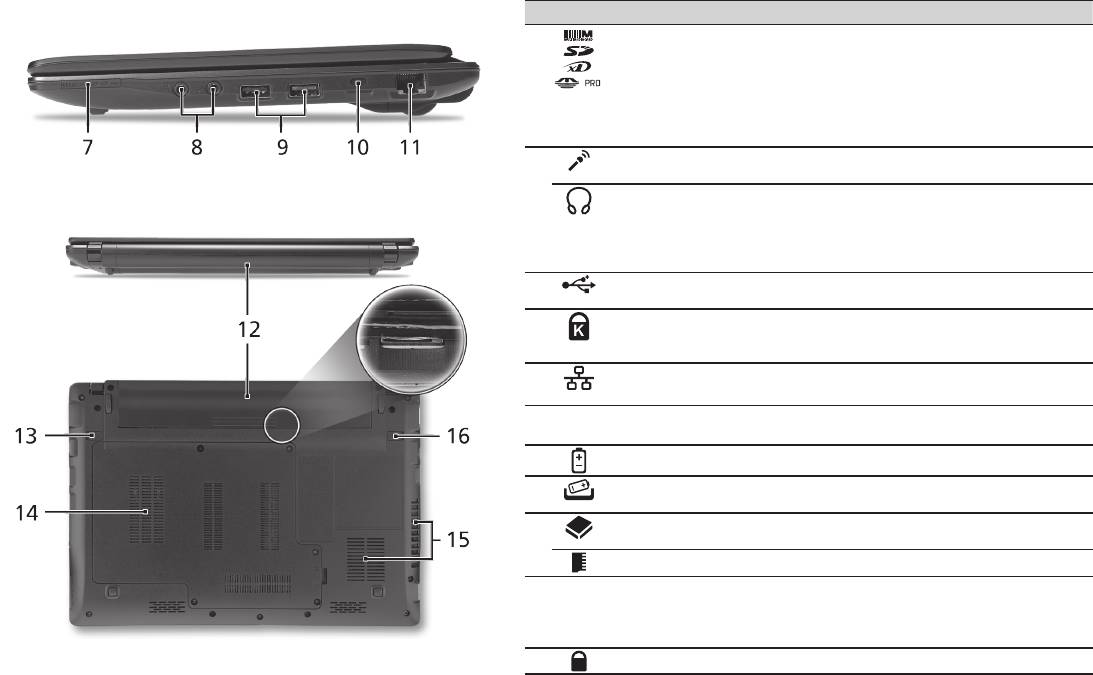
Řada
Stručné pokyny
Řada
Stručné pokyny
6
Pohled zprava
# Ikona Položka Popis
7
Čtečka karet Více v 1 Podporuje karty Secure Digital (SD),
MultiMediaCard (MMC), Memory Stick
(MS), Memory Stick PRO (MS PRO) a xD-
Picture Card (xD).
Poznámka: Stisknutím vyjměte nebo vložte
kartu. V jednom okamžiku lze použít jen
jednu kartu.
8
Konektor pro vstup
Slouží k připojení vstupů z externího
mikrofonu
mikrofonu.
Konektor pro připojení
Slouží k připojení vnějších výstupních
sluchátek, reproduktorů
zvukových zařízení (například reproduktorů
nebo zvukového
nebo sluchátek).
výstupu s podporou
rozhraní S/PDIF
9
Port USB 2.0 Umožňuje připojení zařízení s rozhraním
USB 2.0 (například myš USB).
10
Patice pro zámek
Umožňuje připojení počítačového
Kensington
bezpečnostního zámku kompatibilního
s typem Kensington.
11
Port Ethernet (RJ-45) Umožňuje připojení k síti Ethernet
10/100/1000.
Pohled zezadu & Pohled zespodu
12
Pozice pro baterii Zde je uložena baterie počítače.
13
Uvolňovací západka
Uvolňuje baterii k vyjmutí.
baterie
14
Pozice pro pevný disk Zde je uložen pevný disk počítače
(zajištěný šroubem).
Pozice pro paměť Zde je uložena hlavní paměť počítače.
15
Ventilační otvory a
Umožňují chlazení počítače i při
ventilátor
dlouhodobém používání.
Poznámka: Nezakrývejte ani neblokujte
otvor ventilátoru.
16
Zámek baterie Zamkne baterii na místě.

Řada
Stručné pokyny
Prostředí
Teplota:
Provozní: 5°C až 35°C
Neprovozní: -20°C až 65°C
Vlhkost (nekondenzující):
Provozní: 20% až 80%
Neprovozní: 20% až 80%
7

Séria
Stručná príručka

Séria
© 2010 Všetky práva vyhradené
Stručná príručka séria Aspire One
Pôvodné vydanie: 04/2010
Prenosný počítač séria Aspire One
Číslo modelu: ______________________________
Sériové číslo: ______________________________
Dátum zakúpenia: ___________________________
Miesto zakúpenia: ___________________________

Stručná príručka
Federal Communications Commission
Declaration of Conformity
This device complies with Part 15 of the FCC Rules. Operation is subject to the following two conditions: (1) this device may not
cause harmful interference, and (2) this device must accept any interference received, including interference that may cause
undesired operation.
The following local Manufacturer / Importer is responsible for this declaration:
Product name: Notebook PC
Brand: Acer
Model number: MS2298
Machine type: AO 721 series
Name of Responsible Party: Acer America Corporation
Address of responsible party: 333 West San Carlos St., San Jose
CA 95110, U. S. A.
Contact person: Acer Representative
Phone No.: 1-254-298-4000
Fax No.: 1-254-298-4147
April 30, 2010

Séria
• Themaximumconcentrationvaluesoftherestrictedsubstancesbyweightinhomogenousmaterialare:
CE Declaration of Conformity
Lead
0.1%
Polybrominated Biphenyls (PBB’s)
0.1%
We,
Mercury
0.1%
Polybrominated Diphenyl Ethers (PBDE’s)
0.1%
Acer Incorporated
Hexavalent Chromium
0.1%
Cadmium
0.01%
8F, 88, Sec. 1, Hsin Tai Wu Rd., Hsichih, Taipei Hsien 221, Taiwan
Directive 2009/125/EC with regard to establishing a framework for the setting of ecodesign requirements for energy-related
product.
Contact Person: Mr. Easy Lai, e-mail:easy_lai@acer.com.tw
R&TTE Directive 1999/5/EC as attested by conformity with the following harmonized standard:
And,
• Article3.1(a)HealthandSafety
Acer Europe SA
- EN60950-1
Via Cantonale, Centro Galleria 2 6928 Manno Switzerland
- EN62311
Hereby declare that:
• Article3.1(b)EMC
Product: Notebook Computer
- EN301 489-1
Trade Name: Acer
- EN301 489-3 (Applicable to non-bluetooth wireless keyboard mouse set).
Model Number: MS2298
- EN301 489-7
Machine Type: AO721 series
- EN301 489-17
Is compliant with the essential requirements and other relevant provisions of the following EC directives, and that all the
- EN301 489-24
necessary steps have been taken and are in force to assure that production units of the same product will continue comply with
• Article3.2SpectrumUsages
the requirements.
- EN300 440-2 (Applicable to non-bluetooth wireless keyboard mouse set).
EMC Directive 2004/108/EC as attested by conformity with the following harmonized standards:
- EN300 328
• EN55022,AS/NZSCISPR22,ClassB
- EN301 511
• EN55024
- EN301 893 (Applicable to 5GHz high performance RLAN).
• EN61000-3-2ClassD
- EN301 908-1
• EN61000-3-3
- EN301 908-2
Year to begin affixing CE marking 2010.
Low Voltage Directive 2006/95/EC as attested by conformity with the following harmonized standard:
• EN60950-1
Apr. 30, 2010
Council Decision 98/482/EC (CTR21):
(Applicable to product with pan- European single terminal connection to the Public Switched Telephone Network (PSTN).)
Date
Easy Lai /Manager
RoHS Directive 2002/95/EC on the Restriction of the Use of certain Hazardous Substances in Electrical and Electronic Equipment
Regulation Center, Acer Inc.
Stručná príručka
• Themaximumconcentrationvaluesoftherestrictedsubstancesbyweightinhomogenousmaterialare:
CE Declaration of Conformity
Lead
0.1%
Polybrominated Biphenyls (PBB’s)
0.1%
We,
Mercury
0.1%
Polybrominated Diphenyl Ethers (PBDE’s)
0.1%
Acer Incorporated
Hexavalent Chromium
0.1%
Cadmium
0.01%
8F, 88, Sec. 1, Hsin Tai Wu Rd., Hsichih, Taipei Hsien 221, Taiwan
Directive 2009/125/EC with regard to establishing a framework for the setting of ecodesign requirements for energy-related
product.
Contact Person: Mr. Easy Lai, e-mail:easy_lai@acer.com.tw
R&TTE Directive 1999/5/EC as attested by conformity with the following harmonized standard:
And,
• Article3.1(a)HealthandSafety
Acer Europe SA
- EN60950-1
Via Cantonale, Centro Galleria 2 6928 Manno Switzerland
- EN62311
Hereby declare that:
• Article3.1(b)EMC
Product: Notebook Computer
- EN301 489-1
Trade Name: Acer
- EN301 489-3 (Applicable to non-bluetooth wireless keyboard mouse set).
Model Number: MS2298
- EN301 489-7
Machine Type: AO721 series
- EN301 489-17
Is compliant with the essential requirements and other relevant provisions of the following EC directives, and that all the
- EN301 489-24
necessary steps have been taken and are in force to assure that production units of the same product will continue comply with
• Article3.2SpectrumUsages
the requirements.
- EN300 440-2 (Applicable to non-bluetooth wireless keyboard mouse set).
EMC Directive 2004/108/EC as attested by conformity with the following harmonized standards:
- EN300 328
• EN55022,AS/NZSCISPR22,ClassB
- EN301 511
• EN55024
- EN301 893 (Applicable to 5GHz high performance RLAN).
• EN61000-3-2ClassD
- EN301 908-1
• EN61000-3-3
- EN301 908-2
Year to begin affixing CE marking 2010.
Low Voltage Directive 2006/95/EC as attested by conformity with the following harmonized standard:
• EN60950-1
Apr. 30, 2010
Council Decision 98/482/EC (CTR21):
(Applicable to product with pan- European single terminal connection to the Public Switched Telephone Network (PSTN).)
Date
Easy Lai /Manager
RoHS Directive 2002/95/EC on the Restriction of the Use of certain Hazardous Substances in Electrical and Electronic Equipment
Regulation Center, Acer Inc.
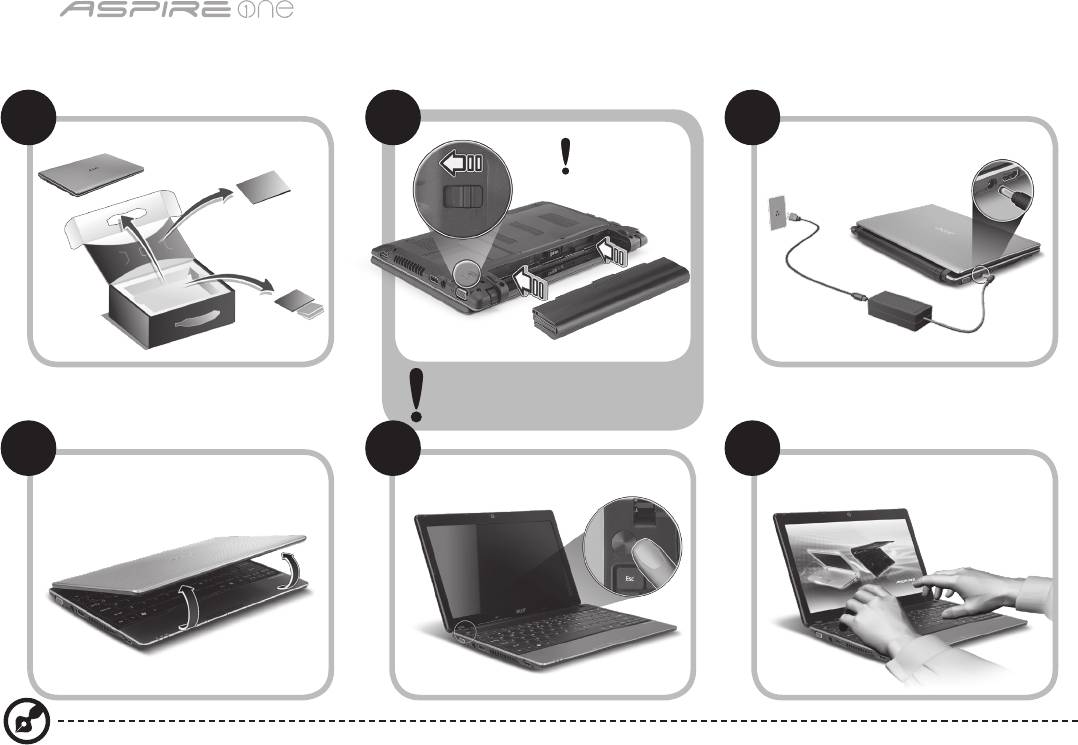
Séria
1
Práve začíname
1 2
3
2-2
3-3
3-1
3-2
2-1
Skontrolujte, či je batéria správne
vložená na svojom mieste, ako je
znázornené na obrázku v časti 2-2.
4 5 6
Ilustrácie sú len orientačné. Parametre aktuálneho výrobku môžu byť odlišné.

Stručná príručka
2
Hneď na úvod
Radi by sme vám poďakovali za rozvoj prenosných počítačov Acer – vašej voľby pre svoje mobilné počítačové potreby.
Vaše príručky
Pomôžeme vám s používaním prenosného počítača Acer – vytvorili sme kvôli tomu niekoľko príručiek*:
Najprv vám Stručná príručka pomôže začať s nastavením počítača.
Informácie o tom, ako vám počítač pomôže byť produktívnejší, nájdete v AcerSystem User Guide. Táto príručka obsahuje podrobné
informácie o systémových programoch, obnove údajov, možnostiach rozšírenia a riešenie problémov. Okrem toho obsahuje informácie
o záruke a všeobecné vyhlásenia k predpisom a bezpečnosti. Je dostupná vo formáte PDF a je umiestnená vo vašom prenosnom
počítači.
Poznámka: Prezeranie súboru vyžaduje Adobe Reader. Ak na vašom počítači nie je Adobe Reader nainštalovaný, kliknutím na
AcerSystem User Guide sa najprv spustí inštalácia programu Adobe Reader. Inštaláciu dokončíte podľa pokynov, ktoré uvidíte
na obrazovke. Inštrukcie ako používať Adobe Reader nájdete v ponuke Pomocník a Podpora.
* DÔLEŽITÁ POZNÁMKA: Majte na pamäti, že všetky tu uvedené príručky, či už v tlačenej alebo elektronickej podobe,
sú len orientačné a žiadne informácie, ktoré sú v nich uvedené, nenahrádzajú ani nereprezentujú záruku spoločnosti
Acer týkajúcu sa zakúpeného výrobku, okrem výslovne uvedených informácií o záruke nachádzajúcich sa v dokumente
AcerSystem User Guide. Spoločnosť Acer vyhlasuje, že nenesie žiadnu zodpovednosť za prípadné chyby v týchto
príručkách.

Séria
3
Kongurácia siete
Tento návod vám pomôže nakongurovať nastavenia siete LAN a bezdrôtovej siete, aby bolo možné pripojiť sa k internetu.
Nastavenie pripojenia k sieti LAN
Stačí zapojiť kábel siete LAN do portu Ethernet (RJ-45). Informácie o umiestnení portu siete Ethernet nájdete v časti„Pohľad sprava“
na strane 6.
Nastavenie bezdrôtového pripojenia
1. Stlačením klávesov <Fn> + <F3> otvoríte správcu komunikácie. Kliknutím na červené tlačidlo vedľa Wi-Fi môžete zapnúť pripojenie
Wi-Fi.
Poznámka: Pripojenie k sieti 3G a Bluetooth je k dispozícii aj prostredníctvom správcu komunikácie. Komunikačné zariadenia sa
môžu líšiť v závislosti od modelu.
2. Kliknite na ikonu v oznamovacej oblasti a vyberte prístupový bod bezdrôtovej siete, ku ktorej sa chcete pripojiť.
Vloženie karty 3G SIM (len určité modely)
Vyberte batériu a opatrne vložte 3G SIM kartu do zásuvky pre 3G SIM kartu. Umiestnenie zásuvky pre 3G SIM kartu nájdete na
obrázku „Pohľad zozadu & Pohľad zdola“ na strane 6.
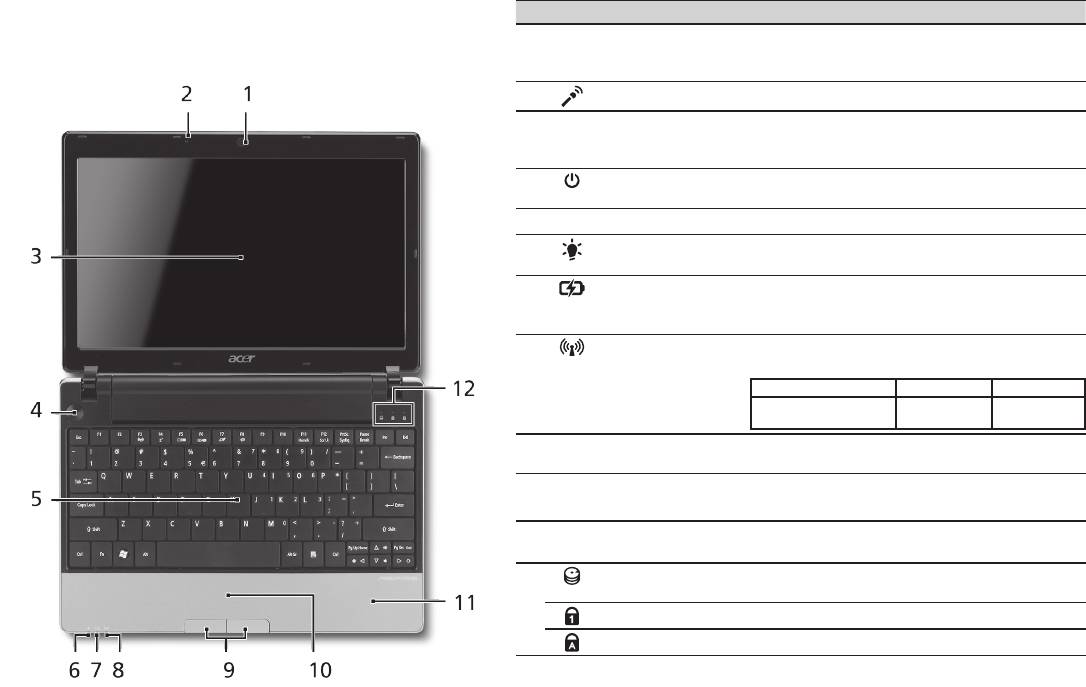
Stručná príručka
4
Pohľad zhora
Spoznajte Aspire One
# Ikona Položka Popis
Po nastavení počítača podľa časti Práve začíname, nám
1
Webkamera Acer
Webová kamera na video komunikáciu
dovoľte, aby sme vás zoznámili s novým prenosným počítačom
Crystal Eye
(kongurácia sa môže v závislosti od modelu
Acer.
líšiť).
2
Mikrofón Interný mikrofón na nahrávanie zvuku.
3
Obrazovka Nazýva sa tiež Liquid-Crystal Display (LCD),
zobrazuje výstup z počítača (kongurácia sa
môže v závislosti od modelu líšiť).
4
Tlačidlo Power
Zapína a vypína počítač.
(Zapnúť)
5
Klávesnica Slúži na zadávanie údajov do počítača.
6
Kontrolka
Signalizuje stav napájania počítača.
1
napájania
1
7
Kontrolka batérie
Signalizuje stav batérie počítača.
1. Nabíjanie: Pri nabíjaní batérie svieti žltá.
2. Nabité: V režime AC svieti modrá.
8
Kontrolka
Signalizuje stav komunikácie siete 3G/
1
komunikácie
bezdrôtovej siete LAN.
Svieti modrá Svieti oranžová Nesvieti
3G zapnuté/WiFi zapnuté
3G vypnuté/
3G vypnuté/
3G zapnuté/WiFi vypnuté
WiFi zapnuté
WiFi vypnuté
9
Tlačidlá na klikanie
Funkcia ľavého a pravého tlačidla je podobná
(ľavé a pravé)
ako funkcia ľavého a pravého tlačidla myši.
10
Dotyková plocha Zariadenie s citlivosťou na dotyk, ktoré funguje
ako počítačová myš.
11
Podložka rúk Pohodlná opora rúk pri práci s počítačom.
12
Kontrolka pevného
Svieti, keď je jednotka pevného disku aktívna.
disku
Num Lock Svieti, keď je Num Lock aktivovaný.
Caps Lock Svieti, keď je Caps Lock aktivovaný.
1. Kontrolky na prednom paneli sú viditeľné, aj keď je veko počítača zatvorené.
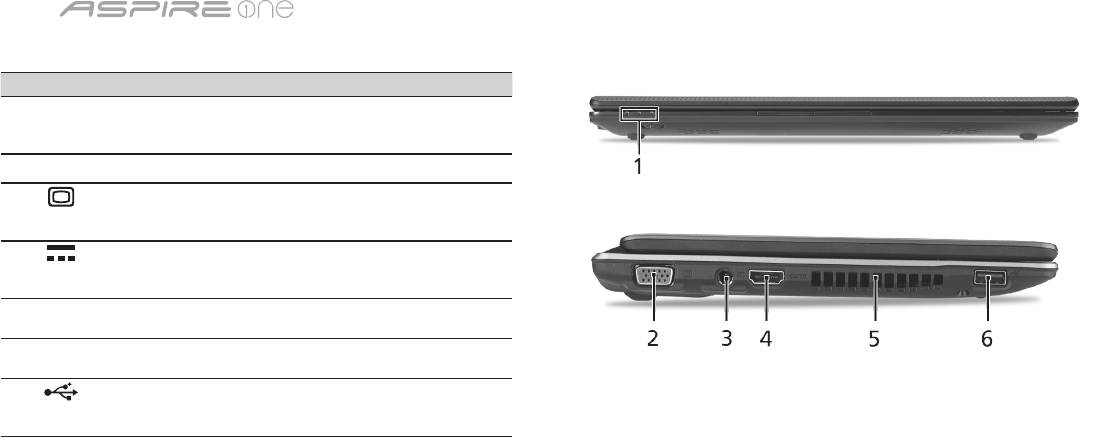
Séria
5
Pohľad spredu (zatvorený)
# Ikona Položka Popis
1
Indikátory stavu Diódy LED (Light-Emitting Diodes),
ktoré svetlom indikujú stav funkcií
počítača a jeho súčastí.
Pohľad zľava
2
Port externej
Pripojenie zobrazovacieho
obrazovky (VGA)
zariadenia (napr. externého
monitora, LCD projektora).
3
Konektor vstupu
Pripojenie adaptéra striedavého
jednosmerného
napätia.
napätia
4
HDMI Port HDMI Podporuje pripojenie digitálneho
videa s vysokým rozlíšením.
5
Otvory na ventiláciu Pomáha udržať pri dlhom
používaní počítač chladný.
6
Port USB 2.0 Pripojenie zariadení cez rozhranie
USB 2.0 (napr. USB myš, USB
fotoaparát).
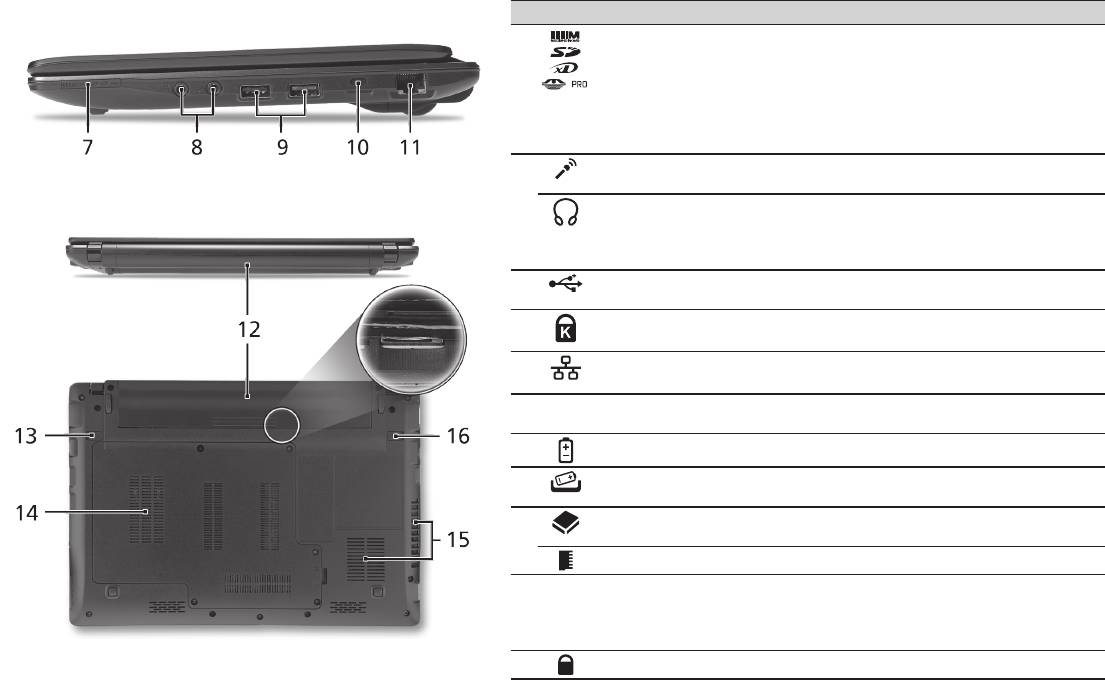
Stručná príručka
6
Pohľad sprava
# Ikona Položka Popis
7
Čítačka kariet Multi-in-1 Podporuje karty Secure Digital (SD),
MultiMediaCard (MMC), Memory Stick (MS),
Memory Stick PRO (MS PRO) a xD-Picture
Card (xD).
Poznámka: Stlačením vytiahnete/vložíte kartu.
Nie je možné pracovať s viacerými kartami
naraz.
8
Konektor vstupu
Slúži na vstup zvuku z externých mikrofónov.
mikrofónu
Výstup s podporou
Výstup zvuku do zvukových zariadení (napr.
S/PDIF na slúchadlá/
reproduktorov, slúchadiel).
reproduktor/externé
zvukové zariadenie
9
Port USB 2.0 Pripojenie zariadení cez rozhranie USB 2.0
(napr. USB myš).
10
Zásuvka na zámok
Pripojenie počítačového bezpečnostného
Kensington
kľúča Kensington.
11
Port siete Ethernet
Pripojenie k sieti Ethernet 10/100/1000.
(RJ-45)
Pohľad zozadu & Pohľad zdola
12
Jednotka batérie Slúži na uloženie batérie počítača.
13
Západka uvoľnenia
Slúži na uvoľnenie batérie pri jej vyberaní.
batérie
14
Jednotka pevného disku Slúži na uchytenie pevného disku počítača
(zaistené skrutkou).
Pozícia pre pamäť Tu je uložená hlavná pamäť počítača.
15
Otvory na ventiláciu a
Pomáha udržať pri dlhom používaní počítač
ventilátor chladenia
chladný.
Poznámka: Neuzatvárajte ani neupchávajte
otvor vetráka.
16
Zámok batérie Uzamyká batériu na jej mieste.

Séria
Prostredie
Teplota:
Prevádzková: od 5°C do 35°C
Mimoprevádzková: od -20°C do 65°C
Vlhkosť (nekondenzačná):
Prevádzková: od 20% do 80%
Mimoprevádzková: od 20% do 80%
7

Serija
Hitri vodič

Serija
© 2010 Vse pravice pridržane
Hitri vodič za serijo Aspire One
Originalna izdaja: 04/2010
Prenosni računalnike serije Aspire One
Številka modela: ____________________________
Serijska številka: ____________________________
Datum nakupa: _____________________________
Kraj nakupa: _______________________________

Hitri vodič
Federal Communications Commission
Declaration of Conformity
This device complies with Part 15 of the FCC Rules. Operation is subject to the following two conditions: (1) this device may not
cause harmful interference, and (2) this device must accept any interference received, including interference that may cause
undesired operation.
The following local Manufacturer / Importer is responsible for this declaration:
Product name: Notebook PC
Brand: Acer
Model number: MS2298
Machine type: AO 721 series
Name of Responsible Party: Acer America Corporation
Address of responsible party: 333 West San Carlos St., San Jose
CA 95110, U. S. A.
Contact person: Acer Representative
Phone No.: 1-254-298-4000
Fax No.: 1-254-298-4147
April 30, 2010

Serija
• Themaximumconcentrationvaluesoftherestrictedsubstancesbyweightinhomogenousmaterialare:
CE Declaration of Conformity
Lead
0.1%
Polybrominated Biphenyls (PBB’s)
0.1%
We,
Mercury
0.1%
Polybrominated Diphenyl Ethers (PBDE’s)
0.1%
Acer Incorporated
Hexavalent Chromium
0.1%
Cadmium
0.01%
8F, 88, Sec. 1, Hsin Tai Wu Rd., Hsichih, Taipei Hsien 221, Taiwan
Directive 2009/125/EC with regard to establishing a framework for the setting of ecodesign requirements for energy-related
product.
Contact Person: Mr. Easy Lai, e-mail:easy_lai@acer.com.tw
R&TTE Directive 1999/5/EC as attested by conformity with the following harmonized standard:
And,
• Article3.1(a)HealthandSafety
Acer Europe SA
- EN60950-1
Via Cantonale, Centro Galleria 2 6928 Manno Switzerland
- EN62311
Hereby declare that:
• Article3.1(b)EMC
Product: Notebook Computer
- EN301 489-1
Trade Name: Acer
- EN301 489-3 (Applicable to non-bluetooth wireless keyboard mouse set).
Model Number: MS2298
- EN301 489-7
Machine Type: AO721 series
- EN301 489-17
Is compliant with the essential requirements and other relevant provisions of the following EC directives, and that all the
- EN301 489-24
necessary steps have been taken and are in force to assure that production units of the same product will continue comply with
• Article3.2SpectrumUsages
the requirements.
- EN300 440-2 (Applicable to non-bluetooth wireless keyboard mouse set).
EMC Directive 2004/108/EC as attested by conformity with the following harmonized standards:
- EN300 328
• EN55022,AS/NZSCISPR22,ClassB
- EN301 511
• EN55024
- EN301 893 (Applicable to 5GHz high performance RLAN).
• EN61000-3-2ClassD
- EN301 908-1
• EN61000-3-3
- EN301 908-2
Year to begin affixing CE marking 2010.
Low Voltage Directive 2006/95/EC as attested by conformity with the following harmonized standard:
• EN60950-1
Apr. 30, 2010
Council Decision 98/482/EC (CTR21):
(Applicable to product with pan- European single terminal connection to the Public Switched Telephone Network (PSTN).)
Date
Easy Lai /Manager
RoHS Directive 2002/95/EC on the Restriction of the Use of certain Hazardous Substances in Electrical and Electronic Equipment
Regulation Center, Acer Inc.
Hitri vodič
• Themaximumconcentrationvaluesoftherestrictedsubstancesbyweightinhomogenousmaterialare:
CE Declaration of Conformity
Lead
0.1%
Polybrominated Biphenyls (PBB’s)
0.1%
We,
Mercury
0.1%
Polybrominated Diphenyl Ethers (PBDE’s)
0.1%
Acer Incorporated
Hexavalent Chromium
0.1%
Cadmium
0.01%
8F, 88, Sec. 1, Hsin Tai Wu Rd., Hsichih, Taipei Hsien 221, Taiwan
Directive 2009/125/EC with regard to establishing a framework for the setting of ecodesign requirements for energy-related
product.
Contact Person: Mr. Easy Lai, e-mail:easy_lai@acer.com.tw
R&TTE Directive 1999/5/EC as attested by conformity with the following harmonized standard:
And,
• Article3.1(a)HealthandSafety
Acer Europe SA
- EN60950-1
Via Cantonale, Centro Galleria 2 6928 Manno Switzerland
- EN62311
Hereby declare that:
• Article3.1(b)EMC
Product: Notebook Computer
- EN301 489-1
Trade Name: Acer
- EN301 489-3 (Applicable to non-bluetooth wireless keyboard mouse set).
Model Number: MS2298
- EN301 489-7
Machine Type: AO721 series
- EN301 489-17
Is compliant with the essential requirements and other relevant provisions of the following EC directives, and that all the
- EN301 489-24
necessary steps have been taken and are in force to assure that production units of the same product will continue comply with
• Article3.2SpectrumUsages
the requirements.
- EN300 440-2 (Applicable to non-bluetooth wireless keyboard mouse set).
EMC Directive 2004/108/EC as attested by conformity with the following harmonized standards:
- EN300 328
• EN55022,AS/NZSCISPR22,ClassB
- EN301 511
• EN55024
- EN301 893 (Applicable to 5GHz high performance RLAN).
• EN61000-3-2ClassD
- EN301 908-1
• EN61000-3-3
- EN301 908-2
Year to begin affixing CE marking 2010.
Low Voltage Directive 2006/95/EC as attested by conformity with the following harmonized standard:
• EN60950-1
Apr. 30, 2010
Council Decision 98/482/EC (CTR21):
(Applicable to product with pan- European single terminal connection to the Public Switched Telephone Network (PSTN).)
Date
Easy Lai /Manager
RoHS Directive 2002/95/EC on the Restriction of the Use of certain Hazardous Substances in Electrical and Electronic Equipment
Regulation Center, Acer Inc.

Serija
1
Za začetek
1 2
3
2-2
3-3
3-1
3-2
2-1
Preverite, ali je baterija pravilno
nameščena na svojem mestu,
kot je prikazano na sliki 2-2.
4 5 6
Ilustracije so le del splošnih napotkov. Dejanski tehnični podatki izdelka so lahko drugačni.

Hitri vodič
2
Začnimo pri začetku
Želimo se vam zahvaliti, ker ste za zadovoljevanje prenosnih računalniških potreb izbrali prenosnik Acer.
Vaša navodila
Za pomoč pri uporabi vašega prenosnika Acer smo izdelali paket navodil*:
Hitri vodič vam pomaga pri nastavljanju vašega računalnika.
Za več infromacije o tem kako vam lahko računalnik pomaga postati bolj produktive, prosimo glejte na AcerSystem User Guide.
Ta navodila vsebujejo podrobne informacije o sistemskih pripomočkih, obnovi podatkov, možnostih razširitve in odpravljanju težav.
Poleg tega vsebuje garancijske informacije in splošne uredbe in varnostna obvestila za vaš prenosnik. Navodila so na voljo v obliki
prenosnega dokumenta (PDF) in so naložena na vaš prenosnik.
Opomba: Za pregledovanje datoteke potrebujete Adobe Reader. Če Adobe Reader ni nameščen na računalnik se bo zagnal
namestitveni program Adobe Reader, ko kliknete na AcerSystem User Guide. Za zaključek postopka sledite navodilom na
zaslonu. Za navodila o uporabi Adobe Reader, odprite meni Pomoč in podpora.
* POMEMBNA OPOMBA: Prosimo pomnite, da so smernice, ki so omenjene tukaj bodisi v tiskani ali v elektronski
obliki, le v informacijo in da njihova vsebina, razen če je to navedeno v posebnih informacijah o garanciji, vključenih v
AcerSystem User Guide, v nobenem primeru ne predstavlja garancija ali jamstev s strani podjetja Acer glede izdelka, ki
ste ga kupili. Acer izrecno zavrača vsakršno odgovornost za napake iz priročnikov.
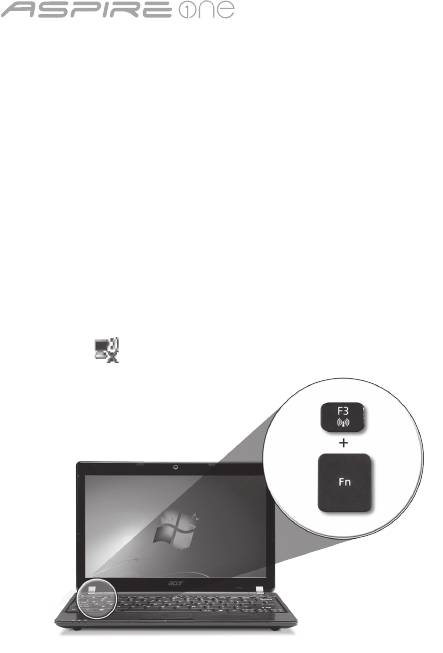
Serija
3
Konguracija omrežja
Ta vodič vam bo pomagal kongurirati nastavitve vašega LAN in brezžičnega omrežja, da bi se lahko povezali z internetom.
Vzpostavitev povezave preko LAN
Kabel LAN vključite v vrata za eternet (RJ-45). Glejte naslov „Pogled iz desne strani“ na strani 6 za lokacijo vrat eterneta.
Nastavitev brezžične povezave
1. Za dostop do upravitelja komunikacijskih nastavitev pritisnite <Fn> + <F3>. V tem upravitelju lahko povezavo WLAN vključite s
klikom na rdeči gumb ob zadevni povezavi.
Opomba: V upravitelju komunikacijskih storitev lahko dostopate tudi do nastavitev za povezave 3G in Bluetooth. Komunikacijske
naprave se lahko razlikujejo glede na model vašega računalnika.
2. Kliknite na ikono v sistemski vrstici in izberite brezžično točko dostopa, s katero se želite povezati.
Vstavljanje kartice 3G SIM (le za določene modele)
Odstranite baterijo in v režo za kartice 3G SIM previdno vstavite kartico 3G SIM. Glejte naslov to „Pogled od zadaj in spodaj“ na
strani 6, da bi našči režo za kartice 3G SIM.
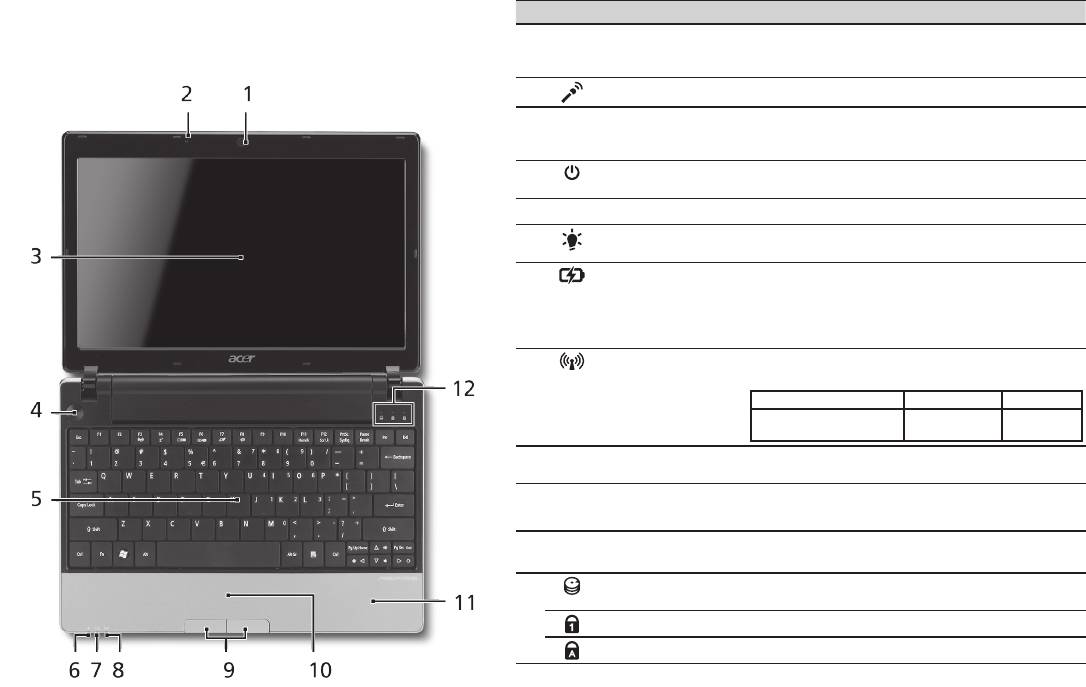
Hitri vodič
4
Pogled od zgoraj
Izlet po Aspire One
# Ikona Predmet Opis
Ko ste nastavili računalnik, kot je prikazano v oddelku Za
1
Integrirana spletna
Spletna kamera za video komunikacijo
začetek, naj vam predstavimo vaš prenosnik Acer.
kamera Acer Crystal
(konguracija je za različne modele različna).
Eye
2
Mikrofon Notranji mikrofon za snemanje zvoka.
3
Zaslon Takoimenovani zaslon s tekoèimi kristali
(LCD), prikazuje izhod vašega raèunalnika
(konguracija je za razliène modele razlièna).
4
Tipka za vklop/
Vklop in izklop računalnika.
izklop
5
Tipkovnica Za vnos podatkov v računalnik.
6
Indikator stanja
Označuje stanje napajanja računalnika.
1
napajanja
7
Indikator stanja
Označuje stanje baterije računalnika.
1
baterije
1. Polnjenje: Lučka sveti rumenkasto rjavo,
ko se baterija polni.
2. V celoti napolnjena: V načinu AC lučka sveti
modro.
8
Indikator
Označuje stanje brezžične komunikacije
1
komunikacije
LAN/3G.
Sveti modra luč Sveti oranžna luč Ne sveti
Vključen 3G/vključen WiFi
Izključen 3G/
Izključen 3G/
Vključen 3G/izključen WiFi
vključen WiFi
izključen WiFi
9
Tipke (levo in
Leva in desna tipka delujejo kot leva in desni
desno)
tipka na miški.
10
Sledilna plošča Na dotik občutljiva naprava, ki deluje kot
računalniška miška.
11
Podpora za dlan Udobna podpora za vaše roke, ko uporabljate
računalnik.
12
Indikator trdega
Označuje, ko je trdi disk aktiven.
diska
Num Lock Zasveti, ko je tipka Num Lock aktivirana.
Caps Lock Zasveti, ko je tipka Caps Lock aktivirana.
1. Indikatorji na sprednji plošči so vidni tudi, ko je pokrov računalnika zaprt.
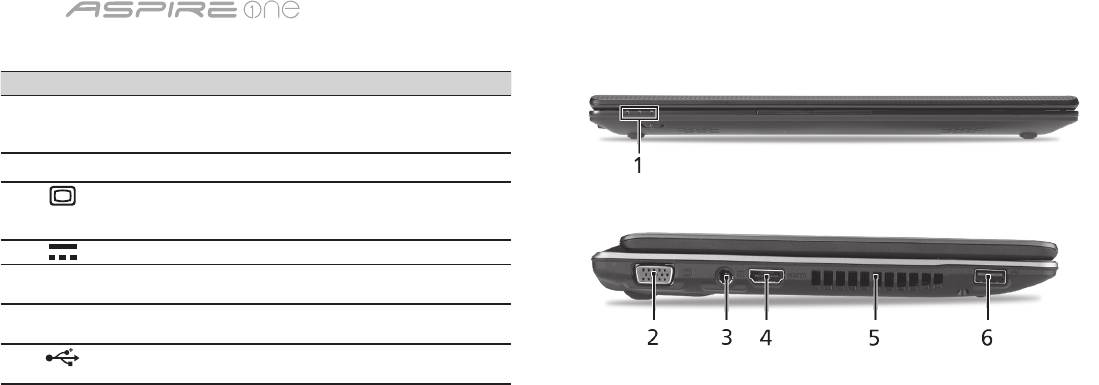
Serija
5
Zaprt pogled od spredaj
# Ikona Predmet Opis
1
Indikatorji stanja Diode (LED), ki zasvetijo,
da prikažejo stanje funkcij in
komponent računalnika.
Pogled iz leve strani
2
Priključek za zunanji
Priključitev na prikazovalno
zaslon (VGA)
napravo (npr. zunanji monitor,
projektor LCD).
3
Priključek napajalnika Priključek na AC napajalnik.
4
HDMI Vhod HDMI Podpira priključke za
visokoločljivostni digitalni video.
5
Reže za
Omogočajo, da računalnik ostane
prezračevanje
hladen tudi po dolgotrajni uporabi.
6
Vrata USB 2.0 Priključek za naprave USB 2.0
(npr., USB miška, USB fotoaparat).
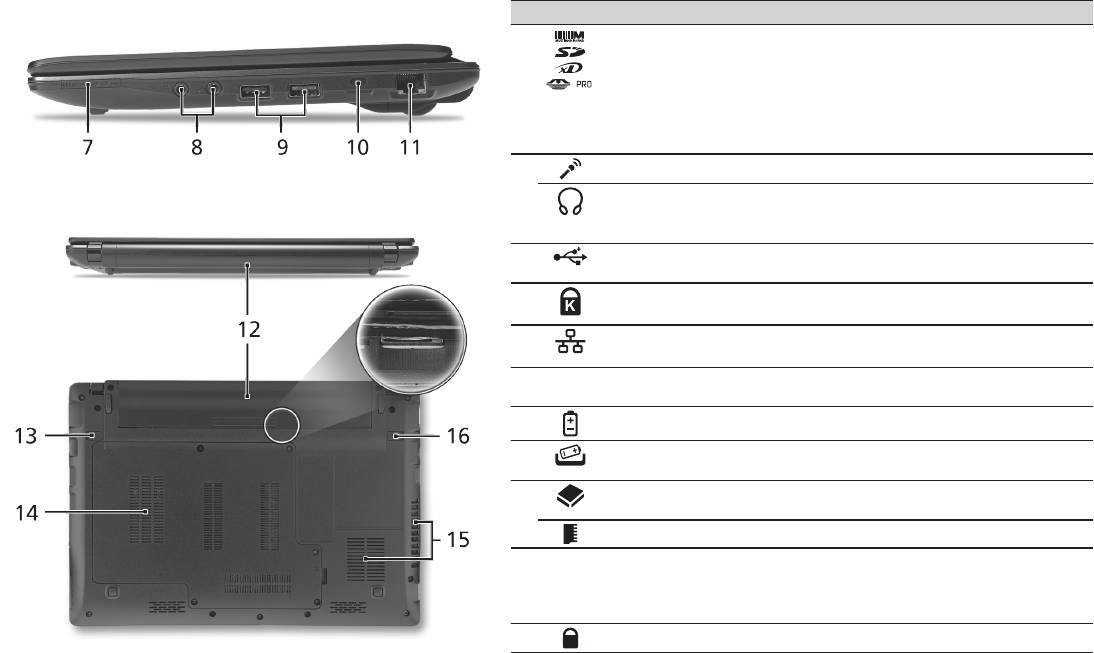
Hitri vodič
6
Pogled iz desne strani
# Ikona Predmet Opis
7
Čitalec kartic več-v-1 Za kratice Secure Digital (SD),
MultiMediaCard (MMC), Memory Stick
(MS), Memory Stick Pro (MS PRO), in
xD Picture Card (xD).
Opomba: Pritisnite, da bi odstranili/vstavili
kartico. Naenkrat lahko uporabljate le eno
kartico.
8
Vtičnica za mikrofon Sprejema vhode iz zunanjih mikrofonov.
Vhod za slušalke/
Priključek za avdio naprave (npr. zvočniki,
zvočnike/naprave
slušalke).
s podporo S/PDIF
9
Vrata USB 2.0 Priključek za naprave USB 2.0 (npr. USB
miška).
10
Reža za zaklep
Priključek za Kensington združljivo
Kensington
računalniško ključavnico.
11
Priključek Ethernet
Priključek na omrežja Ethernet
(RJ-45)
10/100/1000.
Pogled od zadaj in spodaj
12
Nosilec za baterijo Hrani baterijo računalnika.
13
Zapah za sprostitev
Sprostitev baterije za odstranjevanje.
baterije
14
Nosilec trdega diska Hrani trdi disk računalnika (pričvrščeno
z vijaki).
Razdelek za pomnilnik Hrani glavni spomin računalnika.
15
Reže za prezračevanje
Omogočajo, da računalnik ostane hladen
in hladilni ventilator
tudi po dolgotrajni uporabi.
Opomba: Odprtine ventilatorja ne
prekrivajte ali zapirajte.
16
Zaklep za baterijo Zaklene baterijo na mesto.

Serija
Okolje
Temperatura:
Delovanje: 5°C do 35°C
Mirovanje: -20°C do 65°C
Vlažnost (brez kondenza):
Delovanje: 20% do 80%
Mirovanje: 20% do 80%
7

serija
Kratki vodič

serija
© 2010 Sva prava pridržana
Aspire One serije - kratki vodič
Izvorno izdanje: 04/2010
Aspire One serije prijenosno osobno računalo
Broj modela: _______________________________
Serijski broj: _______________________________
Datum kupovine: ____________________________
Mjesto kupnje: _____________________________

Kratki vodič
Federal Communications Commission
Declaration of Conformity
This device complies with Part 15 of the FCC Rules. Operation is subject to the following two conditions: (1) this device may not
cause harmful interference, and (2) this device must accept any interference received, including interference that may cause
undesired operation.
The following local Manufacturer / Importer is responsible for this declaration:
Product name: Notebook PC
Brand: Acer
Model number: MS2298
Machine type: AO 721 series
Name of Responsible Party: Acer America Corporation
Address of responsible party: 333 West San Carlos St., San Jose
CA 95110, U. S. A.
Contact person: Acer Representative
Phone No.: 1-254-298-4000
Fax No.: 1-254-298-4147
April 30, 2010

serija
• Themaximumconcentrationvaluesoftherestrictedsubstancesbyweightinhomogenousmaterialare:
CE Declaration of Conformity
Lead
0.1%
Polybrominated Biphenyls (PBB’s)
0.1%
We,
Mercury
0.1%
Polybrominated Diphenyl Ethers (PBDE’s)
0.1%
Acer Incorporated
Hexavalent Chromium
0.1%
Cadmium
0.01%
8F, 88, Sec. 1, Hsin Tai Wu Rd., Hsichih, Taipei Hsien 221, Taiwan
Directive 2009/125/EC with regard to establishing a framework for the setting of ecodesign requirements for energy-related
product.
Contact Person: Mr. Easy Lai, e-mail:easy_lai@acer.com.tw
R&TTE Directive 1999/5/EC as attested by conformity with the following harmonized standard:
And,
• Article3.1(a)HealthandSafety
Acer Europe SA
- EN60950-1
Via Cantonale, Centro Galleria 2 6928 Manno Switzerland
- EN62311
Hereby declare that:
• Article3.1(b)EMC
Product: Notebook Computer
- EN301 489-1
Trade Name: Acer
- EN301 489-3 (Applicable to non-bluetooth wireless keyboard mouse set).
Model Number: MS2298
- EN301 489-7
Machine Type: AO721 series
- EN301 489-17
Is compliant with the essential requirements and other relevant provisions of the following EC directives, and that all the
- EN301 489-24
necessary steps have been taken and are in force to assure that production units of the same product will continue comply with
• Article3.2SpectrumUsages
the requirements.
- EN300 440-2 (Applicable to non-bluetooth wireless keyboard mouse set).
EMC Directive 2004/108/EC as attested by conformity with the following harmonized standards:
- EN300 328
• EN55022,AS/NZSCISPR22,ClassB
- EN301 511
• EN55024
- EN301 893 (Applicable to 5GHz high performance RLAN).
• EN61000-3-2ClassD
- EN301 908-1
• EN61000-3-3
- EN301 908-2
Year to begin affixing CE marking 2010.
Low Voltage Directive 2006/95/EC as attested by conformity with the following harmonized standard:
• EN60950-1
Apr. 30, 2010
Council Decision 98/482/EC (CTR21):
(Applicable to product with pan- European single terminal connection to the Public Switched Telephone Network (PSTN).)
Date
Easy Lai /Manager
RoHS Directive 2002/95/EC on the Restriction of the Use of certain Hazardous Substances in Electrical and Electronic Equipment
Regulation Center, Acer Inc.
Kratki vodič
• Themaximumconcentrationvaluesoftherestrictedsubstancesbyweightinhomogenousmaterialare:
CE Declaration of Conformity
Lead
0.1%
Polybrominated Biphenyls (PBB’s)
0.1%
We,
Mercury
0.1%
Polybrominated Diphenyl Ethers (PBDE’s)
0.1%
Acer Incorporated
Hexavalent Chromium
0.1%
Cadmium
0.01%
8F, 88, Sec. 1, Hsin Tai Wu Rd., Hsichih, Taipei Hsien 221, Taiwan
Directive 2009/125/EC with regard to establishing a framework for the setting of ecodesign requirements for energy-related
product.
Contact Person: Mr. Easy Lai, e-mail:easy_lai@acer.com.tw
R&TTE Directive 1999/5/EC as attested by conformity with the following harmonized standard:
And,
• Article3.1(a)HealthandSafety
Acer Europe SA
- EN60950-1
Via Cantonale, Centro Galleria 2 6928 Manno Switzerland
- EN62311
Hereby declare that:
• Article3.1(b)EMC
Product: Notebook Computer
- EN301 489-1
Trade Name: Acer
- EN301 489-3 (Applicable to non-bluetooth wireless keyboard mouse set).
Model Number: MS2298
- EN301 489-7
Machine Type: AO721 series
- EN301 489-17
Is compliant with the essential requirements and other relevant provisions of the following EC directives, and that all the
- EN301 489-24
necessary steps have been taken and are in force to assure that production units of the same product will continue comply with
• Article3.2SpectrumUsages
the requirements.
- EN300 440-2 (Applicable to non-bluetooth wireless keyboard mouse set).
EMC Directive 2004/108/EC as attested by conformity with the following harmonized standards:
- EN300 328
• EN55022,AS/NZSCISPR22,ClassB
- EN301 511
• EN55024
- EN301 893 (Applicable to 5GHz high performance RLAN).
• EN61000-3-2ClassD
- EN301 908-1
• EN61000-3-3
- EN301 908-2
Year to begin affixing CE marking 2010.
Low Voltage Directive 2006/95/EC as attested by conformity with the following harmonized standard:
• EN60950-1
Apr. 30, 2010
Council Decision 98/482/EC (CTR21):
(Applicable to product with pan- European single terminal connection to the Public Switched Telephone Network (PSTN).)
Date
Easy Lai /Manager
RoHS Directive 2002/95/EC on the Restriction of the Use of certain Hazardous Substances in Electrical and Electronic Equipment
Regulation Center, Acer Inc.
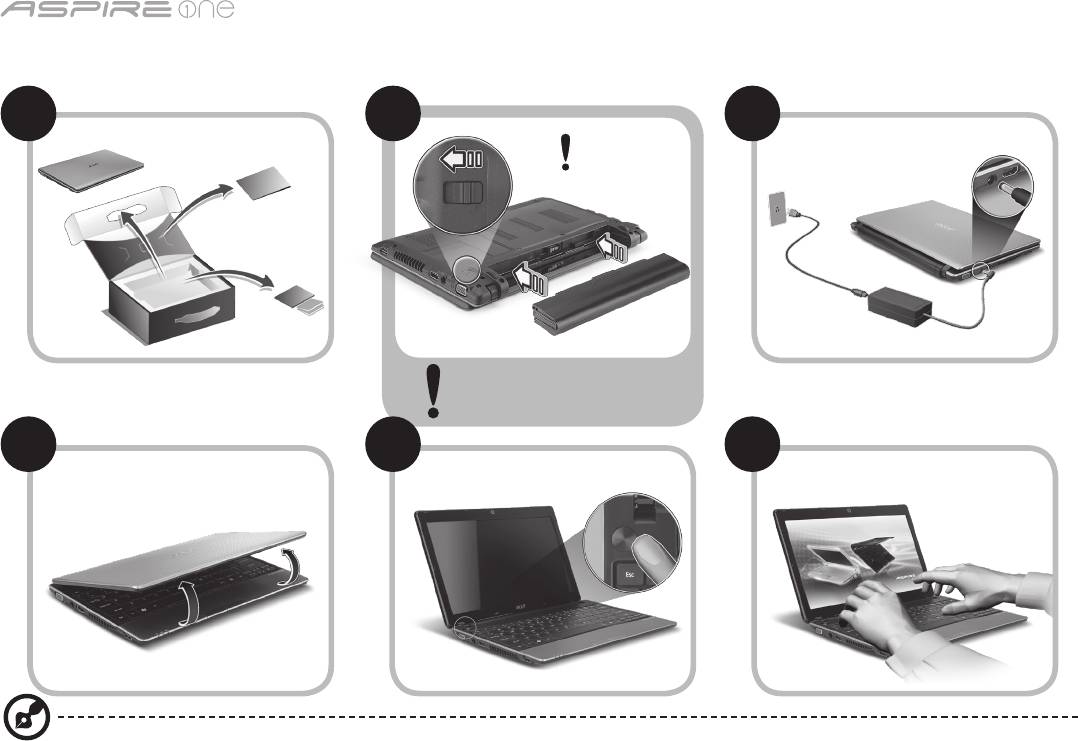
serija
1
Tek za početak
1 2
3
2-2
3-3
3-1
3-2
2-1
Provjerite je li baterija sigurno
i pravilno postavljena, kao
na slici 2-2.
4 5 6
Slikovni prikazi služe samo za ilustraciju. Stvarne specikacije proizvoda mogu varirati.

Kratki vodič
2
Prvo osnovne stvari
Željeli bismo vam zahvaliti na izboru Acer prijenosnog računala koje će vam poslužiti kamo god krenuli.
Vaši vodiči
Kako bismo vam pomogli pri uporabi vašeg Acer prijenosnog računala, pripremili smo skupinu vodiča*:
Na prvom mjestu, poster Kratki vodič pomaže pri početnim postupcima i postavljanju vašeg računala.
Za više informacija o tome kako vam vaše računalo može pomoći da budete produktivniji, molimo, pogledajte AcerSystem User
Guide. Priručnik sadrži detaljne informacije o temama kao što su uslužni programi sustava, vraćanje podataka, opcije za proširivanje i
rješavanje problema. Nadalje, sadrži informacije o jamstvima i osnovne obavijesti o propisima i sigurnosti za vaš prijenosnik. Priručnik
je dostupan u Portable Document Formatu (PDF), a dolazi i snimljen na prijenosnik.
Napomena: Pregled dokumenta zahtijeva Adobe Reader. Ako Adobe Reader nije instaliran na vaše računalo, klik na AcerSystem
User Guide najprije će pokrenuti program za instalaciju Adobe Readera. Slijedite upute na zaslonu da biste završili instalaciju.
Za upute kako koristiti Adobe Reader, pristupite izborniku Pomoć i podrška.
* VAŽNA NAPOMENA: Molimo primite na znanje da su spomenuti priručnici, bilo u ispisanom ili elektronskom obliku,
ovdje samo za vašu obavijest te da, osim spomenutog u izričitim jamstvenim informacijama sadržanim u AcerSystem
User Guide, ništa sadržano u njima ne predstavlja Acer-ova jamstva ili uvjete vezane uz proizvod koji se kupili. Acer se
izričito odriče bilo kakve odgovornosti za greške sadržane u priručnicima.
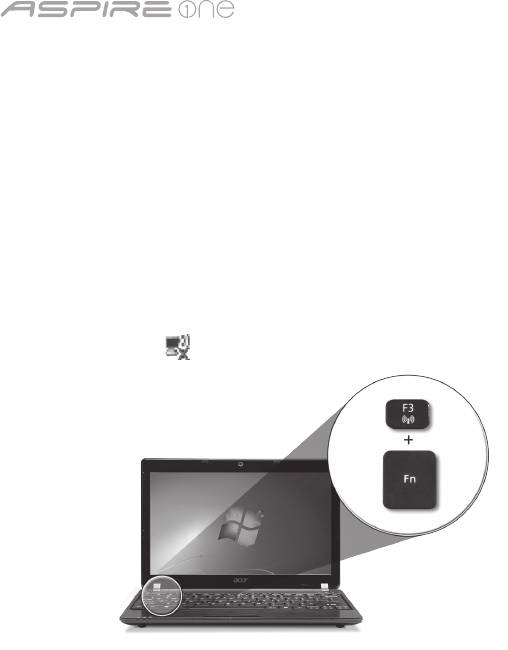
serija
3
Konguracija mreže
Ovaj vodič pomoći će vam podesiti postavke vaše LAN i bežične mreže kako bi bilo moguće spajanje na internet.
Podešavanje LAN veze
Jednostavno uključite LAN kabel na ulaz Ethernet (RJ-45). Pogledajte "Pogled s desne strane" na stranici 6 kako bi uočili položaj
Ethernet ulaza.
Podešavanje bežične veze
1. Pritisnite <Fn> + <F3> kako biste pristupili upravitelju komunikacija. Wi-Fi vezu moguće je uključiti klikom na crvenu tipku kraj
oznake Wi-Fi.
Napomena: 3G i Bluetooth dostupni su preko upravitelja komunikacija. Konguracijski uređaji razlikuju se ovisno o modelu.
2. Kliknite na sličicu u dijelu sustava i odaberite bežičnu pristupnu točku na koju se želite spojiti.
Umetanje 3G SIM kartice (samo za određene modeles)
Uklonite bateriju i pažljivo umetnite 3G SIM karticu u utor za 3G SIM karticu. Pogledajte "Pogled straga i odozdo" na stranici 6 za
lokaciju utora za 3G SIM karticu.
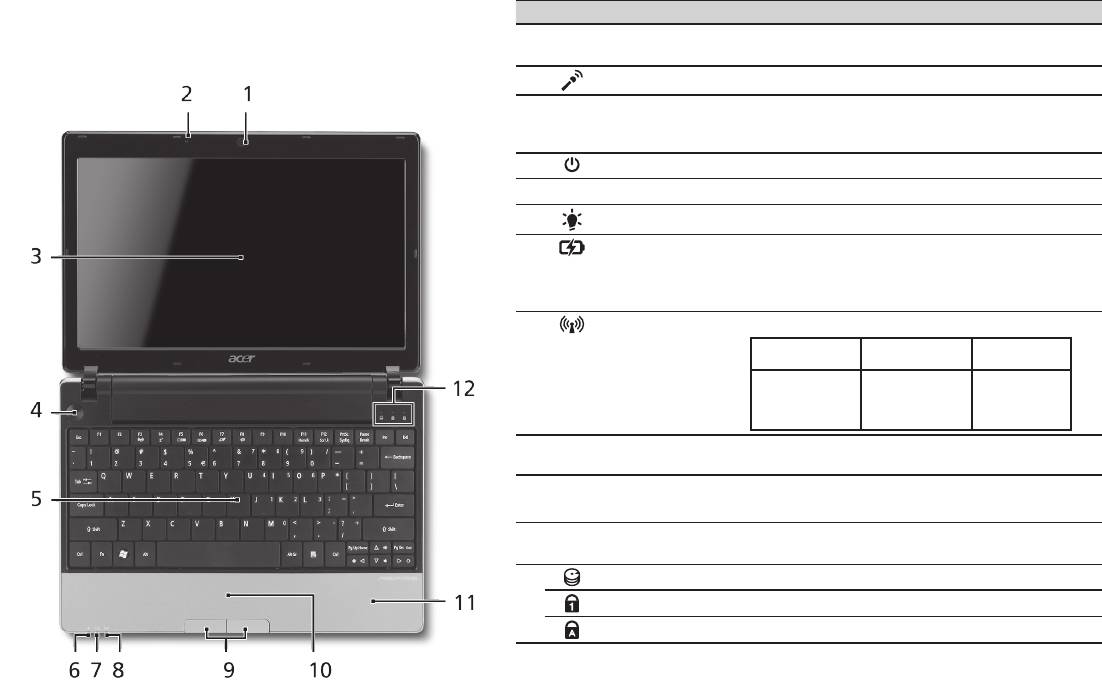
Kratki vodič
4
Pogled odozgo
Upoznajte vaš Aspire One
# Ikona Stavka Opis
Nakon podešavanja računala kako je prikazano u dijelu Na
1
Acer Crystal Eye
Web kamera za video komunikaciju (Konguracija
samom početku, dopustite nam kratki prikaz vašeg novog Acer
web kamera
se može razlikovati ovisno o modelu).
prijenosnog računala.
2
Mikrofon Unutarnji mikrofon za snimanje zvuka.
3
Zaslon prikaza Također nazivan i Liquid-Crystal Display (LCD),
prikazuje izlaz računala (Konguracija se može
razlikovati ovisno o modelu).
4
Tipka napajanja Uključuje i isključuje računalo.
5
Tipkovnica Za unos podataka u vaše računalo.
1
6
Indikator napajanja
Pokazuje stanje napajanja računala.
1
7
Indikator baterije
Pokazuje stanje baterije računala.
1. Punjenje: Svijetli žuto kada se baterija puni.
2. Sasvim napunjeno: Svijetli plavo kada radi na
izmjeničnom napajanju.
8
Indikator
Pokazuje stanje 3G/bežične LAN komunikacije
1
komunikacije
Plavo svjetlo
Narančasto
Ne svijetli
uključeno
svjetlo uključeno
3G uključeno/
WiFi uključeno
3G isključeno/
3G isključeno/
3G uključeno/
Wi-Fi uključeno
WiFi isključeno
WiFi isključeno
9
Tipke za klikanje
Lijeva i desna tipka funkcionira kao lijeva i desna
(lijeva i desna)
tipka miša.
10
Dodirna ploča Pokazivački uređaj osjetljiv na dodir koji
funkcionira kao računalni miš.
11
Oslonac za dlanove Udobno područje koje pruža potporu rukama dok
koristite računalo.
12
HDD indikator Pokazuje kada je pogon tvrdog diska aktivan.
Num Lock Svijetli kada je Num Lock aktiviran.
Caps Lock Svijetli kada je Caps Lock aktiviran.
1. Indikatori na prednjoj ploči su vidljivi čak i kada je poklopac računala zatvoren.
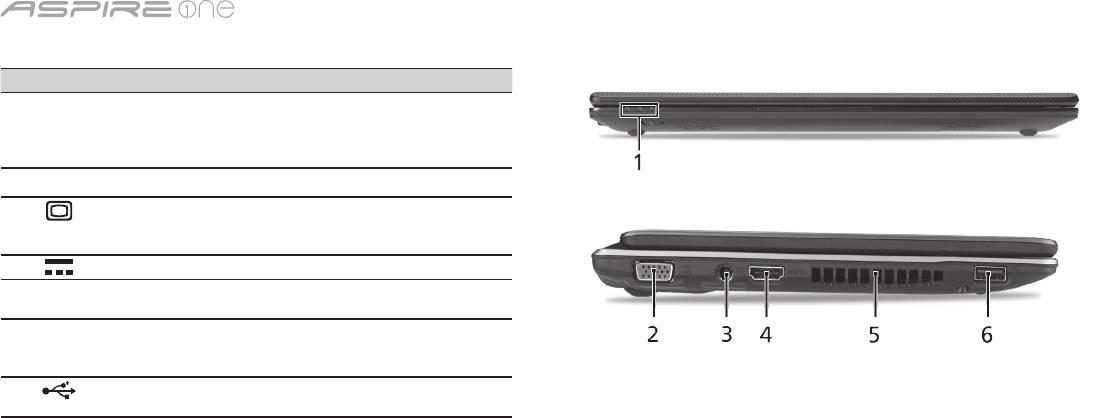
serija
5
Pogled sprijeda izbliza
# Ikona Stavka Opis
1
Indikatori stanja Diode koje emitiraju svjetlo (LED)
koje se uključuju kako bi pokazale
stanje funkcija i komponenti
računala.
Pogled s lijeve strane
2
Priključak vanjskog
Povezuje se s uređajem za prikaz
ekrana (VGA)
(primjerice vanjskim monitorom,
LCD projektorom).
3
DC-in utičnica Povezuje se s AC adapterom.
4
HDMI HDMI ulaz Podržava veze digitalnog videa
visoke denicije.
5
Utori za prozračivanje Omogućavaju rashlađivanje
računala i prilikom dugotrajne
uporabe.
6
USB 2.0 priključak Povezuju se s USB 2.0 uređajima
(npr. USB miš, USB kamera).
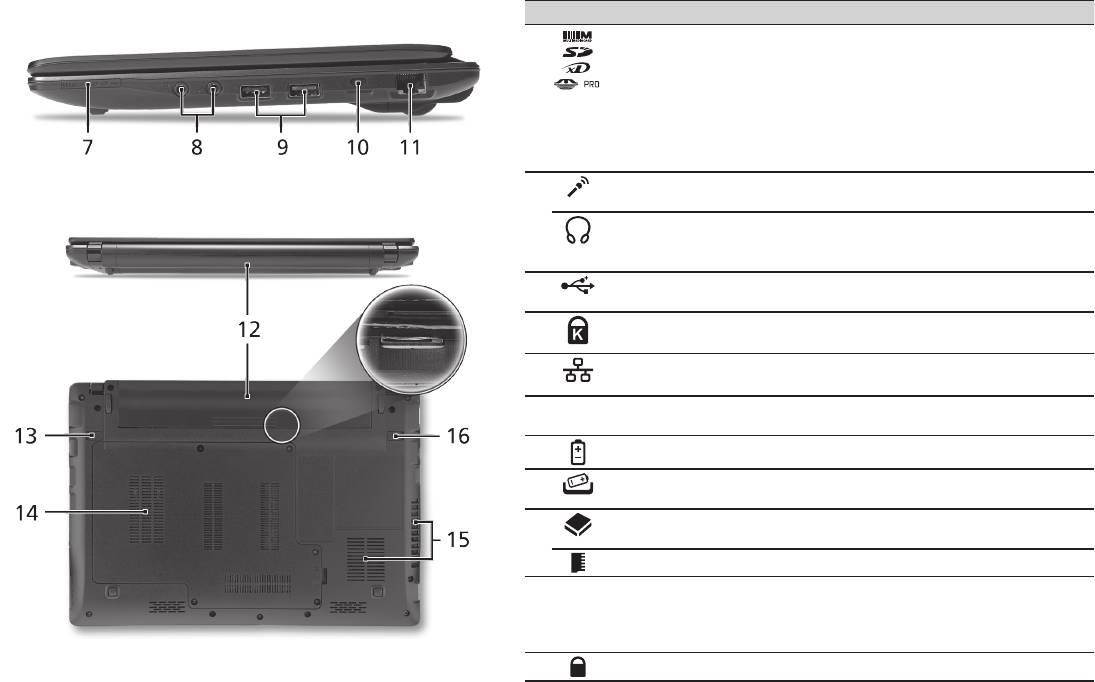
Kratki vodič
6
Pogled s desne strane
# Ikona Stavka Opis
7
Više-u-1 čitač kartica Prihvaća Secure Digital (SD),
MultiMediaCard (MMC), Memory Stick
(MS), Memory Stick PRO (MS PRO), xD-
Picture Card (xD) kartice.
Napomena: Gurnite za uklanjanje/
postavljanje kartice. U bilo koje vrijeme
samo jedna kartica može biti stavljena u
pogon.
8
Utičnica ulaza za
Prihvaća ulaze iz vanjskih mikrofona.
mikrofon
Priključak za slušalice/
Povezuje se sa line-out audio uređajima
zvučnike/line-out sa S/
(npr. zvučnicima, slušalicama).
PDIF podrškom
9
USB 2.0 priključak Povezuje se s USB 2.0 uređajima (npr.
USB miš).
10
Utor za Kensington
Povezuje se s Kensington - kompatibilnom
bravu
računalnom sigurnosnom bravom.
11
Ethernet (RJ-45)
Povezuje se na Ethernet 10/100/1000-
priključak
baziranu mrežu.
Pogled straga i odozdo
12
Prostor za bateriju Sadrži baterijski komplet računala.
13
Bravica za oslobađanje
Oslobađa bateriju radi uklanjanja.
baterije
14
Prostor za tvrdi disk Sadrži tvrdi disk računala (učvršćen
vijcima).
Odjeljak za memoriju Sadrži glavnu memoriju računala.
15
Utori za provjetravanje i
Omogućavaju rashlađivanje računala i
ventilator za hlađenje
prilikom dugotrajne uporabe.
Napomena: Nemojte prekriti ili prepriječiti
otvor ventilatora.
16
Brava baterije Zaključava bateriju u njen položaj.

serija
Okruženje
Temperatura:
Radna: 5°C do 35°C
Neradna: - 20°C do 65°C
Vlažnost (nekondenzirajuća):
Radna: 20% do 80%
Neradna: 20% do 80%
7

Seria
Ghid rapid

Seria
© 2010 Toate drepturile rezervate
Ghid rapid seria Aspire One
Prima ediţie: 04/2010
Notebook seria Aspire One
Număr model: ______________________________
Numărul seriei: _____________________________
Data achiziţiei: _____________________________
Locul achiziţiei: _____________________________

Ghid rapid
Federal Communications Commission
Declaration of Conformity
This device complies with Part 15 of the FCC Rules. Operation is subject to the following two conditions: (1) this device may not
cause harmful interference, and (2) this device must accept any interference received, including interference that may cause
undesired operation.
The following local Manufacturer / Importer is responsible for this declaration:
Product name: Notebook PC
Brand: Acer
Model number: MS2298
Machine type: AO 721 series
Name of Responsible Party: Acer America Corporation
Address of responsible party: 333 West San Carlos St., San Jose
CA 95110, U. S. A.
Contact person: Acer Representative
Phone No.: 1-254-298-4000
Fax No.: 1-254-298-4147
April 30, 2010

Seria
• Themaximumconcentrationvaluesoftherestrictedsubstancesbyweightinhomogenousmaterialare:
CE Declaration of Conformity
Lead
0.1%
Polybrominated Biphenyls (PBB’s)
0.1%
We,
Mercury
0.1%
Polybrominated Diphenyl Ethers (PBDE’s)
0.1%
Acer Incorporated
Hexavalent Chromium
0.1%
Cadmium
0.01%
8F, 88, Sec. 1, Hsin Tai Wu Rd., Hsichih, Taipei Hsien 221, Taiwan
Directive 2009/125/EC with regard to establishing a framework for the setting of ecodesign requirements for energy-related
product.
Contact Person: Mr. Easy Lai, e-mail:easy_lai@acer.com.tw
R&TTE Directive 1999/5/EC as attested by conformity with the following harmonized standard:
And,
• Article3.1(a)HealthandSafety
Acer Europe SA
- EN60950-1
Via Cantonale, Centro Galleria 2 6928 Manno Switzerland
- EN62311
Hereby declare that:
• Article3.1(b)EMC
Product: Notebook Computer
- EN301 489-1
Trade Name: Acer
- EN301 489-3 (Applicable to non-bluetooth wireless keyboard mouse set).
Model Number: MS2298
- EN301 489-7
Machine Type: AO721 series
- EN301 489-17
Is compliant with the essential requirements and other relevant provisions of the following EC directives, and that all the
- EN301 489-24
necessary steps have been taken and are in force to assure that production units of the same product will continue comply with
• Article3.2SpectrumUsages
the requirements.
- EN300 440-2 (Applicable to non-bluetooth wireless keyboard mouse set).
EMC Directive 2004/108/EC as attested by conformity with the following harmonized standards:
- EN300 328
• EN55022,AS/NZSCISPR22,ClassB
- EN301 511
• EN55024
- EN301 893 (Applicable to 5GHz high performance RLAN).
• EN61000-3-2ClassD
- EN301 908-1
• EN61000-3-3
- EN301 908-2
Year to begin affixing CE marking 2010.
Low Voltage Directive 2006/95/EC as attested by conformity with the following harmonized standard:
• EN60950-1
Apr. 30, 2010
Council Decision 98/482/EC (CTR21):
(Applicable to product with pan- European single terminal connection to the Public Switched Telephone Network (PSTN).)
Date
Easy Lai /Manager
RoHS Directive 2002/95/EC on the Restriction of the Use of certain Hazardous Substances in Electrical and Electronic Equipment
Regulation Center, Acer Inc.
Ghid rapid
• Themaximumconcentrationvaluesoftherestrictedsubstancesbyweightinhomogenousmaterialare:
CE Declaration of Conformity
Lead
0.1%
Polybrominated Biphenyls (PBB’s)
0.1%
We,
Mercury
0.1%
Polybrominated Diphenyl Ethers (PBDE’s)
0.1%
Acer Incorporated
Hexavalent Chromium
0.1%
Cadmium
0.01%
8F, 88, Sec. 1, Hsin Tai Wu Rd., Hsichih, Taipei Hsien 221, Taiwan
Directive 2009/125/EC with regard to establishing a framework for the setting of ecodesign requirements for energy-related
product.
Contact Person: Mr. Easy Lai, e-mail:easy_lai@acer.com.tw
R&TTE Directive 1999/5/EC as attested by conformity with the following harmonized standard:
And,
• Article3.1(a)HealthandSafety
Acer Europe SA
- EN60950-1
Via Cantonale, Centro Galleria 2 6928 Manno Switzerland
- EN62311
Hereby declare that:
• Article3.1(b)EMC
Product: Notebook Computer
- EN301 489-1
Trade Name: Acer
- EN301 489-3 (Applicable to non-bluetooth wireless keyboard mouse set).
Model Number: MS2298
- EN301 489-7
Machine Type: AO721 series
- EN301 489-17
Is compliant with the essential requirements and other relevant provisions of the following EC directives, and that all the
- EN301 489-24
necessary steps have been taken and are in force to assure that production units of the same product will continue comply with
• Article3.2SpectrumUsages
the requirements.
- EN300 440-2 (Applicable to non-bluetooth wireless keyboard mouse set).
EMC Directive 2004/108/EC as attested by conformity with the following harmonized standards:
- EN300 328
• EN55022,AS/NZSCISPR22,ClassB
- EN301 511
• EN55024
- EN301 893 (Applicable to 5GHz high performance RLAN).
• EN61000-3-2ClassD
- EN301 908-1
• EN61000-3-3
- EN301 908-2
Year to begin affixing CE marking 2010.
Low Voltage Directive 2006/95/EC as attested by conformity with the following harmonized standard:
• EN60950-1
Apr. 30, 2010
Council Decision 98/482/EC (CTR21):
(Applicable to product with pan- European single terminal connection to the Public Switched Telephone Network (PSTN).)
Date
Easy Lai /Manager
RoHS Directive 2002/95/EC on the Restriction of the Use of certain Hazardous Substances in Electrical and Electronic Equipment
Regulation Center, Acer Inc.

Seria
1
Doar pentru prima utilizare
1 2
3
2-2
3-3
3-1
3-2
2-1
Asiguraţi-vă că bateria este
bine xată în locaşul ei, conform
imaginii 2-2.
4 5 6
Imaginile sunt doar orientative. Specicaţiile reale ale produsului pot varia.

Ghid rapid
2
Înainte de toate
Dorim să vă mulţumim că aţi ales un computer portabil Acer pentru a răspunde nevoilor dvs de procesare mobilă.
Ghidurile dumneavoastră
Pentru a vă ajuta să folosiţi computerul portabil Acer, am conceput un set de ghiduri*:
Primul dintre acestea, Ghidul rapid vă ajută să începeţi congurarea computerului.
Pentru mai multe informaţii privind modul în care computerul vă poate ajuta să ţi mai productiv, consultaţi AcerSystem User Guide.
Acest ghid conţine informaţii detaliate despre astfel de subiecte, precum utilitarele de sistem, recuperarea datelor, opţiunile de extensie
şi depanarea. În plus, acesta conţine informaţii despre garanţie, reglementări generale şi note de siguranţă pentru computerul dvs
portabil. Este disponibil în Format de document portabil (PDF) şi vine preîncărcat pe computerul dvs. portabil.
Notă: Vizualizarea şierului necesită Adobe Reader. Dacă Adobe Reader nu este instalat pe computerul dvs., faceţi clic pe
AcerSystem User Guide şi se va executa mai întâi programul de congurare Adobe Reader. Pentru a încheia instalarea, urmaţi
instrucţiunile de pe ecran. Pentru instrucţiuni privind modul de utilizare a Adobe Reader, accesaţi meniul Ajutor şi asistenţă.
* NOTĂ IMPORTANTĂ: Ghidurile menţionate în acest document, în formă electronică sau pe suport hârtie, sunt doar
pentru referinţa dvs. şi, cu excepţia celor furnizate în informaţiile specice de garanţie din AcerSystem User Guide,
niciunul dintre aceste ghiduri nu va constitui o reprezentare sau o garanţie din partea Acer cu privire la produsul pe
care l-aţi achiziţionat. Acer îşi declină în mod expres orice răspundere pentru greşelile conţinute în ghiduri.

Seria
3
Conguraţie reţea
Acest ghid vă va ajuta să conguraţi reţeaua locală LAN şi pe cea wireless, pentru a vă permite conectarea la Internet.
Congurarea conexiunii LAN
Conectaţi cablul de reţea LAN la priza Ethernet (RJ-45). Consultaţi "Vedere din partea dreaptă", la pagina 6, pentru a aa locaţia
portului Ethernet.
Congurarea conexiunii wireless
1. Apăsaţi <Fn> + <F3> pentru a accesa managerul de comunicaţii. Aici puteţi activa conexiunea Wi-Fi dând clic pe butonul roşu de
lângă Wi-Fi.
Notă: Sunt, de asemenea, accesibile conexiunile 3G şi Bluetooth prin intermediul managerului de comunicaţii. Dispozitivele de
comunicaţie diferă în funcţie de model.
2. Daţi clic pe pictograma din bara de sistem şi selectaţi punctul de acces wireless la care doriţi conectarea.
Introducerea unei cartele SIM 3G (doar pentru anumite modele)
Scoateţi bateria şi introduceţi cu grijă o cartelă SIM 3G în slotul pentru cartele SIM 3G. Consultaţi "Vedere din spate şi din partea de
jos", la pagina 6, pentru a aa locaţia slotului pentru cartela SIM 3G.
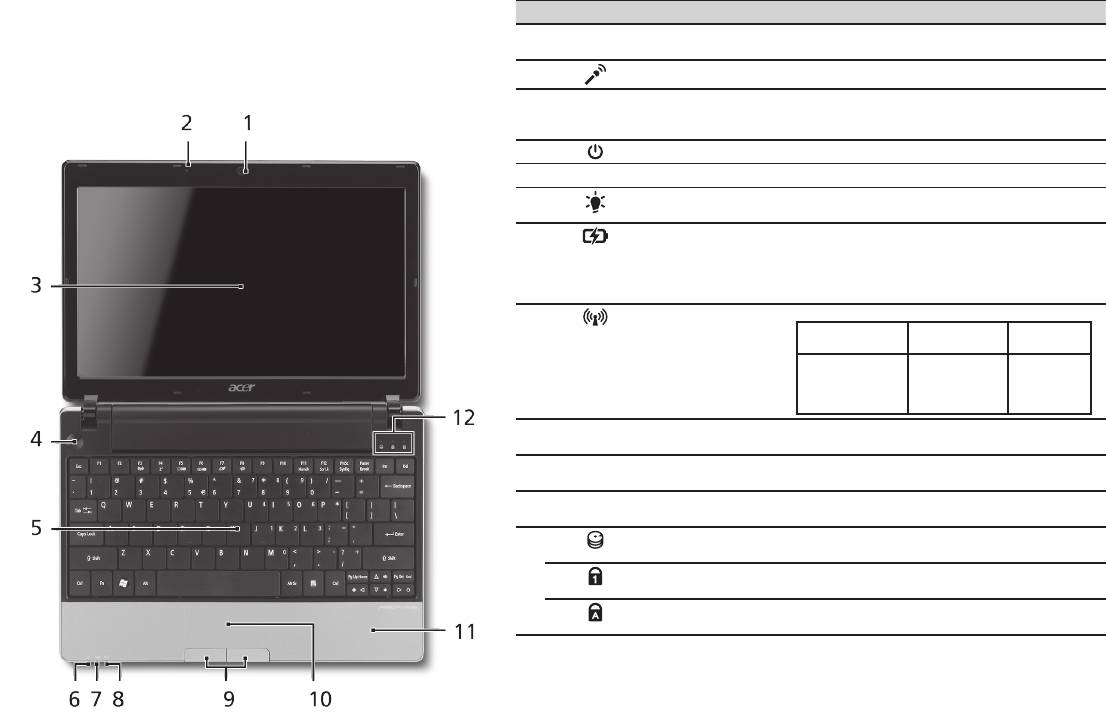
Ghid rapid
4
Vedere de sus
Turul computerului
# Pictogramă Element Descriere
dumneavoastră Aspire One
1
Cameră web Acer
Cameră Web pentru comunicare video
Crystal Eye
(conguraţia poate diferi în funcţie de model).
După congurarea computerului, aşa cum se arată în secţiunea
2
Microfon Microfon intern pentru înregistrarea sunetului.
Doar pentru prima utilizare, permiteţi-ne să vă prezentăm noul
dumneavoastră computer portabil Acer.
3
Ecran de aşaj Mai este numit şi Aşaj cu cristale lichide
(LCD) şi aşează activitatea computerului
(conguraţia poate diferi în funcţie de model).
4
Buton Pornire Porneşte şi opreşte computerul.
5
Tastatură Pentru introducerea datelor în computer.
6
Indicator de
Indică nivelul de alimentare al computerului.
1
alimentare
1
7
Indicator baterie
Indică starea bateriei computerului.
1. Încărcare: Lumina este galbenă când
acumulatorul se încarcă.
2. Complet încărcat: Lumina este albastre în
modul c.a.
8
Indicator
Indică starea comunicării LAN wireless/3G.
1
comunicare
Indicator luminos
Indicator luminos
Stins
albastru
portocaliu
3G aprins/
WiFi aprins
3G stins/
3G stins/
3G aprins/
WiFi aprins
WiFi stins
WiFi stins
9
Butoane clic (stânga
Butoanele stânga şi dreapta funcţionează ca
şi dreapta)
butoanele stânga şi dreapta ale mausului.
10
Zona de atingere Dispozitiv de indicare sensibil la atingere care
funcţionează ca un maus de computer.
11
Placă pentru
Zonă confortabilă de sprijin pentru mână
sprijinirea palmei
atunci când folosiţi computerul.
12
Indicator HDD Indică atunci când unitatea de harddisc este
activă.
Num Lock Se aprinde când tasta Num Lock este
activată.
Caps Lock Se aprinde când tasta Caps Lock este
activată.
1. Indicatoarele de pe panoul frontal sunt vizibile chiar şi atunci când capacul computerului
este închis.
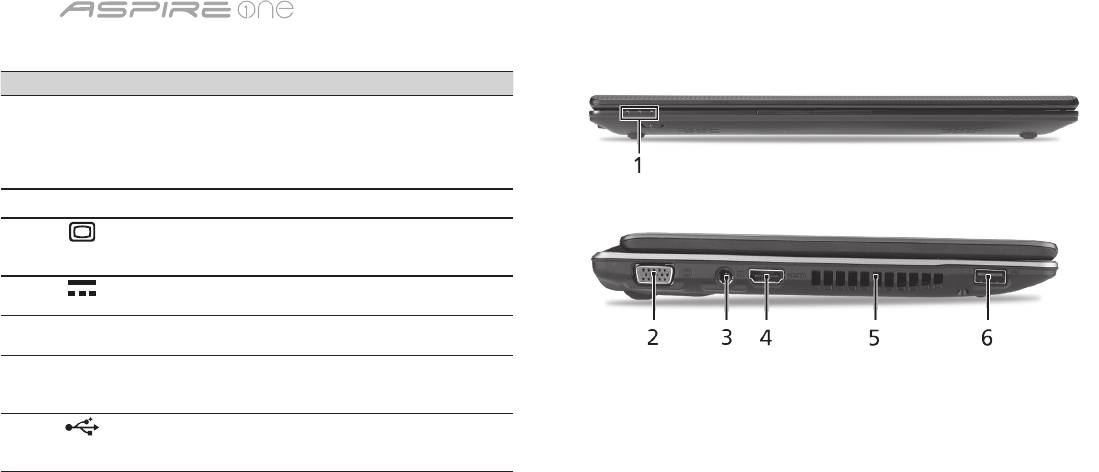
Seria
5
Vedere din faţă de aproape
# Pictogramă Element Descriere
1
Indicatoare de stare Diode electroluminiscente
(LED-uri), care se aprind
pentru a indica starea
funcţiilor şi componentelor
computerului.
Vedere din stânga
2
Port pentru aşaj
Conectează la un dispozitiv
extern (VGA)
de aşare (de ex. monitor
extern sau proiector LCD).
3
Mufă c.c. intrare Conectează la un adaptor de
c.a.
4
HDMI Port HDMI Acceptă conexiuni video
digitale de înaltă deniţie.
5
Oricii de aerisire Permit computerului să
rămână rece, chiar şi după
utilizarea prelungită.
6
Port USB 2.0 Conectează la dispozitivele
USB 2.0 (de ex. maus USB,
cameră USB).
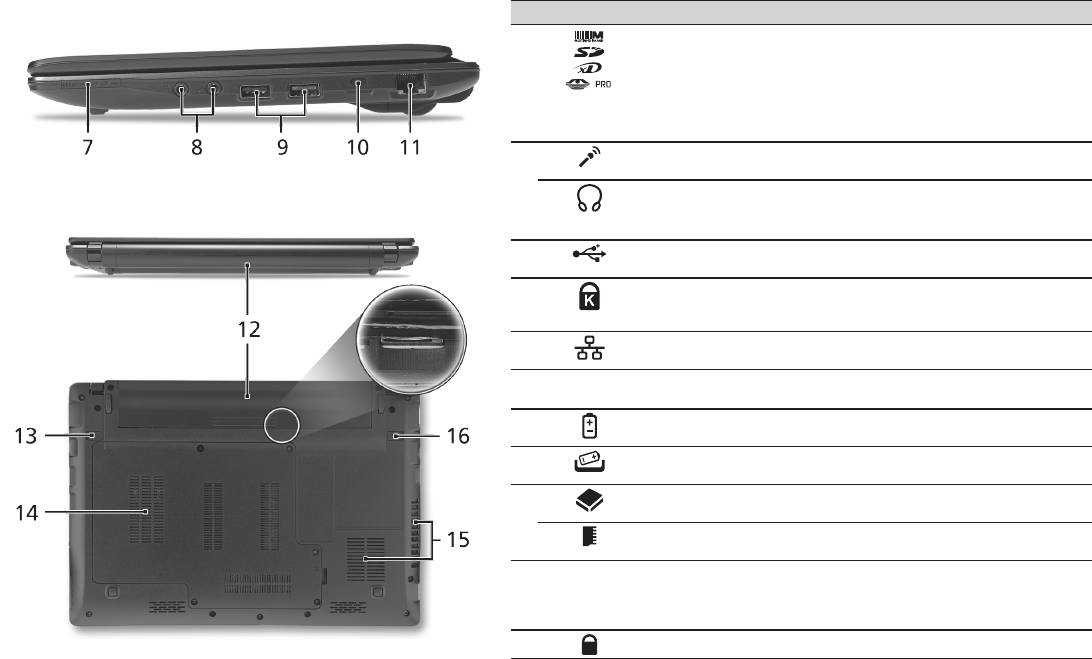
Ghid rapid
6
Vedere din dreapta
# Pictogramă Element Descriere
7
Cititor de cartele multi-
Acceptă cartele Secure Digital (SD),
in-1
MultiMediaCard (MMC), Memory
Stick (MS), Memory Stick PRO (MS
PRO) şi xD-Picture Card (xD).
Notă: Apăsaţi pentru a extrage/a
instala cartela. Nu poate citit decât
o singură cartelă la un moment dat.
8
Mufă intrare microfon Acceptă intrări de la microfoane
externe.
Port de căşti/difuzor/
Conectează la dispozitivele audio de
mufă de ieşire cu suport
ieşire (de ex. difuzoare, căşti).
S/PDIF
9
Port USB 2.0 Conectează la dispozitivele USB 2.0
(de ex. mouse USB).
10
Slot de blocare
Conectează la un dispozitiv de
Kensington
securitate pentru computer compatibil
Kensington.
11
Port Ethernet (RJ-45) Conectează la o reţea Ethernet
10/100/1000.
Vedere din spate şi din partea de jos
12
Nişa pentru acumulator Adăposteşte setul de acumulatori ai
computerului.
13
Zăvor de eliberare a
Eliberează acumulatorul pentru a
acumulatorului.
scos.
14
Nişă unitate de harddisc Adăposteşte unitatea harddisc a
computerului (xată cu şuruburi).
Compartiment de
Adăposteşte memoria principală a
memorie
computerului.
15
Oricii de ventilaţie şi
Permit computerului să rămână rece,
ventilator de răcire
chiar şi după utilizarea prelungită.
Notă: Nu acoperiţi şi nu obstrucţionaţi
deschiderea ventilatorului.
16
Blocaj acumulator Blochează acumulatorul în poziţie.

Seria
Mediu
Temperatură:
Funcţionare: 5°C - 35°C
Nefuncţionare: -20°C - 65°C
Umiditate (fără condensare):
Funcţionare: 20% - 80%
Nefuncţionare: 20% - 80%
7

Серия
Кратко ръководство

Серия
Кратко ръководство
Серия
Кратко ръководство
© 2010 Всички права запазени
Кратко ръководство за Серия Aspire One
Първоначално издание: 04/2010
Серия Aspire One Персонален ноутбук
Номер на модела: __________________________
Сериен номер: ____________________________
Дата на закупуване: ________________________
Място на покупка: __________________________

Серия
Кратко ръководство
Серия
Кратко ръководство
Federal Communications Commission
Declaration of Conformity
This device complies with Part 15 of the FCC Rules. Operation is subject to the following two conditions: (1) this device may not
cause harmful interference, and (2) this device must accept any interference received, including interference that may cause
undesired operation.
The following local Manufacturer / Importer is responsible for this declaration:
Product name: Notebook PC
Brand: Acer
Model number: MS2298
Machine type: AO 721 series
Name of Responsible Party: Acer America Corporation
Address of responsible party: 333 West San Carlos St., San Jose
CA 95110, U. S. A.
Contact person: Acer Representative
Phone No.: 1-254-298-4000
Fax No.: 1-254-298-4147
April 30, 2010

Серия
Кратко ръководство
Серия
Кратко ръководство
• Themaximumconcentrationvaluesoftherestrictedsubstancesbyweightinhomogenousmaterialare:
CE Declaration of Conformity
Lead
0.1%
Polybrominated Biphenyls (PBB’s)
0.1%
We,
Mercury
0.1%
Polybrominated Diphenyl Ethers (PBDE’s)
0.1%
Acer Incorporated
Hexavalent Chromium
0.1%
Cadmium
0.01%
8F, 88, Sec. 1, Hsin Tai Wu Rd., Hsichih, Taipei Hsien 221, Taiwan
Directive 2009/125/EC with regard to establishing a framework for the setting of ecodesign requirements for energy-related
product.
Contact Person: Mr. Easy Lai, e-mail:easy_lai@acer.com.tw
R&TTE Directive 1999/5/EC as attested by conformity with the following harmonized standard:
And,
• Article3.1(a)HealthandSafety
Acer Europe SA
- EN60950-1
Via Cantonale, Centro Galleria 2 6928 Manno Switzerland
- EN62311
Hereby declare that:
• Article3.1(b)EMC
Product: Notebook Computer
- EN301 489-1
Trade Name: Acer
- EN301 489-3 (Applicable to non-bluetooth wireless keyboard mouse set).
Model Number: MS2298
- EN301 489-7
Machine Type: AO721 series
- EN301 489-17
Is compliant with the essential requirements and other relevant provisions of the following EC directives, and that all the
- EN301 489-24
necessary steps have been taken and are in force to assure that production units of the same product will continue comply with
• Article3.2SpectrumUsages
the requirements.
- EN300 440-2 (Applicable to non-bluetooth wireless keyboard mouse set).
EMC Directive 2004/108/EC as attested by conformity with the following harmonized standards:
- EN300 328
• EN55022,AS/NZSCISPR22,ClassB
- EN301 511
• EN55024
- EN301 893 (Applicable to 5GHz high performance RLAN).
• EN61000-3-2ClassD
- EN301 908-1
• EN61000-3-3
- EN301 908-2
Year to begin affixing CE marking 2010.
Low Voltage Directive 2006/95/EC as attested by conformity with the following harmonized standard:
• EN60950-1
Apr. 30, 2010
Council Decision 98/482/EC (CTR21):
(Applicable to product with pan- European single terminal connection to the Public Switched Telephone Network (PSTN).)
Date
Easy Lai /Manager
RoHS Directive 2002/95/EC on the Restriction of the Use of certain Hazardous Substances in Electrical and Electronic Equipment
Regulation Center, Acer Inc.

Серия
Кратко ръководство
Серия
Кратко ръководство
• Themaximumconcentrationvaluesoftherestrictedsubstancesbyweightinhomogenousmaterialare:
CE Declaration of Conformity
Lead
0.1%
Polybrominated Biphenyls (PBB’s)
0.1%
We,
Mercury
0.1%
Polybrominated Diphenyl Ethers (PBDE’s)
0.1%
Acer Incorporated
Hexavalent Chromium
0.1%
Cadmium
0.01%
8F, 88, Sec. 1, Hsin Tai Wu Rd., Hsichih, Taipei Hsien 221, Taiwan
Directive 2009/125/EC with regard to establishing a framework for the setting of ecodesign requirements for energy-related
product.
Contact Person: Mr. Easy Lai, e-mail:easy_lai@acer.com.tw
R&TTE Directive 1999/5/EC as attested by conformity with the following harmonized standard:
And,
• Article3.1(a)HealthandSafety
Acer Europe SA
- EN60950-1
Via Cantonale, Centro Galleria 2 6928 Manno Switzerland
- EN62311
Hereby declare that:
• Article3.1(b)EMC
Product: Notebook Computer
- EN301 489-1
Trade Name: Acer
- EN301 489-3 (Applicable to non-bluetooth wireless keyboard mouse set).
Model Number: MS2298
- EN301 489-7
Machine Type: AO721 series
- EN301 489-17
Is compliant with the essential requirements and other relevant provisions of the following EC directives, and that all the
- EN301 489-24
necessary steps have been taken and are in force to assure that production units of the same product will continue comply with
• Article3.2SpectrumUsages
the requirements.
- EN300 440-2 (Applicable to non-bluetooth wireless keyboard mouse set).
EMC Directive 2004/108/EC as attested by conformity with the following harmonized standards:
- EN300 328
• EN55022,AS/NZSCISPR22,ClassB
- EN301 511
• EN55024
- EN301 893 (Applicable to 5GHz high performance RLAN).
• EN61000-3-2ClassD
- EN301 908-1
• EN61000-3-3
- EN301 908-2
Year to begin affixing CE marking 2010.
Low Voltage Directive 2006/95/EC as attested by conformity with the following harmonized standard:
• EN60950-1
Apr. 30, 2010
Council Decision 98/482/EC (CTR21):
(Applicable to product with pan- European single terminal connection to the Public Switched Telephone Network (PSTN).)
Date
Easy Lai /Manager
RoHS Directive 2002/95/EC on the Restriction of the Use of certain Hazardous Substances in Electrical and Electronic Equipment
Regulation Center, Acer Inc.
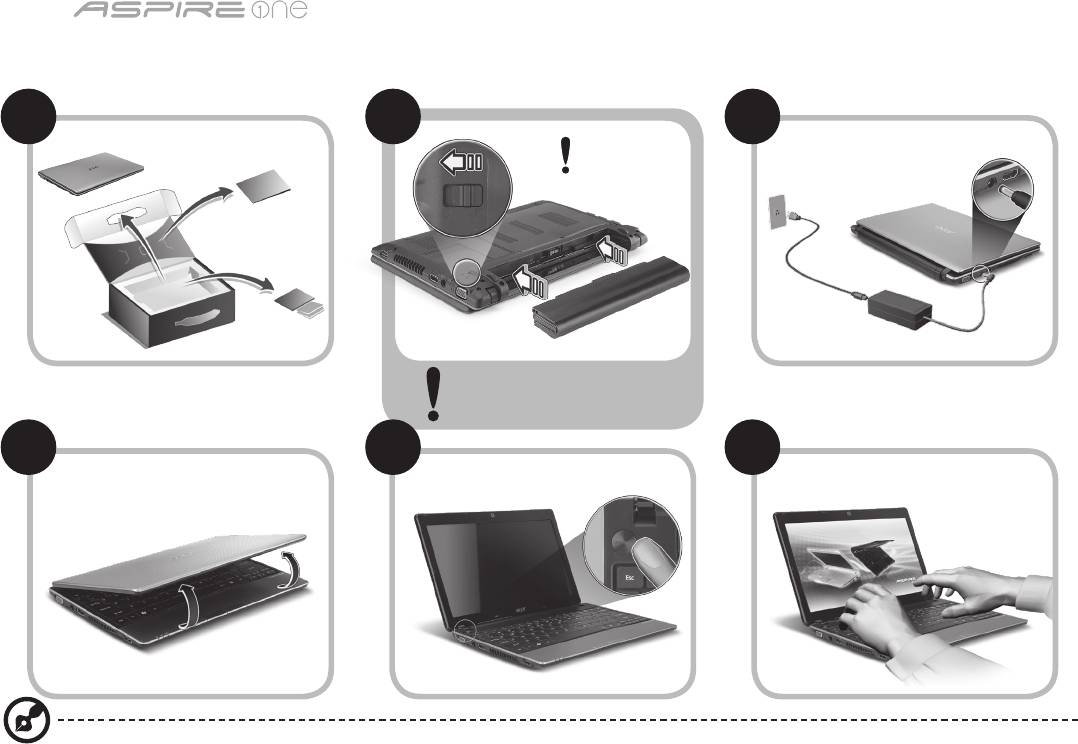
Серия
Кратко ръководство
1
Серия
Кратко ръководство
Като за начало
1 2
3
2-2
3-3
3-1
3-2
2-1
Уверете се, че батерията е
правилно поставена, както се
вижда на илюстрация в 2-2.
4 5 6
Илюстрации само за справка. Реалните технически характеристики на продукта може да се различават.

Серия
Кратко ръководство
Серия
Кратко ръководство
2
Преди всичко
Бихме желали да Ви благодарим, че сте избрали ноутбук на Acer за Вашите нужди в областта на мобилните компютри.
Вашите ръководства
За да Ви помогнем при употребата на Вашия ноутбук Acer, ние изготвихме следните ръководства*:
Първо, ръководството за бърз старт Ви помага с началните настройки на компютъра.
За повече информация за това как Вашият компютър може да Ви помогне да бъдете по-продуктивни, моля вижте
ръководството на потребителя на AcerSystem (AcerSystem User Guide). То съдържа подробна информация за теми като
системни инструменти, възстановяване на данни, опции за ъпгрейд и решаване на проблеми. В допълнение, то съдържа и
гаранционна информация, както и основните наредби и бележки за безопасност, свързани с Вашия ноутбук. То е в PDF формат
(Portable Document Format) и е предварително заредено на ноутбука Ви.
Бележка: За да отворите файла, Ви е нужен Adobe Reader. Ако Adobe Reader не е инсталиран на компютъра Ви,
натиснете ръководството на потребителя AcerSystem (AcerSystem User Guide), първо ще се стартира инсталационната
програма на Adobe Reader. Следвайте инструкциите на екрана, за да извършите инсталацията. За инструкции относно
това как се използва Adobe Reader, отворете менюто "Помощ и поддръжка".
* ВАЖНО СЪОБЩЕНИЕ: Моля имайте предвид, че ръководствата отбелязани в този документ, независимо
дали са напечатани или в електронна форма, са само за Ваша справка и с изключение на съдържанието,
предоставено в специфичната гаранция на ръководството на потребителя на AcerSystem (AcerSystem User
Guide), нищо друго от тези ръководства не представлява заверка или гаранция от Acer по отношение на
продукта, който сте закупили. Acer изрично отказва да поеме отговорност за грешките, съдържащи се в тези
ръководства.
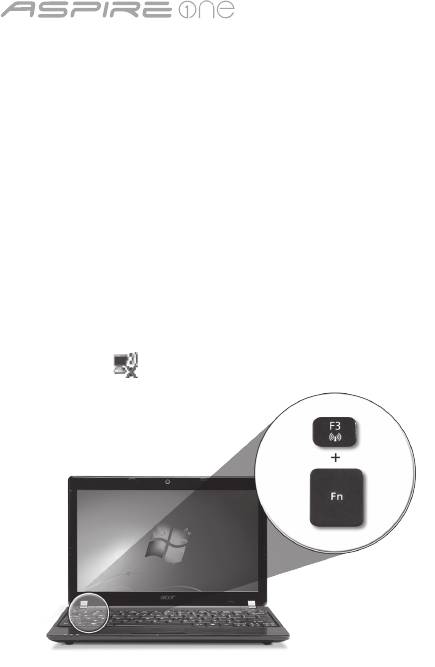
Серия
Кратко ръководство
3
Серия
Кратко ръководство
Мрежова настройка
Тези указания ще ви помогнат да зададете настройките за вашата локална (LAN) или безжична мрежа, за да получите достъп
до интернет.
Настройка на свързването към локална мрежа (LAN)
Просто пъхнете LAN кабела в мрежовия (RJ-45) порт. Моля, вижте "Изглед отдясно" на страница 6 за местоположението на
Ethernet порта.
Конфигуриране на безжична връзка
1. Натиснете <Fn> + <F3>, за да влезете в диспечера за комуникации. Тук можете да включите Wi-Fi връзката като натиснете
червения бутон до Wi-Fi.
Забележка: 3G и Bluetooth са също достъпни от диспечера за комуникации. Комуникационните устройства варират според
модела.
2. Натиснете иконата в системната област и изберете безжичната точка за достъп, към която желаете да се свържете.
Поставете 3G SIM карта (само за някои модели)
Отстранете батерията и внимателно поставете 3G SIM карта в гнездото за 3G SIM карта. Моля, вижте "Изглед отзад и отдолу"
на страница 6 за местоположението на гнездото на 3G SIM картата.
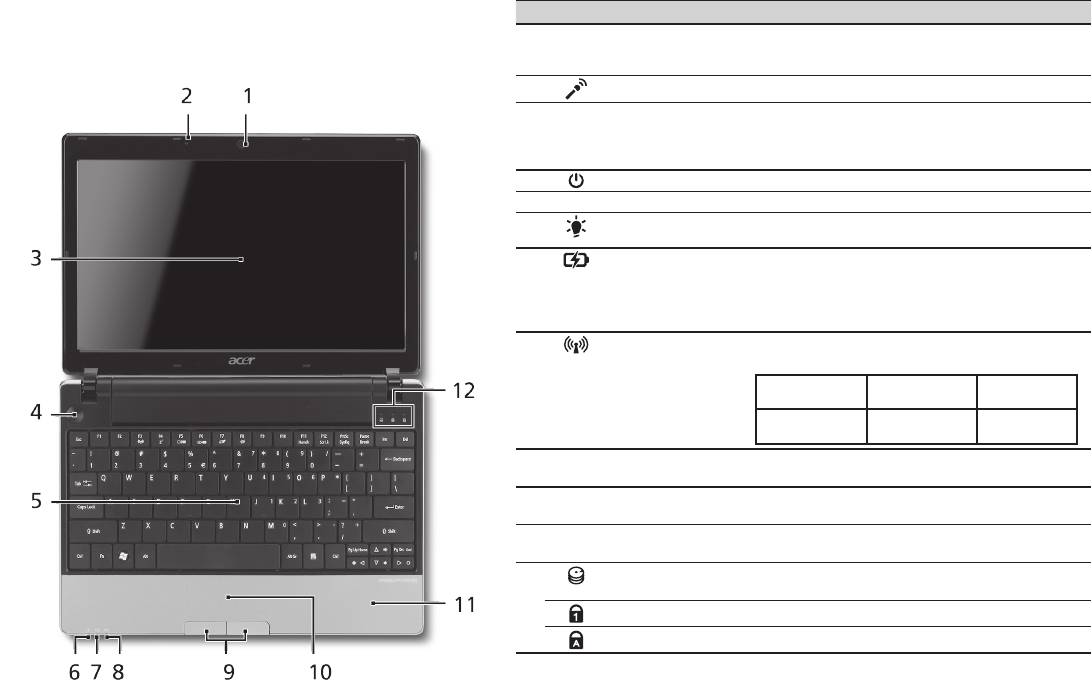
Серия
Кратко ръководство
Серия
Кратко ръководство
4
Изглед отгоре
Преглед на вашия Aspire One
# Икона Обект Описание
След като настроите компютъра си, както е показано в
1
Уеб камера Acer
Уеб камера за видео комуникация
раздела "Като за начало...", ще Ви покажем какво прави и
Crystal Eye
(конфигурацията може да се различава в
какво има Вашият нов ноутбук Acer.
зависимост от моделите).
2
Микрофон Вътрешен микрофон за запис на звук.
3
Дисплей Нарича се още "Течнокристален дисплей"
(LCD) и е екранът на компютъра
(конфигурацията може да се различава в
зависимост от моделите).
4
Бутон за вкл./изкл. С него компютърът се включва и изключва.
5
Клавиатура Служи за въвеждане на данни в компютъра Ви.
6
Индикатор на
Показва статуса на захранване на
1
захранването
компютъра.
7
Индикатор
Посочва статуса на батерията на компютъра.
за нивото на
1. Зареждане: Индикаторът свети в жълто,
1
батерията
докато батерията се зарежда.
2. Напълно заредена: Индикаторът свети в
синьо, когато сте в режим AC.
8
Индикатор за
Посочва статуса на 3G/безжичните LAN
1
комуникации
комуникации.
Синя светлина
Оранжева
Не свети
вкл.
светлина вкл.
3G вкл./WiFi вкл.
3G изкл. / WiFi
3G изкл./WiFi вкл.
3G вкл./WiFi изкл.
изкл.
9
Бутони за щракане
Левият и десният бутони функционират като
(ляв и десен)
ляв и десен бутон на мишка.
10
Тъчпад Чувствително на допир посочващо устройство,
което функционира като компютърна мишка.
11
Подложка за
Удобно място, на което да поставите ръцете
длани
си, когато използвате компютъра.
12
Индикатор на
Посочва дали твърдият диск е активен.
твърдия диск
Num Lock Светва, когато активирате Num Lock.
Caps Lock Светва, когато активирате Caps Lock.
1. Индикаторите на предния панел остават видими дори, когато капакът на компютъра
е затворен.

Серия
Кратко ръководство
5
Серия
Кратко ръководство
Преден изглед при затворен лаптоп
# Икона Обект Описание
1
Статусни
Светодиоди (LED), които светят,
индикатори
за да показват статуса на
функциите и компонентите на
компютъра.
Изглед отляво
2
Порт за външен
За връзка с дисплейно
дисплей (VGA)
устройство (напр. външен
монитор, LCD проектор).
3
Жак за DC вход За връзка с AC адаптер.
4
HDMI HDMI порт Поддържа цифрови видео
връзки с висока разделителна
способност.
5
Вентилационни
Позволява на компютъра
отвори
да се охлажда дори и при
продължителна употреба.
6
USB 2.0 порт За връзка с USB 2.0 устройства
(напр. USB мишки, USB камери).

Серия
Кратко ръководство
Серия
Кратко ръководство
6
Изглед отдясно
# Икона Обект Описание
7
Четец на карти
Чете Secure Digital (SD), MultiMediaCard
Много-в-1
(MMC), Memory Stick (MS), Memory Stick
PRO (MS PRO) и xD-Picture Card (xD).
Бележка: Натиснете, за да извадите/
деинсталитюрате картата.
Едновременно може да работи само
една карта.
8
Жак за вход за
Приема входящ сигнал от външни
микрофон
микрофони.
Жак за слушалки/
За връзка с изходни аудио устройства
колони/изход с
(напр. високоговорители, слушалки).
поддръжка на S/PDIF
9
USB 2.0 порт За връзка с USB 2.0 устройства (напр.
USB мишки).
10
Слот за заключващ
За връзка с Kensington-съвместим
механизъм Kensington
компютърен заключващ механизъм.
11
Порт за Ethernet
За връзка с мрежа, базирана на
(RJ-45)
Ethernet 10/100/1000.
Изглед отзад и отдолу
12
Отделение за батерии Тук се поставя батерийният модул на
компютъра.
13
Езиче за
Освобождава батерията, за да можете
освобождаване на
да я извадите.
батерията
14
Отделение за твърдия
Тук се намира твърдият диск на
диск
компютъра (прикрепен с винтове).
Отделение за памет Тук се поставя главната памет на
компютъра.
15
Вентилационни
Позволява на компютъра да се
слотове и охлаждащ
охлажда дори и при продължителна
вентилатор
употреба.
Бележка: Не покривайте и не
препречвайте отвора на вентилатора.
16
Придържащ
Държи батерията на мястото й.
механизъм на
батерията

Серия
Кратко ръководство
Работна среда
Температура:
За работа: 5°C дo 35°C
За съхранение: -20°C дo 65°C
Влажност (без кондензация):
За работа: 20% дo 80%
За съхранение: 20% дo 80%
7

seeria
Lühijuhend

seeria
© 2010 Kõik õigused kaitstud
Aspire One’i seeria lühijuhend
Originaalväljaanne: 04/2010
Aspire One ’i seeria sülearvuti
Mudeli number: _____________________________
Seerianumber: _____________________________
Ostukuupäev: ______________________________
Ostukoht: _________________________________

Lühijuhend
Federal Communications Commission
Declaration of Conformity
This device complies with Part 15 of the FCC Rules. Operation is subject to the following two conditions: (1) this device may not
cause harmful interference, and (2) this device must accept any interference received, including interference that may cause
undesired operation.
The following local Manufacturer / Importer is responsible for this declaration:
Product name: Notebook PC
Brand: Acer
Model number: MS2298
Machine type: AO 721 series
Name of Responsible Party: Acer America Corporation
Address of responsible party: 333 West San Carlos St., San Jose
CA 95110, U. S. A.
Contact person: Acer Representative
Phone No.: 1-254-298-4000
Fax No.: 1-254-298-4147
April 30, 2010

seeria
• Themaximumconcentrationvaluesoftherestrictedsubstancesbyweightinhomogenousmaterialare:
CE Declaration of Conformity
Lead
0.1%
Polybrominated Biphenyls (PBB’s)
0.1%
We,
Mercury
0.1%
Polybrominated Diphenyl Ethers (PBDE’s)
0.1%
Acer Incorporated
Hexavalent Chromium
0.1%
Cadmium
0.01%
8F, 88, Sec. 1, Hsin Tai Wu Rd., Hsichih, Taipei Hsien 221, Taiwan
Directive 2009/125/EC with regard to establishing a framework for the setting of ecodesign requirements for energy-related
product.
Contact Person: Mr. Easy Lai, e-mail:easy_lai@acer.com.tw
R&TTE Directive 1999/5/EC as attested by conformity with the following harmonized standard:
And,
• Article3.1(a)HealthandSafety
Acer Europe SA
- EN60950-1
Via Cantonale, Centro Galleria 2 6928 Manno Switzerland
- EN62311
Hereby declare that:
• Article3.1(b)EMC
Product: Notebook Computer
- EN301 489-1
Trade Name: Acer
- EN301 489-3 (Applicable to non-bluetooth wireless keyboard mouse set).
Model Number: MS2298
- EN301 489-7
Machine Type: AO721 series
- EN301 489-17
Is compliant with the essential requirements and other relevant provisions of the following EC directives, and that all the
- EN301 489-24
necessary steps have been taken and are in force to assure that production units of the same product will continue comply with
• Article3.2SpectrumUsages
the requirements.
- EN300 440-2 (Applicable to non-bluetooth wireless keyboard mouse set).
EMC Directive 2004/108/EC as attested by conformity with the following harmonized standards:
- EN300 328
• EN55022,AS/NZSCISPR22,ClassB
- EN301 511
• EN55024
- EN301 893 (Applicable to 5GHz high performance RLAN).
• EN61000-3-2ClassD
- EN301 908-1
• EN61000-3-3
- EN301 908-2
Year to begin affixing CE marking 2010.
Low Voltage Directive 2006/95/EC as attested by conformity with the following harmonized standard:
• EN60950-1
Apr. 30, 2010
Council Decision 98/482/EC (CTR21):
(Applicable to product with pan- European single terminal connection to the Public Switched Telephone Network (PSTN).)
Date
Easy Lai /Manager
RoHS Directive 2002/95/EC on the Restriction of the Use of certain Hazardous Substances in Electrical and Electronic Equipment
Regulation Center, Acer Inc.
Lühijuhend
• Themaximumconcentrationvaluesoftherestrictedsubstancesbyweightinhomogenousmaterialare:
CE Declaration of Conformity
Lead
0.1%
Polybrominated Biphenyls (PBB’s)
0.1%
We,
Mercury
0.1%
Polybrominated Diphenyl Ethers (PBDE’s)
0.1%
Acer Incorporated
Hexavalent Chromium
0.1%
Cadmium
0.01%
8F, 88, Sec. 1, Hsin Tai Wu Rd., Hsichih, Taipei Hsien 221, Taiwan
Directive 2009/125/EC with regard to establishing a framework for the setting of ecodesign requirements for energy-related
product.
Contact Person: Mr. Easy Lai, e-mail:easy_lai@acer.com.tw
R&TTE Directive 1999/5/EC as attested by conformity with the following harmonized standard:
And,
• Article3.1(a)HealthandSafety
Acer Europe SA
- EN60950-1
Via Cantonale, Centro Galleria 2 6928 Manno Switzerland
- EN62311
Hereby declare that:
• Article3.1(b)EMC
Product: Notebook Computer
- EN301 489-1
Trade Name: Acer
- EN301 489-3 (Applicable to non-bluetooth wireless keyboard mouse set).
Model Number: MS2298
- EN301 489-7
Machine Type: AO721 series
- EN301 489-17
Is compliant with the essential requirements and other relevant provisions of the following EC directives, and that all the
- EN301 489-24
necessary steps have been taken and are in force to assure that production units of the same product will continue comply with
• Article3.2SpectrumUsages
the requirements.
- EN300 440-2 (Applicable to non-bluetooth wireless keyboard mouse set).
EMC Directive 2004/108/EC as attested by conformity with the following harmonized standards:
- EN300 328
• EN55022,AS/NZSCISPR22,ClassB
- EN301 511
• EN55024
- EN301 893 (Applicable to 5GHz high performance RLAN).
• EN61000-3-2ClassD
- EN301 908-1
• EN61000-3-3
- EN301 908-2
Year to begin affixing CE marking 2010.
Low Voltage Directive 2006/95/EC as attested by conformity with the following harmonized standard:
• EN60950-1
Apr. 30, 2010
Council Decision 98/482/EC (CTR21):
(Applicable to product with pan- European single terminal connection to the Public Switched Telephone Network (PSTN).)
Date
Easy Lai /Manager
RoHS Directive 2002/95/EC on the Restriction of the Use of certain Hazardous Substances in Electrical and Electronic Equipment
Regulation Center, Acer Inc.
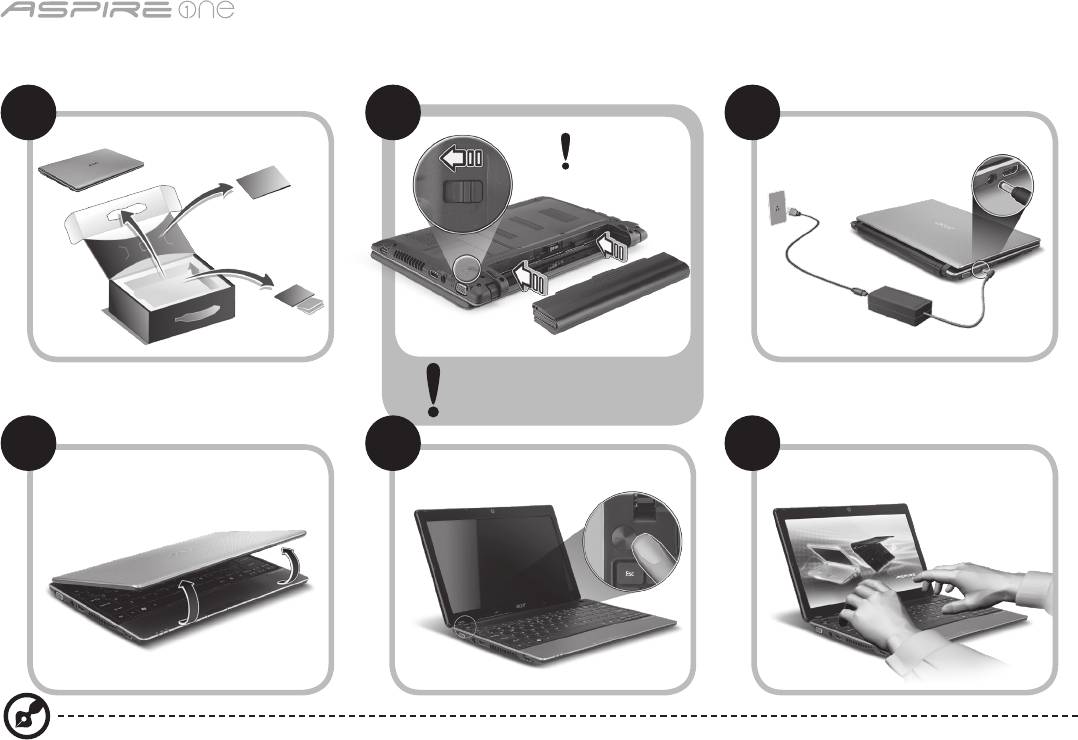
seeria
1
Alustuseks
1 2
3
2-2
3-3
3-1
3-2
2-1
Veenduge, et aku on korralikult
kohale lukustunud, nagu kujutatud
joonisel 2-2.
4 5 6
Illustratsioonid on ainult üldiseks võrdlusaluseks. Toodete tegelikud tehnilised andmed võivad erineda.

Lühijuhend
2
Kõigepealt tähtsamad asjad
Täname Teid selle eest, et valisite oma kaasaskantavaks arvutiks Acer'i sülearvuti.
Teie teejuhid
Et aidata teil kasutada Aceri sülearvutit, oleme loonud komplekti juhiseid*:
Kõigepealt aitab Lühijuhend teil alustada arvuti häälestamist.
Kui soovite rohkem teada saada, kuidas arvuti aitab teil produktiivsem olla, vaadake AcerSystem User Guide’i. Teatmik sisaldab
täpsemat informatsiooni sellistel teemadel, nagu süsteemiutiilidid, andmete taastamine, laiendusvõimalused ja probleemide
lahendamine. Sellele lisaks sisaldab see garantiiteavet ning sülearvuti kohta kehtivaid üldiseid regulatsioone ja ohutuseeskirju.
See on saadaval PDF-formaadis (Portable Document Format) ning on laaditud teie sülearvutisse.
Märkus: Faili vaatamiseks on vajate programmi Adobe Reader. Kui Adobe Reader pole arvutisse installitud, käivitab AcerSystem
User Guide’i klõpsamine kõigepealt Adobe Readeri installimisprogrammi. Installeerimise lõpetamiseks järgige ekraanil olevaid
juhiseid. Juhiseid Adobe Readeri kasutamiseks leiate menüüst Spikker ja Tugi.
* TÄHTIS MÄRKUS: Palun pidage silmas, et ülalmainitud juhised, nii trükitud kui elektroonilisel kujul, on ainult
teavitava iseloomuga ning välja arvatud juhtudel, kui AcerSystem User Guide’is sisalduvas spetsiilises garantiiteabes
pole näidatud teisiti, ei kujuta miski neis juhistes toodud teabes endast Aceri esindatust või garantiid teie poolt ostetud
tootele. Acer vabastab end selgesõnaliselt mis tahes kohustustest seoses juhistes esineda võivate vigadega.
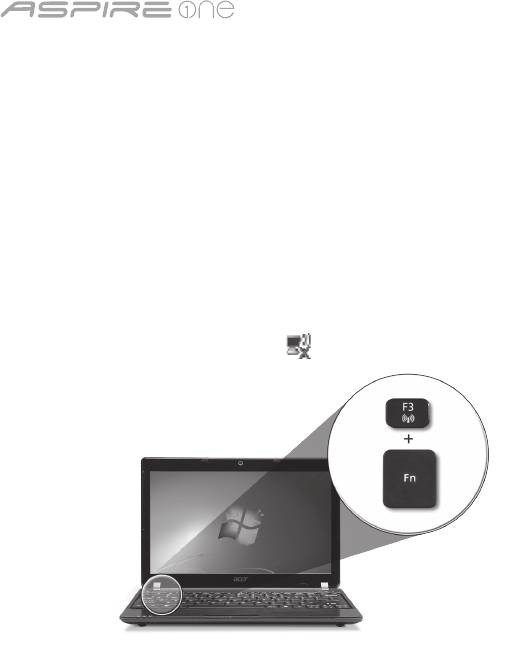
seeria
3
Võrgukonguratsioon
See juhend aitab teil LAN- ja traadita võrgu sätteid kongureerida, et saaksite luua Interneti-ühenduse.
LAN-ühenduse seadistamine
Lihtsalt ühendage LAN-kaabel Etherneti (RJ-45) porti. Vt Etherneti pordi asukohta osast „Vaade paremalt” lk 6.
Traadita ühenduse seadistamine
1. Pääsemaks juurde rakendusele Communication Manager vajutage <Fn> + <F3>. Nüüd saate lülitada sisse Wi-Fi-ühenduse,
klõpsates selle kõrval oleval punasel nupul.
Märkus: 3G-le ja Bluetoothile pääseb ligi ka rakenduse Communication Manager kaudu. Sideseadmed võivad vastavalt mudelile
erineda.
2. Klõpsake süsteemisalves ikoonil ja valige traadita pääsupunkt, millega soovite ühendust luua.
3G SIM-kaardi sisestamine (ainult teatud mudelitel)
Eemaldage aku ja sisestage ettevaatlikult 3G SIM-kaart 3G SIM-kaardi pilusse. Vt 3G SIM-kaardi pilu asukohta osast „Tagant- ja
põhjavaade” lk 6.
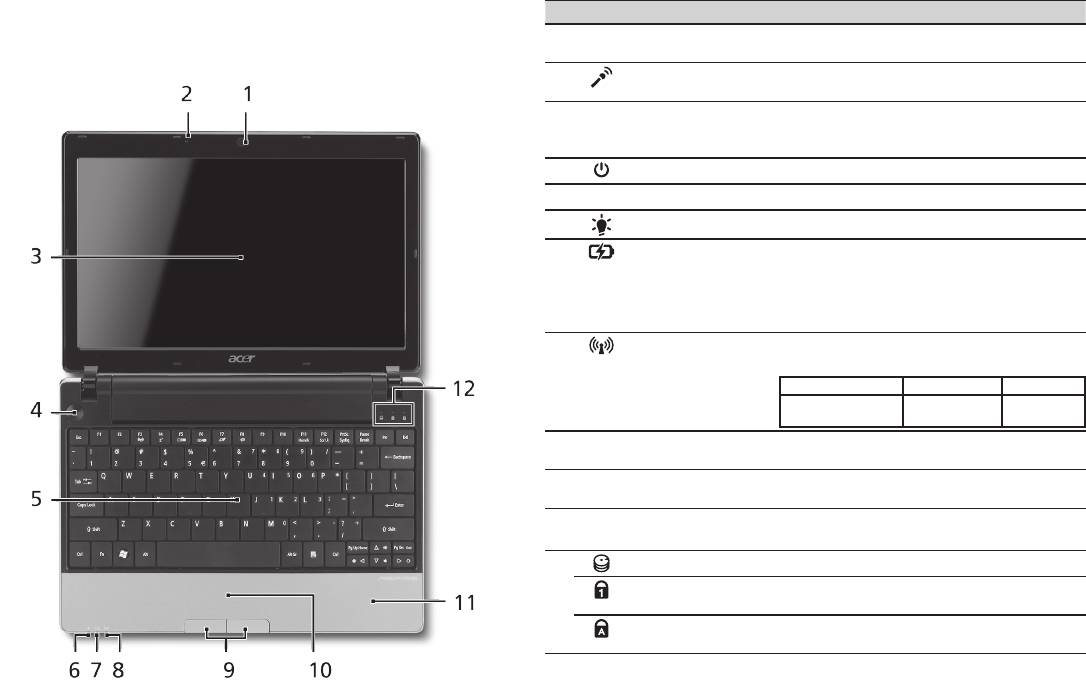
Lühijuhend
4
Pealtvaade
Teie Aspire One ülevaade
# Ikoon Objekt Kirjeldus
Kui olete oma arvuti häälestanud jaotises Alustuseks kirjeldatud
1
Veebikaamera Acer
Veebikaamera videosuhtluseks (mudelite
viisil, lubage meil tutvustada teie uut sülearvutit Acer.
Crystal Eye
konguratsioon võib olla erinev).
2
Mikrofon Sisseehitatud mikrofon heli
salvestamiseks.
3
Kuvariekraan Seda nimetatakse ka vedelkristallekraaniks
(LCD) ning see kuvab arvuti pilti (mudelite
konguratsioon võib olla erinev).
4
Voolunupp Arvuti sisse- ja väljalülitamiseks.
5
Klaviatuur Andmete sisestamiseks arvutisse.
1
6
Vooluindikaator
Näitab arvuti olekut.
1
7
Aku indikaator
Näitab arvuti aku olekut.
1. Laadimine: kui akut laetakse, on tuli
kollakat värvi.
2. Täielikult laetud: kui arvuti on
vooluvõrgus, on tuli sinist värvi.
1
8
indikaator
Näitab 3G või traadita võrguühenduse
olekut.
Sinine tuli põleb Põleb oranž tuli Tuli ei põle
3G sees/WiFi sees
3G väljas/
3G väljas/
3G sees/WiFi väljas
WiFi sees
WiFi väljas
9
Klõpsunupud
Vasak ja parem nupp funktsioneerivad
(vasak ja parem)
vasaku ja parema hiirenupuna.
10
Puuteplaat Puutetundlik osutusseadis, mis töötab
arvutihiirena.
11
Randmetugi Mugav toetusala, kuhu saate arvutit
kasutades toetada oma käsi.
12
Kõvakettaindikaator Näitab kõvaketta aktiivsust.
Numbrilukk Num
Sütib siis, kui numbrilukk aktiveeritakse.
Lock
Suurtähelukk Caps
Sütib siis, kui suurtähelukk aktiveeritakse.
Lock
1. Esipaneelil asuvad indikaatorid on nähtavad ka siis, kui arvuti kaas on suletud.
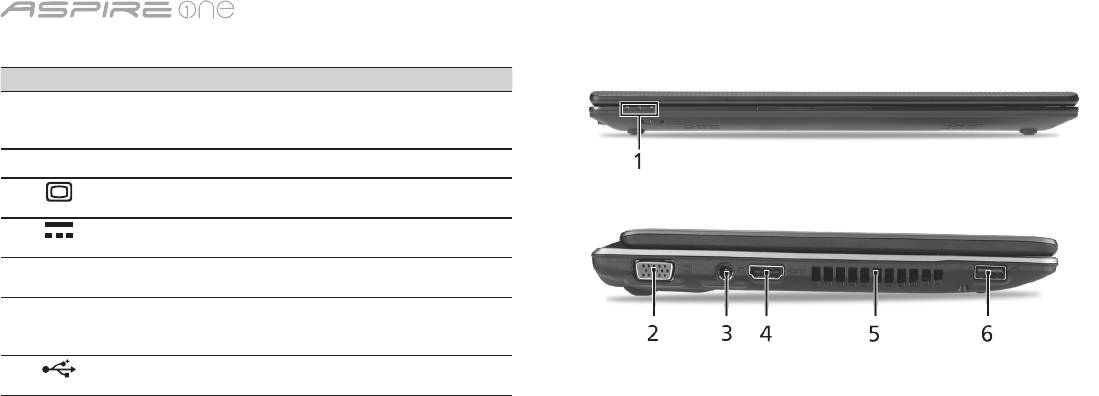
seeria
5
Suletud eestvaade
# Ikoon Objekt Kirjeldus
1
Olekuindikaatorid Valgusdioodid (LED-id), mille
süttimine näitab arvuti funktsioonide
ja komponentide olekut.
Vaade vasakult
2
Välise kuvari (VGA)
Kuvaseadme (nt välise kuvari või
port
LCD-projektori) ühendamiseks.
3
Alalisvoolusisendi
Vahelduvvooluadapteri (toiteploki)
pistik
ühendamiseks.
4
HDMI HDMI-port Toetab kõrglahutusega
digitaalvideoühendusi.
5
Ventilatsiooniavad Võimaldavad arvutil püsida
jahedana ka pärast pikaajalist
kasutamist.
6
USB 2.0 port USB 2.0 seadmete ühendamiseks
(nt USB-hiir või USB-kaamera).

Lühijuhend
6
Vaade paremalt
# Ikoon Objekt Kirjeldus
7
Mitu-ühes kaardilugeja Võtab vastu järgmisi kaarte: Secure Digital
(SD), MultiMediaCard (MMC), Memory
Stick (MS), Memory Stick PRO (MS PRO)
ja xD-Picture (xD).
Märkus: Kaardi eemaldamiseks/
paigaldamiseks vajutage sellele. Korraga
saab töötada ainult üks kaart.
8
Mikrofonipesa Võtab vastu sisendheli välisest
mikrofonist.
Kõrvaklappide/kõlarite/
Heliväljundseadmete ühendamiseks
heliväljundi pistiks
(nt kõlarid, kõrvaklapid).
S/PDIF toega
9
USB 2.0 port USB 2.0 seadmete ühendamiseks
(nt USB-hiir).
10
Kensington-luku pesa Kensington-tüüpi arvuti turvaluku
ühendamiseks.
11
Etherneti (RJ-45) port Ethernet 10/100/1000-põhise võrguga
ühendamiseks.
Tagant- ja põhjavaade
12
Akusektsioon Siin asuvad arvuti akud.
13
Aku vabastamise riiv Vabastab aku, et seda saaks välja võtta.
14
Kõvakettasektsioon Siin asub arvuti kõvaketas (kinnitatud
kruvidega).
Mälusahtel Siin asub arvuti põhimälu.
15
Ventilatsiooniavad ning
Võimaldavad arvutil püsida jahedana ka
jahutusventilaator
pärast pikaajalist kasutamist.
Märkus: Ärge katke ega blokeerige
ventilatsiooniavasid.
16
Akulukk Lukustab aku kohale.

seeria
Keskkond
Temperatuur:
Töötamiseks sobiv: 5 °C kuni 35 °C
Sobimatu: –20 °C kuni 65 °C
Niiskus (mittekondenseeruv):
Töötamiseks sobiv: 20% kuni 80%
Sobimatu: 20% kuni 80%
7

sērija
Ātrais ceļvedis

sērija
Ātrais ceļvedis
sērija
Ātrais ceļvedis
© 2010 Visas tiesības aizsargātas
Aspire One sērijas ātrais ceļvedis
Oriģinālizdevums: 04/2010
Aspire One sērijas piezīmjdators
Modeļa numurs: ____________________________
Sērijas numurs: _____________________________
Pirkuma datums: ____________________________
Pirkuma vieta: ______________________________

sērija
Ātrais ceļvedis
sērija
Ātrais ceļvedis
Federal Communications Commission
Declaration of Conformity
This device complies with Part 15 of the FCC Rules. Operation is subject to the following two conditions: (1) this device may not
cause harmful interference, and (2) this device must accept any interference received, including interference that may cause
undesired operation.
The following local Manufacturer/Importer is responsible for this declaration:
Product name: Notebook PC
Brand: Acer
Model number: MS2298
Machine type: AO 721 series
Name of Responsible Party: Acer America Corporation
Address of responsible party: 333 West San Carlos St., San Jose
CA 95110, U. S. A.
Contact person: Acer Representative
Phone No.: 1-254-298-4000
Fax No.: 1-254-298-4147
April 30, 2010

sērija
Ātrais ceļvedis
sērija
Ātrais ceļvedis
• Themaximumconcentrationvaluesoftherestrictedsubstancesbyweightinhomogenousmaterialare:
CE Declaration of Conformity
Lead
0.1%
Polybrominated Biphenyls (PBB’s)
0.1%
Mercury
Polybrominated Diphenyl Ethers (PBDE’s)
We,
0.1%
0.1%
Hexavalent Chromium
0.1%
Cadmium
0.01%
Acer Incorporated
8F, 88, Sec. 1, Hsin Tai Wu Rd., Hsichih, Taipei Hsien 221, Taiwan
Directive 2009/125/EC with regard to establishing a framework for the setting of ecodesign requirements for energy-related
Contact Person: Mr. Easy Lai, e-mail:easy_lai@acer.com.tw
product.
And,
R&TTE Directive 1999/5/EC as attested by conformity with the following harmonized standard:
Acer Europe SA
• Article3.1(a)HealthandSafety
Via Cantonale, Centro Galleria 2 6928 Manno Switzerland
- EN60950-1
Hereby declare that:
- EN62311
• Article3.1(b)EMC
Product: Notebook Computer
- EN301 489-1
Trade Name: Acer
- EN301 489-3 (Applicable to non-bluetooth wireless keyboard mouse set).
Model Number: MS2298
- EN301 489-7
Machine Type: AO721 series
- EN301 489-17
Is compliant with the essential requirements and other relevant provisions of the following EC directives, and that all the
- EN301 489-24
necessary steps have been taken and are in force to assure that production units of the same product will continue comply with
the requirements.
• Article3.2SpectrumUsages
EMC Directive 2004/108/EC as attested by conformity with the following harmonized standards:
- EN300 440-2 (Applicable to non-bluetooth wireless keyboard mouse set).
• EN55022,AS/NZSCISPR22,ClassB
- EN300 328
• EN55024
- EN301 511
- EN301 893 (Applicable to 5GHz high performance RLAN).
• EN61000-3-2ClassD
- EN301 908-1
• EN61000-3-3
- EN301 908-2
Year to begin affixing CE marking 2010.
Low Voltage Directive 2006/95/EC as attested by conformity with the following harmonized standard:
• EN60950-1
Apr. 30, 2010
Council Decision 98/482/EC (CTR21):
(Applicable to product with pan- European single terminal connection to the Public Switched Telephone Network (PSTN).)
Date
Easy Lai /Manager
RoHS Directive 2002/95/EC on the Restriction of the Use of certain Hazardous Substances in Electrical and Electronic Equipment
Regulation Center, Acer Inc.
sērija
Ātrais ceļvedis
sērija
Ātrais ceļvedis
• Themaximumconcentrationvaluesoftherestrictedsubstancesbyweightinhomogenousmaterialare:
CE Declaration of Conformity
Lead
0.1%
Polybrominated Biphenyls (PBB’s)
0.1%
Mercury
Polybrominated Diphenyl Ethers (PBDE’s)
We,
0.1%
0.1%
Hexavalent Chromium
0.1%
Cadmium
0.01%
Acer Incorporated
8F, 88, Sec. 1, Hsin Tai Wu Rd., Hsichih, Taipei Hsien 221, Taiwan
Directive 2009/125/EC with regard to establishing a framework for the setting of ecodesign requirements for energy-related
Contact Person: Mr. Easy Lai, e-mail:easy_lai@acer.com.tw
product.
And,
R&TTE Directive 1999/5/EC as attested by conformity with the following harmonized standard:
Acer Europe SA
• Article3.1(a)HealthandSafety
Via Cantonale, Centro Galleria 2 6928 Manno Switzerland
- EN60950-1
Hereby declare that:
- EN62311
• Article3.1(b)EMC
Product: Notebook Computer
- EN301 489-1
Trade Name: Acer
- EN301 489-3 (Applicable to non-bluetooth wireless keyboard mouse set).
Model Number: MS2298
- EN301 489-7
Machine Type: AO721 series
- EN301 489-17
Is compliant with the essential requirements and other relevant provisions of the following EC directives, and that all the
- EN301 489-24
necessary steps have been taken and are in force to assure that production units of the same product will continue comply with
the requirements.
• Article3.2SpectrumUsages
EMC Directive 2004/108/EC as attested by conformity with the following harmonized standards:
- EN300 440-2 (Applicable to non-bluetooth wireless keyboard mouse set).
• EN55022,AS/NZSCISPR22,ClassB
- EN300 328
• EN55024
- EN301 511
- EN301 893 (Applicable to 5GHz high performance RLAN).
• EN61000-3-2ClassD
- EN301 908-1
• EN61000-3-3
- EN301 908-2
Year to begin affixing CE marking 2010.
Low Voltage Directive 2006/95/EC as attested by conformity with the following harmonized standard:
• EN60950-1
Apr. 30, 2010
Council Decision 98/482/EC (CTR21):
(Applicable to product with pan- European single terminal connection to the Public Switched Telephone Network (PSTN).)
Date
Easy Lai /Manager
RoHS Directive 2002/95/EC on the Restriction of the Use of certain Hazardous Substances in Electrical and Electronic Equipment
Regulation Center, Acer Inc.
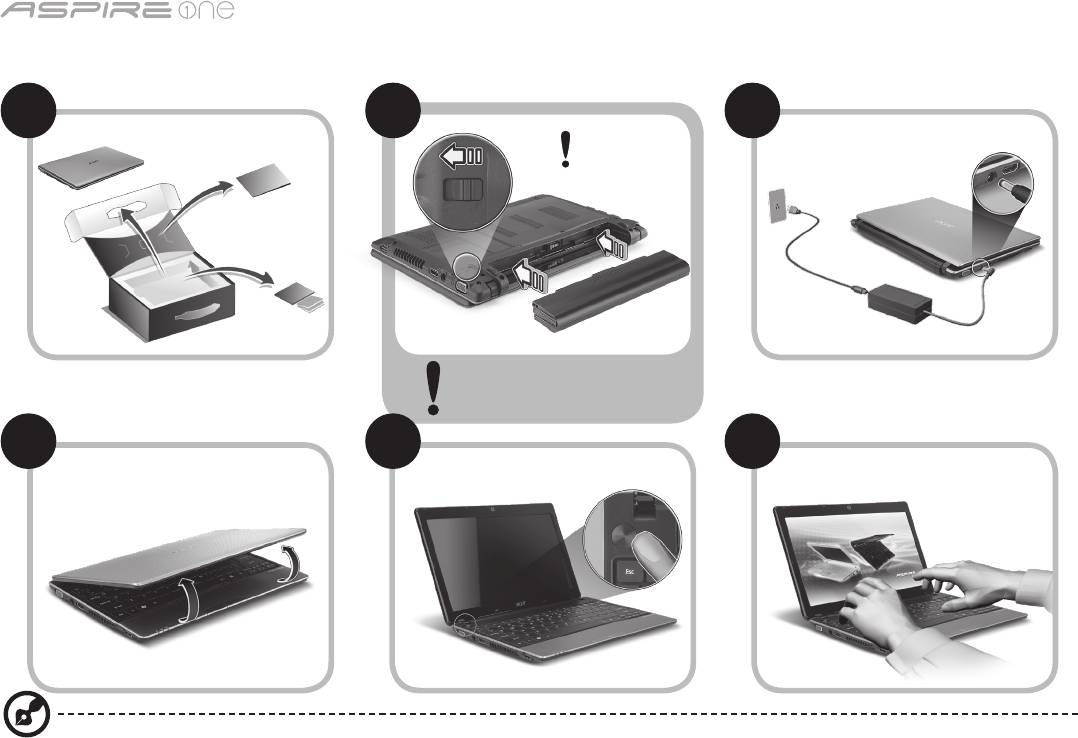
sērija
Ātrais ceļvedis
sērija
Ātrais ceļvedis
Tikai iesācējiem
1 2
3
2-2
3-3
3-1
3-2
2-1
Pārliecinieties, vai akumulators
ir pareizi noksēts vietā, kā
redzams attēlā 2-2.
4 5 6
Attēli ir tikai norādēm. Preces faktiskās tehniskās normas var atšķirties.
1

sērija
Ātrais ceļvedis
sērija
Ātrais ceļvedis
Galvenais vispirms
Mēs vēlamies jums pateikties, ka esat izvēlējies Acer piezīmjdatoru, lai nodrošinātu savas mobilās skaitļošanas vajadzības.
Jūsu rokasgrāmatas
Lai palīdzētu jums lietot Acer piezīmjdatoru, esam sagatavojuši rokasgrāmatu komplektu*:
Pirmkārt, Ātrais ceļvedis jums palīdz uzsākt datora iestatīšanu.
Lai uzzinātu vairāk, kā jūsu dators jums var palīdzēt būt vēl produktīvākam, lūdzu, skatiet AcerSystem lietotāja ceļvedi. Šajā ceļvedī ir
detalizēta informācija par tādām tēmām kā sistēmas utilītas, datu atkopšana, paplašināšanas opcijas un problēmu novēršana. Bez tam
tajā ir iekļauta informācija par garantijām un piezīmjdatora lietošanas vispārīgas regulas un drošības paziņojumi. Tas ir pieejams PDF
(Portable Document Format - portatīvā dokumenta formāts) formātā un ir iepriekš ielādēts jūsu piezīmjdatorā.
Piezīme: lai skatītu failu, nepieciešama programma Adobe Reader. Ja jūsu datorā nav instalēta programma Adobe Reader,
pirmo reizi noklikšķinot uz AcerSystem User Guide (AcerSystem lietotāja ceļvedis), automātiski tiks palaista programmas
Adobe Reader instalēšana. Lai pabeigtu instalāciju, izpildiet ekrānā redzamos norādījumus. Lai iegūtu norādījumus, kā lietot
programmu Adobe Reader, piekļūstiet izvēlnei Help and Support (Palīdzība un atbalsts).
* SVARĪGS PAZIŅOJUMS: Lūdzam ņemt vērā, ka šeit minētie ceļveži, kas ir gan izdrukātā, gan elektroniskā formātā,
ir paredzēti tikai atsaucei, un nekas no šajos ceļvežos minētā nedod tiesības uz Acer garantiju attiecībā uz iegādāto
produktu izņemot to, kas norādīts attiecīgajā garantijas informācijā, kas ietverta AcerSystem lietotāja ceļvedī. Acer
neuzņemas nekādu atbildību par kļūdām, kuras satur ceļveži.
2
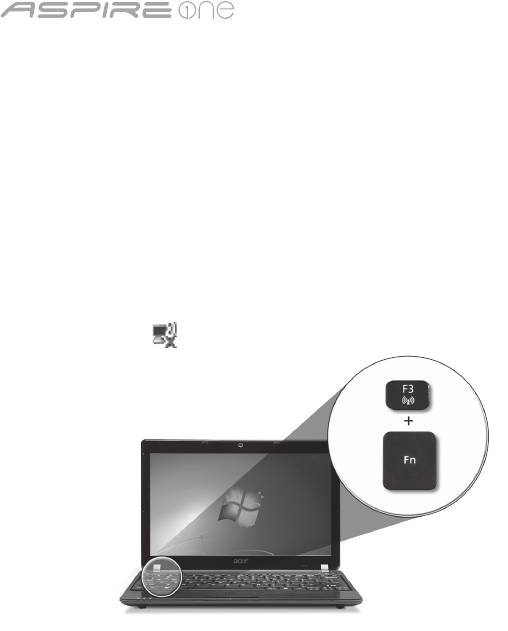
sērija
Ātrais ceļvedis
sērija
Ātrais ceļvedis
Tīkla kongurācija
Šis ceļvedis jums palīdzēs kongurēt jūsu LAN un bezvadu tīkla iestatījumus, lai ļautu jums izveidot interneta savienojumu.
LAN savienojuma iestatīšana
Vienkārši iespraudiet LAN kabeli Ethernet (RJ-45) portā. Lūdzu, skatiet "Skats no labās puses" 6. lappusē, lai noteiktu Ethernet porta
atrašanās vietu.
Bezvadu savienojuma iestatīšana
1. Nospiediet <Fn> + <F3>, lai piekļūtu sakaru pārvaldniekam. Šeit jūs varat iespējot Wi-Fi savienojumu, noklikšķinot sarkano pogu,
kas atrodas blakus Wi-Fi.
Piezīme: Izmantojot sakaru pārvaldnieku, var piekļūt arī 3G un Bluetooth. Sakaru ierīces var atšķirties atkarībā no modeļa.
2. Noklikšķiniet uz ikonas sistēmas teknē un izvēlieties bezvadu piekļuves punktu, ar kuru vēlaties izveidot savienojumu.
3G SIM kartes ievietošana (tikai noteiktiem modeļiem)
Izņemiet akumulatoru un uzmanīgi ievietojiet 3G SIM karti 3G SIM kartes slotā. Lūdzu, skatiet "Aizmugure un apakšpuse"
6. lappusē, lai noteiktu 3G SIM kartes slota atrašanās vietu.
3
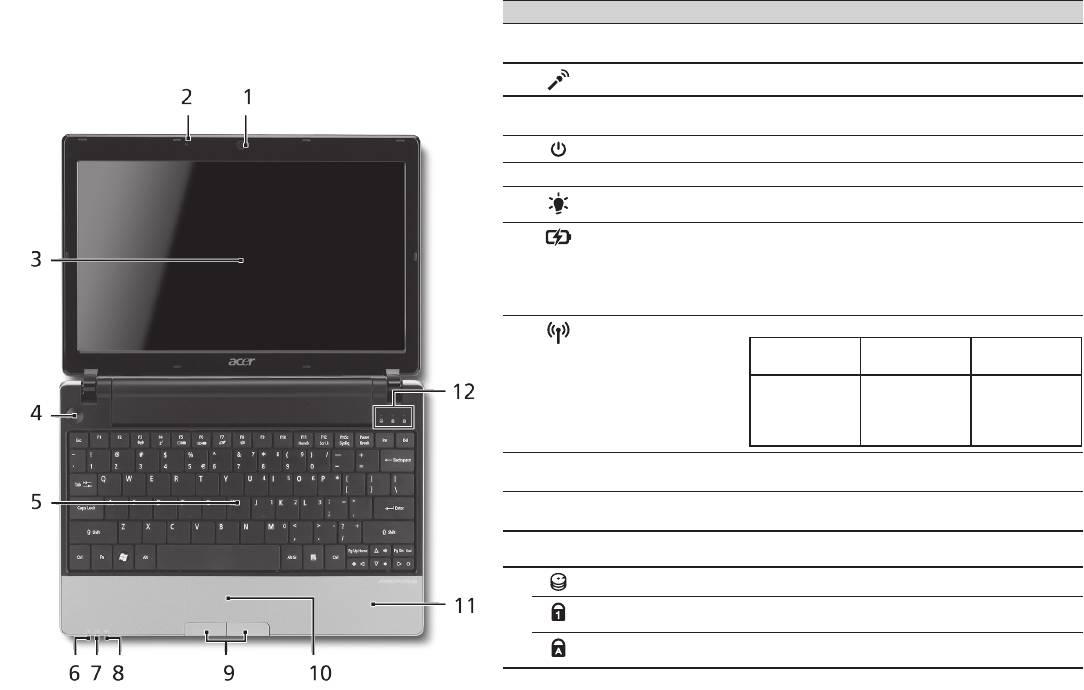
sērija
Ātrais ceļvedis
sērija
Ātrais ceļvedis
Skats no augšpuses
Jūsu Aspire One pārskats
# Ikona Elements Apraksts
Pēc tam, kad esat sagatavojis savu datoru, kā parādīts
1
Acer Crystal Eye
Tīmekļa kamera videosakariem
sadaļā Tikai iesācējiem, atļaujiet jūs iepazīstināt ar jūsu
tīmekļa kamera
(modeļu kongurācija var atšķirties).
jauno Acer piezīmjdatoru.
2
Mikrofons Iekšējais mikrofons skaņas ierakstīšanai.
3
Displeja ekrāns Saukts arī par šķidro kristālu displeju (LCD); rāda
datora izvadi (modeļu kongurācija var atšķirties).
4
Barošanas poga Ieslēdz un izslēdz datoru.
5
Tastatūra Datu ievadīšanai datorā.
1
6
Barošanas indikators
Norāda datora barošanas statusu.
7
Akumulatora
Norāda datora akumulatora statusu.
indikators
1
1. Uzlāde: Indikators ir oranžā krāsā,
akumulatoram lādējoties.
2. Pilnīgi uzlādēts: Datoram darbojoties no
maiņstrāvas, indikators ir zils.
8
Sakaru indikators
1
Norāda 3G/bezvadu lokālā tīkla sakaru statusu.
Zilā gaisma iedegta Oranžā gaisma
Gaisma nedeg
iedegta
3G ieslēgts/
WiFi ieslēgts
3G izslēgts/
3G izslēgts/
3G ieslēgts/
WiFi ieslēgts
WiFi izslēgts
WiFi izslēgts
9
Klikšķināmas pogas
Kreisā un labā poga darbojas tāpat kā peles
(kreisā un labā)
kreisā un labā poga.
10
Skārienpanelis Skārienjutīga rādītājierīce, kas darbojas kā datora
pele.
11
Plaukstu atbalsta zona Ērta atbalsta zona jūsu rokām, kad lietojat datoru.
12
Cietā diska indikators Norāda, ka cietais disks ir aktīvs.
Num Lock (Ciparslēgs) Deg, ja ir aktivizēts ciparslēgs.
Caps Lock (Burtslēgs) Deg, ja ir aktivizēts burtslēgs.
1. Priekšējā paneļa indikatori ir redzami pat tad, kad datora vāks ir cieši aizvērts.
4
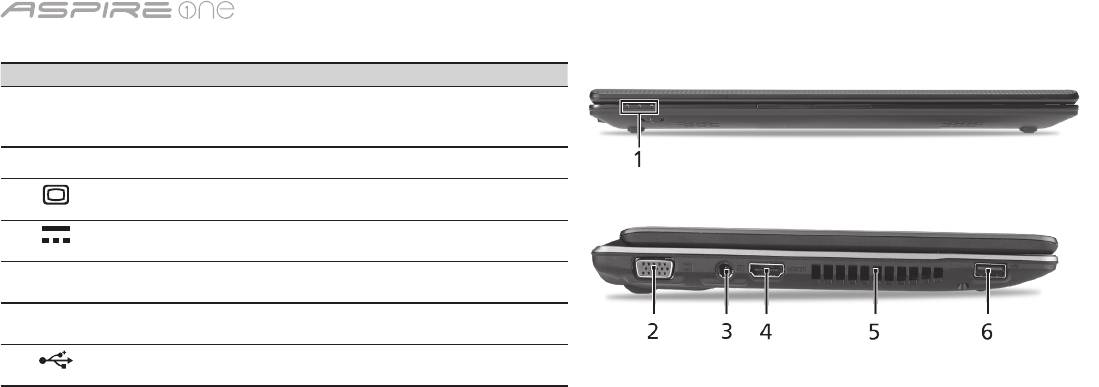
sērija
Ātrais ceļvedis
sērija
Ātrais ceļvedis
Skats no priekšpuses aizvērtā veidā
# Ikona Elements Apraksts
1
Statusa indikatori Gaismas diodes (LED), kas iedegas, lai
norādītu datora funkciju un komponentu
statusu.
Skats no kreisās puses
2
Ārējā displeja (VGA)
Šeit pieslēdz displeja ierīci (piemēram, ārēju
ports
monitoru, LCD projektoru).
3
Līdzstrāvas ieejas
Šeit pieslēdz maiņstrāvas adapteru.
ligzda
4
HDMI HDMI ports Atbalsta augstas kvalitātes ciparu video
savienojumus.
5
Ventilācijas atveres Neļauj datoram sakarst pat pēc ilgstošas
lietošanas.
6
USB 2.0 ports Šeit pieslēdz USB 2.0 ierīces (piemēram,
USB peli, USB kameru).
5
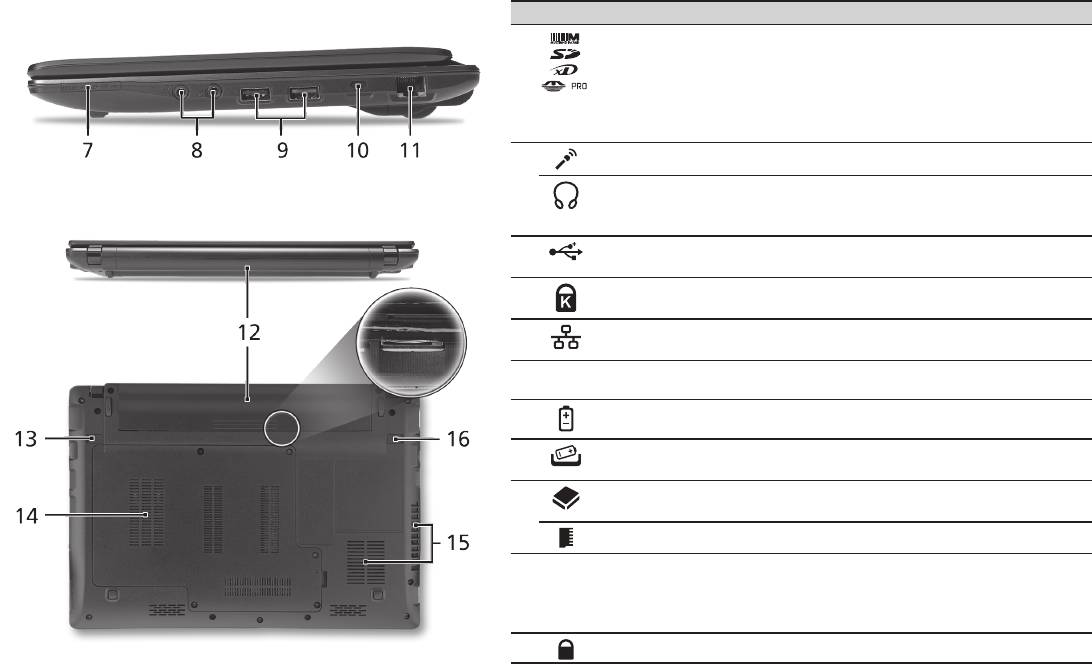
sērija
Ātrais ceļvedis
sērija
Ātrais ceļvedis
Skats no labās puses
# Ikona Elements Apraksts
7
Karšu lasītājs
Pieņem datu nesējus Secure Digital (SD),
"Vairāki vienā"
MultiMediaCard (MMC), Memory Stick (MS),
Memory Stick PRO (MS PRO) un xD-Picture
Card (xD).
Piezīme: Nospiediet, lai izņemtu/ieliktu karti.
Vienlaikus var lietot tikai vienu karti.
8
Mikrofona ieejas ligzda Pieņem ievadi no ārējiem mikrofoniem.
Austiņas/skaļruņu/
Pievieno audio līnijas izejas ierīces
līnijas izejas ports ar
(piem., skaļruņus, austiņas).
S/PDIF atbalstu
9
USB 2.0 ports Šeit pieslēdz USB 2.0 ierīces (piemēram,
USB peli).
10
Kensingtona atslēgas
Šeit pieslēdz Kensingtona atslēgu datora
slots
drošībai.
11
Ethernet (RJ-45) ports Šeit pieslēdz Ethernet 10/100/1000 tīkla
vadu.
Aizmugure un apakšpuse
12
Akumulatora nodalījums Šeit ievieto datora akumulatoru.
13
Akumulatora
Atbrīvo akumulatoru, lai to varētu izņemt.
atbrīvošanas slēdzis
14
Cietā diska nodalījums Šeit atrodas datora cietais disks
(nostiprināts ar skrūvēm).
Atmiņas nodalījums Šeit atrodas datora pamatatmiņa.
15
Ventilācijas atveres un
Neļauj datoram sakarst pat pēc ilgstošas
ventilators
lietošanas.
Piezīme: neaizsedziet un nenosprostojiet
ventilatora atveri.
16
Akumulatora ksators Noksē akumulatoru.
6

sērija
Ātrais ceļvedis
Vide
Temperatūra:
Ieslēgtā stāvoklī: 5°C - 35°C
Izslēgtā stāvoklī: -20°C - 65°C
Mitrums (bez kondensācijas):
Ieslēgtā stāvoklī: 20% - 80%
Izslēgtā stāvoklī: 20% - 80%
7

serijų
Trumpa instrukcija

serijų
© 2010 Visos teisės saugomos
Aspire One serijų Trumpa instrukcija
Originalus leidimas: 04/2010
Aspire One serijų nešiojamasis kompiuteris
Modelio numeris: ___________________________
Serijos numeris: ____________________________
Pirkimo data: _______________________________
Pirkimo vieta: ______________________________

Trumpa instrukcija
Federal Communications Commission
Declaration of Conformity
This device complies with Part 15 of the FCC Rules. Operation is subject to the following two conditions: (1) this device may not
cause harmful interference, and (2) this device must accept any interference received, including interference that may cause
undesired operation.
The following local Manufacturer/Importer is responsible for this declaration:
Product name: Notebook PC
Brand: Acer
Model number: MS2298
Machine type: AO 721 series
Name of Responsible Party: Acer America Corporation
Address of responsible party: 333 West San Carlos St., San Jose
CA 95110, U. S. A.
Contact person: Acer Representative
Phone No.: 1-254-298-4000
Fax No.: 1-254-298-4147
April 30, 2010

serijų
• Themaximumconcentrationvaluesoftherestrictedsubstancesbyweightinhomogenousmaterialare:
CE Declaration of Conformity
Lead
0.1%
Polybrominated Biphenyls (PBB’s)
0.1%
Mercury
Polybrominated Diphenyl Ethers (PBDE’s)
We,
0.1%
0.1%
Hexavalent Chromium
0.1%
Cadmium
0.01%
Acer Incorporated
8F, 88, Sec. 1, Hsin Tai Wu Rd., Hsichih, Taipei Hsien 221, Taiwan
Directive 2009/125/EC with regard to establishing a framework for the setting of ecodesign requirements for energy-related
Contact Person: Mr. Easy Lai, e-mail:easy_lai@acer.com.tw
product.
And,
R&TTE Directive 1999/5/EC as attested by conformity with the following harmonized standard:
Acer Europe SA
• Article3.1(a)HealthandSafety
Via Cantonale, Centro Galleria 2 6928 Manno Switzerland
- EN60950-1
Hereby declare that:
- EN62311
• Article3.1(b)EMC
Product: Notebook Computer
- EN301 489-1
Trade Name: Acer
- EN301 489-3 (Applicable to non-bluetooth wireless keyboard mouse set).
Model Number: MS2298
- EN301 489-7
Machine Type: AO721 series
- EN301 489-17
Is compliant with the essential requirements and other relevant provisions of the following EC directives, and that all the
- EN301 489-24
necessary steps have been taken and are in force to assure that production units of the same product will continue comply with
the requirements.
• Article3.2SpectrumUsages
EMC Directive 2004/108/EC as attested by conformity with the following harmonized standards:
- EN300 440-2 (Applicable to non-bluetooth wireless keyboard mouse set).
• EN55022,AS/NZSCISPR22,ClassB
- EN300 328
• EN55024
- EN301 511
- EN301 893 (Applicable to 5GHz high performance RLAN).
• EN61000-3-2ClassD
- EN301 908-1
• EN61000-3-3
- EN301 908-2
Year to begin affixing CE marking 2010.
Low Voltage Directive 2006/95/EC as attested by conformity with the following harmonized standard:
• EN60950-1
Apr. 30, 2010
Council Decision 98/482/EC (CTR21):
(Applicable to product with pan- European single terminal connection to the Public Switched Telephone Network (PSTN).)
Date
Easy Lai /Manager
RoHS Directive 2002/95/EC on the Restriction of the Use of certain Hazardous Substances in Electrical and Electronic Equipment
Regulation Center, Acer Inc.
Trumpa instrukcija
• Themaximumconcentrationvaluesoftherestrictedsubstancesbyweightinhomogenousmaterialare:
CE Declaration of Conformity
Lead
0.1%
Polybrominated Biphenyls (PBB’s)
0.1%
Mercury
Polybrominated Diphenyl Ethers (PBDE’s)
We,
0.1%
0.1%
Hexavalent Chromium
0.1%
Cadmium
0.01%
Acer Incorporated
8F, 88, Sec. 1, Hsin Tai Wu Rd., Hsichih, Taipei Hsien 221, Taiwan
Directive 2009/125/EC with regard to establishing a framework for the setting of ecodesign requirements for energy-related
Contact Person: Mr. Easy Lai, e-mail:easy_lai@acer.com.tw
product.
And,
R&TTE Directive 1999/5/EC as attested by conformity with the following harmonized standard:
Acer Europe SA
• Article3.1(a)HealthandSafety
Via Cantonale, Centro Galleria 2 6928 Manno Switzerland
- EN60950-1
Hereby declare that:
- EN62311
• Article3.1(b)EMC
Product: Notebook Computer
- EN301 489-1
Trade Name: Acer
- EN301 489-3 (Applicable to non-bluetooth wireless keyboard mouse set).
Model Number: MS2298
- EN301 489-7
Machine Type: AO721 series
- EN301 489-17
Is compliant with the essential requirements and other relevant provisions of the following EC directives, and that all the
- EN301 489-24
necessary steps have been taken and are in force to assure that production units of the same product will continue comply with
the requirements.
• Article3.2SpectrumUsages
EMC Directive 2004/108/EC as attested by conformity with the following harmonized standards:
- EN300 440-2 (Applicable to non-bluetooth wireless keyboard mouse set).
• EN55022,AS/NZSCISPR22,ClassB
- EN300 328
• EN55024
- EN301 511
- EN301 893 (Applicable to 5GHz high performance RLAN).
• EN61000-3-2ClassD
- EN301 908-1
• EN61000-3-3
- EN301 908-2
Year to begin affixing CE marking 2010.
Low Voltage Directive 2006/95/EC as attested by conformity with the following harmonized standard:
• EN60950-1
Apr. 30, 2010
Council Decision 98/482/EC (CTR21):
(Applicable to product with pan- European single terminal connection to the Public Switched Telephone Network (PSTN).)
Date
Easy Lai /Manager
RoHS Directive 2002/95/EC on the Restriction of the Use of certain Hazardous Substances in Electrical and Electronic Equipment
Regulation Center, Acer Inc.
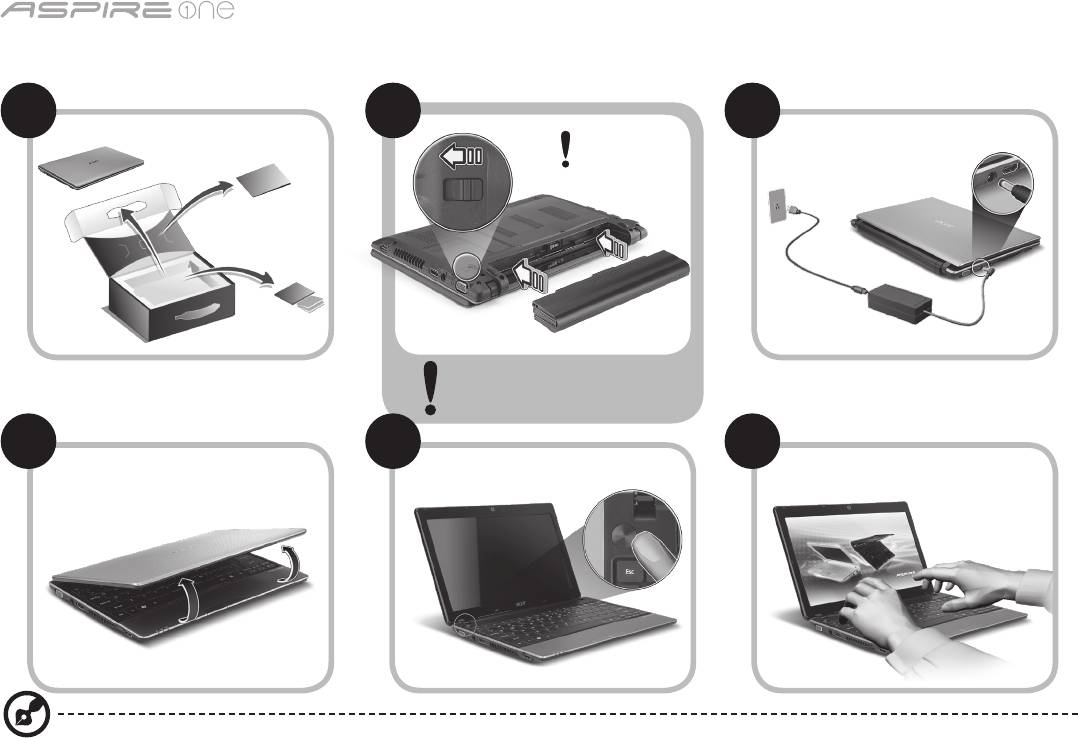
serijų
Tik pradedantiesiems
1 2
3
2-2
3-3
3-1
3-2
2-1
Įsitikinkite, kad baterija yra tinkamai
užksuota, kaip parodyta 2-2.
4 5 6
Paveiksliukus naudoti tik informacijai. Konkrečios produkto specikacijos gali skirtis.
1

Trumpa instrukcija
Dalykai, kuriuos reikia atlikti pirmiausia
Leiskite padėkoti, kad pasirinkote „Acer“ nešiojamąjį kompiuterį – tikimės Jūsų nenuvilti ir užtikrinti visus nešiojamojo kompiuterio
teikiamus privalumus.
Instrukcijos Jums
Tam, kad palengvintume Jums naudojimąsi „Acer“ kompiuteriu, parengėme kelias instrukcijas*:
Pirmoji vadinasi Trumpa instrukcija - ši informacija padės pirmosiomis kompiuterio naudojimo minutėmis.
Išsamesnės informacijos apie tai, kaip padaryti kompiuterį produktyvesniu, rasite AcerSystem User Guide. Šioje instrukcijoje išsamiai
aprašoma tokia informacija, kaip sisteminiai failai, duomenų atstatymas, kompiuterio galimybių praplėtimas ir gedimų diagnostika.
Be to, šioje instrukcijoje yra ir garantinė informaciją, bendrieji reikalavimai ir su sauga susiję įspėjimai. Ši instrukcija yra „Portable
Document Format (PDF)“ formate ir ji jau bus kompiuteryje.
Pastaba: Failo peržiūrai reikės „Adobe Reader“. Jei kompiuteryje nėra „Adobe Reader“, paspaudus ant AcerSystem User Guide
bus pirmiausiai paleistas „Adobe Reader“ įdiegimas. Vadovaukitės ekrane esančiomis instrukcijomis įdiegimo užbaigimui.
Instrukcijų dėl „Adobe Reader“ naudojimosi ieškokite „Help and Support“ [Žinynas ir pagalba] meniu.
* SVARBI PASTABA: Įsidėmėkite, kad čia paminėtos instrukcijos, tiek spausdintine, tiek elektronine forma yra tik
jūsų informacijai ir išskyrus kaip numatyta specinėje garantijos informacijoje, kuri yra išdėstyta AcerSystem User
Guide, joks šių instrukcijų turinys nebus laikomas jūsų įsigyto Acer gaminio pateikimu ar garantija. Acer pabrėžia, kas
neprisiima jokios atsakomybės už instrukcijose esančias klaidas.
2

serijų
Tinklo kongūracija
Ši instrukcija padės jums sukongūruoti savo LAN ir belaidžio tinklo nustatymus, kad galėtumėte prisijungti prie interneto.
LAN ryšio nustatymas
Tiesiog įkiškite LAN kabelį į eterneto (RJ-45) prievadą. Žr. „Vaizdas iš dešinės“ 6 p., kad nustatytumėte eterneto prievado vietą.
Belaidžio ryšio nustatymas
1. Paspauskite <Fn> + <F3>, kad atidarytumėte ryšių valdymo priemonę. Čia galite įjungti belaidį ryšį spustelėdami raudoną mygtuką
prie belaidžio ryšio ženklo.
Pastaba: 3G ir „Bluetooth“ taip pat galima pasiekti per ryšių valdymo priemonę. Ryšių įrenginiai skiriasi priklausomai nuo modelio.
2. Spustelėkite piktogramą ant sistemos užduočių juostos ir pasirinkite belaidės prieigos tašką, prie kurio norite jungtis.
3G SIM kortelės įdėjimas (tik tam tikriems modeliams)
Išimkite bateriją ir atidžiai įdėkite 3G SIM kortelę į 3G SIM kortelės lizdą. Žr. „Vaizdai iš galo ir apačios“ 6 p., kad nustatytumėte 3G
SIM kortelės lizdo vietą.
3

Trumpa instrukcija
Vaizdas iš viršaus
Ekskursija po jūsų
# Piktograma Objektas Aprašymas
Aspire One
1
Acer Crystal Eye
Interneto kamera vaizdinei komunikacija
interneto kamera
(kongūravimo tvarka gali kisti priklausomai nuo
Atlikus kompiuterio sąranką kaip parodyta dalyje
modelio).
Pradedantiesiems, leiskite jus supažindinti su jūsų
2
Mikrofonas Vidinis mikrofonas garso įrašymui.
naujuoju Acer nešiojamuoju kompiuteriu.
3
Ekranas Taip pat vadinamas skystųjų kristalų ekranu (angl.
Liquid-Crystal Display (LCD)), jame pateikiamas
kompiuterio rodomas vaizdas (kongūravimo
tvarka gali kisti priklausomai nuo modelio).
4
Energijos
Įjungia ir išjungia kompiuterį.
mygtukas
5
Klaviatūra Skirta duomenų įvedimui į kompiuterį.
6
Maitinimo
Nurodo kompiuterio energijos sistemos būklę.
indikatorius
1
7
Baterijos
Nurodo kompiuterio baterijos būklę.
indikatorius
1
1. Įkraunama: Kraunantis baterijai lemputė dega
gintaro spalva.
2. Pilnai pakrauta: Dirbant iš kintamos srovės
(AC) tinklo lemputė dega mėlynai.
8
Komunikacijos
Rodo 3G / belaidžio LAN ryšio būseną.
indikatorius
1
Dega mėlyna
Dega oranžinė
Nedega
lemputė
lemputė
3G įjungtas/
WiFi įjungtas
3G išjungtas/
3G išjungtas/
3G įjungtas/
WiFi įjungtas
WiFi išjungtas
WiFi išjungtas
9
Pelės klavišai
Kairysis ir dešinysis klavišai veikia kaip kairysis ir
(kairysis ir
dešinysis pelės mygtukai.
dešinysis)
10
Liečiamasis
Lietimui jautrus įrenginys, veikiantis kaip
laukelis
kompiuterio pelė.
11
Atrama delnui Patogi atramos vieta jūsų rankoms naudojimosi
kompiuteriu metu.
12
HDD indikatorius Nurodo ar kietasis diskas yra naudojamas
(į jį rašoma ar skaitoma).
„Num Lock“ Dega kai yra aktyvuotas „Num Lock“ klavišas.
„Caps Lock“ Dega kai yra aktyvuotas „Caps Lock“ klavišas.
1. Priekinio pulto indikatoriai matomi ne tada, kai kompiuterio viršus yra uždarytas.
4
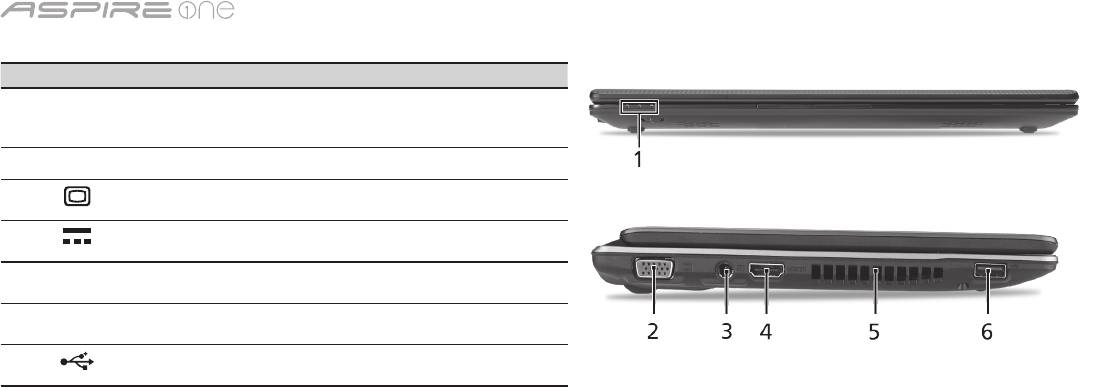
serijų
Uždaryto kompiuterio vaizdas iš priekio
# Piktograma Objektas Aprašymas
1
Būsenos
Šviesos diodai (LED), užsidegantys,
indikatoriai
kad parodytų kompiuterio funkcijų ir
komponentų būseną.
Vaizdas iš kairės
2
Išorinio ekrano
Skirtas prijungti papildomą monitorių
(VGA) lizdas
(pvz. išorinį monitorių, LCD projektorių).
3
Nuolatinės srovės
Skirtas prijungti kintamos srovės (AC)
(DC) kištuko lizdas
adapteriui.
4
HDMI HDMI lizdas Skirtas pajungti didelės raiškos
skaitmeniniams vaizdo prietaisams.
5
Ventiliacijos angos Neleidžia kompiuteriui perkaisti net ir po
ilgo naudojimo.
6
USB 2.0 lizdas Skirtas USB 2.0 įrenginiams
(pvz., USB pelė, USB kamera) prijungti.
5

Trumpa instrukcija
Vaizdas iš dešinės
# Piktograma Objektas Aprašymas
7
„Multi-in-1“ atminties
Skaito Secure Digital (SD),
kortelių skaitytuvas
MultiMediaCard (MMC), Memory Stick
(MS), Memory Stick PRO (MS PRO),
xD-Picture Card (xD) tipų atminties
korteles.
Pastaba: Spauskite norėdami įdėti/išimti
kortelę. Vienu metu galima naudotis tik
viena kortele.
8
Mikrofono kištuko lizdas Skirtas prijungti išorinį mikrofoną.
Ausinių/garsiakalbio/
Skirtas išoriniams linijiniams audio
linijinio išėjimo kištukas,
prietaisams prijungti (pvz. garsiakalbiams,
palaikantis S/PDIF
ausinėms).
9
USB 2.0 lizdas Skirtas USB 2.0 įrenginiams (pvz., USB
pelė) prijungti.
10
Kensington spynos lizdas Skirtas užksuoti Kensington tipo
kompiuterio užraktui.
11
Ethernet (RJ-45) lizdas Skirtas prisijungti prie Ethernet
10/100/1000 tipo tinklo.
Vaizdai iš galo ir apačios
12
Baterijos lizdas Skirtas montuoti kompiuterio baterijai.
13
Baterijos ksatorius Atpalaiduoja baterijos ksavimą, leidžia
ją išimti.
14
Kietųjų diskų lizdas Montuojamas kietasis diskas (įtvirtintas
varžtais).
Operatyviosios atminties
Montuojama pagrindinė kompiuterio
lizdas
atmintis.
15
Ventiliacijos angos ir
Neleidžia kompiuteriui perkaisti net ir po
aušintuvas
ilgo naudojimo.
Pastaba: Neuždenkite ir neužblokuokite
ventiliatoriaus ertmės.
16
Baterijos užraktas Fiksuoja įdėtą bateriją darbinėje padėtyje.
6

serijų
Aplinka
Temperatūra:
Darbinė: nuo 5°C iki 35°C
Saugojimo: nuo -20°C iki 65°C
Drėgmė (be kondensacijos):
Darbinė: nuo 20% iki 80%
Saugojimo: nuo 20% iki 80%
7

Σειρά
Γρήγορος οδηγός

Σειρά
© 2010 Με επιφύλαξη κάθε νόμιμου δικαιώματος
Γρήγορος οδηγός σειράς Aspire One
Αρχική Έκδοση: 04/2010
Φορητό PC Σειρά Aspire One
Αριθμός Μοντέλου: __________________________
Σειριακός Αριθμός: __________________________
Ημερομηνία αγοράς: _________________________
Τόπος Αγοράς: _____________________________

Γρήγορος οδηγός
Federal Communications Commission
Declaration of Conformity
This device complies with Part 15 of the FCC Rules. Operation is subject to the following two conditions: (1) this device may not
cause harmful interference, and (2) this device must accept any interference received, including interference that may cause
undesired operation.
The following local Manufacturer / Importer is responsible for this declaration:
Product name: Notebook PC
Brand: Acer
Model number: MS2298
Machine type: AO 721 series
Name of Responsible Party: Acer America Corporation
Address of responsible party: 333 West San Carlos St., San Jose
CA 95110, U. S. A.
Contact person: Acer Representative
Phone No.: 1-254-298-4000
Fax No.: 1-254-298-4147
April 30, 2010

Σειρά
• Themaximumconcentrationvaluesoftherestrictedsubstancesbyweightinhomogenousmaterialare:
CE Declaration of Conformity
Lead
0.1%
Polybrominated Biphenyls (PBB’s)
0.1%
We,
Mercury
0.1%
Polybrominated Diphenyl Ethers (PBDE’s)
0.1%
Acer Incorporated
Hexavalent Chromium
0.1%
Cadmium
0.01%
8F, 88, Sec. 1, Hsin Tai Wu Rd., Hsichih, Taipei Hsien 221, Taiwan
Directive 2009/125/EC with regard to establishing a framework for the setting of ecodesign requirements for energy-related
product.
Contact Person: Mr. Easy Lai, e-mail:easy_lai@acer.com.tw
R&TTE Directive 1999/5/EC as attested by conformity with the following harmonized standard:
And,
• Article3.1(a)HealthandSafety
Acer Europe SA
- EN60950-1
Via Cantonale, Centro Galleria 2 6928 Manno Switzerland
- EN62311
Hereby declare that:
• Article3.1(b)EMC
Product: Notebook Computer
- EN301 489-1
Trade Name: Acer
- EN301 489-3 (Applicable to non-bluetooth wireless keyboard mouse set).
Model Number: MS2298
- EN301 489-7
Machine Type: AO721 series
- EN301 489-17
Is compliant with the essential requirements and other relevant provisions of the following EC directives, and that all the
- EN301 489-24
necessary steps have been taken and are in force to assure that production units of the same product will continue comply with
• Article3.2SpectrumUsages
the requirements.
- EN300 440-2 (Applicable to non-bluetooth wireless keyboard mouse set).
EMC Directive 2004/108/EC as attested by conformity with the following harmonized standards:
- EN300 328
• EN55022,AS/NZSCISPR22,ClassB
- EN301 511
• EN55024
- EN301 893 (Applicable to 5GHz high performance RLAN).
• EN61000-3-2ClassD
- EN301 908-1
• EN61000-3-3
- EN301 908-2
Year to begin affixing CE marking 2010.
Low Voltage Directive 2006/95/EC as attested by conformity with the following harmonized standard:
• EN60950-1
Apr. 30, 2010
Council Decision 98/482/EC (CTR21):
(Applicable to product with pan- European single terminal connection to the Public Switched Telephone Network (PSTN).)
Date
Easy Lai /Manager
RoHS Directive 2002/95/EC on the Restriction of the Use of certain Hazardous Substances in Electrical and Electronic Equipment
Regulation Center, Acer Inc.
Γρήγορος οδηγός
• Themaximumconcentrationvaluesoftherestrictedsubstancesbyweightinhomogenousmaterialare:
CE Declaration of Conformity
Lead
0.1%
Polybrominated Biphenyls (PBB’s)
0.1%
We,
Mercury
0.1%
Polybrominated Diphenyl Ethers (PBDE’s)
0.1%
Acer Incorporated
Hexavalent Chromium
0.1%
Cadmium
0.01%
8F, 88, Sec. 1, Hsin Tai Wu Rd., Hsichih, Taipei Hsien 221, Taiwan
Directive 2009/125/EC with regard to establishing a framework for the setting of ecodesign requirements for energy-related
product.
Contact Person: Mr. Easy Lai, e-mail:easy_lai@acer.com.tw
R&TTE Directive 1999/5/EC as attested by conformity with the following harmonized standard:
And,
• Article3.1(a)HealthandSafety
Acer Europe SA
- EN60950-1
Via Cantonale, Centro Galleria 2 6928 Manno Switzerland
- EN62311
Hereby declare that:
• Article3.1(b)EMC
Product: Notebook Computer
- EN301 489-1
Trade Name: Acer
- EN301 489-3 (Applicable to non-bluetooth wireless keyboard mouse set).
Model Number: MS2298
- EN301 489-7
Machine Type: AO721 series
- EN301 489-17
Is compliant with the essential requirements and other relevant provisions of the following EC directives, and that all the
- EN301 489-24
necessary steps have been taken and are in force to assure that production units of the same product will continue comply with
• Article3.2SpectrumUsages
the requirements.
- EN300 440-2 (Applicable to non-bluetooth wireless keyboard mouse set).
EMC Directive 2004/108/EC as attested by conformity with the following harmonized standards:
- EN300 328
• EN55022,AS/NZSCISPR22,ClassB
- EN301 511
• EN55024
- EN301 893 (Applicable to 5GHz high performance RLAN).
• EN61000-3-2ClassD
- EN301 908-1
• EN61000-3-3
- EN301 908-2
Year to begin affixing CE marking 2010.
Low Voltage Directive 2006/95/EC as attested by conformity with the following harmonized standard:
• EN60950-1
Apr. 30, 2010
Council Decision 98/482/EC (CTR21):
(Applicable to product with pan- European single terminal connection to the Public Switched Telephone Network (PSTN).)
Date
Easy Lai /Manager
RoHS Directive 2002/95/EC on the Restriction of the Use of certain Hazardous Substances in Electrical and Electronic Equipment
Regulation Center, Acer Inc.
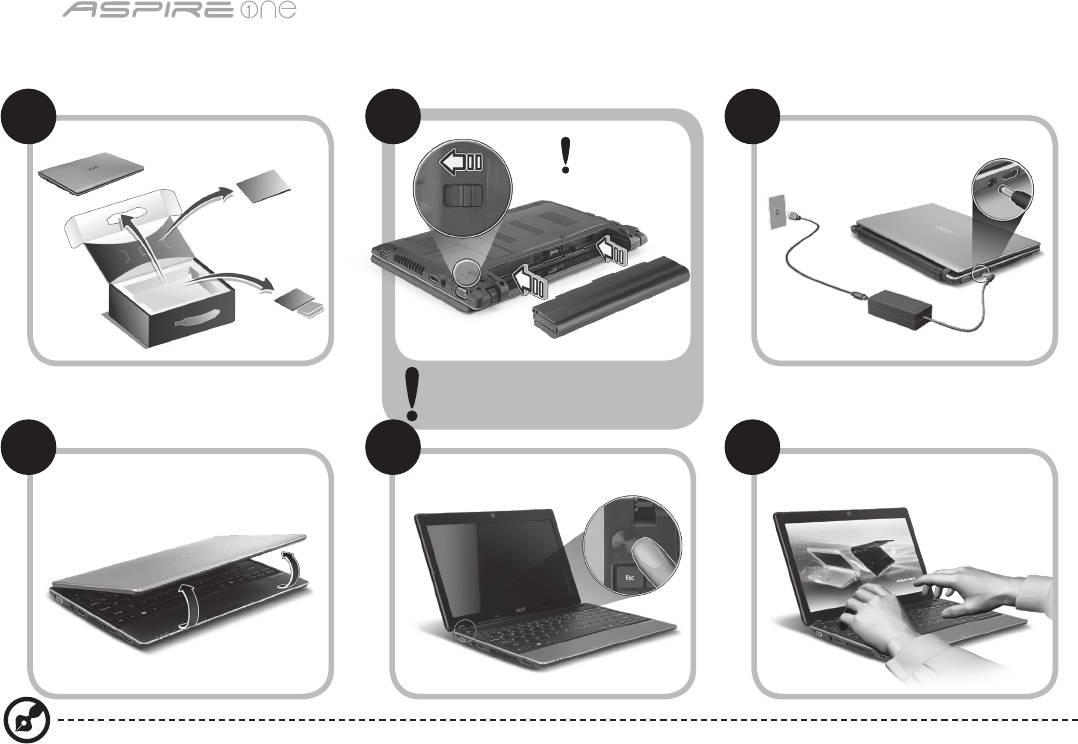
Σειρά
1
Μόνο για αρχάριους
1 2
3
2-2
3-3
3-1
3-2
2-1
Φροντίστε η μπαταρία να είναι
κατάλληλα ασφαλισμένη στη θέση της,
όπως υποδεικνύεται στην εικόνα 2-2.
4 5 6
Οι απεικονίσεις είναι µόνο για αναφορά. Οι πραγµατικές προδιαγραφές των προϊόντων µπορεί να διαφοροποιηθούν.

Γρήγορος οδηγός
2
Πρώτα από όλα
Θα επιθυμούσαμε να σας ευχαριστήσουμε που επιλέξατε το φορητό υπολογιστή της Acer με σκοπό την αντιμετώπιση των αναγκών σας
για φορητό υπολογιστή.
Οι οδηγοί σας
Για να σας διευκολύνουμε στη χρήση του φορητού υπολογιστή της Acer, έχουμε σχεδιάσει ένα σετ εγχειριδίων χρήσης*:
Πρώτα απ’ όλα, ο Γρήγορος Οδηγός Χρήσης σας διευκολύνει να ξεκινήσετε τη ρύθμιση του υπολογιστή σας.
Για περισσότερες πληροφορίες όσον αφορά τον τρόπο με τον οποίο ο υπολογιστής μπορεί να σας βοηθήσει να αυξήσετε την
παραγωγικότητά σας, ανατρέξτε στον AcerSystem User Guide. Ο οδηγός αυτός περιλαμβάνει λεπτομερείς πληροφορίες σχετικά με
θέματα όπως τα βοηθητικά προγράμματα του συστήματος, την επαναφορά δεδομένων, τις επιλογές επέκτασης και την αντιμετώπιση
προβλημάτων. Επιπλέον, περιλαμβάνει πληροφορίες σχετικά με την εγγύηση καλής λειτουργίας και τους γενικούς κανονισμούς όπως
και τις προειδοποιήσεις ασφαλείας για το φορητό υπολογιστή. Διατίθεται σε μορφή Portable Document Format (PDF) και έχει προ-
εγκατασταθεί στο φορητό υπολογιστή σας.
Σημείωση: Για την προβολή του αρχείου απαιτείται το πρόγραμμα Adobe Reader. Εάν το Adobe Reader δεν είναι εγκατεστημένο
στον υπολογιστή σας, κάνοντας κλικ στο AcerSystem User Guide, θα πραγματοποιηθεί εκτέλεση του προγράμματος
εγκατάστασης του Adobe Reader πρώτα. Ακολουθήστε τις οδηγίες στην οθόνη για να ολοκληρώσετε την εγκατάσταση. Για
οδηγίες σχετικά με το πώς θα χρησιμοποιήσετε το πρόγραμμα Adobe Reader, ανατρέξτε στο μενού Βοήθεια και Υποστήριξη.
* ΣΗΜΑΝΤΙΚΗ ΑΝΑΚΟΙΝΩΣΗ: Παρακαλούμε σημειώστε ότι οι οδηγοί που αναφέρονται στο παρόν, σε έντυπη ή
ηλεκτρονική μορφή, παρατίθενται για λόγους παραπομπής και μόνο και, εκτός αν ορίζεται διαφορετικά στις ειδικές
πληροφορίες εγγύησης που περιλαμβάνονται στο Οδηγός Χρήστη AcerSystem, τίποτα που περιλαμβάνεται σε αυτούς
τους οδηγούς δεν θα αποτελεί δήλωση ή εγγύηση της Acer σχετικά με το προϊόν που αγοράσατε. Η Acer αποποιείται
ρητά τυχόν ευθύνης σχετικά με σφάλματα που περιλαμβάνονται στους οδηγούς.
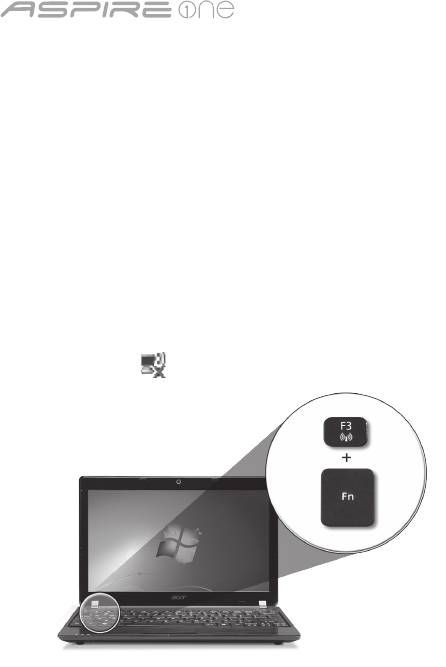
Σειρά
3
Ρύθμιση παραμέτρων δικτύου
Ο οδηγός αυτός θα σας βοηθήσει στον καθορισμό των παραμέτρων LAN και των ρυθμίσεων ασύρματου δικτύου, ώστε να
διευκολυνθείτε στη σύνδεσή σας στο Internet.
Εγκατάσταση σύνδεσης LAN
Απλά συνδέστε το καλώδιο LAN στη θύρα Ethernet (RJ-45). Παρακαλούµε ανατρέξτε στο "Δεξιά όψη" στη σελίδα 6 για τη θέση της
θύρας Ethernet.
Εγκατάσταση ασύρματης σύνδεσης
1. Πατήστε <Fn> + <F3> για πρόσβαση στη διαχείριση επικοινωνίας. Εδώ μπορείτε να ενεργοποιήσετε τη σύνδεση Wi-Fi κάνοντας κλικ
στο κόκκινο κουμπί δίπλα στο Wi-Fi.
Σημείωση: Η πρόσβαση στις λειτουργίες 3G και Bluetooth είναι εφικτή και από τη διαχείριση επικοινωνίας. Οι συσκευές επικοινωνίας
διαφέρουν ανάλογα με το μοντέλο.
2. Κάντε κλικ στο εικονίδιο στο συρτάρι του συστήματος και επιλέξτε το σημείο ασύρματης πρόσβασης στο οποίο επιθυμείτε να συνδεθείτε.
Εισαγωγή κάρτας SIM 3G (ορισμένα μοντέλα μόνο)
Αφαιρέστε τη μπαταρία και τοποθετήστε με προσοχή μια κάρτα SIM 3G στην υποδοχή κάρτας SIM 3G. Παρακαλούμε ανατρέξτε στην
ενότητα "Πίσω όψη & Άποψη βάσης" στη σελίδα 6 για τη θέση της υποδοχής κάρτας SIM 3G.
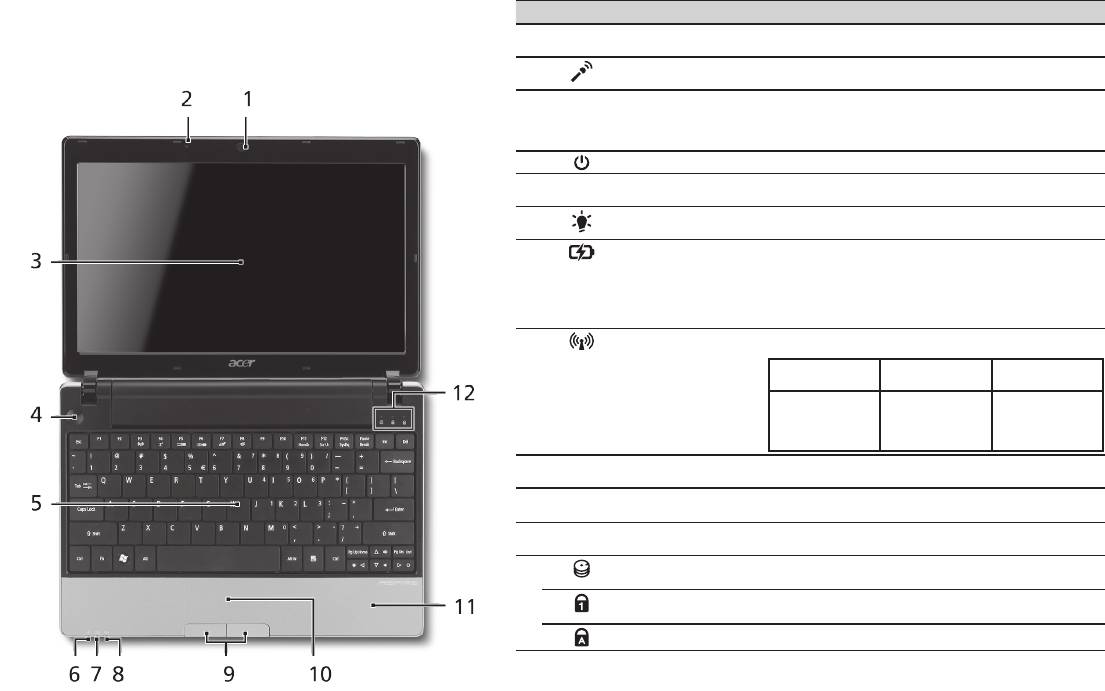
Γρήγορος οδηγός
4
Κάτοψη
Ξενάγηση στο Aspire One
# Εικονίδιο Στοιχείο Περιγραφή
Μετά από την εγκατάσταση του υπολογιστή όπως απεικονίζεται
1
Κάμερα διαδικτύου
Κάμερα διαδικτύου για επικοινωνία βίντεο (Η σύνθεση
Acer Crystal Eye
ενδέχεται να ποικίλλει ανάλογα με το μοντέλο).
στην ενότητα Μόνο για αρχάριους, θα σας περιγράψουµε τα
2
Μικρόφωνο Εσωτερικό μικρόφωνο για στερεοφωνικές
διάφορα µέρη του νέου σας φορητού υπολογιστή Acer.
ηχογραφήσεις.
3
Οθόνη απεικόνισης Αποκαλούμενη επίσης Οθόνη Υγρών Κρυστάλλων
(Liquid-Crystal Display; LCD), απεικονίζει την έξοδο
του υπολογιστή (Η σύνθεση ενδέχεται να ποικίλλει
ανάλογα με το μοντέλο).
4
Κουμπί τροφοδοσίας Ενεργοποιεί και απενεργοποιεί τον υπολογιστή.
5
Πληκτρολόγιο Χρησιμοποιείται για την καταχώρηση δεδομένων στον
υπολογιστή.
6
Ενδείκτης
Δηλώνει την κατάσταση τροφοδοσίας του υπολογιστή.
1
τροφοδοσίας
1
7
Ενδείκτης μπαταρίας
Δηλώνει την κατάσταση της μπαταρίας του υπολογιστή.
1. Φόρτιση: Η ενδεικτική λυχνία κατά τη φόρτιση της
μπαταρίας μετατρέπεται σε πορτοκαλί.
2. Πλήρως φορτισμένη: Η ενδεικτική λυχνία
μετατρέπεται σε μπλε όταν βρίσκεται σε λειτουργία
εναλλασσόμενου ρεύματος (AC).
8
Ενδεικτική λυχνία
Δηλώνει την κατάσταση της επικοινωνίας ασύρματου
1
επικοινωνίας
LAN/3G.
Μπλε λυχνία
Πορτοκαλί λυχνία
Όχι αναμμένη
αναμμένη
αναμμένη
3G ενεργό/
WiFi ενεργό
3G ανενεργό/
3G ανενεργό/
3G ενεργό/
WiFi ενεργό
WiFi ανενεργό
WiFi ανενεργό
9
Κουμπιά κλικ
Το κουμπιά, αριστερό και δεξιό, λειτουργούν σαν τα
(αριστερό και δεξιό)
κουμπιά, αριστερό και δεξιό, του ποντικιού.
10
Ταμπλέτα αφής Συσκευή κατάδειξης ευαίσθητη στην αφή που
λειτουργεί ως ποντίκι υπολογιστή.
11
Στήριγμα παλάμης Άνετος χώρος στήριξης των χεριών κατά τη χρήση
του υπολογιστή.
12
Ενδείκτης HDD Δηλώνει πότε είναι ενεργοποιημένη η μονάδα του
σκληρού δίσκου.
Αριθμητικό
Ανάβει όταν ενεργοποιηθεί το Num Lock.
πληκτρολόγιο
Κεφαλαία Ανάβει όταν ενεργοποιηθεί το Caps Lock.
1. Οι ενδεικτικές λυχνίες της πρόσοψης είναι ορατές ακόμη και όταν το καπάκι του υπολογιστή
είναι κλειστό.

Σειρά
5
Πρόσοψη με το καπάκι κλειστό
# Εικονίδιο Στοιχείο Περιγραφή
1
Ενδεικτικές λυχνίες
Δίοδοι φωτοεκπομπής (LED)
κατάστασης
οι οποίες ανάβουν για να
δηλώσουν την κατάσταση των
λειτουργιών του υπολογιστή και
των διαφόρων εξαρτημάτων.
Αριστερή πλευρά
2
Θύρα εξωτερικής
Συνδέεται σε συσκευή
οθόνης απεικόνισης
απεικόνισης (π.χ. εξωτερικό
(VGA)
μόνιτορ, προβολέα LCD).
3
Τζακ εισόδου
Συνδέεται σε προσαρμογέα
συνεχούς ρεύματος
εναλλασσόμενου ρεύματος
(DC)
(AC).
4
HDMI Θύρα HDMI Υποστηρίζει συνδέσεις
ψηφιακού βίντεο υψηλής
ανάλυσης.
5
Θυρίδες εξαερισμού Διατηρούν τον υπολογιστή σε
χαμηλή θερμοκρασία, ακόμη
και ύστερα από παρατεταμένη
χρήση.
6
Θύρα USB 2.0 Συνδέεται σε συσκευές USB
2.0 (π.χ. ποντίκι USB, κάμερα
USB).
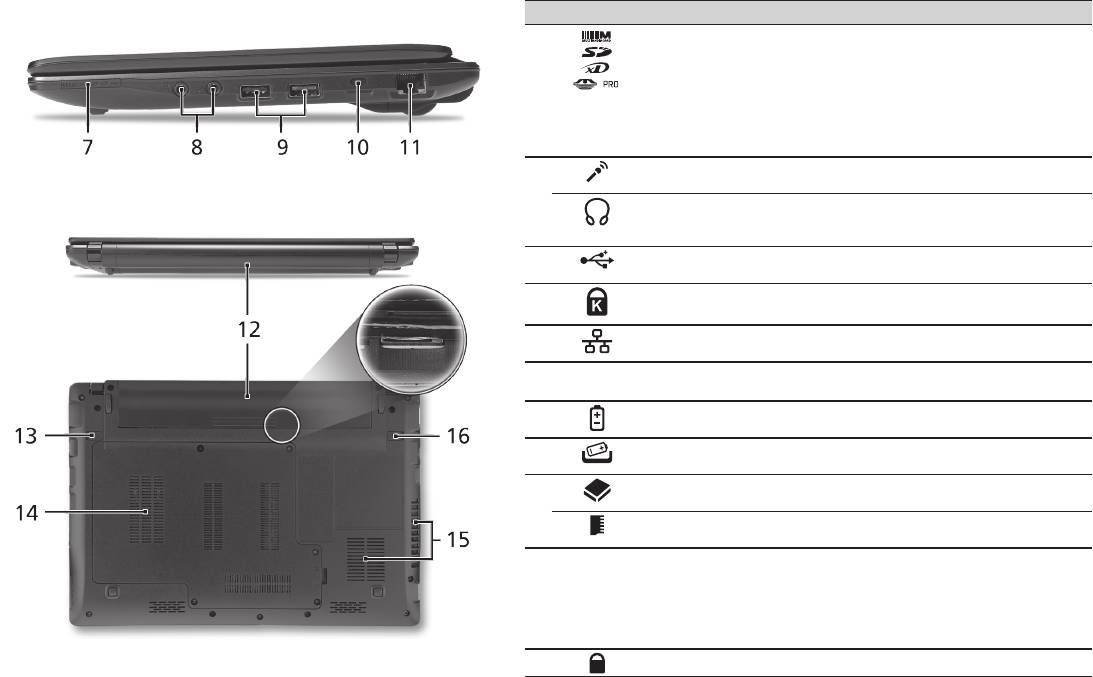
Γρήγορος οδηγός
6
Δεξιά πλευρά
# Εικονίδιο Στοιχείο Περιγραφή
7
Αναγνώστης καρτών
Δέχεται Secure Digital (SD),
πολλών-σε-1
MultiMediaCard (MMC), Memory
Stick (MS), Memory Stick PRO (MS
PRO)), και xD-Picture Card (xD).
Σημείωση: Πιέστε για αφαίρεση/
τοποθέτηση της κάρτας. Δυνατότητα
λειτουργίας μόνο μίας κάρτας κάθε
φορά.
8
Τζακ εισόδου
Δέχεται εισόδους από εξωτερικά
μικροφώνου
μικρόφωνα.
Τζακ ακουστικών/
Συνδέεται σε συσκευές με γραμμή
ηχείων/γραμμής εξόδου
εξόδου ακουστικού σήματος
με υποστήριξη S/PDIF
(π.χ. ηχεία, ακουστικά).
9
Θύρα USB 2.0 Συνδέεται σε συσκευές USB 2.0
(π.χ. ποντίκι USB).
10
Υποδοχή λουκέτου
Συνδέεται σε λουκέτο ασφαλείας
τύπου Kensington
υπολογιστή συμβατό με Kensington.
11
Θύρα Ethernet (RJ-45) Συνδέεται σε δίκτυο Ethernet
10/100/1000.
Πίσω όψη & Άποψη βάσης
12
Φατνίο μπαταρίας Περιέχει το πακέτο μπαταρίας του
υπολογιστή.
13
Μάνδαλο απασφάλισης
Απασφαλίζει τη μπαταρία για
μπαταρίας
αφαίρεση.
14
Φατνίο σκληρού δίσκου Περιέχει το σκληρό δίσκο του
υπολογιστή (ασφαλίζεται με βίδες).
Διαμέρισμα μνήμης Περιέχει την κύρια μνήμη του
υπολογιστή.
15
Θυρίδες εξαερισμού και
Διατηρούν τον υπολογιστή σε χαμηλή
ανεμιστήρας ψύξης
θερμοκρασία, ακόμη και ύστερα από
παρατεταμένη χρήση.
Σημείωση: Μην καλύπτετε ή
παρεμποδίζετε το άνοιγμα του
ανεμιστήρα.
16
Λουκέτο μπαταρίας Ασφαλίζει τη μπαταρία στη θέση της.

Σειρά
Περιβάλλον
Θερμοκρασία:
Λειτουργίας: 5°C έως 35°C
Μη λειτουργίας: -20°C έως 65°C
Υγρασία (µη συμπυκνούμενη):
Λειτουργίας: 20% έως 80%
Μη λειτουργίας: 20% έως 80%
7

Serisi
Hızlı Başlama Kılavuzu

Serisi
© 2010 Tüm Hakları Saklıdır
Aspire One Serisi Hızlı Başlama Kılavuzu
Orijinal İhraç: 04/2010
Aspire One Serisi Dizüstü Bilgisayarı
Model numarası: ____________________________
Seri Numarası: _____________________________
Satın alma tarihi: ____________________________
Satın alma yeri: _____________________________

Hızlı Başlama Kılavuzu
Federal Communications Commission
Declaration of Conformity
This device complies with Part 15 of the FCC Rules. Operation is subject to the following two conditions: (1) this device may not
cause harmful interference, and (2) this device must accept any interference received, including interference that may cause
undesired operation.
The following local Manufacturer / Importer is responsible for this declaration:
Product name: Notebook PC
Brand: Acer
Model number: MS2298
Machine type: AO 721 series
Name of Responsible Party: Acer America Corporation
Address of responsible party: 333 West San Carlos St., San Jose
CA 95110, U. S. A.
Contact person: Acer Representative
Phone No.: 1-254-298-4000
Fax No.: 1-254-298-4147
April 30, 2010

Serisi
• Themaximumconcentrationvaluesoftherestrictedsubstancesbyweightinhomogenousmaterialare:
CE Declaration of Conformity
Lead
0.1%
Polybrominated Biphenyls (PBB’s)
0.1%
We,
Mercury
0.1%
Polybrominated Diphenyl Ethers (PBDE’s)
0.1%
Acer Incorporated
Hexavalent Chromium
0.1%
Cadmium
0.01%
8F, 88, Sec. 1, Hsin Tai Wu Rd., Hsichih, Taipei Hsien 221, Taiwan
Directive 2009/125/EC with regard to establishing a framework for the setting of ecodesign requirements for energy-related
product.
Contact Person: Mr. Easy Lai, e-mail:easy_lai@acer.com.tw
R&TTE Directive 1999/5/EC as attested by conformity with the following harmonized standard:
And,
• Article3.1(a)HealthandSafety
Acer Europe SA
- EN60950-1
Via Cantonale, Centro Galleria 2 6928 Manno Switzerland
- EN62311
Hereby declare that:
• Article3.1(b)EMC
Product: Notebook Computer
- EN301 489-1
Trade Name: Acer
- EN301 489-3 (Applicable to non-bluetooth wireless keyboard mouse set).
Model Number: MS2298
- EN301 489-7
Machine Type: AO721 series
- EN301 489-17
Is compliant with the essential requirements and other relevant provisions of the following EC directives, and that all the
- EN301 489-24
necessary steps have been taken and are in force to assure that production units of the same product will continue comply with
• Article3.2SpectrumUsages
the requirements.
- EN300 440-2 (Applicable to non-bluetooth wireless keyboard mouse set).
EMC Directive 2004/108/EC as attested by conformity with the following harmonized standards:
- EN300 328
• EN55022,AS/NZSCISPR22,ClassB
- EN301 511
• EN55024
- EN301 893 (Applicable to 5GHz high performance RLAN).
• EN61000-3-2ClassD
- EN301 908-1
• EN61000-3-3
- EN301 908-2
Year to begin affixing CE marking 2010.
Low Voltage Directive 2006/95/EC as attested by conformity with the following harmonized standard:
• EN60950-1
Apr. 30, 2010
Council Decision 98/482/EC (CTR21):
(Applicable to product with pan- European single terminal connection to the Public Switched Telephone Network (PSTN).)
Date
Easy Lai /Manager
RoHS Directive 2002/95/EC on the Restriction of the Use of certain Hazardous Substances in Electrical and Electronic Equipment
Regulation Center, Acer Inc.
Hızlı Başlama Kılavuzu
• Themaximumconcentrationvaluesoftherestrictedsubstancesbyweightinhomogenousmaterialare:
CE Declaration of Conformity
Lead
0.1%
Polybrominated Biphenyls (PBB’s)
0.1%
We,
Mercury
0.1%
Polybrominated Diphenyl Ethers (PBDE’s)
0.1%
Acer Incorporated
Hexavalent Chromium
0.1%
Cadmium
0.01%
8F, 88, Sec. 1, Hsin Tai Wu Rd., Hsichih, Taipei Hsien 221, Taiwan
Directive 2009/125/EC with regard to establishing a framework for the setting of ecodesign requirements for energy-related
product.
Contact Person: Mr. Easy Lai, e-mail:easy_lai@acer.com.tw
R&TTE Directive 1999/5/EC as attested by conformity with the following harmonized standard:
And,
• Article3.1(a)HealthandSafety
Acer Europe SA
- EN60950-1
Via Cantonale, Centro Galleria 2 6928 Manno Switzerland
- EN62311
Hereby declare that:
• Article3.1(b)EMC
Product: Notebook Computer
- EN301 489-1
Trade Name: Acer
- EN301 489-3 (Applicable to non-bluetooth wireless keyboard mouse set).
Model Number: MS2298
- EN301 489-7
Machine Type: AO721 series
- EN301 489-17
Is compliant with the essential requirements and other relevant provisions of the following EC directives, and that all the
- EN301 489-24
necessary steps have been taken and are in force to assure that production units of the same product will continue comply with
• Article3.2SpectrumUsages
the requirements.
- EN300 440-2 (Applicable to non-bluetooth wireless keyboard mouse set).
EMC Directive 2004/108/EC as attested by conformity with the following harmonized standards:
- EN300 328
• EN55022,AS/NZSCISPR22,ClassB
- EN301 511
• EN55024
- EN301 893 (Applicable to 5GHz high performance RLAN).
• EN61000-3-2ClassD
- EN301 908-1
• EN61000-3-3
- EN301 908-2
Year to begin affixing CE marking 2010.
Low Voltage Directive 2006/95/EC as attested by conformity with the following harmonized standard:
• EN60950-1
Apr. 30, 2010
Council Decision 98/482/EC (CTR21):
(Applicable to product with pan- European single terminal connection to the Public Switched Telephone Network (PSTN).)
Date
Easy Lai /Manager
RoHS Directive 2002/95/EC on the Restriction of the Use of certain Hazardous Substances in Electrical and Electronic Equipment
Regulation Center, Acer Inc.
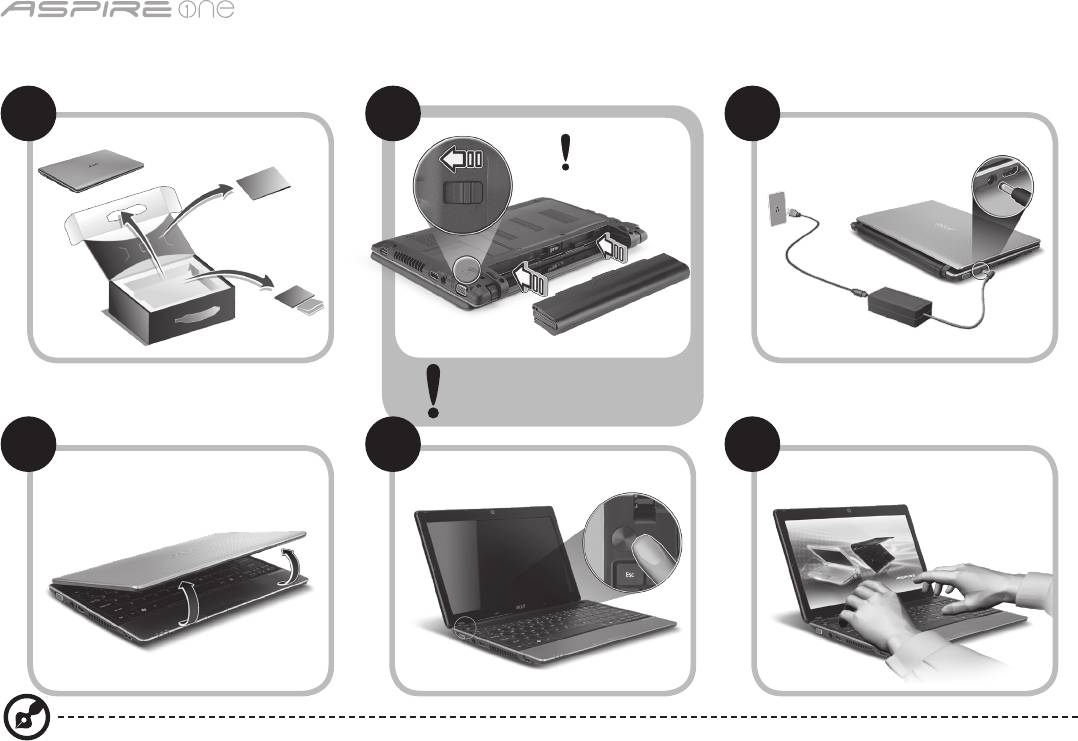
Serisi
1
Başlayanlar için
1 2
3
2-2
3-3
3-1
3-2
2-1
2-2’de gösterildiği gibi pilin yerine
oturmuş olduğundan emin olun.
4 5 6
Resimler yalnızca referans içindir. Gerçek ürün spesikasyonları çeşitlilik gösterebilir.

Hızlı Başlama Kılavuzu
2
İlk Yapılacaklar
Taşınabilir bilgisayar ihtiyacınızı karşılamak için Acer dizüstü bilgisayarı tercih ettiğiniz için teşekkür ederiz.
Kılavuzlarınız
Acer dizüstü bilgisayarınızı kullanırken kolaylık sağlaması amacıyla bir kaç kılavuz tasarladık*:
Hızlı Başvuru Kılavuzu, bilgisayarınızın kurulumuna başlarken size yardımcı olur.
Bilgisayarınızın üretkenliğiniz üzerindeki etkisini arttırmak için lütfen AcerSystem User Guide göz gezdirin. Bu kılavuz sistem hizmet
programları, veri düzeltme, genişletme seçenekleri ve arıza giderme üzerine detaylı bilgiler içermektedir. Buna ek olarak bilgisayarınızla
ilgili garanti bilgileri, genel kuralları ve güvenlik uyarılarını içerir. Bu, bilgisayarınıza önceden yüklenmiş şekilde PDF dosya formatında
gelmektedir.
Not: Dosyayı açabilmeniz için Adobe Reader gerekmektedir. Bilgisayarınızda Adobe Reader yüklü değilse AcerSystem User
Guide tıklayarak Adobe Reader kurulum programını çalıştırabilirsiniz. Yüklemeyi tamamlamak için ekrandaki talimatları izleyin.
Adobe Reader programını kullanma üzerinde talimatlar için Yardım ve Destek menüsüne erişin.
* ÖNEMLİ NOT: Gerek basılı gerek elektronik formatta olsun, burada adı geçen kılavuzlar sadece yol gösterme amaçlı
olup AcerSystem User Guide özel garanti bilgileri dışında Acer, satın aldığınız ürün ile ilgili kılavuz bilgileri üzerine
açıklama yapmak ya da güvence vermek sorumluluğunda değildir. Acer, bu kılavuzlarda bulunan hatalardan kaynaklı
hiçbir mesuliyeti kabul etmez.
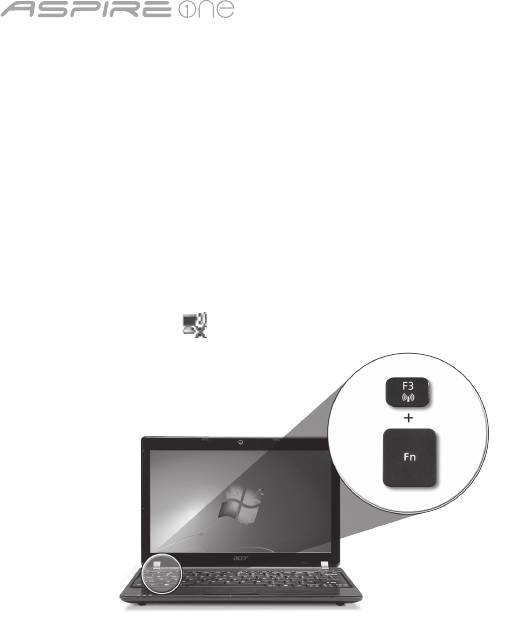
Serisi
3
Şebeke yapılandırması
Bu kılavuz İnternete bağlanabilmeniz için LAN ve kablosuz ağ ayarlarınızı yapılandırmanıza yardımcı olur.
LAN bağlantısı kurulumu
LAN kablosunu Ethernet (RJ-45) portuna takın. Ethernet portunun yeri için lütfen sayfa 6’deki “Sağ görünüm” bölümüne bakın.
Kablosuz bağlantı kurulumu
1. <Fn> + <F3> tuşlarına basarak iletişim yöneticisine giriş yapın Buradan Wi-Fi’nin aynındaki kırmızı düğmeye tıklayarak Wi-Fi
bağlantısını açabilirsiniz.
Not: 3G ve Bluetooth’a iletişim yöneticisinden de ulaşılabilir. İletişim aygıtları modele göre farklılık gösterir.
2. Sistem tepsisindeki simgesini tıklayın ve bağlantı yapmak istediğiniz kablosuz erişim noktasını seçin.
Bir 3G SIM kartı takma (sadece belli modellerde)
Pili çıkartın ve 3G SIM kartını dikkatli bir şekilde 3G SIM kartı yuvasına takın. 3G SIM kartı yuvasının yeri için lütfen sayfa 6’deki “Arka
görünüm & Taban görünümü” başlığına bakın.
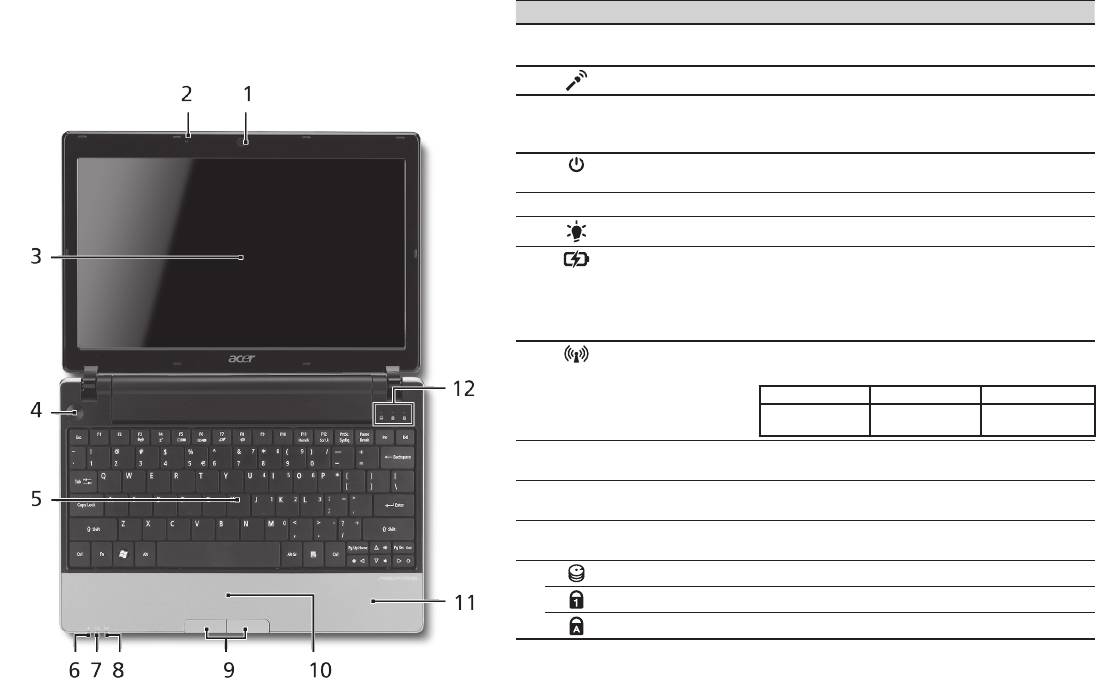
Hızlı Başlama Kılavuzu
4
Üstten görünüş
Aspire One turunuz
# Simge Öğe Açıklama
Başlayanlar için bölümünde gösterildiği gibi bilgisayarınızı
1
Acer Crystal Eye
Video iletişimi için Web kamerası (yapılandırma
ayarladıktan sonra, yeni Acer dizüstü bilgisayarınızı daha
video kamera
modellere göre farklı olabilir).
yakından tanıtalım.
2
Mikrofon Ses kaydı için dahili mikrofon.
3
Görüntü ekranı Sıvı Kristalli Görüntü (LCD) olarak da bilinir
ve bilgisayar çıktılarını gösterir (yapılandırma
modellere göre farklı olabilir).
4
Açma/kapama
Bilgisayarı açar ve kapatır.
düğmesi
5
Klavye Bilgisayarınıza veri girebilmek için.
1
6
Güç göstergesi
Bilgisayarın güç durumunu gösterir.
1
7
Batarya göstergesi
Bilgisayarın pil durumunu gösterir.
1. Şarj oluyor: Pil şarj olurken ışık kehribar
renginde yanar.
2. Tamamen şarj oldu: AC modundayken ışık
mavi yanar.
1
8
İletişim göstergesi
Kablosuz LAN/3G iletişiminin durumunu
gösterir.
Mavi ışık açık Turuncu ışık açık Yanmıyor
3G açık/WiFi açık
3G kapalı/
3G kapalı/WiFi açık
3G açık/WiFi kapalı
WiFi kapalı
9
Tuşlar (sol ve sağ) Sol ve sağ tuşlar, bilgisayar faresinin sağ ve
sol tuşları ile aynı fonksiyondadır.
10
Dokunmatik yüzey Bilgisayar faresi gibi fonksiyonu olan,
dokunmaya duyarlı işaret aygıtı.
11
Palmrest Bilgisayarı kullanırken ellerinizi destekleyen
rahat bir alan.
12
HDD göstergesi Sabit diskin etkin olduğunu gösterir.
Num Lock Num Lock etkin olduğunda yanar.
Caps Lock Caps Lock etkin olduğunda yanar.
1. Ön panel göstergeleri bilgisayar kapağı kapalı olsa bile görülebilir.

Serisi
5
Kapalı ön görünüm
# Simge Öğe Açıklama
1
Durum göstergeleri Bilgisayar fonksiyonu ve
parçalarının durumunu göstermek
için yanan Elektro Işıklı Diod (LED).
Sol görünüm
2
Harici görüntü (VGA)
Bir görüntü aygıtına bağlar
portu
(örneğin, harici monitör, LCD
projektör).
3
DC-in jakı AC adaptöre bağlanır.
4
HDMI HDMI portu Yüksek çözünürlüklü dijital video
bağlantılarını destekler.
5
Havalandırma
Bilgisayarınızın uzun kullanımlar
yuvaları
sonrası bile ısınmamasını
sağlarlar.
6
USB 2.0 portu USB 2.0 cihazlara bağlar (örneğin,
USB mouse, USB kamera).
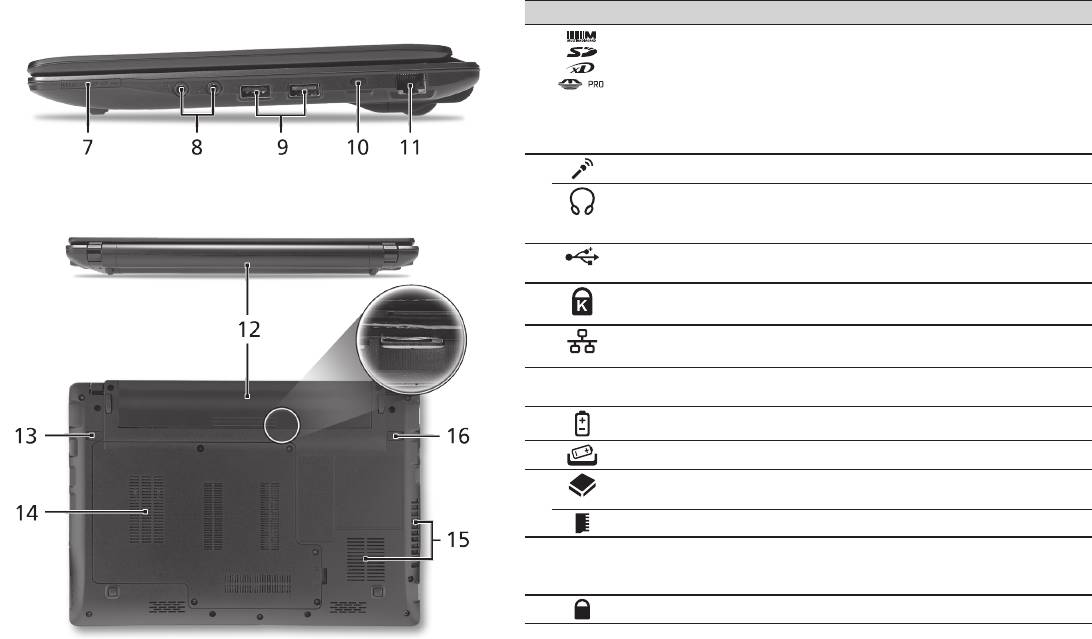
Hızlı Başlama Kılavuzu
6
Sağ görünüm
# Simge Öğe Açıklama
7
Çoklu kart okuyucu Güvenli Dijital (SD), Çoklu Ortam
Kartı(MMC), Bellek Çubuğu (MS), Bellek
Çubuğu PRO (MS PRO), xD-Görüntü
Kartı (xD)’nı kabul eder.
Not: Kartı çıkartmak/takmak için itin.
Her hangi bir zamanda sadece bir kart
çalışabilir.
8
Mikrofon-in jakı Harici mikrofon girişlerini kabul eder.
S/PDIF desteği ile
Sesli line-out cihazlarına bağlantıyı sağlar
kulaklık/hoparlör/hat
(örneğin hoparlör, kulaklık).
çıkışı jakı
9
USB 2.0 portu USB 2.0 cihazlara bağlar (örneğin, USB
mouse).
10
Kensington kilit yuvası Kensington-uyumlu bilgisayar güvenlik
kilidine bağlar.
11
Ethernet (RJ-45) portu Ethernet10/100/1000-temelli ağa bağlar.
Arka görünüm & Taban görünümü
12
Pil bölmesi Bilgisayar pil takımının yeridir.
13
Pil çıkarma mandalı Eskiyen pilleri çıkarmanız içindir.
14
Sabit disk bölmesi Bilgisayarın sabit diskini barındırır
(vidalarla sabitlenmiştir).
Bellek bölmesi Bilgisayarın ana hafızasını barındırır.
15
Havalandırma delikleri
Bilgisayarınızın uzun kullanımlar sonrası
ve soğutma fanı
bile ısınmamasını sağlarlar.
Not: Fanın girişini tıkamayın.
16
Pil kilidi Pil yerine oturduğunda kilitler.

Serisi
Ortam
Sıcaklık:
Çalışma: 5°C ila 35°C arasında
Çalışmadığı durumda: -20°C ila 65°C arasında
Nem (yoğunlaşmayan):
Çalışma: 20% ila 80% arasında
Çalışmadığı durumda: 20% ila 80% arasında
7

シリーズ
クイックガイド

シリーズ
© 2010 All Rights Reserved
Aspire One
シリーズ クイックガイド
初版:04/2010
Aspire One
シリーズノートブックコンピューター
モデル番号: __________________________________________________________
シリアル番号: ________________________________________________________
購入日: ________________________________________________________________
購入場所: _____________________________________________________________

クイックガイド
Federal Communications Commission
Declaration of Conformity
This device complies with Part 15 of the FCC Rules. Operation is subject to the following two conditions: (1) this device may not
cause harmful interference, and (2) this device must accept any interference received, including interference that may cause
undesired operation.
The following local Manufacturer / Importer is responsible for this declaration:
Product name: Notebook PC
Brand: Acer
Model number: MS2298
Machine type: AO 721 series
Name of Responsible Party: Acer America Corporation
Address of responsible party: 333 West San Carlos St., San Jose
CA 95110, U. S. A.
Contact person: Acer Representative
Phone No.: 1-254-298-4000
Fax No.: 1-254-298-4147
April 30, 2010

シリーズ
• Themaximumconcentrationvaluesoftherestrictedsubstancesbyweightinhomogenousmaterialare:
CE Declaration of Conformity
Lead
0.1%
Polybrominated Biphenyls (PBB’s)
0.1%
Mercury
Polybrominated Diphenyl Ethers (PBDE’s)
We,
0.1%
0.1%
Hexavalent Chromium
0.1%
Cadmium
0.01%
Acer Incorporated
8F, 88, Sec. 1, Hsin Tai Wu Rd., Hsichih, Taipei Hsien 221, Taiwan
Directive 2009/125/EC with regard to establishing a framework for the setting of ecodesign requirements for energy-related
Contact Person: Mr. Easy Lai, e-mail:easy_lai@acer.com.tw
product.
And,
R&TTE Directive 1999/5/EC as attested by conformity with the following harmonized standard:
Acer Europe SA
• Article3.1(a)HealthandSafety
Via Cantonale, Centro Galleria 2 6928 Manno Switzerland
- EN60950-1
Hereby declare that:
- EN62311
• Article3.1(b)EMC
Product: Notebook Computer
- EN301 489-1
Trade Name: Acer
- EN301 489-3 (Applicable to non-bluetooth wireless keyboard mouse set).
Model Number: MS2298
- EN301 489-7
Machine Type: AO721 series
- EN301 489-17
Is compliant with the essential requirements and other relevant provisions of the following EC directives, and that all the
- EN301 489-24
necessary steps have been taken and are in force to assure that production units of the same product will continue comply with
the requirements.
• Article3.2SpectrumUsages
EMC Directive 2004/108/EC as attested by conformity with the following harmonized standards:
- EN300 440-2 (Applicable to non-bluetooth wireless keyboard mouse set).
• EN55022,AS/NZSCISPR22,ClassB
- EN300 328
• EN55024
- EN301 511
- EN301 893 (Applicable to 5GHz high performance RLAN).
• EN61000-3-2ClassD
- EN301 908-1
• EN61000-3-3
- EN301 908-2
Year to begin affixing CE marking 2010.
Low Voltage Directive 2006/95/EC as attested by conformity with the following harmonized standard:
• EN60950-1
Apr. 30, 2010
Council Decision 98/482/EC (CTR21):
(Applicable to product with pan- European single terminal connection to the Public Switched Telephone Network (PSTN).)
Date
Easy Lai /Manager
RoHS Directive 2002/95/EC on the Restriction of the Use of certain Hazardous Substances in Electrical and Electronic Equipment
Regulation Center, Acer Inc.
クイックガイド
• Themaximumconcentrationvaluesoftherestrictedsubstancesbyweightinhomogenousmaterialare:
CE Declaration of Conformity
Lead
0.1%
Polybrominated Biphenyls (PBB’s)
0.1%
Mercury
Polybrominated Diphenyl Ethers (PBDE’s)
We,
0.1%
0.1%
Hexavalent Chromium
0.1%
Cadmium
0.01%
Acer Incorporated
8F, 88, Sec. 1, Hsin Tai Wu Rd., Hsichih, Taipei Hsien 221, Taiwan
Directive 2009/125/EC with regard to establishing a framework for the setting of ecodesign requirements for energy-related
Contact Person: Mr. Easy Lai, e-mail:easy_lai@acer.com.tw
product.
And,
R&TTE Directive 1999/5/EC as attested by conformity with the following harmonized standard:
Acer Europe SA
• Article3.1(a)HealthandSafety
Via Cantonale, Centro Galleria 2 6928 Manno Switzerland
- EN60950-1
Hereby declare that:
- EN62311
• Article3.1(b)EMC
Product: Notebook Computer
- EN301 489-1
Trade Name: Acer
- EN301 489-3 (Applicable to non-bluetooth wireless keyboard mouse set).
Model Number: MS2298
- EN301 489-7
Machine Type: AO721 series
- EN301 489-17
Is compliant with the essential requirements and other relevant provisions of the following EC directives, and that all the
- EN301 489-24
necessary steps have been taken and are in force to assure that production units of the same product will continue comply with
the requirements.
• Article3.2SpectrumUsages
EMC Directive 2004/108/EC as attested by conformity with the following harmonized standards:
- EN300 440-2 (Applicable to non-bluetooth wireless keyboard mouse set).
• EN55022,AS/NZSCISPR22,ClassB
- EN300 328
• EN55024
- EN301 511
- EN301 893 (Applicable to 5GHz high performance RLAN).
• EN61000-3-2ClassD
- EN301 908-1
• EN61000-3-3
- EN301 908-2
Year to begin affixing CE marking 2010.
Low Voltage Directive 2006/95/EC as attested by conformity with the following harmonized standard:
• EN60950-1
Apr. 30, 2010
Council Decision 98/482/EC (CTR21):
(Applicable to product with pan- European single terminal connection to the Public Switched Telephone Network (PSTN).)
Date
Easy Lai /Manager
RoHS Directive 2002/95/EC on the Restriction of the Use of certain Hazardous Substances in Electrical and Electronic Equipment
Regulation Center, Acer Inc.

シリーズ
1
最初のセットアップ
1 2
3
2-2
3-3
3-1
3-2
2-1
図 2-2 に示すように、バッテリー
が正しくロックされていることを
確認してください。
4 5 6
ここに掲載する図は参照用です。 実際の仕様は製品によって異なります。

クイックガイド
2
はじめに
Acer ノートブックをお買い上げいただきありがとうございます。
各種ガイドについて
Acer ノートブックを快適にお使いいただけるよう、数種類のガイド*をご用意いたしました*。
まず、コンピュータの設定手順を説明したガイドがクイックガイドです。
生産性を高めるためにノートブックを活用する方法については、AcerSystem User Guide をご参照ください。 このガイドにはシステムユーティリテ
ィ、データリカバリー、拡張オプション、トラブルシューティングなどの詳細情報が記載されています。 その他、保証情報および一般的な規制、安
全のためのご注意なども記載されています。 これは PDF (Portable Document Format) フォーマットでもお読みいただけるよう、ノートブックにあ
らかじめプリロードされています。
注意: このファイルをご覧になるには、Adobe Reader が必要です。 ノートブックに Adobe Reader がインストールされていない場合は、
[AcerSystem User Guide] をクリックすると Adobe Reader セットアッププログラムが起動されます。 画面の指示にしたがってインストール
を完了してください。 Adobe Reader の使い方については、ヘルプとサポートメニューを参照してください。
* 重要: 本書 (印刷版およびデジタル版) の説明は参照を目的として記載されており、AcerSystem User Guide に特別に保証情報が記載
されている場合を除き、Acer はお客様が購入された製品についていかなる責任も保証も行いません。 Acer はガイドに含まれる誤りにつ
いて一切責任を負いません。
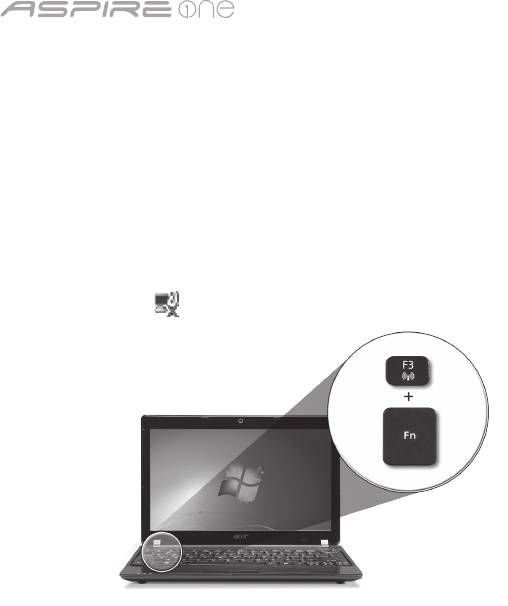
シリーズ
3
ネットワークの設定
本書には、インターネットに接続できるように LAN およびワイヤレスネットワークの設定を行うための手順が記載されています。
LAN 接続の設定
LAN ケーブルを Ethernet (RJ-45) ポートに接続するだけです。 Ethernet ポートの位置については、6 ページの「右面」を参照してください。
ワイヤレス接続の設定
1. <Fn> + <F3> を押して、通信マネージャにアクセスします。 Wi-Fi の隣にある赤いボタンをクリックして、Wi-Fi 接続をオンにできます。
注意:
通信マネージャを通して、3G と Bluetooth も利用できます。 通信機器は、モデルによって異なります。
2. システムトレイの アイコンをクリックし、接続先となるワイヤレス アクセスポイントを選択します。
3G SIM カードの挿入 (特定モデルのみ)
バッテリーを外し、3G SIM カードスロットに慎重に 3G SIM カードを挿入します。 3G SIM カードスロットの位置については、6 ページの「背面 & 底
面」を参照してください。
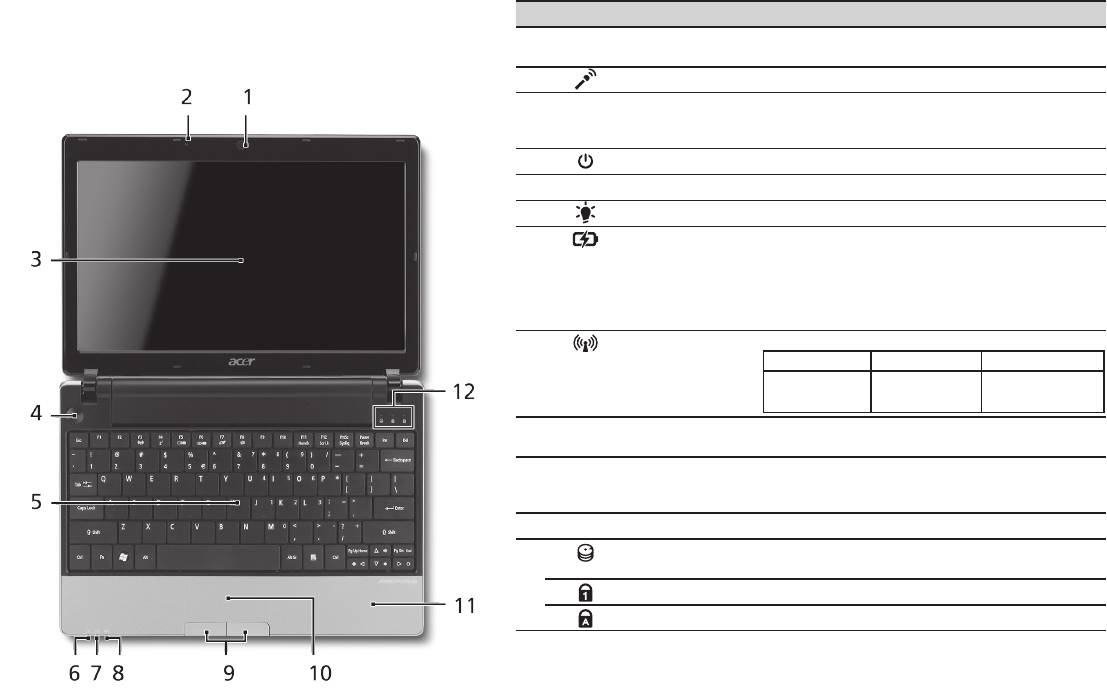
クイックガイド
4
上面
Aspire One
ツアー
# アイコン アイテム 説明
初心者の方へ セクションの図にしたがってコンピュータ
1
Acer Crystal Eye
ビデオ通信用のウェブカメラです (構成はモデルに
を設定したら、これから新しい Acer ノートブックについ
ウェブカメラ
よって異なります)。
て紹介します。
2
マイクロフォン 録音用の内部マイクロフォンです。
3
ディスプレイスク
液晶ディスプレイ (LCD) とも呼びます。コンピ
リーン
ューター出力を表示します (構成はモデルによ
って異なります)。
4
電源ボタン コンピュータの電源をオン/オフにします。
5
キーボード コンピュータにデータを入力します。
1
6
電源インジケータ
PC の電源がオンのときに点灯します。
7
バッテリーインジケ
バッテリパックが充電されているときに点灯し
1
ータ
ます。
1. 充電中: バッテリーを充電している間、ランプは
琥珀色に点灯します。
2. 完全に充電: AC モードでは、ライトが青くなりま
す。
1
8
通信インジケータ
3G/ワイヤレス LAN 通信の状態を表示します。
青く点灯 オレンジ色に点灯 点灯しない
3G オン/WiFi オン
3G オフ/WiFi オン 3G オフ/WiFi オフ
3G オン/WiFi オフ
9
クリックボタン
左右のボタンはマウスの左右のボタンと同じよ
(左、右)
うに機能します。
10
タッチパッド コンピュータマウスと同じように機能し、指を
触れることで反応するポインティングデバイス
です。
11
パームレスト コンピュータ操作時に手を置く場所です。
12
HDD インジケー
ハードディスクドライブがアクティブになると
タ
点灯します。
Num Lock Num Lock 機能を使っているときに点灯します。
Caps Lock Caps Lock 機能を使っているときに点灯します。
1. フロントパネルのインジケータは、コンピュータカバーが閉じた状態でも見えるようにな
っています。

シリーズ
5
正面 (閉じた場合)
# アイコン アイテム 説明
1
状態インジケータ 点灯や点滅によりコンピュータ
の機能やコンポーネントの状態
を知らせる LED です。
左面
2
外部ディスプレイ
ディスプレイデバイスに接続し
(VGA) ポート
ます (外付けモニタ、LCD プロジ
ェクタなど)。
3
DC 入力ジャック AC アダプタに接続します。
4
HDMI HDMI ポート 高性能デジタルビデオ接続対応
します。
5
通気孔 長時間使用してもコンピュータ
が過熱しないよう冷却します。
6
USB 2.0 ポート USB 2.0 デバイスに接続しま
す (USB マウス、USB カメラな
ど)。
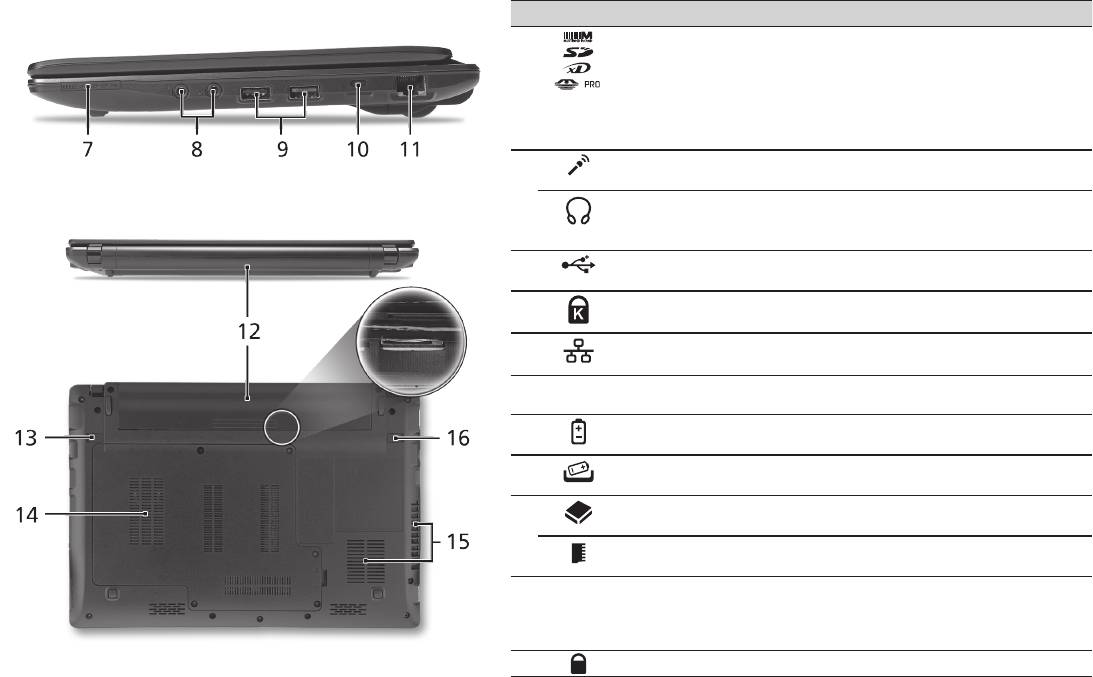
クイックガイド
6
右面
# アイコン アイテム 説明
7
1 台多機能のカードリ
Secure Digital (SD)、MultiMediaCard
ーダー
(MMC)、メモリスティック (MS)、メ
モリスティック PRO (MS PRO)、xD-
Picture Card (xD) に対応しています。
注意: カード押すとカードを取り出し/装着
することができます。 一度に 1 個のカード
しか操作できません。
8
マイクロフォン入力ジ
外部マイクロフォンを接続します。
ャック
ヘッドフォン/スピーカ
オーディオ出力デバイスを接続します
ー/S/PDIF 対応出力ジャ
(スピーカー、ヘッドフォンなど)。
ック
9
USB 2.0 ポート USB 2.0 デバイスに接続します (USB マ
ウスなど)。
10
Kensington ロックスロ
Kensington 対応コンピュータセキュリ
ット
ティロックに接続します。
11
Ethernet (RJ-45) ポー
Ethernet 10/100/1000 ベースのネット
ト
ワークに接続します。
背面 & 底面
12
バッテリーベイ コンピュータのバッテリーパックを装着
します。
13
バッテリー取り外しつ
バッテリーを取り出します。
まみ
14
ハードディスクベイ コンピュータのハードディスクを装着し
ます (ネジで固定)。
メモリコンパートメン
コンピュータのメインメモリを装着しま
ト
す。
15
通気孔スロットと冷却
長時間使用してもコンピュータが過熱し
ファン
ないよう冷却します。
注意: ファンの通気穴を塞いだり、異物を
詰め込んだりしないでください。
16
バッテリーロック バッテリーを定位置にロックします。

シリーズ
環境
温度:
操作時: 5
°C
~ 35
°C
非操作時: -20
°C
~ 65
°C
湿度 (結露しないこと):
操作時: 20% ~ 80%
非操作時: 20% ~ 80%
7

시리즈
빠른 시작 설명서

시리즈
© 2010 All Rights Reserved
Aspire One
시리즈 빠른 시작 설명서
최초 발행일: 04/2010
Aspire One
시리즈 노트북 PC
모델 번호: _____________________________________
일련 번호: _____________________________________
구입 날짜: _____________________________________
구입 장소: _____________________________________

빠른 시작 설명서
Federal Communications Commission
Declaration of Conformity
This device complies with Part 15 of the FCC Rules. Operation is subject to the following two conditions: (1) this device may not
cause harmful interference, and (2) this device must accept any interference received, including interference that may cause
undesired operation.
The following local Manufacturer / Importer is responsible for this declaration:
Product name: Notebook PC
Brand: Acer
Model number: MS2298
Machine type: AO 721 series
Name of Responsible Party: Acer America Corporation
Address of responsible party: 333 West San Carlos St., San Jose
CA 95110, U. S. A.
Contact person: Acer Representative
Phone No.: 1-254-298-4000
Fax No.: 1-254-298-4147
April 30, 2010

시리즈
• Themaximumconcentrationvaluesoftherestrictedsubstancesbyweightinhomogenousmaterialare:
CE Declaration of Conformity
Lead
0.1%
Polybrominated Biphenyls (PBB’s)
0.1%
Mercury
Polybrominated Diphenyl Ethers (PBDE’s)
We,
0.1%
0.1%
Hexavalent Chromium
0.1%
Cadmium
0.01%
Acer Incorporated
8F, 88, Sec. 1, Hsin Tai Wu Rd., Hsichih, Taipei Hsien 221, Taiwan
Directive 2009/125/EC with regard to establishing a framework for the setting of ecodesign requirements for energy-related
Contact Person: Mr. Easy Lai, e-mail:easy_lai@acer.com.tw
product.
And,
R&TTE Directive 1999/5/EC as attested by conformity with the following harmonized standard:
Acer Europe SA
• Article3.1(a)HealthandSafety
Via Cantonale, Centro Galleria 2 6928 Manno Switzerland
- EN60950-1
Hereby declare that:
- EN62311
• Article3.1(b)EMC
Product: Notebook Computer
- EN301 489-1
Trade Name: Acer
- EN301 489-3 (Applicable to non-bluetooth wireless keyboard mouse set).
Model Number: MS2298
- EN301 489-7
Machine Type: AO721 series
- EN301 489-17
Is compliant with the essential requirements and other relevant provisions of the following EC directives, and that all the
- EN301 489-24
necessary steps have been taken and are in force to assure that production units of the same product will continue comply with
the requirements.
• Article3.2SpectrumUsages
EMC Directive 2004/108/EC as attested by conformity with the following harmonized standards:
- EN300 440-2 (Applicable to non-bluetooth wireless keyboard mouse set).
• EN55022,AS/NZSCISPR22,ClassB
- EN300 328
• EN55024
- EN301 511
- EN301 893 (Applicable to 5GHz high performance RLAN).
• EN61000-3-2ClassD
- EN301 908-1
• EN61000-3-3
- EN301 908-2
Year to begin affixing CE marking 2010.
Low Voltage Directive 2006/95/EC as attested by conformity with the following harmonized standard:
• EN60950-1
Apr. 30, 2010
Council Decision 98/482/EC (CTR21):
(Applicable to product with pan- European single terminal connection to the Public Switched Telephone Network (PSTN).)
Date
Easy Lai /Manager
RoHS Directive 2002/95/EC on the Restriction of the Use of certain Hazardous Substances in Electrical and Electronic Equipment
Regulation Center, Acer Inc.
빠른 시작 설명서
• Themaximumconcentrationvaluesoftherestrictedsubstancesbyweightinhomogenousmaterialare:
CE Declaration of Conformity
Lead
0.1%
Polybrominated Biphenyls (PBB’s)
0.1%
Mercury
Polybrominated Diphenyl Ethers (PBDE’s)
We,
0.1%
0.1%
Hexavalent Chromium
0.1%
Cadmium
0.01%
Acer Incorporated
8F, 88, Sec. 1, Hsin Tai Wu Rd., Hsichih, Taipei Hsien 221, Taiwan
Directive 2009/125/EC with regard to establishing a framework for the setting of ecodesign requirements for energy-related
Contact Person: Mr. Easy Lai, e-mail:easy_lai@acer.com.tw
product.
And,
R&TTE Directive 1999/5/EC as attested by conformity with the following harmonized standard:
Acer Europe SA
• Article3.1(a)HealthandSafety
Via Cantonale, Centro Galleria 2 6928 Manno Switzerland
- EN60950-1
Hereby declare that:
- EN62311
• Article3.1(b)EMC
Product: Notebook Computer
- EN301 489-1
Trade Name: Acer
- EN301 489-3 (Applicable to non-bluetooth wireless keyboard mouse set).
Model Number: MS2298
- EN301 489-7
Machine Type: AO721 series
- EN301 489-17
Is compliant with the essential requirements and other relevant provisions of the following EC directives, and that all the
- EN301 489-24
necessary steps have been taken and are in force to assure that production units of the same product will continue comply with
the requirements.
• Article3.2SpectrumUsages
EMC Directive 2004/108/EC as attested by conformity with the following harmonized standards:
- EN300 440-2 (Applicable to non-bluetooth wireless keyboard mouse set).
• EN55022,AS/NZSCISPR22,ClassB
- EN300 328
• EN55024
- EN301 511
- EN301 893 (Applicable to 5GHz high performance RLAN).
• EN61000-3-2ClassD
- EN301 908-1
• EN61000-3-3
- EN301 908-2
Year to begin affixing CE marking 2010.
Low Voltage Directive 2006/95/EC as attested by conformity with the following harmonized standard:
• EN60950-1
Apr. 30, 2010
Council Decision 98/482/EC (CTR21):
(Applicable to product with pan- European single terminal connection to the Public Switched Telephone Network (PSTN).)
Date
Easy Lai /Manager
RoHS Directive 2002/95/EC on the Restriction of the Use of certain Hazardous Substances in Electrical and Electronic Equipment
Regulation Center, Acer Inc.
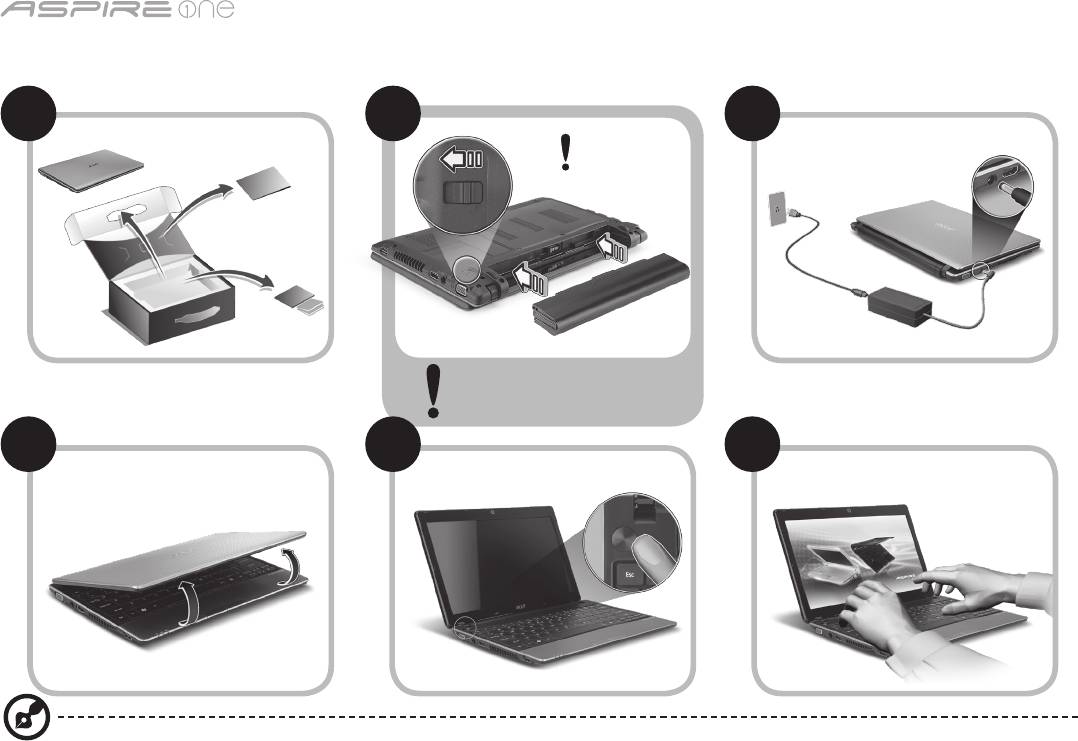
시리즈
1
사용을 위한 준비
1 2
3
2-2
3-3
3-1
3-2
2-1
그림 2-2와 같이 배터리가
제자리에 올바르게 잠겨 있는지
확인하십시오.
4 5 6
이 그림들은 참고 목적으로만 제공되며. 실제 제품 사양은 이와 다를 수 있습니다.

빠른 시작 설명서
2
사용 전 유의 사항
Acer 노트북을 선택해주셔서 감사합니다. 이 노트북이 귀하의 모바일 컴퓨팅 요구를 충족시켜 드릴 것입니다.
제공되는 설명서
Acer 노트북을 사용하는 데 도움을 줄 수 있는 여러 설명서가 제공됩니다*.
우선 빠른 시작 설명서는 컴퓨터 설정을 시작하는 데 유용합니다.
컴퓨터를 좀더 생산적으로 활용하는 방법에 대한 자세한 내용은 AcerSystem User Guide를 참조하십시오. 이 설명서에서는 시스템
유틸리티, 데이터 복구, 확장 옵션 및 문제 해결과 같은 주제를 자세하게 설명합니다. 또한 노트북에 대한 일반 규정과 안전 주의 사항 및
보증 정보가 포함되어 있습니다. 이 설명서는 PDF (Portable Document Format) 파일로 제공되며 노트북에 이미 설치되어 있습니다.
참고: 이 파일을 보려면 Adobe Reader가 필요합니다. 컴퓨터에 Adobe Reader가 설치되어 있지 않은 경우 AcerSystem User
Guide를 클릭하면 자동으로 Adobe Reader 설치 프로그램이 실행됩니다. 화면의 지시에 따라 나머지 설치 과정을 완료합니다.
Adobe Reader 사용 방법에 대한 지침을 보려면 Help and Support (도움말 및 지원) 메뉴에 액세스하십시오.
* 알림: 여기에 언급된 인쇄물 형태 또는 전자적 형태의 모든 설명서는 참고용으로만 제공됩니다. AcerSystem User Guide에
포함된 특정 보증 정보에 제공된 사항을 제외하고, 이러한 설명서의 어떠한 부분도 귀하가 구매한 제품과 관련한 Acer의
책임이나 보증을 나타내지 않습니다. Acer는 이들 설명서에 포함된 오류에 대해 어떠한 책임도 지지 않습니다.
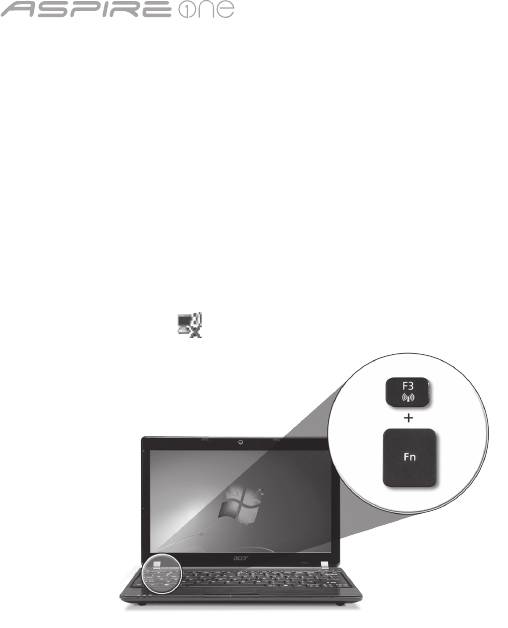
시리즈
3
네트워크 구성
여기에서는 인터넷에 연결할 수 있도록 LAN 및 무선 네트워크 설정을 구성하는 방법을 설명합니다.
LAN 연결 설정
LAN 케이블을 이더넷 (RJ-45) 포트에 연결하기만 하면 됩니다. 이더넷 포트의 위치를 알려면 6페이지의 "오른쪽 모습"을 참조하십시오.
무선 연결 설정
1. 통신 관리자에 액세스하려면 <Fn>+<F3>을 누르십시오. 여기에서 Wi-Fi 옆에 있는 빨간색 단추를 클릭하여 Wi-Fi 연결을 켤 수
있습니다.
참고: 3G 및 Bluetooth는 통신 관리자를 통해 액세스할 수도 있습니다. 통신 장치는 모델에 따라 다를 수 있습니다.
2. 시스템 트레이에서 아이콘을 클릭하고 연결할 무선 액세스 지점을 선택하십시오.
3G SIM 카드 삽입 (특정 모델에만 해당)
배터리를 제거하고 3G SIM 카드 슬롯에 3G SIM 카드를 주의해서 삽입하십시오. 3G SIM 슬롯의 위치를 알려면 6페이지의 "뒤쪽 및 바닥
모습"을 참조하십시오.
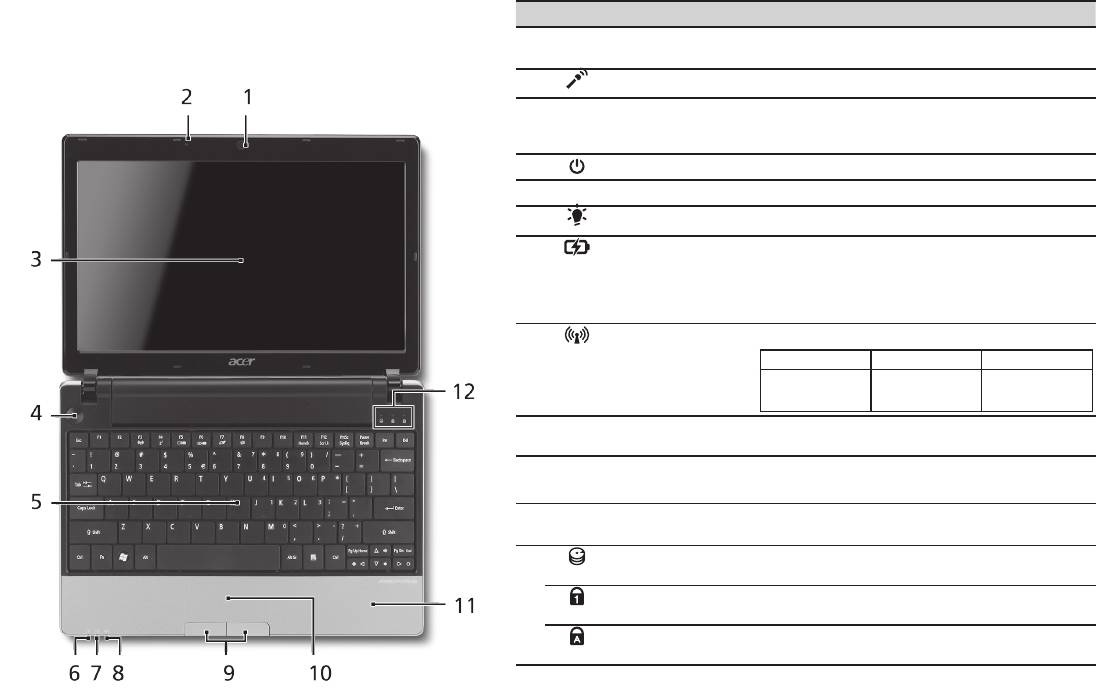
빠른 시작 설명서
4
위에서 본 모습
Aspire One 둘러보기
# 아이콘 항목 설명
사용을 위한 준비 단원에 설명된 대로 컴퓨터를 설정했으면
1
Acer Crystal Eye
비디오 통신용 웹 카메라입니다(구성은 모델에
이제 새 Acer 노트북을 살펴볼 차례입니다.
웹캠
따라 다를 수 있습니다).
2
마이크 소리를 녹음할 수 있는 내부 마이크입니다.
3
디스플레이 화면 LCD (액정 디스플레이) 라고도 하며, 컴퓨터
출력을 표시합니다 (구성은 모델에 따라 다를
수 있습니다).
4
전원 단추 컴퓨터를 켜고 끕니다.
5
키보드 컴퓨터에 데이터를 입력하는 데 사용됩니다.
1
6
전원 표시등
컴퓨터의 전원 상태를 표시합니다.
1
7
배터리 표시등
컴퓨터의 배터리 상태를 표시합니다.
1. 충전 중: 배터리가 충전 중이면 황색 불이
켜집니다.
2. 충전 완료: AC 모드일 때 파란 불이
켜집니다.
1
8
통신 표시등
3G/무선 LAN 통신 상태를 표시합니다.
파란색 표시등 켜짐 주황색 표시등 켜짐 불 켜지지 않음
3G 켜짐 / WiFi 켜짐
3G 꺼짐 / WiFi 켜짐 3G 꺼짐 / WiFi 꺼짐
3G 켜짐 / WiFi 꺼짐
9
누름 단추들
왼쪽과 오른쪽의 단추는 마우스의 왼쪽 및
(왼쪽 및 오른쪽)
오른쪽 단추와 같은 역할을 합니다.
10
터치패드 컴퓨터 마우스와 같은 역할을 하는 접촉식
포인팅 장치입니다.
11
손목 받침대 컴퓨터를 사용할 때 편안하게 손을 올려 놓는
영역입니다.
12
HDD 표시등 하드 디스크 드라이브가 동작 중이면 불이
켜집니다.
Num Lock Num Lock이 활성화되어 있으면 불이
켜집니다.
Caps Lock Caps Lock이 활성화되어 있으면 불이
켜집니다.
1. 전면 패널 표시등은 컴퓨터 덮개를 닫은 상태에서도 볼 수 있습니다.
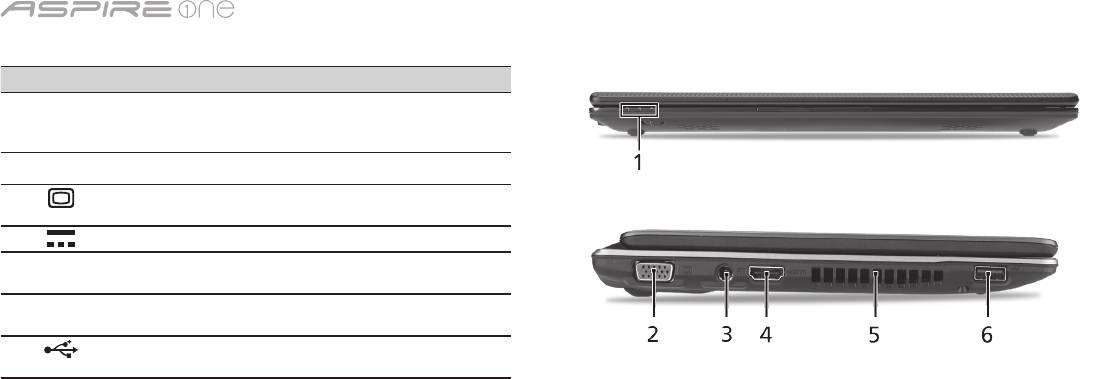
시리즈
5
닫힌 상태의 앞 모습
# 아이콘 항목 설명
1
상태 표시등 컴퓨터의 기능과 구성 요소의
상태를 알려주는 LED (발광
다이오드) 입니다.
왼쪽 모습
2
외부 디스플레이
디스플레이 장치 (예: 외부 모니터,
(VGA) 포트
LCD 프로젝터)를 연결합니다.
3
DC 입력 잭 AC 어댑터에 연결합니다.
4
HDMI HDMI 포트 고선명 디지털 비디오 연결을
지원합니다.
5
통풍용 슬롯 장시간 사용한 후에도 컴퓨터를
차갑게 유지할 수 있습니다.
6
USB 2.0 포트 USB 2.0 장치 (예: USB 마우스,
USB 카메라)에 연결합니다.
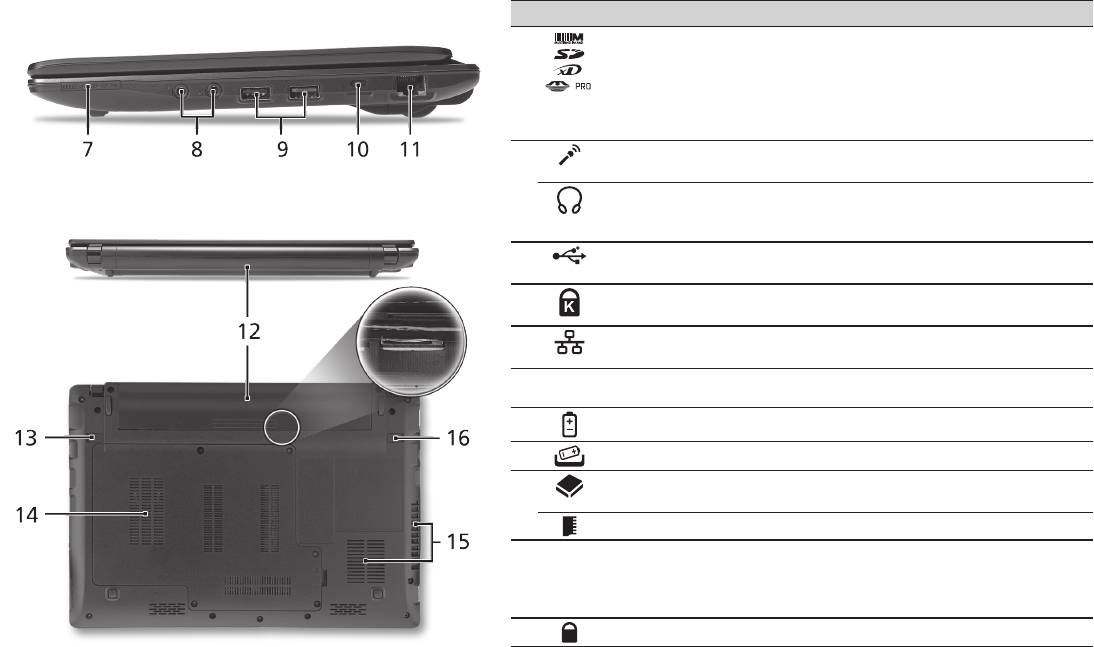
빠른 시작 설명서
6
오른쪽 모습
# 아이콘 항목 설명
7
멀티 카드 판독기 Secure Digital (SD), MultiMediaCard
(MMC), Memory Stick (MS), Memory Stick
PRO (MS PRO) 및 xD-Picture Card (xD)를
사용할 수 있습니다.
참고: 카드를 눌러 제거 또는 설치합니다.
카드를 한 번에 하나만 사용할 수 있습니다.
8
마이크 입력 잭 외부 마이크로 소리를 입력할 때
사용합니다.
헤드폰/스피커/S/PDIF를
오디오 출력 장치에 연결합니다(예: 스피커,
지원하는 출력 잭
헤드폰).
9
USB 2.0 포트 USB 2.0 장치 (예: USB 마우스)에
연결합니다.
10
Kensington 잠금 장치
Kensington 호환 컴퓨터 보호용 잠금
슬롯
장치를 연결합니다.
11
이더넷 (RJ-45) 포트 10/100/1000 이더넷 네트워크에
연결합니다.
뒤쪽 및 바닥 모습
12
배터리 장착부 컴퓨터의 배터리 팩을 넣습니다.
13
배터리 제거용 래치 제거를 위해 배터리를 뺄 때 사용합니다.
14
하드 디스크 장착부 컴퓨터의 하드 디스크를 넣습니다 (나사로
고정).
메모리 장착부 컴퓨터의 주 메모리를 넣습니다.
15
통풍용 슬롯 및 냉각 팬 장시간 사용한 후에도 컴퓨터를 차갑게
유지할 수 있습니다.
참고: 팬의 입구를 막거나 차단하지
마십시오.
16
배터리 잠금 장착된 배터리를 빠지지 않도록 잠급니다.

시리즈
환경
온도:
작동: 5°C ~ 35°C
비작동: -20°C ~ 65°C
습도 (비응축):
작동: 20% ~ 80%
비작동: 20% ~ 80%
7

系列
快速使用指南

系列
© 2010 版權所有
Aspire One
系列快速使用指南
初版:04/2010
Aspire One
系列筆記型電腦
產品型號:_____________________________________
產品序號:_____________________________________
購買日期:_____________________________________
購買地點:_____________________________________

快速使用指南
Federal Communications Commission
Declaration of Conformity
This device complies with Part 15 of the FCC Rules. Operation is subject to the following two conditions: (1) this device may not
cause harmful interference, and (2) this device must accept any interference received, including interference that may cause
undesired operation.
The following local Manufacturer / Importer is responsible for this declaration:
Product name: Notebook PC
Brand: Acer
Model number: MS2298
Machine type: AO 721 series
Name of Responsible Party: Acer America Corporation
Address of responsible party: 333 West San Carlos St., San Jose
CA 95110, U. S. A.
Contact person: Acer Representative
Phone No.: 1-254-298-4000
Fax No.: 1-254-298-4147
April 30, 2010

系列
• Themaximumconcentrationvaluesoftherestrictedsubstancesbyweightinhomogenousmaterialare:
CE Declaration of Conformity
Lead
0.1%
Polybrominated Biphenyls (PBB’s)
0.1%
Mercury
Polybrominated Diphenyl Ethers (PBDE’s)
We,
0.1%
0.1%
Hexavalent Chromium
0.1%
Cadmium
0.01%
Acer Incorporated
8F, 88, Sec. 1, Hsin Tai Wu Rd., Hsichih, Taipei Hsien 221, Taiwan
Directive 2009/125/EC with regard to establishing a framework for the setting of ecodesign requirements for energy-related
Contact Person: Mr. Easy Lai, e-mail:easy_lai@acer.com.tw
product.
And,
R&TTE Directive 1999/5/EC as attested by conformity with the following harmonized standard:
Acer Europe SA
• Article3.1(a)HealthandSafety
Via Cantonale, Centro Galleria 2 6928 Manno Switzerland
- EN60950-1
Hereby declare that:
- EN62311
• Article3.1(b)EMC
Product: Notebook Computer
- EN301 489-1
Trade Name: Acer
- EN301 489-3 (Applicable to non-bluetooth wireless keyboard mouse set).
Model Number: MS2298
- EN301 489-7
Machine Type: AO721 series
- EN301 489-17
Is compliant with the essential requirements and other relevant provisions of the following EC directives, and that all the
- EN301 489-24
necessary steps have been taken and are in force to assure that production units of the same product will continue comply with
the requirements.
• Article3.2SpectrumUsages
EMC Directive 2004/108/EC as attested by conformity with the following harmonized standards:
- EN300 440-2 (Applicable to non-bluetooth wireless keyboard mouse set).
• EN55022,AS/NZSCISPR22,ClassB
- EN300 328
• EN55024
- EN301 511
- EN301 893 (Applicable to 5GHz high performance RLAN).
• EN61000-3-2ClassD
- EN301 908-1
• EN61000-3-3
- EN301 908-2
Year to begin affixing CE marking 2010.
Low Voltage Directive 2006/95/EC as attested by conformity with the following harmonized standard:
• EN60950-1
Apr. 30, 2010
Council Decision 98/482/EC (CTR21):
(Applicable to product with pan- European single terminal connection to the Public Switched Telephone Network (PSTN).)
Date
Easy Lai /Manager
RoHS Directive 2002/95/EC on the Restriction of the Use of certain Hazardous Substances in Electrical and Electronic Equipment
Regulation Center, Acer Inc.

快速使用指南
• Themaximumconcentrationvaluesoftherestrictedsubstancesbyweightinhomogenousmaterialare:
CE Declaration of Conformity
Lead
0.1%
Polybrominated Biphenyls (PBB’s)
0.1%
Mercury
Polybrominated Diphenyl Ethers (PBDE’s)
We,
0.1%
0.1%
Hexavalent Chromium
0.1%
Cadmium
0.01%
Acer Incorporated
8F, 88, Sec. 1, Hsin Tai Wu Rd., Hsichih, Taipei Hsien 221, Taiwan
Directive 2009/125/EC with regard to establishing a framework for the setting of ecodesign requirements for energy-related
Contact Person: Mr. Easy Lai, e-mail:easy_lai@acer.com.tw
product.
And,
R&TTE Directive 1999/5/EC as attested by conformity with the following harmonized standard:
Acer Europe SA
• Article3.1(a)HealthandSafety
Via Cantonale, Centro Galleria 2 6928 Manno Switzerland
- EN60950-1
Hereby declare that:
- EN62311
• Article3.1(b)EMC
Product: Notebook Computer
- EN301 489-1
Trade Name: Acer
- EN301 489-3 (Applicable to non-bluetooth wireless keyboard mouse set).
Model Number: MS2298
- EN301 489-7
Machine Type: AO721 series
- EN301 489-17
Is compliant with the essential requirements and other relevant provisions of the following EC directives, and that all the
- EN301 489-24
necessary steps have been taken and are in force to assure that production units of the same product will continue comply with
the requirements.
• Article3.2SpectrumUsages
EMC Directive 2004/108/EC as attested by conformity with the following harmonized standards:
- EN300 440-2 (Applicable to non-bluetooth wireless keyboard mouse set).
• EN55022,AS/NZSCISPR22,ClassB
- EN300 328
• EN55024
- EN301 511
- EN301 893 (Applicable to 5GHz high performance RLAN).
• EN61000-3-2ClassD
- EN301 908-1
• EN61000-3-3
- EN301 908-2
Year to begin affixing CE marking 2010.
Low Voltage Directive 2006/95/EC as attested by conformity with the following harmonized standard:
• EN60950-1
Apr. 30, 2010
Council Decision 98/482/EC (CTR21):
(Applicable to product with pan- European single terminal connection to the Public Switched Telephone Network (PSTN).)
Date
Easy Lai /Manager
RoHS Directive 2002/95/EC on the Restriction of the Use of certain Hazardous Substances in Electrical and Electronic Equipment
Regulation Center, Acer Inc.
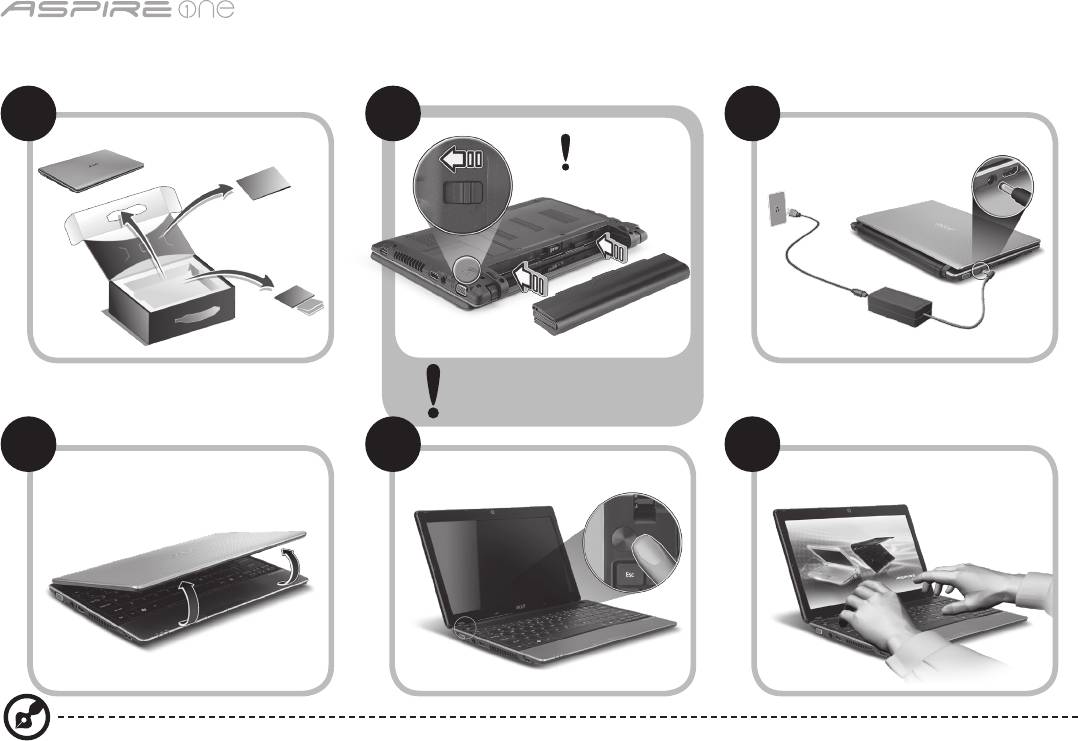
系列
1
新手入門
1 2
3
2-2
3-3
3-1
3-2
2-1
請確認電池是否正確裝入
(如圖 2-2 所示)。
4 5 6
所有插圖僅供參考。 實際產品規格可能有所不同。

快速使用指南
2
初步設定
首先,感謝您選擇 Acer 筆記型電腦,其會是滿足您行動運算需求的最佳首選。
使用指南
為了協助您了解使用 Acer 筆記型電腦的方式,我們設計了一系列的指南*:
首先,快速使用指南可協助您開始設定您的電腦。
如需更多關於讓電腦協助您提升生產力的資訊,請參閱 AcerSystem User Guide。 本指南包含系統公用程式、資料復原、擴充選項及
疑難排解等主題的詳細資訊。 此外,本指南也包含筆記型電腦的保固資訊、一般規範及安全注意事項。 該文件以「可攜式文件格式」
(PDF) 提供,並已預載在您的筆記型電腦上。
注意: 您需要安裝 Adobe Reader 才可檢視此檔案。 如果電腦尚未安裝 Adobe Reader,請先按一下 AcerSystem User Guide,
便會開始執行 Adobe Reader 設定程式。 請遵循畫面上的指示完成安裝程序。 如需了解使用 Adobe Reader 的方式,請存取說
明及支援功能表。
* 重要聲明: 請注意,此處所提及之指南 (無論是以印刷或電子版形式呈現) 僅供參考之用;除了 AcerSystem User Guide 中所
包含的特定保固資訊以外,Acer 不會因為這些指南中的任何內容而針對您所購買的產品提供任何聲明或保固。 明確來說,Acer
對於指南中所包含的任何錯誤均不負相關責任。
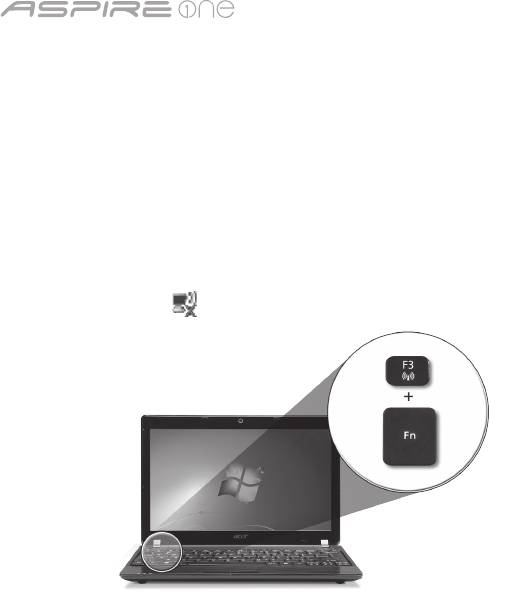
系列
3
網路設定
本指南將會協助您配置區域網路及無線網路設定,讓您可連線到網際網路。
設定區域網路連線
只要將區域網路纜線插入乙太網路 (RJ-45) 連接埠即可。 如需了解乙太網路連接埠之位置的資訊,請參閱第 6 頁的「右視圖」。
設定無線網路連線
1. 按下 <Fn> + <F3> 可存取通訊管理員。 您可以在此處按一下 Wi-Fi 旁的紅色按鈕,開啟 Wi-Fi 連線功能。
注意: 也可以透過通訊管理員存取 3G 和藍牙功能。 通訊裝置將依機型而有所不同。
2. 按一下系統匣上的 圖示,然後選擇想要連線的無線網路存取點。
插入 3G SIM 卡 (僅適用於特定機型)
將電池卸下,並將 3G SIM 卡小心地插入 3G SIM 卡插槽中。 如需了解 3G SIM 卡插槽之位置的資訊,請參閱第 6 頁的「後視圖及底視
圖」。
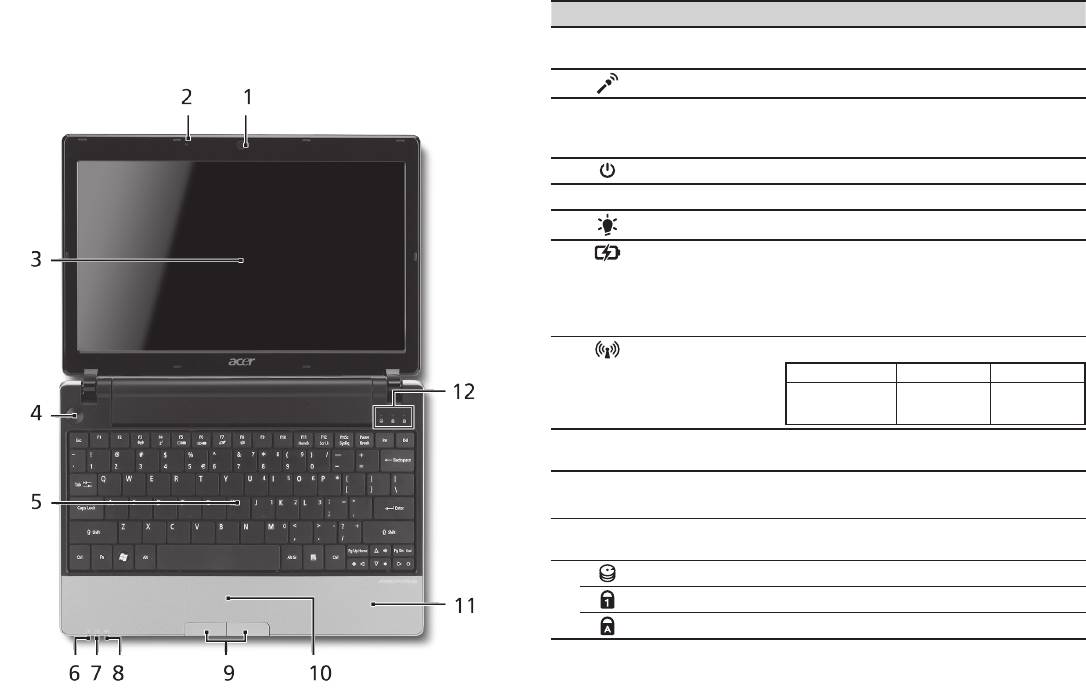
快速使用指南
4
上視圖
Aspire One
導覽
# 圖示 項目 說明
在依照新手入門一節中所提及的說明完成電腦的設定之後,
1
Acer Crystal Eye
網路相機,可用於視訊通訊 (設定將依機
就讓我們為您展示一下全新 Acer 筆記型電腦的各項功能吧!
網路攝影機
型而有所不同)。
2
麥克風 內建的麥克風,用於錄音。
3
顯示螢幕 亦稱為液晶顯示器 (Liquid-Crystal
Display;LCD),用於顯示電腦資料的輸出
(設定將依機型而有所不同)。
4
電源鍵 開啟和關閉電腦。
5
鍵盤 可用來將資料輸入電腦。
1
6
電源指示燈
表示電腦的電源狀態。
1
7
電池指示燈
表示電腦的電池狀態。
1. 充電中: 當電池充電時,指示燈會亮琥
珀色。
2. 充電完畢: 當使用 AC 電源模式時,指
示燈會亮藍色。
1
8
通訊指示燈
指示 3G/無線區域網路通訊的狀態。
亮藍色 亮橘色 未亮起
3G 開啟 / WiFi 開啟
3G 關閉 /
3G 關閉 /
3G 開啟 / WiFi 關閉
WiFi 開啟
WiFi 關閉
9
點選鍵 (左和右) 左鍵和右鍵的功能等同於滑鼠的左鍵和右
鍵。
10
觸控板 觸控感應式移動游標裝置,功能等同於電
腦的滑鼠。
11
腕靠 讓您在使用電腦時,可舒適擺放手腕的位
置。
12
硬碟指示燈 當存取硬碟時,指示燈會亮起。
Num Lock Num Lock 功能啟用時,指示燈會亮起。
Caps Lock Caps Lock 功能啟用時,指示燈會亮起。
1. 即使在電腦螢幕闔上時,您依然可看見位於前面板的狀態指示燈。
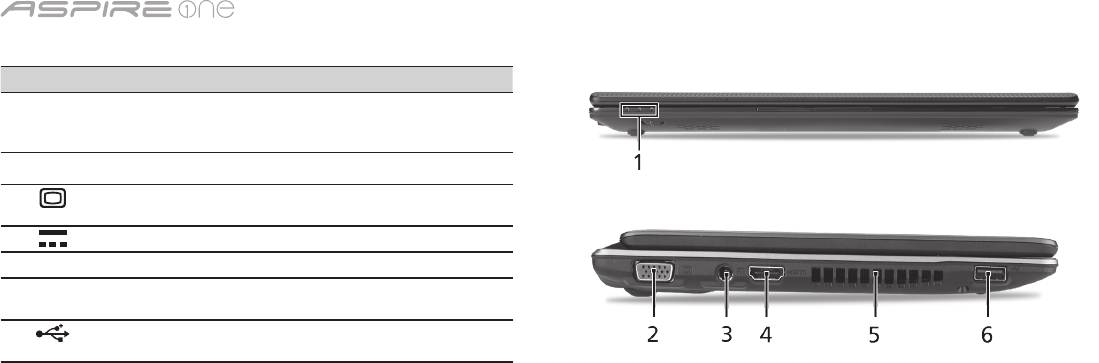
系列
5
上蓋闔起的前視圖
# 圖示 項目 說明
1
狀態指示燈 以 LED (Light-Emitting Diodes;發
光二極體) 亮燈的方式來顯示電腦功能
及元件的狀態。
左視圖
2
外接顯示螢幕 (VGA)
連接到顯示器裝置 (例如外接式顯示
連接埠
器、LCD 投影機)。
3
DC 輸入插孔 連接到 AC 變壓器。
4
HDMI HDMI 埠 支援高清晰度數位視訊連線。
5
通風槽 可讓電腦在長時間使用後仍然能夠保
持冷卻狀態。
6
USB 2.0 埠 連接至 USB 2.0 裝置 (例如,USB 滑
鼠、USB 攝影機)。
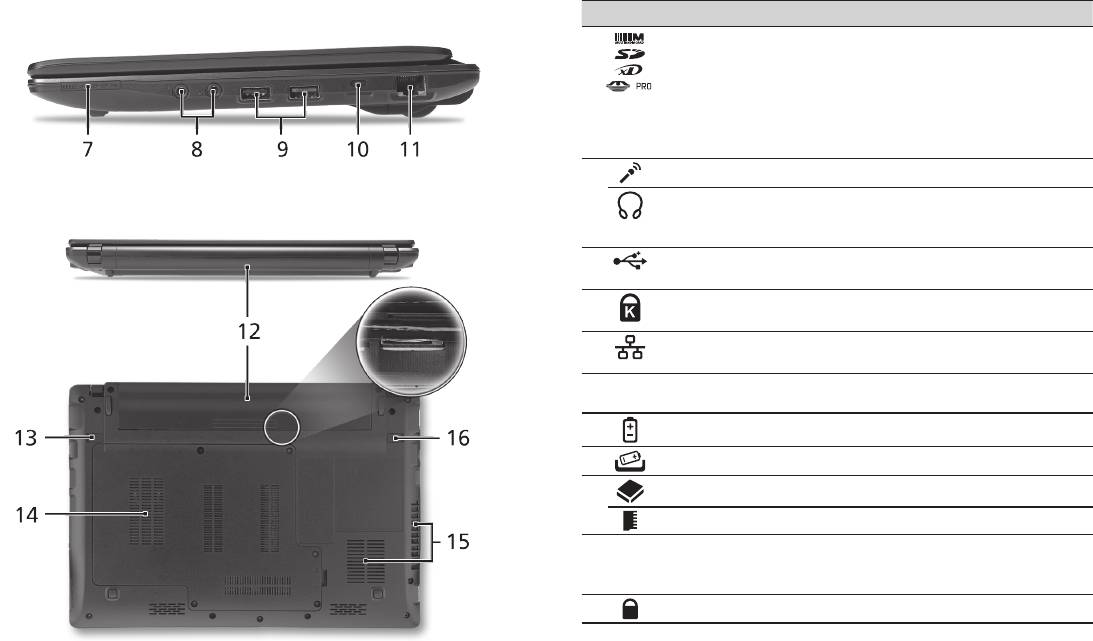
快速使用指南
6
右視圖
# 圖示 項目 說明
7
多合一讀卡機 可支援 Secure Digital (SD)、
MultiMediaCard (MMC)、Memory
Stick (MS)、Memory Stick PRO (MS
PRO)、xD-Picture Card (xD)。
注意: 推一下即可取出/安裝記憶
卡。 任何時候皆僅能夠使用一張記
憶卡。
8
麥克風輸入插孔 接受從外接麥克風所輸入的聲音。
耳機/喇叭/音訊輸出插孔
連接外接音訊輸出裝置的插孔
(支援 S/PDIF)
(例如:喇叭、耳機)。
9
USB 2.0 埠 連接到 USB 2.0 裝置 (例如 USB 滑
鼠)。
10
Kensington 安全鎖插槽 連接到與 Kensington 相容的電腦安
全鎖。
11
乙太網路 (RJ-45) 連接埠 連線到 10/100/1000 基礎的乙太網
路。
後視圖及底視圖
12
電池槽 用於安裝電腦的電池組。
13
電池卸除卡榫 用於卸下電池組。
14
硬碟槽 用於安裝電腦的硬碟 (以螺絲固定)。
記憶體槽 用於安裝電腦的主記憶體。
15
散熱孔和冷卻風扇 可讓電腦在長時間使用後仍然能夠保
持冷卻狀態。
注意: 請勿阻塞或擋住風扇開口。
16
電池組固定鎖 可將電池鎖到定位。

系列
環境
溫度:
操作中: 5
°C
到 35
°C
非操作中: -20
°C
到 65
°C
溼度 (非冷凝狀態):
操作中: 20% 到 80%
非操作中: 20% 到 80%
7

系列
快速指南

系列
© 2010 保留所有权利
Aspire One 系列快速指南
初版发行日期:04/2010
Aspire One 系列笔记本电脑
产品型号:_____________________________________
产品序号:_____________________________________
购买日期:_____________________________________
购买地点:_____________________________________

快速指南
Federal Communications Commission
Declaration of Conformity
This device complies with Part 15 of the FCC Rules. Operation is subject to the following two conditions: (1) this device may not
cause harmful interference, and (2) this device must accept any interference received, including interference that may cause
undesired operation.
The following local Manufacturer / Importer is responsible for this declaration:
Product name: Notebook PC
Brand: Acer
Model number: MS2298
Machine type: AO 721 series
Name of Responsible Party: Acer America Corporation
Address of responsible party: 333 West San Carlos St., San Jose
CA 95110, U. S. A.
Contact person: Acer Representative
Phone No.: 1-254-298-4000
Fax No.: 1-254-298-4147
April 30, 2010

系列
• Themaximumconcentrationvaluesoftherestrictedsubstancesbyweightinhomogenousmaterialare:
CE Declaration of Conformity
Lead
0.1%
Polybrominated Biphenyls (PBB’s)
0.1%
Mercury
Polybrominated Diphenyl Ethers (PBDE’s)
We,
0.1%
0.1%
Hexavalent Chromium
0.1%
Cadmium
0.01%
Acer Incorporated
8F, 88, Sec. 1, Hsin Tai Wu Rd., Hsichih, Taipei Hsien 221, Taiwan
Directive 2009/125/EC with regard to establishing a framework for the setting of ecodesign requirements for energy-related
Contact Person: Mr. Easy Lai, e-mail:easy_lai@acer.com.tw
product.
And,
R&TTE Directive 1999/5/EC as attested by conformity with the following harmonized standard:
Acer Europe SA
• Article3.1(a)HealthandSafety
Via Cantonale, Centro Galleria 2 6928 Manno Switzerland
- EN60950-1
Hereby declare that:
- EN62311
• Article3.1(b)EMC
Product: Notebook Computer
- EN301 489-1
Trade Name: Acer
- EN301 489-3 (Applicable to non-bluetooth wireless keyboard mouse set).
Model Number: MS2298
- EN301 489-7
Machine Type: AO721 series
- EN301 489-17
Is compliant with the essential requirements and other relevant provisions of the following EC directives, and that all the
- EN301 489-24
necessary steps have been taken and are in force to assure that production units of the same product will continue comply with
the requirements.
• Article3.2SpectrumUsages
EMC Directive 2004/108/EC as attested by conformity with the following harmonized standards:
- EN300 440-2 (Applicable to non-bluetooth wireless keyboard mouse set).
• EN55022,AS/NZSCISPR22,ClassB
- EN300 328
• EN55024
- EN301 511
- EN301 893 (Applicable to 5GHz high performance RLAN).
• EN61000-3-2ClassD
- EN301 908-1
• EN61000-3-3
- EN301 908-2
Year to begin affixing CE marking 2010.
Low Voltage Directive 2006/95/EC as attested by conformity with the following harmonized standard:
• EN60950-1
Apr. 30, 2010
Council Decision 98/482/EC (CTR21):
(Applicable to product with pan- European single terminal connection to the Public Switched Telephone Network (PSTN).)
Date
Easy Lai /Manager
RoHS Directive 2002/95/EC on the Restriction of the Use of certain Hazardous Substances in Electrical and Electronic Equipment
Regulation Center, Acer Inc.
快速指南
• Themaximumconcentrationvaluesoftherestrictedsubstancesbyweightinhomogenousmaterialare:
CE Declaration of Conformity
Lead
0.1%
Polybrominated Biphenyls (PBB’s)
0.1%
Mercury
Polybrominated Diphenyl Ethers (PBDE’s)
We,
0.1%
0.1%
Hexavalent Chromium
0.1%
Cadmium
0.01%
Acer Incorporated
8F, 88, Sec. 1, Hsin Tai Wu Rd., Hsichih, Taipei Hsien 221, Taiwan
Directive 2009/125/EC with regard to establishing a framework for the setting of ecodesign requirements for energy-related
Contact Person: Mr. Easy Lai, e-mail:easy_lai@acer.com.tw
product.
And,
R&TTE Directive 1999/5/EC as attested by conformity with the following harmonized standard:
Acer Europe SA
• Article3.1(a)HealthandSafety
Via Cantonale, Centro Galleria 2 6928 Manno Switzerland
- EN60950-1
Hereby declare that:
- EN62311
• Article3.1(b)EMC
Product: Notebook Computer
- EN301 489-1
Trade Name: Acer
- EN301 489-3 (Applicable to non-bluetooth wireless keyboard mouse set).
Model Number: MS2298
- EN301 489-7
Machine Type: AO721 series
- EN301 489-17
Is compliant with the essential requirements and other relevant provisions of the following EC directives, and that all the
- EN301 489-24
necessary steps have been taken and are in force to assure that production units of the same product will continue comply with
the requirements.
• Article3.2SpectrumUsages
EMC Directive 2004/108/EC as attested by conformity with the following harmonized standards:
- EN300 440-2 (Applicable to non-bluetooth wireless keyboard mouse set).
• EN55022,AS/NZSCISPR22,ClassB
- EN300 328
• EN55024
- EN301 511
- EN301 893 (Applicable to 5GHz high performance RLAN).
• EN61000-3-2ClassD
- EN301 908-1
• EN61000-3-3
- EN301 908-2
Year to begin affixing CE marking 2010.
Low Voltage Directive 2006/95/EC as attested by conformity with the following harmonized standard:
• EN60950-1
Apr. 30, 2010
Council Decision 98/482/EC (CTR21):
(Applicable to product with pan- European single terminal connection to the Public Switched Telephone Network (PSTN).)
Date
Easy Lai /Manager
RoHS Directive 2002/95/EC on the Restriction of the Use of certain Hazardous Substances in Electrical and Electronic Equipment
Regulation Center, Acer Inc.
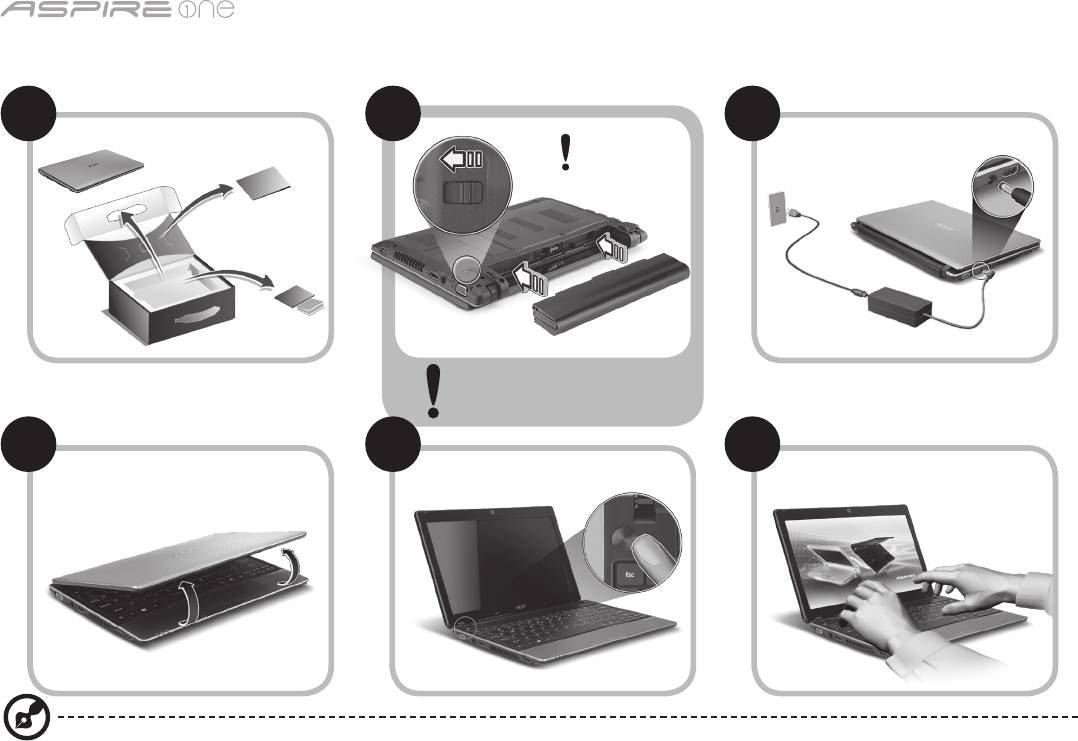
系列
1
初学者入门
1 2
3
2-2
3-3
3-1
3-2
2-1
确保电池如图 2-2 所示正确锁定
到位。
4 5 6
图例仅供参考。 产品实际规格将以用户实际购买为准。

快速指南
2
使用入门
感谢您选购 Acer 笔记本电脑,让它满足您随时随地使用计算机的需要。
用户指南
为帮助您使用 Acer 笔记本电脑,我们专门设计了一套指南*:
首先,“快速指南”将指导您对电脑进行设置。
要了解关于您的电脑如何能够帮助您提高工作效率的详细信息,请参见“AcerSystem User Guide”。 本指南包含了诸如系统实用程
序、数据恢复、扩展选项和疑难解答等详细信息。 此外,它还包含了保修信息和笔记本电脑的一般规则和安全注意事项。 我们也提供了
PDF 格式的用户指南并已预先安装在本电脑中供用户参考。
注意: 查看 PDF 文件需要安装 Adobe Reader。 如果您的电脑上没有安装 Adobe Reader,单击“AcerSystem User Guide”
将会先启动 Adobe Reader 安装程序。 依屏幕上指导完成安装程序。 有关如何使用 Adobe Reader 的说明,请参见“帮助和支
持”菜单。
*重要须知: 请注意,本手册中所提及的指南,无论是印刷或电子版本,均仅供参考,“AcerSystem User Guide”中包含的特定
保证信息除外。指南中包含的任何信息均不构成 Acer 对您所购产品的陈述或保证。 Acer 对指南中包含的错误不承担任何责任。
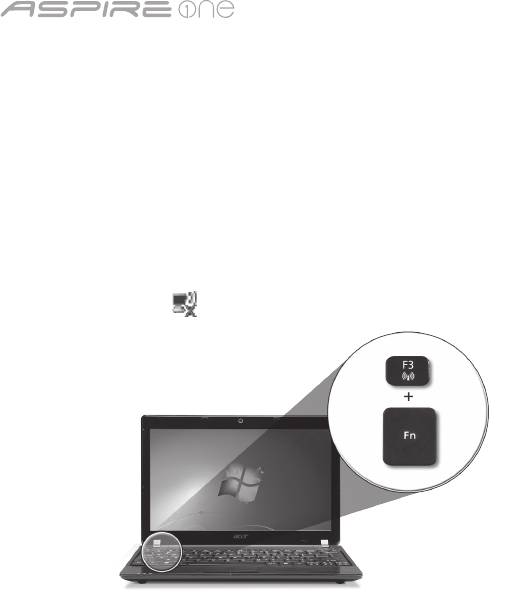
系列
3
网络配置
本指南将帮助您配置 LAN 和无线网络设置,以便连接至 Internet。
设置 LAN 连接
只需将 LAN 线缆插入以太网 (RJ-45) 端口即可。 以太网端口位置请参见
第 6 页的“右视图”
。
设置无线连接
1. 按 <Fn> + <F3> 可进入通信管理器。 在此处单击 Wi-Fi 旁的红色按钮可开启 Wi-Fi 连接。
注:
通过通信管理器还可以使用 3G 和蓝牙。 通信设备根据型号有所不同。
2. 单击系统托盘上的 图标,选择要连接的无线接入点。
插入 3G SIM 卡 (仅限部分型号)
取出电池并将 3G SIM 卡小心地插入 3G SIM 卡槽。 请参见
第 6 页的“后视图 & 底视图”
以了解 3G SIM 卡槽的位置。
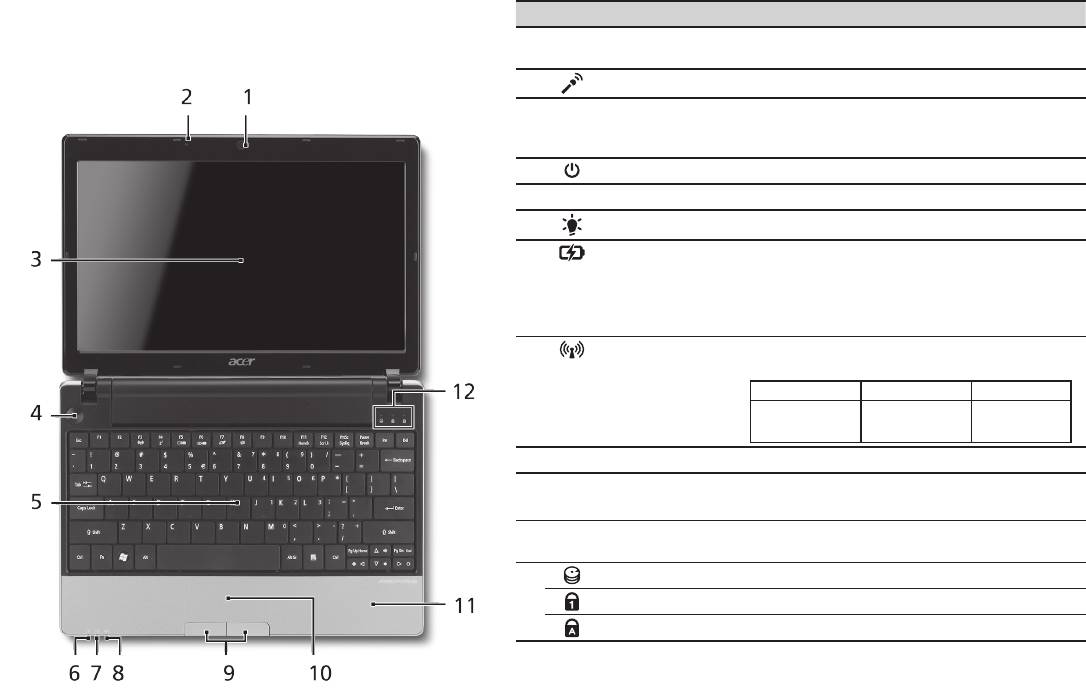
快速指南
4
俯视图
了解 Aspire One
# 图标 项目 描述
按照初学者入门章节中的图示完成计算机安装后,让我们
1
Acer Crystal Eye
网络相机,用于视频通信 (不同型号配置可能有
带您认识一下您新购的 Acer 笔记本电脑。
摄像头
所不同)。
2
麦克风 用于录音的内置麦克风。
3
显示屏 也称液晶显示屏 (Liquid-Crystal Display;
LCD),用于显示电脑的输出内容 (不同型号配置
可能有所不同)。
4
电源键 用于打开和关闭计算机电源。
5
键盘 将数据输入到电脑中。
1
6
电源指示灯
表示计算机的电源状态。
1
7
电池指示灯
表示计算机的电池状态。
1. 正在充电: 当电池在充电时,指示灯显示琥珀
色。
2. 完全充电: 当处在 AC 模式时,指示灯显示
蓝色。
1
8
通信指示灯
根据亮灯情况可检视目前无线 LAN/3G 通信的
状态。
蓝灯亮 橙灯亮 不亮
3G 开/WiFi 开
3G 关/WiFi 开 3G 关/WiFi 关
3G 开/WiFi 关
9
单击按钮 (左和右) 左右按钮的功能与鼠标的左右键相同。
10
触控板 触摸式定位设备,功能和电脑鼠标相同。
11
掌垫板 当您使用电脑时,可舒适支撑手部的区域。
12
硬盘指示灯 硬盘活动时,该指示灯亮。
Num Lock 当 Num Lock 键启用时,该指示灯亮。
Caps Lock 当 Caps Lock 键启用时,该指示灯亮。
1. 即使计算机外盖合上,也能看到前面板的状态指示灯。
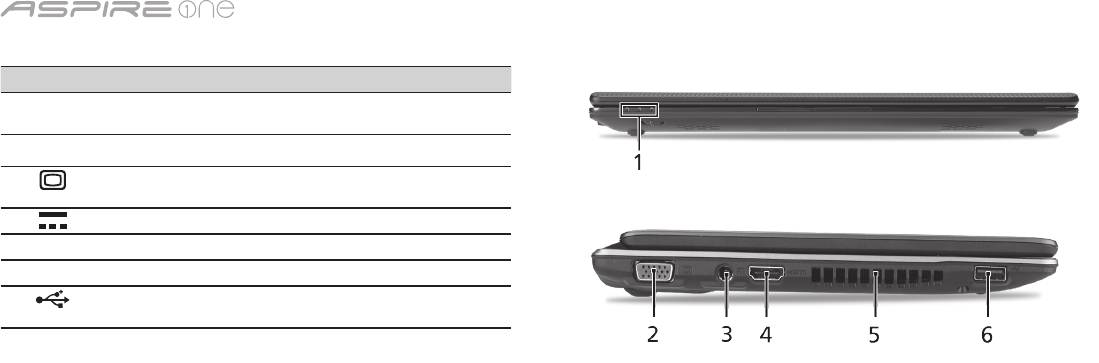
系列
5
前视图
# 图标 项目 描述
1
状态指示灯 通过亮灭显示计算机功能及组件状态的
发光二极管 (LED)。
左视图
2
外部显示器 (VGA)
连接显示设备 (例如外接显示器、LCD
端口
投影机)。
3
直流电源输入插孔 连接交流适配器。
4
HDMI HDMI 端口 支持高清晰数字视频连接。
5
通风槽 可使电脑在长时间使用后仍保持低温。
6
USB 2.0 端口 连接 USB 2.0 设备 (例如,USB 鼠标、
USB 相机)。
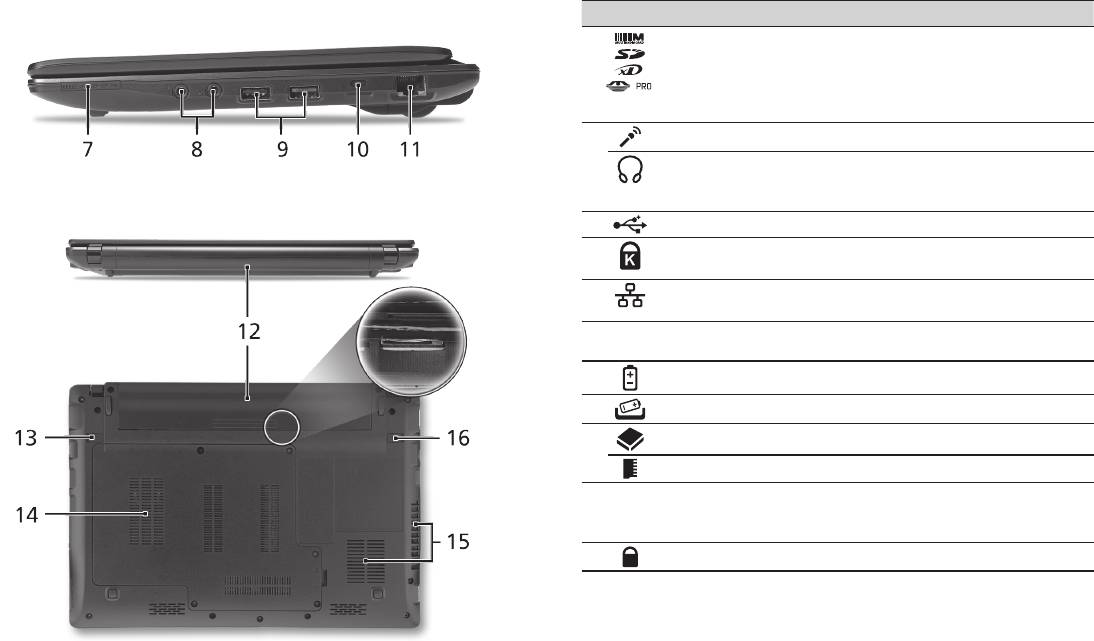
快速指南
6
右视图
# 图标 项目 描述
7
多合 1 读卡器 可支持安全数码卡 (SD)、多媒体卡
(MMC)、记忆棒 (MS)、PRO 记忆棒
(MS PRO) 及 xD-Picture 卡 (xD)。
注意: 轻推取下/安装存储卡。 一次
只能使用一张卡。
8
麦克风输入插孔 连接外接麦克风。
支持 S/PDIF 的耳机/
连接音频输出设备 (例如:扬声器、
扬声器/音频输出插孔
耳机)。
9
USB 2.0 端口 连接 USB 2.0 设备 (例如 USB鼠标)。
10
Kensington 安全锁插槽 连接 Kensington 兼容电脑安全锁。
11
以太网络 (RJ-45) 端口 连接 10/100/1000 以太网。
后视图 & 底视图
12
电池槽 安装电池组。
13
电池释放闩锁 释放电池闩锁可取下电池组。
14
硬盘槽 安装电脑硬盘的位置 (用螺丝紧固)。
内存槽 安装电脑主内存的位置。
15
通风槽和冷却风扇 可使电脑在长时间使用后仍保持低
温。
注意: 请勿遮挡风扇口。
16
电池锁 可固定锁紧电池组。

系列
环境
温度:
操作时: 5
°C
- 35
°C
不操作时: -20
°C
- 65
°C
湿度 (非冷凝):
操作时: 20% - 80%
不操作时: 20% - 80%
7

Seri
Panduan cepat

Seri
© 2010 Hak Cipta Dilindungi Undang-Undang
Panduan Cepat Seri Aspire One
Edisi Pertama: 04/2010
PC Notebook Seri Aspire One
Nomor model: _________________________________
Nomor seri: ___________________________________
Tanggal pembelian: ___________________________
Alamat pembelian: ____________________________

Panduan cepat
Federal Communications Commission
Declaration of Conformity
This device complies with Part 15 of the FCC Rules. Operation is subject to the following two conditions: (1) this device may not
cause harmful interference, and (2) this device must accept any interference received, including interference that may cause
undesired operation.
The following local Manufacturer / Importer is responsible for this declaration:
Product name: Notebook PC
Brand: Acer
Model number: MS2298
Machine type: AO 721 series
Name of Responsible Party: Acer America Corporation
Address of responsible party: 333 West San Carlos St., San Jose
CA 95110, U. S. A.
Contact person: Acer Representative
Phone No.: 1-254-298-4000
Fax No.: 1-254-298-4147
April 30, 2010

Seri
• Themaximumconcentrationvaluesoftherestrictedsubstancesbyweightinhomogenousmaterialare:
CE Declaration of Conformity
Lead
0.1%
Polybrominated Biphenyls (PBB’s)
0.1%
We,
Mercury
0.1%
Polybrominated Diphenyl Ethers (PBDE’s)
0.1%
Acer Incorporated
Hexavalent Chromium
0.1%
Cadmium
0.01%
8F, 88, Sec. 1, Hsin Tai Wu Rd., Hsichih, Taipei Hsien 221, Taiwan
Directive 2009/125/EC with regard to establishing a framework for the setting of ecodesign requirements for energy-related
product.
Contact Person: Mr. Easy Lai, e-mail:easy_lai@acer.com.tw
R&TTE Directive 1999/5/EC as attested by conformity with the following harmonized standard:
And,
• Article3.1(a)HealthandSafety
Acer Europe SA
- EN60950-1
Via Cantonale, Centro Galleria 2 6928 Manno Switzerland
- EN62311
Hereby declare that:
• Article3.1(b)EMC
Product: Notebook Computer
- EN301 489-1
Trade Name: Acer
- EN301 489-3 (Applicable to non-bluetooth wireless keyboard mouse set).
Model Number: MS2298
- EN301 489-7
Machine Type: AO721 series
- EN301 489-17
Is compliant with the essential requirements and other relevant provisions of the following EC directives, and that all the
- EN301 489-24
necessary steps have been taken and are in force to assure that production units of the same product will continue comply with
• Article3.2SpectrumUsages
the requirements.
- EN300 440-2 (Applicable to non-bluetooth wireless keyboard mouse set).
EMC Directive 2004/108/EC as attested by conformity with the following harmonized standards:
- EN300 328
• EN55022,AS/NZSCISPR22,ClassB
- EN301 511
• EN55024
- EN301 893 (Applicable to 5GHz high performance RLAN).
• EN61000-3-2ClassD
- EN301 908-1
• EN61000-3-3
- EN301 908-2
Year to begin affixing CE marking 2010.
Low Voltage Directive 2006/95/EC as attested by conformity with the following harmonized standard:
• EN60950-1
Apr. 30, 2010
Council Decision 98/482/EC (CTR21):
(Applicable to product with pan- European single terminal connection to the Public Switched Telephone Network (PSTN).)
Date
Easy Lai /Manager
RoHS Directive 2002/95/EC on the Restriction of the Use of certain Hazardous Substances in Electrical and Electronic Equipment
Regulation Center, Acer Inc.

Panduan cepat
• Themaximumconcentrationvaluesoftherestrictedsubstancesbyweightinhomogenousmaterialare:
CE Declaration of Conformity
Lead
0.1%
Polybrominated Biphenyls (PBB’s)
0.1%
We,
Mercury
0.1%
Polybrominated Diphenyl Ethers (PBDE’s)
0.1%
Acer Incorporated
Hexavalent Chromium
0.1%
Cadmium
0.01%
8F, 88, Sec. 1, Hsin Tai Wu Rd., Hsichih, Taipei Hsien 221, Taiwan
Directive 2009/125/EC with regard to establishing a framework for the setting of ecodesign requirements for energy-related
product.
Contact Person: Mr. Easy Lai, e-mail:easy_lai@acer.com.tw
R&TTE Directive 1999/5/EC as attested by conformity with the following harmonized standard:
And,
• Article3.1(a)HealthandSafety
Acer Europe SA
- EN60950-1
Via Cantonale, Centro Galleria 2 6928 Manno Switzerland
- EN62311
Hereby declare that:
• Article3.1(b)EMC
Product: Notebook Computer
- EN301 489-1
Trade Name: Acer
- EN301 489-3 (Applicable to non-bluetooth wireless keyboard mouse set).
Model Number: MS2298
- EN301 489-7
Machine Type: AO721 series
- EN301 489-17
Is compliant with the essential requirements and other relevant provisions of the following EC directives, and that all the
- EN301 489-24
necessary steps have been taken and are in force to assure that production units of the same product will continue comply with
• Article3.2SpectrumUsages
the requirements.
- EN300 440-2 (Applicable to non-bluetooth wireless keyboard mouse set).
EMC Directive 2004/108/EC as attested by conformity with the following harmonized standards:
- EN300 328
• EN55022,AS/NZSCISPR22,ClassB
- EN301 511
• EN55024
- EN301 893 (Applicable to 5GHz high performance RLAN).
• EN61000-3-2ClassD
- EN301 908-1
• EN61000-3-3
- EN301 908-2
Year to begin affixing CE marking 2010.
Low Voltage Directive 2006/95/EC as attested by conformity with the following harmonized standard:
• EN60950-1
Apr. 30, 2010
Council Decision 98/482/EC (CTR21):
(Applicable to product with pan- European single terminal connection to the Public Switched Telephone Network (PSTN).)
Date
Easy Lai /Manager
RoHS Directive 2002/95/EC on the Restriction of the Use of certain Hazardous Substances in Electrical and Electronic Equipment
Regulation Center, Acer Inc.
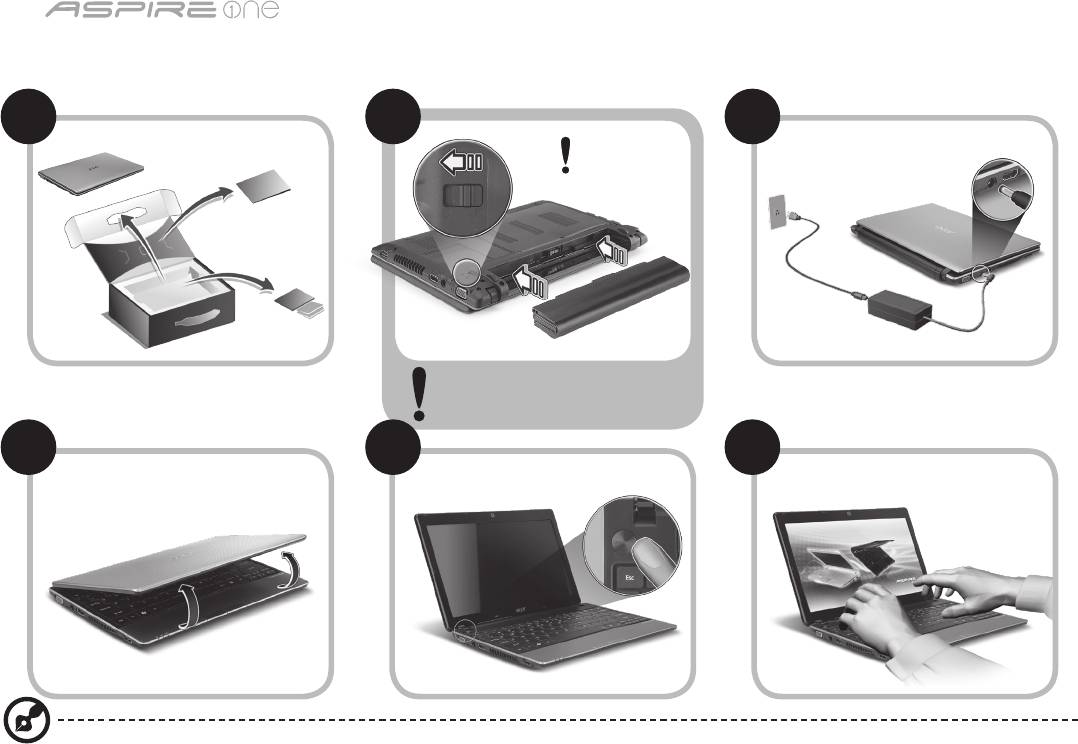
Seri
1
Persiapan
1 2
3
2-2
3-3
3-1
3-2
2-1
Pastikan baterai terpasang dengan
benar di tempatnya, seperti
terlihat pada gambar 2-2.
4 5 6
Gambar ilustrasi hanya sebagai referensi. Spesifikasi produk sebenarnya mungkin berbeda.

Panduan cepat
2
Informasi penting
Kami mengucapkan terima kasih kepada Anda yang telah memilih notebook Acer untuk memenuhi kebutuhan Anda akan
komputer.
Panduan Anda
Kami telah mendesain serangkaian panduan guna membantu Anda menggunakan notebook Acer Anda*:
Pertama-tama, Panduan Cepat akan membantu Anda mulai melakukan pengaturan pada komputer Anda.
Untuk informasi lebih lanjut tentang cara komputer ini membantu Anda agar lebih produktif, lihat AcerSystem User Guide.
Panduan ini berisi informasi terinci mengenai hal-hal seperti utilitas sistem, pemulihan data, opsi-opsi ekspansi dan pemecahan
masalah. Di samping itu, panduan ini berisi informasi jaminan dan peraturan umum serta peringatan keselamatan untuk
notebook Anda. Panduan tersebut tersedia dalam format PDF dan sudah tersedia dalam notebook Anda.
Catatan: Diperlukan Adobe Reader untuk melihat file tersebut. Jika Adobe Reader belum diinstal dalam komputer Anda,
klik AcerSystem User Guide untuk terlebih dulu menjalankan program konfigurasi Adobe Reader. Ikuti petunjuk pada
layar untuk melakukan instalasi tersebut. Anda bisa mengakses menu Bantuan dan Dukungan untuk mendapatkan
petunjuk mengenai bagaimana menggunakan Adobe Reader.
* PEMBERITAHUAN PENTING: Harap diperhatikan bahwa panduan yang disebutkan dalam dokumen ini, apakah dalam
bentuk cetak atau elektronik, hanya untuk referensi dan kecuali sebagaimana diberikan dalam informasi jaminan
spesifik yang terdapat dalam AcerSystem User Guide, maka tidak satu hal pun dalam panduan ini yang merupakan
pernyataan atau jaminan oleh Acer berkenaan dengan produk yang Anda beli. Acer secara tersurat menyangkal segala
pertanggungjawaban atas kesalahan yang terdapat dalam panduan ini.
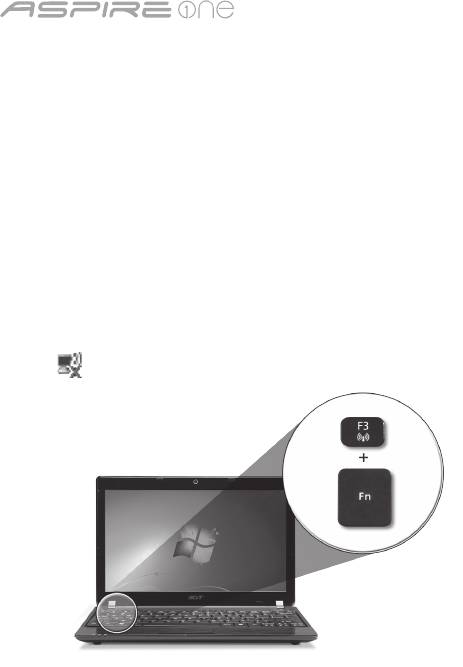
Seri
3
Konfigurasi jaringan
Panduan ini akan membantu Anda mengonfigurasikan pengaturan jaringan LAN dan nirkabel sehingga Anda bisa terhubung
ke Internet.
Mengatur koneksi LAN
Anda cukup mencolokkan kabel LAN ke port Ethernet (RJ-45). Harap lihat "Pandangan kanan" pada halaman 6 untuk
mengetahui lokasi port Ethernet.
Mengatur koneksi nirkabel
1. Tekan <Fn> + <F3> untuk mengakses manajer komunikasi. Di sini Anda dapat mengaktifkan koneksi W-Fi dengan mengklik
pada tombol merah di sebelah Wi-Fi.
Catatan: 3G dan Bluetooth juga dapat diakses melalui manajer komunikasi. Perangkat komunikasi berbeda-beda berdasarkan
model.
2. Klik ikon pada sistem tray dan pilih titik akses nirkabel yang ingin Anda hubungkan.
Masukkan kartu SIM 3G (hanya untuk model-model tertentu)
Lepas baterai dan masukkan kartu SIM 3G dengan hati-hati ke dalam slot kartu SIM 3G. Lihat “Pandangan belakang &
Pandangan bawah” pada halaman 6 untuk melihat lokasi slot kartu SIM 3G.
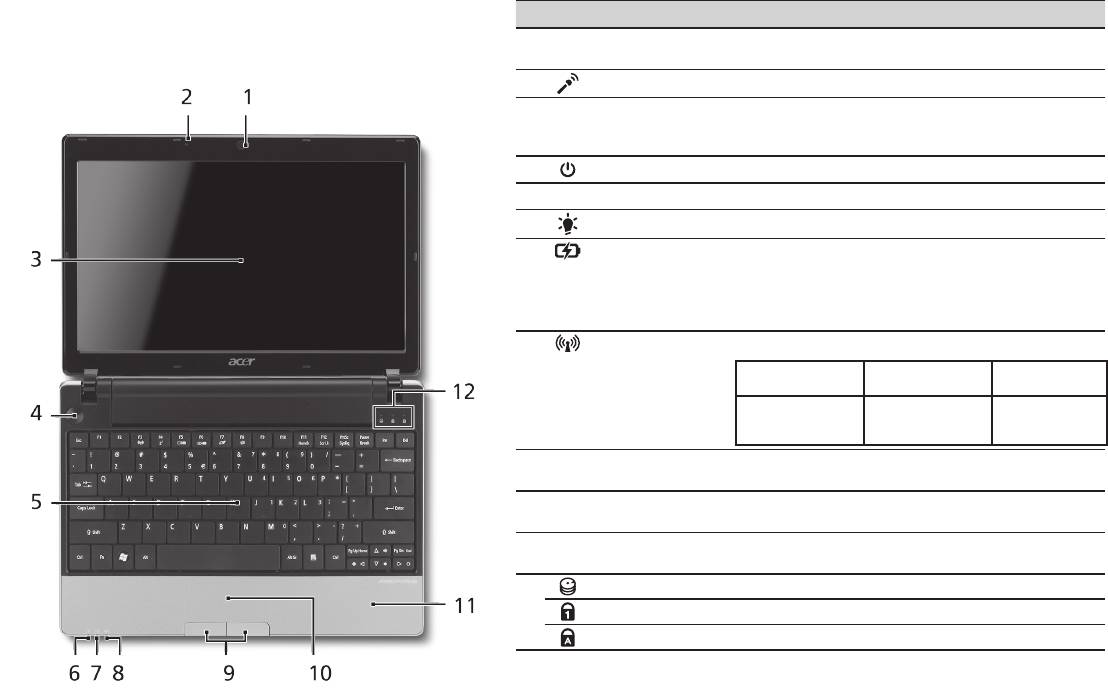
Panduan cepat
4
Pandangan atas
Tur Aspire One Anda
# Ikon Item Keterangan
Setelah Anda melakukan pengaturan pada komputer
1
Webcam Acer
Kamera web untuk komunikasi video (konfigurasi
Anda seperti terlihat pada gambar di bagian Persiapan,
Crystal Eye
mungkin berbeda tergantung model).
kami akan menunjukkan bagian-bagian notebook Acer.
2
Mikrofon Mikrofon internal untuk perekaman suara.
3
Layar tampilan Disebut juga sebagai LCD (Liquid-Crystal Display),
akan menampilkan output komputer (konfigurasi
mungkin berbeda tergantung model).
4
Tombol daya Menghidupkan/mematikan komputer.
5
Keyboard Untuk memasukkan data ke komputer.
1
6
Indikator daya
Menunjukkan status daya komputer.
1
7
Indikator baterai
Menunjukkan status baterai komputer.
1. Mengisi daya: Lampu akan menyala kuning
kecokelatan bila daya baterai sedang diisi.
2. Daya terisi penuh: Lampu menyala biru bila
dalam mode AC.
8
Indikator
Menunjukkan status komunikasi LAN Nirkabel/3G.
1
komunikasi
Lampu biru
Lampu oranye
Tidak menyala
menyala
menyala
3G aktif/WiFi aktif
3G tidak aktif/
3G tidak aktif/
3G aktif/WiFi tidak
WiFi aktif
WiFi tidak aktif
aktif
9
Tombol klik
Tombol kiri dan kanan berfungsi seperti tombol
(kiri dan kanan)
mouse kiri dan kanan.
10
Panel sentuh Perangkat penunjuk sensitif sentuhan yang
berfungsi seperti mouse komputer.
11
Tempat tangan Tempat nyaman untuk meletakkan tangan Anda
sewaktu menggunakan komputer.
12
Indikator HDD Menunjukkan bila drive hard disk aktif.
Num Lock Menyala bila Num Lock diaktifkan.
Caps Lock Menyala bila Caps Lock diaktifkan.
1. Indikator panel depan akan terlihat meskipun penutup komputer dalam keadaan tertutup.

Seri
5
Pandangan depan tertutup
# Ikon Item Keterangan
1
Indikator status Light-Emitting Diodes (LED) yang
menyala menunjukkan status fungsi
dan komponen komputer.
Pandangan kiri
2
Port tampilan
Menghubungkan perangkat tampilan
(VGA) eksternal
(mis., monitor eksternal, proyektor
LCD).
3
Jack DC-in Menghubungkan ke Adaptor AC.
4
HDMI Port HDMI Mendukung koneksi video digital
definisi tinggi.
5
Slot ventilasi Membuat komputer tetap dingin,
bahkan setelah pemakaian yang lama.
6
Port USB 2.0 Menghubungkan ke perangkat USB
2.0 (mis., mouse USB, kamera USB).
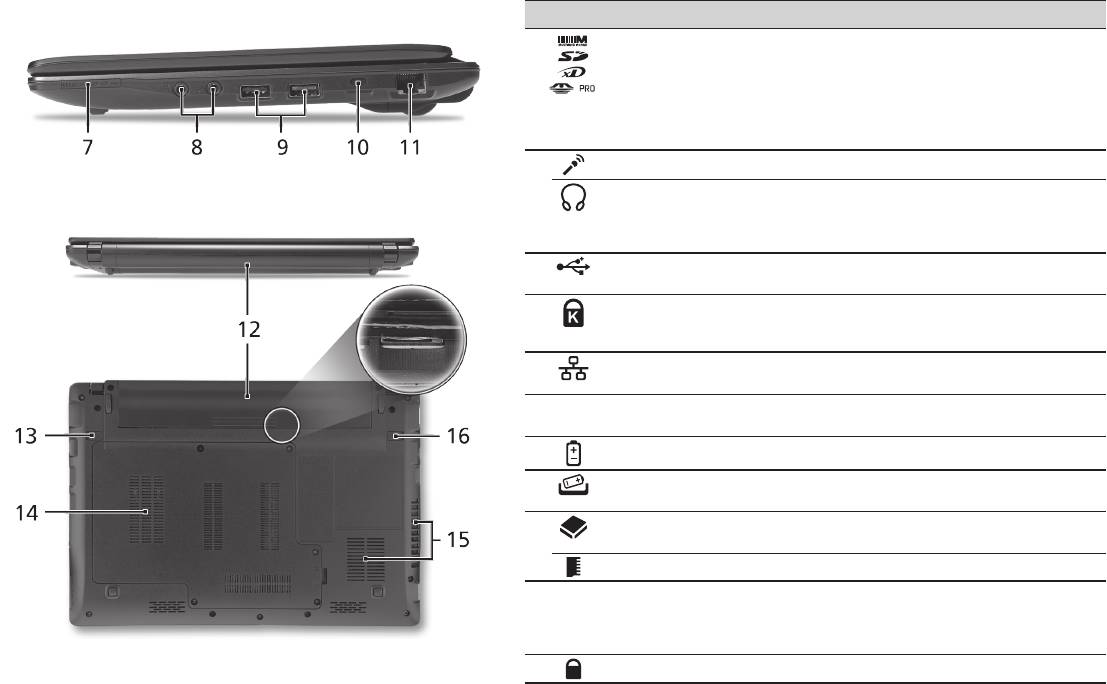
Panduan cepat
6
Pandangan kanan
# Ikon Item Keterangan
7
Pembaca kartu
Menerima Secure Digital (SD),
Multi-in-1
MultiMediaCard (MMC), Memory Stick (MS),
Memory Stick PRO (MS PRO), xD-Picture
Card (xD).
Catatan: Tekan untuk melepas/memasang
kartu. Hanya satu kartu yang bisa
beroperasi saat Anda menggunakannya.
8
Jack mikrofon-in Menerima input dari mikrofon eksternal.
Port headphone/
Menghubungkan ke perangkat line-out
speaker/saluran output
audio (mis. pengeras suara, headphone).
dengan dukungan
S/PDIF
9
Port USB 2.0 Menghubungkan ke perangkat USB 2.0
(mis., mouse USB).
10
Slot kunci Kensington Menghubungkan ke kunci keamanan
komputer yang kompatibel dengan kunci
Kensington.
11
Port ethernet (RJ-45) Menghubungkan ke jaringan berbasis
Ethernet 10/100/1000.
Pandangan belakang & Pandangan bawah
12
Tempat baterai Tempat kemasan baterai komputer.
13
Penutup pelepas
Untuk melepaskan baterai.
baterai
14
Bay hard disk Untuk memasang hard disk komputer
(dipasang dengan sekrup).
Kompartemen memori Untuk memasang memori utama komputer.
15
Slot ventilasi dan kipas
Membuat komputer tetap dingin, bahkan
pendingin
setelah pemakaian yang lama.
Catatan: Lubang kipas jangan sampai
tertutup atau terhalang.
16
Kunci baterai Mengunci baterai pada tempatnya.

Seri
Lingkungan
Suhu:
Beroperasi: 5°C hingga 35°C
Tidak beroperasi: -20°C hingga 65°C
Kelembaban (non-kondensasi):
Beroperasi: 20% hingga 80%
Tidak beroperasi: 20% hingga 80%
7

ซีรี่ส์
คู่มืออย่างย่อ

ซีรี่ส์
© 2010 สงวนลิขสิทธิ์
คู่มืออย่างย่อ
Aspire One
ซีรี่ส์
ฉบับดั้งเดิม: 04/2010
พีซีโน้ตบุ๊ก
Aspire One
ซีรี่ส์
หมายเลขรุ่น: ________________________________
ซีเรียลนัมเบอร์: _______________________________
วันที่ซื้อ: ____________________________________
สถานที่ซื้อ: _________________________________

คู่มืออย่างย่อ
Federal Communications Commission
Declaration of Conformity
This device complies with Part 15 of the FCC Rules. Operation is subject to the following two conditions: (1) this device may not
cause harmful interference, and (2) this device must accept any interference received, including interference that may cause
undesired operation.
The following local Manufacturer / Importer is responsible for this declaration:
Product name: Notebook PC
Brand: Acer
Model number: MS2298
Machine type: AO 721 series
Name of Responsible Party: Acer America Corporation
Address of responsible party: 333 West San Carlos St., San Jose
CA 95110, U. S. A.
Contact person: Acer Representative
Phone No.: 1-254-298-4000
Fax No.: 1-254-298-4147
April 30, 2010

ซีรี่ส์
• Themaximumconcentrationvaluesoftherestrictedsubstancesbyweightinhomogenousmaterialare:
CE Declaration of Conformity
Lead
0.1%
Polybrominated Biphenyls (PBB’s)
0.1%
We,
Mercury
0.1%
Polybrominated Diphenyl Ethers (PBDE’s)
0.1%
Acer Incorporated
Hexavalent Chromium
0.1%
Cadmium
0.01%
8F, 88, Sec. 1, Hsin Tai Wu Rd., Hsichih, Taipei Hsien 221, Taiwan
Directive 2009/125/EC with regard to establishing a framework for the setting of ecodesign requirements for energy-related
product.
Contact Person: Mr. Easy Lai, e-mail:easy_lai@acer.com.tw
R&TTE Directive 1999/5/EC as attested by conformity with the following harmonized standard:
And,
• Article3.1(a)HealthandSafety
Acer Europe SA
- EN60950-1
Via Cantonale, Centro Galleria 2 6928 Manno Switzerland
- EN62311
Hereby declare that:
• Article3.1(b)EMC
Product: Notebook Computer
- EN301 489-1
Trade Name: Acer
- EN301 489-3 (Applicable to non-bluetooth wireless keyboard mouse set).
Model Number: MS2298
- EN301 489-7
Machine Type: AO721 series
- EN301 489-17
Is compliant with the essential requirements and other relevant provisions of the following EC directives, and that all the
- EN301 489-24
necessary steps have been taken and are in force to assure that production units of the same product will continue comply with
• Article3.2SpectrumUsages
the requirements.
- EN300 440-2 (Applicable to non-bluetooth wireless keyboard mouse set).
EMC Directive 2004/108/EC as attested by conformity with the following harmonized standards:
- EN300 328
• EN55022,AS/NZSCISPR22,ClassB
- EN301 511
• EN55024
- EN301 893 (Applicable to 5GHz high performance RLAN).
• EN61000-3-2ClassD
- EN301 908-1
• EN61000-3-3
- EN301 908-2
Year to begin affixing CE marking 2010.
Low Voltage Directive 2006/95/EC as attested by conformity with the following harmonized standard:
• EN60950-1
Apr. 30, 2010
Council Decision 98/482/EC (CTR21):
(Applicable to product with pan- European single terminal connection to the Public Switched Telephone Network (PSTN).)
Date
Easy Lai /Manager
RoHS Directive 2002/95/EC on the Restriction of the Use of certain Hazardous Substances in Electrical and Electronic Equipment
Regulation Center, Acer Inc.
คู่มืออย่างย่อ
• Themaximumconcentrationvaluesoftherestrictedsubstancesbyweightinhomogenousmaterialare:
CE Declaration of Conformity
Lead
0.1%
Polybrominated Biphenyls (PBB’s)
0.1%
We,
Mercury
0.1%
Polybrominated Diphenyl Ethers (PBDE’s)
0.1%
Acer Incorporated
Hexavalent Chromium
0.1%
Cadmium
0.01%
8F, 88, Sec. 1, Hsin Tai Wu Rd., Hsichih, Taipei Hsien 221, Taiwan
Directive 2009/125/EC with regard to establishing a framework for the setting of ecodesign requirements for energy-related
product.
Contact Person: Mr. Easy Lai, e-mail:easy_lai@acer.com.tw
R&TTE Directive 1999/5/EC as attested by conformity with the following harmonized standard:
And,
• Article3.1(a)HealthandSafety
Acer Europe SA
- EN60950-1
Via Cantonale, Centro Galleria 2 6928 Manno Switzerland
- EN62311
Hereby declare that:
• Article3.1(b)EMC
Product: Notebook Computer
- EN301 489-1
Trade Name: Acer
- EN301 489-3 (Applicable to non-bluetooth wireless keyboard mouse set).
Model Number: MS2298
- EN301 489-7
Machine Type: AO721 series
- EN301 489-17
Is compliant with the essential requirements and other relevant provisions of the following EC directives, and that all the
- EN301 489-24
necessary steps have been taken and are in force to assure that production units of the same product will continue comply with
• Article3.2SpectrumUsages
the requirements.
- EN300 440-2 (Applicable to non-bluetooth wireless keyboard mouse set).
EMC Directive 2004/108/EC as attested by conformity with the following harmonized standards:
- EN300 328
• EN55022,AS/NZSCISPR22,ClassB
- EN301 511
• EN55024
- EN301 893 (Applicable to 5GHz high performance RLAN).
• EN61000-3-2ClassD
- EN301 908-1
• EN61000-3-3
- EN301 908-2
Year to begin affixing CE marking 2010.
Low Voltage Directive 2006/95/EC as attested by conformity with the following harmonized standard:
• EN60950-1
Apr. 30, 2010
Council Decision 98/482/EC (CTR21):
(Applicable to product with pan- European single terminal connection to the Public Switched Telephone Network (PSTN).)
Date
Easy Lai /Manager
RoHS Directive 2002/95/EC on the Restriction of the Use of certain Hazardous Substances in Electrical and Electronic Equipment
Regulation Center, Acer Inc.
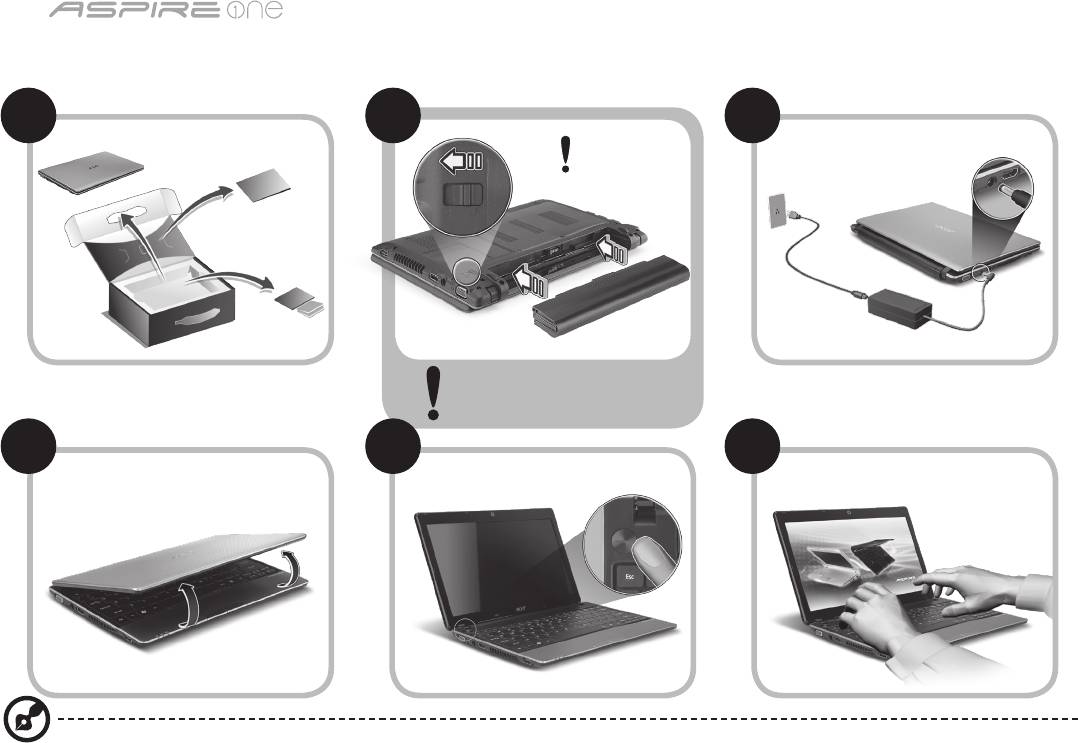
ซีรี่ส์
1
สำหรับผู้เริ่มใช้
1 2
3
2-2
3-3
3-1
3-2
2-1
ตรวจดูให้แน่ใจว่าแบตเตอรี่่
ถูกล็อคในตำแหน่งที่ถูกต้อง
ดังที่แสดงในภาพประกอบที่ 2-2
4 5 6
ภาพประกอบมีเพื่อการอ้างอิงเท่านั้น ข้อมูลจำเพาะผลิตภัณฑ์ที่แท้จริงอาจแตกต่างกัน

คู่มืออย่างย่อ
2
ก่อนอื่น
ขอขอบคุณที่คุณเลือกโน้ตบุ๊กจาก Acer เพื่อรองรับการใช้งานแบบพกพาของคุณ
คู่มือ
เพื่อช่วยสอนการใช้โน้ตบุ๊ก Acer เราจึงได้จัดทำคู่มือชุดนี้ขึ้น*:
อันดับแรกคือ คู่มือฉบับย่อที่จะช่วยคุณในการเริ่มใช้คอมพิวเตอร์ของคุณ
สอบถามข้อมูลการใช้งานคอมพิวเตอร์เพื่อให้เกิดประสิทธิภาพสูงสุดได้จาก AcerSystem User Guide คู่มือนี้ประกอบด้วยข้อมูลรายละเอียดเกี่ยวกับยูทิ
ลิตี้ระบบ, การกู้คืนข้อมูล, ตัวเลือกเสริม, และวิธีในการแก้ไขปัญหา นอกจากนี้ยังประกอบด้วยข้อมูลการรับประกัน ข้อบังคับทั่วไป และการแจ้งเตือนด้าน
ความปลอดภัยสำหรับโน้ตบุ๊คของคุณ ซึ่งมีให้ในรูปแบบ Portable Document Format (PDF) และมาพร้อมกับโน้ตบุ๊คของคุณ
หมายเหตุ: การเรียกดูไฟล์ต้องการ Adobe Reader หากคอมพิวเตอร์ของคุณไม่มี Adobe Reader ติดตั้งอยู่ การคลิกที่ AcerSystem
User Guide จะเป็นการรันการติดตั้งโปรแกรม Adobe Reader ก่อน ทำตามคำแนะนำบนจอแสดงผลเพื่อติดตั้งให้เสร็จสมบูรณ์
สำหรับคำแนะนำในการใช้งาน Adobe Reader โปรดดูที่เมนูช่วยเหลือและสนับสนุน
* การแจ้งเตือนที่สำคัญ: คู่มือที่ได้กล่าวถึงไว้ในที่นี้ ทั้งในรูปแบบสิ่งพิมพ์หรืออิเล็คทรอนิกส์ มีเพื่ออ้างอิงเท่านั้นและไม่รวมถึงข้อมูล
การรับประกันเฉพาะที่กล่าวถึงใน AcerSystem User Guide ไม่มีส่วนใดในคู่มือนี้ที่จะแสดงถึงการเป็นตัวแทนหรือการรับประกันโด
ย Acer เกี่ยวกับผลิตภัณฑ์ที่คุณซื้อ Acer ขอปฏิเสธความรับผิดชอบอื่นๆทั้งหมดสำหรับข้อผิดพลาดที่มีในคู่มือนี้
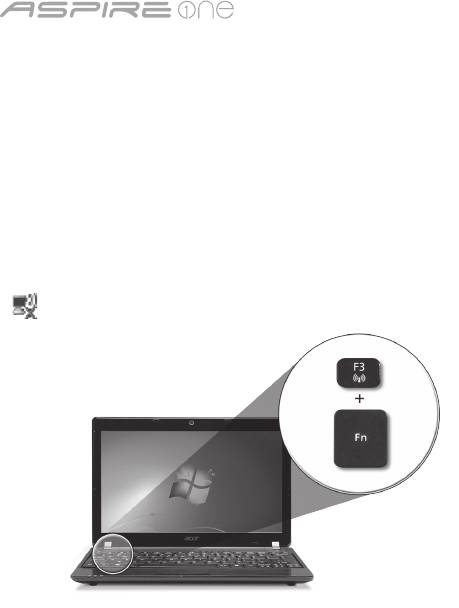
ซีรี่ส์
3
การปรับตั้งค่าเครือข่าย
คู่มือนี้จะช่วยคุณในการปรับตั้งค่า LAN และตั้งค่าเครือข่ายไร้สายของคุณเพื่อช่วยให้สามารถเชื่อมต่ออินเตอร์เน็ตได้
การตั้งค่าการเชื่อมต่อ LAN
ง่ายๆเพียงแค่เสียบสาย LAN เข้ากับพอร์ต Ethernet (RJ-45) โปรดดูที่ "มุมมองด้านขวา" บนหน้า 6 สำหรับตำแหน่งของพอร์ต Ethernet
การตั้งค่าการเชื่อมต่อไร้สาย
1. กด <Fn> + <F3> เพื่อเข้าถึงโปรแกรมจัดการสื่อสาร ที่นี่คุณจะสามารถเปิดการเชื่อมต่อ Wi-Fi ได้โดยการคลิกที่ปุ่มสีแดงถัดจาก Wi-Fi
หมายเหตุ: 3G และ Bluetooth สามารถเข้าถึงได้จากโปรแกรมจัดการสื่อสาร อุปกรณ์สื่อสารอาจแตกต่างกันขึ้นอยู่กับแต่ละรุ่น
2. คลิก ไอคอนบนถาดระบบและเลือกจุดเชื่อมต่อไร้สายที่คุณต้องการเชื่อมต่อ
ใส่ซิมการ์ด 3G (สำหรับบางรุ่น)
ถอดแบตเตอรี่่ออกและใส่ซิมการ์ด 3G เข้าในสล็อตซิมการ์ด 3G อย่างระมัดระวัง โปรดดูที่ "มุมมองด้านหลังและด้านล่าง" ในหน้า 6
สำหรับตำแหน่งของสล็อตซิมการ์ด 3G
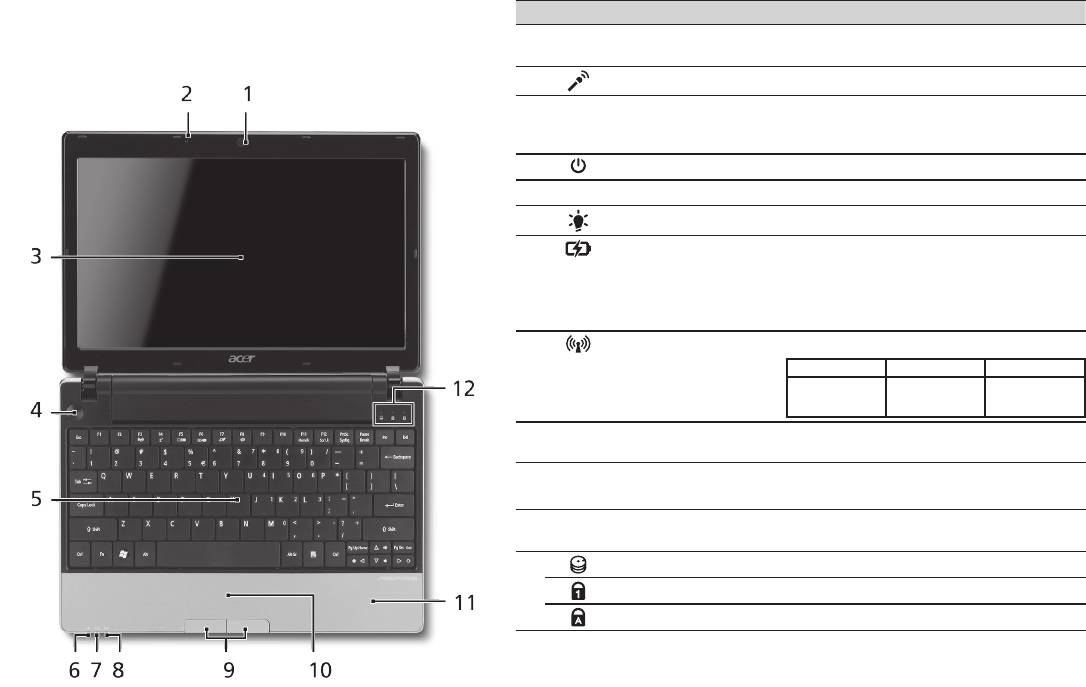
คู่มืออย่างย่อ
4
มุมมองด้านบน
ชม
Aspire One
ของคุณ
# ไอคอน รายการ คำอธิบาย
หลังจากตั้งค่าคอมพิวเตอร์ของคุณตามภาพประกอบในส่วนสำหรั
1
เว็บแคม Acer Crystal
กล้องเว็บแคมสำหรับการสื่อสารด้วยวิดีโอ
บผู้เริ่มใช้ ใ้ห้เราได้พาคุณชมโน้ตบุ๊ก Acer ของคุณอย่างทั่วถึง
Eye
(ส่วนประกอบอาจแตกต่างกันไปตามรุ่น)
2
ไมโครโฟน ไมโครโฟนในตัวสำหรับการบันทึกเสียง
3
จอแสดงผล หรือที่เรียกว่า Liquid-Crystal Display (LCD)
ซึ่งใช้แสดงข้อมูลต่างๆ ของคอมพิวเตอร์
(ส่วนประกอบอาจแตกต่างกันไปตามรุ่น)
4
ปุ่มเปิดปิด เปิดและปิดคอมพิวเตอร์
5
คีย์บอร์ด เพื่อป้อนข้อมูลเข้าสู่คอมพิวเตอร์ของคุณ
1
6
ไฟแสดงสถานะพลังงาน
ระบุสถานะการเปิดใช้งานคอมพิวเตอร์
1
7
ตัวแสดงสถานะแบตเตอรี่
แสดงถึงสถานะแบตเตอรี่ของคอมพิวเตอร์
1. กำลังชาร์จ: ไฟสว่างเป็นสีเหลืองอำพันเมื่อ
ทำการชาร์จแบตเตอรี่
2. ชาร์จไฟเต็ม: ไฟสีน้ำเงินติดสว่างขณะอยู่ใน
โหมด AC
1
8
ตัวแสดงสถานะ
แสดงสถานะของการสื่อสาร 3G/Wireless LAN
ไฟสีน้ำเงินสว่าง ไฟสีส้มสว่าง ไม่มีไฟติด
3G เปิด/WiFi เปิด
3G ปิด/WiFi เปิด 3G ปิด/WiFi ปิด
3G เปิด/WiFi ปิด
9
ปุ่มคลิก (ซ้ายและขวา) ปุ่มซ้ายและขวาทำงานเหมือนกับปุ่มเมาส์ซ้าย
และขวา
10
ทัชแพด อุปกรณ์ชี้ตำแหน่งแบบสัมผัส ซึ่งทำงานแบบเดี
ยวกับเมาส์คอมพิวเตอร์
11
ที่วางมือ พื้นที่รองรับมือเพื่อให้รู้สึกสบายขณะใช้คอมพิว
เตอร์
12
ตัวแสดงสถานะ HDD แสดงเมื่อฮาร์ดดิสก์ไดร์ฟมีการทำงาน
Num Lock ติดสว่างในกรณีที่เปิดใช้ Num Lock
Caps Lock ไฟสว่างเมื่อเปิดใช้งาน Caps Lock
1. สัญลักษณ์ที่แผงด้านหน้าสามารถมองเห็นได้แม้ขณะปิดฝาพับคอมพิวเตอร์
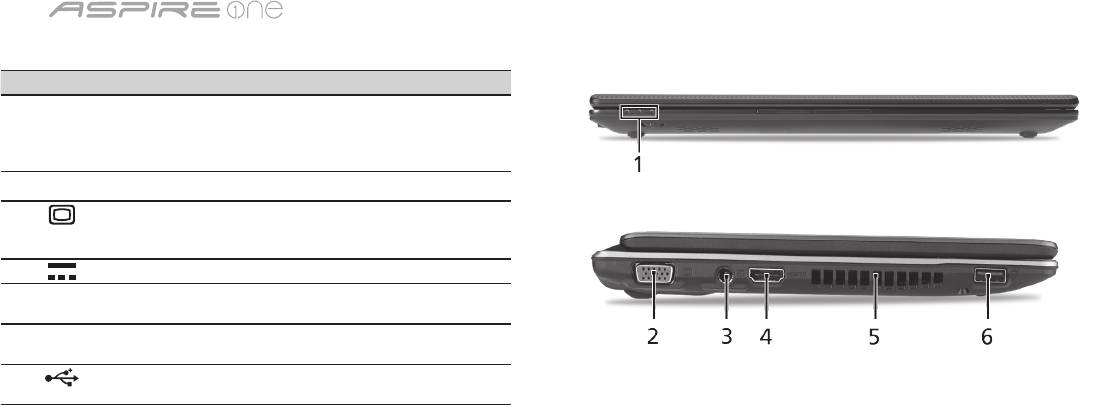
ซีรี่ส์
5
ปิดมุมมองด้านบน
# ไอคอน รายการ คำอธิบาย
1
ตัวแสดงสถานะ Light-Emitting Diode (LED) ที่จะ
มีไฟปรากฏขึ้นเพื่อแสดงสถานะการ
ใช้งานของคอมพิวเตอร์และส่วนประ
กอบต่างๆ
มุมมองด้านซ้าย
2
พอร์ตจอแสดงผลต่อพ่วง
เชื่อมต่อกับจอแสดงผล (เช่น
(VGA)
จอภาพภายนอก, โปรเจคเตอร์
LCD)
3
ช่องเสียบ DC-in เชื่อมต่อกับอแดปเตอร์ AC
4
HDMI พอร์ต HDMI รองรับการเชื่อมต่อระบบวิดีโอดิจิตอ
ลความละเอียดสูง
5
ช่องระบายอากาศ ช่วยให้คอมพิวเตอร์เย็น
แม้หลังจากใช้งานเป็นเวลานาน
6
พอร์ต USB 2.0 ต่ออุปกรณ์ USB 2.0 (เช่น
เมาส์หรือกล้อง USB)
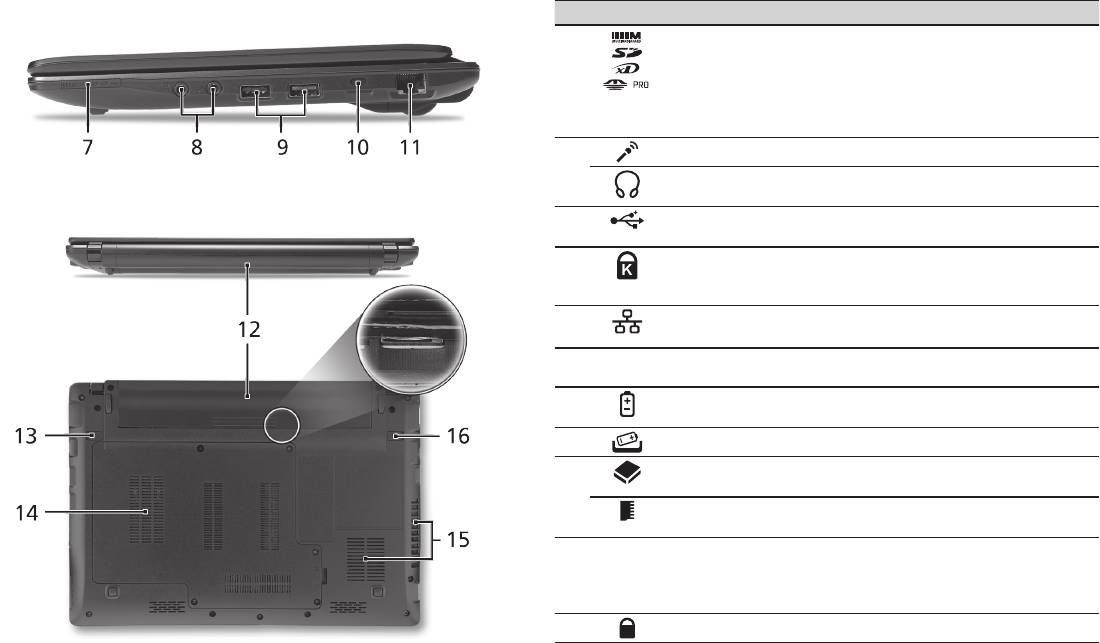
คู่มืออย่างย่อ
6
มุมมองด้านขวา
# ไอคอน รายการ คำอธิบาย
7
การ์ดรีดเดอร์มัลติอินวัน รับ Secure Digital (SD),
MultiMediaCard (MMC), Memory
Stick (MS), Memory Stick PRO
(MS PRO), xD-Picture Card (xD)
หมายเหตุ: กดเพื่อถอด/ติดตั้งการ์ด ท
ำงานได้ครั้งละหนึ่งการ์ดเท่านั้น
8
แจ็คเสียบไมโครโฟน ใช้สำหรับต่อไมโครโฟน
ช่องเสียบหูฟัง/ลำโพง/
เชื่อมต่อกับอุปกรณ์ระบบเสียงภายนอก
line-out รองรับ S/PDIF
(เช่น ลำโพง ชุดหูฟัง)
9
พอร์ต USB 2.0 เชื่อมต่อกับอุปกรณ์ USB 2.0 (เช่น
เมาส์ USB)
10
สล็อตล็อค Kensington พ่วงต่อกับระบบล็อคความปลอดภัย
สำหรับคอมพิวเตอร์ที่ใช้งานได้กับ
Kensington
11
พอร์ต Ethernet (RJ-45) เชื่อมต่อไปยังเครือข่ายซึ่งใช้
Ethernet 10/100/1000
มุมมองด้านหลังและด้านล่าง
12
ช่องใส่แบตเตอรี่ ใช้สำหรับเก็บแพ็คแบตเตอรี่ของคอม
พิวเตอร์
13
สลักปลดล็อคแบตเตอรี่ ปลดล็อคเพื่อนำแบตเตอรี่ออก
14
ช่องใส่ฮาร์ดดิสก์ ที่อยู่ของฮาร์ดดิสก์ของคอมพิวเตอร์
(ยึดติดแน่นด้วยน๊อต)
ช่องหน่วยความจำ ที่อยู่ของหน่วยความจำของคอมพิวเต
อร์
15
สล็อตอุปกรณ์ระบายอากาศ
ช่วยให้คอมพิวเตอร์เย็น
และพัดลมระบายความร้อน
แม้หลังจากใช้งานเป็นเวลานาน
หมายเหตุ:
ห้ามปิดหรือกีดขวางช่องพัดลม
16
ล็อคแบตเตอรี่ ล็อคแบตเตอรี่ให้อยู่ในตำแหน่ง

ซีรี่ส์
สิ่งแวดล้อม
อุณหภูมิ:
ขณะทำงาน: 5 °C ถึง 35 °C
ขณะปิดเครื่อง: -20 °C ถึง 65 °C
ความชื้น (ไม่ควบแน่นเป็นไอน้ำ):
ขณะทำงาน: 20% ถึง 80%
ขณะปิดเครื่อง: 20% ถึง 80%
7
