
Lacie Little Disk: • LaCie Little Disk • FireWire 400 cable • USB power sharing cable • USB extension cable • Carrying case
• LaCie Little Disk • FireWire 400 cable • USB power sharing cable • USB extension cable • Carrying case: Lacie Little Disk
PACKAGE CONTENT
• LaCie Little Disk
• FireWire 400 cable
• USB power sharing cable
• USB extension cable
• Carrying case
1
2
3
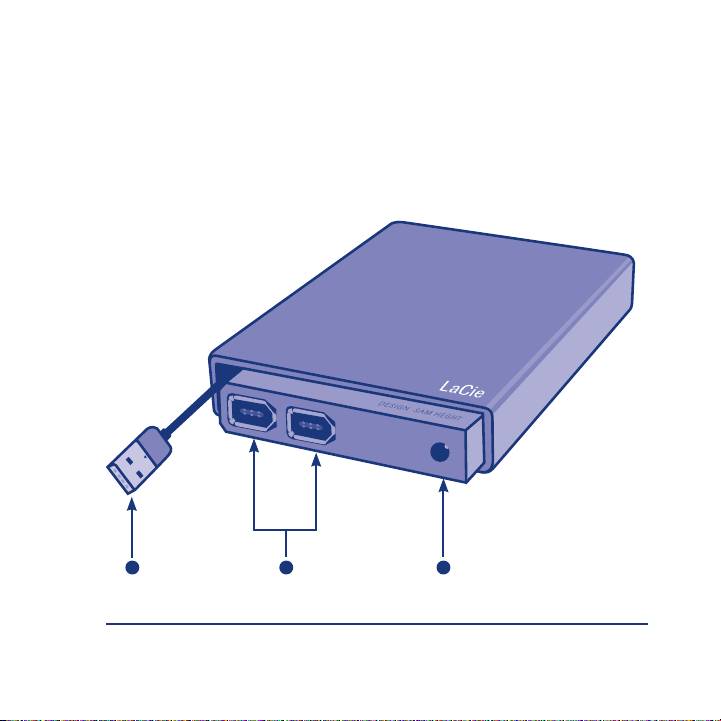
1. USB 2.0 cable
2. FireWire 400 ports
3. Power connection
Table of contents
- D E S I G N B Y S A M H E C H T
- • LaCie Little Disk • FireWire 400 cable • USB power sharing cable • USB extension cable • Carrying case
- Setup Steps Remove the cap and con-1.
- Optional: Some computers limit USB bus power. If your drive does not power on after connecting the USB cable, you may need to connect the USB power sharing cable to power your drive. Unplug the USB cable from the drive, con- nect the USB power sharing cable to your computer and to the drive and recon- nect the USB cable.
- Disconnection
Top 10 manuals
100.00
NZXT HALE90 1000W99.99
Samsung SM-R38099.97
AEG BSB 18C99.97
Dell 2700W99.97
Smeg KSEC70X99.96
Beurer HDE 4099.96
Pyramida KH 50 v.299.96
MSI CSM-H81M-P3299.96
AEG HR 562799.95
Melissa 640-048