
Ariston AVSD 109: Washing machine description
Washing machine description: Ariston AVSD 109
4
GB
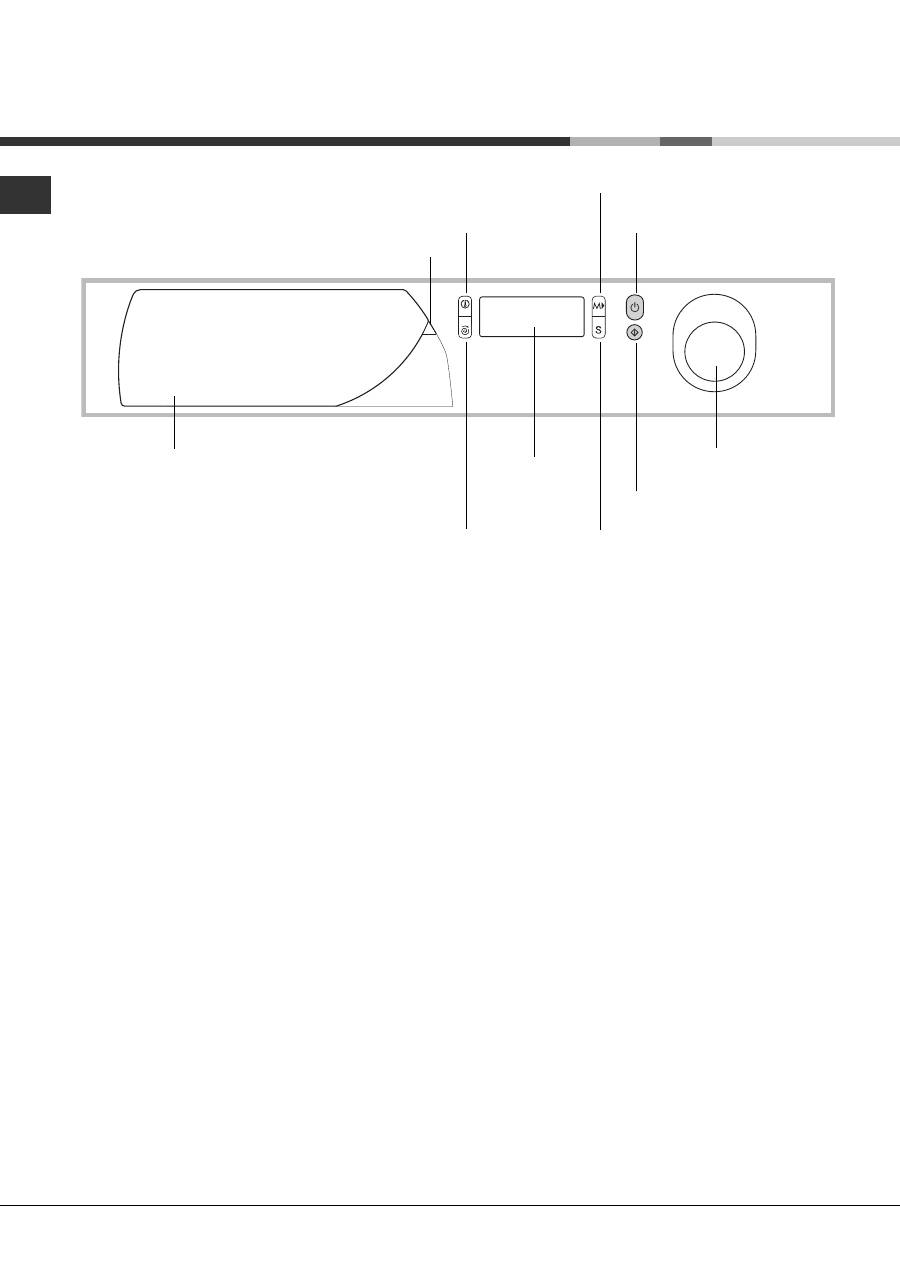
Control panel
Washing machine description
Control knob
Display
Detergent dispenser
Programme key
SPIN
button
TEMPERATURE
button
MODE
button
SELECT
button
START/STOP
button
START/RESET
button
Detergent dispenser
to add detergent and fabric
softener
(see page 8).
Programme key
to consult a straightforward chart
of the different programmes available: pull the grey
tab outwards to open it.
TEMPERATURE
button to adjust the wash tempe-
rature
(see page 7).
SPIN
button to adjust the spin speed or exclude it
altogether
(see page 7).
Display
to programme the washing machine and
follow the wash cycle progress
(see opposite page)
.
MODE
button to choose the options for the
appliance personalisation
(see page 7)
.
SELECT
button to set the options for the appliance
personalisation
(see page 7)
.
START/STOP
button to turn the washing machine
on and off.
START/RESET
button to start the programmes or
cancel any incorrect settings.
Control knob
to select the wash programmes. The
retractable control knob: press the centre of the
knob for it to pop out. The knob stays still during the
cycle.
5
GB
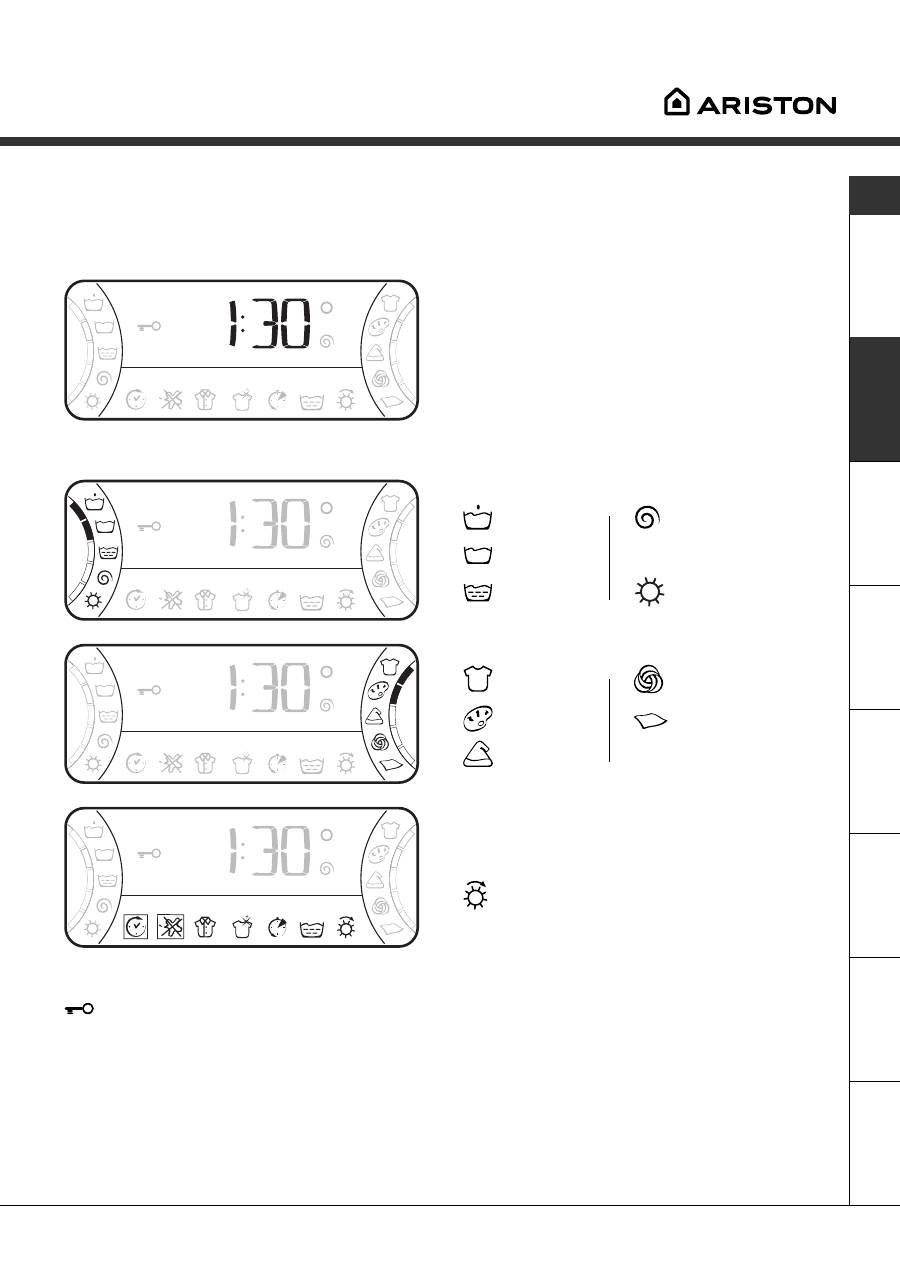
Display
In addition to being a practical tool to programme your appliance
(see page 7)
, the display provides useful
information concerning the wash cycle and status.
Once you have pressed the START/RESET button to
start the programme, the display will indicate the
amount of time left until the end of the wash cycle. If
a delayed start has been set (using the Delay Timer,
see page 7
), the delay time will be indicated on the
display.
The following information is displayed during the
wash cycle:
Cycle phase under way:
Pre-wash
Spin cycle
Wash cycle
Rinse
Disabled symbol.
Fabric selected:
Cotton
Wool
Colours
Silk
Synthetics
Personalisation options:
The enabled options are bordered by a frame.
To choose the options,
see page 7
.
Disabled symbol.
Service
Tr
oubleshooting
Precautions
Care
Programmes
Detergents
Installation
Description
Door lock:
If the symbol is on, the washing machine door is locked to prevent it from being opened accidentally. To avoid
any damages, wait for the symbol to switch itself off before you open the appliance door.
This model is fitted with a device that allows you to open the appliance door during some of the programme
phases. This is possible when the symbol is not on.
At the end of the programme, the word END is displayed.
In the event of an anomaly, an error code will appear, such as: F-01, which should be communicated to the
Service Centre
(see page 12)
.
Table of contents
- Installation
- Washing machine description
- Starting and Programmes
- Personalisations
- Detergents and laundry
- Precautions and advice
- Care and maintenance
- Troubleshooting
- Service
- Ðóêîâîäñòâî ïî ýêïóàòàöèè
- Óñòàíîâêà
- Îïèñàíèå ñòèðàëüíîé ìàøèíû
- Çàïóñê ìàøèíû. Ïðîãðàììû
- Ïåðñîíàëèçàöèÿ ñòèðêè
- Ìîþùèå ñðåäñòâà è áåëüå
- Ïðåäóïðåæäåíèÿ èðåêîìåíäàöèè
- Îáñëóæèâàíèå è óõîä
- Íåèñïðàâíîñòèè ìåòîäû èõ óñòðàíåíèÿ
- Ñåðâèñíîåîáñëóæèâàíèå
- Bedienungsanleitungen
- Installation
- Beschreibung desWaschvollautomaten
- Inbetriebnahme undProgramme
- Individualisierungen
- Waschmittel und Wäsche
- Vorsichtsmaßregelnund Hinweise
- Reinigung und Pflege
- Störungen und Abhilfe
- Kundendienst
- Návod k pouití
- Instalace
- Popis praèky
- Uvedení do chodu a programy
- Nastavení èinnostidle potøeb uivatele
- Prací prostøedky a prádlo
- Opatøení a rady
- Údrba a péèe
- Poruchy azpùsob jejich odstranìní
- Servisní sluba
- INSTRUCÞIUNI DE FOLOSIRE
- Instalare
- Descriereamaºinii de spãlat
- Pornire ºi Programe
- Personalizãri
- Detergenþi ºi rufe albe
- Precauþii ºi sfaturi
- Întreþinere ºi îngrijire
- Anomalii ºi remedii
- Asistenþã
- Használati utasítás
- Üzembehelyezés
- A mosógép leírása
- Indítás és Programok
- Program módosítások
- Mosószerek és mosandók
- Óvintézkedések és tanácsok
- Karbantartás és törõdés
- Rendellenességekés elhárírásuk
- Szerviz
- Návod na pouitie
- Intalácia
- Popis práèky
- Uvedenie do chodu a programy
- Nastavenie èinnostipod¾a potrieb uivate¾a
- Pracie prostriedky a bielizeò
- Opatrenia a rady
- Údrba a starostlivos
- Poruchy aspôsob ich odstránenia
- Servisná sluba


