
Samsung NV24 HD: When Using the Camera for the First Time : Smart button
When Using the Camera for the First Time : Smart button: Samsung NV24 HD
EN-7
When Using the Camera for the First Time : Smart button
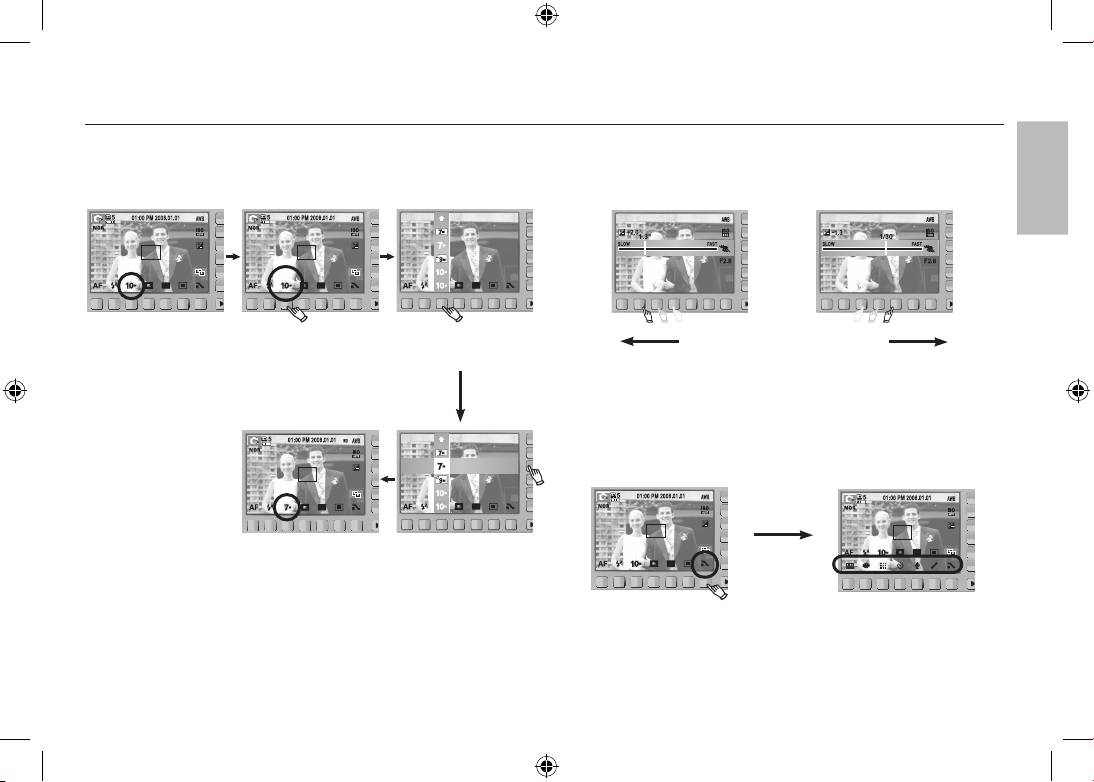
This button is used for shifting the menu cursor to select or for confirming
To select a sub menu, in some menus, touch the button and slide your
the selected menu.
finger to the left / right.
3648x2056
3072x2304
3648x2432
SIZE
3648x2736
[Selecting the main menu :
[Confirming the main menu :
Slow Fast
Touching the button]
Pressing the button]
[e.g. : Manual - Selecting the shutter speed]
Extending the menus : Press the extension menu button and more
3648x2056
available menus will be displayed.
3072x2304
3648x2432
3648x2736
[Confirming the sub menu :
[Selecting the sub menu :
Pressing the
Pressing the button]
Touching the button]
extension menu
button
※ The AMOLED monitor will be dark when some menus are selected. After
selecting the menu, the AMOLED monitor returns to the brightness set as
before.
ENGLISH
Table of contents
- Getting to know your camera
- Getting to know your camera
- Identification of features / Contents of camera
- Battery life & Number of shot (Recording time)
- When Using the Camera for the First Time : Smart button
- When Using the Camera for the First Time : Setting up the Date / Time and Language
- AMOLED monitor indicator
- Mode dial
- Taking a picture
- Playingback, Deleting and Protecting Images
- Using the remote control
- Connecting to the HDTV using the HDMI cable
- Downloading images
- Specifications
- Specifications Correct Disposal of This Product
- Correct disposal of batteries in this product
- MEMO
- Die Kamera kennen lernen Korrekte Entsorgung dieses Produkts
- Die Kamera kennen lernen
- Identifikation der Funktionen / Lieferumfang der Kamera
- Batteriebetriebsdauer und Anzahl der Aufnahmen (Aufnahmezeit)
- Wenn die Kamera zum ersten Mal benutzt wird : Smarttaste
- Wenn die Kamera zum ersten Mal benutzt wird : Einstellung von Datum / Uhrzeit und Sprache
- AMOLED Monitoranzeige
- Betriebsarten-Einstellra
- Fotografieren
- Wiedergabe, Löschen und Schützen von Bildern
- Verwenden der Fernbedienung
- Herstellen einer Verbindung mit dem HDTV mithilfe des HDMI-Kabels
- Herunterladen von Bildern
- Technische Daten
- Technische Daten Korrekte Entsorgung der Batterien dieses Produkts
- Kameraan tutustuminen Tuotteen hävittäminen
- Kameraan tutustuminen
- Toimintojen tunnistaminen / kameran sisältö
- Akun kesto ja kuvien määrä (tallennusaika)
- Kameran käyttäminen ensimmäistä kertaa : Smart-painike
- Kameran käyttäminen ensimmäistä kertaa : Päivämäärän, kellonajan ja kielen asettaminen
- AMOLED-näytössä näkyvät kuvakkeet
- Tilanvalitsin
- Kuvan ottaminen
- Kuvien toistaminen, poistaminen ja suojaaminen
- Kaukosäätimen käyttäminen
- Yhdistäminen teräväpiirtotelevisioon HDMI-kaapelin avulla
- Kuvien lataaminen
- Tekniset tiedot
- Tekniset tiedot Tuotteen paristojen oikea hävittäminen
- Att bli bekant med din kamera Korrekt avfallshantering av produkten
- Att bli bekant med din kamera
- Identifiering av egenskaper / innehåll hos kamera
- Batteriets livslängd & antalet tagningar (inspelningstid)
- När du använder kameran första gången : Smart-knapp
- När du använder kameran första gången : Ställa in tid, datum och språk
- AMOLED skärmsindikator
- Lägesomkopplare
- Att ta en blid
- Uppspelning, radering och skyddande av bilder
- Använda fjärrkontrollen
- Ansluta till en HDTV med hjälp av HDMI-kabeln
- Nedladdning av bilder
- Specifikationer
- Specifikationer Korrekt avfallshantering av batterierna i denna produkt
- Korrekt bortskaffelse af dette produkt
- Kameraets funktioner/Kameraets indhold
- Batterilevetid og antal billeder (optagetid)
- Når du bruger kameraet for første gang : Smart-knap
- Når du bruger kameraet for første gang : Indstilling af dato / klokkeslæt og sprog
- Indikatorer på AMOLED-monitoren
- Funktionsknap
- Optagelse af et billede
- Afspilning, sletning og beskyttelse af billeder
- Brug af fjernbetjeningen
- Tilslutning til HDTV’et ved hjælp af HDMI-kablet
- Overførsel af billeder
- Specifikationer
- Specifikationer Korrekt bortskaffelse af batterierne i dette produkt
- Знакомство с фотокамерой
- Рабочие элементы / содержимое упаковки
- Ресурс батарей и доступное количество снимков (время записи)
- Первое включение фотокамеры : "умные" кнопки
- Первое включение фотокамеры : Настройка даты / времени и выбор языка
- Информация, отображаемая на AMOLED-дисплее
- Селектор режимов
- Фотосъемка
- Воспроизведение, удаление и защита изображений
- Использование пульта ДУ
- Подключение кабеля HDMI к ТВЧ
- Загрузка изображений
- Технические характеристики
- MEMO
