
Lenovo N70: instruction
Class: Household, kitchen appliances, electronics and equipment
Type: The input device
Manual for Lenovo N70
Table of contents

Levono Wireless Laser Mouse N70

© Copyright Lenovo 2011. All rights reserved.
LENOVO products, data, computer software, and services have been developed
exclusively at private expense and are sold to governmental entities as commercial
items as dened by 48 C.F.R. 2.101 with limited and restricted rights to use,
reproduction and disclosure.
LIMITED AND RESTRICTED RIGHTS NOTICE: If products, data, computer
software, or services are delivered pursuant a General Services Administration
“GSA” contract, use, reproduction, or disclosure is subject to restrictions set forth in
Contract No. GS-35F-05925.

Contents
English ..................................................................................... 1
Français ................................................................................... 2
Deutsch ................................................................................... 3
Italiano ..................................................................................... 4
Español....................................................................................5
Polski ....................................................................................... 6
......................................................................................... 7
Português ................................................................................ 8
Türkçe...................................................................................... 9
................................................................................. 10
.................................................................................. 11
Dansk .................................................................................... 12
Nederlands ............................................................................ 13
Suomi .................................................................................... 14
................................................................................15
......................................................................................16
Magyar................................................................................... 17
Norsk ..................................................................................... 18
Svenska ................................................................................. 19
日本語 .................................................................................... 20
한국어 .................................................................................... 21
简体中文 ................................................................................ 22
繁體中文 ................................................................................ 23
Levono Wireless Laser Mouse N70
English
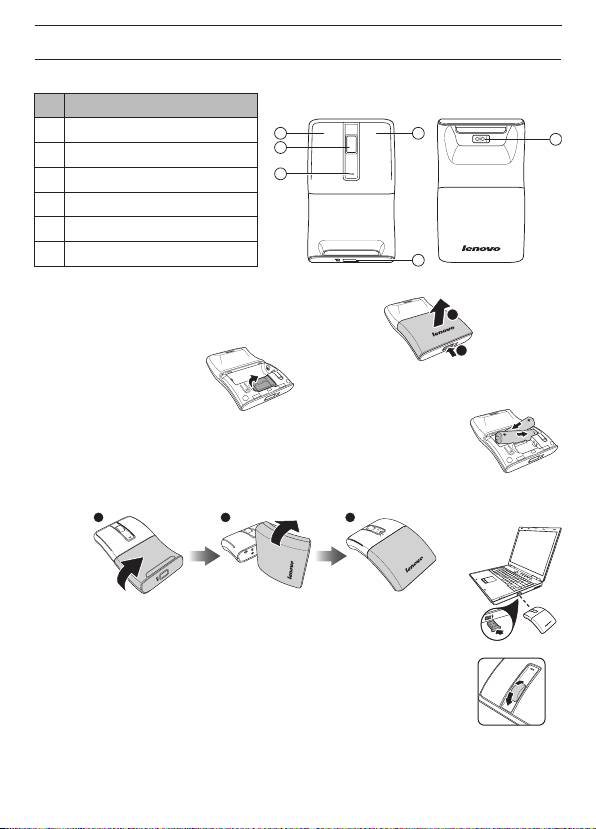
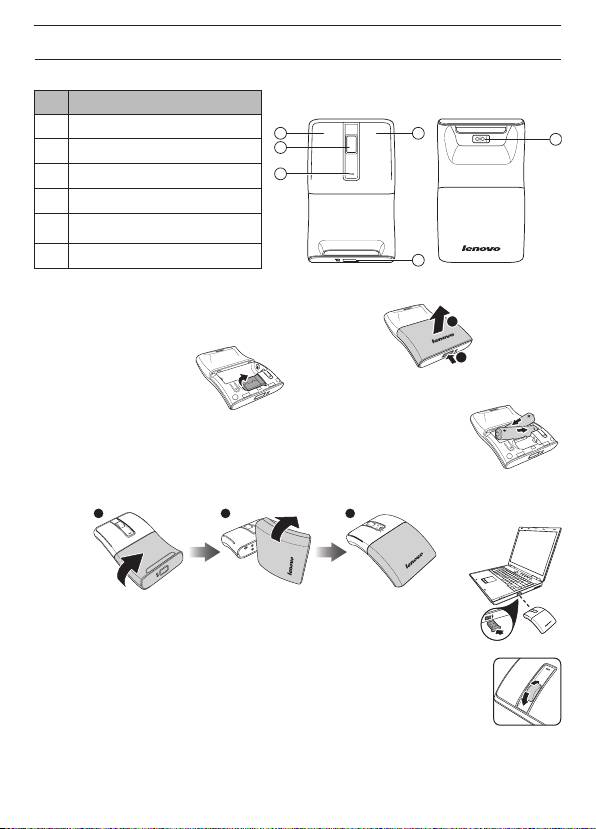
Features
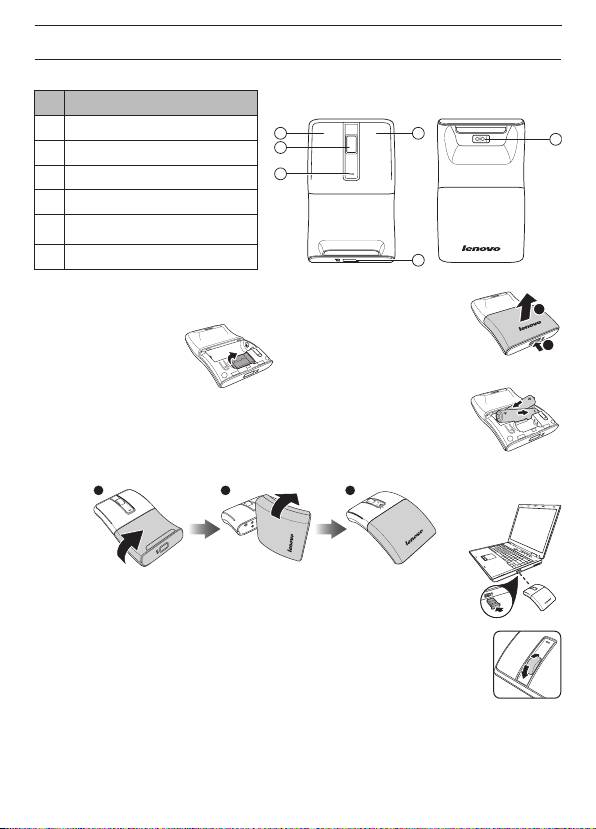
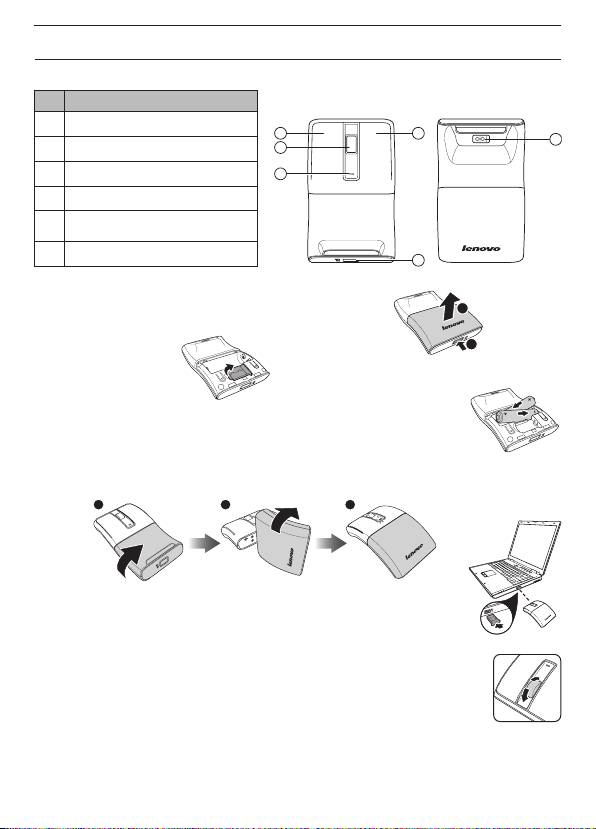
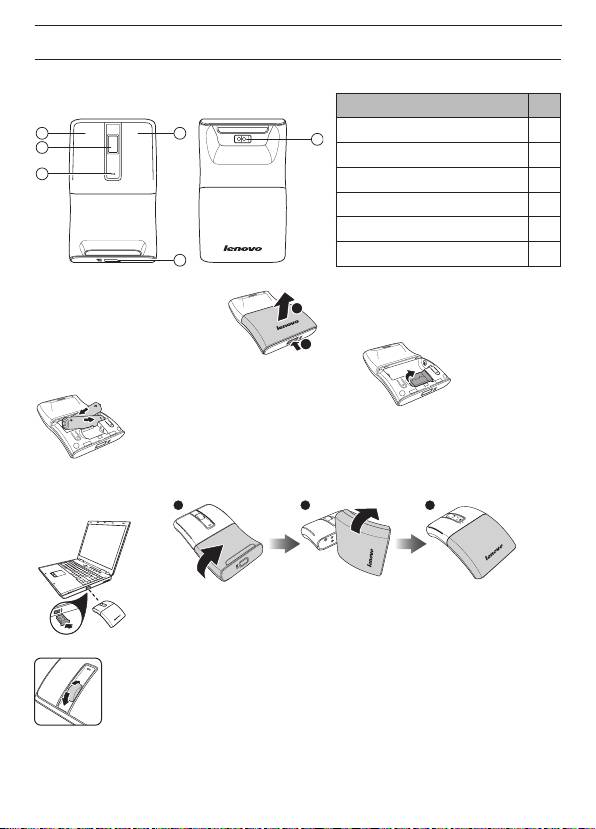
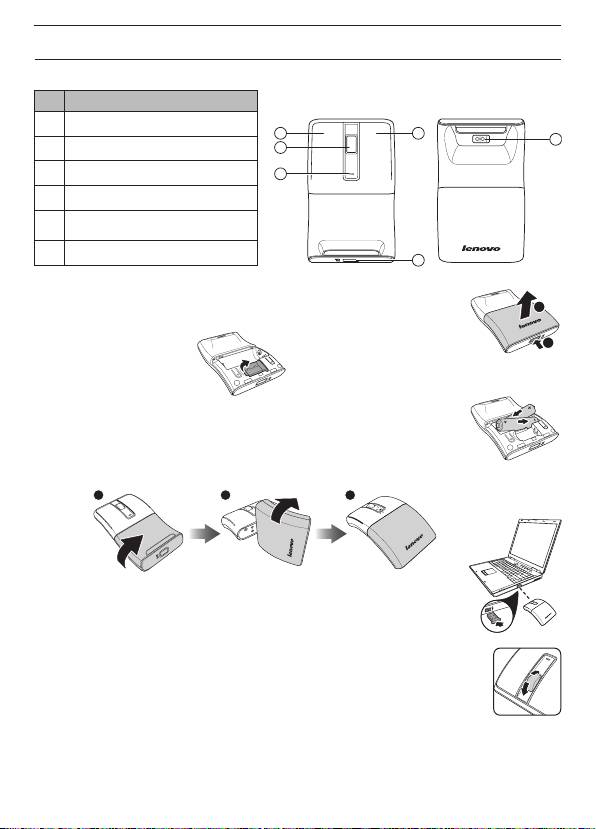
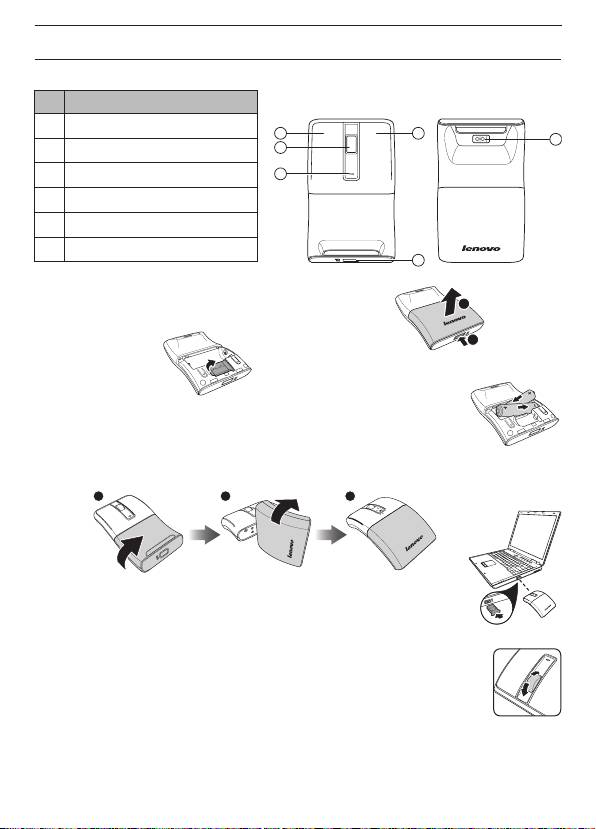
Front View Rear View
No. Component
1 Left Button
41
6
2
2 Scroll Wheel
3
3 LED Indicator
4 Right Button
5 Battery/USB Receiver Cover Latch
6 Laser Sensor
5
Setting up your mouse
2
1. Open the battery/USB receiver compartment cover as shown.
1
2. Remove the USB receiver.
3. Insert two AAA batteries, making sure that the + and - on the batteries match
the + and - in the battery compartment. Then close the battery/USB receiver
compartment cover.
0
4. Rotate the bottom half of mouse 180
to switch on your mouse.
Follow the rotation direction as shown.
1 2 3
5. Plug the USB receiver into an available USB port on your laptop. The laptop
automatically detects the mouse.
Using your mouse
1. Use the scroll wheel to scroll up and down the screen.
2. Press and hold the scroll wheel down, then move the mouse up and down to
scroll up and down the page.
LED Indicator
• The LED indicator lights orange when the mouse is switched on and pairing is established.
• The LED indicator continuously ashes for approximately 30 seconds when the battery level is
low. Replace the batteries immediately.
1
Souris laser sans l N70 de Lenovo
Français
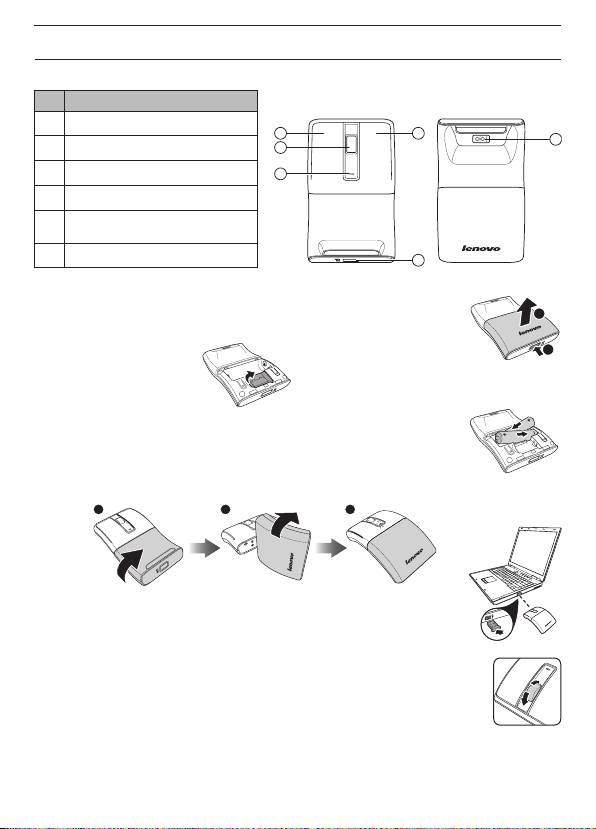
Fonctions
No. Composant
Vue de devant Vue de derrière
1 Bouton Gauche
41
6
2
2 Molette de délement
3 Voyant DEL
3
4 Bouton Droite
Loquet du couvercle des piles/du
5
récepteur USB
6 Capteur laser
5
Préparation de votre souris
2
1. Ouvrez le couvercle du compartiment des piles/du récepteur USB comme
indiqué.
1
2. Enlevez le récepteur USB.
3. Insérez deux piles AAA et assurez-vous que les bornes + et - des piles sont
dans le bon sens comme indiqué par + et - dans le compartiment des piles.
Puis fermez le couvercle du compartiment des piles/du récepteur USB.
0
4. Faites tourner la partie inférieure de la souris par 180
pour allumer votre
souris. Suivez le sens de rotation comme indiqué.
1 2 3
5. Branchez le récepteur USB sur un port USB de votre ordinateur portable.
L’ordinateur portable détecte automatiquement la souris.
Utilisation de la souris
1. Utilisez la molette de délement pour déler vers le haut ou le bas sur l'écran.
2. Appuyez sans arrêter sur la molette de délement, pour bougez la souris vers le
haut ou le bas pour déler par des pages vers le haut ou le bas.
Voyant DEL
• Le voyant DEL s'allume en orange lorsque la souris est allumée et le pairage a été effectué.
• Le voyant DEL clignote en continu pendant environ 30 secondes lorsque le niveau des piles est
faible. Remplacez les piles immédiatement.
2
Kabellose Lenovo-Lasermaus N70
Deutsch
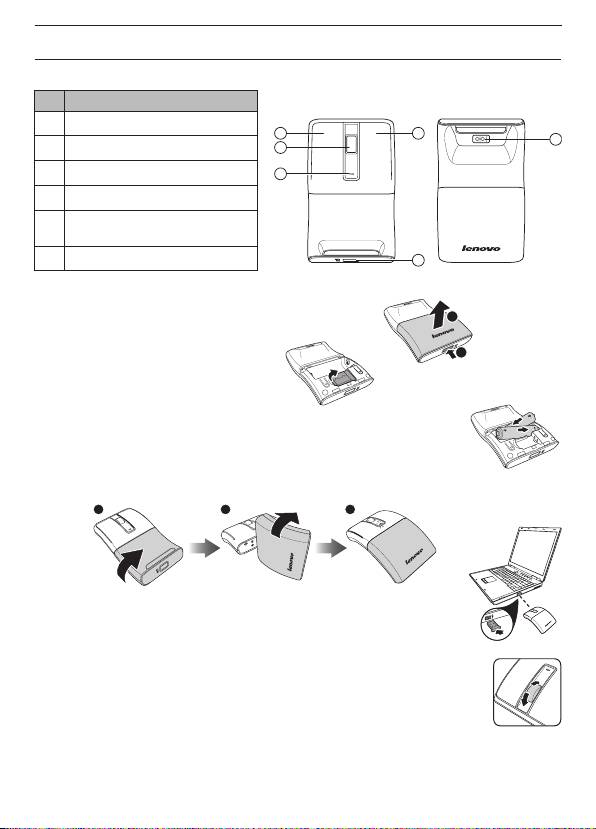
Eigenschaften
Nr. Komponente
Ansicht von vorne Ansicht von hinten
1 Linke Taste
41
6
2
2 Mausrad
3 LED-Indikator
3
4 Rechte Taste
USB-Empfänger-/Batteriefach-
5
Entriegelung
6 Lasersensor
5
Maus vorbereiten und verbinden
2
1. Öffnen Sie das USB-Empfänger-/Batteriefach wie abgebildet.
1
2. Nehmen Sie den USB-Empfänger heraus.
3. Legen Sie zwei AAA-Batterien richtig herum ein, orientieren Sie sich dabei an
den Kennzeichnungen „+“ und „-“ im Batteriefach. Setzen Sie anschließend
wieder den Deckel auf das USB-Empfänger-/Batteriefach.
4. Schalten Sie die Maus durch Drehen des Unterteils um 180° ein.
Drehen Sie das Unterteil bitte in die abgebildete Richtung.
1 2 3
5. Stecken Sie den USB-Empfänger in einen freien USB-Port Ihres Notebooks
ein. Die Maus wird vom Notebook automatisch erkannt.
So nutzen Sie Ihre Maus
1. Mit dem Mausrad blättern Sie zeilenweise nach oben und unten.
2. Wenn Sie das Mausrad gedrückt halten und die Maus anschließend nach oben
oder unten bewegen, blättern Sie ebenfalls nach oben oder unten.
LED-Indikator
• Der LED-Indikator leuchtet orange, wenn die Maus eingeschaltet und mit dem
Computer gekoppelt ist.
• Bei niedrigem Energiestand blinkt der LED-Indikator etwa 30 Sekunden lang. Tauschen Sie die
Batterien so schnell wie möglich aus.
3
Mouse laser wireless Levono N70
Italiano
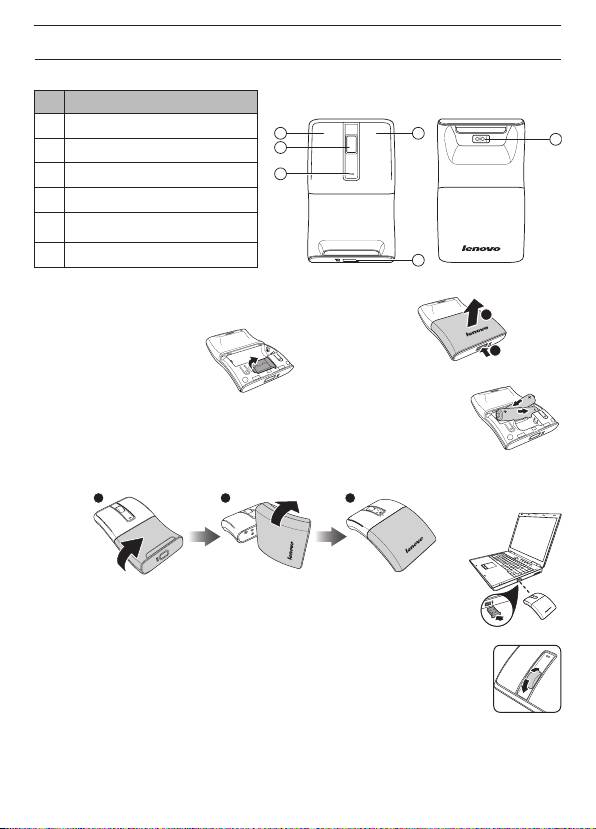
Caratteristiche
N. Componente
Vista anteriore Vista posteriore
1 Tasto sinistro
41
6
2
2 Rotella di scorrimento
3
3 Indicatore LED
4 Tasto destro
Blocco coperchio batterie/ricevi-
5
tore USB
6 Sensore laser
5
Impostazione del mouse
1. Aprire il coperchio del vano batterie/ricevitore USB come illustrato.
2
1
2. Rimuovere il ricevitore USB.
3. Inserire due batterie AAA, assicurandosi che le polarità + e - sulle batterie
combacino con le polarità + e - nel vano batterie. Quindi chiudere il coperchio
del vano batterie/ricevitore USB.
0
4. Ruotare la metà inferiore del mouse di 180
per accendere il mouse.
Seguire la direzione di rotazione come illustrato.
1 2 3
5. Inserire il ricevitore USB in una porta USB disponibile del notebook. Il
notebook rileva automaticamente il mouse.
Utilizzo del mouse
1. Ruotare la rotellina per scorrere la schermata su e giù.
2. Tenere premuta la rotellina verso il basso, quindi spostare il mouse verso l'alto e
il basso per scorrere la pagina su e giù.
Indicatore LED
• L'indicatore LED si accende in arancione quando si accende il mouse e si stabilisce
l'associazione.
• L'indicatore LED continua a lampeggiare per circa 30 secondi quando il livello della batteria è
basso. Sostituire immediatamente le batterie.
4
Ratón láser inalámbrico N70 de Levono
Español
Características
Vista frontal Vista posterior
Nº Componente
1 Botón izquierdo
41
6
2
2 Rueda de desplazamiento
3
3 Indicador LED
4 Botón derecho
Seguro de la tapa de las pilas y
5
del receptor USB
6 Sensor láser
5
Preparar el ratón
2
1. Abra la tapa del compartimento de las pilas y del receptor USB tal y como se
muestra en la imagen.
1
2. Retire el receptor USB.
3. Inserte dos pilas de tipo AAA asegurándose de que los polos + y - de las
mismas coinciden con los polos + y - de su compartimento. A continuación,
cierre la tapa del compartimento de las pilas y del receptor USB.
0
4. Gire la mitad inferior del ratón 180
para encenderlo.
Siga la dirección de giro tal y como se muestra en la imagen.
1 2 3
5. Enchufe el receptor USB en un puerto USB disponible de su equipo portátil.
El equipo portátil detectará automáticamente el ratón.
Utilizar el ratón
1. Utilice la rueda de desplazamiento para recorrer la pantalla hacia arriba y hacia
abajo.
2. Mantenga presionada la rueda de desplazamiento y, a continuación, mueva el
ratón hacia arriba y hacia abajo para recorrer la página en la misma dirección.
Indicador LED
• El indicador LED se ilumina en color naranja cuando el ratón está encendido y la asociación
está establecida.
• El indicador LED parpadea continuamente durante aproximadamente 30 segundos cuando el
nivel de carga de las pilas es bajo. Cambie las pilas inmediatamente.
5
Bezprzewodowa mysz laserowa Levono N70
Polski
Funkcje
Nr Komponent
Widok z przodu
Widok z tyłu
1 Lewy przycisk
41
6
2
2 Pokrętło przewijania
3 Wskaźnik LED
3
4 Prawy przycisk
Zatrzask pokrywy baterii/
5
odbiornika USB
6 Sensor laserowy
5
Ustawienia myszy
2
1. Otwórz pokrywę wnęki baterii/odbiornika USB, jak na ilustracji.
1
2. Wyjmij odbiornik USB.
3. Włóż dwie baterie AAA, sprawdzając dopasowanie znaków + i - na bateriach
ze znakami + i - we wnęce baterii. Następnie zamknij pokrywę wnęki baterii/
odbiornika USB.
0
4. Obróć dolną połowę myszy o 180
, aby włączyć mysz.
Zachowaj kierunek obracania, jak na ilustracji.
1 2 3
5. Podłącz odbiornik USB do dostępnego portu USB laptopa. Laptop wykryje
mysz automatycznie.
Używanie myszy
1. Użyj pokrętło przewijania do przewijania w górę i w dół ekranu.
2. Naciśnij i przytrzymaj pokrętło przewijania, a następnie przesuń mysz w górę i w
dół, aby przewinąć stronę w górę i w dół.
Wskaźnik LED
• Wskaźnik LED świeci w kolorze pomarańczowym, po włączeniu myszy i wykonaniu parowania.
• Wskaźnik LED miga ciągle przez około 30 sekund, przy słabym naładowaniu baterii. Należy jak
najszybciej wymienić baterie.
6
LevonoN70
41
1
6
2
2
3
3
4
5USB
6
5
2
USB1
1
.USB2
AAA3
.USB
0
180
4
1 2 3
USBUSB5
1
2
30
7
Rato Sem Fios a Laser N70 da Lenovo
Português
Características
Nº. Componente
Vista frontal Vista traseira
1 Botão esquerdo
41
6
2
2 Roda de deslocamento
3 Indicador LED
3
4 Botão direito
Trinco da tampa do compartimen-
5
to das pilhas/receptor USB
6 Sensor laser
5
Instalação do rato
2
1. Abra a tampa do compartimento das pilhas/receptor USB, tal como ilustrado.
1
2. Remova o receptor USB.
3. Insira duas pilhas AAA, certicando-se de que as polaridades + e - das pilhas
coincidem com os símbolos + e - do compartimento das pilhas. Em seguida,
feche a tampa do compartimento das pilhas/receptor USB.
0
4. Roda a metade inferior do rato 180
para ligar o rato.
Siga a direcção de rotação ilustrada.
1 2 3
5. Ligue o receptor USB a uma porta USB disponível no seu computador
portátil. O computador portátil detectará automaticamente o rato.
Utilizar o rato
1. Utilize a roda de deslocamento para deslocar o ecrã para cima e para baixo.
2. Mantenha pressionada a roda de deslocamento e depois desloque o rato para
cima e para baixo para deslocar a página para cima e para baixo.
Indicador LED
• O indicador LED acende em laranja quando o rato está ligado e o emparelhamento foi
estabelecido.
• O indicador LED pisca durante aproximadamente 30 segundos quando o nível da bateria estiver
baixo. Substitua imediatamente as pilhas.
8
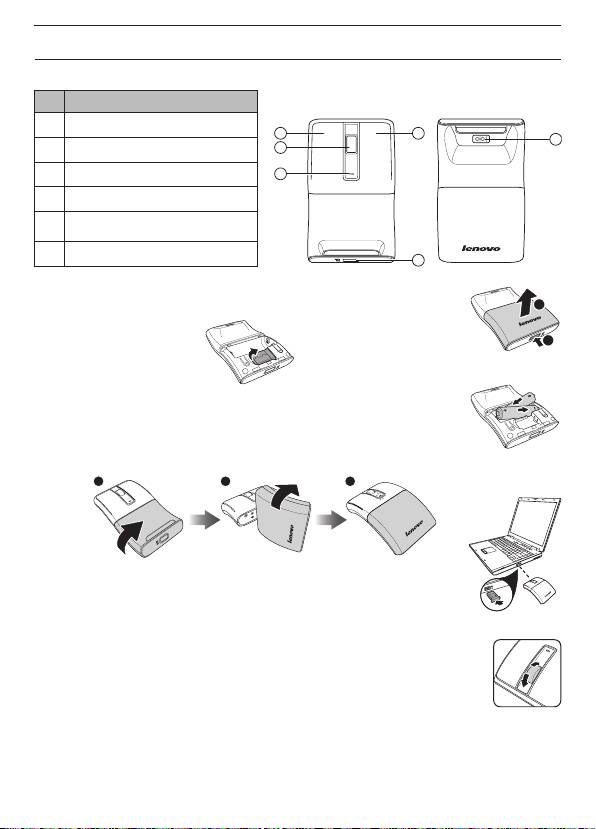
Lenovo Kablosuz Lazer Mouse N70
Türkçe
Özellikler
No. Parçalar
Önden Görünüm Arkadan Görünüm
1 Sol Düğme
41
6
2
2 Kaydırma Tekerleği
3
3 LED Göstergesi
4 Sağ Düğme
5 Pil/USB Alıcı Kapak Sürgüsü
6 Lazer Sensörü
5
Mouse kurma
2
1. Pil/USB alıcı bölmesi kapağını resimde gösterildiği şekilde açın.
1
2. USB alıcıyı çıkartın.
3. Her iki AAA pili, pillerin üzerindeki + ve - işaretlerini pil bölmesindeki + ve -
işaretleri ile eşleştirmeye dikkat ederek takın. Bunu yaptıktan sonra, pil/USB
alıcı bölmesi kapağını kapatın.
0
4. Mouse'u açmak için alt kısmını 180
döndürün.
Resimde gösterilen döndürme yönünü takip edin.
1 2 3
5. USB alıcıyı dizüstü bilgisayarınızdaki boş bir USB yuvasına takın. Dizüstü
bilgisayarınız mouse'u otomatik olarak algılayacaktır.
Mouse'un kullanılması
1. Ekranı yukarı aşağı kaydırmak için kaydırma tekerleğini kullanın.
2. Kaydırma tekerleğini aşağıya doğru basılı tutun, daha sonra sayfayı yukarı-aşağı
kaydırmak için mouse yukarı-aşağı hareket ettirin.
LED Göstergesi
• Mouse açık olduğunda ve bağlantı kurulduğunda LED göstergesi turuncu yanar.
• Pilin şarjı düşük olduğunda yaklaşık 30 saniye süreyle sürekli yanıp söner. Pilleri derhal yenileri
ile değiştirin.
9
1
41
6
2
2
3
3
4
5
6
5
2
1
0
1 2 3
10

Levono bezdrátová laserová myš N70
Čeština
Funkce
Pohled zepředu Pohled zezadu
č. Součást
1 Levé tlačítko
41
6
2
2 Rolovací kolečko
3
3 Indikátor LED
4 Pravé tlačítko
5 kryt baterie/USB přijímače
6 Laserový snímač
5
Příprava myši k použiti
2
1. Otevřete kryt prostoru pro baterie/USB přijímače podle obrázku.
1
2. Vyjměte USB přijímač.
3. Vložte dvě AAA baterie, ujistěte se, že + a - na bateriích odpovídají + a - v
prostoru na baterie. Zavřete prostor pro baterie/USB přijímače krytem.
0
4. Otočením spodní poloviny myši o 180
zapnete myš.
Otáčejte podle obrázku.
1 2 3
5. Připojte USB přijímač k volnému portu USB na vašem notebooku. Notebook
automaticky rozpozná myš.
Používání myši
1. Použijte kolečko pro posun nahoru a dolů po obrazovce.
2. Stiskněte a držte kolečko stisknuté, pohybem myši nahoru a dolů se posouváte
nahoru a dolů po stránce.
Indikátor LED
• LED indikátor svítí oranžově, pokud je myš zapnuta a spárována.
• LED indikátor průběžně bliká po dobu přibližně 30 sekund při nízkém napětí baterie. Vyměňte
baterie.
11
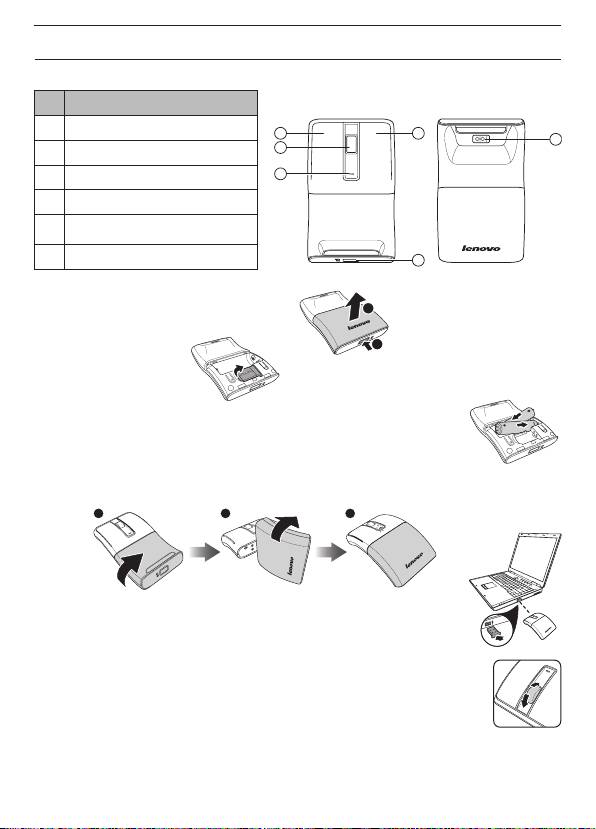
Levono Trådløs Lasermus N70
Dansk
Funktioner
Set forfra Set bagfra
Nr Komponent
1 Venstre knap
41
6
2
2 Rullehjul
3
3 LED indikator
4 Højre knap
Låseknap til dæksel til batteri/
5
USB-modtager
6 Lasersensor
5
Opsætning af musen
2
1. Åbn batteri/USB-modtager-rummet som vist.
1
2. Fjern USB-modtageren.
3. Indsæt 2 AAA batterier. Sørg for at vende batteriernes plus- og minus-side,
så det passer med mærkningen i batterirummet. Luk derefter batteri/USB-
modtager-rummet.
0
4. Drej musens nederste halvdel 180
for at tænde for den.
Følg omdrejningsretningen som vist.
1 2 3
5. Sæt USB-modtageren i et USB-stik på din laptop. Laptoppen nder
automatisk musen.
Sådan bruges musen
1. Brug rullehjulet til at rulle op og ned af skærmen.
2. Tryk og hold rullehjulet nede og yt musen op og ned for at rulle op og ned ad
siden.
LED indikator
• Lysdioden lyser orange, når musen er tændt og parring er foretaget.
• Lysdioden blinker i ca. 30 sek., når batteriniveauet er lavt. Udskift straks batterierne.
12
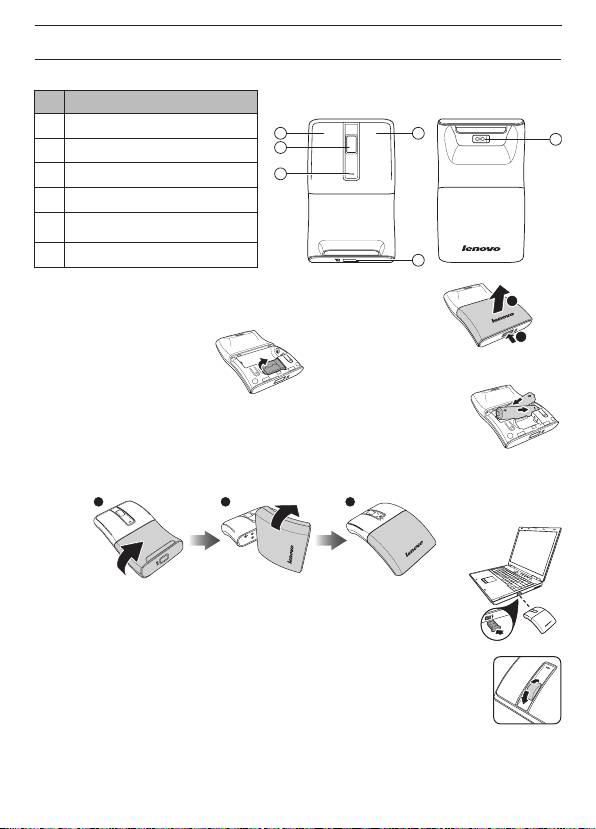
Levono draadloze lasermuis N70
Nederlands
Opties
Nr. Component
Vooraanzicht Achteraanzicht
1 Knop Links
41
6
2
2 Bladerwiel
3
3 LED-indicator
4 Knop Rechts
Sluiting klep batterij/
5
USB-ontvanger
6 Lasersensor
5
Uw muis instellen
2
1. Open de klep van het vak voor de batterij/USB-ontvanger als afgebeeld.
1
2. Verwijder de USB-ontvanger.
3. Plaats twee AAA-batterijen en zorg er voor dat de + en - op de batterijen
overeenkomen met de + en - in het batterijvak. Sluit daarna de klep van het
vak voor de batterij/USB-ontvanger.
0
4. Draai de onderkant van de muis 180
om de muis in te schakelen.
Volg de draairichting als in de afbeelding.
1 2 3
5. Steek de USB-ontvanger in een vrije USB-poort van uw computer. De
computer detecteert de muis automatisch.
De muis gebruiken
1. Gebruik het muiswieltje om omhoog en omlaag te schuiven over het scherm.
2. Houd het muiswieltje ingedrukt en beweeg de muis omhoog en omlaag om over de
pagina omhoog en omlaag te bladeren.
LED-indicator
• De LED-indicator licht oranje op als de muis is ingeschakeld en gekoppeld is.
• De LED-indicator knippert voortdurend gedurende ongeveer 30 seconden als de batterij bijna
leeg is. Vervang de batterijen direct.
13
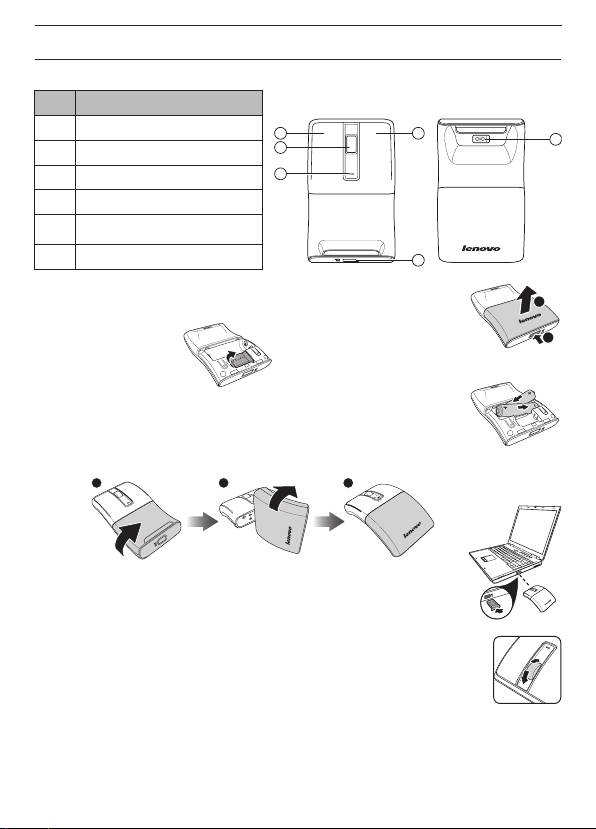
Levono langaton laserhiiri N70
Suomi
Ominaisuudet
Nro Laite
Näkymä edestä Näkymä takaa
1 Vasen painike
41
6
2
2 Vieritysrulla
3
3 LED-merkkivalo
4 Oikea painike
Paristo-/USB-vastaanotinlokeron
5
kannen salpa
6 Laser-tunnistin
5
Hiiren ottaminen käyttöön
2
1. Avaa paristo-/USB-vastaanotinlokeron kansi kuten kuvassa.
1
2. Poista USB-vastaanotin.
3. Aseta paristolokeroon kaksi AAA-paristoa varmistaen, että paristojen plus
(+) - ja miinusnapa (-) vastaavat paristolokeron vastaavia merkintöjä. Sulje
sitten paristo-/USB-vastaanotinlokeron kansi.
0
4. Kytke hiiri päälle kiertämällä hiiren alapuolikasta 180
.
Noudata kuvassa näkyvää kiertosuuntaa.
1 2 3
5. Kytke USB-vastaanotin kannettavan vapaaseen USB-porttiin. Kannettava
havaitsee hiiren automaattisesti.
Hiiren käyttö
1. Voit vierittää näyttöä ylös- ja alaspäin hiiren vierityskiekolla.
2. Pidä vierityskiekkoa painettuna ja siirrä hiirtä ylös ja alas vierittääksesi sivua ylös
ja alas.
LED-merkkivalo
• LED-merkkivalo palaa oranssina, kun hiiri on kytketty päälle ja laitepari on muodostettu.
• LED-merkkivalo vilkkuu jatkuvasti noin 30 sekuntia, kun paristojen lataus on vähissä. Vaihda
paristot välittömästi.
14
1
41
6
2
2
3
3
4
5
6
5
2
1
0
1 2 3
15
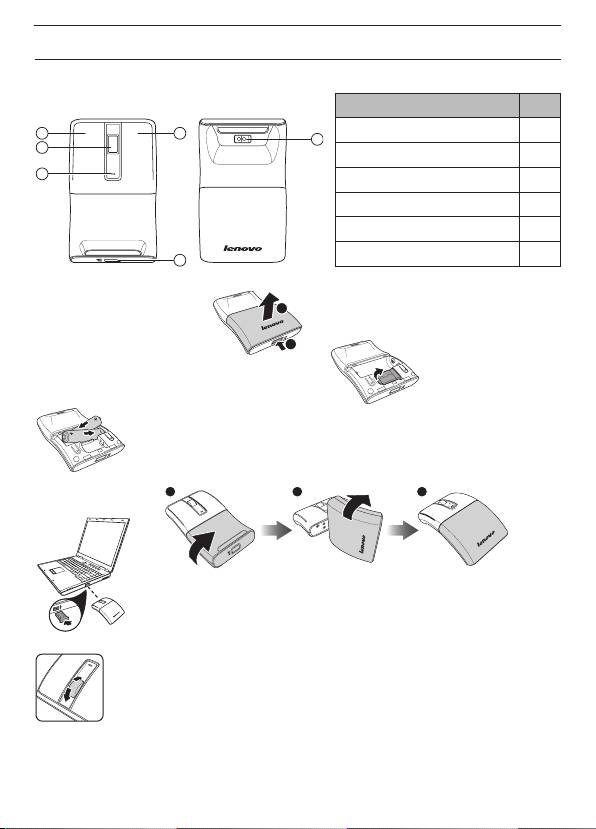
N70Lenovo
41
1
6
2
2
3
3
4
5USB
6
5
2
USB1
1
.USB2
AAA3
.USB
0
180
4
1 2 3
USBUSB5
1
2
30
16
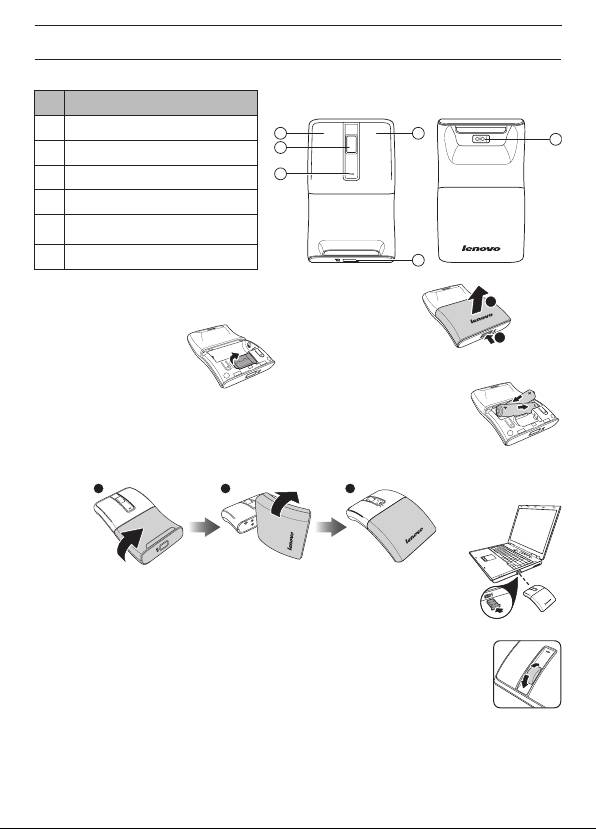
Levono vezeték nélküli lézeres egér N70
Magyar
Jellemzők
Elölnézet Hátulnézet
Sz. Részegység
1 Bal gomb
41
6
2
2 Görgetőkerék
3
3 LED jelzőfény
4 Jobb gomb
Akkumulátor/USB vevő fedelé-
5
nek retesze
6 Lézer érzékelő
5
Az egér üzembe helyezése
2
1. Nyissa ki az akkumulátor/USB vevő fedelét az ábrán látható módon.
1
2. Vegye ki az USB vevőt.
3. Helyezzen be két AAA méretű elemet, és ügyeljen arra, hogy a megfelelő
irányban álljanak az elemkamrában, azaz az elemek + és - pólusa illeszkedjen
a tartó + és - pólusához. Ezután csukja be az akkumulátor/USB vevő fedelét.
0
4. Forgassa el az egér alsó részét 180
-kal a bekapcsolásához.
Az ábra szerint forgassa el.
1 2 3
5. Csatlakoztassa az USB vevőt a laptop egyik szabad USB-csatlakozójához. A
laptop automatikusan észlelni fogja az egeret.
Az egér használata
1. Használja a görgetőkereket a képernyő fel-, illetve lefelé görgetéséhez.
2. Nyomja meg és tartsa lenyomva a görgetőkereket, majd mozgassa felfelé és lefelé
az egeret az oldal felfelé, illetve lefelé görgetéséhez.
LED jelzőfény
• A LED kijelző narancssárga színű az egér bekapcsolt és párosított állapotában.
• A LED kijelző kb. 30 másodpercig folyamatosan villog, ha az elemek kimerülőfélben vannak.
Cserélje ki azonnal az elemeket.
17
- 1
- 2
