
HEIDENHAIN ND 1200 Quick Start: instruction
Class: Equipment
Type:
Manual for HEIDENHAIN ND 1200 Quick Start

Quick Reference Guide
Kurzanleitung
Guide de Démarrage rapide
Guida rapida
Guía rápida de referencia
Snabbreferensguide
Beknopte handleiding
Stručná referenční příručka
Guia de referência rápida
Krótka instrukcja
Краткое руководство
Hızlı Başvuru Kılavuzu
クイックリファレンスガイド
快速參考手冊
ND 1200
QUADRA-CHEK
Software Version
2.19.x
9/2013
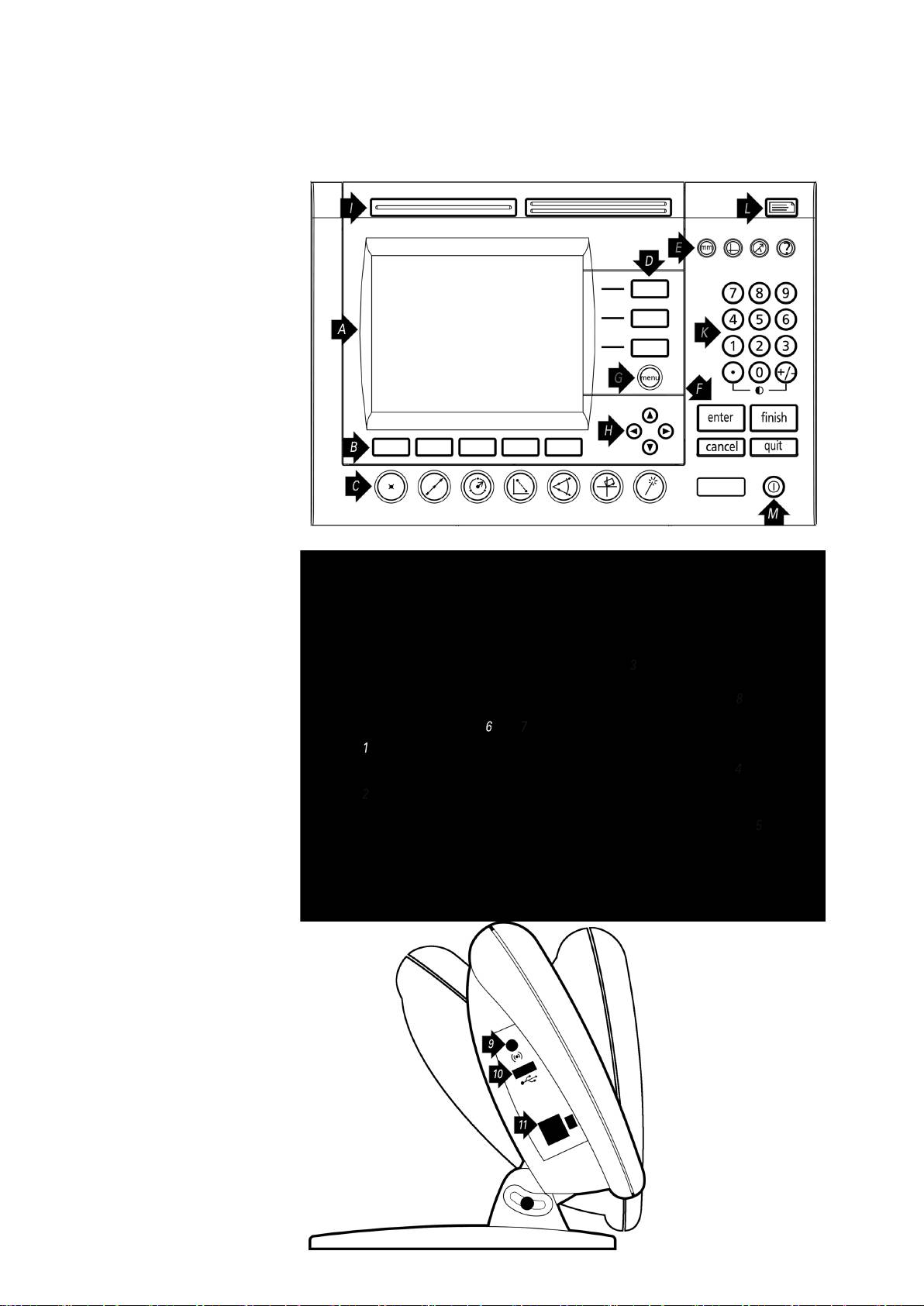
ND 1200 QUADRA-CHEK
Front panel
Rear side
Side view

ND 1200 QUADRA-CHEK English
Setup
Very important
Please note
For detailed description, see www.heidenhain.de
For your information
Before Power up
Controls and Displays
Mounting
The ND 1200 is secured to the swivel
A LCD screen
slots of the mounting stand or arm
Electrical connection
B
Soft keys: Change to support
mount by a shoulder screw, a cap
Line voltage: 100 V~ to 240 V~
functions
screw mount is shown and associated
(–15 % to +10 %)
C
Measure keys: Initiate
washers.
Line frequency: 47 Hz to 63 Hz
measurements
Line fuse: T1600 mA, 250 V
D
Axis keys: Zero or preset datums
5 x 20 mm
E
Mode keys: Select unit of
measure, datum, coordinate
Power connector wiring
system or help
F
Command keys: Control
measurement
G
Menu key: Displays user menus
H
Arrow cursor keys: Menu
navigation
I
Fast track keys: Programmable
for frequently used functions
K
Numeric keypad: Enter numeric
data
L
Send key: Transmit
L: Line voltage (brown)
measurement data to PC, USB
N: Neutral (blue)
printer or USB drive
Earth ground (yellow/green)
M
LCD on/off key: Turn LCD on or
off, clear data, datums and skew
alignments
Danger of electrical shock!
Connections rear side
• Do not open the enclosure
• Never use 3-wire to 2-wire adapters
1 Power switch
or allow the ground connection to
2 Power connection with fuse
the ND 1200 to be interrupted or
3
Ground (protective ground)
disconnected.
4
Encoder inputs, X, Y, Z, Q axis
for linear and rotary encoders.
Interface specified at the time of
Caution
purchase.
Changes to the power cable may be
5
RS-232-C interface for PC
made only by an electrical technician.
connection. RS-232 cable must
not include crossovers.
6
Optical cable connector for
Caution
comparator screen sensor
Do not make connect encoders or other
equipment to the ND 1200 when the
7
Optical cable connector for
power is on.
Comparator reference light
source
8 Unused
Safety Considerations
General accepted safety precautions
Connections side view
must be followed when operating the
9
Audio out, for 3,5 mm
ND 1200. Failure to observe these
headphone /speaker jack,
precautions could result in damage to
monaural, 8 Ohm
the equipment, or injury to personnel.
10
USB type A interface for printer
It is understood that safety rules within
or data storage
individual companies vary. If a conflict
11
Remote accessory interface
exists between the material contained
RJ-45 for optional foot switch or
in this guide or the and the rules of a
keypad accessory. Two optional
company using this system, the more
remote accessories can be used
stringent rules should take precedence.
simultaneously using an RJ-45
splitter.
1
Table of contents
- ND 1200 QUADRA-CHEK
- ND 1200 QUADRA-CHEK English Setup
- ND 1200 QUADRA-CHEK Setup
- Operation
- ND 1200 QUADRA-CHEK Deutsch Einrichten
- ND 1200 QUADRA-CHEK Einrichten
- Bedienung
- ND 1200 QUADRA-CHEK Français Paramétrage
- ND 1200 QUADRA-CHEK Paramétrage
- Présentation
- ND 1200 QUADRA-CHEK Italiano Configurazione
- ND 1200 QUADRA-CHEK Configurazione
- Funzionamento
- ND 1200 QUADRA-CHEK Español Ajustes del ND 780
- ND 1200 QUADRA-CHEK Ajustes del ND 780
- Operación
- ND 1200 QUADRA-CHEK Svenska Inställning
- ND 1200 QUADRA-CHEK Inställning
- Handhavande
- ND 1200 QUADRA-CHEK Nederlands Instellen
- ND 1200 QUADRA-CHEK Instellen
- Bediening
- ND 1200 QUADRA-CHEK Česky Nastavení
- ND 1200 QUADRA-CHEK Nastavení
-
- ND 1200 QUADRA-CHEK Português Configurar
- ND 1200 QUADRA-CHEK Configurar
- Operação
- Funcionamento
- ND 1200 QUADRA-CHEK Język polski Nastawienie
- ND 1200 QUADRA-CHEK Nastawienie
-
- ND 1200 QUADRA-CHEK Русский
- ND 1200 QUADRA-CHEK
-
- ND 1200 QUADRA-CHEK Türkçe Kurulum
- ND 1200 QUADRA-CHEK Kurulum
-
- ND 1200 QUADRA-CHEK Nihongo
- ND 1200 QUADRA-CHEK
-
- ND 1200 QUADRA-CHEK Zhongwen (zh_TW)
- ND 1200 QUADRA-CHEK
-
- ND 1200 QUADRA-CHEK
