
Apple LED Cinema Display: Position the display by tilting it up or down to minimize glare and reflections from overhead lights and nearby windows.
Position the display by tilting it up or down to minimize glare and reflections from overhead lights and nearby windows.: Apple LED Cinema Display
Table of contents
- Getting Started
- Setting Up Your Display
- Setting Up Your Computer with the Lid Closed
- Using Your Display Setting Up Sound Input and Output
- Using the Built-in iSight Setting Up Your Apple LED Cinema Display as an Additional Display
- Adjusting the Color and Brightness
- Using the USB Ports and Security Slot Using a VESA Mounting Solution with Your Display
- Care and Safety
- Ergonomics
- Position the display by tilting it up or down to minimize glare and reflections from overhead lights and nearby windows.
- Troubleshooting Your Display
- More Troubleshooting Information Learning More, Service, and Support To learn about Do this
- Specifications
Â
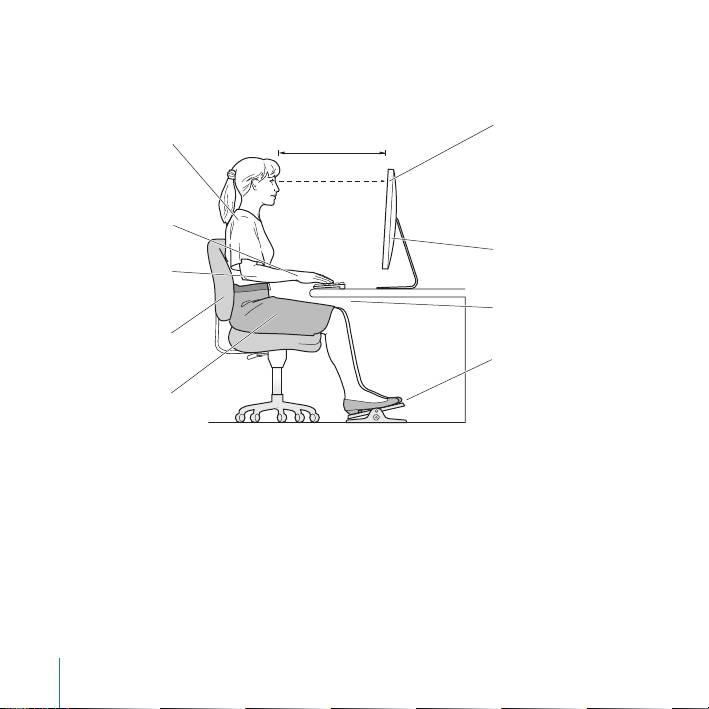
Position the display by tilting it up or down to minimize glare and reflections from
overhead lights and nearby windows.
Shoulders
Top of the screen at or
relaxed
18–28 in. (45–70 cm)
slightly below eye level
(You may need to adjust
the height of your display
Forearms and
by raising or lowering
hands in a
your work surface)
straight line
Screen positioned to
Forearms level
avoid reflected glare
or tilted slightly
Clearance under
work surface
Lower back
supported
Feet flat on the floor
or on a footrest
Thighs tilted
slightly
For more information about health, safety, and maintenance, go to the Apple
ergonomic website at www.apple.com/about/ergonomics.
16
English
Top 10 manuals
100.00
NZXT HALE90 1000W99.99
Samsung SM-R38099.97
AEG BSB 18C99.97
Dell 2700W99.97
Smeg KSEC70X99.96
Beurer HDE 4099.96
Pyramida KH 50 v.299.96
MSI CSM-H81M-P3299.96
AEG HR 562799.95
Melissa 640-048