
Xoro HSD 8430: TROUBLESHOOTING
TROUBLESHOOTING: Xoro HSD 8430
TROUBLESHOOTING
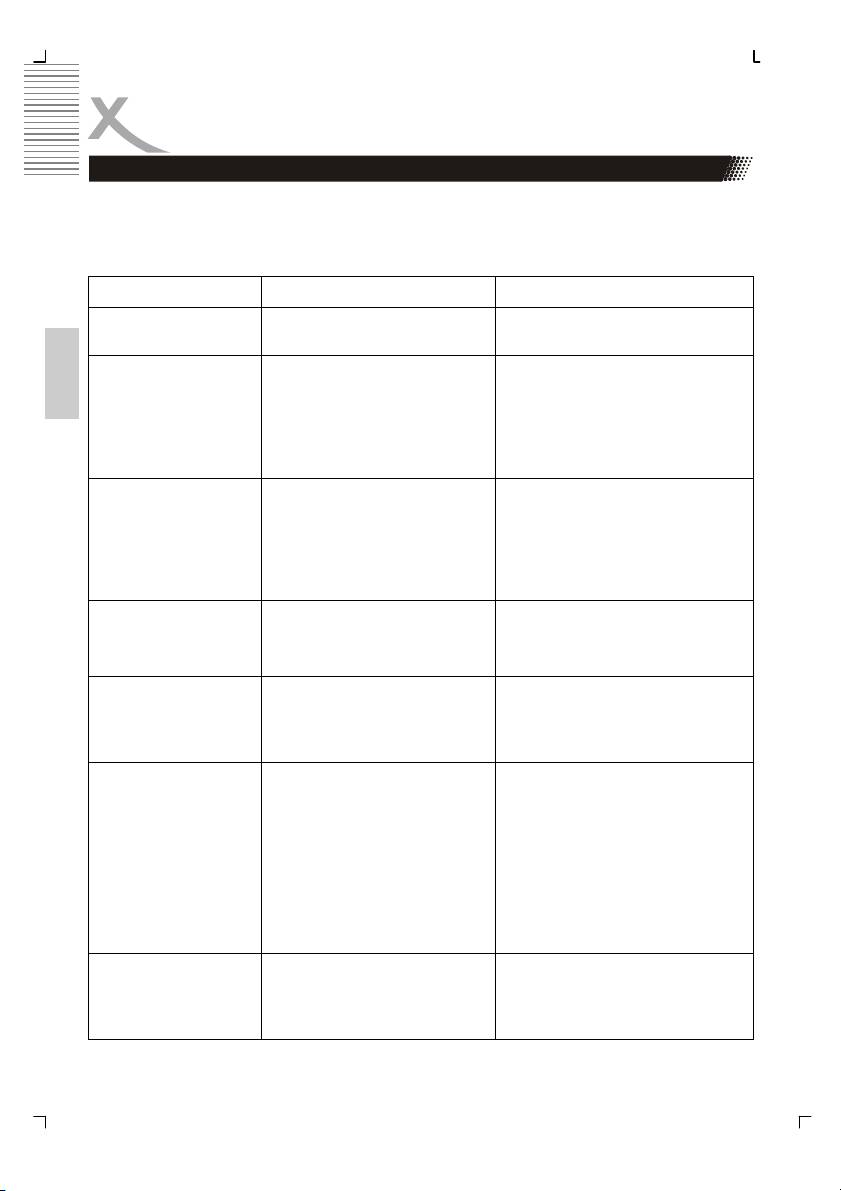
Check the following guide for the possible cause of a problem before contacting service.
Technical Support of Xoro/MAS:
Tel.: 040/77 11 09 17
Internet: www.xoro.de/support.htm
Sympton Cause Correction
No power The power plug is discon-
Connect the power plug into the
nected
wall outlet
No picture
• The TV is not set into re-
• Select the appropriate video
ceive DVD signal output
input on the TV so the picture
English
from the DVD player appears on
• The video cable is not con-
the TV screen
nected securely
• Connect the video cable into the
• The DVD video mode is not
jacks securely
matched with the TV
• Refer to connecting to a TV
No sound
• The audio cable is not con-
• Connect the audio cable into the
nected securely
jacks
• The power of the equipment
• Turn on the equipment con-
with the audio cable is
nected with the audio cables
turned off
• Set the audio settings correctly
• The setting of output sound
type is not correct
The playback picture
• The disc is dirty
• Eject the disc and clean it
has occasional
• It is in fast forward or fast
• Sometimes a small amount of
reverse playback
picture distortion may appear.
This is not malfunction.
Brightness is unsta-
• The copy protection effect • Connect the DVD player to the
TV directly
ble or noises are
produced on play-
back pictures
The DVD player does
• No disc inserted
• Insert a disc
not start playback
• An unplayback disc in in-
• Check the disc type and colour
serted
system
• The disc is placed upside
• Place the disc with the correctly
down
• Place the disc on the disc tray
• The disc is not placed within
correctly inside the guide
the guide
• Clean the disc
• A menu is on the screen
• Press the SETUP button to turn
• The parental lock function is
off the menu screen. Cancel the
set
parental lock function or change
the parental.
Buttons do not work Power supply fluctuations or
Turn the power on or off with the
other abnormalities such as
POWER button or disconnect the
static electricity may interupt
power plug and insert it into the
correct
wall outlet again.
40
TROUBLESHOOTING
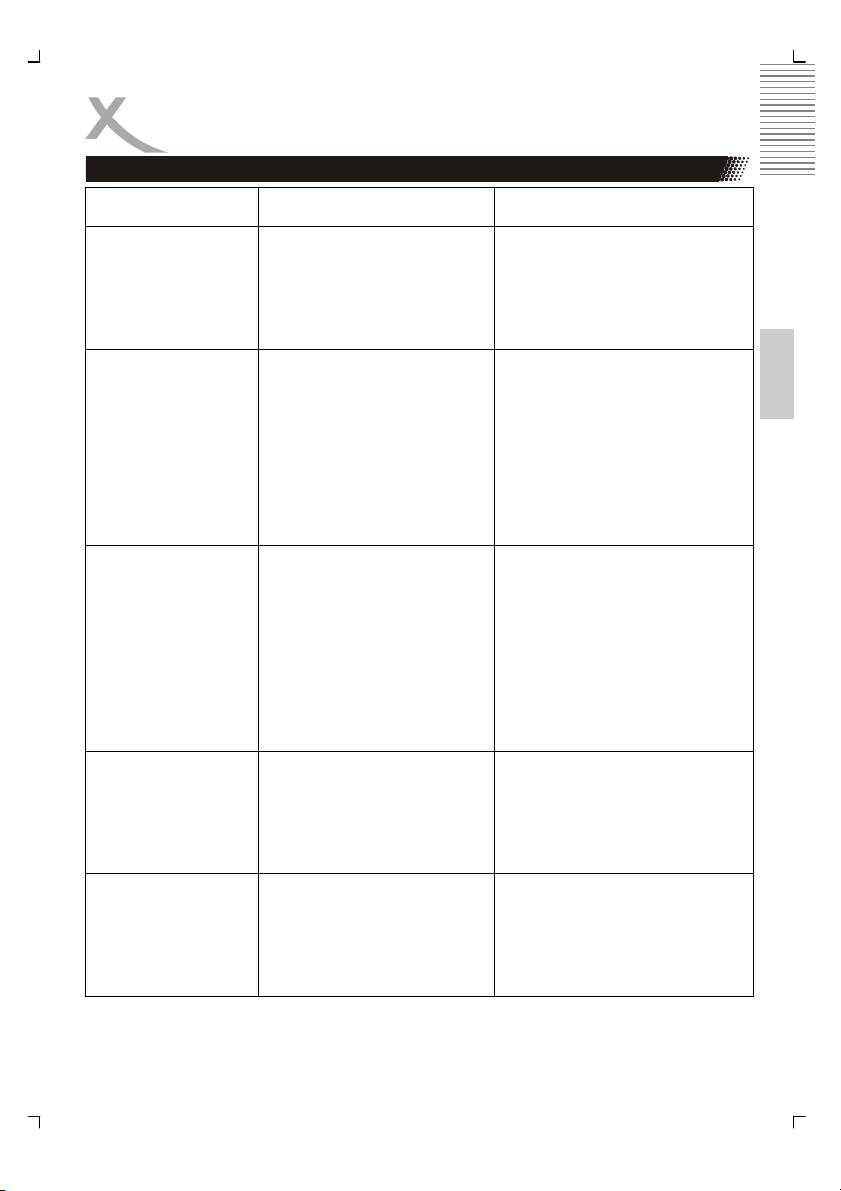
Symptons Cause Correction
The remote control
• The remote control is not
• Point the remote control at the
pointed at the remote sensor
remote sensor of the DVD
does not work prop-
of the DVD player.
player.
erly
• The remote control is too far
• Operate the remote control
from the DVD player.
within about 7 m.
• The batteries in the remote
• Replaced the batteries with new
control are exhausted.
ones.
English
Y Pb Pr (YUV)
• The video cable is not con-
• Connect the video cable into the
nected securely
jacks securely
No picture or picture
• The DVD video mode is not
• Set the video output as Progres-
distortion
matched
sive scan mode
(progressive scan)
• The TV is not set into re-
• Select the appropriate video
ceive DVD signal output
input on the TV so the picture
from the DVD player
• The TV set may not be compati-
ble with this DVD-Player and
switch to NTSC output or use
CVBS, S-VIDEO or SCART to
connect TV set
HDMI
• The video cable is not con-
• Connect the video cable into the
nected securely
jacks securely
No picture
• The DVD video mode is not
• Set the video output as HDMI
matched with the TV
(HD) mode
• The TV is not set into re-
• Select the appropriate video
ceive DVD signal output
input on the TV so the picture
from the DVD player
• The TV set may not be compati-
ble with this DVD-Player and
switch to NTSC output or use
CVBS, S-VIDEO or SCART to
connect TV set
Picture distorted
• You had press the >> or <<
• The picture will be somewhat at
button for during fast forward
times
during fast forward
or fast backward
• This is normal advance or re-
or fast reverse
verse
• Press > (Play) button for normal
speed
No 4:3 or 16:9 pic-
• Wrong setting by TV TYPE • Choose the correct setup at TV
TYPE item that matches the TV
ture (distorted pic-
set
ture)
41
TROUBLESHOOTING
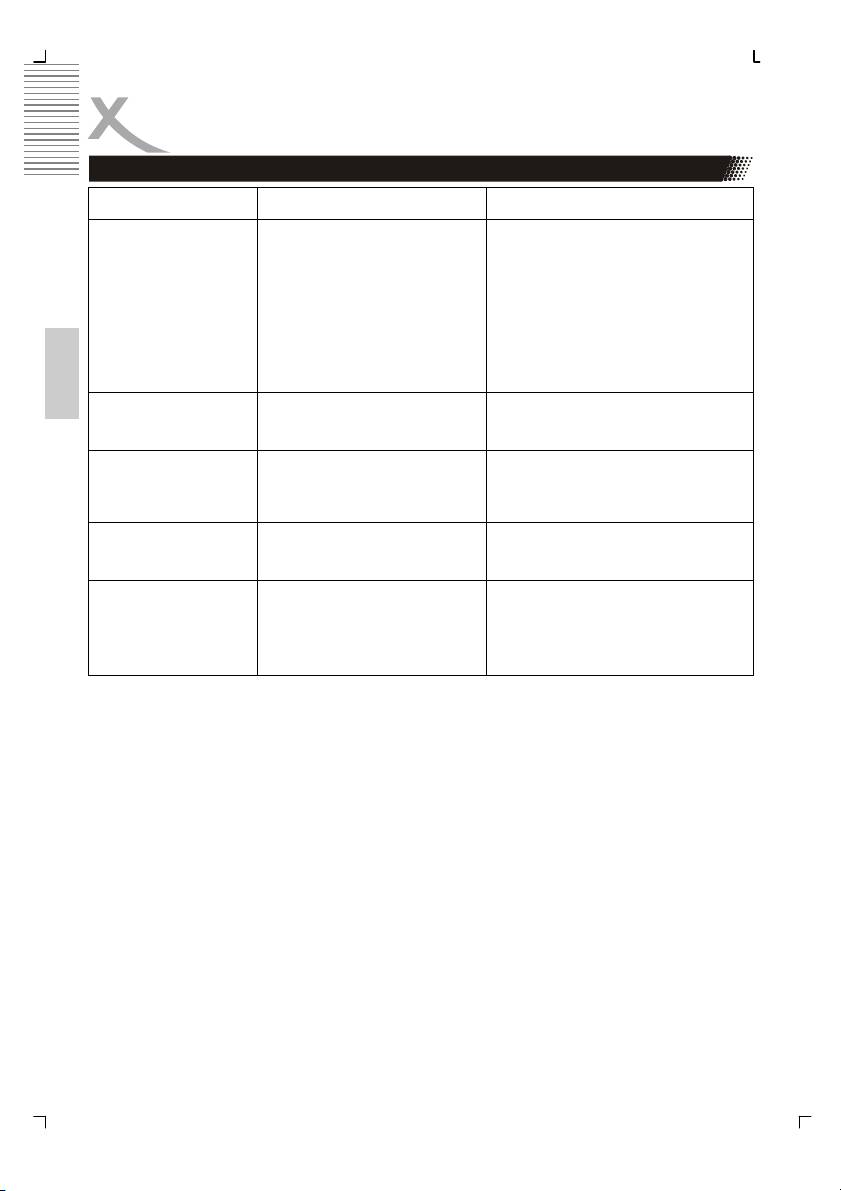
Symptons Cause Correction
Audio Soundtrack
• Cannot choose the correct
• If the audio soundtrack and/or
Soundtrack or Subtitle lan-
subtitle language does not exist
and/or Subtitle lan-
guage
on the disc, the language se-
guage are not set-
lected at the initial settings will
ting
not seen/heard.
• Alternative audio soundtracks (or
an alternative language is not
selected with disc which contain
subtitle) language cannot be
more than one language se-
lected.
English
Can not change
• This function depends on
• If a disc has a number of angles
software availability
recorded, these angles may be
Angle
recorded for specific scenes only
Forget password
• While the unit is in the Stop
mode, enter the setup mode and
8888 for the password to unlock
parental setting
No Repeat, No A-B
• Some DVD disc have no
• In program playing mode, no
random function
repeat, A-B functions are avail-
function
able.
CD-Ripping does
• Audio-CD has a copy pro-
• Use an Audio-CD without a copy
tection
protection.
not work
• No Audio CD is insert
• Please insert an Audio-CD
• No USB mass storage or
• Please insert an USB mass stor-
cards are insert.
age or a card into the player.
42
Table of contents
- HSD 8430 MPEG-4 DVD-Player CD-Ripping Function
- INHALTVERZEICHNIS
- INHALTVERZEICHNIS
- SICHERHEITSHINWEISE
- MERKMALE
- ANSCHLÜSSE & BEDIENELEMENTE
- FERNBEDIENUNG
- BASISANSCHLÜSSE
- BEDIENUNG
- KARTENLESEGERÄT UND USB
- CD-RIPPING
- ANFANGSEINSTELLUNGEN
- HÄUFIGE BEDIENFEHLER
- PROBLEMBEHANDLUNG
- TECHNISCHE DATEN
- GLOSSAR
- CONTENTS
- SAFETY RECAUTIONS
- FEATURES
- REMOTE CONTROL
- BASIC CONNECTIONS
- OPERATION
- OPERATION FOR CARD READER
- CD-RIPPING
- INITIAL SETTINGS
- DISC INFORMATION
- TROUBLESHOOTING
- SPECIFICATIONS
- GLOSSARY
- СОДЕРЖАНИЕ
- МЕРЫ ПРЕДОСТОРОЖНОСТИ
- КРАТКИЙ СЛОВАРЬ ТЕРМИНОВ
- CONTENU
- CARACTÉRISTIQUES
- INTERFACES ET COMMANDES
- TELECOMMANDE
- RACCORDEMENTS DE BASE
- FONCTIONNEMENT
- LECTEUR DE CARTES ET PORT USB
- FONCTION EXTRACTION
- RÉGLAGES INITIAUX
- DÉPANNAGE
- SPÉCIFICATIONS
- GLOSSAIRE
- CONTENIDOS
- CONTENIDOS
- CONSIGNAS DE SEGURIDAD
- CARACTERÍSTICAS
- INTERFACES Y CONTROLES
- MANDO A DISTANCIA
- CONEXIONES BÁSICAS
- OPERACIÓN
- FUNCIONAMIENTO
- FUNCION EXTRACCION
- CONFIGURACIÓN INICIAL
- CONFIGURACIÓN INICIAL
- CONFIGURACIÓN INICIAL
- Solución de problemas
- ESPECIFICACIONES
- GLOSARIO
