
Xoro HSD 8430: REMOTE CONTROL
REMOTE CONTROL : Xoro HSD 8430
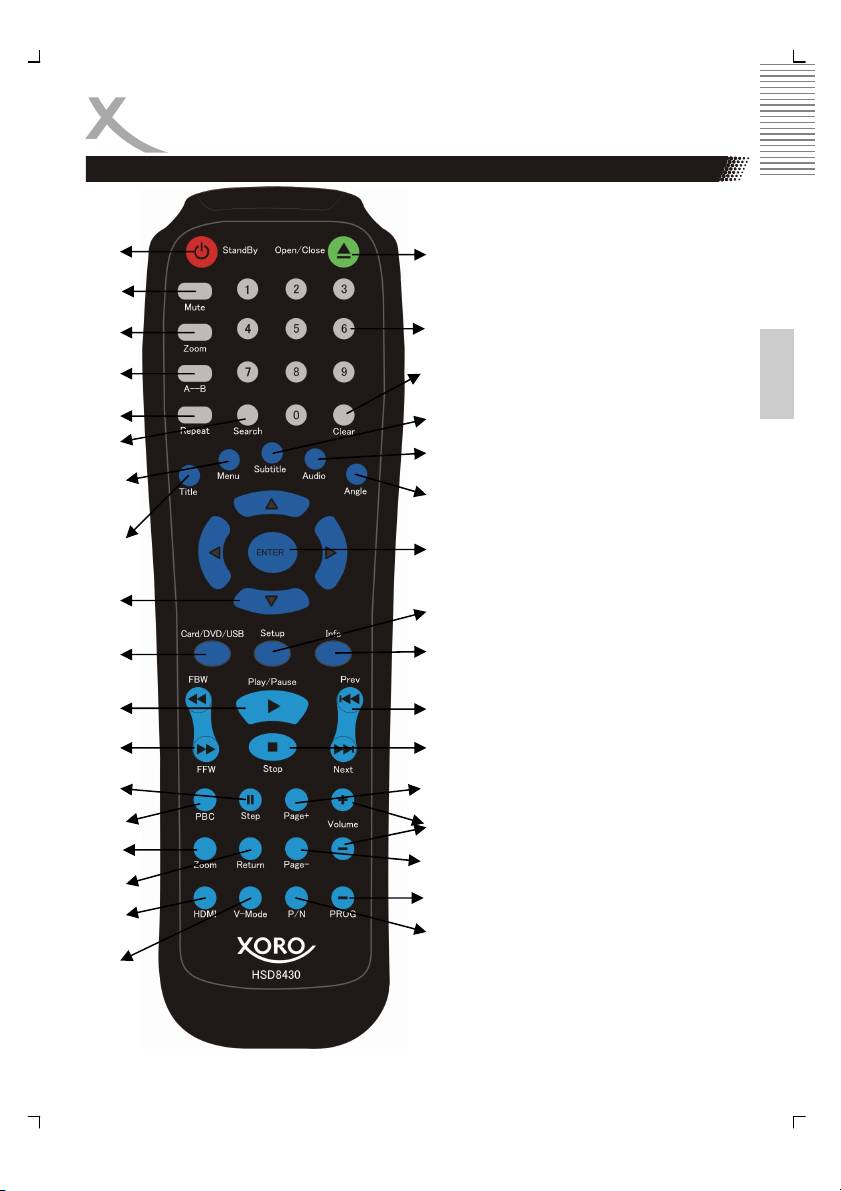
REMOTE CONTROL
1. STANDBY button
2. MUTE button
3. Zoom button
1
19
4. A-B button
5. REPEAT button
2
6. SEARCH button
7. MENU button
3
20
8. TITLE button
English
9. Navigation buttons(_, `,c and d)
10. CARD/DVD/USB button
4
21
11. PLAY/PAUSE button
12. FBW / FFW buttons
5
22
13. STEP button
6
14. PBC button
23
15. MODE button
7
16. RETURN button
24
17. HDMI button
18. V-Mode button
8
19. OPEN/CLOSE button
25
20. Number (0-9, 10+) button
21. CLEAR button
22. SUBTITLE button
9
26
23. AUDIO button
24. ANGLE button
25. ENTER button
27
10
26. SETUP button
27. INFO button
28. PREV / NEXT buttons
11
28
29. STOP button
30. PAGE + button
12
29
31. Volume +/- buttons
32. PAGE- button
13
30
33. PROG(Program) button
34. P/N (NTSC/ PAL) button
14
31
Notes:
15
32
The same buttons on remote control
and front panel have the same func-
16
33
tion.
17
34
18
9
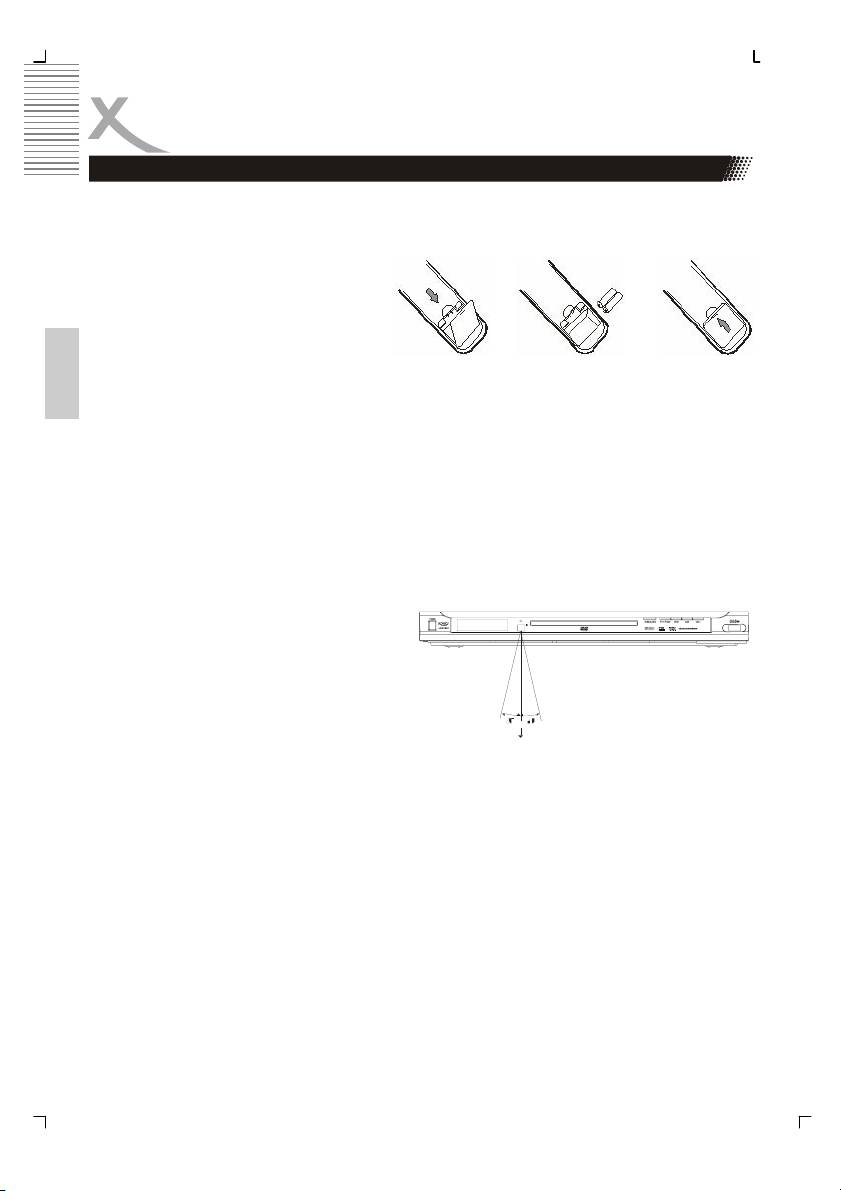
REMOTE CONTROL
Insert batteries and Operationradius
Insert the batteries in the remote control:
1. Open the cover.
2. Insert the batteries. Make sure to match - and +.
3. Close the cover
Notes on batteries:
Improper use may cause battery leakage and corrosion. Please follow the instructions be-
English
low:
• Do not insert the batteries in the wrong direction
• Do not use different types of batteries together
• If you do not use the remote control for a long time, remove the batteries
• If the remote control operates not correctly, replace the batteries
• lf battery leakage occurs, wipe the battery liquid from the battery compartment, then insert
new batteries
• Make sure that the used batteries are disposed properly according to you local regula-
tions.
Point the remote control at the IR. Within
about 5 m with angle about 30 grade in both
direction.
Notes:
• Do not expose the IR of the device to a strong light source
or direct sunlight.
• Direct the remote control at the infrared receiver (IR) of the player
• Do not drop the remote control.
• Do not spill water or put anything wet on it.
• Do not disassemble the remote control.
10
Table of contents
- HSD 8430 MPEG-4 DVD-Player CD-Ripping Function
- INHALTVERZEICHNIS
- INHALTVERZEICHNIS
- SICHERHEITSHINWEISE
- MERKMALE
- ANSCHLÜSSE & BEDIENELEMENTE
- FERNBEDIENUNG
- BASISANSCHLÜSSE
- BEDIENUNG
- KARTENLESEGERÄT UND USB
- CD-RIPPING
- ANFANGSEINSTELLUNGEN
- HÄUFIGE BEDIENFEHLER
- PROBLEMBEHANDLUNG
- TECHNISCHE DATEN
- GLOSSAR
- CONTENTS
- SAFETY RECAUTIONS
- FEATURES
- REMOTE CONTROL
- BASIC CONNECTIONS
- OPERATION
- OPERATION FOR CARD READER
- CD-RIPPING
- INITIAL SETTINGS
- DISC INFORMATION
- TROUBLESHOOTING
- SPECIFICATIONS
- GLOSSARY
- СОДЕРЖАНИЕ
- МЕРЫ ПРЕДОСТОРОЖНОСТИ
- КРАТКИЙ СЛОВАРЬ ТЕРМИНОВ
- CONTENU
- CARACTÉRISTIQUES
- INTERFACES ET COMMANDES
- TELECOMMANDE
- RACCORDEMENTS DE BASE
- FONCTIONNEMENT
- LECTEUR DE CARTES ET PORT USB
- FONCTION EXTRACTION
- RÉGLAGES INITIAUX
- DÉPANNAGE
- SPÉCIFICATIONS
- GLOSSAIRE
- CONTENIDOS
- CONTENIDOS
- CONSIGNAS DE SEGURIDAD
- CARACTERÍSTICAS
- INTERFACES Y CONTROLES
- MANDO A DISTANCIA
- CONEXIONES BÁSICAS
- OPERACIÓN
- FUNCIONAMIENTO
- FUNCION EXTRACCION
- CONFIGURACIÓN INICIAL
- CONFIGURACIÓN INICIAL
- CONFIGURACIÓN INICIAL
- Solución de problemas
- ESPECIFICACIONES
- GLOSARIO
